
Ergonomic Mouse & Keyboard Tray Under Desk, 20×11.8 in Board, Black
4.4Editor score
Affordable ergonomic solution
Smooth slide mechanism
Supports up to 2.76 inch desks
Finding the right clamp on keyboard tray can transform your workspace into a more ergonomic and productive environment. These under-desk solutions free up valuable surface area while promoting healthier typing positions for long hours of work or play.
We have evaluated ten leading models based on stability, adjustability, and ease of installation. Each product offers unique features ranging from rotating clamps to integrated storage drawers. Our analysis highlights the strengths and weaknesses of every option to assist your decision.
Each pick below showcases specific benefits and potential limitations to help you choose wisely. Please note that product availability and pricing can fluctuate over time. Always verify current dimensions and compatibility before placing your order to ensure a perfect fit.
4.4Editor score

4.4Editor score

4.3Editor score
As an Amazon Associate we earn from qualifying purchases.
This side-by-side comparison highlights key specifications and unique features across all ten selected models. Reviewing these details helps you identify which tray aligns best with your desk dimensions and ergonomic needs.




The VIVO MOUNT-KB05E stands out as a reliable choice for standard office setups. With a 4.4 rating, it delivers consistent performance and ergonomic benefits. The tray measures 26.8 by 11 inches, providing ample room for most keyboard and mouse combinations.
We may earn a commission when you buy through this link, at no additional cost to you.
Its standout feature is the sturdy C-clamp system that attaches securely without damaging the desk surface. Users can easily slide the tray in and out to access their work surface or store it away. The design relieves stress on wrists and shoulders by lowering the typing position.
While the tray does not support beveled edges, it fits most flat desks up to 1.25 inches thick. The maximum extension of 8.5 inches ensures enough reach for comfortable typing. Hardware and instructions are included for a straightforward assembly process.
This tray is ideal for anyone seeking a cost-effective way to declutter their desk. It works well for home offices and shared workstations where space is at a premium. Choose this model if you prioritize stability and ease of installation over advanced adjustability.
Mounting the keyboard below the desktop frees up significant surface area for monitors and documents.
Lowering the input devices promotes a neutral wrist position to reduce strain during long sessions.
We may earn a commission when you buy through this link, at no additional cost to you.
The MOUNT-KBST1 offers flexibility with height adjustment and a wider surface area for larger setups. Its 4.3 rating reflects solid construction and user satisfaction. The tray splits into two parts to accommodate both keyboard and mouse comfortably.
We may earn a commission when you buy through this link, at no additional cost to you.
Users can adjust the height with five set points to find the perfect ergonomic angle. The tray accommodates desks up to 3.4 inches thick, making it versatile for various workstation types. Included accessories like a wrist pad add value to the package.
While it requires more desk width due to the clamps, the extra space allows for extended typing sessions. The sliding mechanism is smooth, ensuring easy access to the workspace. However, it is not compatible with beveled edges.
This model suits users who need height customization or have a thicker desktop. It is also great for those who want a complete package with wrist support. Consider this if your desk thickness exceeds standard limits.
Five height adjustment points allow you to fine-tune the tray position for comfort.
The included wrist pad helps maintain a neutral hand position to reduce fatigue.
We may earn a commission when you buy through this link, at no additional cost to you.
The MOUNT-KB04CB offers unique flexibility with its single clamp rotating mechanism. This design allows the tray to pivot fully for customized placement. It is ideal for users who need to store the tray away completely when not working.
We may earn a commission when you buy through this link, at no additional cost to you.
The tray holds up to 11 lbs and fits standard to small keyboards. The single clamp setup is simpler than dual clamp models, making installation faster. However, the smaller surface may feel tight for large mice or keyboards.
While the rotation feature is excellent for flexibility, the 4.0 rating suggests some users find the stability lacking compared to others. It is best for temporary setups or desks where space is extremely limited. Ensure your desk is flat and not beveled.
Choose this tray if you need to hide the keyboard completely when guests are around. The rotating clamp allows you to tuck it under the desk effortlessly. It is a niche solution for maximizing floor and desk space.
The single clamp allows 360 degree rotation for versatile positioning under the desk.
You can rotate the tray completely under the desktop to save space.
We may earn a commission when you buy through this link, at no additional cost to you.
The BONTEC tray combines affordability with a robust build. It features protective pads on the clamps to prevent scratches on your desk. The large 25.6 by 11.8 inch platform offers plenty of room for full-size peripherals.
We may earn a commission when you buy through this link, at no additional cost to you.
Installation is simple with the included hardware and non-drill clamps. The sliding motion is smooth, which helps maintain stability during use. It fits desks up to 1.97 inches thick, covering most standard office furniture.
One drawback is the requirement for specific under-desk clearance. You must measure your desk depth and width to ensure the tray fits comfortably. It does not work with beveled or rounded edges, so check your surface before buying.
This model is a solid choice for home offices seeking a balance of price and performance. It is easy to set up and provides immediate ergonomic benefits. If your desk meets the dimensions, it is a reliable pick.
Non-slip pads on the clamps protect your desk surface from scratches and slipping.
The spacious platform accommodates full-size keyboards and vertical mice effectively.
We may earn a commission when you buy through this link, at no additional cost to you.
The MOUNT-KB05HT is designed for users who demand precise ergonomic control. It offers nine tilt settings ranging from positive to negative angles. This allows you to find the exact typing posture that suits your needs.
We may earn a commission when you buy through this link, at no additional cost to you.
The premium build quality is evident in the swivel clamps that rotate 90 degrees. This makes it suitable for corner desks where space is often tricky. It fits desks up to 3.4 inches thick, expanding compatibility significantly.
While the price is higher than standard models, the adjustability justifies the cost for heavy users. The clamps tighten securely to prevent wobbling during use. You must ensure your desk has enough width for the clamps.
This tray is perfect for ergonomic specialists who need negative tilt options. It supports a neutral typing position to reduce wrist strain. If you want the most customizable angle settings, this is the top choice.
Lock into place with nine tilt settings ranging from 10 degrees to minus 10 degrees.
Swivel clamps allow installation on corner desks or standard setups easily.
We may earn a commission when you buy through this link, at no additional cost to you.
This tray is tailored for corner desk setups where standard clamps might fail. The swivel clamps rotate to accommodate the angles of an L-shaped workstation. It provides a dedicated typing surface without crowding the main desk area.
We may earn a commission when you buy through this link, at no additional cost to you.
The build quality is sturdy, holding up to 11 lbs securely. It fits desks up to 1.25 inches thick, which covers most home office furniture. The sliding mechanism is smooth, making it easy to access.
However, it does not support thicker desks, so measure your surface before purchasing. It is not compatible with beveled edges either. For typical corner desks, it is a space-saving solution.
Choose this model if you have an L-shaped desk and need a dedicated keyboard area. It keeps your workspace tidy and provides ergonomic positioning. It is a practical solution for multi-monitor corner setups.
Swivel clamps rotate 90 degrees to fit securely on corner desk edges.
The compact design keeps the main desk surface free for other tasks.
We may earn a commission when you buy through this link, at no additional cost to you.
The MOUNT-KB05-4D combines a keyboard tray with a useful 17-inch pencil drawer. This dual functionality helps keep office supplies organized and within reach. It is a 4.4-rated choice for those wanting extra storage under the desk.
We may earn a commission when you buy through this link, at no additional cost to you.
The drawer provides ample room for pens, paperclips, and other small tools. The keyboard surface is standard 26.8 by 11 inches. The sliding mechanism is smooth, though the drawer may add slight weight to the slide.
It requires standard desk dimensions and is not compatible with beveled edges. Installation is straightforward with provided hardware. If you need storage, this offers excellent value without needing a separate drawer.
This model is ideal for organized workers who need supplies handy but off the desk. It adds functionality to your workspace without clutter. It is a practical solution for home offices with limited drawer space.
The attached drawer stores small accessories keeping your workspace tidy and organized.
Tray extends up to 8.5 inches providing comfortable typing reach.
We may earn a commission when you buy through this link, at no additional cost to you.
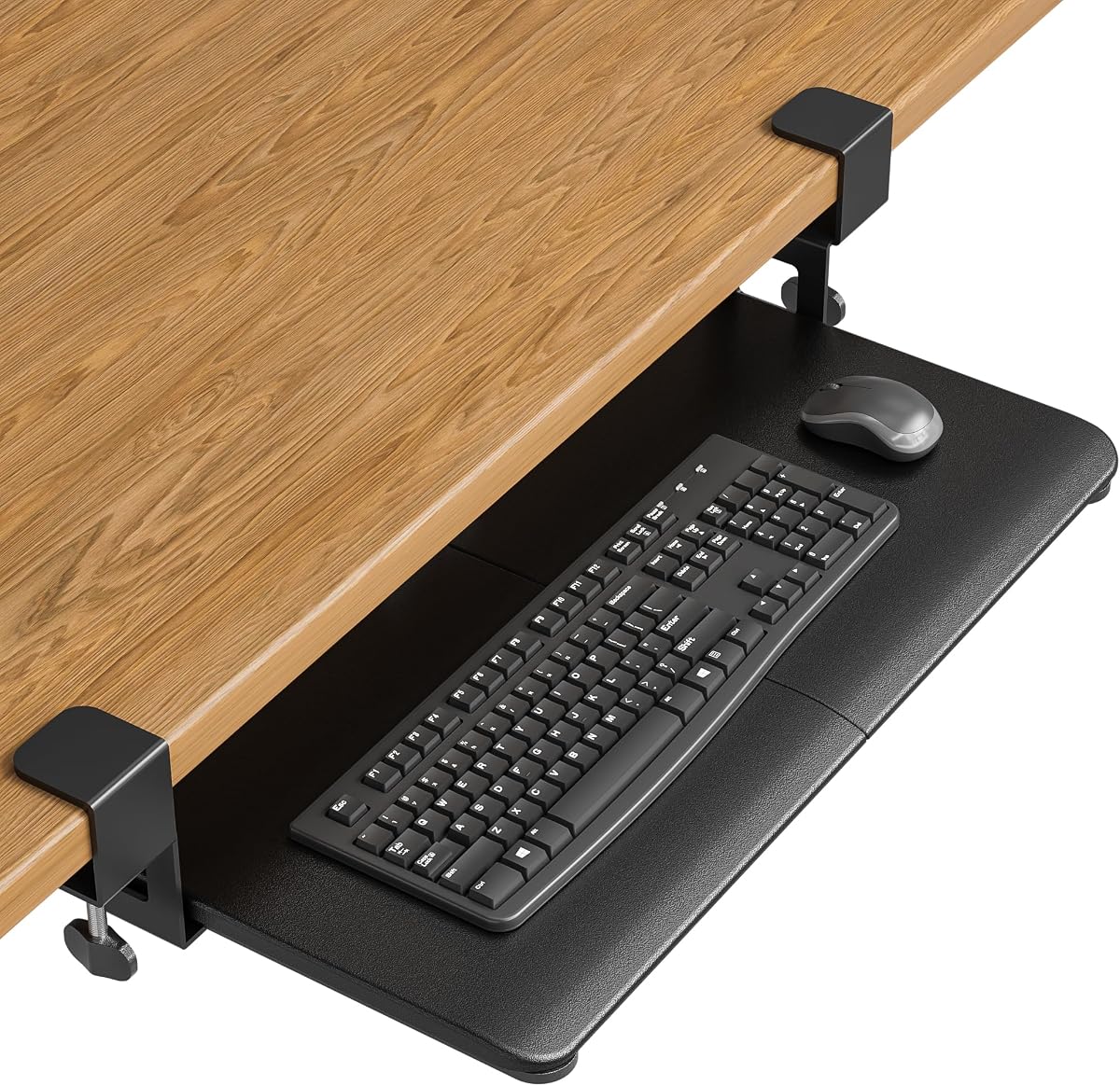
This tray is the most affordable option in our list while still delivering solid performance. It features a back baffle that keeps your keyboard from sliding off during use. The upgraded slide mechanism ensures smooth movement.
We may earn a commission when you buy through this link, at no additional cost to you.
It supports desks up to 2.76 inches thick, which is wider than most competitors. The surface is smaller at 20 by 11.8 inches, fitting most keyboards but potentially tight for large mice. It is easy to install without drilling.
While the finish is less premium, the functionality is reliable for daily use. The 4.4 rating indicates users are satisfied with the stability and ease of use. It is a great entry point for ergonomic upgrades.
Choose this if you need an affordable solution for a thinner or thicker desk. It is perfect for budget-conscious users who still want ergonomic benefits. Ensure your keyboard and mouse fit the smaller footprint.
A built-in baffle prevents keyboards from sliding forward during intense typing sessions.
Compatible with desks up to 2.76 inches thick for broader installation options.
We may earn a commission when you buy through this link, at no additional cost to you.
The DESK-EXT24 is a versatile extension that can function as a keyboard tray or storage surface. Its foldable design allows it to be tucked away when not needed. It supports up to 44 lbs, making it strong enough for printers.
We may earn a commission when you buy through this link, at no additional cost to you.
It fits desks up to 3.5 inches thick and clamps securely without damage. The 90-degree folding mechanism is simple to operate. This flexibility makes it useful for shared spaces where the tray might not always be needed.
While it lacks specific keyboard-specific features like a mouse platform, it is a sturdy alternative. The K-shaped brackets provide rigid support. It is not compatible with beveled edges, so check your desk shape.
This model is best for users who need occasional extra surface space. It offers a flexible solution for small offices or studios. If you need a dedicated keyboard tray with a mouse slot, consider a different model.
Press the release levers to fold the platform out of the way when not in use.
Supports up to 44 lbs making it suitable for heavy equipment or printers.
We may earn a commission when you buy through this link, at no additional cost to you.
The Mount-It! tray offers strong build quality backed by a lifetime warranty. It features US-based support for any installation questions. The tray is 27 by 11 inches, providing ample space for most users.
We may earn a commission when you buy through this link, at no additional cost to you.
Installation is simple with no-drill clamps that fit desks up to 2.2 inches thick. It is not compatible with glass desks, so check your material. The sliding mechanism is designed for smooth daily use without sticking.
While it does not offer tilt adjustments, its durability and support are major selling points. The warranty provides peace of mind for long-term use. It is ideal for offices where reliability is crucial.
Choose this model if you want the security of a lifetime warranty. It is a solid investment for a stable typing surface. Ensure your desk is not made of glass before purchase.
Includes a lifetime warranty and US-based product specialists to assist with setup.
Clamps securely without drilling holes making it perfect for renters.
We may earn a commission when you buy through this link, at no additional cost to you.
Choosing the right tray depends on your desk setup and ergonomic needs. Below are key factors to consider.
Ensure the tray clamps fit your desk thickness. Most models support up to 1.25 inches, while others go up to 3.4 inches.
Check the maximum desk thickness before buying to avoid compatibility issues.
Measure your keyboard and mouse size to ensure the tray fits comfortably. Larger surfaces provide more movement room.
Select a tray that matches your peripheral dimensions for optimal comfort.
Most trays require flat, unobstructed undersides. Beveled or rounded edges may prevent proper clamping.
Inspect your desk edges to confirm compatibility before purchasing.
Some models offer tilt settings for ergonomic typing. This helps maintain neutral wrist positions.
Choose a model with tilt if you type for long hours.
Verify the weight limit to ensure stability during use. Most trays support around 11 pounds.
Select a tray with a weight limit that exceeds your setup needs.
Most trays use C-clamps for easy installation. Ensure the clamps are sturdy to prevent wobbling.
Look for clamps with protective pads to avoid desk damage.
Corner desks require swivel clamps. Standard trays may not fit L-shaped workstations.
Pick a model designed for your desk shape.
Check warranty periods to protect your investment. Some models offer lifetime warranties.
A strong warranty indicates manufacturer confidence in quality.
Start by measuring your desk thickness and width to ensure compatibility. Place the clamps on a flat, unobstructed edge of the desk.
Tighten the clamps securely but avoid over-tightening which might crack the desk. Test the slide mechanism before using it daily.
Clean the tray surface regularly to prevent dust buildup. Lubricate the sliding rails occasionally to maintain smooth movement.
Most standard clamp on trays are not compatible with glass desks due to lack of grip. Look for models specifically designed for glass surfaces if needed.
Most trays support around 11 pounds. This is sufficient for standard keyboards and mice but may not handle heavy printers.
No, most trays require flat, unobstructed undersides. Beveled or rounded edges may prevent proper clamping and stability.
No, most models use no-drill C-clamps. They attach securely to the desk without permanent modification or tools.
Yes, corner trays feature swivel clamps to fit L-shaped desks. Standard trays are designed for straight edges only.
Some models offer height adjustments via bracket settings. Others are fixed height. Check the product details for adjustable options.
Yes, but measure the width first. Split keyboards are wider, so ensure the tray is large enough to hold both halves.
Tighten the clamps to secure the base. Check for obstructions or uneven surfaces underneath that might block movement.
Our top picks highlight the VIVO MOUNT-KB05E for standard setups and the MOUNT-KB05HT for premium tilt needs. Each option offers unique features for different budgets.
Prioritize desk thickness and edge shape when selecting a model. These factors determine whether a tray will install securely on your workspace.
Remember to verify current pricing and availability before ordering. Ergonomic setups evolve quickly so stay informed about new options.