
LG UltraFine evo 32U990A-S
4.5Editor score
Thunderbolt 5 Support
Nano IPS Black Panel
High Pixel Density
Selecting the right display is crucial for modern workflows. A 6K monitor offers exceptional clarity, making it ideal for creative professionals who demand precise color and fine detail in their work.
We analyzed the latest models based on panel technology, connectivity options, and ergonomic features. Our selection process ensures you find a display that balances high resolution with practical usability for daily tasks.
Each pick highlights specific strengths like touch capabilities or gaming performance. Prices and availability change frequently, so verify current details before purchasing to ensure you get the best value for your setup.
4.5Editor score

3.9Editor score

3.7Editor score
As an Amazon Associate we earn from qualifying purchases.
This table provides a side-by-side view of key specifications across all ten models, helping you quickly identify which display matches your specific resolution, color, and connectivity needs.




The ASUS ProArt PA32QCV stands out as a leading choice for professional creators needing reliable color performance. With a 31.5-inch 6K display, it offers ample workspace for detailed editing tasks. Its factory calibration ensures consistent color accuracy right out of the box.
We may earn a commission when you buy through this link, at no additional cost to you.
Color fidelity is a major strength here. The monitor covers 98% of the DCI-P3 gamut and is Calman verified with a Delta E under 2. The M Model-P3 Color Preset Mode specifically matches MacBook displays, which is vital for Mac users maintaining workflow consistency across devices.
Connectivity is robust with dual Thunderbolt 4 ports supporting up to 96W power delivery and daisy-chaining. The built-in Auto KVM switch allows easy switching between two computers using one keyboard and mouse. While the price is premium, the included warranty and Adobe subscription add value.
This monitor is ideal for graphic designers and video editors who prioritize color integrity. The ergonomic stand supports tilt, swivel, pivot, and height adjustments for comfort. If you need a seamless Mac integration and professional color standards, this model delivers strongly.
The factory calibration and Calman verification ensure that what you see on screen is true to life, which is critical for print and digital media work.
With dedicated color presets matching MacBook displays, this monitor eliminates color mismatch issues between your laptop and desktop workspace.
We may earn a commission when you buy through this link, at no additional cost to you.
The Dell 52-Inch 6K monitor provides an immersive viewing experience with its massive curved screen. It is designed for users who need expansive workspace for multitasking and content creation. The 120Hz refresh rate adds smoothness for scrolling and motion.
We may earn a commission when you buy through this link, at no additional cost to you.
This model uses an IPS Black panel offering a 2000:1 contrast ratio and 99% DCI-P3 coverage. This technology improves black levels significantly compared to standard IPS, making images look more vivid. The 120Hz rate ensures fluid motion in design or video work.
Connectivity is centralized with a Thunderbolt hub delivering up to 140W power. You can connect multiple PCs and use Picture-by-Picture or KVM support for streamlined workflows. Eye comfort features like low blue light help reduce strain during long sessions.
Ideal for command centers or large desk setups, this monitor excels in productivity. It requires significant space and budget but rewards you with unmatched screen estate and visual quality. Consider it if you need maximum display area.
The 52-inch curved display wraps around your vision, reducing eye movement and making multi-window workflows feel more natural.
The built-in Thunderbolt hub connects multiple devices and charges laptops simultaneously, reducing cable clutter on your desk.
We may earn a commission when you buy through this link, at no additional cost to you.
The G32P offers a 32-inch 6K glossy display with impressive brightness for HDR workflows. It delivers deep blacks and vibrant colors, making it suitable for video grading and gaming. The 223 PPI provides incredibly sharp text and fine details.
We may earn a commission when you buy through this link, at no additional cost to you.
Key strengths include 500-nit brightness and 10-bit color support ensuring accurate gradients. The 100W power delivery via a single cable simplifies setup for laptops. Its ergonomic stand supports height adjustment, tilt, swivel, and pivot for flexible positioning.
While the 60Hz rate is not for high-speed gaming, the panel handles HDR content well. The anti-glare coating minimizes eye fatigue. Honeycomb cooling ensures durability. If you prioritize brightness and color fidelity for media work, this model is compelling.
This monitor suits video editors and media consumers who value visual impact. The high PPI makes UI elements crisp. However, glossy screens may show reflections in bright rooms. Weigh these factors when choosing for your specific lighting environment.
With 500 nits peak brightness and HDR support, you can preview content accurately before final delivery to audiences.
The 223 PPI ensures text and interfaces are razor-sharp, reducing eye strain during detailed editing tasks.
We may earn a commission when you buy through this link, at no additional cost to you.
The Samsung 32" Odyssey G8 is the industry's first 6K gaming monitor. It offers a unique dual mode allowing 6K at 165Hz for visuals or 3K at 330Hz for fast action. The Fast IPS panel ensures vivid colors across wide viewing angles.
We may earn a commission when you buy through this link, at no additional cost to you.
With a near-instant 1ms response time and G-Sync compatibility, it minimizes tearing and lag. HDR10+ gaming optimizes brightness and contrast for immersive play. The ergonomic stand pivots and tilts for comfortable viewing during long sessions.
This monitor bridges the gap between creative work and gaming. The high resolution allows for detailed game textures. However, the dual mode switching requires GPU support. It is best for those wanting top-tier performance in both areas.
Gamers who also edit content will find this versatile. The 224 PPI ensures crisp UI and game details. If you want a single display for high-end gaming and productivity, this model is a strong contender with unique refresh rate flexibility.
Switch between high resolution for detail and high refresh rates for speed, adapting to different game genres instantly.
With 1ms response and G-Sync, competitive gamers experience smooth motion without distracting screen tearing or input lag.
We may earn a commission when you buy through this link, at no additional cost to you.
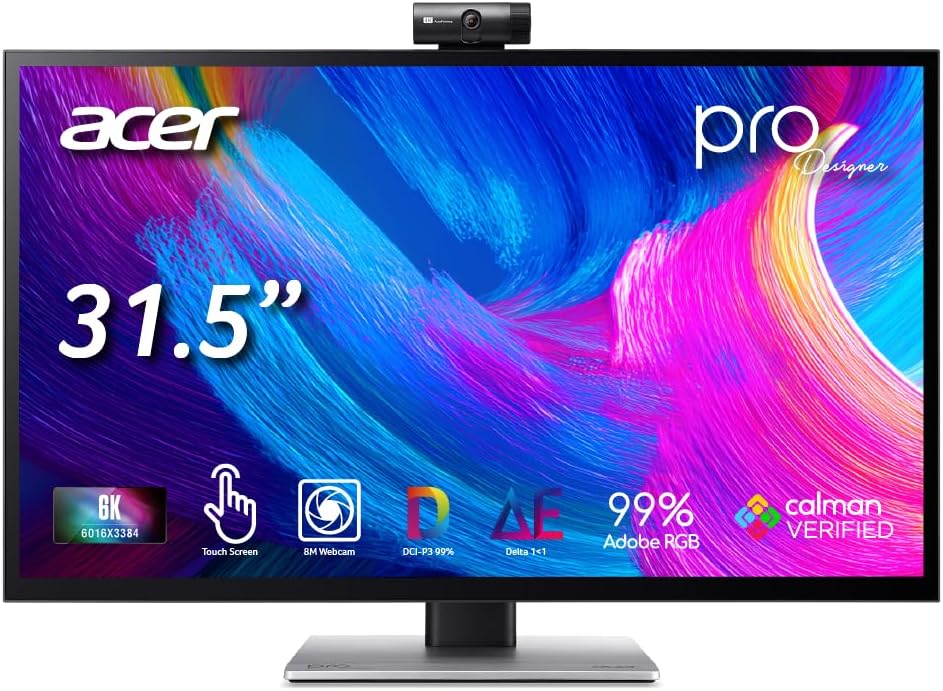
The Acer ProDesigner PE320QXT is built for direct interaction. It allows you to draw and annotate directly on the 6K screen with included stylus support. This removes the need for a separate tablet, consolidating your creative workspace effectively.
We may earn a commission when you buy through this link, at no additional cost to you.
Color accuracy is paramount here with Delta E under 1 and 99% Adobe RGB coverage. The built-in 8MP webcam and 4-mic array facilitate client calls without extra hardware. DisplayHDR 600 ensures you can preview high dynamic range content accurately.
Productivity is enhanced by a single USB-C cable providing signal and 90W charging. The Creator Hub software manages color spaces and workflows. The ergonomic stand supports full adjustment for comfort. This is ideal for designers needing tactile control.
Choose this if you want a streamlined setup for graphic design or annotation. The high pixel count ensures precise strokes. While the stylus is sold separately, the touch integration offers unique workflow benefits not found in standard displays.
Combine sketching, reviewing, and creating in one place, eliminating the friction of switching between a mouse and a separate tablet.
Factory calibration to Delta E under 1 ensures your work matches print and delivery standards consistently.
We may earn a commission when you buy through this link, at no additional cost to you.
The G32X focuses on providing a clean viewing experience. It features a 6K IPS panel with a minimalist stand design. The CNC-machined aluminum body ensures durability while maintaining a sleek aesthetic that fits modern workspaces easily.
We may earn a commission when you buy through this link, at no additional cost to you.
It supports 100W high-speed power delivery for single-cable laptop setups. The multi-layer anti-reflective coating helps minimize eye fatigue during long sessions. VESA mount compatibility offers flexibility for arm mounting if the stand is not preferred.
While it lacks specialized gaming or creative software, it offers solid basic performance. The 218 PPI delivers sharp details. For users who value simplicity and hardware quality over extra features, this monitor is a reliable choice for everyday productivity.
This model suits home offices where aesthetics matter. The high resolution makes documents and images clear. It balances cost and quality well. If you need a no-fuss display for general work, this is a practical option to consider.
The minimalist stand and aluminum body reduce visual clutter, helping you focus on your screen content.
With standard VESA compatibility, you can easily mount this display on flexible arms for ergonomic positioning.
We may earn a commission when you buy through this link, at no additional cost to you.
The Dell U5226KW offers a huge 52-inch canvas for professional tasks. It includes a Thunderbolt hub and Dell Color Management software for tailored color adjustments. The 120Hz refresh rate keeps motion smooth for data visualization.
We may earn a commission when you buy through this link, at no additional cost to you.
Remote control and KVM functionality let you manage multiple devices efficiently. The built-in USB hub and speakers add convenience. However, reviews note some initial setup complexity. Ensure your room supports the size before purchase.
This monitor is designed for high-end command or presentation centers. The IPS Black panel enhances contrast. If you need to manage multiple systems on one screen with advanced controls, this model provides the necessary tools.
Suitable for IT admins or broadcast professionals. The large footprint requires planning. It integrates well with enterprise workflows. Verify firmware updates are available to avoid initial issues. A powerful tool for specific professional needs.
Built-in software and remote control options make this ideal for managed environments where IT oversight is required.
The 52-inch screen provides unmatched real estate for complex dashboards, video walls, and multi-app monitoring.
We may earn a commission when you buy through this link, at no additional cost to you.
The LG UltraFine evo 32U990A-S brings Thunderbolt 5 technology to the table. This ensures ultra-fast data transfer and power over a single cable. The Nano IPS Black panel offers deep blacks and vivid colors for professional work.
We may earn a commission when you buy through this link, at no additional cost to you.
With 99.5% Adobe RGB coverage and VESA DisplayHDR 600, it meets strict creative standards. The bundle includes practical items like a cleaning kit. KVM functionality supports efficient multi-system use. It is a forward-thinking choice for future-proofing your setup.
While limited to 60Hz, its focus is on resolution and color precision. The 224 PPI delivers sharp text. For Mac users wanting seamless integration with high-end connectivity, this model is a strong contender. It balances performance and premium features.
Ideal for video editors who need HDR and color accuracy. The Thunderbolt 5 ensures you are ready for next-gen devices. If you prioritize connectivity and color over refresh rate, this display offers exceptional value for professional workflows.
Thunderbolt 5 support future-proofs your setup with high-speed data and charging over a single cable.
Coverage of 99.5% Adobe RGB ensures you are working with the colors your clients expect in print and digital.
We may earn a commission when you buy through this link, at no additional cost to you.
This bundle includes a Dell UltraSharp 32 6K Monitor with a protection pack. It focuses on reliability and essential features for business environments. The USB-C port ensures quick data transmission. It handles action and media well with fast response.
We may earn a commission when you buy through this link, at no additional cost to you.
The included bundle offers cables and a protection plan for peace of mind. It is designed for productivity tasks like document editing. The 6144×3456 resolution ensures clarity. While it lacks some advanced color tools, it meets general business needs.
Ideal for corporate fleets or home offices valuing warranty. The 450 Nit brightness works in lit areas. It provides a stable platform for daily use. If you prioritize service support over creative tools, this is a practical solution.
This monitor suits general office work and web browsing. The included accessories reduce setup hassles. Check if the protection plan fits your needs. It offers a balance of resolution and support for users who want reliability.
The 2-year enhanced protection plan provides added security against unexpected issues for your critical work display.
Designed for clarity and reliability, this monitor handles text and data tasks with consistent performance.
We may earn a commission when you buy through this link, at no additional cost to you.
This renewed model of the Dell UltraSharp 52 offers value for budget-conscious buyers. It lacks a stand but supports VESA mounting for custom setups. The 52-inch curved screen provides expansive workspace. Thunderbolt hub features remain functional.
We may earn a commission when you buy through this link, at no additional cost to you.
Buying renewed can save money while offering similar performance. The 120Hz refresh and 21:9 aspect ratio suit multitasking. It is best for users who already have monitor arms. Verify the renewed condition before purchasing to ensure quality.
Ideal for setups where a custom arm is preferred. The Thunderbolt hub allows single-cable connectivity. It is a cost-effective way to get a large 6K display. If you are flexible about the stand, this is a viable option.
Suitable for large desks needing big real estate. Ensure the renewed unit is tested properly. It offers the benefits of a large Dell display without the full stand cost. Consider it if you have mounting hardware ready.
Without a stand, you can integrate this screen into your existing VESA arm setup for a cleaner look.
The renewed status provides a lower entry point for those needing a large 6K display without paying full price.
We may earn a commission when you buy through this link, at no additional cost to you.
Choosing a 6K monitor involves balancing resolution, color accuracy, and connectivity. This guide outlines key factors to ensure you pick the right model for your professional needs.
6K resolution typically offers around 6144 x 3456 pixels, providing immense detail. Look for high PPI values like 220+ to ensure text is crisp and images are sharp without scaling issues.
High pixel density is essential for reducing eye strain and seeing fine details in design work. A display with 200+ PPI ensures interfaces and text look as intended.
For professional work, color coverage is critical. Look for monitors with 99% or higher DCI-P3 and Adobe RGB coverage. Factory calibration with low Delta E values ensures the colors you see are accurate.
Accurate color gamut and calibration mean your work translates correctly from screen to print. Always check for verified specs before buying to ensure reliable results.
IPS panels offer wide viewing angles and good color consistency. IPS Black or Nano IPS variants provide better contrast ratios. OLED and QD-IPS offer vibrant colors but may have burn-in risks or higher costs.
Choose the panel type based on your lighting and color needs. IPS Black is ideal for high contrast needs in dark environments.
A single cable solution is convenient. Thunderbolt 4 or 5 ports can deliver video and power simultaneously. Ensure your laptop supports the specific bandwidth required for 6K at 60Hz or higher.
Connectivity determines setup simplicity. Thunderbolt hubs reduce clutter and allow daisy-chaining for multi-monitor setups effectively.
Most 6K monitors are 60Hz. Gaming monitors offer dual modes with higher rates at lower resolutions. Low response times prevent motion blur in fast-paced tasks.
If you edit video or play games, check if the refresh rate supports your workflow. A 60Hz rate is usually sufficient for static content.
A good stand should support tilt, swivel, pivot, and height adjustments. VESA mount compatibility allows for flexible positioning using monitor arms.
Comfort during long sessions is vital. Proper adjustability helps maintain good posture and reduces neck strain.
Look for brightness levels around 500 nits or higher for HDR. DisplayHDR certifications indicate specific performance standards for contrast and color.
High brightness ensures visibility in bright rooms and accurate HDR preview. Aim for 500+ nits for better dynamic range.
Premium monitors often come with longer warranties and extended protection plans. Check what is included before buying to ensure peace of mind.
Reliable support is crucial for professional equipment. A strong warranty covers defects and extends the monitor's usable life.
Clean the screen regularly with a microfiber cloth to avoid scratches. Avoid harsh chemicals that can damage the panel coating. Gently wipe the surface in circular motions for best results.
Adjust your monitor's brightness and contrast to match your room lighting. Use ambient light sensors if available to reduce eye strain. Proper settings improve comfort during long work sessions.
Organize your cables neatly to maintain a clean workspace. Use cable ties provided with the monitor. Good cable management prevents accidents and keeps your setup tidy.
A 6K monitor provides significantly higher pixel density than 4K, allowing for sharper text and more workspace without scaling. It is ideal for detailed creative work where clarity is crucial.
Yes, many models are optimized for Macs with Thunderbolt 4 or 5 ports. Ensure your Mac supports the necessary bandwidth to drive 6K resolution at 60Hz for smooth performance.
Some 6K monitors offer high refresh rates at lower resolutions via dual mode. While mostly for productivity, gaming models exist with Fast IPS panels and G-Sync support for better immersion.
Use high-quality Thunderbolt or DisplayPort cables that support the required bandwidth. Older HDMI or DP cables may not sustain 6K resolution and refresh rates properly.
Power draw varies but typical professional models use around 100 to 150 watts. Many provide power delivery to charge laptops, reducing the need for separate chargers.
Yes, the high pixel density makes text incredibly sharp and readable. You may need to adjust scaling settings in your OS for optimal readability and UI size.
Many high-end models include factory calibration certificates. Software tools like Dell Color Manager or creator hubs help manage color profiles without needing external hardware.
If you need more screen real estate and sharper detail for professional work, 6K is worth it. For casual use, 4K may suffice depending on screen size and viewing distance.
The ASUS ProArt PA32QCV, LG UltraFine evo 32U990A-S, and Samsung 32" Odyssey G8 offer top choices for different needs. Each model brings unique strengths in color accuracy, connectivity, and performance.
Prioritize resolution, color accuracy, and connectivity for your specific workflow. Ensure your computer supports the necessary bandwidth to make the most of these high-resolution displays.
Prices and availability change frequently. Always check current deals and verify compatibility before making your purchase to secure the best value for your setup.