
MEKO Stylus Pen for Touchscreen, 3-in-1 Universal iPad Stylus Stylists
4.6Editor score
High sensitivity disc tip
Durable silicone tips
Comes with extra tips
Discover the top-rated fine point stylus options for 2026. Our guide compares compatibility, precision, battery life, and build quality to help you choose the
Finding the right fine point stylus can transform how you interact with your digital devices. Whether you are an artist, student, or professional, having a precise tool makes navigation and creativity significantly easier.
We evaluated ten top-rated stylus pens based on accuracy, compatibility, build quality, and user feedback. Our analysis covers capacitive and active options to ensure you find a match for your specific needs.
Each pick highlights unique strengths and ideal use cases for different users. Prices may fluctuate over time, so checking the latest listings is recommended before making your final purchasing decision today.
4.6Editor score

4.5Editor score

4.2Editor score
The following table provides a side-by-side look at the key specifications and features of each top-rated fine point stylus available this year.




This versatile stylus offers an excellent balance of precision and adaptability for general touchscreen use. With a 4.5 star rating, users appreciate its ability to work seamlessly across tablets and phones.
We may earn a commission when you buy through this link, at no additional cost to you.
The standout feature is the transparent disc tip, which allows for pinpoint accuracy during writing or drawing. This design ensures you can see exactly where your mark is being made on the screen.
While it lacks palm rejection, the rubber tips provide a comfortable experience for casual users. The flexible angle ensures smooth operation without lag or interruption during daily tasks.
Ideal for students or professionals who need a reliable tool for note-taking and gaming. Its replaceable tips ensure longevity, making it a practical choice for long-term use.
The transparent disc tip offers unmatched clarity for detailed work.
Works across almost all capacitive touchscreens without extra setup.
We may earn a commission when you buy through this link, at no additional cost to you.
The MEKO stylus is a top choice for budget-conscious buyers seeking reliable performance. Its 4.6 star rating reflects strong satisfaction with its build quality and usability.
We may earn a commission when you buy through this link, at no additional cost to you.
This pen excels in providing a smooth writing experience thanks to its high-sensitivity disc tip. Users can browse, write, and play games with ease using the dual-sized rubber tips.
The package includes multiple replacement tips, ensuring you have spares for long-term use. This thoughtful addition makes it a cost-effective solution for anyone needing a durable stylus.
Recommended for everyday users who want simplicity without compromising on precision. It is perfect for note-taking, gaming, and general navigation on various devices.
Affordable price point with extra tips included for added value.
Silicone material ensures tips glide easily without scratching screens.
We may earn a commission when you buy through this link, at no additional cost to you.
This active stylus brings a premium touch to digital creation with its ultra-fine 1.5mm tip. It delivers a natural pen-like experience that artists and professionals will appreciate.
We may earn a commission when you buy through this link, at no additional cost to you.
Users report excellent performance for detailed drawing and writing without the need for Bluetooth pairing. The smart battery saver ensures you get up to eight hours of active use per charge.
While it requires a Micro USB charge, the convenience of a long-lasting battery outweighs the minor setup. Its lightweight design makes it comfortable for extended periods of creative work.
Best suited for artists or students who need a stylus that mimics traditional pen feel. It stands out for those willing to invest in a higher-end tool for accuracy.
The fine tip allows for intricate details in digital drawings and sketches.
Long runtime ensures uninterrupted creativity without constant recharging.
We may earn a commission when you buy through this link, at no additional cost to you.
This white stylus features a magnetic design that securely attaches to compatible iPads. It is a great option for users who want a pen that stays close at hand.
We may earn a commission when you buy through this link, at no additional cost to you.
With a battery life of up to ten hours, it supports long sessions of drawing or writing. The one-touch switch makes it easy to power on and off quickly.
While it does not offer palm rejection, its sensitivity ensures smooth input on supported devices. It is an attractive choice for students who value convenience and ease of use.
Ideal for those working with specific iPad models who want a reliable active tool. Its magnetic feature prevents it from getting lost, adding to its practicality.
Attaches securely to the side of your device for easy access.
Fully charges in just 40 minutes for minimal downtime.
We may earn a commission when you buy through this link, at no additional cost to you.
This black stylus offers a realistic writing experience with its 1.5mm diameter tip. It is a practical choice for users who prioritize simplicity and reliability.
We may earn a commission when you buy through this link, at no additional cost to you.
It powers on quickly without the need for a Bluetooth connection, making it convenient for everyday use. The auto power-off function helps preserve battery life during periods of inactivity.
While it lacks pressure sensitivity, the tip provides consistent performance for basic note-taking. Users appreciate its broad compatibility with a wide range of touchscreen devices.
Recommended for casual users who need a dependable tool for browsing or writing. Its straightforward design ensures you can focus on creativity without technical complexities.
Instant activation allows you to start writing without delay.
Works with most tablets and phones for versatile application.
We may earn a commission when you buy through this link, at no additional cost to you.
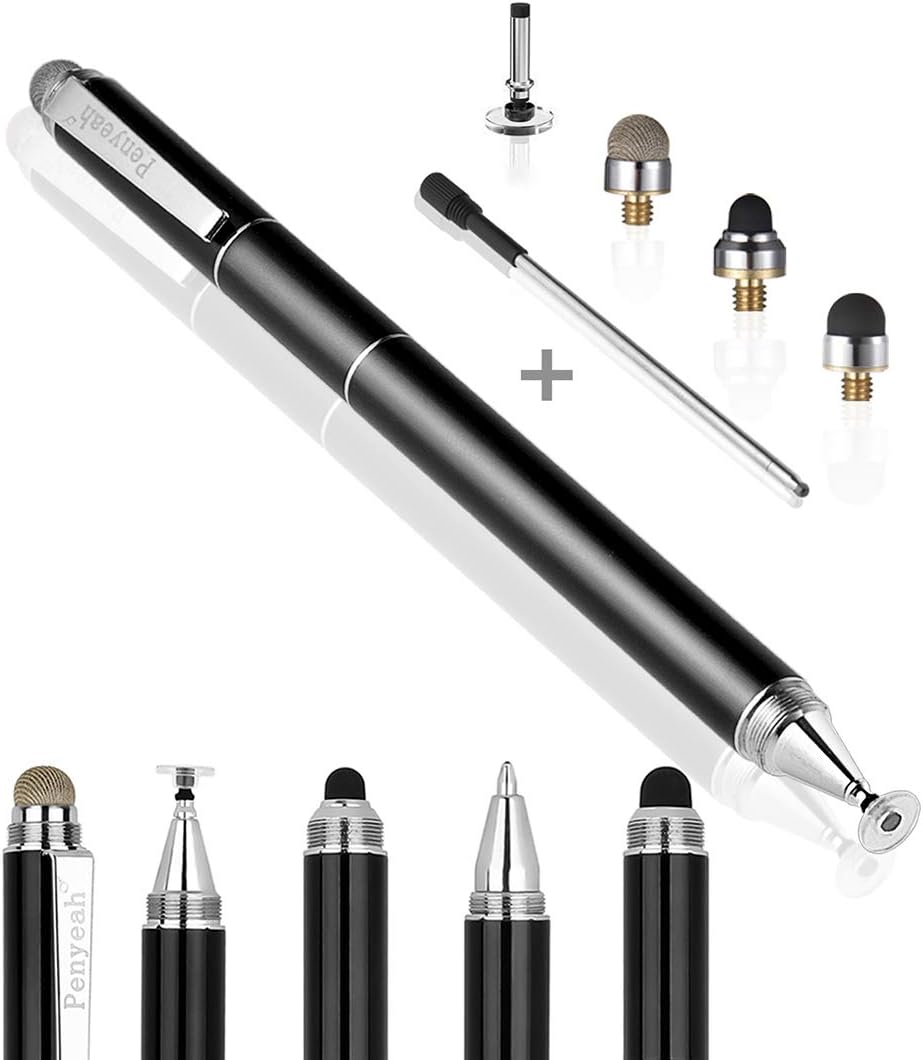
The Penyeah stylus is a versatile tool featuring four different tips for various tasks. Its high rating reflects user satisfaction with its durability and multifunctional design.
We may earn a commission when you buy through this link, at no additional cost to you.
It stands out with a built-in ballpoint pen, offering offline writing capabilities. The clear disc tip allows for precise interaction with digital screens, making it ideal for drawing.
The metal body ensures the pen is durable and corrosion resistant. However, users should avoid resting their hand on the screen as it lacks palm rejection.
Perfect for professionals who need a single tool for both digital and physical writing. Its slim clip design makes it easy to carry in a pocket or notebook.
Switch between digital stylus and ballpoint pen for seamless workflow.
Clear disc tip provides accuracy for detailed digital tasks.
We may earn a commission when you buy through this link, at no additional cost to you.
This 6-pack bundle is an excellent solution for families or offices needing multiple styluses. Users appreciate the high sensitivity and ease of use across all devices.
We may earn a commission when you buy through this link, at no additional cost to you.
The built-in clip ensures you can easily attach the pen to your pocket or notebook. It works instantly without any technical setup, making it convenient for daily tasks.
The rubber tips provide a smooth experience without scratching your screen. With no battery required, these pens are ready to use straight out of the package.
Recommended for environments where sharing devices is common. The vibrant color options help distinguish individual pens for different users efficiently.
Ideal for households or classrooms with multiple device users.
No pairing or charging needed for immediate operation.
We may earn a commission when you buy through this link, at no additional cost to you.
MEKO provides a solid value with this 4-pack featuring an aluminum barrel for durability. The rating indicates strong approval for the pen's precision and feel.
We may earn a commission when you buy through this link, at no additional cost to you.
Each pen has a transparent disc tip for accuracy and a soft rubber tip for touch. This dual setup makes it suitable for writing, drawing, and navigating apps.
With twelve replacement tips included, you can ensure your stylus stays in top condition. The aluminum design offers a comfortable grip for extended use.
Perfect for artists or students needing multiple reliable tools. The extra tips ensure your pens remain functional over a long period.
Aluminum barrel provides a sturdy and comfortable feel in hand.
Combination of disc and rubber tips covers different tasks.
We may earn a commission when you buy through this link, at no additional cost to you.
This 10-piece set offers exceptional value for schools or offices. Users rate it highly for its smooth performance and durable alloy body.
We may earn a commission when you buy through this link, at no additional cost to you.
The dual rubber tips provide different levels of precision for navigation or detailed work. The alloy body ensures longevity, making these pens reliable for daily use.
Included replacement tips help maintain performance over time. The vibrant mixed colors make it easy to assign a stylus to different individuals.
Recommended for bulk procurement where reliability and value are key. Its simplicity ensures it works for anyone needing basic touchscreen control.
Soft rubber nibs glide effortlessly without damaging screens.
Perfect for classrooms or businesses needing multiple units.
We may earn a commission when you buy through this link, at no additional cost to you.
This 10-piece set provides a reliable solution for multiple users. Users appreciate its high precision and scratch-free performance across all devices.
We may earn a commission when you buy through this link, at no additional cost to you.
The sleek aluminum body combines functionality with elegance for a professional look. It works instantly without Bluetooth, making it a practical tool for everyday tasks.
Dual silicone tips protect your screen while delivering a smooth writing experience. The included replaceable accessories ensure your styluses remain functional for longer.
Ideal for sharing among family members or colleagues. Its universal compatibility ensures it works on almost any capacitive screen.
Anti-scratch tips keep your device display pristine.
Works seamlessly with iPhones, Android, and tablets.
We may earn a commission when you buy through this link, at no additional cost to you.
Selecting the right stylus depends on your specific needs and devices. Here are the key factors to consider before making a purchase.
The tip design defines accuracy. Transparent disc tips offer visual clarity, while fine rubber tips provide a traditional feel. Choose based on whether you prioritize visibility or tactile feedback.
Look for tips smaller than 1mm for detailed work.
Active styluses need charging but offer features like palm rejection. Passive capacitive styluses are always ready but lack advanced capabilities. Decide if you prefer convenience or enhanced functionality.
Check battery life and charging method for active models.
Ensure the stylus works with your specific devices. Some models are optimized for iPads, while others work universally. Compatibility with multiple platforms increases versatility.
Verify support for your phone or tablet model before buying.
Metal bodies like aluminum or alloy last longer and feel more premium. Plastic bodies are lighter but may wear out faster. Durability matters for daily use.
Choose sturdy materials to prevent wear and breakage.
A comfortable grip prevents fatigue during long sessions. Consider weight and balance. Some styluses feature clips for easy portability.
Test the weight and balance to ensure comfort.
Tips wear out over time. Styluses with replaceable nibs extend the pen's lifespan. Ensure replacements are easy to find and install.
Check the availability of spare parts.
Buying in packs can be cost-effective for multiple users. Check if replacement tips are included. Bundles often offer better value per unit.
Compare bulk prices against individual purchases.
Ensure your screen is clean before using the stylus. Dust or fingerprints can reduce sensitivity. Use a microfiber cloth to wipe the display.
For active styluses, charge them fully before first use. Check battery levels regularly to avoid unexpected shutdowns during tasks.
Store your stylus in a safe place to prevent tip damage. If it has a clip, attach it to a notebook or pocket for easy access.
No, capacitive styluses do not need power. Active models do require battery. Check your specific device requirements before buying.
Most work on capacitive screens like iPhones and Androids. Passive models support all devices. Active ones may have compatibility restrictions.
Many models include replaceable tips. Look for packs with spares. Check availability of replacements for your specific brand.
A disc tip is transparent for visibility. It shows exact contact points. It is great for precision drawing or writing.
High-quality tips are scratch-resistant. Avoid using worn tips. Replace them if you notice resistance or marks.
Look for fine tips and high sensitivity. Active models often offer more control. Consider your budget and device compatibility.
We have reviewed the top fine point stylus options available in November 2026. From budget-friendly bundles to premium active pens, there is a choice for everyone.
Focus on compatibility and durability when making your decision. If you need precision, prioritize models with disc tips. For ease, passive models are sufficient.
Always check the latest prices and availability. Our picks are based on current ratings but may change over time.