
Epson LQ-590II
4.3Editor score
24-pin impact technology
584 cps print speed
USB and parallel ports
Compare the top 10 dot matrix computer printers for 2026 featuring durability, speed, and connectivity options for businesses and heavy-duty printing needs.
Dot matrix computer printers remain essential for businesses needing durable, multi-part form printing. These impact printers excel in high-volume environments where reliability matters more than quiet operation or color graphics.
We analyzed ten top models based on print speed, connectivity options, duty cycles, and user feedback. Our comparison highlights which models offer the best balance of performance and cost for different business requirements.
Each pick shows key specifications and real-world strengths. Prices fluctuate frequently so check current listings before purchasing to ensure you get the best value for your specific printing workflow needs.
4.3Editor score

4.7Editor score

4.8Editor score
This side-by-side comparison shows key specs for all ten models to help you quickly identify which printer matches your office workflow requirements and budget constraints.


The Epson LQ-590II stands out as a top performer in the impact printer category. With a 4.3 rating it delivers reliable monochrome output suitable for invoices and shipping labels.
We may earn a commission when you buy through this link, at no additional cost to you.
Its 24-pin mechanism allows for 584 characters per second which is impressive for this class. The USB and parallel ports ensure compatibility with older legacy systems still in use.
While it lacks color capabilities it compensates with speed and durability. The noise level is typical for dot matrix but acceptable for office environments needing continuous forms.
Businesses needing affordable high-volume printing should consider this model. It balances cost with performance making it an excellent entry point for impact printing needs.
The 584 cps speed ensures quick turnaround for high-volume document batches without compromising on print quality.
Having both USB and parallel ports means you can integrate this printer into diverse legacy and modern setups easily.
We may earn a commission when you buy through this link, at no additional cost to you.
The Epson LQ-590II NT offers Energy Star certification which appeals to eco-conscious businesses. It maintains the 584 cps speed of the base model while reducing power consumption.
We may earn a commission when you buy through this link, at no additional cost to you.
Users praise its reliability for multi-part forms and continuous paper feeding. The serial and parallel options provide flexibility for industrial setups without USB compatibility.
Although slightly more expensive the energy savings over time can offset the initial cost. It is ideal for facilities prioritizing environmental standards.
If you need an efficient impact printer for long-term use this NT model delivers consistent results without draining power resources excessively.
Energy Star certification reduces operational costs significantly over the lifespan of the device.
Serial and parallel ports ensure seamless integration with older factory systems that lack USB interfaces.
We may earn a commission when you buy through this link, at no additional cost to you.
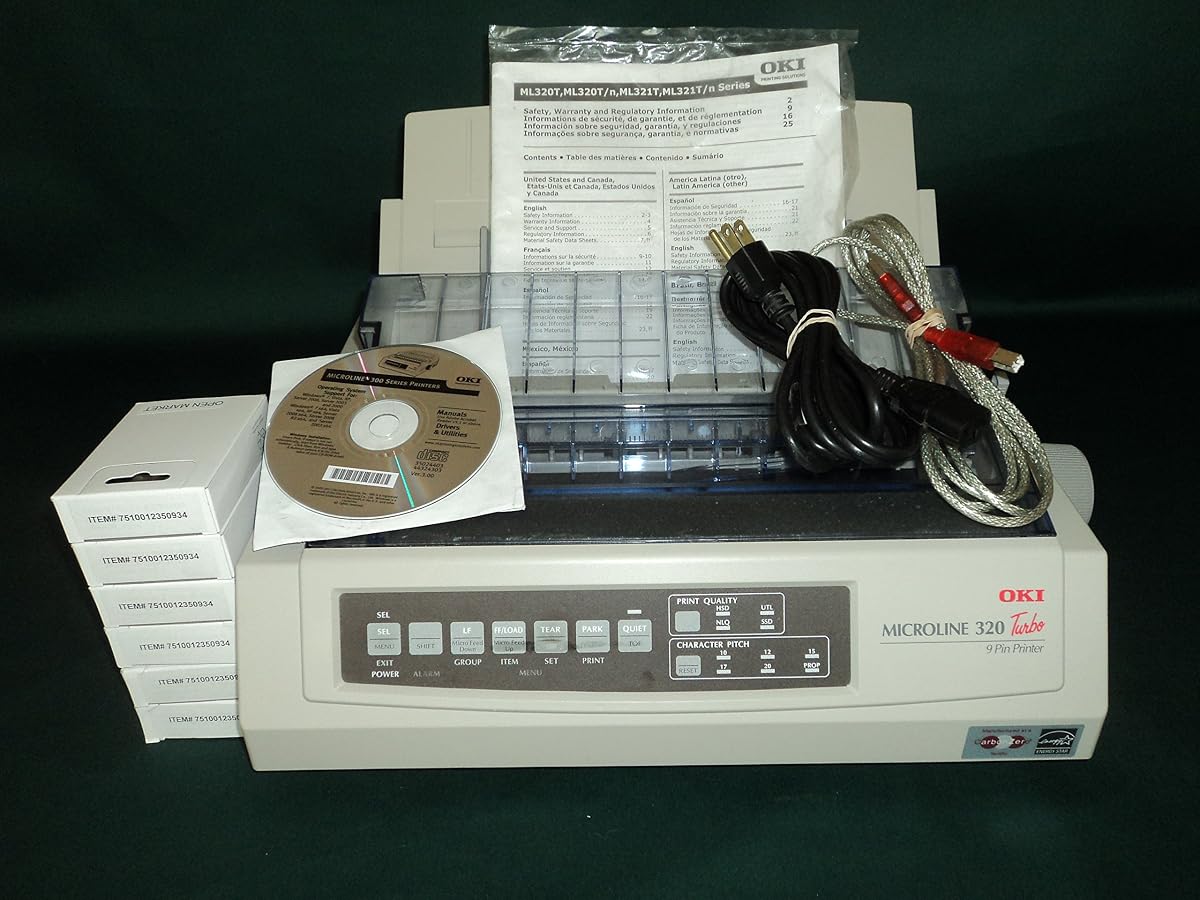
The Oki Microline 320 Turbo boasts a 4.7 rating reflecting its exceptional durability. The zero-tear and auto-park features reduce paper waste significantly.
We may earn a commission when you buy through this link, at no additional cost to you.
With USB serial and parallel connectivity it adapts to various network configurations. The 9-pin system offers a balance between speed and clarity.
While 435 cps is slower than 24-pin models it remains sufficient for most business documents. The high reliability reduces downtime.
This printer is perfect for users needing minimal maintenance and consistent output. It justifies the price through long-term dependability and reduced material waste.
Ensures paper feeds properly through the rear push standard tractor minimizing waste.
Supports USB serial and parallel to suit diverse office setups.
We may earn a commission when you buy through this link, at no additional cost to you.
This model offers a max duty cycle of 20000 pages monthly making it suitable for busy departments. Users note its straightforward setup and consistent print quality.
We may earn a commission when you buy through this link, at no additional cost to you.
The 240 x 216 dpi resolution ensures sharp text and barcodes. With 64 KB memory it handles basic jobs efficiently without slowing down.
The noise level is standard for impact printers but might disturb quiet offices. However reliability often outweighs this for heavy users.
If you need a workhorse for shipping logs or inventory tags this unit provides steady performance. Its 4.5 rating confirms satisfaction among professional buyers.
Handles up to 20000 pages per month without overheating or jamming.
240 x 216 dpi ensures readable text and clear barcodes for inventory.
We may earn a commission when you buy through this link, at no additional cost to you.
The OKI Microline 420 delivers 570 cps which rivals many 24-pin models. Its 128 KB memory allows for larger buffers improving throughput.
We may earn a commission when you buy through this link, at no additional cost to you.
With a 24000 page monthly duty cycle it supports high-demand environments. Energy Star certification adds value through lower energy bills.
Users appreciate its robust build and minimal service needs. The price is higher but justified by the performance and efficiency.
Choose this if speed and capacity are priorities. It fits well in logistics centers needing fast continuous printing without frequent breaks.
570 cps speeds up document processing compared to standard 9-pin printers.
Energy Star label ensures lower power usage during long print runs.
We may earn a commission when you buy through this link, at no additional cost to you.
This unit earned a perfect 5.0 rating from users. It offers USB serial and parallel ports ensuring it works with almost any system.
We may earn a commission when you buy through this link, at no additional cost to you.
The 9-pin technology delivers consistent text quality. Zero-tear features minimize jams which is crucial for continuous operations.
The price is steep but the reliability justifies it. Offices needing minimal downtime appreciate the flawless performance.
For critical printing tasks this model is a top contender. It reduces administrative headaches with its consistent output and robust design.
Supports USB serial and parallel for maximum system compatibility.
Zero-tear tech ensures paper feeds properly to prevent jams.
We may earn a commission when you buy through this link, at no additional cost to you.
The Epson LQ-2090II offers 550 cps speed with Energy Star efficiency. Users find it dependable for labeling and shipping documents.
We may earn a commission when you buy through this link, at no additional cost to you.
Its 24-pin head ensures sharp text even at high speeds. Parallel port support maintains compatibility with older infrastructure.
Some reviews mention noise and minor setup issues but overall it performs well. The energy efficiency helps reduce ongoing costs.
Consider this if you need a standard impact solution without extra frills. It balances speed and cost effectively for basic needs.
550 mono cps ensures quick batch processing for daily tasks.
Energy Star certification lowers power consumption significantly.
We may earn a commission when you buy through this link, at no additional cost to you.
This printer excels at multi-part form generation supporting up to six carbonless copies. It is ideal for invoices and manifests.
We may earn a commission when you buy through this link, at no additional cost to you.
The SuperSpeed Draft mode hits 435 cps ensuring rapid output. Auto-park technology reduces waste by optimizing paper usage.
Emulations for IBM Epson and ANSI allow flexible driver support. Users appreciate the zero-tear mechanisms for consistent operation.
If multi-copy printing is your primary need this model stands out. Its reliability and specialized features save time on administrative tasks.
Produce original plus up to five carbonless copies easily.
Auto-park tech ensures paper is fed properly to eliminate waste.
We may earn a commission when you buy through this link, at no additional cost to you.
The Oki Microline 620 is a premium option delivering high-volume versatility. Its 4.8 rating reflects strong user trust and performance.
We may earn a commission when you buy through this link, at no additional cost to you.
Media loading is simplified compared to competitors reducing setup time. Precise sharp printing ensures documents meet professional standards.
Users note its reliable performance over years of continuous use. The cost is higher but durability justifies the investment.
For large enterprises needing top-tier impact printing this model leads the pack. It minimizes downtime and maximizes document quality.
Built for continuous heavy-duty usage in demanding environments.
Simplified media loading reduces downtime and frustration.
We may earn a commission when you buy through this link, at no additional cost to you.
The Epson LQ-590 provides an affordable entry into 24-pin impact printing. It supports USB and IBM PPDS emulations offering broad compatibility.
We may earn a commission when you buy through this link, at no additional cost to you.
Its ESC/P support ensures smooth integration with many systems. Users find it reliable for basic document output.
While features are standard the price point makes it accessible. It suits businesses needing simple impact functionality without high costs.
If budget is tight this model delivers essential capabilities. It meets basic impact printing needs effectively for entry-level setups.
Lower price point makes impact printing accessible for small budgets.
ESC/P and IBM PPDS support ensures system compatibility.
We may earn a commission when you buy through this link, at no additional cost to you.
Selecting a dot matrix computer printer requires evaluating speed, connectivity, and duty cycles to match your workflow.
Print speed measured in characters per second (cps) dictates how fast documents are produced. Higher cps is vital for high-volume environments.
Prioritize models with 500+ cps for efficient batch processing.
Modern offices need USB while legacy systems often require parallel or serial ports. Ensure the printer matches your infrastructure.
Choose devices supporting both USB and legacy ports for maximum flexibility.
Monthly duty cycle indicates the maximum pages a printer can handle. Exceeding this limit reduces lifespan.
Select a model with a duty cycle exceeding your expected monthly volume.
Features like zero-tear and auto-park prevent jams and waste. Look for rear push standard tractor mechanisms.
Verify the printer supports your specific paper types and thickness.
Impact printers are noisier than inkjet models. Consider placement in quiet environments.
Accept noise as a trade-off for durability in active offices.
Support for ESC/P IBM and ANSI ensures driver compatibility. Mismatched emulations cause setup issues.
Check that the printer matches your software's language requirements.
If you need carbonless copies the number of copies supported varies by model.
Ensure the printer handles up to six copies if your workflow requires it.
Energy Star certified models reduce power costs over time.
Look for Energy Star labels for long-term savings.
Always load paper through the rear push standard tractor at the correct thickness to prevent jams.
Use the auto-park feature to save ribbons and ensure paper alignment after each run.
Clean the print head and feed path regularly with a soft cloth to maintain quality.
The OKI Microline 320 Turbo offers excellent multi-copy support ideal for invoices. Its reliability ensures consistent carbonless copy output.
Yes for multi-part forms and high-volume printing they remain essential. They outperform inkjet in reliability for continuous paper.
Look for parallel or serial ports. The Epson LQ-590II NT supports serial options for legacy infrastructure compatibility.
It defines the max pages per month. Models like the OKI Microline 420 handle 24,000 pages monthly without stress.
Check the ribbon capacity. For high-volume setups buy in bulk. Reliable brands often offer long-lasting cartridges.
Yes many models support USB. The Oki Microline 320 Turbo offers USB serial and parallel ports.
The Epson LQ-590II NT and OKI Microline 420 carry Energy Star labels for power efficiency.
Speeds over 500 cps are fast. The Epson LQ-590II reaches 584 cps for quick batch output.
Our top picks balance speed durability and connectivity for diverse needs. The Epson LQ-590II leads as a budget option while the Oki Microline 620 excels in premium performance.
Prioritize duty cycle and connectivity options over raw speed to avoid workflow bottlenecks. Ensure your chosen model matches existing hardware requirements.
Prices fluctuate regularly so verify current deals before purchasing. Always check warranty coverage and ribbon availability for long-term satisfaction.