
Canon Color imageCLASS LBP646Cdw
4.1Editor score
Up to 26 PPM speed
Compact single-function design
Easy wireless setup
This guide compares the top duplex color laser printers for businesses and home offices, evaluating speed, connectivity, print quality, and reliability.
Finding the right duplex color laser printer can transform your workflow by delivering crisp documents and vibrant graphics efficiently. Modern machines offer wireless connectivity, automatic double-sided printing, and robust security features tailored for diverse professional needs.
We evaluated ten leading models based on print speed, paper capacity, connectivity options, and user feedback. Each selection balances performance with value, ensuring you find a reliable solution that fits your specific office environment and operational demands.
Every pick highlights key strengths and potential trade-offs to help you make an informed decision. While features vary significantly across models, all listed options provide high-quality color output and duplex capabilities essential for modern productivity.
4.1Editor score

4.4Editor score
4.0Editor score
This side-by-side comparison highlights the core specifications and capabilities of each selected model to help you identify the most suitable option for your printing requirements.


The Canon Color imageCLASS MF753Cdw II stands out as a robust 4-in-1 solution for offices needing print, scan, copy, and fax capabilities. With a rating reflecting solid performance, it delivers reliable color output and seamless wireless integration for diverse workflows.
We may earn a commission when you buy through this link, at no additional cost to you.
Its standout qualities include efficient duplex printing that saves paper and time, alongside strong connectivity options ensuring all team members can access the device easily. The integration of fax services adds significant value for businesses still relying on traditional document transmission methods.
While it carries a higher price point compared to single-function models, the consolidation of multiple tools into one device reduces overall clutter and operational complexity. Users appreciate the consistent quality and the convenience of managing all document tasks from a single interface.
This model is ideal for small to mid-sized offices seeking a versatile, all-encompassing device. If your workflow demands faxing alongside standard printing tasks, this printer offers the comprehensive capabilities necessary to keep operations running smoothly.
Consolidating printing, scanning, copying, and faxing into one unit reduces desk clutter and simplifies workflow management for busy teams.
Built-in wireless connectivity allows seamless integration with office networks, enabling remote printing and scanning from any connected device.
We may earn a commission when you buy through this link, at no additional cost to you.
The Brother HL-L3220CDW offers an accessible entry point into professional color laser printing with essential features like duplex printing and wireless connectivity. Its rating reflects a balance of affordability and functionality suitable for home offices or small business environments.
We may earn a commission when you buy through this link, at no additional cost to you.
Key strengths include its generous 250-sheet paper tray which minimizes refills, and built-in security protocols that protect sensitive documents. Mobile integration ensures users can print directly from smartphones or tablets, enhancing flexibility in modern workspaces.
Trade-offs involve a slower 19 PPM speed which may not suit high-volume demands, but for general office tasks this remains adequate. The simpler interface lacks advanced scanning features but delivers consistent crisp text and vibrant graphics at a competitive cost.
This printer is perfect for budget-conscious buyers needing reliable color output without extra bells and whistles. If you prioritize cost efficiency and essential wireless features, the HL-L3220CDW delivers dependable performance for daily document needs.
Designed for affordability, this model delivers professional-quality color documents without the premium price tag of higher-end office units.
Built-in security protocols safeguard sensitive business documents during wireless transmission ensuring safe and private access across devices.
We may earn a commission when you buy through this link, at no additional cost to you.
The Canon Color imageCLASS LBP646Cdw focuses purely on high-speed printing with a 26 PPM output that suits users who do not need scanning or copying functions. Its rating highlights reliability and speed making it a strong choice for document-heavy workflows.
We may earn a commission when you buy through this link, at no additional cost to you.
Standout qualities include easy wireless setup and compatibility with major mobile platforms via AirPrint and Mopria. The 5-inch LCD screen provides intuitive navigation while high-capacity toner options reduce replacement frequency and lower long-term operating costs.
The trade-off is the lack of multifunction features which limits versatility but streamlines the device for pure printing tasks. Users benefit from compact design and automatic duplex printing that conserves paper without compromising output quality or speed.
Ideal for teams needing a dedicated print server or a secondary device for high-volume color documents. If scanning and copying are handled elsewhere, this printer delivers fast efficient performance with minimal administrative overhead or complexity.
Focusing solely on printing allows for faster processing and consistent output without the overhead of scanning or copying mechanisms.
Seamless mobile printing via Canon PRINT app and AirPrint ensures users can output documents directly from their personal devices.
We may earn a commission when you buy through this link, at no additional cost to you.
The Brother MFC-L3720CDW balances compact design with essential office functions including printing scanning copying and faxing. Its rating indicates reliable performance suitable for small offices where space and budget are key considerations for equipment selection.
We may earn a commission when you buy through this link, at no additional cost to you.
Key strengths include a 3.5-inch color touchscreen for intuitive operation and direct access to cloud services like Google Drive and Dropbox. Advanced connectivity options ensure multiple users can connect seamlessly while security protocols protect sensitive data across wireless networks.
Trade-offs involve a 19 PPM speed which may not suit high-demand environments and a modest 50-sheet ADF requiring frequent reloading. However for moderate usage these limitations are acceptable given the versatility and cost-effectiveness of the all-in-one package.
This model works well for small businesses needing a complete document solution in a small footprint. If you value cloud integration and fax capabilities without investing in larger machinery this printer provides solid reliable performance for daily tasks.
Direct access to popular cloud services allows effortless document management and retrieval without needing local file transfers or servers.
Advanced security protocols and dual-band wireless ensure safe and reliable connections for multiple users across diverse office environments.
We may earn a commission when you buy through this link, at no additional cost to you.
The Brother MFC-L8930CDW is a powerhouse designed for business environments requiring high-speed printing scanning and advanced security. With a top rating this model delivers reliable performance and durable construction that supports demanding workflows and frequent usage patterns.
We may earn a commission when you buy through this link, at no additional cost to you.
Standout qualities include speeds up to 33 PPM for both print and copy tasks alongside two-sided scanning up to 104ipm. Triple Layer Security and NFC card reader authentication protect sensitive documents while high capacity toners reduce cost per page significantly.
Trade-offs include a higher initial price and potentially complex configuration due to extensive features. However for businesses needing robust security and speed these costs are justified by the productivity gains and reduced long-term operational expenses.
Ideal for mid-sized offices or teams with high document volumes and security requirements. If you need fast reliable performance with advanced protection this printer offers the comprehensive capabilities necessary for professional and scalable workflows.
With speeds up to 33 PPM and rapid scanning this device minimizes wait times and keeps busy teams moving efficiently.
Triple Layer Security and NFC authentication safeguard devices and data ensuring only authorized personnel access sensitive print jobs.
We may earn a commission when you buy through this link, at no additional cost to you.
The Brother HL-L3280CDW offers impressive laser-quality output tailored for small offices with a focus on efficiency and speed. Its rating reflects dependable performance and ease of use making it a practical choice for daily business document needs.
We may earn a commission when you buy through this link, at no additional cost to you.
Key strengths include a fast 27 PPM speed and cloud-based app integration via Google Drive and Dropbox for streamlined workflows. The compact design saves space while automatic duplex printing ensures professional double-sided documents without manual intervention or wasted paper.
Trade-offs involve limited advanced features compared to multifunction models and standard toner yields that may require frequent changes. However for focused printing tasks the reliability and speed make it a strong option for budget-conscious small business setups.
This printer suits small teams needing consistent color output without complex functionality. If you value speed and cloud accessibility in a space-saving package this device delivers solid performance and professional results for daily office use.
Support for popular cloud apps allows users to print directly from services like Google Drive and EverNote for efficient file access.
Its compact footprint is designed for smaller offices ensuring high performance without consuming valuable workspace or desk space.
We may earn a commission when you buy through this link, at no additional cost to you.
The Canon Color imageCLASS MF665Cdw combines print scan copy and fax capabilities with a 26 PPM speed suitable for growing small businesses. Its rating indicates consistent performance and user-friendly features that support varied document tasks efficiently and reliably.
We may earn a commission when you buy through this link, at no additional cost to you.
Standout qualities include a 5-inch color touchscreen for intuitive navigation and a 50-sheet automatic document feeder for scanning multi-page documents. A 3-year limited warranty offers long-term peace of mind while high-capacity toner keeps costs down over the device's lifespan.
Trade-offs involve standard connectivity and medium paper capacity which may require occasional refills in high-volume settings. However for typical office use the reliability and ease of use make it a dependable choice for teams needing consistent multifunction support.
Ideal for offices seeking balanced performance with strong warranty support. If you value user-friendly interfaces and consistent color output for scanning and printing tasks this model offers practical features for everyday document management.
The 5-inch color touchscreen simplifies navigation and settings allowing quick access to the most frequently used features and functions.
A 3-year limited warranty provides extended coverage giving buyers confidence in the device durability and reliability over time.
We may earn a commission when you buy through this link, at no additional cost to you.
The Canon Color imageCLASS MF662Cdw provides essential 3-in-1 functions with a focus on speed and usability for home or small office environments. Its rating reflects user satisfaction with the device performance and ease of integration into existing workflows.
We may earn a commission when you buy through this link, at no additional cost to you.
Key strengths include a 26 PPM print speed and a 5-inch color touchscreen that simplifies navigation and customization. High-capacity toner options reduce replacement frequency while a 3-year warranty ensures reliable long-term usage for varied business needs.
Trade-offs involve the absence of fax capabilities which may limit specific communication needs. However for teams prioritizing print and scan tasks this model offers streamlined efficiency and consistent output quality without unnecessary complexity or features.
This printer is ideal for offices needing core document functions without fax overhead. If you want a reliable easy-to-use machine with strong warranty support and consistent color quality this device handles daily tasks effectively.
Fast print speeds and automatic duplex support reduce wait times and save paper for daily document workflows and output.
The 5-inch touchscreen offers clear navigation allowing users to adjust settings and manage tasks quickly without technical frustration.
We may earn a commission when you buy through this link, at no additional cost to you.
The HP Color Laserjet Pro 3201dw is designed for small teams seeking professional-quality documents with reliable wireless connectivity. While user ratings are moderate it brings brand trust and consistent output quality to office environments needing daily color printing capabilities.
We may earn a commission when you buy through this link, at no additional cost to you.
Standout qualities include vivid color reproduction via TerraJet toner and dual-band Wi-Fi with self-reset for stable network connections. The 250-sheet input tray ensures minimal interruptions while automatic duplex printing supports sustainable document handling practices in modern offices.
Trade-offs include strict cartridge chip restrictions which can limit cost flexibility and some reported connectivity issues. However for businesses prioritizing brand support and color fidelity this model delivers professional results that align with standard office expectations.
Ideal for teams needing a trusted brand for reliable color output. If you prioritize color vividness and network stability over cost-saving workarounds this printer provides dependable performance for professional business documentation needs.
Next-generation TerraJet toner delivers vivid colors that make business documents and reports visually impactful and professionally appealing.
Dual-band Wi-Fi with self-reset capabilities ensures reliable wireless connections that automatically resolve common network issues quickly.
We may earn a commission when you buy through this link, at no additional cost to you.
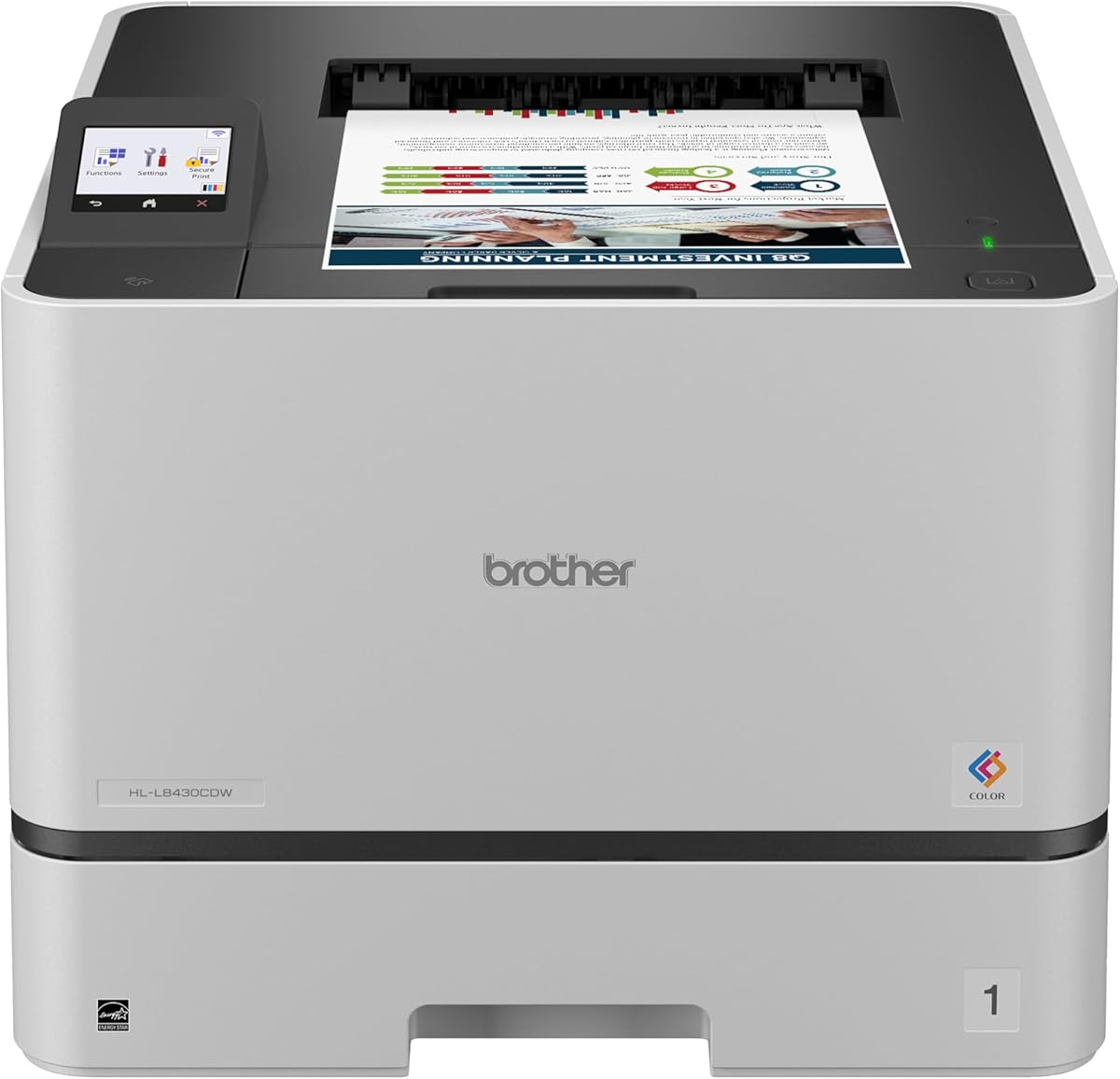
The Brother HL-L8430CDW delivers high-speed color printing with scalability options suitable for growing business environments. Its rating reflects dependable performance and robust features that support high-volume printing needs and secure document management in professional settings.
We may earn a commission when you buy through this link, at no additional cost to you.
Key strengths include speeds up to 33 PPM expandable paper capacity up to 1340 sheets and advanced security with NFC authentication. Low-cost printing options using super high yield toners help manage budgets while ensuring consistent output quality for demanding workloads.
Trade-offs involve a higher initial investment and potentially complex setup compared to simpler models. However for businesses needing speed and scalability these costs are justified by the device ability to support growth without hardware upgrades or replacements.
Ideal for businesses needing scalable high-performance printing. If you value speed capacity and security in a single unit this model provides the flexibility and reliability required for efficient and secure office workflows.
Optional trays allow capacity expansion up to 1340 sheets supporting high-volume printing without frequent paper refills or interruptions.
Triple Layer Security and NFC badge authentication ensure devices remain secure and protect sensitive documents during transit and printing.
We may earn a commission when you buy through this link, at no additional cost to you.
Selecting the right duplex color laser printer requires balancing speed, features, and security with your specific operational demands.
Print speed determines how quickly your device can output documents measured in pages per minute. Faster speeds like 26 PPM or 33 PPM are ideal for high-volume environments to prevent bottlenecks in daily operations.
Prioritize models offering at least 20 PPM for efficiency if you regularly handle urgent documents or large print runs.
Wireless connectivity including dual-band Wi-Fi and Ethernet ensures seamless integration with office networks and mobile devices. Look for support of AirPrint Mopria and cloud services for flexible printing from any location.
Choose a model with robust wireless features to allow multiple users to access the printer remotely without needing physical connections.
Standard paper trays usually hold 250 sheets but high-volume offices may benefit from expandable options. Adequate capacity reduces the frequency of refills keeping your team focused on work rather than maintenance.
Select a printer with at least a 250-sheet tray or one that supports optional trays for increased loading capacity.
Decide whether you need scanning copying and faxing alongside printing. All-in-one units consolidate these tasks saving space but may be costlier than single-function printers designed for high-speed output.
Choose a multifunction device if your workflow requires scanning and copying; otherwise a dedicated printer may offer better speed and efficiency.
Ongoing toner expenses can exceed the initial device cost. High-capacity or super high yield toners lower the cost per page significantly compared to standard cartridges.
Prioritize models compatible with high-yield toners to reduce long-term operational costs and minimize frequent replacements.
Advanced security features protect sensitive data during transmission and storage. Look for devices offering network security protocols and authentication methods like NFC card readers to prevent unauthorized access.
Choose a printer with layered security options to ensure your business documents remain private and compliant with internal policies.
A robust warranty reflects manufacturer confidence and reduces risk of unexpected repair costs. Many top models offer extended warranties ranging from 1 to 3 years providing peace of mind for critical business equipment.
Prioritize brands that offer strong customer support and clear warranty terms to ensure rapid resolution if issues arise.
Consider the available space in your office or home workspace. Compact designs save desk space without sacrificing performance making them ideal for smaller environments with limited room.
Measure your workspace carefully to ensure the printer fits comfortably while allowing enough clearance for ventilation and paper trays.
To get started connect your printer to your wireless network following the on-screen prompts and download any necessary mobile apps. Ensure all cables are secure and the device is placed in a cool dry area away from direct sunlight.
Load paper into the tray carefully ensuring the guides are adjusted to prevent jams and aligning with the paper size settings. Configure duplex printing in your software settings to automatically print double-sided and reduce paper usage.
Regular maintenance includes cleaning the interior glass and rollers with a soft dry cloth and keeping the firmware updated through the manufacturer app. Replace toner cartridges promptly when low to maintain consistent quality and avoid print defects.
A duplex color laser printer automatically prints on both sides of the paper saving money on paper and reducing waste. This feature is essential for businesses aiming for sustainable operations and professional double-sided documents.
Yes most models support wireless printing from smartphones via apps like Canon PRINT or Brother Mobile Connect. AirPrint and Mopria services allow seamless printing without installing additional drivers on your device.
Use high-capacity toner cartridges and enable duplex printing to reduce paper consumption. Choosing a printer with low cost per page options ensures long-term savings for your business operations.
Many models offer advanced security protocols and authentication methods like NFC readers to protect data. Ensure your printer has dual-band Wi-Fi and encryption features to safeguard sensitive business documents effectively.
A standard printer only prints while a multifunction printer adds scanning copying and fax capabilities. Multifunction units save space by consolidating tasks but may have slower print speeds than dedicated printers.
Clean the interior glass and rollers every few weeks to prevent dust buildup and paper jams. Regular maintenance ensures consistent print quality and extends the lifespan of the device.
Standard office paper works well but higher quality paper can enhance color vibrancy and reduce jams. Ensure paper weight is compatible with the printer specs to avoid feeding issues.
Look for a warranty covering at least one year including parts and labor. Extended warranties of three years are available on select models providing better protection against potential hardware failures.
The top picks for November 2026 include the Brother MFC-L8930CDW for its speed and security the Canon LBP646Cdw for fast single-function performance and the Brother HL-L8430CDW for scalable business needs.
Prioritize features that align with your workflow such as print speed network connectivity and toner capacity. Choosing the right balance ensures your device supports your productivity goals without unnecessary complexity or expense.
Always check current availability and features before purchasing as offerings may vary. With the right duplex color laser printer you can streamline document tasks and achieve professional results consistently.