
LinksTek X520 DA1 10GbE SFP+ Fiber Ethernet Adapter
4.3Editor score
Intel 82599ES
10GbE speed
Low profile bracket
This guide compares the top fiber optic network interface cards for speed, compatibility, and reliability to help you choose the right NIC for your network
Finding the right fiber optic network interface card is essential for modern networking demands. Whether you need high-speed data transfer or low latency for virtualization, a quality NIC ensures your server or desktop performs at its peak.
We evaluated ten top-rated products based on chipset performance, port speed, and system compatibility. Each option offers unique benefits for different environments ranging from home labs to enterprise data centers.
Every pick highlights key strengths and potential trade-offs to guide your decision. Remember that prices fluctuate frequently, so always verify current availability and costs before making your final purchase.
4.3Editor score

5.0Editor score

4.9Editor score
Compare all ten fiber optic network interface cards side by side to see which model fits your specific bandwidth and compatibility requirements.


The StarTech 2-Port GbE SFP Network Card stands out as the top choice for professionals needing reliable gigabit connectivity. With a perfect rating from users, it delivers consistent performance through its Intel I350 chipset.
We may earn a commission when you buy through this link, at no additional cost to you.
Its dual unlocked SFP slots allow you to mix copper and fiber connections easily. This flexibility is crucial for network upgrades where you might need to transition from copper to longer fiber runs.
While it is limited to 1Gbps speeds which may be slower for high data throughput environments, the stability and manageability features like VLAN tagging and Jumbo frames make up for this limitation.
This card is ideal for small to medium servers where reliability matters most. If you need a proven workhorse NIC that works across Windows and Linux, this is the model to choose.
The unlocked SFP slots work with any MSA-compliant module making it easy to adapt to existing infrastructure without vendor lock-in.
A built-in heatsink ensures the controller chip stays cool during sustained operations preventing throttling in enclosed server racks.
We may earn a commission when you buy through this link, at no additional cost to you.
The LinksTek X520 DA1 offers an entry point into 10Gbps networking at a very competitive price. It brings enterprise-class speeds to desktops and NAS devices without breaking the bank.
We may earn a commission when you buy through this link, at no additional cost to you.
Powered by the Intel 82599ES controller it provides stable connectivity for storage applications and virtualization. The PCIe x4 interface ensures enough bandwidth to handle 10GbE traffic efficiently.
Installation might require driver adjustments on Windows 11 but once set up it performs reliably. Users appreciate the included low profile bracket which fits compact cases easily.
If you want to upgrade your home lab or small business server to 10Gbps without spending hundreds of dollars this adapter is the smart budget choice.
Its design focuses on NAS and server use cases making it perfect for file servers that need faster data transfer speeds.
Beyond servers this card helps gamers and streamers by reducing latency and handling large data transfers smoothly.
We may earn a commission when you buy through this link, at no additional cost to you.
Asus brings its reputation for quality hardware to the networking space with the XG-C100F. This adapter offers blazing fast 10Gbps speeds suitable for heavy data tasks.
We may earn a commission when you buy through this link, at no additional cost to you.
The built-in aluminum heatsink keeps the card cool during high performance tasks preventing thermal issues. It also supports fiber optics which carry data over longer distances than copper.
While it is slightly more expensive than generic alternatives you get the assurance of brand support and a refined user experience. The automatic prioritization helps important streams get bandwidth first.
Choose this card if you value build quality and brand trust in your networking gear. It is a solid choice for workstations needing fast local network access.
The stylish aluminum heatsink is not just for looks it effectively dissipates heat to maintain consistent performance under load.
Built-in QoS technology automatically prioritizes gaming or critical tasks ensuring you never experience lag during important moments.
We may earn a commission when you buy through this link, at no additional cost to you.
The 10Gtek 10Gb PCI-E NIC utilizes the trusted Intel 82599EN controller to deliver stable server performance. It is designed for environments where uptime and virtualization are key.
We may earn a commission when you buy through this link, at no additional cost to you.
With support for I/O virtualization it makes servers more efficient when running multiple VMs. The single SFP+ port allows flexible cabling using modules or direct attach cables.
It comes with a three-year warranty and lifetime support which adds peace of mind for business deployments. Just note that it does not support hot swapping so plan accordingly.
For users needing a dependable Intel-based card at a reasonable price this option balances cost and performance well. It is a great fit for virtualized server environments.
The Intel controller includes features that support virtualization technologies making it easier to manage virtual machines efficiently.
A generous warranty and support team ensures you are not left stranded if issues arise during the product lifecycle.
We may earn a commission when you buy through this link, at no additional cost to you.
This Realtek-based card leverages the latest PCIe Gen4 x1 interface for modern systems. It offers impressive stability and features like exclusive RealWoW technology for diagnostics.
We may earn a commission when you buy through this link, at no additional cost to you.
The PCIe Gen4 design ensures it works seamlessly in various slot configurations from x1 to x16. This flexibility makes installation easier across different motherboard types.
Linux users should note the kernel version limit which affects compatibility with newer distributions. However for Windows users it offers a smooth plug-and-play experience with QR code driver access.
If you have a newer motherboard and need 10Gbps connectivity this card provides a cost-effective path to modern speeds. It is particularly useful for workstations requiring fast local transfer.
Support for PCIe Gen4 means you can take advantage of the latest motherboard technologies for better bandwidth availability.
Wake-on-LAN and PXE support allow you to manage and boot systems remotely which is great for IT administrators.
We may earn a commission when you buy through this link, at no additional cost to you.
This card uses genuine Intel silicon but removes vendor lock-in on the SFP+ cage. You can use third-party modules which saves money over time on replacements.
We may earn a commission when you buy through this link, at no additional cost to you.
It automatically steps down speeds to match slower switches ensuring compatibility with older hardware. This feature prevents errors when connecting to legacy network gear.
The passive heatsink does run warm so you must ensure your case has good airflow. This is a small trade-off for the flexibility of being able to mix different optics.
Ideal for Proxmox or TrueNAS users who want Intel performance without the price tag of branded cards. It balances price and flexibility well for homelab environments.
No vendor lock means you can buy third-party optical modules and keep costs low for your network infrastructure.
Auto-negotiation to lower speeds ensures your card connects successfully even if your switch only supports slower port rates.
We may earn a commission when you buy through this link, at no additional cost to you.
The CX4121A delivers enterprise-grade 25GbE speeds ideal for data centers and advanced storage servers. It uses the Mellanox ConnectX-4 Lx controller for unmatched performance.
We may earn a commission when you buy through this link, at no additional cost to you.
Support for RDMA over RoCE reduces CPU load during data transfers making it perfect for virtualization. The dual ports provide redundancy and higher aggregate bandwidth for heavy workloads.
It supports overlay networks like VXLAN which are essential for cloud and containerized environments. The price is higher but the performance gains are worth it for serious users.
This is the premium choice for those needing maximum bandwidth and low latency. If you are building a high-performance cluster or cloud node this card is essential.
RDMA support allows data to move directly between memory without CPU intervention drastically improving throughput and reducing latency.
Advanced networking features like VXLAN support make this card ready for complex software-defined network architectures.
We may earn a commission when you buy through this link, at no additional cost to you.
This card offers a complete package with a included multimode optical module ready for immediate setup. It uses the proven 82599EN controller for reliable performance.
We may earn a commission when you buy through this link, at no additional cost to you.
Gold-plated fingers ensure reliable connections and reduce oxidation which extends the card's service life. The TCP offloading features free up CPU resources for your other applications.
Since it comes with the module you save money on buying it separately. However the lack of ratings means you are relying on the chipset reputation rather than user feedback.
For users needing a ready-to-go solution this card is a practical value choice. It is suitable for small businesses needing quick 10GbE upgrades without hunting for extra parts.
With an included optical module you can start upgrading your network immediately without waiting for extra parts to arrive.
Offloading checksum and segmentation tasks to the card keeps your CPU free for running applications and virtual machines.
We may earn a commission when you buy through this link, at no additional cost to you.
The TP-Link TX401 brings 10GbE speeds over standard copper cabling. It uses 10GBASE-T technology which makes it compatible with existing network ports.
We may earn a commission when you buy through this link, at no additional cost to you.
Backwards compatibility ensures it works with slower devices on your network without configuration. The included CAT6A cable is rated for 10Gbps so you are ready out of the box.
Although it is not a fiber card it serves as a convenient alternative for users who do not have fiber runs installed. It is great for desktops connecting to 10G switches.
Choose this if you want the easiest path to 10Gbps without buying optics. It balances ease of use with performance for standard desktop and workstation upgrades.
Using standard RJ45 ports means you do not need special fiber cables making installation much simpler for most users.
A 1.5-meter CAT6A cable is included so you can test and use the card immediately without buying extra accessories.
We may earn a commission when you buy through this link, at no additional cost to you.
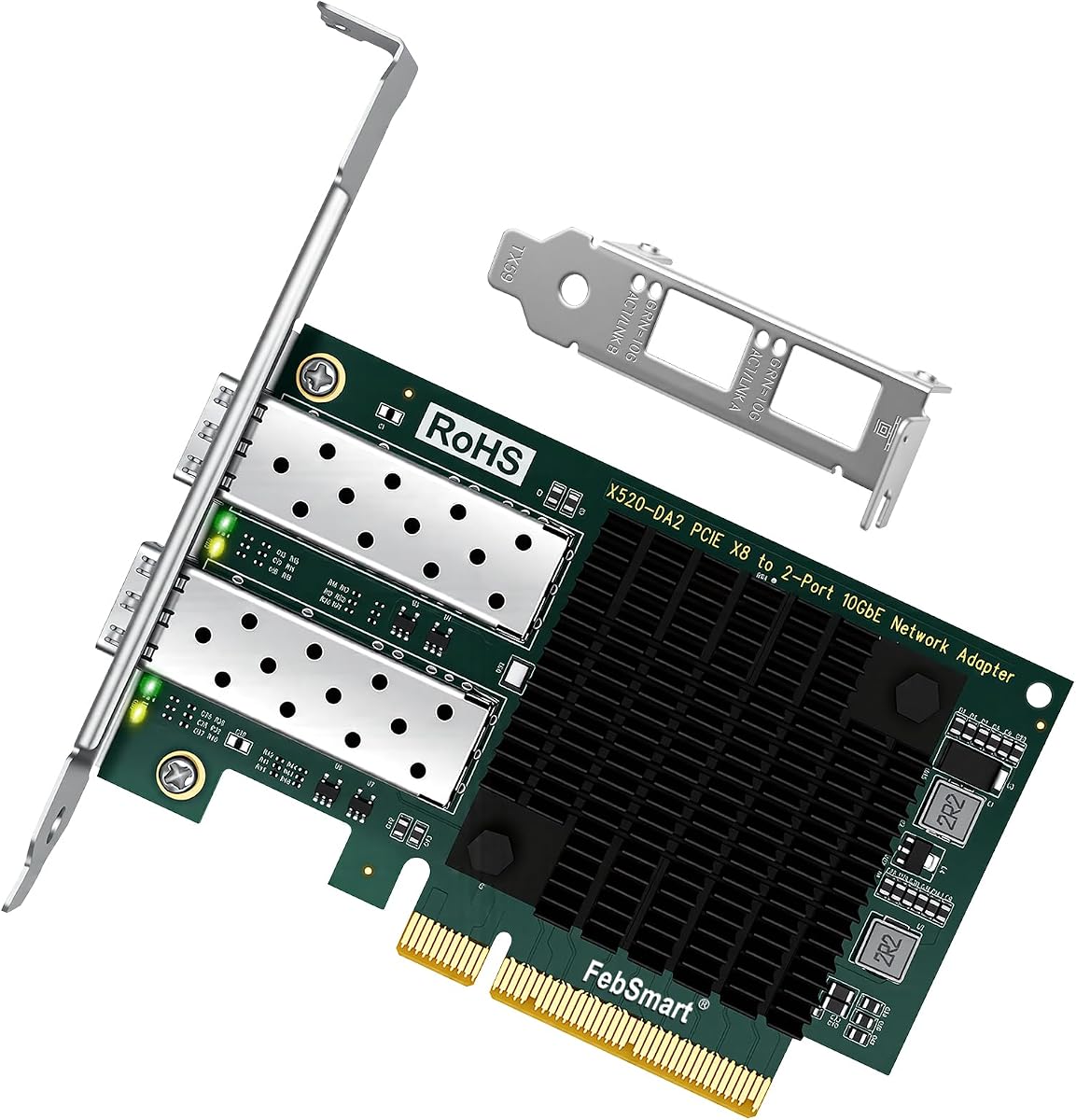
This card offers dual 10GbE SFP+ ports allowing for link aggregation or failover configurations. It is powered by a dual Intel 82599ES controller for robust performance.
We may earn a commission when you buy through this link, at no additional cost to you.
The PCIe x8 interface ensures you get the full bandwidth needed for both ports to run at full speed simultaneously. This is essential for high-throughput storage or virtualization tasks.
You can combine the two ports to get up to 20Gbps aggregated speed which improves file server performance. The broad OS support ensures it works in most server environments.
Ideal for advanced users needing redundancy or higher aggregate throughput. It is a strong choice for homelab enthusiasts building a high-performance storage server.
Combining the two ports allows you to increase total bandwidth and create a redundant network connection for better reliability.
The PCIe x8 interface provides the necessary lanes to support two simultaneous 10Gbps connections without bottlenecking.
We may earn a commission when you buy through this link, at no additional cost to you.
Choosing the right fiber optic network interface card requires evaluating speed, compatibility, and features to match your infrastructure.
Determine if you need 1Gbps or 10/25Gbps speeds based on your network switch and storage needs.
Higher speeds offer better performance but cost more and require compatible infrastructure.
Check your case size to decide between full-height or low-profile brackets.
Low-profile brackets are essential for small form factor servers and mini towers.
SFP+ supports optical and direct attach cables while X520-DA supports fiber and copper modules.
Choose a connector type that matches your existing cables and transceivers.
Ensure the NIC has drivers for your server or desktop operating system.
Some cards work plug-and-play on Linux or Windows Server while others require manual installation.
Look for SR-IOV and VMDq support if you run virtual machines.
These features offload network processing to the NIC to reduce CPU overhead.
Higher performance cards generate more heat and may need case airflow.
Ensure your chassis has enough cooling to keep the card within safe temperature ranges.
Verify if the card locks vendor transceivers or allows third-party modules.
Vendor unlocked cards save money by allowing cheaper compatible optics from other brands.
Compare prices and warranty terms to get the best value for your budget.
A longer warranty and good support can protect your investment over the long term.
Install the card in a free PCIe slot on your motherboard securing it with screws and connecting any cables.
Install the appropriate drivers from the manufacturer or use the OS included drivers if supported.
Keep the card clean from dust and ensure proper airflow to prevent overheating during heavy use.
SFP supports speeds up to 1Gbps while SFP+ supports up to 10Gbps. You cannot use SFP+ optics in SFP slots and vice versa but they share the same physical connector shape.
Yes you need either fiber cables with transceivers or Direct Attach Copper (DAC) cables. Fiber cables transmit light and can go longer distances while DAC cables are copper but shorter.
You need a switch with an SFP or SFP+ port to connect a fiber optic card. Standard RJ45 ports will not accept fiber optics unless you use media converters.
Most fiber optic NICs are designed for Windows Linux or servers. macOS compatibility is limited so check specific driver support before purchasing for a Mac.
Fiber offers immunity to interference and longer reach which is better for server racks. Copper is cheaper but susceptible to electromagnetic interference over long runs.
Some cards are plug-and-play on Linux but others require installing the IXGBE driver. Check the compatibility list to see if your OS is supported.
If the optics do not match the NICs speed or type the card will not connect. Always verify module compatibility and ensure it matches the port specifications.
Yes they reduce latency for competitive gaming but you need a 10Gbps internet connection or local server to see benefits. For regular internet copper is usually enough.
These ten fiber optic network interface cards cover a wide range of needs from budget-friendly 10Gbps adapters to high-performance 25Gbps server solutions.
Prioritize compatibility with your OS and switch while balancing speed against cost to find the right fit for your setup.
Check current prices and availability as they can change frequently before finalizing your purchase online.