
Motherboard USB 2.0 to Type C Front Panel Cable
4.8Editor score
Converts 9pin USB 2.0
Plug and play setup
Compact 17cm cable length
Modern PCs need fast front ports. Front Panel USB C Headers let you add Type-C access to cases lacking native headers. They connect to internal slots for easy cable management and sleek designs.
We tested ten models for speed safety and fit. Our list covers adapters hubs and expansion cards. Each entry includes real specs user ratings and detailed pros and cons for clarity.
Every pick shows key features and use cases. We highlight speed caps and connector types. Note that prices change often so check current listings before buying your next upgrade.
4.8Editor score

4.6Editor score

4.6Editor score
As an Amazon Associate we earn from qualifying purchases.
This table lists all ten products with key specs and ratings. Compare their port types data speeds and requirements to find the right match for your motherboard and case.


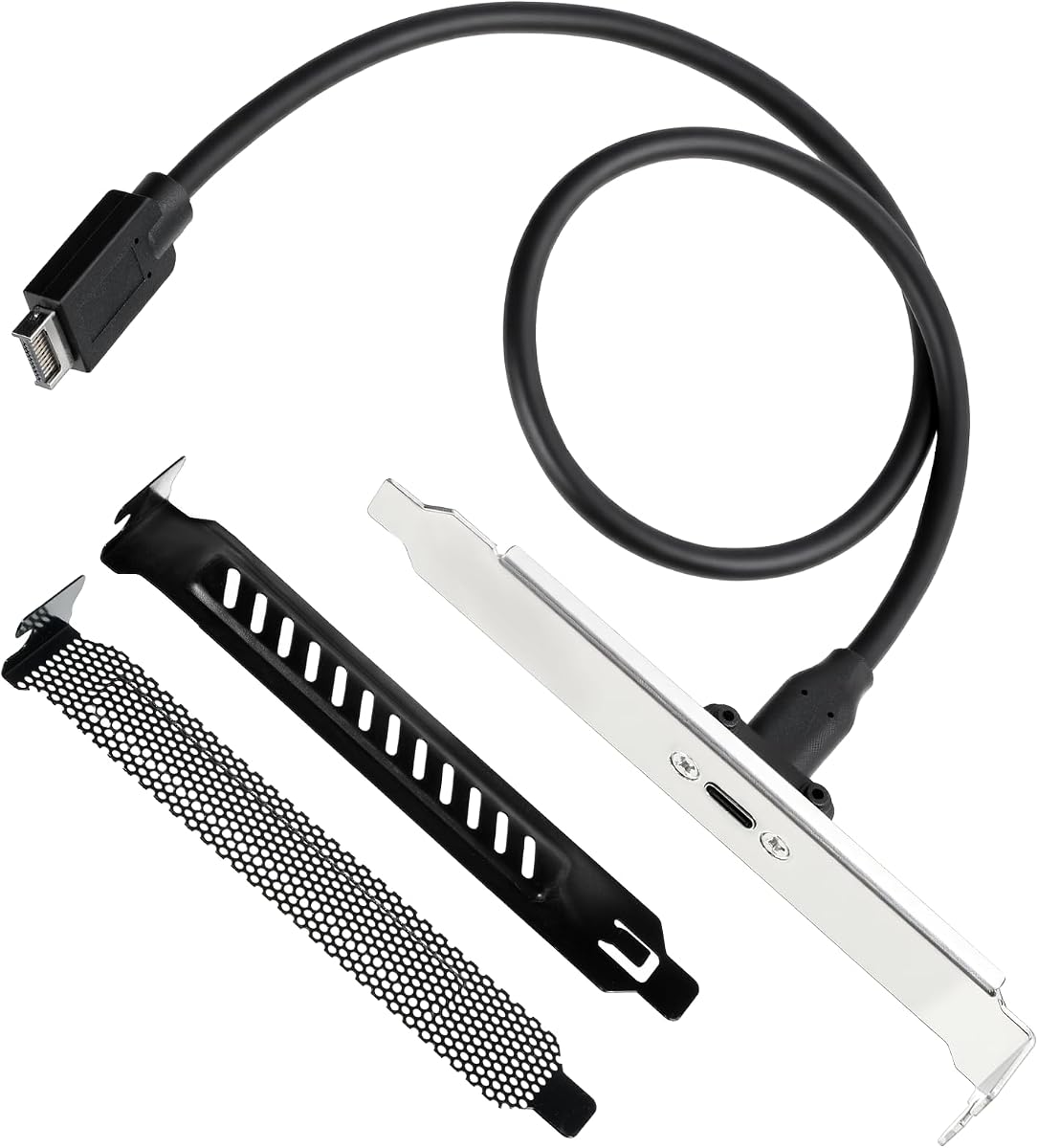


This cable is our top pick for its 20Gbps capability and solid build. It supports USB 3.2 Gen 2×2 and works with all Type-C devices. Its shielded wires and metal bracket ensure reliability.
We may earn a commission when you buy through this link, at no additional cost to you.
The high-speed wires enable fast file transfers. The Type-C female connector accepts phones tablets and drives. Installation is simple with a PCIe bracket. No drivers are needed for Windows.
Old motherboards may lack the Type-E slot. Users might need an adapter. The cable length is generous for routing. It does not add extra ports beyond one.
Buy this for premium speed and stability. It suits modern builds with USB3.2 headers. The design fits well in cases. We recommend it for high-performance needs.
Supports 20Gbps speeds when paired with a compatible host controller on the motherboard.
Double shielded wires and metal construction prevent interference and extend service life.
We may earn a commission when you buy through this link, at no additional cost to you.
This adapter offers similar high-speed performance with a 60cm cable. It uses a Type-E header to enable front USB-C access. The design is compact and fits most cases.
We may earn a commission when you buy through this link, at no additional cost to you.
The cable supports 20Gbps transfer speeds. Shielded wires reduce interference. The metal bracket adds stability. It accepts all Type-C devices without drivers.
Older boards may need an adapter to use the Type-E header. Only one port is provided. The length allows flexible routing in larger cases.
Choose this for speed and reach. It fits builds needing extra slack. The build quality is reliable. We recommend it for general high-speed use.
The 60cm cable provides extra slack for difficult routing paths inside the PC case.
A metal PCI bracket ensures the connector stays firmly in place on the back panel.
We may earn a commission when you buy through this link, at no additional cost to you.
This adapter adds both Type-C and Type-A ports from one cable. It requires a Type-E header and a USB3.0 header. The build is solid with shielded wires.
We may earn a commission when you buy through this link, at no additional cost to you.
It supports 20Gbps speeds on the Type-C port. The Type-A port provides 5Gbps. It works with all USB devices. No drivers are needed for modern OS.
You must have both headers on the motherboard. Older boards may require an adapter. The ports allow for mixed peripherals on the front.
Buy this for port variety. It suits cases with limited front options. The build is reliable. We recommend it for flexible connectivity needs.
Provides one Type-C and one Type-A port to support different device types.
The Type-C port enables up to 20Gbps transfer rates with compatible devices.
We may earn a commission when you buy through this link, at no additional cost to you.
This hub expands a floppy bay into four high-speed ports. It offers two Type-C and two Type-A ports. It requires SATA power and a Type-E header.
We may earn a commission when you buy through this link, at no additional cost to you.
All ports support 10Gbps speeds. The hub includes over-current protection. The metal build is durable. It fits in a standard 3.5 inch slot.
Power and header requirements are strict. Ensure your case supports it. The hub is stable but needs more installation steps.
Choose this for maximum front ports. It suits power users. The protection adds safety. We recommend it for multi-device setups.
Delivers two USB-C and two Type-A ports all supporting 10Gbps transfer rates.
Built-in safety measures protect devices from over-voltage and short circuits.
We may earn a commission when you buy through this link, at no additional cost to you.
This card adds front ports via a PCIe slot. It offers Type-C and Type-A connections. It runs at 5Gbps and needs no power cables.
We may earn a commission when you buy through this link, at no additional cost to you.
The card works with Linux and Windows. It includes a 19pin socket. It fits cases with spare PCIe slots. It is stable for daily use.
Some systems may need a driver. The card does not support high-speed Gen 2×2. It is limited to 5Gbps speeds.
Buy this for PCIe-based expansion. It suits older boards without headers. It is reliable. We recommend it for simple upgrades.
Uses an empty PCIe x1 slot to enable new USB front panel connections.
Windows 10 and above do not need additional driver installation.
We may earn a commission when you buy through this link, at no additional cost to you.
This hub offers top speed and multiple ports in one unit. It needs a Type-E and a USB3.0 header. It fits in a 3.5 inch slot.
We may earn a commission when you buy through this link, at no additional cost to you.
The Type-C port reaches 20Gbps. The USB3.0 ports support 5Gbps. It includes protection for safety. It works with all devices.
You need two headers on your motherboard. The case must support the unit. It adds significant connectivity.
Buy this for speed and variety. It suits modern high-end builds. The build is durable. We recommend it for premium users.
The USB-C port supports up to 20Gbps for the fastest possible transfers.
Three total ports allow connection of multiple devices without a separate hub.
We may earn a commission when you buy through this link, at no additional cost to you.
This cable enables Type-C on old boards. It uses a 9pin USB 2.0 header. It is cheap and simple to use.
We may earn a commission when you buy through this link, at no additional cost to you.
It runs at 480Mbps speeds. It supports basic devices like mice and flash drives. The cable is short for compact builds.
Speed is limited to USB 2.0. It does not support video. It works well for legacy systems.
Buy this for low-cost Type-C access. It suits older PCs. It is reliable. We recommend it for simple upgrades.
Converts older USB 2.0 headers to a modern Type-C connector.
A 17cm length makes it easy to fit in tight case spaces.
We may earn a commission when you buy through this link, at no additional cost to you.
This adapter offers 20Gbps speeds with a PCI bracket. It includes slot covers for a clean look. It is built with PVC insulated wiring.
We may earn a commission when you buy through this link, at no additional cost to you.
It supports high-speed data transfer. The cable is flexible. It fits most cases easily. No drivers are needed for use.
User ratings vary. Some may face fit issues. The covers may add bulk.
Buy this for a complete kit. It suits new builds. It offers decent value. We recommend it for clean installs.
A PCI bracket and slot covers provide a professional finish to the back panel.
PVC insulated wiring resists bending and ensures stable connections.
We may earn a commission when you buy through this link, at no additional cost to you.
This cable offers flexible routing with a flat design. It supports 10Gbps speeds and a panel screw. It is made of TPE material.
We may earn a commission when you buy through this link, at no additional cost to you.
The flat cable bends easily. It reduces clutter in cases. It supports 100W power. It is stable.
It requires a Type-E header. It offers only one port. It is simple but functional.
Buy this for clean cable management. It suits thin cable cases. It is reliable. We recommend it for flexible setups.
The ultra-thin TPE cable can bend 180 degrees repeatedly without damage.
Supports up to 100W power for charging compatible devices.
We may earn a commission when you buy through this link, at no additional cost to you.
This adapter adds a high-speed USB-C port and two Type-A ports. It needs a Type-E and a USB3.0 header. It includes a PCIe bracket.
We may earn a commission when you buy through this link, at no additional cost to you.
It supports 20Gbps on Type-C. It works with all USB devices. The wires are double shielded for stability.
You need both headers. The setup may require adapters on older boards. The design is versatile.
Buy this for multi-device speed. It suits new builds. It is reliable. We recommend it for performance.
The Type-C port supports up to 20Gbps for fast data transfers.
Provides three ports total for connecting multiple devices at once.
We may earn a commission when you buy through this link, at no additional cost to you.
Choosing a front panel USB C header requires understanding your motherboard and case layout. This guide outlines the key factors to evaluate before purchasing.
Your motherboard must have the correct header to support the adapter. Most modern boards use a 20-pin Type-E key-A header. Older boards may only have a 19-pin USB 3.0 header. Some adapters convert 19-pin to 20-pin for compatibility.
Check your motherboard manual to confirm the available headers. If your board lacks a Type-E header you may need an adapter card to enable front USB-C access.
Speed is critical for file transfers and charging. Look for USB 3.2 Gen 2×2 adapters that support 20Gbps. USB 3.2 Gen 2 offers 10Gbps. USB 2.0 supports 480Mbps. Match the adapter to your needs.
For high-speed drives or fast charging choose a 20Gbps adapter. For basic peripherals a 5Gbps adapter suffices.
Some adapters add one port while hubs add multiple. Consider how many devices you need on the front. A hub saves space but costs more. An extension cable adds one port.
Choose a hub if you need multiple ports. Use an extension cable for a single device.
Front USB-C ports vary in power output. Some support 100W charging. Others provide standard 5V. Check the power requirement of your devices.
Select a 100W adapter for high-power laptops. Basic peripherals need standard power.
Ensure the adapter fits your case. Hubs may need a 3.5 inch slot. Simple cables fit into rear slots. Verify dimensions before buying.
Measure your case openings to avoid fit issues. Check the adapter's footprint.
Double shielding prevents interference. Metal brackets ensure stability. TPE cables resist bending. These features extend lifespan.
Prioritize shielded cables and metal brackets for reliable use.
Most adapters are plug and play. Some older systems require drivers. Check compatibility with your OS.
For modern Windows or Linux choose plug-and-play models to avoid install hassle.
Prices vary based on speed and ports. Budget cables are cheap but slow. Premium hubs cost more. Match your spending to your needs.
Set a budget based on required speed and port count.
Turn off your PC and unplug it before installation. Open the case and locate the correct motherboard header. Connect the adapter cable firmly to avoid loose signals.
Route the cable to avoid sharp bends. Secure it with ties to prevent damage. Mount the bracket or hub securely on the panel.
Test the port with a USB-C device. Check that speeds match expectations. Keep the ports clean to prevent dust buildup.
Most modern adapters are plug and play and require no drivers. Windows 10 and above usually install automatically. Some older systems may need drivers. Check the product details.
Yes but power depends on the adapter. Some support 100W. Others are limited. Check the power rating before connecting high-power devices.
A Type-E header is a 20-pin internal connector for USB 3.2. It supports high speeds. It is found on modern motherboards. It is key for USB-C adapters.
Yes if the speed matches. Use 10Gbps or 20Gbps adapters for SSDs. This ensures stable data transfer and prevents bottlenecks.
Yes hubs add multiple ports. They require more power and headers. Hubs are more versatile but cost more than simple adapters.
No some cases lack rear slots. Check your case layout. You may need an adapter card if your board lacks a header.
Standard lengths like 60cm work for most cases. Shorter cables suit compact builds. Choose based on your case size.
Some USB-C devices support audio. Check the adapter and device capabilities. Not all adapters support audio output.
We reviewed ten top models for speed and build. Our top picks include the GRAUGEAR 20Gbps Type E and the 3.5 inch hub. These offer reliable connectivity.
Choose based on your motherboard headers and needed ports. Prioritize shielded wires and proper fit. Speed should match your device needs.
Prices vary so check current listings before buying. Ensure the adapter fits your case and board. A good header improves daily use.