
10.1" Digital Calendar Smart Touchscreen
4.2Editor score
Full HD smart display
No subscription required
Wall or desk mount
Finding the right digital chore chart can transform how your family manages daily tasks and schedules. These smart devices combine calendars, task trackers, and photo frames into one sleek display. They help reduce clutter and keep everyone informed about upcoming events and responsibilities without relying on paper planners.
We evaluated ten leading models based on screen quality, ease of setup, and synchronization features. Our analysis focuses on how well each device integrates with existing calendars and supports interactive chore tracking. We also considered design flexibility and whether they require ongoing subscriptions for full functionality.
Each pick in this list highlights specific strengths like budget-friendly options or premium features. You will find details on what makes each chart stand out for different family sizes. Please note that prices and availability can change frequently so check current listings before purchasing.
4.2Editor score

4.4Editor score

4.4Editor score
As an Amazon Associate we earn from qualifying purchases.
The following table provides a side-by-side overview of all ten digital chore charts reviewed in this guide. It highlights key specifications such as screen size, sync options, and unique features to help you quickly identify the model that best fits your family organization needs and budget constraints.
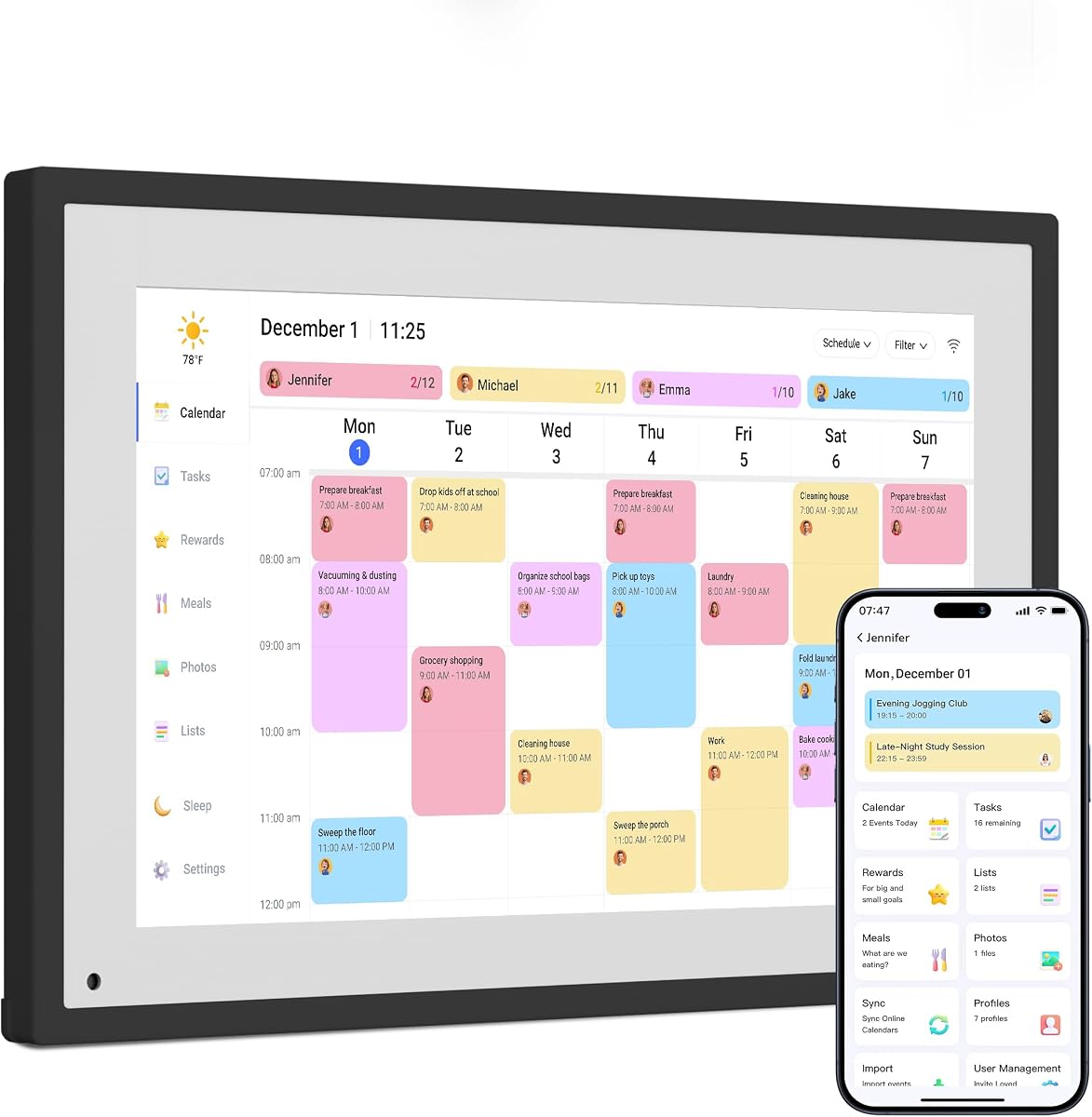





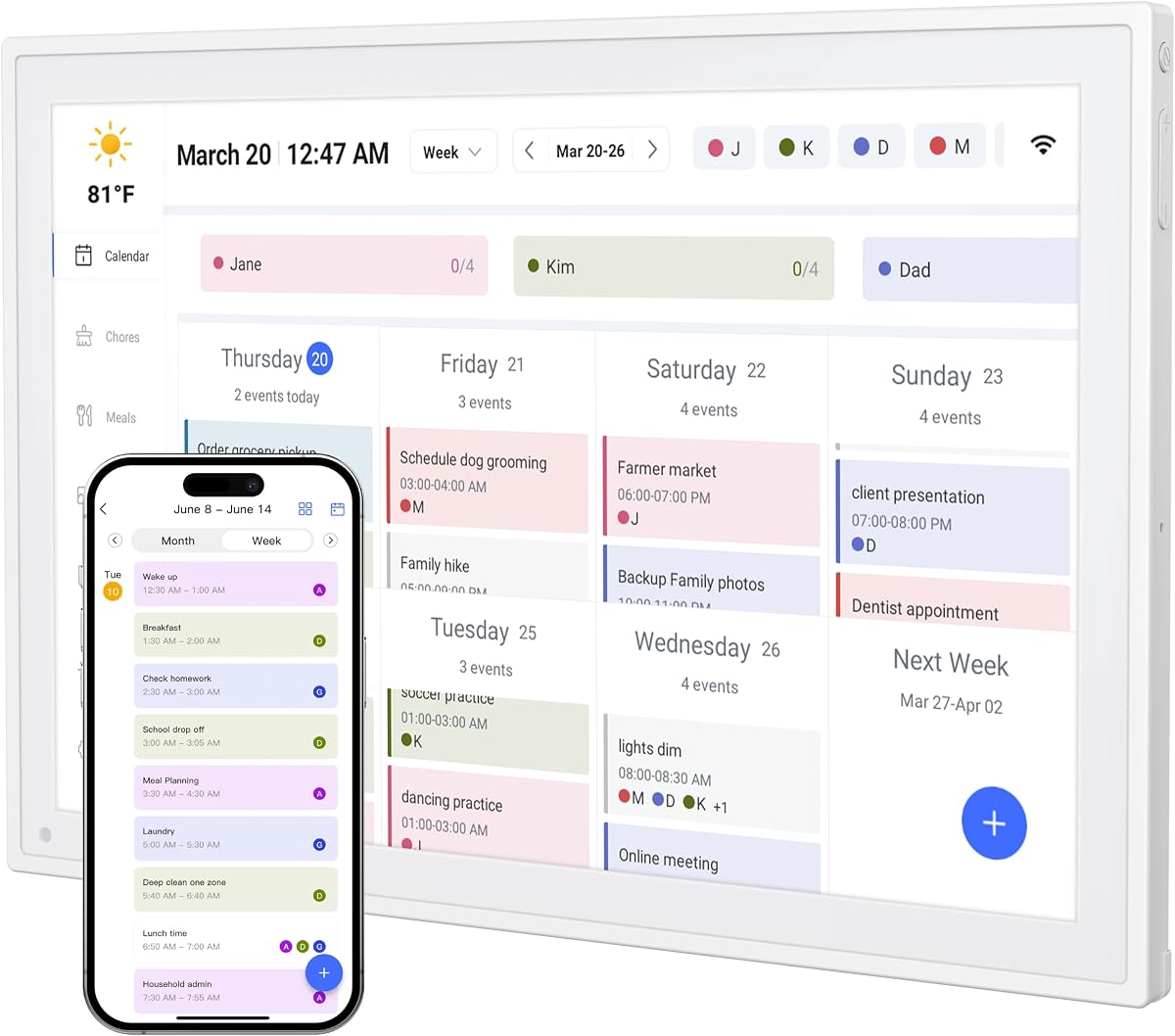
This model stands out as a comprehensive command center for busy households. It combines a large 15.6 inch touchscreen with robust syncing capabilities and a built-in chore system. Users appreciate the lack of monthly fees while still accessing advanced features like AI photo enhancement.
We may earn a commission when you buy through this link, at no additional cost to you.
The display quality is excellent for reading schedules from a distance. It supports real-time synchronization with major calendar services allowing family members to update plans simultaneously. The reward system helps motivate children to complete tasks consistently without constant parental reminders.
While the price is higher than basic models the value is justified by the feature set. Some users note it requires a dedicated power source which limits placement options compared to battery alternatives. The included mounting hardware ensures secure installation on most wall surfaces.
This is an ideal choice for families needing a central hub for all household organization. It balances functionality with aesthetic appeal making it suitable for common areas like kitchens or hallways. The investment pays off through improved coordination and reduced paper clutter.
The large screen allows multiple family members to view and edit schedules simultaneously without confusion.
Interactive reward points turn mundane chores into engaging activities that children enjoy completing regularly.
We may earn a commission when you buy through this link, at no additional cost to you.
This device offers an efficient entry point into digital family planning. It merges a calendar and picture frame into a single 10.1 inch display that fits well on most counters. The interface is intuitive making setup quick even for those less tech-savvy.
We may earn a commission when you buy through this link, at no additional cost to you.
Users can assign colors and tasks to each family member for clear visual organization. The device transitions to photo mode when not actively in use adding warmth to the room. It supports essential syncing to keep schedules updated across devices.
The limitation of no wall mounting may be a drawback for those wanting a central wall display. However the desk-friendly design works well for kitchens or desks. Performance is reliable for core tasks without unnecessary complexity.
This is a solid choice for families wanting to try digital organization without a large investment. It provides the essential tools needed to track chores and appointments effectively. The combination of utility and decor makes it a practical addition to any home.
Affordable pricing makes digital planning accessible for families who previously relied on paper calendars and charts.
Color coding tasks ensures everyone knows their responsibilities at a glance without verbal reminders needed.
We may earn a commission when you buy through this link, at no additional cost to you.
This model focuses on simplicity and ease of use for daily household management. The touchscreen interface is responsive allowing quick updates to chores and events. It includes a dedicated feature for planning meals which helps reduce daily decision fatigue.
We may earn a commission when you buy through this link, at no additional cost to you.
Setup is straightforward with auto-sync capabilities that integrate existing calendars effortlessly. Users can manage schedules remotely via an app ensuring everyone stays updated even when away from home. The design is elegant enough to serve as a decorative piece.
While it lacks some advanced customization options it covers the basics very well. Some users may prefer wall mounting which is not available on this model. The price point remains competitive for the features provided.
It is an excellent gift for parents looking to streamline their home organization. The balance of functionality and style makes it suitable for various occasions. Families will appreciate the time saved by having a clear digital overview of their week.
Built-in dinner planning tools help families organize weekly meals and reduce daily stress effectively.
Management app allows parents to update schedules and chores from anywhere without physical access.
We may earn a commission when you buy through this link, at no additional cost to you.
This digital calendar fits well in tighter spaces while maintaining essential organizational tools. It supports syncing with various platforms ensuring data is consistent across all devices. The integrated meal planner and to-do list offer a holistic approach to daily planning.
We may earn a commission when you buy through this link, at no additional cost to you.
The design is sleek and modern blending well with contemporary home decor. Touchscreen responsiveness is good for quick edits and checks. Users appreciate the all-in-one nature that reduces the need for multiple separate planners or notebooks.
The smaller screen size might be a limitation for those with visual impairments or large families. Setup can require some patience to ensure all sync connections are correctly configured. Once configured however performance is stable and efficient.
Ideal for those wanting a dedicated digital planner without taking up too much counter space. It provides the necessary features to manage a busy schedule efficiently. The focus on practical tools makes it a strong contender for active households.
Combining meal and task planning with the calendar simplifies daily organization significantly.
Compact design ensures the device fits on crowded counters or desks without cluttering the workspace.
We may earn a commission when you buy through this link, at no additional cost to you.
This device offers a premium experience for families seeking high-end features and design. The large 15.4 inch screen provides excellent visibility and ease of use. It stands out with unique options like Disney Mode which adds fun animations for kids.
We may earn a commission when you buy through this link, at no additional cost to you.
Syncing is smooth with all major services keeping family schedules perfectly aligned. The device is customizable to fit different home styles and layouts. Users enjoy the clean interface and responsive touch controls that make interaction effortless.
The Plus subscription unlocks additional features which might be a consideration for budget-conscious buyers. However core functionality remains strong without any extra fees. Build quality is solid ensuring the device looks good and performs well over time.
It is an excellent choice for households that value both style and advanced functionality. The Disney Mode creates a playful environment encouraging children to engage with chores. This makes it a top pick for families prioritizing engagement and aesthetics.
Disney Mode animations make checking chores and schedules an enjoyable experience for children.
Customizable layouts allow users to adapt the display to their specific household routines and preferences.
We may earn a commission when you buy through this link, at no additional cost to you.
This model emphasizes freedom from ongoing costs while delivering essential family management tools. All features are unlocked from the start including syncing and meal planning. Users appreciate the transparency and ease of use without hidden traps.
We may earn a commission when you buy through this link, at no additional cost to you.
The visual weekly meal manager is particularly helpful for organizing groceries and dinners. Smart sleep features conserve energy while keeping the device ready when needed. Setup is straightforward once connected to Wi-Fi ensuring quick deployment.
Some users might find the initial setup requires more steps than simpler devices. The price is competitive for the feature set but not the lowest on the market. Overall value remains high for those avoiding subscription models.
Ideal for families who want full functionality without recurring monthly charges. The thoughtful design makes it a great gift for moms managing busy households. It simplifies routines effectively without financial commitment beyond the initial purchase.
All features are accessible without any monthly fees providing long-term savings for families.
Smart sleep modes ensure the device runs efficiently without wasting power when not in use.
We may earn a commission when you buy through this link, at no additional cost to you.
This device stands out for its substantial storage capacity which supports extensive media collections. The 1080P display ensures crisp visuals for both calendars and photos. It includes robust app integration for managing schedules remotely.
We may earn a commission when you buy through this link, at no additional cost to you.
Wall mounting capabilities allow for central placement in common areas like hallways. The auto-rotation feature adjusts the screen orientation based on how it is installed. This flexibility ensures readability regardless of whether it is mounted or placed on a stand.
Setup may require more time to configure the mount and sync settings properly. Users relying heavily on the app might find occasional connectivity delays. However hardware performance is solid and supports high definition content well.
Best suited for households with large photo libraries needing a central display. The wall mount option keeps counters clear and maximizes space efficiency. It combines technical robustness with practical family tools effectively.
64GB storage allows thousands of photos and videos to be displayed without cloud reliance.
Wall mounting capability ensures the device fits well in larger homes with multiple viewing areas.
We may earn a commission when you buy through this link, at no additional cost to you.
This model focuses on delivering core functionality with minimal complexity. Setup involves simple plug and play steps making it accessible to everyone. Users value the instant sync speed which keeps schedules updated without delay.
We may earn a commission when you buy through this link, at no additional cost to you.
Integrated weather updates provide valuable context for daily planning and events. The reward system encourages kids to complete tasks without needing complex setup. It is a versatile tool that supports both desk and wall placement options.
While photo editing features are basic they suffice for casual display of family memories. Users looking for deep automation may find limitations in feature depth. However for essential organization it performs reliably.
Ideal for families seeking a no-fuss solution for daily management. The balance of simplicity and utility makes it a great option for busy households. It helps reduce mental load by centralizing key household information clearly.
Instant sync capabilities ensure schedules are updated immediately across all connected family devices.
Included weather updates help families plan outdoor activities and routines effectively throughout the day.
We may earn a commission when you buy through this link, at no additional cost to you.
This device is designed for flexibility and subtle alerting methods. It features silent vibration alerts ensuring reminders are felt without noise disruption. This makes it ideal for quiet environments like offices or bedrooms.
We may earn a commission when you buy through this link, at no additional cost to you.
The recipe keeper feature helps manage meal planning effectively. Users can save favorite recipes and ingredients directly on the device. Display options include both portrait and landscape modes adapting to desk layouts easily.
Wall mounting is not supported limiting placement to desk or shelf use. Syncing is reliable but basic compared to some advanced models. Overall it serves well for personal or small family needs.
Best suited for individuals or small families needing quiet reminders. The multi-angle display ensures optimal viewing from any chair angle. It combines essential tools with unique alert features that stand out in this category.
Vibration alerts provide timely reminders without disturbing others in the shared space.
Integrated recipe keeping helps streamline grocery shopping and meal prep efficiency.
We may earn a commission when you buy through this link, at no additional cost to you.
This model offers an accessible entry into digital family organization. It is affordable without sacrificing key features like syncing and photo display. Users enjoy the ultra-thin design that adds minimal visual clutter to any surface.
We may earn a commission when you buy through this link, at no additional cost to you.
Photo frame functionality allows the device to serve as decor when not tracking schedules. The lack of subscription fees is a strong selling point for long-term use. It supports both desk and wall mounting for flexibility.
The interface is basic but functional for standard household needs. Some customization is limited compared to premium alternatives. However for budget-conscious buyers it delivers solid performance and utility.
Ideal for those seeking an affordable gift that solves real organization problems. The multi-mount options ensure it fits various home layouts. It provides essential tracking tools in a sleek and practical package.
Low cost entry makes digital organization accessible without financial barriers for most households.
Ultra-thin design blends into modern decor seamlessly while offering powerful planning functionality.
We may earn a commission when you buy through this link, at no additional cost to you.
Choosing the right digital chore chart involves evaluating several key factors to ensure it meets your family's specific organizational needs. From screen size to subscription requirements, each detail impacts daily usability and long-term satisfaction.
The size of the screen determines how easily family members can read tasks and schedules from a distance. Larger screens like 15.6 inches are ideal for central wall mounts in common areas. Smaller screens around 10.1 inches are better for desks or crowded kitchen counters where space is limited.
Prioritize a screen size that fits your intended installation spot without obstructing workflow or walkways.
Ensure the device supports syncing with your existing calendar services such as Google, iCloud, or Outlook. Real-time updates prevent double bookings and ensure everyone sees the latest changes immediately. Some models require a separate app for syncing which adds a step to the setup.
Check compatibility with your current ecosystem to avoid data silos and manual entry.
Many digital calendars offer free basic features but require a subscription for advanced tools like photo cloud storage or premium apps. Look for models that provide full functionality without ongoing monthly fees. This ensures long-term cost savings and consistent access to all features.
Verify that core features like chore tracking and meal planning are included without extra charges.
Consider whether the device supports wall mounting or desk placement. Wall mounts allow for a central command center but require installation tools. Desk stands offer flexibility to move the device as needed but may take up counter space.
Choose a mounting option that aligns with your home layout and installation preferences.
Interactive features like star rewards and gamified task tracking motivate children to complete chores. Look for devices that allow customization of points and rewards. Systems that include visual progress bars help build habits through positive reinforcement.
Select a system that matches your child's age and motivation style to ensure engagement.
Built-in storage allows you to display local photos without relying on cloud services. High storage capacity like 32GB or 64GB ensures thousands of photos can be stored. Check if the device supports high definition photos and videos for clear display.
Prioritize storage capacity and media compatibility if photo display is a key function.
Devices with dedicated meal planners help organize weekly menus and grocery lists. Look for features that allow recipe saving or grocery list generation. These tools reduce daily decision stress and streamline household routines effectively.
Ensure the meal planning features integrate well with your existing habits and kitchen setup.
Invest in models with durable construction and reliable customer support. Check warranty terms and available assistance channels. High-quality screens resist glare and ensure readability under various lighting conditions.
Read user reviews regarding longevity to ensure your investment lasts for years.
Begin by plugging the device into a power outlet and connecting it to your home Wi-Fi network. Follow the on-screen prompts to set up your profile and link your calendar accounts. Once connected, add family members and assign colors to differentiate tasks and schedules.
For daily use, encourage family members to check the device each morning to review tasks and events. Use the reward system to track progress and acknowledge completed chores. Update meal plans and grocery lists weekly to keep routines organized.
Maintain the device by cleaning the screen with a soft dry cloth to avoid scratches. Avoid exposing it to direct sunlight which may affect screen visibility or durability. Regularly update the device software through the settings menu to ensure smooth performance and new feature access.
Many modern digital chore charts offer full functionality without any monthly subscription. Some premium models may have optional paid plans for advanced features but basic syncing and task tracking are usually included for free. Always verify subscription details before purchasing.
Yes most devices support real-time syncing allowing multiple family members to edit schedules simultaneously. This ensures everyone sees the most current information without delays. Conflicts are managed through automatic updates across all connected devices.
Check if the model includes wall mounting hardware. Most devices come with brackets and screws for standard walls. Follow the included instructions to secure the mount and attach the device safely. Some models may require professional installation.
Most devices will continue to show cached schedules and tasks even without internet. However syncing with external calendars will pause until the connection is restored. A wired Ethernet adapter is sometimes available for more stable connectivity.
While many devices are compatible with iOS and Android apps, the standalone unit works independently. You can link calendars via the web or app on your phone but the screen operates as a dedicated hub. Check compatibility details for app integration.
Photo storage is managed via the built-in interface or companion app. You can upload photos from your phone or computer directly to the device. Most models allow local storage management and cloud syncing options for backup.
Larger screens and robust syncing features are better suited for large families. They can display many tasks and calendars clearly without clutter. Ensure the device supports multiple user profiles to manage complex schedules effectively.
With regular maintenance and stable power, these devices typically last several years. Screen longevity depends on usage and brightness settings. Software updates often extend functionality and keep the device relevant for a long time.
This guide highlights ten top digital chore charts ranging from budget-friendly options to premium command centers. Each model offers unique strengths such as large screens, no subscription fees, or specialized features like Disney Mode.
Consider your household's specific needs including screen size, syncing capabilities, and mounting preferences before choosing. Prioritize devices that offer full functionality without hidden costs for long-term value and satisfaction.
Prices and availability for these digital tools change frequently. Check current listings on Amazon to confirm details and take advantage of any current deals before making your purchase decision.