
Adesso Easy Touch 630Ub
4.2Editor score
IP67 Waterproof Rating
Large Durable Keys
Plug-and-Play USB Connectivity
Selecting the right keyboard for your point of sale system is crucial for efficient daily operations. A good model combines durability, ergonomic design, and specific features like touchpads or smart card readers to streamline checkout processes without unnecessary delays.
We evaluated ten distinct options ranging from industrial-grade mechanical boards to compact consumer units. Our comparison focuses on build quality, interface compatibility, key layout flexibility, and specialized tools that enhance productivity in retail, hospitality, and service environments.
Each pick highlights unique strengths suited to different operational demands. While some offer spill resistance and programmable keys, others prioritize wireless freedom or security features. Please note that availability and pricing may vary, so verify current details before purchasing.
4.2Editor score
4.0Editor score

4.6Editor score
As an Amazon Associate we earn from qualifying purchases.
The following table provides a side-by-side overview of all ten products, highlighting their key specifications, form factors, and unique capabilities to assist in quick decision-making.


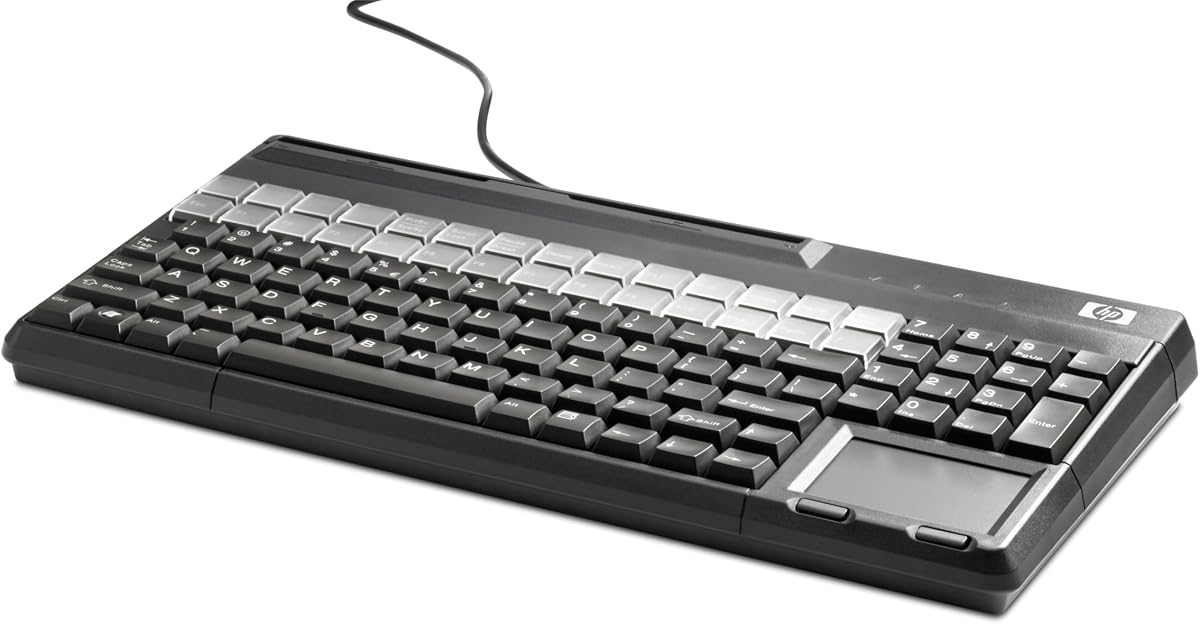
The HP POS Keyboard stands out as a versatile solution designed specifically for point of sale environments. With a robust 106-key QWERTY layout and 28 relegendable keys, it offers significant flexibility for custom workflows and rapid data entry tasks.
We may earn a commission when you buy through this link, at no additional cost to you.
Its integrated magnetic stripe reader eliminates the need for separate peripheral hardware, streamlining checkout counters. The inclusion of a touchpad further reduces desk clutter by replacing the need for an external mouse during transaction processing.
While it commands a higher price than standard office keyboards, the combination of specialized features justifies the investment for businesses seeking efficiency. The build quality ensures reliability under constant use, though finding replacement units might take slightly longer.
This keyboard is ideal for retail stores, pharmacies, or ticketing stations where customization and space-saving features are paramount. We recommend it for operators who prioritize workflow optimization and require a unified input and scanning solution.
The 28 relegendable keys allow businesses to map frequently used commands directly to the surface, reducing the reliance on software menus and accelerating service times during peak hours.
By combining keyboard, card reader, and touchpad into one unit, the HP POS Keyboard minimizes cable management issues and frees up valuable counter space for product displays or additional tools.
We may earn a commission when you buy through this link, at no additional cost to you.
The Cherry G86-62401 offers a refined approach to space-constrained POS setups with its integrated touchpad and compact design. It maintains a full 106-key QWERTY layout while eliminating external peripherals through its built-in pointing device.
We may earn a commission when you buy through this link, at no additional cost to you.
Its spill-resistant construction is a critical feature for hospitality or cafe environments where liquids are a constant risk. This durability ensures that accidental spills do not disrupt operations, making it a practical choice for frontline staff.
While it lacks specialized programmable keys or card readers found in higher-end models, its simplicity and robust build make it a reliable workhorse. The main trade-off is the need for separate card scanning hardware if transactions require it.
We suggest this keyboard for cafes, small retail shops, or kiosks where counter space is limited but standard typing efficiency is required. It balances functionality and durability effectively for general point of sale tasks.
The compact footprint combined with the touchpad allows for a cleaner counter arrangement, giving employees more room to handle physical goods or process transactions without clutter.
Spill resistance means the device can withstand minor liquid exposure without failure, reducing maintenance costs and downtime in busy service areas where drinks might be present.
We may earn a commission when you buy through this link, at no additional cost to you.
The Logitech K120 is a standard full-size keyboard that brings reliable everyday typing comfort to POS environments. With deep-profile keys and a spill-proof design, it offers basic resilience suitable for offices or light retail counter use.
We may earn a commission when you buy through this link, at no additional cost to you.
Its straightforward USB plug-and-play nature means minimal configuration is required to get started. This simplicity is advantageous for settings where technical expertise might be limited or rapid deployment is necessary across multiple locations.
While it does not offer advanced features like programmable keys or touchpads, its affordability and reliability make it a solid baseline option. The main limitation is its generic nature, requiring separate peripherals for full POS functionality.
This model is best suited for businesses needing a secondary keyboard or a basic input method without specialized requirements. It provides a familiar typing experience that supports comfortable work during extended shifts.
Users can connect the K120 directly to a USB port and begin typing immediately without installing drivers, ensuring minimal downtime during system maintenance or initial setup phases.
With plastic parts made from certified post-consumer recycled materials, this keyboard supports sustainability goals while maintaining the durability expected from standard commercial devices.
We may earn a commission when you buy through this link, at no additional cost to you.
The Cherry Lpos G86-71411 expands on standard layouts with 169 keys and 42 relegendable options, offering extensive customization for complex inventory or service workflows. It also integrates a magnetic stripe reader for seamless payment handling.
We may earn a commission when you buy through this link, at no additional cost to you.
This level of customization enables staff to access specific software functions quickly without navigating menus. The presence of a touchpad and card reader means a single device can handle most input needs efficiently.
However, the larger footprint demands ample counter space, and configuring 42 custom keys requires initial technical setup. It is best for specialized environments where high-volume, multi-step data entry is daily routine.
We recommend this unit for pharmacies, medical offices, or high-volume ticketing centers where speed and precision matter. Its feature set is powerful, though it may be overkill for simple retail checkouts.
With 169 keys and extensive relegendable options, staff can program shortcuts for frequent actions, significantly reducing the time spent per transaction in busy environments.
The magnetic stripe reader built directly into the keyboard eliminates the need for a separate reader, keeping the checkout area tidy and reducing cable clutter.
We may earn a commission when you buy through this link, at no additional cost to you.
The Perixx PERIBOARD-513III brings a laptop-like quiet typing experience to the POS counter with its scissor-switch mechanism. It also includes a full-size layout with an integrated touchpad and dedicated multimedia hotkeys for versatile control.
We may earn a commission when you buy through this link, at no additional cost to you.
The quiet keys are particularly beneficial in environments where noise reduction is valued, such as libraries or quiet retail spaces. The touchpad allows for cursor control without an external mouse, optimizing desk usage.
While it offers comfort and versatility, it lacks industrial-grade spill resistance or specialized payment hardware. This makes it more suitable for light commercial use rather than rugged daily operations.
Ideal for offices or reception desks where standard input combined with media control is needed. It provides a comfortable typing experience that reduces finger fatigue over long periods of use.
The quiet scissor-switch mechanism minimizes sound feedback during typing, creating a more pleasant atmosphere in customer-facing environments where loud clicks might be distracting.
Dedicated multimedia keys allow quick access to audio or system controls, enhancing user productivity when managing background tasks or digital signage alongside transactions.
We may earn a commission when you buy through this link, at no additional cost to you.
The Adesso Easy Touch 630Ub distinguishes itself with an IP67 waterproof rating, making it one of the most rugged options available for harsh environments. Its large keys provide high readability and comfort even with gloves or in low-light conditions.
We may earn a commission when you buy through this link, at no additional cost to you.
This model is engineered to withstand significant exposure to liquids and dust, suitable for manufacturing or outdoor kiosks. The plug-and-play USB connection ensures it works seamlessly with standard Windows systems without extra software.
While it lacks features like touchpads or card readers, its durability and affordability make it an unbeatable budget choice for demanding settings. The main limitation is that it serves as a basic input tool rather than a multifunctional hub.
We recommend this keyboard for industrial workstations or outdoor service points where protection against elements is critical. It offers unmatched resilience for the price, ensuring continuous operation despite tough conditions.
Capable of withstanding submersion in water up to 3 feet for 30 minutes, this keyboard remains operational even after significant spills, making it ideal for wet environments.
The large 2x print size keys improve contrast and readability, reducing typing errors and fatigue when staff wear gloves or work in varying lighting conditions.
We may earn a commission when you buy through this link, at no additional cost to you.
The Cherry G86-71401 offers extensive customization with 127 programmable and 42 relegendable keys, making it suitable for complex workflows needing unique shortcuts. It also includes a touchpad to consolidate input devices on the desk.
We may earn a commission when you buy through this link, at no additional cost to you.
This level of programmability allows businesses to tailor the keyboard to specific software requirements, potentially streamlining operations. The integrated pointing device further enhances convenience by reducing peripheral count.
However, user feedback indicates mixed experiences, suggesting that setup complexity might be a hurdle. It is best for technical environments where custom mapping is essential and configuration resources are available.
Ideal for specialized industrial or medical terminals where standard input is insufficient. The trade-off is the need for careful initial setup to unlock its full potential for custom workflow optimization.
With 127 programmable keys, users can assign macros or shortcuts to virtually any function, allowing the keyboard to adapt to complex software environments beyond standard tasks.
The combination of keyboard and touchpad in one device simplifies the desk setup, offering a cleaner workspace and faster access to cursor control during transactions.
We may earn a commission when you buy through this link, at no additional cost to you.
The Cherry KC 1000 is a specialized security keyboard featuring an integrated smartcard terminal and FIPS 201 approval. It is designed for environments requiring secure authentication, government access, or financial transaction compliance.
We may earn a commission when you buy through this link, at no additional cost to you.
Secure PIN entry is built directly into the device, ensuring data integrity and reducing fraud risk. The thin design and cross-platform compatibility make it versatile for secure computing environments needing robust identity verification.
While expensive for general retail use, its security features are unmatched for compliance-heavy industries. The main limitation is its narrow focus on secure cards, making it unsuitable for standard magnetic stripe workflows.
This unit is perfect for government offices, healthcare, or secure financial terminals where identity verification is mandatory. It provides a secure and efficient method for handling sensitive access and transaction data.
With FIPS 201 approval and EMV Level 1 certification, this keyboard meets strict government and financial standards for secure identity and data management in regulated environments.
Integrated secure PIN entry ensures that sensitive codes are protected at the hardware level, preventing interception by malicious software or unauthorized access attempts.
We may earn a commission when you buy through this link, at no additional cost to you.
The Cherry G80-1800 combines compact dimensions with robust mechanical CHERRY MX Black switches, offering reliable performance for industrial applications. Its gold crosspoint contacts ensure smooth switching even after millions of actuations.
We may earn a commission when you buy through this link, at no additional cost to you.
This keyboard is built for environments where durability is non-negotiable, such as manufacturing floors or server rooms. The inclusion of both USB and PS/2 connections provides flexibility for legacy systems.
While mechanical switches provide a precise tactile feel, they can be louder than membrane alternatives. It is best suited for settings where input accuracy and switch longevity are prioritized over noise levels.
We recommend this model for technical workstations requiring precise, long-lasting input. Its compact footprint makes it easy to integrate into tight spaces without sacrificing performance or reliability.
With CHERRY MX Black switches rated for over 100 million actuations, this keyboard delivers consistent performance over years of heavy use, reducing the need for frequent replacements.
The included PS/2 adapter allows connection to older computers or systems that do not support USB, ensuring broader compatibility across diverse industrial setups.
We may earn a commission when you buy through this link, at no additional cost to you.
The Logitech K270 introduces wireless freedom to the POS setup, eliminating cable clutter with a reliable 2.4 GHz connection. It offers a full-size layout with long battery life and spill-proof durability for everyday reliability.
We may earn a commission when you buy through this link, at no additional cost to you.
The 24-month battery life minimizes maintenance, allowing teams to focus on transactions rather than hardware issues. Its spill-proof design adds a layer of protection common to wired office keyboards.
While wireless convenience is a plus, it may introduce latency or range issues in crowded RF environments. It is best for offices or counters where mobility is more important than specialized input features.
This model suits reception areas or back-of-house operations where cabling is a constraint. It provides a familiar typing experience with the added benefit of cable-free flexibility.
The wireless connection allows users to position the keyboard wherever comfortable without worrying about cable reach, enhancing ergonomics and counter organization.
With a battery life lasting up to 24 months, this keyboard reduces the frequency of battery changes, keeping operations running smoothly with minimal interruption.
We may earn a commission when you buy through this link, at no additional cost to you.
Selecting the right keyboard involves balancing durability, features, and connectivity. This guide outlines key factors to consider for optimal performance.
In POS environments, keyboards face constant use, spills, and wear. Look for spill-resistant or waterproof designs, robust chassis materials, and mechanical switches for longevity. Durability ensures consistent operation and reduces replacement costs over time.
Prioritize models with high actuation ratings or reinforced keycaps to handle heavy daily usage without failing.
A standard QWERTY layout supports general typing, while programmable or relegendable keys allow workflow shortcuts. Consider the number of keys and whether specialized keys are needed for frequent commands or menu access.
Opt for customizable layouts if your software requires quick access to specific functions beyond standard text input.
Many POS keyboards include touchpads, magnetic stripe readers, or smartcard slots. These features reduce desk clutter and simplify transactions by consolidating multiple functions into a single unit.
Choose a model with integrated peripherals if space is limited or if you need to streamline checkout procedures.
USB plug-and-play offers simple connectivity for most systems, while wireless options provide flexibility. Ensure compatibility with your hardware and operating system to avoid driver issues.
Select wired connections for reliability or wireless for mobility depending on your workspace setup.
For secure transactions, keyboards with integrated smartcard readers or PIN entry modules may be necessary. Look for compliance certifications like FIPS 201 or EMV approval for financial data protection.
Security features are critical in healthcare, government, or financial applications to meet regulatory requirements.
In industrial or outdoor settings, waterproof ratings like IP67 are essential to protect against liquids and dust. Ensure the keyboard is designed to withstand the specific hazards of your location.
High environmental resistance prevents failures due to exposure to spills, humidity, or physical debris.
Deep-profile keys and ergonomic designs reduce hand fatigue during long shifts. Consider tilt legs, key spacing, and overall weight for comfortable daily use.
Ergonomic features improve staff efficiency and reduce repetitive strain injuries in high-volume environments.
Check whether the keyboard requires specific software to configure macros or programmable keys. Plug-and-play models simplify setup, while advanced units may need drivers for full functionality.
Ensure driver support exists for your operating system to avoid compatibility issues during installation or updates.
Always connect the keyboard to a USB port and allow the system to recognize it before starting transactions. For specialized models, configure relegendable keys or macros through the provided software to optimize workflow.
Regularly clean the surface with a soft, dry cloth or use compressed air to remove dust from key crevices. For spill-resistant models, wipe up liquids immediately to prevent internal damage or sticky keys.
Store wireless keyboards in a cool, dry place when not in use to preserve battery life and connectivity stability. Check battery levels periodically to avoid unexpected interruptions during busy periods.
Yes, a standard office keyboard works for basic input. However, specialized POS keyboards offer features like programmable keys, touchpads, or card readers that improve efficiency and save space.
Most POS keyboards are designed for heavy daily use with durable materials and reinforced switches. Look for models with high actuation ratings or spill resistance for longer lifespans.
A relegendable key allows you to remove or customize the label on the keycap. This helps businesses map specific functions to keys for faster access during transactions.
A built-in touchpad saves desk space by eliminating the need for an external mouse. It is useful if counter space is limited or you prefer integrated controls.
Yes, select a keyboard with a high waterproof rating like IP67 for wet environments. These models can withstand spills or submersion without damage.
Use the manufacturer's software to map functions to programmable keys. Follow the installation instructions to set up macros or custom commands tailored to your workflow.
We found that the HP POS Keyboard offers the best balance of customization and space-saving features, while the Adesso Easy Touch 630Ub provides unmatched durability at an affordable price.
Prioritize security features and programmability if your business handles complex transactions, or opt for spill resistance for high-risk environments. Your workflow needs should dictate the necessary peripherals.
Prices and availability change frequently, so verify the latest details on product pages before purchasing. The right choice ensures smooth operations and lasting performance for your business.