
Upgraded Watt Power Meter Plug
4.6Editor score
Seven Display Modes
Overload Protection
Adjustable Backlight Time
This guide compares the top energy consumption monitors for PC to help you track usage, reduce bills, and optimize your home or office power setup efficiently.
Finding the right energy consumption monitor for your PC setup is crucial for managing electricity costs and ensuring efficiency. Whether you are a gamer or a workstation user, tracking power usage helps you identify waste and optimize your hardware performance over time.
We evaluated the top ten products on the market based on accuracy, ease of installation, feature sets, and user feedback. Our selection includes both plug-in meters for individual devices and whole-home monitors that track your entire electrical panel for comprehensive insights.
Each pick in this list highlights specific strengths such as smart integration, detailed reporting, or budget-friendly pricing. Please note that prices and availability can change frequently, so checking the current listing is recommended before making your final purchase decision.
4.6Editor score

4.6Editor score

4.3Editor score
This comparison table provides a side-by-side overview of all ten selected monitors to help you quickly identify the features that matter most for your specific PC power monitoring needs.


The Emporia Vue 3 Home Energy Monitor stands out as a top choice for those who want detailed insights into their home power usage including PC setups. With a strong user rating and extensive features, it offers a reliable way to track energy consumption in real-time.
We may earn a commission when you buy through this link, at no additional cost to you.
Its standout quality lies in its safety certifications and ability to monitor up to sixteen branch circuits. This means you can isolate your PC and gaming rig from other appliances to see exactly how much power they draw without interference.
One trade-off is the requirement for a 2.4 GHz WiFi connection and the need for electrical panel installation. While this ensures high accuracy and data retention in the cloud, it may be intimidating for users who prefer simple plug-in solutions.
If you need comprehensive monitoring that scales with your home energy needs, this monitor is the ideal choice. It provides actionable notifications and savings opportunities that help you reduce costs while keeping your PC setup efficient.
The device collects energy data every second when the app is active and retains it for three hours, allowing you to see immediate spikes when your PC is under load.
Being UL Listed means every component has been tested to prevent hazards like overheating, giving you peace of mind when monitoring high-power electrical loads.
We may earn a commission when you buy through this link, at no additional cost to you.
The Upgraded Watt Power Meter Plug offers an affordable entry point for users who want to track their PC power usage without investing in a full home system. It is highly rated for its clear display and robust protection features.
We may earn a commission when you buy through this link, at no additional cost to you.
Its main strength is the ability to switch between seven display modes to show power, energy, voltage, and cost. The large backlight makes it easy to read data even in dark gaming rooms or offices.
The lack of connectivity means you cannot view data remotely or receive alerts on your phone. However, the memory function ensures that data is saved even if the device is unplugged or during a power failure.
For anyone looking to check specific device usage like a gaming PC or monitor without complex setup, this is an excellent budget option. It helps you identify energy hogs quickly and save on your electricity bill effectively.
You can set the unit price to calculate how much your PC costs to run over time, helping you understand the financial impact of long gaming sessions.
The built-in overload protection warns you if the appliance exceeds the set threshold, preventing potential electrical hazards in your home setup.
We may earn a commission when you buy through this link, at no additional cost to you.
The Meross Smart Home Energy Monitor is a premium choice designed for users who value privacy and advanced automation features. With ETL certification and local data storage, it ensures your energy usage details remain secure and accessible.
We may earn a commission when you buy through this link, at no additional cost to you.
Its key strength is the ability to store up to five years of data locally without relying on the cloud. This is ideal for long-term trend analysis of your PC usage patterns without worrying about subscription fees.
The integration with Home Assistant adds a layer of smart home control that allows you to automate power settings based on solar surplus or usage spikes. This makes it perfect for tech-savvy users who want full control over their energy systems.
If you are looking for a robust monitoring solution that respects privacy and supports advanced smart home ecosystems, this monitor is the top pick. It provides deep insights that help you maximize efficiency and cut unnecessary electricity costs.
All energy data stays local on your network, ensuring no delays or privacy concerns associated with cloud-based tracking solutions.
It integrates with Home Assistant to detect solar surplus and automatically power high-use appliances, helping you use clean energy more effectively.
We may earn a commission when you buy through this link, at no additional cost to you.
The SURAIELEC Outlet Watt Meter is a versatile plug-in monitor designed to work with a wide voltage range. It is an excellent tool for measuring the power draw of your PC and peripherals with high precision.
We may earn a commission when you buy through this link, at no additional cost to you.
Its ability to store data for up to ninety days during power outages is a significant advantage for long-term usage tracking. This ensures that you do not lose historical data even if there are temporary disruptions in your power supply.
The compact design leaves the lower wall outlet accessible which is useful in setups where space is limited. However, without WiFi connectivity, you must check the display manually to see current power usage or costs.
For users who need a reliable meter for tracking specific devices without smart features, this is a strong candidate. It helps you monitor energy consumption accurately and identify opportunities to reduce your electricity bills efficiently.
Measuring from 90 to 250 volts ensures compatibility with various regions and electrical standards making it a versatile tool for different setups.
The built-in rechargeable battery backup ensures your data is saved even during sudden power failures allowing for uninterrupted long-term tracking.
We may earn a commission when you buy through this link, at no additional cost to you.
This Smart Home Energy Monitor with sixteen sensors provides granular control over your home's power distribution. It is particularly useful for shared living spaces where tracking individual PC usage is essential for fair billing.
We may earn a commission when you buy through this link, at no additional cost to you.
Its key strength is the ability to assign customizable electricity rate templates which helps in accurate cost calculation for different rooms or circuits. This transparency is invaluable for landlords or property managers managing shared energy costs.
While it relies on WiFi for remote monitoring, the Super Privacy Mode allows you to run on a local LAN without internet access. This flexibility ensures that you can maintain privacy while still getting real-time data on your PC usage.
If you need detailed circuit-level data for multiple devices including gaming rigs and workstations this monitor is the ideal choice. It helps you optimize usage patterns and reduce unnecessary energy waste effectively.
Track power usage for each bedroom or circuit to ensure electricity allocation is transparent and fair for all shared residents.
The ability to run without cloud services or apps allows you to use your own MQTT server for complete data control.
We may earn a commission when you buy through this link, at no additional cost to you.
The HBN Watt Meter Plug is a compact device designed to provide clear and distinct data readings from any angle. It is a solid option for monitoring the power consumption of your PC and peripherals.
We may earn a commission when you buy through this link, at no additional cost to you.
Its key strength is the wide viewing angle which makes it easy to read data without bending over. The ability to toggle through nine display modes helps you gain insights into various operational parameters of your devices.
The backlight automatically turns off after fifteen seconds to conserve energy which might be inconvenient in low-light environments. Additionally the data storage only covers non-real-time data so current usage is lost when unplugged.
For simple and direct monitoring of specific devices this meter is a practical tool. It helps you save money by making you aware of energy consumption and managing usage effectively over time.
The 160-degree angle ensures you can read data clearly from any position making it convenient for hard to reach outlets.
Calculate electricity consumption and cost over time to understand the financial impact of leaving your PC on standby.
We may earn a commission when you buy through this link, at no additional cost to you.
The KETOTEK Watt Meter Power Meter Plug is highly rated for its ease of use and robust protection features. It is an excellent choice for users who want to monitor their PC power usage with precision.
We may earn a commission when you buy through this link, at no additional cost to you.
Its key strength is the one-click switching interface which allows quick access to different parameters like voltage current and power factor. This makes it simple to navigate through various data points without complex menus.
The multiple protection features include warnings for overload and cost alarms which alert you to potential issues before they become critical. The upgraded LCD display ensures visibility from any angle for convenient reading.
For a reliable and straightforward way to monitor household appliances and PCs this meter is a strong recommendation. It helps you reduce electricity bills by providing accurate and timely consumption data.
Use the dedicated buttons to quickly view KWH watt and voltage readings without needing to search through menus.
The device displays specific alarms for overload and cost limits ensuring you stay within safe power usage ranges.
We may earn a commission when you buy through this link, at no additional cost to you.
This 2 Pack Watt Meter Power Meter Plug offers excellent value by providing two units for the price of one. It is ideal for monitoring multiple devices like your PC and monitor simultaneously to track total power draw.
We may earn a commission when you buy through this link, at no additional cost to you.
Its key strength is the durable ABS material construction which makes it fireproof and anti-drop. This ensures longevity and safety when leaving the monitor plugged in for extended periods.
The default overload threshold of 1800 watts provides a general safety net but cannot be adjusted as easily as some other models. The memory function saves cumulative data even if the device is removed from the socket.
For anyone needing a budget friendly and reliable way to track multiple devices this pack is a great option. It helps you monitor energy consumption effectively and make informed decisions about your electricity usage.
Get two high quality monitors to track your PC and peripherals simultaneously saving you money on individual purchases.
Made from high quality ABS material the device is fireproof and durable ensuring safety during long term use.
We may earn a commission when you buy through this link, at no additional cost to you.
The P4400 Kill A Watt Electricity Usage Monitor is a classic device known for its straightforward approach to tracking power consumption. It is a reliable choice for users who prefer simplicity over smart connectivity features.
We may earn a commission when you buy through this link, at no additional cost to you.
Its key strength is the large LCD display that counts consumption by the kilowatt-hour making it easy to read. It offers four settings to monitor your electrical usage by day week month or year providing long-term visibility.
While it lacks the connectivity of newer models it remains compatible with inverters which is useful for backup power setups. The design is simple but effective for assessing the efficiency of your PC and other appliances.
If you want a traditional tool to check appliance efficiency without complex setups this monitor is a solid choice. It helps you understand your energy usage patterns and identify ways to save on your electricity bill.
Just plug it in between your device and the outlet to get immediate readings on power usage and costs.
Monitor your electrical usage over days weeks or months to see trends in your energy consumption patterns.
We may earn a commission when you buy through this link, at no additional cost to you.
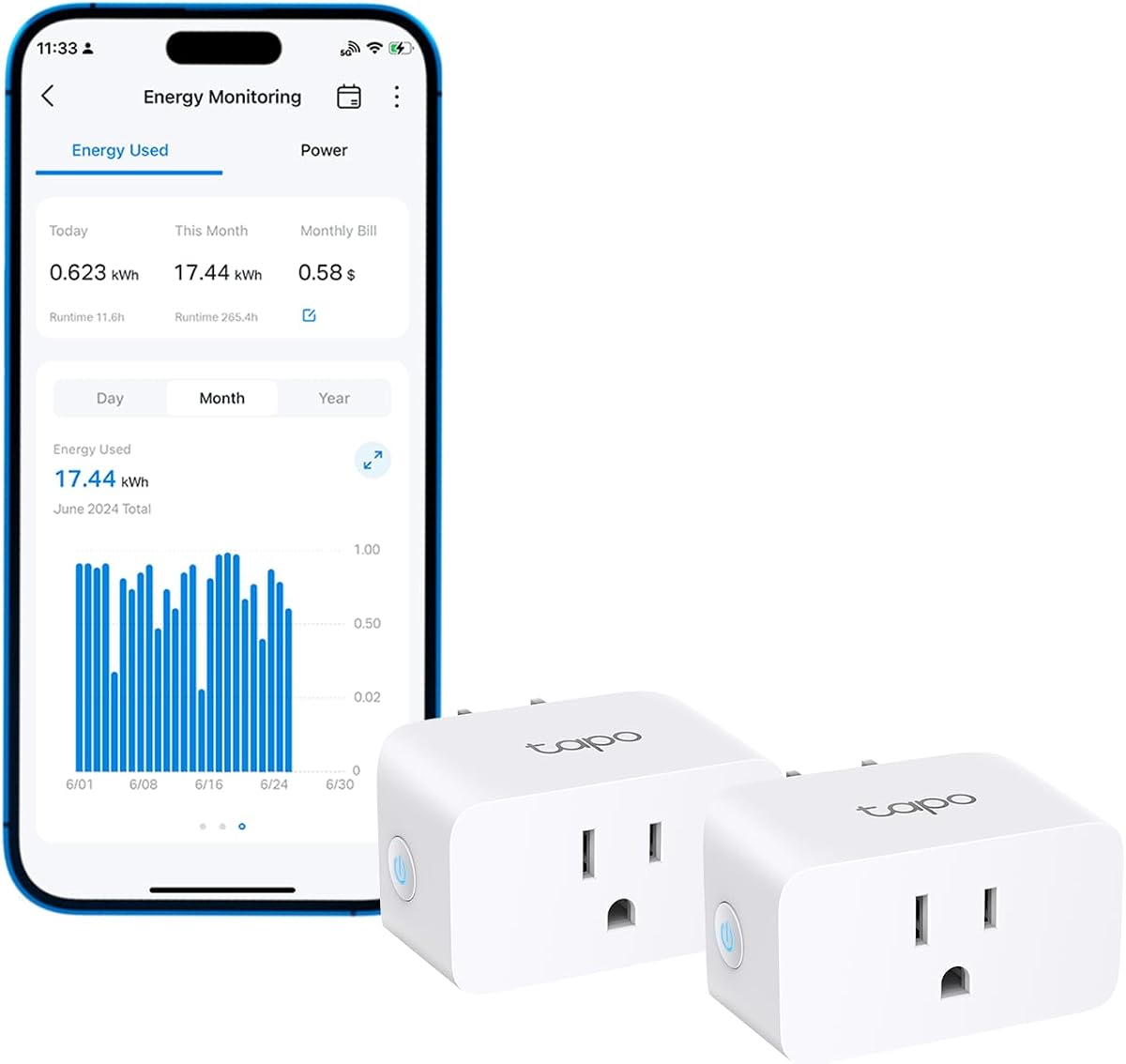
The Tapo Smart Plug Wi-Fi Energy Monitoring offers a smart way to track power usage with voice control and app integration. It is a great choice for users who want to manage their PC power usage remotely.
We may earn a commission when you buy through this link, at no additional cost to you.
Its key strength is the ability to integrate with Alexa and Google Assistant allowing you to issue voice commands to adjust settings or turn devices on or off. The intuitive charts help you optimize power usage effectively.
Auto-shutoff prevents electrical overload by shutting off devices that use too much power which adds a layer of safety. Additionally programmable scheduling allows automatic operation of high consumption devices during off peak hours to save costs.
For tech savvy users who want to combine energy monitoring with smart home automation this plug is an ideal pick. It helps you save on electricity bills while maintaining convenient control over your devices.
Automatically operate high consumption devices during off peak hours with lower electricity rates to maximize your savings.
Use voice commands to adjust settings or turn devices on and off without lifting a finger for added convenience.
We may earn a commission when you buy through this link, at no additional cost to you.
Choosing the right energy consumption monitor for PC involves understanding your specific needs and the capabilities of the device.
Look for monitors that provide high accuracy ratings such as ±1% or ±2% to ensure your readings are reliable. Accurate data is essential for understanding exactly how much power your PC is consuming.
Prioritize devices with proven accuracy standards to avoid misleading consumption figures.
Decide if you need real-time data via WiFi or Bluetooth or if a manual display is sufficient. Smart monitors allow you to track usage remotely and integrate with home automation systems.
Choose connectivity based on your need for remote access and smart home integration.
Consider whether the monitor stores data locally or in the cloud as this impacts your privacy and access to historical trends. Local storage is ideal for those concerned about data security and internet connectivity.
Select a model that aligns with your privacy preferences and data access needs.
Plug-in monitors are easy to set up but whole-home monitors require installation at the circuit panel which might need a professional. Ensure you are comfortable with the level of installation required before purchasing.
Weigh the complexity of installation against the depth of monitoring you need.
Set a budget that balances the features you need with the price you are willing to pay. Entry level models are cheaper but may lack advanced features like detailed analytics or smart controls.
Find the best value that meets your monitoring requirements without overspending.
Check the clarity of the display and the ease of navigation through different data modes. A clear LCD with backlight helps you read data easily even in low light conditions.
Ensure the interface is user-friendly for efficient daily use.
Look for certifications like UL or ETL that confirm the device meets safety standards for electrical products. Overload protection and fire-resistant materials add an extra layer of security for your setup.
Prioritize safety certifications to protect your home and devices.
If you use smart home systems like Home Assistant or Alexa ensure the monitor supports integration for seamless control. Good app design enhances the user experience and provides better insights.
Check compatibility with your existing smart home ecosystem before buying.
To use a plug-in monitor simply connect it to your wall outlet and plug your PC power supply into the device. The display will show real-time power usage which you can record or view through a connected app.
For whole-home monitors follow the installation guide carefully to attach sensors to your circuit panel. Ensure the WiFi or network connection is stable to enable accurate data transmission and remote monitoring.
Care for your monitor by keeping it in a dry and cool environment away from direct sunlight. Regularly update the firmware if using a smart model to ensure optimal performance and security.
Yes, monitors that carry UL or ETL certification are tested for electrical safety and are safe for regular use. They are designed to prevent hazards such as overheating or short-circuiting when used properly.
Plug-in monitors do not require an internet connection to display local data on their screens. However smart monitors need a stable WiFi connection to provide remote access and detailed app features.
Most reliable monitors have an accuracy range of ±1% to ±2% which is sufficient for tracking power usage trends. Look for models that advertise high precision for the best results in monitoring consumption.
Plug-in meters typically track one device at a time but some monitors offer multiple sensors to monitor several circuits or devices simultaneously. Whole-home systems can track all connected appliances from a central panel.
Yes, by identifying high usage patterns and energy hogs like PCs or routers you can optimize your usage and reduce waste. Many users save significant amounts by adjusting their habits based on monitor data.
Most advanced monitors have memory functions that save data during power outages so you do not lose historical usage information. Simply reconnect the device after power restoration to continue tracking seamlessly.
Yes, standard plug-in monitors work with any PC power supply that uses a regular plug. Ensure the total wattage of your PC does not exceed the monitor's maximum capacity to avoid overloading.
Most monitors have a reset button or function in the app that clears cumulative data to zero. Press and hold the reset button for the specified time to start tracking from a fresh point.
The ten monitors featured in this guide provide a wide range of options to suit different needs and budgets. From simple plug-in units to sophisticated whole-home systems there is a solution for every PC user.
Prioritize features like accuracy, safety certifications, and connectivity based on how deeply you want to analyze your power usage. Choosing the right monitor can help you make informed decisions about your energy habits.
Remember to check current prices and availability on the product pages before making a purchase. With the right tool you can track your PC energy consumption and contribute to a more efficient future.