
8mm & Super 8 Film to Digital Converter
3.7Editor score
32GB card included
2.4 inch display
1080p resolution
Simple frame capture
Preserving your family history on film requires the right tools to convert analog reels into modern digital files. A good converter ensures your precious memories are captured clearly without damaging the fragile original media during the scanning process.
We compared ten leading devices based on their scanning quality, ease of use, and compatibility with different reel sizes. Our analysis focuses on standalone units that do not require a computer to operate, making them accessible for everyone.
Each pick below highlights specific strengths and weaknesses to help you find the perfect match for your collection. Please note that product availability and pricing can change frequently, so always check the current listings before making a purchase decision.
3.7Editor score

4.1Editor score

4.0Editor score
As an Amazon Associate we earn from qualifying purchases.
This comparison table outlines the key specifications and features of each top-rated digital converter to help you quickly identify the device that best fits your specific needs and budget constraints.




The KODAK REELS Digitizer stands out as a robust solution for converting your cherished 8mm and Super 8 film reels into high definition digital files. With a strong rating of 4.1 stars, users appreciate its ability to produce 1080p MP4 videos without needing a computer. The large 5 inch LCD screen makes it incredibly easy to navigate settings and preview your footage directly on the device.
We may earn a commission when you buy through this link, at no additional cost to you.
One of its most significant strengths is the 8MP sensor which captures frames with remarkable clarity and detail. This ensures that even older or slightly damaged film reels retain as much visual quality as possible during the transfer process. The universal supply reel accommodates sizes from 3 inches to 9 inches making it versatile for various collections. Touch buttons allow you to adjust exposure and sharpness on the fly which adds a layer of control not found in simpler units.
While the device performs exceptionally well for video capture, it is important to note that it does not support audio output. This means you will capture the visuals but not the sound from the original film which is a common trade off in standalone digitizers. However, this is acceptable for many users who only wish to preserve the visual memories of their past events.
This converter is best suited for families or collectors who want a straightforward, high quality solution to digitize their film archive. If you prioritize screen size and ease of use over audio features, this is an excellent choice. The included accessory kit ensures you have everything needed to start converting right out of the box.
The 8MP sensor ensures that every frame is scanned with high detail allowing for crisp playback on modern screens.
The 5 inch touchscreen simplifies the process allowing you to align frames and adjust settings without complex menus.
We may earn a commission when you buy through this link, at no additional cost to you.
This 8mm and Super 8 Film to Digital Converter offers an accessible entry point for those looking to digitize their old movie reels without breaking the bank. Boasting a rating of 3.7 stars, it provides the essential functions needed to convert analog film into digital MP4 files. The inclusion of a 32GB SD card is a major plus as it allows you to begin archiving immediately without additional purchases.
We may earn a commission when you buy through this link, at no additional cost to you.
The device captures video frame by frame at 20 fps creating standard MP4 files compatible with modern systems. Its 2.4 inch LCD screen lets you review footage instantly on the device or connect to a TV for a larger viewing experience. The wide reel capacity accommodates reels up to 9 inches which is excellent for longer conversion sessions without frequent reloads.
However, the lower rating suggests there may be some inconsistencies in build quality or user experience compared to higher end models. Users should be prepared for a slightly more manual process when aligning frames or adjusting settings. Additionally, the smaller screen might make it harder to see fine details during the setup process.
This unit is ideal for budget conscious users who need a basic, functional scanner for occasional use. If you are looking to convert a few reels at a low cost and do not require advanced editing features, this is a solid option. It simplifies the process of saving old memories to a format that is easy to share with family.
With the 32GB SD card included you can start digitizing your film reels right away without needing extra accessories.
The scanner handles reels up to 9 inches allowing you to convert larger film collections without constant interruptions.
We may earn a commission when you buy through this link, at no additional cost to you.
The Magnasonic Super 8/8mm Film Scanner is designed to bring back memories with ease by automatically converting your film reels into digital MP4 files. With a rating of 4.0 stars, it is well regarded for its straightforward operation and vibrant 2.3 inch screen. The push of a button is all it takes to start scanning 3, 5, or 7 inch reels making it very user friendly for non technical users.
We may earn a commission when you buy through this link, at no additional cost to you.
Key features include the ability to adjust brightness, sharpness, and framing directly on the scanner without needing expensive photo editing software. This level of control allows you to optimize the output for the specific condition of your old film. The RCA video out cable also offers the convenience of viewing your scanned video on a larger TV or monitor immediately.
Despite its strengths, the device does not capture sound which is a limitation for those looking to preserve the full audio visual experience of their old films. Additionally, the SD card support is limited to 32GB which might require more frequent transfers for large collections. These factors are minor trade offs for the simplicity and quality of the video scan.
This scanner is a great premium choice for those who want a balance of quality and ease of use. If you value a bright display and simple controls over audio features, this unit will serve you well. It is particularly suitable for grandparents or families who want to quickly digitize their most cherished movie reels.
The push button setup makes scanning effortless right out of the box requiring no complicated software installation.
You can manually adjust brightness and sharpness on the device to get the best possible result from old film.
We may earn a commission when you buy through this link, at no additional cost to you.
This 8mm and Super 8 Film to Digital Converter provides a comprehensive package for digitizing film strips into digital MP4 files. Rated at 3.8 stars, it offers a full color LCD screen with touch buttons that make recording and converting live films intuitive. The 5 Megapixel sensor captures images with good clarity and color accuracy resulting in high definition 1080P digital video files.
We may earn a commission when you buy through this link, at no additional cost to you.
The package includes a 32GB SD card and various cables ensuring you have everything needed to start using the device immediately. Touch buttons allow you to adjust brightness and framing without needing a computer which streamlines the conversion process. Additionally, the device comes with a one year warranty and 24 hour technical support providing peace of mind for the buyer.
While the features are robust the lack of audio support is a limitation for users who want a complete restoration of their film. The branding is somewhat generic which might make it harder to find community support compared to more established brands. However, the technical specifications are quite strong for the price point.
This device is well suited for users who want a full kit with included memory and support. If you need a reliable converter that offers a range of settings and a warranty backing it is a solid contender. The touch interface adds a modern convenience that can make the digitization process faster and more enjoyable.
Includes all necessary cables and a memory card so you can begin scanning your film reels without delays.
The 5 Megapixel sensor ensures that your converted videos are sharp and detailed for modern viewing.
We may earn a commission when you buy through this link, at no additional cost to you.
The 8mm & Super 8 Reels to Digital MovieMaker Pro is a fully automated digitizer that converts old movie reels into digital videos. With a rating of 3.3 stars, it is designed to handle 3, 5, and 9 inch reels with 1080P resolution. The built-in 2.4 inch LCD screen and included TV cable provide multiple ways to view your converted files.
We may earn a commission when you buy through this link, at no additional cost to you.
It captures frames at 20 fps creating mjpeg-4 files that are compatible with Windows, Mac, and Linux systems. The device saves directly to an included SD card so there is no need for a computer or complex software. This makes it a convenient solution for users who want to avoid technical setups.
However, the lower rating indicates some users may experience difficulties with frame alignment or build quality. Proper mounting of the film on the reel is essential to ensure smooth conversion and avoid jams. It requires careful handling to prevent the film from slipping during the scanning process which might be frustrating for beginners.
This digitizer is suitable for those who need a basic automated solution for converting various reel sizes. If you are comfortable with some manual setup and want to avoid PC software it is a viable option. The inclusion of an SD card helps you get started right away without additional costs.
The fully automated process simplifies conversion so you do not need a computer to save your digital videos.
It supports reels up to 9 inches which is beneficial for users with large film collections to convert efficiently.
We may earn a commission when you buy through this link, at no additional cost to you.
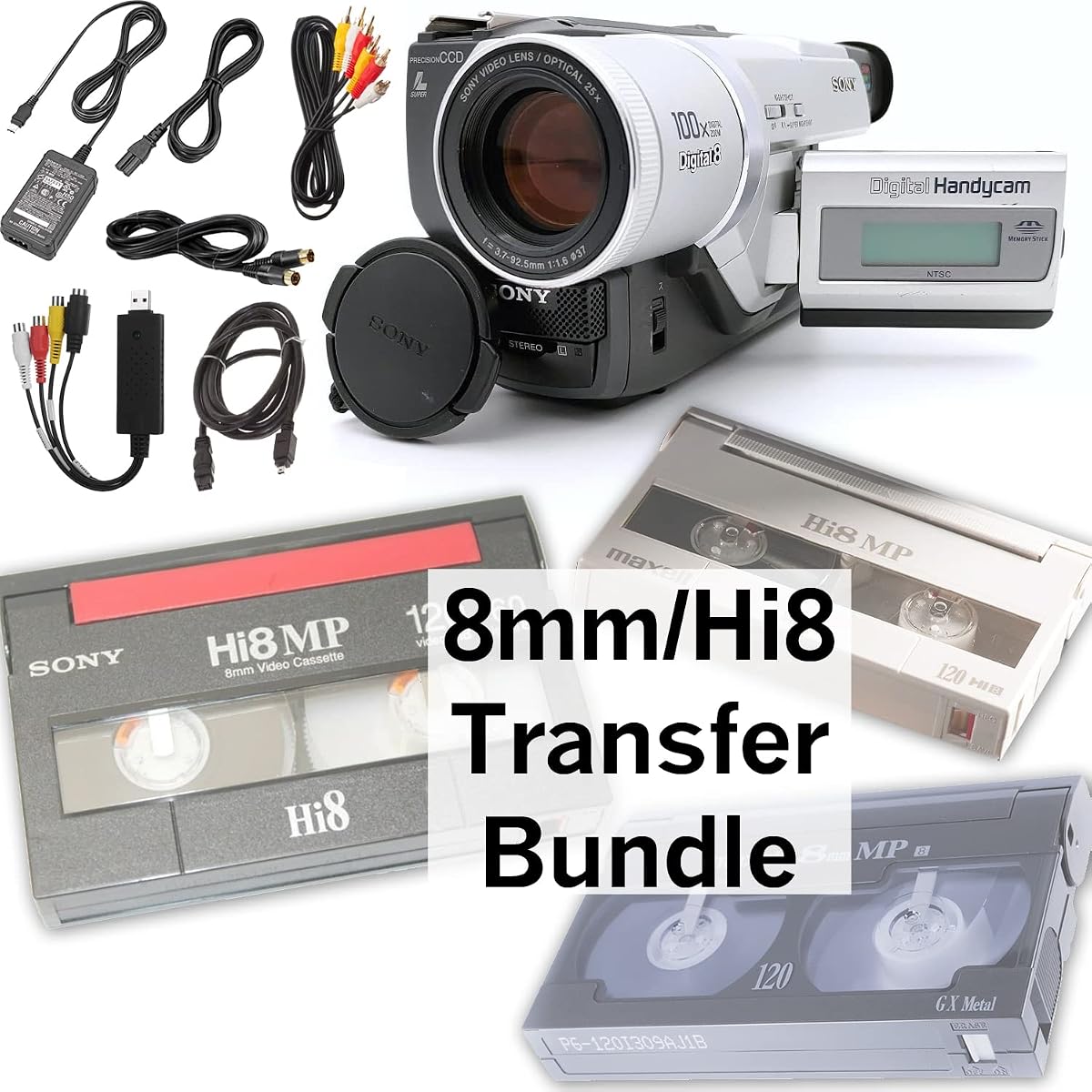
The Tech Collector 8mm, Digital8, and Hi8 Transfer Bundle is designed specifically for transferring tape formats rather than film reels. Rated at 4.0 stars, it includes a camcorder and a USB capture device that allows you to transfer tapes to computer files or burn them to DVD. This bundle is ideal if you have old camcorder tapes instead of movie film.
We may earn a commission when you buy through this link, at no additional cost to you.
The included battery and AV cables ensure you can connect the device to a TV for playback or transfer files to a computer. This comprehensive approach saves you from needing to purchase separate hardware to access your stored media. The guarantee of being 100% working and free returns adds a layer of confidence to the purchase.
It is important to note that this device does not convert 8mm film reels like the other options in this guide. It is strictly for tape formats which means it will not help you digitize your family movie reels from the 80s or 90s. Ensure you have the correct media type before ordering.
This bundle is best for users who specifically have 8mm, Digital8, or Hi8 tapes to digitize. If you own camcorder tapes and want a quick way to convert them to DVD or digital files this set offers all the necessary tools. The working guarantee ensures you can rely on it for your digitization projects.
The set includes everything needed from the camcorder to the capture device to transfer and save your tapes.
You can transfer tapes to computer files or burn them to DVD giving you flexibility in how you store your media.
We may earn a commission when you buy through this link, at no additional cost to you.
This Tech Collector bundle is another option for digitizing 8mm, Digital8, and Hi8 tapes. With a rating of 3.8 stars, it comes with a camcorder and a blank tape to help you get started. The USB capture device transfers your tapes to computer files or allows you to burn them to DVD for long term storage.
We may earn a commission when you buy through this link, at no additional cost to you.
The package includes necessary AV cables and a battery which facilitates easy transfer or TV playback. This makes it a self contained solution for those who have not already bought a capture card. The guarantee of being 100% working ensures that the hardware is functional when it arrives.
As with the previous Tech Collector bundle, this unit is designed for tapes and not film reels. It will not help you convert 8mm film rolls which are distinct from the magnetic tapes used in camcorders. It is vital to verify your media type before purchasing to avoid mismatched expectations.
This bundle is useful if you have tapes that you need to convert to digital formats or DVD. The inclusion of a blank tape and camcorder makes it a complete kit to handle your digitization needs. It is a reliable choice for those looking to archive their tape based memories without extra purchases.
Includes a blank tape and camcorder so you can start digitizing your old media immediately upon receipt.
The USB capture device ensures your tapes can be easily transferred to files or burned to DVD.
We may earn a commission when you buy through this link, at no additional cost to you.
The Digital Film & Slide Scanner offers a modern solution to bring your old 8mm and Super 8mm films into the 21st century. With a built-in 1080P display and 2.4 inch LCD screen, you can play your scanned videos directly on the device. It converts film strips into digital MP4 files suitable for lifetime viewing with family and friends.
We may earn a commission when you buy through this link, at no additional cost to you.
The setup process is simple allowing you to load 3 or 5 inch film onto the universal supply reel and follow on-screen prompts. It sends footage directly to an SD card without requiring a computer or drivers which makes it very accessible for non-technical users. The elegant design also serves as a digital photo frame at home or in the office.
Since this product is relatively new there are no user ratings available yet to confirm its long term reliability. The higher price point suggests it may be targeted at users seeking premium features or a specific design aesthetic. You may want to read further reviews once they become available before purchasing.
This scanner is a great gift for grandparents or filmmakers who want to reminisce with old friends. If you value a standalone device with a large display for immediate viewing this model could be a strong contender. Its design focuses on ease of use and the social aspect of sharing old memories.
The built-in display allows you to play your scanned videos immediately on the device without needing a TV.
Follow simple on-screen prompts to load and convert your film without needing any drivers or a computer.
We may earn a commission when you buy through this link, at no additional cost to you.
The Old School Film Scanner provides an option to convert 8mm and Super 8 films to JPEG images or MP4 files. It features a 2.4 inch LCD screen to play scanned videos or photos directly. This device is designed to bring obsolete media into the modern era for sharing with family and friends.
We may earn a commission when you buy through this link, at no additional cost to you.
Similar to other standalone scanners it allows you to load film onto a universal supply reel and use on-screen prompts to send footage to an SD card. This no-driver process ensures you can digitize your collection without installing software. It is also marketed as a great gift for special occasions like anniversaries or birthdays.
As a newer product on the market there are currently no user ratings to gauge its performance. The higher price suggests it might include specific features for high-end scanning or a more refined design. It would be wise to check for customer feedback before buying to ensure it meets your expectations.
This scanner is a suitable choice for those who want to convert film into JPEG images for easy sharing. If you prioritize convenience and a standalone workflow without needing a computer this device is worth considering. Its design is focused on preserving memories and making them accessible for modern viewing.
Converts your old films into JPEG images which are easy to store and share on modern digital devices.
The device operates independently without needing drivers or software installation for a hassle-free experience.
We may earn a commission when you buy through this link, at no additional cost to you.
This Digital Film & Slide Scanner includes a full set of accessories such as a film reel and cleaning cloth to aid in the digitization process. It features a 1080P display and a 2.4 inch LCD screen for viewing your scanned videos. The device is designed to convert your old 8mm and Super 8mm films into digital MP4 files.
We may earn a commission when you buy through this link, at no additional cost to you.
The scanner offers a simple workflow where you load 3 or 5 inch film onto a supply reel and follow prompts to save to an SD card. It includes a TV cable with RCA video output allowing you to watch your scans on a larger screen. The set is ideal for stable and fast digitization without the need for external computers.
Since this model has no ratings yet it is a newer offering in the market. The inclusion of a full accessory kit adds value and convenience for users who want a ready to use solution. The price reflects the added value of the included accessories and the promise of fast scanning.
This scanner is a strong candidate for those who value a complete package with essential accessories included. If you want to ensure you have everything needed for quick and stable digitization this unit is a great choice. Its design is tailored for ease of use and fast results for your old film memories.
The package includes a film reel, cleaning cloth, and cables to ensure a complete and hassle-free setup experience.
Designed for fast and stable digitization allowing you to convert your film frames quickly and efficiently.
We may earn a commission when you buy through this link, at no additional cost to you.
Selecting the right digital converter involves considering several factors to ensure your old film is converted correctly.
The resolution of the scanner determines how clear your converted videos will be. Look for devices that offer 1080p output to ensure that details in your old film are preserved and visible on modern high definition TVs. Higher megapixel sensors generally contribute to better image quality and sharper results.
Always check the output format as MP4 files are the most widely compatible with modern devices and editing software.
A built-in LCD screen allows you to review your footage immediately without needing a computer. Larger screens such as 5 inch displays make it easier to align frames and check settings during the conversion process. This feature adds significant convenience and helps ensure your scans are accurate before saving.
If you plan to view the results on a TV, ensure the device includes appropriate cables like RCA or USB for connection.
Film reels come in various sizes ranging from small 3 inch spools to large 9 inch reels. It is important to choose a converter that supports the specific sizes of your collection to avoid buying adapters or extra reels. Universal supply reels with adjustable adapters offer the most flexibility for different film formats.
Always verify the maximum reel diameter the device can handle before purchasing to ensure it fits your needs.
Many standalone film scanners do not capture audio from the original film which is a significant trade off. If preserving the original soundtrack is important to you, you may need to choose a device that explicitly supports audio capture or use a separate audio source. This limitation is common in budget models but can impact the viewing experience.
For most visual memories, the lack of audio is acceptable, but consider this factor if you have sound reels.
Most scanners save files to an SD card which is easy to swap and transfer to a computer. Ensure the device supports at least 32GB SD cards to store multiple movie reels without needing to offload data frequently. USB connectivity is also useful for transferring files directly to your laptop for editing or backup.
Look for models that include an SD card in the package to get started immediately without extra purchases.
The best converters are those that require no computer software or drivers to operate. Touch buttons and on-screen prompts make the conversion process intuitive even for non technical users. A simple workflow ensures you can spend more time viewing your memories and less time troubleshooting software issues.
Check if the device comes with a detailed manual and instructional videos to guide you through setup and operation.
A complete accessory kit including reels, adapters, and cleaning cloths adds value and convenience. Ensure the device comes with the necessary power cords and video cables to connect to a TV or computer. High quality build materials will ensure the scanner lasts for multiple conversion sessions without issues.
Warranty coverage and customer support availability are also important factors to consider for long-term reliability.
Prices for digital converters vary widely based on features and brand reputation. Budget models often offer basic functionality while premium models may include larger screens and better sensors. Determine your priorities to find a device that balances cost with the features you need for your specific film collection.
Avoid assuming the most expensive option is the best and focus on the specific needs of your digitization projects.
Begin by cleaning your film reels gently with a soft cloth to remove dust and debris before loading them into the scanner. This prevents any dirt from being captured in your digital files and ensures a smoother conversion process without scratches or marks on your old film. Always handle the film by the edges to avoid leaving fingerprints or causing damage.
Load the film reel onto the universal supply reel according to the on-screen prompts and secure the take-up reel to pull the film through the scanner. Ensure the film is threaded correctly to avoid jams and that the sprockets are aligned with the guide tracks. This step is crucial to maintain the proper tension and prevent the film from tearing during the digitization process.
After converting your film, transfer the MP4 files to your computer or external storage drive using the provided USB cable for safekeeping. Regularly back up your digital files to prevent data loss and store the scanner in a cool, dry place when not in use. Proper storage extends the life of your equipment and ensures it is ready for future digitization projects.
Most standalone converters do not capture audio because the soundtracks on 8mm and Super 8 film are optical and require specific processing. These devices focus on the visual frames only to simplify the conversion process. If you need audio, you may need to record it separately or use a professional service.
These converters typically save videos in MP4 format which is widely compatible with modern computers and smart TVs. This format allows for easy sharing online and storage on standard hard drives without needing special codecs or software to play them back.
No, most of these converters are standalone units that do not require a computer connection to operate. You can convert and save your film directly to an SD card using the built-in buttons and screen making the process very simple and accessible.
Most units support reel sizes from 3 inches to 9 inches which covers the standard sizes found in home collections. It is best to check the specific specifications of each model to ensure it fits your largest film reels before making a purchase.
The time required depends on the length of the film and the settings used but a 3 minute reel typically takes around 3 to 5 minutes to scan. The device captures frame by frame which ensures high quality but means the process is slower than real-time playback.
Yes, once you transfer the MP4 files to your computer you can edit them using standard video editing software. These files are compatible with Windows, Mac, and Linux systems allowing you to trim, enhance, or share your converted memories easily.
Many models come with a one year warranty and technical support which protects your investment. It is important to keep your receipt and register the product if required to ensure you can claim support if issues arise in the future.
Choosing the right converter for your film collection is a crucial step in preserving your cherished memories for future generations. The KODAK REELS offers the best overall experience with its large screen and high resolution output making it ideal for serious collectors. The 8mm & Super 8 Film to Digital Converter is a great budget option for those needing basic functionality at a lower cost.
When selecting a device, prioritize features like screen size, resolution, and ease of use to match your technical comfort level. Ensure the device supports your film reel sizes and offers a straightforward workflow without needing complex software setups. This will make the digitization process much more enjoyable and efficient for you.
Please remember that prices and availability are subject to change so always verify the current listings before making your final decision. Checking the most recent reviews and product details will help you confirm that the model still meets your needs and expectations for your film conversion projects.