
Thibault Aluminum Laptop Stand for Desk
4.6Editor score
Ventilated Aluminum Design
Easy Assembly Required
Universal Laptop Compatibility
Laptops are essential for work and play, but heat buildup can cause performance throttling and hardware damage over time. Finding the right cooling solution is crucial for maintaining peak performance and extending your device's lifespan during intense tasks.
We evaluated ten highly-rated cooling pads and stands based on airflow efficiency, noise levels, build quality, and ergonomic design. Each product was analyzed for compatibility with various laptop sizes and its ability to dissipate heat effectively without adding unnecessary bulk.
Each pick highlights key features and real-world performance benefits to help you decide which solution fits your setup. Note that product availability and specifications may change over time, so verify details before purchasing to ensure compatibility with your specific model.
4.6Editor score
4.4Editor score

4.4Editor score
As an Amazon Associate we earn from qualifying purchases.
Below is a detailed side-by-side comparison of the top cooling solutions to help you quickly identify the best fit for your needs.


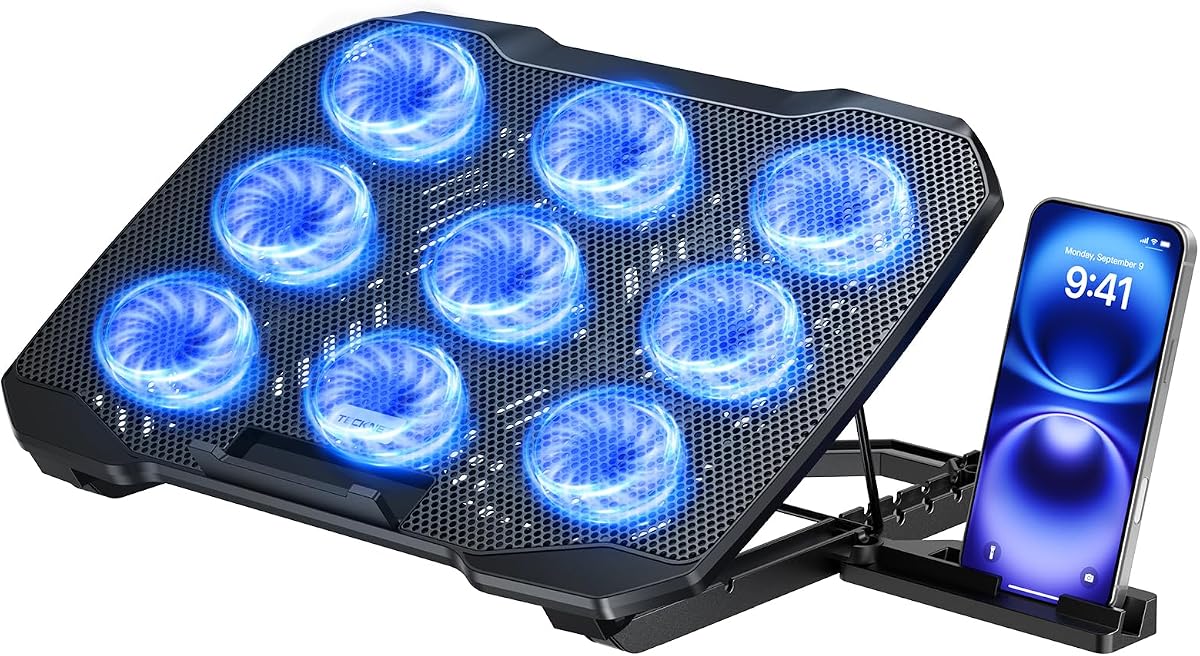
This TECKNET cooling pad stands out with nine high-performance fans and stepless speed control up to 2600 RPM, delivering robust thermal management for intense workloads and gaming sessions alike.
We may earn a commission when you buy through this link, at no additional cost to you.
The 360-degree surround airflow efficiently dissipates heat from all angles, while the five-level height adjustment allows users to achieve optimal ergonomic positioning for extended typing or viewing comfort without strain.
While the LED brightness automatically syncs with fan speed for status visibility, some users may prefer complete darkness during nighttime use, though this does not detract from the cooling efficiency or overall build quality.
Ideal for power users and professionals needing reliable thermal protection and multi-device integration, this pad combines powerful cooling with practical features like a built-in phone holder and dual USB ports.
The nine high-speed fans work in unison to create a comprehensive airflow network that prevents hotspots and maintains consistent internal temperatures even during prolonged heavy usage periods.
Adjusting the stand to five different heights up to six inches helps align the screen with eye level, reducing neck and shoulder tension while improving overall posture during daily computer tasks.
We may earn a commission when you buy through this link, at no additional cost to you.
This minimalist aluminum stand provides an affordable yet durable solution for improving laptop airflow and ergonomics through passive cooling principles and solid construction quality.
We may earn a commission when you buy through this link, at no additional cost to you.
By elevating the laptop off the desk surface, the ventilated design ensures natural air circulation under the exhaust fans, helping maintain lower operating temperatures without requiring power or moving parts.
Although it lacks adjustable height settings or fans, its simple assembly and wide compatibility make it an excellent choice for users seeking a clean workspace upgrade that supports thermal health.
Best suited for those who prioritize simplicity and cost-effectiveness, this stand delivers stable typing support and enhanced airflow to keep laptops running smoothly during extended work sessions.
Elevating the laptop creates space for natural air movement underneath, allowing heat to dissipate more effectively than when the device sits directly on a flat surface.
Its sleek, sturdy design complements any office or home setup, combining functional cooling benefits with a premium look that elevates the overall desk appearance.
We may earn a commission when you buy through this link, at no additional cost to you.
Designed for comfortable lap usage, this Targus mat combines dual fans with soft neoprene cushioning to provide a stable and cool surface for extended work or entertainment on your couch or bed.
We may earn a commission when you buy through this link, at no additional cost to you.
The open mesh top enables efficient airflow while the ergonomic tilt supports comfortable wrist and hand positioning, making it an ideal choice for users who often work outside traditional desk environments.
While the mat adds some weight compared to ultra-slim pads, its dual-fan cooling and cushioned surface prioritize user comfort and thermal protection when using laptops directly on your lap.
Perfect for casual users and professionals who need portable cooling without sacrificing comfort, this pad delivers a balanced mix of thermal efficiency and ergonomic support for versatile daily tasks.
The soft neoprene bottom provides a cushioned barrier between the hot laptop and your legs, ensuring a comfortable and heat-protected surface even during long periods of direct lap use.
Two USB-powered fans work together to actively dissipate heat away from the laptop base, maintaining optimal temperatures during intensive software or gaming operations.
We may earn a commission when you buy through this link, at no additional cost to you.
The havit HV-F2056 delivers whisper-quiet cooling performance with three ultra-quiet fans, making it ideal for users who need effective thermal management without distracting background noise during work or study.
We may earn a commission when you buy through this link, at no additional cost to you.
Its slim, portable design doubles as an ergonomic stand with two adjustable height settings, offering flexibility for comfortable viewing angles while keeping the laptop stable and securely positioned on the mesh surface.
Although compatibility is focused on 15.6 to 17-inch laptops, the extra USB port and USB-to-USB cable design provide convenient connectivity for peripherals without occupying additional laptop ports.
Best suited for professionals and students who prioritize silence and portability, this cooling pad balances performance with user-friendly features to support productive computing environments.
Three ultra-quiet fans create a noise-free environment, ensuring that your focus remains on tasks rather than mechanical sounds from the cooling device.
Its lightweight and slim construction allows easy transport in bags, while adjustable height settings promote better posture regardless of your working location.
We may earn a commission when you buy through this link, at no additional cost to you.
This TECKNET portable slim cooler features three powerful fans optimized for laptops ranging from 12 to 17 inches, ensuring broad compatibility across various models and brands without requiring external power adapters.
We may earn a commission when you buy through this link, at no additional cost to you.
Powered directly via USB, it operates quietly with dedicated on/off switches and blue LED indicators, offering straightforward control and visual confirmation that cooling is active during use.
The dual USB ports allow for additional device connectivity, and integrated rubber pads keep your laptop secure, though users with USB-C devices may need an adapter for the included cable.
Best for users seeking versatile, low-maintenance cooling across multiple devices, this pad combines reliable performance with responsive lifetime support for peace of mind.
Its compatibility with laptops from 12 to 17 inches ensures you can use the same cooler for different devices or upgrades without purchasing multiple solutions.
Each product comes with lifetime support upon registration, giving users direct access to assistance and warranty service if issues arise in the future.
We may earn a commission when you buy through this link, at no additional cost to you.
Kootek’s cooling pad features five built-in fans with two on/off switches, allowing you to customize cooling intensity by activating one, four, or all five fans based on your thermal needs.
We may earn a commission when you buy through this link, at no additional cost to you.
Six ergonomic height settings let you fine-tune the viewing angle for comfort, while a dual USB hub provides additional peripheral connectivity, making it suitable for multitasking setups and extended use sessions.
The included USB-to-USB cable requires an adapter for USB-C devices, but the front stoppers ensure your laptop stays secure during use, preventing slips even when adjusting angles or moving the pad.
Ideal for users who want customizable fan performance and ergonomic flexibility, this stand balances versatile cooling options with practical features for daily computing needs.
Two independent switches let you select how many fans run at once, giving you control over noise levels and cooling power depending on current workload demands.
Six adjustable height positions enable precise alignment with your eye level and typing posture, reducing physical strain during prolonged work or gaming activities.
We may earn a commission when you buy through this link, at no additional cost to you.
This KeiBn cooling pad delivers efficient heat dissipation for laptops up to 15.6 inches with two strong fans and a metal mesh surface, maintaining cooler operating temperatures during extended gaming or productivity tasks.
We may earn a commission when you buy through this link, at no additional cost to you.
Five adjustable height stands let you find a comfortable typing and viewing angle, while a hidden side phone holder frees your hands for multitasking, keeping notifications visible without cluttering the workspace.
The dual USB ports on the back enable convenient peripheral connections, and the portable design ensures easy transport between home, office, or gaming setups.
Best for gamers and mobile professionals needing a compact, functional cooling solution, this pad combines practical ergonomics with essential thermal protection for daily use.
A hideable side stand holds your phone securely on either side, allowing easy access to messages or apps while you focus on your laptop screen.
Two powerful fans and a metal mesh surface work together to quickly move heat away from the laptop base, preventing overheating during intensive operations.
We may earn a commission when you buy through this link, at no additional cost to you.
The Hagibis invisible cooler ball offers a minimalist cooling approach, using magnetic feet to elevate your laptop slightly for better airflow without adding bulk, weight, or power requirements.
We may earn a commission when you buy through this link, at no additional cost to you.
Weighing just 1.76 ounces, these two magnetic stands attach easily via Nd-Fe-B magnets and provide silica gel pads to prevent scratches, making them a discreet addition to any setup.
While they rely on physical heat dissipation rather than active fans, the improved bottom air circulation helps reduce temperatures efficiently for users who prefer passive, maintenance-free solutions.
Ideal for travelers and minimalists seeking portable cooling, this product delivers basic thermal support and ergonomic lift in an ultra-compact design that fits in any bag or pocket.
Elevating the laptop even slightly allows cooler air to flow underneath, reducing heat buildup without needing batteries, cables, or electrical connections.
With negligible weight and size, these stands slip easily into pockets or small compartments, ensuring you always have basic cooling and ergonomics available on the go.
We may earn a commission when you buy through this link, at no additional cost to you.
AIMIUZI’s cooling pad features five quiet fans arranged around a honeycomb-style metal mesh to provide consistent airflow across a wide area, helping dissipate heat efficiently from laptops up to 15.6 inches.
We may earn a commission when you buy through this link, at no additional cost to you.
Five adjustable stand height settings add room beneath the device for improved heat dissipation, while USB-powered operation and dual USB ports keep setup simple and flexible for any desk arrangement.
Although fan speed cannot be individually controlled, the included USB cable and user manual guide quick setup, and the 12-month warranty provides peace of mind for new users.
Best for users wanting multiple fans and adjustable ergonomics at a reasonable price, this stand delivers solid cooling performance and reliable support for daily computing tasks.
Five fans working together across a honeycomb mesh ensure even cooling across the laptop base, reducing localized hotspots and maintaining stable internal temperatures.
Multiple height and angle settings let you optimize the laptop’s position for comfortable viewing and typing, reducing physical fatigue during long sessions.
We may earn a commission when you buy through this link, at no additional cost to you.
TECKNET’s targeted cooling pad features two large fans and an internal channel design that directs concentrated airflow toward the CPU area, addressing the hottest part of the laptop for efficient thermal management.
We may earn a commission when you buy through this link, at no additional cost to you.
An adjustable side switch lets you control fan speed from low noise to maximum power, while USB-C and USB-A ports offer flexible connectivity for modern laptops and peripheral charging during use.
Its thin, portable design allows placement on desks, laps, or beds without damaging the device, and a flat base ensures stability even during casual use on soft surfaces.
Ideal for users seeking focused CPU cooling and adjustable speed control, this pad balances performance, connectivity, and portability to support reliable laptop operation in various environments.
The internal channel design concentrates cool air on the CPU, which is typically the primary heat source, maximizing cooling efficiency where it matters most.
Including both USB-C and USB-A ports ensures compatibility with a wide range of laptops while allowing you to power or charge small devices simultaneously.
We may earn a commission when you buy through this link, at no additional cost to you.
Selecting the right cooling solution depends on your specific laptop model, usage patterns, and portability needs. Here are key factors to consider for an informed decision.
Active cooling pads use fans to push air through the laptop vents, providing stronger thermal relief during high-load tasks, whereas passive stands rely on elevation to improve natural airflow without moving parts.
Choose active fans for gaming or heavy computing, and passive stands for basic use or minimal maintenance.
Ensure the pad or stand matches your laptop dimensions to avoid overhang or insufficient support, as most models specify compatibility with ranges like 12–17 inches or specific inch sizes.
Check manufacturer specifications to confirm your model fits comfortably and securely.
If you carry your laptop daily, look for slim, lightweight designs under one pound that fold or stack easily, while stationary setups can accommodate larger, heavier cooling units with extra features.
Balance weight against cooling performance based on your travel frequency.
Multi-height or tilting stands improve posture by raising the screen to eye level, reducing neck and wrist strain, while fixed designs may suffice for occasional use.
Prioritize adjustable options if you work many hours daily to prevent physical fatigue.
Most USB-powered pads draw power from your laptop, which may drain batteries faster, so consider models with built-in batteries or external power options for longer unplugged sessions.
Check cable type compatibility to avoid needing adapters for modern USB-C ports.
Quiet fans operate below 40 dB to avoid distraction in shared environments, whereas high-speed models may generate more noise but deliver stronger airflow for demanding applications.
Read user reviews to assess real-world noise levels before purchase.
Built-in phone holders, extra USB ports, LED indicators, or protective surfaces add convenience and organization, enhancing the overall value beyond basic cooling functionality.
Identify which extras matter most to your workflow to avoid paying for unused capabilities.
Look for solid materials like aluminum or metal mesh that resist warping, and check warranty length to ensure protection against defects or wear over time.
Longer warranties often indicate higher build quality and manufacturer confidence in product lifespan.
Place the cooling pad on a flat, stable surface and connect the USB cable to your laptop or powered USB hub, ensuring the laptop sits evenly on the mesh or platform without overhang.
Adjust the height settings to your preferred ergonomic angle before starting work, and if the pad has fan controls, set speeds based on your current workload intensity and noise tolerance.
Regularly clean dust from fan vents and mesh surfaces using a soft brush or compressed air to maintain airflow efficiency, and avoid placing heavy objects on fans to prevent mechanical damage.
Yes, cooling pads improve airflow beneath the laptop, which helps dissipate heat more efficiently than flat surfaces. By reducing internal temperatures, they prevent throttling and extend component lifespan.
No, cooling pads are safe when used correctly. Look for non-slip pads and soft materials to prevent scratches, and ensure your laptop is compatible with the size limits specified by the manufacturer.
Clean every two to four weeks depending on usage frequency and environment. Dust buildup restricts airflow, so wiping vents and fans regularly maintains optimal cooling performance.
Yes, but only if it has a soft bottom surface like neoprene. Hard pads may transfer heat to your legs, so check for lap-friendly designs if you plan to work outside a desk.
Yes, many modern pads include USB-C ports or adapters for MacBooks and newer Windows laptops, but always check the included cable type before purchasing to ensure direct compatibility.
For under 15-inch laptops, look for compact designs with fans aligned to vent locations, such as TECKNET or Kootek models, which offer strong airflow while maintaining portability and desk space efficiency.
The TECKNET cooling pad with phone stand leads as the top pick for its balanced combination of high-speed fans, ergonomic adjustments, and practical connectivity features.
Prioritize your primary usage scenario—whether gaming, travel, or desk work—to narrow down options between active fans for thermal relief and passive stands for ergonomic and airflow benefits.
Remember to verify product compatibility and current availability before purchasing, as specifications and stock levels may change over time.