
Beelink SER3
4.3Editor score
16GB DDR4 RAM
Ryzen 3 3200U
Dual HDMI Ports
This guide compares the top Linux Mini Pcs for performance and value, analyzing specs and features to help you choose the right compact computer for your needs.
Linux Mini Pcs offer powerful computing in a tiny footprint, ideal for developers and home labs. They run open-source systems efficiently, providing security and flexibility without the bulk of traditional desktops.
We evaluated ten top models based on processor power, memory capacity, and Linux compatibility. Our analysis covers real-world performance, connectivity options, and build quality to ensure you find the best fit.
Each pick highlights specific strengths like gaming capability or server readiness. Prices and availability change often, so verify current details before purchasing to ensure you get the best value today.
4.3Editor score

4.8Editor score

4.9Editor score
This table provides a side-by-side look at the key specifications of our top ten Linux Mini Pcs to help you quickly compare processors, memory, and storage options.


The TK Node Mini PC stands out as the top choice for Linux users seeking reliability and performance. It ships with Zorin OS pre-installed, offering a familiar interface for those transitioning from Windows.
We may earn a commission when you buy through this link, at no additional cost to you.
Its AMD Ryzen R2314 processor handles daily tasks efficiently while supporting virtualization and automation workloads. The dual NVMe slots allow up to 4TB storage, and RAM can expand to 64GB.
While the base model comes with 8GB RAM, the dual SO-DIMM slots make upgrades easy. The lack of Wi-Fi 6E is a minor trade-off given the robust wired and Bluetooth connectivity options available.
For developers and home lab enthusiasts, this mini PC delivers exceptional value. The US-based warranty and quality checks ensure peace of mind for long-term operation in professional or personal setups.
Zorin OS provides a secure, Ubuntu-based desktop ready for productivity and development immediately out of the box.
Dual NVMe and SO-DIMM slots ensure you can grow storage and RAM as your data and workload needs expand over time.
We may earn a commission when you buy through this link, at no additional cost to you.
The Beelink SER3 offers excellent value for budget-conscious buyers needing solid Linux performance. It comes with 16GB DDR4 RAM which is rare at this price point ensuring smooth multitasking.
We may earn a commission when you buy through this link, at no additional cost to you.
The AMD Ryzen 3 3200U processor handles everyday computing tasks effectively including 4K video playback and light design work. Dual HDMI ports allow dual monitor setups for increased productivity.
While it uses an older 14nm processor limiting heavy workloads the 16GB RAM compensates for many users. Storage upgrades are possible via M.2 slot but the base configuration is quite capable.
Ideal for students or home office use this mini PC delivers reliability at a low cost. The lifetime technical support adds significant value for those needing long-term assistance with setup.
16GB of DDR4 RAM ensures browsers and apps run smoothly without slowdowns even with many tabs open.
Two HDMI 2.0 ports enable connecting two 4K monitors for efficient multitasking across screens.
We may earn a commission when you buy through this link, at no additional cost to you.
The ASUS NUC 14 Pro represents the pinnacle of Linux Mini PC performance with cutting-edge AI and graphics capabilities. It runs Linux Mint pre-installed providing a developer-friendly open-source environment.
We may earn a commission when you buy through this link, at no additional cost to you.
Its Intel Ultra 7 155H processor boasts 16 cores and 22 threads handling intensive AI and data tasks effortlessly. DDR5 RAM and Thunderbolt 4 ensure ultra-fast data transfer and connectivity.
While expensive this machine justifies the cost for professionals needing raw power. The Intel Arc GPU handles rendering and gaming tasks that cheaper options cannot manage efficiently.
For AI researchers and power users this is the ultimate compact workstation. The advanced cooling system maintains performance during 24/7 operation without thermal throttling or noise issues.
The Intel Ultra 7 155H processor offers dedicated AI acceleration for machine learning and inference tasks.
Thunderbolt 4 ports allow for lightning-fast external storage and high-speed docking station connections.
We may earn a commission when you buy through this link, at no additional cost to you.
The Beelink Mini S12 Pro excels as a low-power workstation ideal for media and light office tasks. The Intel N100 processor provides excellent performance per watt for silent operation.
We may earn a commission when you buy through this link, at no additional cost to you.
It includes 16GB DDR4 RAM and 500GB SSD ensuring quick boot times and smooth app loading. Dual HDMI ports support two 4K monitors at 60Hz for immersive multitasking.
Cooling is handled via a large fan and copper heat sink maintaining stable performance even under load. The plastic chassis is durable and lightweight making it easy to mount or carry.
For home office use or media centers this mini PC balances cost and capability well. The 3-year warranty and 24/7 support provide confidence in its reliability for daily use.
The Intel N100 processor delivers strong performance while consuming minimal power for reduced heat output.
Hardware AV1 decode ensures smooth streaming of modern video formats without taxing the CPU.
We may earn a commission when you buy through this link, at no additional cost to you.
The KAMRUI Pinova P2 is designed for users needing multiple monitors without sacrificing performance. It supports triple 4K display output via HDMI DisplayPort and USB-C for versatile setups.
We may earn a commission when you buy through this link, at no additional cost to you.
Powered by the AMD Ryzen 7 3300U it delivers efficient processing with 16GB LPDDR4X RAM for fluid multitasking. The Zen3 architecture ensures good single-core performance for responsive workflows.
Storage can be expanded to 4TB via two M.2 slots allowing ample space for media and projects. The cooling system is quiet and effective keeping noise levels minimal during operation.
For home office and creative tasks this mini PC offers great value. The VESA mount and compact design save space while providing robust connectivity for peripherals and monitors.
Simultaneous triple 4K output enables side-by-side work without window switching.
USB 3.2 Gen2 Type-C provides fast data transfer and display connectivity.
We may earn a commission when you buy through this link, at no additional cost to you.
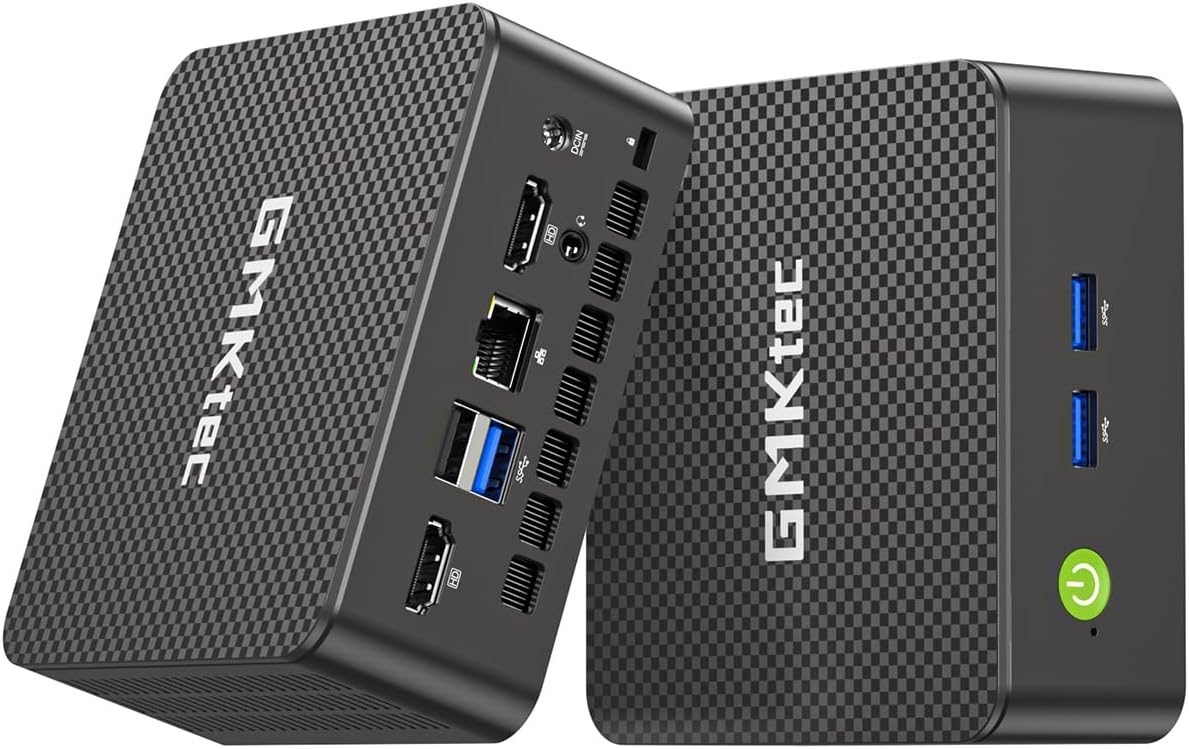
The GMKtec G11 targets network enthusiasts needing powerful virtualization capabilities. Dual 2.5GbE Ethernet ports allow it to act as a firewall or router easily for home labs.
We may earn a commission when you buy through this link, at no additional cost to you.
The Ryzen R2514 processor outperforms standard Intel N-series chips significantly delivering better multi-threaded performance. Dual-channel 16GB DDR4 RAM ensures smooth operation across multiple virtual machines.
Triple 4K display support makes it versatile for monitoring and productivity tasks. WiFi 6E ensures stable high-speed wireless connections for peripherals and data transfers.
For IT professionals building home servers this mini PC is unmatched in value. The compact size and robust networking features make it ideal for advanced users seeking control.
Dual 2.5GbE ports enable advanced routing and firewall configurations like pfSense or OPNsense.
WiFi 6E support ensures low latency and fast data rates for modern wireless devices.
We may earn a commission when you buy through this link, at no additional cost to you.
The CyberGeek Mini PC packs high-end specs into a compact form for demanding users. The Intel i9-11900H delivers up to 30% more power than 10th-gen equivalents for heavy workloads.
We may earn a commission when you buy through this link, at no additional cost to you.
It comes with 32GB DDR4 RAM and 1TB PCIe SSD ensuring rapid loading and smooth multitasking. Ubuntu Linux is preloaded providing a versatile environment for development and gaming.
With 6 USB ports and triple 4K support it connects easily to various peripherals. The advanced cooling system keeps performance high even under sustained load without throttling.
For gamers and developers needing desktop power this mini PC is a strong contender. It balances raw performance with compact design for versatile home and office use.
8 cores and 16 threads handle rendering and compilation tasks efficiently.
Six USB ports accommodate multiple peripherals without needing extra hubs or adapters.
We may earn a commission when you buy through this link, at no additional cost to you.
The BOSGAME E5 balances affordability and performance for daily productivity. The Ryzen 3 5300U offers efficient computing for spreadsheets and web apps without lag.
We may earn a commission when you buy through this link, at no additional cost to you.
It includes 16GB DDR4 RAM and 512GB NVMe SSD ensuring quick boot and app load times. Dual 2.5GbE LAN ports make it suitable for networked storage or secure setups.
Full-Function Type-C allows display output and power delivery adding versatility. The compact and quiet design fits well in home offices or professional environments.
For users seeking a reliable daily driver this mini PC offers solid value. The expandable RAM and storage options allow it to grow with your needs over time.
Dual 2.5GbE LAN ports provide robust connectivity for networked storage or virtualization tasks.
16GB RAM and NVMe SSD ensure smooth performance for daily computing and multitasking.
We may earn a commission when you buy through this link, at no additional cost to you.
The BOSGAME E4 Air is a budget-friendly option for basic Linux tasks. Its Ryzen 5 3500U handles daily workloads like browsing and HD video streaming smoothly.
We may earn a commission when you buy through this link, at no additional cost to you.
8GB DDR4 RAM is sufficient for everyday use but limits heavy multitasking. Triple 4K display support via HDMI DP and USB-C offers flexible setups for work or entertainment.
The 256GB SATA SSD is decent but slower than NVMe options. The lightweight chassis makes it portable for on-the-go work in cafes or co-working spaces.
For light users on a strict budget this mini PC is ideal. The 3-year warranty and support provide assurance despite the entry-level specs.
Low cost allows new users to access Linux mini computing without high financial risk.
Lightweight design and small size make it easy to carry and deploy in different locations.
We may earn a commission when you buy through this link, at no additional cost to you.
The GMKtec G3S offers a compact and affordable solution for home use. The Intel N95 processor delivers improved performance over previous models for efficient daily computing.
We may earn a commission when you buy through this link, at no additional cost to you.
It includes 8GB RAM and 256GB SSD providing adequate space for apps and files. Dual HDMI ports allow two 4K displays for improved productivity and entertainment setups.
Its small form factor fits easily on desks or shelves without taking much space. The quiet operation makes it suitable for living rooms or study areas.
For users seeking a simple and reliable mini PC this model is a strong choice. It balances cost and capability for typical home tasks like media and browsing.
Compact size makes it easy to integrate into modern home office or entertainment setups.
Intel N95 processor provides good speed for daily tasks while keeping power usage low.
We may earn a commission when you buy through this link, at no additional cost to you.
Choosing the right Linux Mini PC requires balancing performance, connectivity, and budget to match your specific computing needs.
The processor is the brain of your Mini PC and determines how well it handles tasks. For basic browsing and office work entry-level chips like Intel N100 or AMD Ryzen 3 are sufficient. For heavy workloads like virtualization or video editing consider higher-end options like Intel Core i9 or AMD Ryzen 7.
Look for models with at least 4 cores for modern multitasking and ensure the CPU supports 64-bit Linux for full compatibility.
RAM affects how many apps you can run simultaneously without slowdowns. Aim for 16GB if you plan to multitask heavily or use virtual machines. Storage speed and capacity impact boot times and file access; NVMe SSDs are faster than SATA drives.
Verify if RAM is soldered or upgradable. Soldered memory limits future upgrades so choose higher capacity upfront if you cannot expand later.
Some Mini PCs ship with Linux pre-installed like Zorin OS or Ubuntu which simplifies setup. Others may come with Windows but can be wiped for Linux. Always check hardware support for Wi-Fi Bluetooth and graphics drivers to ensure smooth operation.
Choose a pre-installed model if you prefer immediate use. Check Linux compatibility before installing yourself to avoid driver issues.
Ports determine how many peripherals you can connect. Look for HDMI DisplayPort and USB-C for monitors and USB-A for drives and keyboards. Dual Ethernet ports are useful for advanced networking or virtual machines.
Ensure you have enough USB-A and USB-C ports to match your devices. Thunderbolt support is a plus for fast external storage and high-speed docking.
Build quality affects durability and noise levels. Metal chassis dissipates heat better than plastic and often runs quieter. Active cooling with fans is common but ensure the model has good thermal management for 24/7 operation.
Check for fan noise reviews especially if placing it on a desk. Quiet cooling is essential for home offices or media rooms.
Consider how easy it is to upgrade components later. Some models allow RAM or SSD expansion while others are fixed. Dual NVMe slots or multiple M.2 slots provide flexibility for growing storage needs.
Choose a model with upgrade options if you plan to keep the Mini PC for years. Future-proofing saves money in the long run.
Prices vary widely based on specs and brand. Budget models under $300 are great for basic tasks while premium ones offer high-end performance. Warranty length and support quality matter for long-term reliability.
Set a budget and compare specs to find the best value. Look for at least 1-year warranty and responsive customer support.
For home labs or remote work network performance is critical. WiFi 6E and Gigabit Ethernet ensure fast and stable connections. Dual LAN ports enable advanced routing or firewall setups.
Prioritize Ethernet if your setup allows it for better reliability. Advanced network features are valuable for server users.
Start by connecting the Mini PC to a monitor using HDMI or USB-C. Power it on and follow on-screen prompts to set up your Linux distribution and user account.
Install essential software via the software center or package manager like apt or flatpak. Keep the system updated regularly to ensure security patches are applied.
Maintain cleanliness by keeping vents free of dust using compressed air periodically. Monitor temperatures occasionally to prevent overheating during intensive tasks.
Yes most Mini PCs can run Linux but compatibility depends on drivers. Always check Wi-Fi Bluetooth and graphics chip support before installing. Models with Intel or AMD CPUs usually work best without issues.
The TK Node Mini PC is ideal for users wanting pre-installed Linux. For high performance the ASUS NUC 14 Pro is unmatched. Budget buyers can consider the Beelink SER3 for solid entry-level use.
Many Mini PCs with multi-core CPUs handle development well. The CyberGeek with Intel i9 or ASUS NUC with Ultra 7 offer desktop-level power suitable for compiling code and running containers.
Some Mini PCs allow upgrades while others do not. Models with SO-DIMM slots let you expand RAM and those with extra M.2 slots allow more storage. Check specs before purchasing to confirm.
Create a bootable USB with your chosen Linux distribution. Enter BIOS boot menu and select USB to install Linux over or alongside Windows. Back up data before proceeding to avoid data loss.
Mini PCs are great for home servers due to low power and noise. Dual Ethernet models like the GMKtec G11 excel as routers or NAS units. Ensure adequate storage for data needs.
Most Mini PCs support dual displays. The KAMRUI Pinova P2 supports triple 4K while Beelink SER3 handles dual 4K. Check ports to ensure HDMI and DisplayPort meet your setup needs.
Mini PCs are generally quiet with fan noise under load. Models like Beelink S12 Pro have advanced cooling to stay silent. Avoid compact sealed cases that might overheat during sustained use.
Our top picks include the TK Node Mini PC for pre-installed Linux the Beelink SER3 for budget value and the ASUS NUC 14 Pro for premium performance. Each excels in different areas.
Prioritize processor power and RAM for demanding tasks or storage and ports for home lab needs. Balance cost with long-term needs to find the ideal Mini PC.
Prices and availability change frequently. Check current deals and stock before purchasing to secure the best options available today for your Linux computing needs.