
SteelSeries Apex 3 Gaming Keyboard
4.6Editor score
IP32 water resistant design
Whisper quiet gaming switches
10-zone RGB illumination
This guide compares the top ten Mac gaming keyboard options available in October 2026 to help you find the perfect mechanical input device for your setup.
Finding the right Mac gaming keyboard can transform your daily workflow and entertainment experience significantly. You need a device that matches the sleek aesthetic of your Apple ecosystem while delivering the precision required for competitive play. This ensures every keystroke counts whether you are coding, creating, or competing in high-stakes titles.
We evaluated ten standout models based on build quality, switch performance, wireless connectivity, and overall value. Our team focused on compatibility with macOS alongside essential features like programmable keys and ergonomic support. We examined real user feedback and technical specifications to ensure every recommendation meets rigorous standards for reliability.
Each selection highlights specific strengths tailored to different user needs ranging from budget-friendly options to premium configurations. Note that product availability and pricing fluctuate regularly so verify current details before purchasing. This overview aims to streamline your decision-making process with clear insights into what each model offers today.
4.6Editor score
4.3Editor score

4.0Editor score
This side-by-side comparison breaks down the core specifications of every model included in our top ten list. We highlight layout differences connectivity options and unique features to help you quickly identify which keyboard aligns best with your specific workflow requirements and desk setup constraints.


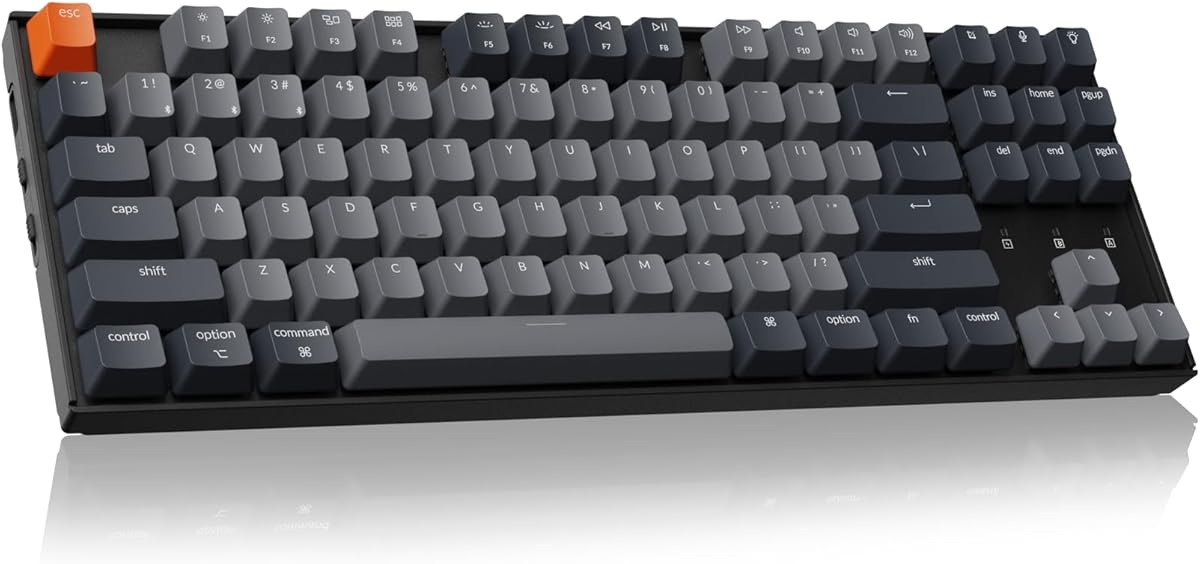
The Keychron K8 stands out as a top contender for Mac users seeking a versatile mechanical keyboard. Its rating of 4.3 reflects strong user satisfaction across both productivity and gaming tasks. This model excels in providing a seamless experience between macOS and Windows environments.
We may earn a commission when you buy through this link, at no additional cost to you.
You get an optimized layout with dedicated function keys for Mac systems along with included keycaps for Windows. The dual connection modes allow you to switch between three devices effortlessly via Bluetooth 5.1 or use the reliable USB Type-C wired mode. The brown switches offer tactile feedback without excessive noise.
While the battery life is impressive at up to 200 hours with backlight off, the lack of dedicated media keys means you rely on function combinations. The price point is higher than budget options but justified by the feature set and build quality. This trade-off is acceptable for users prioritizing reliability.
This keyboard is ideal for professionals who game occasionally and need robust Mac compatibility. The ergonomic design supports long sessions comfortably. If you value flexibility and premium features, the K8 deserves serious consideration for your setup.
Switch between up to three devices seamlessly using Bluetooth 5.1 or enjoy stable wired performance via USB Type-C.
Includes all essential multimedia and function keys for macOS along with extra keycaps for Windows compatibility.
We may earn a commission when you buy through this link, at no additional cost to you.
The SteelSeries Apex 3 offers an entry point into gaming keyboards without breaking the bank. With a high rating of 4.6 it delivers reliable performance for casual gamers on Mac systems. Its water resistant build adds peace of mind for everyday use.
We may earn a commission when you buy through this link, at no additional cost to you.
You benefit from whisper quiet gaming switches that make 20 million low friction keypresses ideal for shared workspaces. The 10-zone RGB illumination adds visual flair while dedicated multimedia controls let you adjust settings quickly. Compatibility extends to Mac OS X ensuring it works well with your setup.
However the lack of true mechanical switches means you might miss out on tactile feedback compared to pricier models. Long-term durability could be less than premium alternatives despite the water resistance. These limitations are acceptable given the very competitive pricing for budget-conscious buyers.
This keyboard suits users needing a quiet versatile input device for light gaming and general tasks. It is perfect for dorm rooms or offices where noise matters. If you want value over premium feel the Apex 3 is a smart choice.
IP32 water resistant design prevents accidental damage from liquid spills during intense gaming sessions.
Whisper quiet gaming switches ensure nearly silent use suitable for quiet environments like offices.
We may earn a commission when you buy through this link, at no additional cost to you.
The Logitech G915 X represents the pinnacle of wired gaming keyboards with its premium engineering. A rating of 4.0 indicates strong performance though some users may find the cost steep. It brings next-gen technology to the table for serious Mac gamers.
We may earn a commission when you buy through this link, at no additional cost to you.
You gain speed and precision through low-profile GL mechanical switches with a 1.3 mm actuation point for faster reactions. The full-size layout provides a numpad and media controls for complete command over your setup. LIGHTSYNC RGB allows ~16.8M colors synced with other Logitech G gear.
While the design is elegant with a sand-blasted aluminum top plate the lack of wireless connectivity limits flexibility. The high price makes it an investment rather than a casual purchase. These trade-offs are acceptable for users demanding top-tier performance and aesthetics.
This keyboard targets enthusiasts who want the latest innovations in gaming tech. The elevated typing experience supports long sessions comfortably. If budget is not a constraint the G915 X offers a superior solution for competitive play.
Increase actions per minute rate with 1.3 mm actuation point and 3.2 mm total travel distance.
Set up to 15 functions per key and remap commands to turn your keyboard into a command center.
We may earn a commission when you buy through this link, at no additional cost to you.
The EPOMAKER X Aula F75 MAX introduces unique features like a customizable TFT screen and volume knob. With a 4.6 rating it appeals to enthusiasts who enjoy personalizing their gaming gear. Its gasket mount structure enhances typing comfort significantly.
We may earn a commission when you buy through this link, at no additional cost to you.
You get 80 programmable keys along with a smart display for battery monitoring and connectivity status. The hot-swappable design allows you to experiment with different switches easily. Compatibility with Mac and Linux makes it versatile for various workflows beyond just gaming.
The complexity of software customization can be daunting for beginners needing time to master. The layout might not suit users requiring a full numpad or number keys. These issues are minor for those seeking high levels of control and customization options.
This keyboard suits tech-savvy users who want a distinct look and feel. The gasket mount reduces harsh bottom-out for softer typing. If you value innovation and personalization the F75 MAX is a standout option.
Gif-showing screen makes backlight customization fun and easy with connectivity and battery info in one.
Compatible with 3/5-pin mechanical switches for experimenting typing feel and sound easily.
We may earn a commission when you buy through this link, at no additional cost to you.
The Logitech G413 TKL SE delivers a robust tenkeyless design ideal for saving desk space. Its 4.6 rating highlights consistent quality and performance for competitive gaming. The PBT keycaps ensure resistance to wear and heat over time.
We may earn a commission when you buy through this link, at no additional cost to you.
You get tactile mechanical switches that provide uncompromising performance for precise inputs. The brushed aluminum-magnesium alloy top case serves as a sturdy backbone with minimal flex. FN media controls let you manage volume and lighting without interrupting your game.
The lighting is limited to white LEDs rather than full RGB which might disappoint color enthusiasts. The fixed layout offers no flexibility for custom mapping beyond standard functions. These drawbacks are acceptable given the price and durability benefits offered.
This keyboard fits gamers who prioritize function and build over aesthetic customization. The robust body design supports intense sessions well. If you need a reliable workhorse the G413 TKL SE is a strong contender.
Heat- and wear-resistant PBT keycaps ensure longevity during extended gaming usage.
6-Key rollover anti-ghosting performance ensures reliable key input versus non-gaming keyboards.
We may earn a commission when you buy through this link, at no additional cost to you.
The Redragon K742 offers versatile tri-mode connectivity including Bluetooth 5.0 and 2.4GHz wireless. A 4.6 rating reflects strong satisfaction among users needing flexible connection options. Its gasket structure provides a silent and satisfying typing feel.
We may earn a commission when you buy through this link, at no additional cost to you.
You benefit from QMK/VIA programmable support for endless key mapping and macro possibilities. The compact 98% layout saves desk space while keeping essential multimedia keys. The built-in USB dongle collection design ensures safe storage for your receiver.
Accessing full customization requires contacting the brand for a JSON file which adds a step. The VIA software may take time to learn for average users. These issues are minor for those wanting deep control over their device.
This keyboard suits hybrid workers who game occasionally and need seamless device switching. The compact design fits minimalist battlestations perfectly. If you value programmability and flexibility the K742 is an excellent choice.
VIA Software offers endless possibilities in remapping keys and editing macros for efficiency.
98% compact layout saves 10% desk space without sacrificing functionality.
We may earn a commission when you buy through this link, at no additional cost to you.
The Keychron K4 96% packs a number pad into a compact design suitable for productivity. Its 4.4 rating shows solid reliability for mixed use cases on Mac. The unique Mac layout ensures all necessary function keys are present.
We may earn a commission when you buy through this link, at no additional cost to you.
You get wireless connectivity via Bluetooth 5.1 to switch between three devices easily. The 4000 mAh battery lasts up to 240 hours with backlight disabled for long-term usage. N-Key Rollover on wired mode ensures accurate inputs during intense gaming.
White LED backlight is simpler than RGB but suits modern minimalist setups. Fixed switches mean you cannot customize the feel later. These limitations are acceptable given the compact efficiency and reliable wireless performance.
This keyboard fits users needing a number pad in a small footprint. It is ideal for home offices with limited space. If you want Mac compatibility with a number pad the K4 96% is perfect.
100-key compact design that's built for productivity and a tactile typing experience.
Unique Mac layout includes all necessary function keys while compatible with Windows.
We may earn a commission when you buy through this link, at no additional cost to you.
The Logitech MX Mechanical is designed for effortless precision with low-profile mechanical switches. Its 4.2 rating reflects strong user approval for productivity tasks across OS. Smart illumination lights up keys when hands approach for convenience.
We may earn a commission when you buy through this link, at no additional cost to you.
You enjoy cross-computer flow for seamless control between devices and customized Fn keys via Logi Options+. The USB-C quick charging keeps it powered for up to 15 days on full charge. Multi-device pairing via Bluetooth Low Energy or Logi Bolt is versatile.
It is not built primarily for high-performance gaming but offers enough responsiveness for light play. The price is higher than standard gaming boards due to productivity features. These trade-offs are worth it for users needing a hybrid work-and-play device.
This keyboard suits professionals who need reliable performance and cross-device syncing. The low-profile keys reduce wrist strain significantly. If workflow efficiency is your priority the MX Mechanical is a top choice.
Backlit keys light up the moment your hands approach and adjust to lighting conditions.
Pair with up to 3 devices on nearly any operating system via Bluetooth or Bolt receiver.
We may earn a commission when you buy through this link, at no additional cost to you.
The GravaStar Mercury K1 boasts a unique aluminum alloy exoskeleton with a gradient black finish. Its 4.7 rating highlights strong satisfaction for both style and performance. The custom switches ensure quick reactions while minimizing accidental key presses.
We may earn a commission when you buy through this link, at no additional cost to you.
You get tri-mode connectivity for seamless switching between devices via wired or wireless. The gasket-mounted structure with five layers of sound-dampening foam enhances acoustics significantly. Dual independent RGB lighting systems offer 16.8 million colors for customization.
The futuristic design may not suit traditional setups but stands out in modern battlestations. The price is higher than average for mechanical keyboards. These factors are acceptable for those wanting a unique look and premium typing feel.
This keyboard targets users who value aesthetics and premium build quality equally. It fits well in minimalist and futuristic setups. If you want something that stands out the Mercury K1 is ideal.
Five layers of sound-dampening foam enhance acoustics and reduce noise for comfort.
Aluminum alloy exoskeleton with a gradient black finish combines strength and lightness.
We may earn a commission when you buy through this link, at no additional cost to you.
The Logitech G213 Prodigy offers a full-sized design suitable for gaming and productivity. A 4.2 rating reflects decent performance for entry-level users on Mac systems. Its slim body is built for gamers of all levels with durable construction.
We may earn a commission when you buy through this link, at no additional cost to you.
You get five customizable lighting zones with over 16.8M colors to match your setup. The anti-ghosting gaming matrix keeps you in control during intense sessions. An integrated palm rest helps maintain comfort during long gaming sessions.
It is not a mechanical keyboard which limits tactile feedback compared to others. The full-sized layout takes up more desk space than TKL options. These are acceptable compromises given the low price and ease of cleaning.
This keyboard fits casual gamers or those needing a simple reliable input device. The durable construction repels liquids and dirt effectively. If you want ease of use and value the G213 Prodigy works well.
Personalize 5 customizable lighting zones with over 16.8M colors to match your setup.
Stay comfortable during long gaming sessions thanks to an integrated palm rest.
We may earn a commission when you buy through this link, at no additional cost to you.
Selecting the ideal Mac gaming keyboard involves balancing compatibility performance and ergonomics for your specific needs.
Ensure the keyboard explicitly supports macOS with correct function keys and shortcuts. Look for models that offer both Mac and Windows keycaps for flexibility if you switch systems. This prevents frustration with missing commands like Command and Option keys.
Choose a layout like TKL or 96% based on your available desk space. Compact designs save room without sacrificing critical functionality for most gaming tasks.
Decide between tactile or linear switches based on whether you prefer feedback or smooth travel. Tactile switches often enhance typing precision while linear switches may suit rapid gaming inputs better. Consider noise levels if you work in shared environments.
Look for high durability ratings measured in keystrokes to ensure long-term reliability. Higher rated switches typically withstand heavy use without degradation over time.
Wireless keyboards offer flexibility but check battery life and latency for gaming. Wired options provide stable connections without charging interruptions during extended sessions. Some models support both wired and wireless modes for maximum versatility.
Bluetooth 5.0 or higher ensures stable connections with your Mac or other devices. Verify the number of devices supported if you need to switch between work and play often.
Materials like aluminum or magnesium alloy contribute to a sturdy frame and minimal flex. High-quality keycaps such as PBT resist wear and shine compared to cheaper ABS plastic. Check for water resistance if you drink near your keyboard frequently.
A solid build ensures the keyboard withstands intense gaming sessions without degradation. Look for reinforced key structures to maintain performance over years of use.
RGB lighting adds flair but consider if you need full color zones or simple backlighting. Look for synchronization with other gear if you use a cohesive brand ecosystem. Adjustable brightness helps maintain comfort in low-light environments.
The aesthetic should match your desk setup whether minimalist or gaming-focused. Some models feature smart illumination that reacts to your presence for a modern touch.
Palm rests and adjustable feet help maintain proper posture during long typing or gaming sessions. A keyboard with a low profile might reduce wrist strain for some users over time. Ergonomic designs prevent fatigue during daily productivity work.
Check the typing angle and height adjustments to suit your personal preferences. Comfort features become essential when you spend hours using your keyboard every day.
Software support allows you to remap keys and create macros for efficiency. Look for models offering dedicated media keys or knobs for easy volume control without software. Advanced customization can enhance both productivity and gaming performance.
Consider if you need hot-swappable switches for future customization. This flexibility allows you to change switch types without replacing the entire keyboard.
Set a budget but recognize that higher-priced models often offer better durability and features. Entry-level keyboards may lack advanced features but serve casual users well. Balance cost with the specific needs of your gaming and productivity workflow.
Evaluate the cost per feature to ensure you get what you need without overspending. Read reviews to confirm that the price matches the actual performance and build quality.
Start by connecting your keyboard via Bluetooth or USB-C ensuring it is set to Mac mode. Install any necessary software for customization and map essential keys for your workflow. Adjust brightness and key response settings to suit your personal comfort levels.
Keep your keyboard clean by gently wiping the surface with a microfiber cloth regularly. Use compressed air to remove debris between keycaps and maintain smooth operation. Avoid liquids and store in a dry environment to prevent accidental damage.
For wireless models charge the battery using the provided USB-C cable before long gaming sessions. Rotate devices in the memory slots if you switch between Mac and PC frequently. Re-check firmware updates occasionally to ensure optimal performance and bug fixes.
All listed models are tested for macOS compatibility with correct function keys. Most come with specific Mac layouts or extra keycaps for seamless integration. Some require switching modes to ensure correct key mapping for Apple systems.
Tactile switches offer precise feedback for both gaming and typing tasks. Linear switches may be smoother for rapid key presses in fast-paced games. Your personal preference regarding noise and feel determines the best choice.
Many models support tri-mode connectivity allowing you to switch between three devices. Bluetooth 5.0 or higher ensures stable connections for seamless device changes. Dedicated shortcuts simplify switching between Mac and other operating systems easily.
Modern wireless tech with low latency matches wired performance for most games. Look for models with high polling rates to ensure instant input registration. Wired options remain best for absolute zero-latency scenarios in competitive play.
Regularly clean the surface and remove debris between keycaps with compressed air. Avoid exposure to liquids and keep the device in a dry environment. Proper maintenance extends the durability and performance of mechanical switches significantly.
TKL and 96% layouts save space while retaining essential navigation keys. Full-size models offer numpads for productivity tasks but occupy more room. Choose based on your need for space versus functionality.
Our top picks highlight the Keychron K8 for overall balance the SteelSeries Apex 3 for budget needs and the Logitech G915 X for premium features. Each model serves distinct user requirements ranging from casual to competitive gaming. The variety ensures you can find a match for your specific workflow and budget.
Prioritize compatibility and build quality to ensure the keyboard serves you well over time. Consider whether wireless freedom or wired stability matters most to your gaming style. These choices will impact your long-term satisfaction with the device.
Always check current availability and details before purchasing since specs may vary by region. Verify warranty terms and customer support for peace of mind. With the right choice you can enhance your Mac gaming experience effectively.