
RDS – Licensed Nintendo Action Grip NES Classic Controller
4.5Editor score
Licensed Nintendo accessory quality
Textured silicone material for grip
Affordable price point for gamers
This guide compares the top Classic Nes Controller Replacement options for retro gaming on PC, Mac, and consoles to help you find the perfect fit.
Finding the right Classic Nes Controller Replacement is essential for anyone looking to revive their retro gaming experience. Whether you are playing on a PC or using the original console, having reliable controllers ensures smooth gameplay and comfort during long sessions.
We have carefully evaluated ten top-rated products based on compatibility, build quality, and user feedback. Our list includes wired and wireless options designed for various systems, ensuring you find a controller that meets your specific gaming needs without breaking the bank.
Each pick highlights key features, pros, and cons to help you make an informed decision quickly. Please note that prices and availability may change over time, so we recommend checking the latest details before making your final purchase decision.
4.5Editor score

3.7Editor score

4.8Editor score
Below is a detailed side-by-side comparison of all ten products to help you identify the best option for your setup. We have organized the key specifications and features to make your selection process easier and more efficient.


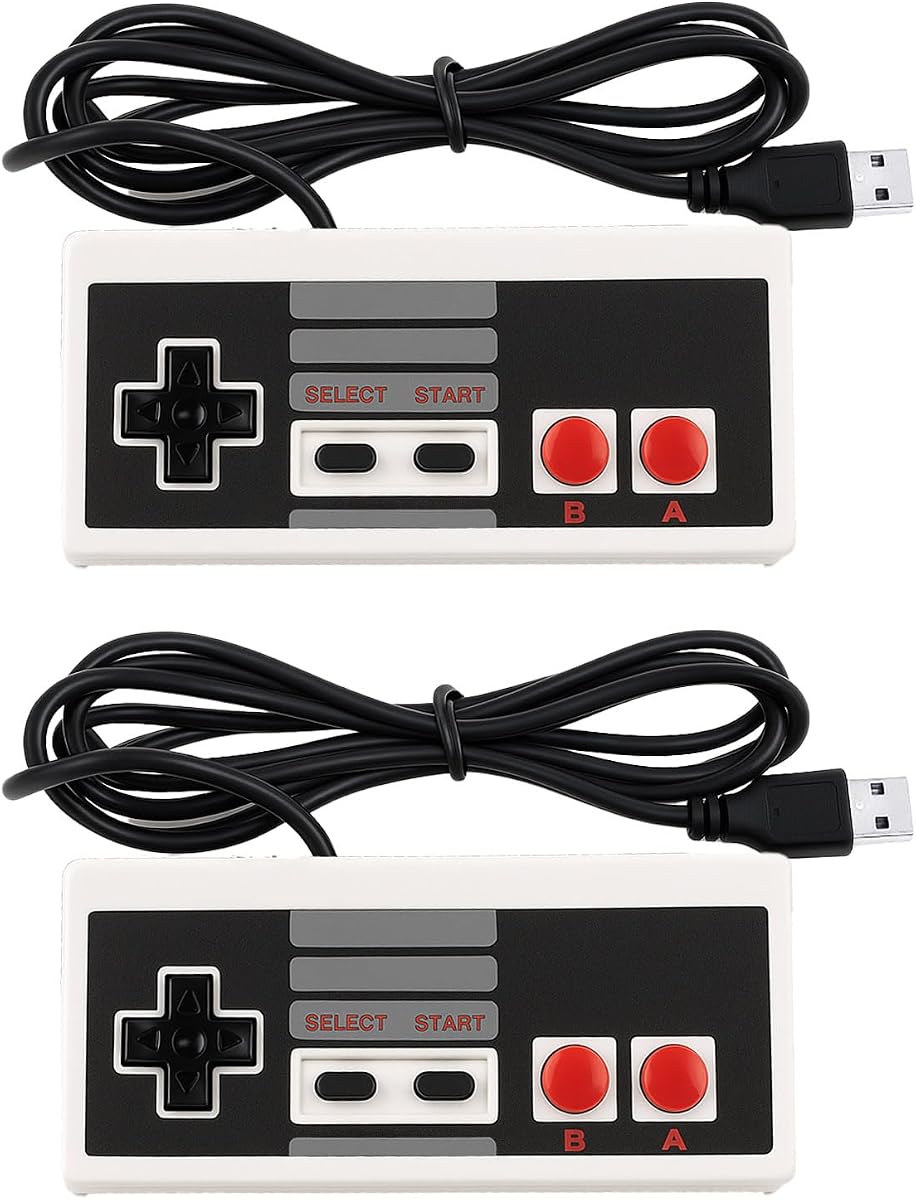


The NGHTMRE controller replacement is a strong contender for anyone needing a reliable accessory for their NES Classic Edition. With a 3.7 rating, it offers sensitive buttons and an extended 10ft cable that enhances gameplay freedom.
We may earn a commission when you buy through this link, at no additional cost to you.
Its standout feature is the cable length, which allows players to sit back comfortably without being tethered closely to the TV. The buttons are designed for precision control, ensuring that your moves register accurately during intense gaming sessions.
While the product is designed for the newer NES Classic model, compatibility is specific so buyers must ensure they have the right console version. The durability of the cable is good but some users note it may require care over time.
This controller is best for casual gamers who value comfort and distance from the screen. If you want a straightforward replacement that gets the job done without extra complexity, this pack is a solid choice.
The 10ft cable allows you to sit further away from the screen, reducing eye strain and making long gaming sessions more comfortable.
Sensitive buttons ensure that your inputs are registered quickly, giving you the edge in fast-paced retro games where timing matters.
We may earn a commission when you buy through this link, at no additional cost to you.
The ZAMPAM wireless controllers are a modern take on retro gaming input, offering freedom from cables for PC and Mac users. With a 4.0 rating, they bring convenience to your setup with a rechargeable battery and turbo features.
We may earn a commission when you buy through this link, at no additional cost to you.
These controllers use 2.4GHz technology to maintain a stable connection up to 10 meters away, which is excellent for couch gaming on a PC setup. The turbo function allows you to set rapid fire buttons, useful for older games that lacked this feature.
However, these are not compatible with the NES Classic Mini or original Nintendo consoles, limiting their use to emulators on computers. You may also need to download software to configure keys properly before use, which adds a small setup step.
This option is ideal for emulators who play on a computer and prefer a wireless experience. If you want to ditch cables while playing classic titles on your PC, these controllers deliver that convenience effectively.
Enjoy the freedom of wireless play without being tied down to your desk or console, perfect for relaxing on a comfortable couch.
The built-in turbo function lets you automate rapid inputs, giving you an advantage in action games that require constant button pressing.
We may earn a commission when you buy through this link, at no additional cost to you.
The XYAB Classic USB Controller is designed for users who want a simple plug-and-play experience on their PC or Mac. With a 1.0 rating, it aims to provide a classic feel with modern connectivity options for retro gaming.
We may earn a commission when you buy through this link, at no additional cost to you.
Its USB connection means you do not need to install any drivers, making it a straightforward choice for those who want to start playing immediately. The ergonomic design is built to be comfortable, ensuring you can hold it for long periods without fatigue.
Despite the classic appeal, the low rating suggests there may be quality control or durability issues that potential buyers should consider. The cable is standard at 6 feet, which is adequate but shorter than the extended options available in other packs.
This controller is best for those who prioritize simplicity and compatibility with modern computers. If you need a basic controller for emulation and do not want to deal with software setup, this is a viable option to consider.
Plug the controller directly into your USB port and start playing right away without needing to download or install any additional drivers.
The shape is tailored to fit your hand comfortably, reducing strain during long gaming sessions and making gameplay more enjoyable.
We may earn a commission when you buy through this link, at no additional cost to you.
The happymaxplus Retro Classic Controller stands out with a high 4.8 rating, making it a top choice for specific retro console owners. It is designed for AV 620 HD consoles and offers a classic plug-and-play experience with two controllers included.
We may earn a commission when you buy through this link, at no additional cost to you.
These controllers feature a 9 Pin DB9 plug port that works seamlessly with select retro game consoles. The continuous fire button is a standout feature that helps you dominate challenges in games that require rapid input, giving you an edge over opponents.
While the build quality and user satisfaction are high, compatibility is limited to specific console models like the AV 620 HD and not universal across all retro systems. Ensure your console matches the requirements before purchasing to avoid incompatibility issues.
This pack is perfect for families or groups who want to share retro gaming moments on compatible consoles. If you own one of the supported systems and want reliable controllers with added features, this is a premium choice to buy.
The continuous fire button allows you to hold down a key for rapid inputs, which is incredibly useful for shooting games or fast-paced platformers.
With two controllers included in the pack, you can play local multiplayer games with friends or family without needing to buy extra hardware.
We may earn a commission when you buy through this link, at no additional cost to you.
The ZENANBiBi USB wired controller is a versatile choice for those using Linux, Windows, or Raspberry Pi systems. With a 3.8 rating, it offers a classic NES feel with a 5.6ft cable and plug-and-play functionality for various emulators.
We may earn a commission when you buy through this link, at no additional cost to you.
This controller supports a wide range of operating systems including RetroPie, which makes it a popular pick for enthusiasts who build custom retro gaming setups. The authentic feel replicates the classic design, allowing you to relive nostalgic memories with smooth performance.
While it covers many platforms, it is not compatible with the NES Classic Mini, Wii, or Switch, so check your device before buying. The 5.6ft cable is decent but might be short for some setups where you prefer to sit further away from the screen.
This option is ideal for hobbyists who want a reliable controller for their PC or Raspberry Pi emulator projects. If you need a simple wired solution that works across different systems without much fuss, this 2-pack is a practical buy.
Compatible with Windows, Mac, Linux, and RetroPie, allowing you to use the same controller across multiple setups and projects.
The design replicates the classic NES controller, giving you that nostalgic feel and comfort that fans of retro games love.
We may earn a commission when you buy through this link, at no additional cost to you.
The MAYFLASH adapter is a unique tool that lets you use SNES controllers on NES Classic and Wii systems. With a 3.9 rating, it expands your options for controller choice without needing to buy entirely new hardware for your setup.
We may earn a commission when you buy through this link, at no additional cost to you.
This adapter is compatible with NES Classic Edition controllers and allows SNES controllers to play on Wii U and Wii systems. It requires no extra driver, offering a simple plug-n-play experience that integrates seamlessly with your existing gaming hardware.
One key feature is the built-in turbo function which enhances gameplay in games that benefit from rapid inputs. Additionally, the D-pad and left stick can be exchanged, giving you flexibility in how you configure the controller for different games.
This adapter is perfect for collectors who want to use their existing SNES controllers on modern retro systems. If you already own controllers and just need an adapter to connect them to your console, this is a convenient and functional solution.
Use your favorite SNES controllers on NES Classic and Wii systems, giving you more choice in controller style and feel.
The adapter includes a turbo function to help you with games that require rapid button presses, enhancing your gameplay experience.
We may earn a commission when you buy through this link, at no additional cost to you.
The eXtremeRate housing is a custom replacement shell designed to give your Switch Joycons a classic NES look. With a 4.4 rating, it appeals to users who want to personalize their handheld experience with a nostalgic design without buying a new controller.
We may earn a commission when you buy through this link, at no additional cost to you.
This package includes the replacement Joycon case, full set buttons, and screwdrivers to help you install the new shell. The ergonomic d-pad button greatly improves functionality for d-pad intensive games, making it a practical upgrade for Switch players.
Installation requires moderate electronic experience, so you must be comfortable opening your Joycons and assembling the new parts. The soft touch material provides a great smooth grip that is sweat free for long gaming sessions, keeping your hands comfortable.
This option is ideal for DIY enthusiasts who want to customize their Switch with a retro aesthetic. If you enjoy modding your hardware and want a unique style that stands out from the standard gray, this housing kit is a great project.
Transform your standard gray Joycons into a retro-looking device with the classic NES design and soft touch material finish.
The ergonomic d-pad is designed to improve control in games that rely heavily on directional input, enhancing your performance.
We may earn a commission when you buy through this link, at no additional cost to you.
The NES Classic Edition Accessory Bundle offers a comprehensive set including a controller, power supply, and extension cables. With a 2.4 rating, it provides convenience for those needing to replace missing parts for their console setup.
We may earn a commission when you buy through this link, at no additional cost to you.
This bundle includes one controller and a power supply which are essential components for getting your console running. Additionally, the two long 6FT extension cables help you manage cable length issues, allowing for more flexible placement of your console and TV.
The low rating indicates potential quality issues or inconsistencies with the components included in this pack. Buyers should proceed with caution and be prepared to inspect the items carefully upon arrival to ensure they function correctly.
This bundle is best for users who are missing multiple parts and want to buy them together. If you need a power supply and cables alongside a replacement controller, this package saves you from sourcing items individually.
Get everything you need to power up and play in one box, saving time and effort on finding individual replacement parts.
The included extension cables help you position your console further from the TV, reducing clutter and giving you better play space.
We may earn a commission when you buy through this link, at no additional cost to you.
The RDS Licensed Action Grip is an affordable accessory that enhances your NES Classic experience with a licensed quality build. With a 4.5 rating, it offers a comfortable grip and textured silicone material that ensures secure handling during gameplay.
We may earn a commission when you buy through this link, at no additional cost to you.
As a licensed accessory manufacturer, RDS focuses on superior quality materials that meet Nintendo standards. The controller creates a comfortable grip that extends your control in gaming, providing more precision for your play compared to unbranded options.
While it is a great option for the price, it only includes one controller, so you would need to buy a second one for multiplayer. The red color is distinct and may not match every console aesthetic, but it adds a pop of style to your setup.
This controller is perfect for players looking for a budget-friendly upgrade with official licensing. If you value quality and comfort without spending a fortune, this single grip accessory is an excellent addition to your retro collection.
As a licensed accessory, this controller meets Nintendo quality standards, ensuring durability and performance you can trust.
The textured silicone material provides a secure grip, preventing slips during intense play and making the controller easier to hold.
We may earn a commission when you buy through this link, at no additional cost to you.
The KIWITATA Classic SNES USB controllers are designed for PC gamers who want to play retro titles on modern systems. With a 4.3 rating, they offer an ergonomic design and anti-sweat material that makes them comfortable to use for long periods.
We may earn a commission when you buy through this link, at no additional cost to you.
These controllers are specifically tailored for emulation on Windows, Mac, and Raspberry Pi, making them versatile for various retro setups. The cross direction key features a frosted concave design that helps with anti-sweat and anti-slip performance, enhancing your grip during gameplay.
Note that these are SNES style controllers and may require manual button setup within your emulator software before use. This adds a small setup step but ensures that the layout matches your preferred configuration for the games you play.
This pack is best for retro enthusiasts who prefer the SNES shape and need controllers for emulation projects. If you want a durable, ergonomic option for your PC retro setup, these two controllers are a reliable and comfortable choice.
The shape is designed to fit the contour of your hands, providing a comfortable and easy hold that reduces fatigue during play.
The frosted concave design on the keys helps prevent slipping due to sweat, ensuring consistent input even during long sessions.
We may earn a commission when you buy through this link, at no additional cost to you.
Choosing the right replacement controller involves considering compatibility, connection type, and additional features. This guide outlines the key factors to help you make a smart decision for your retro gaming setup.
The most critical factor is ensuring the controller works with your specific console or system. Some controllers are designed exclusively for the NES Classic Mini while others are for PC or Mac emulation. Always check the product description to confirm it supports your device.
Verify compatibility before buying to avoid return hassle.
Wired controllers are generally more reliable with no latency or battery concerns, which is ideal for competitive or precise gameplay. Wireless options offer freedom of movement but require charging and can have connection drops if the signal is weak.
Wired is best for simplicity while wireless adds convenience.
A longer cable provides more flexibility to sit comfortably away from the screen. Standard cables might be short, causing you to sit too close to the TV. Look for models with extended cables like 10ft options for better ergonomics.
Choose longer cables for relaxed couch gaming.
Durability ensures your controller lasts through many gaming sessions. Check reviews for mentions of cable wear or button issues. Higher rated products typically use better materials that withstand regular use without failing.
Opt for products with strong user ratings for longevity.
Features like turbo buttons, continuous fire, or ergonomic designs can enhance your gaming experience. These extras are particularly useful for older games that did not originally support rapid fire or precise input options.
Look for features that match your gaming preferences.
Prices vary significantly from budget-friendly singles to premium bundles. Determine how much you are willing to spend and balance that with the features you need. Often, mid-range options offer the best value for money.
Set a budget that balances price with quality.
Plug-and-play controllers require no drivers or software configuration, making them ready to use immediately. Some advanced controllers may require software to map buttons, which can be a hurdle for casual users.
Prioritize plug-and-play for hassle-free setup.
If you plan to play with friends, ensure the product includes multiple controllers or supports multiplayer modes. Some packs come with two units, which is cost-effective compared to buying individually.
Buy packs with multiple controllers for group play.
To start using your new controller, connect it to your console or PC via the USB or adapter port. Ensure the connection is secure and that your system recognizes the input device. Test the buttons and directions to confirm all features are working correctly.
Keep your controller clean by wiping it with a soft dry cloth. Avoid using harsh chemicals or liquids directly on the buttons or ports. If you experience stick drift or button issues, check for debris or consider gentle cleaning of the contacts.
Store your controller in a safe place when not in use to prevent damage to the cable. Do not pull on the cable when unplugging and keep it away from pets or sharp objects. Proper care will extend the lifespan of your controller significantly.
Most controllers in this guide are designed for the NES Classic Mini or PC emulation systems. Original NES consoles use a different port and connector type. You would need an adapter specifically for the original hardware.
Most modern controllers are plug-and-play and do not require drivers. However, some advanced models may need software configuration for button mapping. Check the product description for specific requirements before purchasing.
Yes, many of the controllers listed are compatible with PC emulators on Windows, Mac, and Linux. They work well with popular retro gaming software like RetroArch and OpenEmu for playing classic titles.
Warranty terms vary by manufacturer. Most Amazon sellers offer a standard return window of 30 days. Always check the seller's policy for longer warranty coverage before making your final purchase.
Wireless controllers offer convenience but wired ones are more reliable. Wireless can have latency or battery issues while wired controllers provide consistent performance. Choose based on your preference for mobility versus stability.
Check the product compatibility section to see which systems are supported. If you are unsure, consult the console manual or search online for your system model number. Ensure the controller type matches your needs.
No, multiplayer games require multiple controllers. Most packs include either one or two controllers. Ensure you buy enough units for the number of players you intend to have in your gaming session.
Choosing the right Classic Nes Controller Replacement is about balancing compatibility with comfort and features. The NGHTMRE option stands out for its long cable and sensitive buttons while the RDS grip offers excellent value for budget-conscious buyers.
Prioritize what matters most to you such as wireless freedom or plug-and-play simplicity. Your specific system and play style will dictate which model fits best into your retro gaming setup without compromise.
Always verify current prices and availability before buying since deals change frequently. With the right controller, you can enjoy endless hours of nostalgic gameplay on your favorite retro systems with ease.