
1-to-3 ARGB Splitter Cable
4.6Editor score
Two pack with eight connectors
Supports 5V 3-pin headers
Simple plug and play setup
This guide compares the best ARGB Splitter Cables for PC builds, evaluating compatibility, durability, and signal quality to help you choose the right lighting
Custom PC builds thrive on vibrant lighting effects that transform a simple setup into a stunning visual centerpiece. To achieve synchronized color patterns across multiple fans and strips, you need reliable ARGB Splitter Cables that ensure consistent signal transmission without flickering or data loss.
We analyzed ten top-rated ARGB Splitter Cables available on the market today, focusing on build quality, connector types, and motherboard compatibility. Our review process examined customer feedback, technical specifications, and real-world performance to identify the most reliable options for both beginners and experienced builders.
Each product in this list offers unique advantages ranging from flexible lengths to high-quality copper wiring that maintains signal integrity. Keep in mind that prices and availability can change frequently, so checking current listings before purchase is always recommended to secure the best deal for your specific build needs.
4.6Editor score

5.0Editor score

4.9Editor score
Below is a detailed side-by-side comparison of all ten products evaluated in this guide. We have extracted key specifications such as length, connector count, and package contents to help you quickly identify the best fit for your specific PC case layout and motherboard headers.


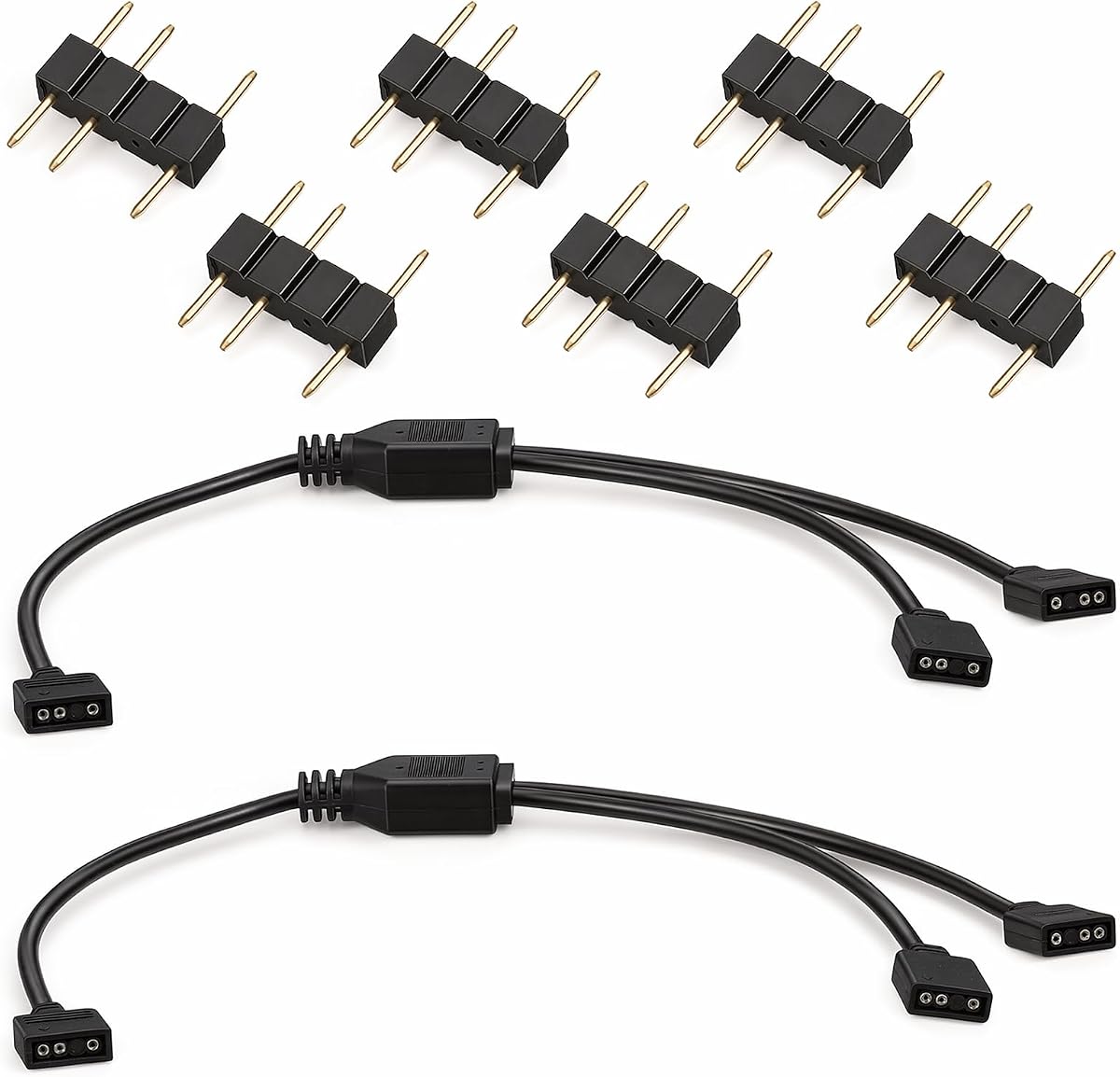


This 1-to-3 ARGB Splitter Cable offers an affordable way to expand your lighting setup without sacrificing functionality. It holds a strong 4.6 star rating from users who appreciate its simplicity and reliability for basic RGB fan or strip connections.
We may earn a commission when you buy through this link, at no additional cost to you.
The package includes two splitter cables and eight male connectors, providing plenty of flexibility for multiple zones in your PC case. The 5V 3-pin design ensures compatibility with most modern addressable RGB headers found on motherboards today.
While it lacks some premium features like arrow indicators for polarity alignment, the plug-and-play design makes installation straightforward for anyone familiar with PC building. Just ensure you match the pins correctly before plugging them in.
This is an ideal choice for builders on a budget who need reliable splitter cables without extra frills. It delivers solid performance for synchronizing fans and LED strips efficiently and effectively.
Getting two splitters and eight connectors in one package offers great value for those needing to connect multiple fans simultaneously across different areas of their case.
The cable requires no soldering or special tools, making it accessible for beginners who want to add RGB effects to their build quickly without hassle.
We may earn a commission when you buy through this link, at no additional cost to you.
The White ARGB Spliter Cables provide a clean aesthetic solution for users building white-themed PCs where standard black cables might clash. With a 4.7 star rating, these cables are praised for their material quality and color accuracy.
We may earn a commission when you buy through this link, at no additional cost to you.
Each cable is made from soft PVC material wrapped around new copper cores to ensure durability and signal transmission. The 1-to-2 configuration is perfect for smaller setups where splitting to three devices isn't necessary.
While the white color looks great, it might show dust more easily than black cables over time. The copper core helps maintain consistent lighting effects across connected devices without flickering or signal loss.
Choose this option if your build relies heavily on a white color scheme and you want splitters that blend in seamlessly with your case internals without compromising on performance.
The white cables blend perfectly into light-themed builds, avoiding the visual distraction of black wires against white fans and cooling components.
Soft PVC wrapping protects the copper core from damage while keeping the cables flexible enough to route through tight spaces inside your PC case.
We may earn a commission when you buy through this link, at no additional cost to you.
The ARGB Splitter Cable ZCZQC stands out with its unique insulating protective caps designed to prevent unused pins from short-circuiting on the chassis. This safety feature has earned it a 4.7 star rating from safety-conscious PC builders.
We may earn a commission when you buy through this link, at no additional cost to you.
With a length of 33.5 cm, it offers slightly more reach than standard 11.8-inch cables, which can be crucial in cramped cases where routing from motherboard headers is difficult. The 1-to-2 split helps extend your lighting control to additional fans.
The protective caps add a layer of security that many other cables lack, preventing potential burns when exposed pins contact metal surfaces. This makes it a reliable choice for custom loops or cases with exposed components.
If you value safety and need a bit more length than typical splitters offer, this cable is a smart investment. It ensures your RGB setup remains secure without risking electrical issues during operation.
The insulating caps ensure that any unused pins do not touch the metal chassis, eliminating the risk of short circuits and accidental burns.
At 13.19 inches, this cable provides extra room to route connections from distant motherboard headers to rear case fans without tension or strain.
We may earn a commission when you buy through this link, at no additional cost to you.
The 1-to-5 ARGB Splitter offers impressive expansion capabilities for large builds that require connecting many fans to a single motherboard header. With a 4.6 star rating, it is favored by users managing complex lighting zones.
We may earn a commission when you buy through this link, at no additional cost to you.
This splitter allows up to five connections from one port, reducing the number of motherboard headers you need. The 19.6-inch total length ensures you can reach fans even in the back of the case without stretching the cables.
While having five outputs might be excessive for smaller builds, it simplifies cable management for extensive setups. The copper core ensures consistent signal delivery across all connected devices without flickering issues.
Opt for this option if you have a large chassis with multiple RGB fans that would otherwise require multiple motherboard headers. It consolidates connections efficiently while maintaining stable lighting performance.
Connecting up to five devices from one header saves motherboard ports and keeps your wiring diagram much cleaner for intricate setups.
The extra length allows you to route cables through tight channels without tension, preventing damage and ensuring a tidy cable management look.
We may earn a commission when you buy through this link, at no additional cost to you.
This 1-to-3 ARGB Splitter Cable earns an impressive 5.0 star rating for its flawless performance and user-friendly design. It is consistently praised for helping users get their RGB fans working instantly without any headaches or issues.
We may earn a commission when you buy through this link, at no additional cost to you.
The inclusion of arrow indicators on the connectors makes alignment incredibly simple, ensuring you plug the cable in correctly every time. This small detail greatly reduces the chance of incorrect wiring that could damage components.
While it uses standard plastic housing similar to other budget options, the copper core inside ensures that your lights remain synchronized and vibrant. The package includes everything needed for a quick and clean installation.
This is the top recommendation for anyone seeking a reliable splitter that just works. The perfect rating reflects its ability to meet all basic needs without any noticeable downsides for most users.
Achieving a full five-star rating shows this product meets user expectations consistently, making it a safe bet for any PC builder.
Arrow indicators remove the guesswork from installation, ensuring proper alignment with the motherboard header to prevent connection errors.
We may earn a commission when you buy through this link, at no additional cost to you.
The ARGB Extension Cable offers a flexible 1-to-1 configuration that is ideal for extending connections between components rather than splitting signals. With a 4.5 star rating, users value its simplicity for connecting LED strips or fans that need to move away from headers.
We may earn a commission when you buy through this link, at no additional cost to you.
The female-to-female connector design allows you to link it directly to other extension cables or devices, providing versatility for custom routing paths. This setup is particularly useful when your motherboard header is too far from the target fan.
While it does not offer the signal splitting of other options, it excels at extending distance without adding unnecessary connectors. The standard 5V 3-pin interface ensures compatibility with a wide range of RGB devices on the market.
Choose this cable if you need to bridge a gap between your motherboard and a fan or strip. It ensures a solid connection without compromising signal quality or requiring additional adapters.
The female-to-female design allows you to link multiple cables together, giving you the freedom to customize cable lengths for your specific case.
Use these to extend the reach of existing ARGB headers without needing a splitter, ensuring your lights are reachable from the motherboard.
We may earn a commission when you buy through this link, at no additional cost to you.
This 5V 3 Pin ARGB Splitter Cable combines balanced functionality with high build quality, earning a 5.0 star rating. It is designed for users who need reliable 1-to-2 splitting with solid internal wiring.
We may earn a commission when you buy through this link, at no additional cost to you.
The pure copper core ensures efficient power and data transmission, which is crucial for maintaining consistent color across all connected devices. The 1-to-2 split allows you to connect two devices to one header without complex wiring.
Its female-to-female extension capability adds extra versatility for routing cables through tight spots in your case. While it includes male pins for motherboard connection, the extension style helps bridge gaps effectively.
This cable is a great middle ground for those needing moderate splitting power with reliable materials. It delivers consistent performance and high user satisfaction for everyday RGB lighting needs.
The pure copper core ensures that your signals remain stable over time, reducing flickering and keeping your lights synchronized across multiple devices.
With 1-to-2 splitting, you get enough capacity for most standard cases without the clutter of larger splitters that may overwhelm smaller setups.
We may earn a commission when you buy through this link, at no additional cost to you.
The 3-Pack ARGB Spliter Cables offer excellent value for users needing to manage multiple lighting zones simultaneously. With a 4.6 star rating, it is appreciated for its comprehensive packaging that includes plenty of connectors for complex builds.
We may earn a commission when you buy through this link, at no additional cost to you.
Each cable supports a 1-to-3 split, allowing you to connect three devices to one motherboard header. Having three separate cables lets you create distinct zones for fans, strips, and coolers without overloading a single port.
The package includes twelve male connectors, ensuring you have enough to connect all your devices securely. While it lacks specific features like arrow markers, the standard design works reliably with most ARGB setups on the market.
This bundle is perfect for builders planning a large case build with many components. It provides the necessary tools to expand your lighting system efficiently and effectively without multiple separate purchases.
Getting three splitters and twelve connectors in one package saves time and ensures you have the right parts for every zone in your build.
Three cables let you group lights separately for better control, giving you more creative freedom when configuring your RGB lighting zones.
We may earn a commission when you buy through this link, at no additional cost to you.
This ARGB Splitter Cable earns a 5.0 star rating for its robust construction featuring pure copper core wires and a soft PVC outer sheath. These materials work together to provide stable signal transmission and durability over long-term use.
We may earn a commission when you buy through this link, at no additional cost to you.
The 1-to-3 split capability allows you to connect multiple fans or LED strips to a single header effectively. The PVC sheath adds a layer of protection against wear and tear, ensuring the cables last longer during regular handling.
Users praise its anti-interference design, which maintains consistent color accuracy even with multiple devices connected. This reliability makes it a top choice for those who prioritize performance and stability in their RGB builds.
Choose this cable if you want a durable option that combines good materials with reliable performance. It delivers consistent results and is easy to install thanks to its standard connector design.
Pure copper cores and PVC sheathing work together to ensure the cables withstand frequent use without degrading over time inside your PC case.
Anti-interference engineering ensures that your RGB lights stay synchronized without flickering, even when multiple devices are connected to one header.
We may earn a commission when you buy through this link, at no additional cost to you.
The 3Pin ARGB Splitter Cable stands out as a premium option with gold-plated contacts and braided sleeves designed for long-term durability. With a 4.9 star rating, it is favored by enthusiasts who value high-end materials and signal integrity.
We may earn a commission when you buy through this link, at no additional cost to you.
This splitter supports up to twelve ARGB devices through a single motherboard header, making it ideal for complex custom configurations. The oxygen-free copper wiring ensures stable data transmission without color mismatch issues across your setup.
The braided sleeves add a touch of style and protect the cables from tangling or damage during cable management. While the price is higher than standard options, the build quality and extended reach justify the investment for serious builders.
Choose this premium cable if you need the best possible signal integrity and durability for a high-end PC build. It delivers superior performance and is perfect for complex setups requiring extensive connectivity.
Gold-plated contacts resist corrosion and ensure a secure connection, maintaining optimal performance and signal strength over years of use.
Premium braided sleeves prevent tangling and add a polished look to your build, keeping your internal wiring organized and visually appealing.
We may earn a commission when you buy through this link, at no additional cost to you.
Selecting the right ARGB Splitter Cable involves considering several technical factors to ensure compatibility and performance for your specific PC build.
Always verify that the splitter supports 5V 3-pin headers rather than 12V 4-pin RGB headers. Most modern addressable RGB fans and strips require the 5V 3-pin connection, and using the wrong type can damage your components. Check your motherboard manual or the device labels to confirm the required standard.
This is critical because connecting incompatible cables can fry the LEDs and potentially damage your motherboard. Ensure you clearly identify the header type before purchasing any splitter cable.
Decide whether you need a 1-to-2 or 1-to-3 split based on your lighting needs. More split points allow you to connect more devices to a single header, but you must ensure your motherboard can handle the power draw from all connected devices.
If your build only has a few fans, a simpler splitter is often enough. Overloading a single header with too many devices can lead to flickering or weak signal quality, so choose based on actual needs.
Look for splitters with pure copper cores and durable outer sheaths. Copper ensures efficient power and data transmission, while PVC or braided sleeves protect against physical damage and tangling inside the case.
High-quality materials prevent signal degradation over time. Avoid cheap plastic wires that might break easily or cause inconsistent lighting effects across your setup.
Measure the distance from your motherboard header to the furthest fan or LED strip you plan to connect. Most cables are around 11.8 inches, but if your PC case is large or the header is hard to reach, you may need an extended version.
Too short a cable forces tension and difficult routing. Ensure the length is sufficient to reach comfortably without stretching the wires.
Many splitters come in packs of two or three, which offers better value than single units. Having extra splitters lets you create distinct lighting zones without needing to buy more later.
Consider your total fan count and zones. If you plan to upgrade later, buying a multi-pack is cost-effective and saves time.
Some splitters include insulating caps for unused pins, which prevent accidental short circuits when exposed pins touch the chassis. This is especially important if you plan to leave unused pins unconnected.
Safety features add peace of mind. Look for splitters that include these caps if you plan to use them in complex builds.
Look for splitters with arrow indicators on connectors to help you align the signal pin correctly. Proper polarity is essential to prevent flickering or reverse color effects.
Without clear indicators, you might plug in the cable backwards. This simple feature saves time and prevents connection issues.
Premium splitters often use gold-plated contacts and oxygen-free copper wiring to reduce resistance and corrosion over time. These features ensure consistent signal transmission and long-term reliability.
Higher build quality often correlates with better performance. If you want a long-lasting solution, invest in splitters with these enhanced materials.
Start by checking your motherboard manual to identify the correct 5V 3-pin ARGB header location. Ensure your PC is powered off and unplugged before touching any internal components to prevent electrical damage.
Align the arrow indicator on the male connector with the corresponding pin on the motherboard header. Insert the connector firmly until it clicks, ensuring a stable connection. If using extension cables, repeat the same alignment process for each connection.
After installation, power on your PC and use your motherboard software to test the lighting effects. If any fan does not light up, check the connection and polarity. Avoid bending cables sharply to prevent internal wire damage, and tuck excess length neatly to maintain airflow.
No, standard ARGB splitters are designed specifically for 5V 3-pin headers. Using them on 12V 4-pin headers can damage components. Always verify your motherboard's header type before connecting any splitter cable.
Most ARGB headers can safely support two to three fans or strips. Always check your motherboard manual for power limits to avoid overloading and damaging the header or causing flickering effects.
Most splitter packages include the necessary male connectors for motherboard connection. However, if you need to extend cables or add more devices, check the package contents carefully to ensure you have enough connectors.
If you connect the cable backwards, the colors may appear inverted or the device might not work at all. Check the arrow indicator on the connector and realign it correctly to fix the issue.
Generally, high-quality splitters maintain stable signal sync. Poor quality cables may cause flickering or signal loss. Choose splitters with copper cores to ensure consistent lighting effects across all connected devices.
Yes, extension cables work well with splitters to extend the reach from motherboard headers to distant fans. Ensure the combined length does not compromise signal integrity or cause cable management issues.
We have explored ten top-rated ARGB Splitter Cables, from budget-friendly options to premium choices with gold-plated contacts. Each model offers unique benefits depending on your build needs and budget constraints.
Prioritize compatibility and cable quality to ensure your RGB lighting functions smoothly over time. Features like copper cores, protective caps, and arrow indicators make a significant difference in performance and ease of use.
Prices and availability can vary daily, so checking current listings is recommended before making a purchase. With the right splitter, you can achieve vibrant, synchronized lighting effects that elevate your entire PC build.