
HDMI Media Player Black Mini 1080p Full-HD
4.1Editor score
Compact aluminum alloy design
Full HD 1080p output support
Multiple playback modes available
This guide compares the top external hard drive media players for 2026, evaluating 4K playback, storage compatibility, and digital signage features for home
Finding the right external hard drive media player can transform your entertainment setup or business display into a versatile hub. These devices allow you to play high-definition videos, music, and photos directly from USB drives or hard disks without needing a subscription service.
We have analyzed ten top-rated models based on their video resolution support, file format compatibility, and ease of use. Our comparison covers devices ranging from compact portable units to robust systems designed for continuous digital signage applications in various environments.
Each selection highlights unique strengths such as 4K output, HDD enclosure integration, or specialized trigger sensors. While features vary significantly across models, all picks offer reliable playback for diverse media needs. Please note that product availability and details may change over time.
4.1Editor score

4.1Editor score
4.3Editor score
The following table provides a side-by-side comparison of all ten selected external hard drive media players. It highlights key specifications such as resolution support, storage compatibility, and unique features to help you make an informed decision.


The Micca 4K Ultra-HD Media Player stands out as a reliable solution for anyone needing to play high-definition content from external storage. With a solid rating of 4.1 stars, it offers straightforward performance for home entertainment and professional displays alike.
We may earn a commission when you buy through this link, at no additional cost to you.
This device excels in its ability to handle 4K video playback smoothly over HDMI. It supports a wide variety of video formats including MKV, MP4, and AVI, ensuring compatibility with most downloaded files. The dual USB and microSD readers make it easy to switch between different storage sources without hassle.
While it is highly capable, users should note that wireless remotes may require a clear line of sight for best performance. Additionally, subtitle support is broad but may depend on the specific encoding of the media file. These are minor trade-offs for such a versatile unit.
If you are looking to upgrade an existing TV into a smart media hub or need a digital signage solution that does not rely on the internet, this player is an excellent choice. It provides the perfect balance of simplicity and advanced features for everyday use.
Connect this player to 4K or 1080p TVs, projectors, or even analog monitors using the included composite AV output for broader utility.
Whether for a restaurant menu board or a home slideshow, the automatic video playback and looping features simplify unattended operation.
We may earn a commission when you buy through this link, at no additional cost to you.
For users seeking an affordable option for HD media playback, this mini HDMI media player delivers consistent performance. It holds a rating of 4.1 stars and is designed for travelers or those with limited space on their entertainment centers.
We may earn a commission when you buy through this link, at no additional cost to you.
The unit supports Full HD 1080p video decoding at 60Hz, covering most common formats like MP4, AVI, and MKV. Its aluminum alloy casing ensures durability during travel, and the inclusion of an analog AV cable makes it compatible with older television sets.
However, it is limited to 1080p output, so it will not display native 4K content. The manufacturer also notes that for professional presentation needs like PPT files, other models might be more suitable. These limitations are acceptable for casual viewing purposes.
This player is ideal for short trips or simple home office setups where high-resolution streaming is not critical. It offers a cost-effective way to access local media files without the complexity of smart TV interfaces or streaming subscriptions.
Fits easily into a palm or small bag, making it a perfect companion for hotel rooms or temporary office presentations.
Decodes a broad range of video codecs including H.264 and WMV9, ensuring that most standard files play without conversion.
We may earn a commission when you buy through this link, at no additional cost to you.
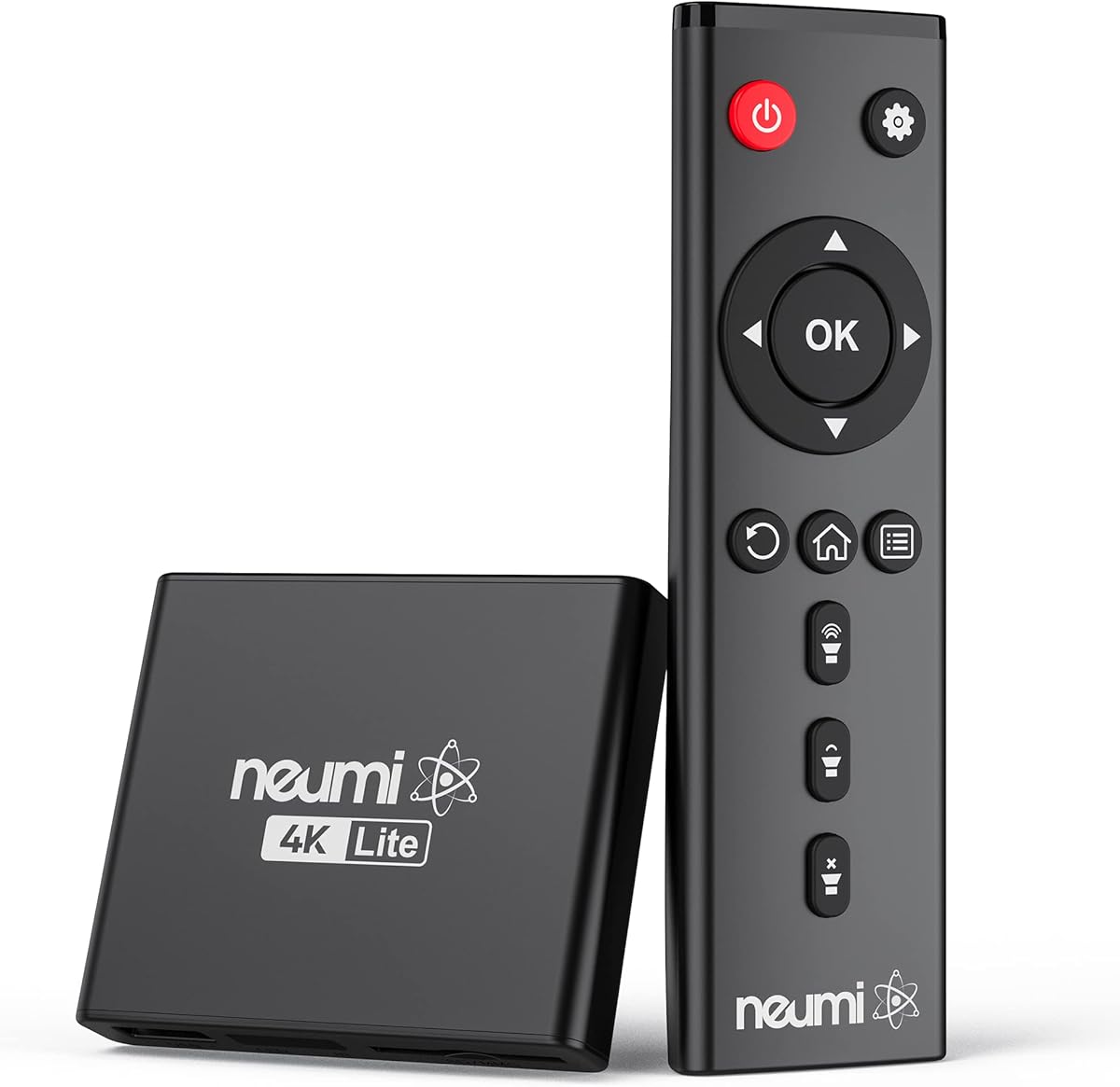
The NEUMI Atom 4K Lite stands out for its unique ability to integrate with external sensors, making it a top choice for interactive displays. With a rating of 4.3 stars, it combines premium video performance with specialized commercial capabilities.
We may earn a commission when you buy through this link, at no additional cost to you.
This device offers stunning 4K video quality up to 2160p at 60Hz with support for H.265/HEVC codecs. It includes a trigger sensor input that allows you to start specific videos when a button is pressed or motion is detected, which is perfect for galleries or museums.
While it is a powerful tool, users must purchase push-button or motion sensors separately to utilize the trigger feature. Additionally, its compact size means it may not be visible as an on-screen interface without careful placement. These are minor constraints for such specialized functionality.
If you need a media player that goes beyond simple playback to create interactive experiences, this model is unmatched. It is highly recommended for art installations, museum exhibits, or any scenario requiring on-demand video triggers.
Build custom digital signage by triggering different videos based on visitor interaction using optional sensors.
Enjoy cinema-like video with support for 10-bit color and high bit rates, ensuring vibrant and smooth playback.
We may earn a commission when you buy through this link, at no additional cost to you.
The ACEMAX 4K@60Hz Offline Media Player offers a unique 2-in-1 design that includes an enclosure for 2.5-inch SATA HDDs or SSDs. With a rating of 3.5 stars, it serves well for dedicated display needs where physical storage integration is a priority.
We may earn a commission when you buy through this link, at no additional cost to you.
This device supports high-resolution 4K video at 60Hz and features a durable metal housing to manage heat during long playback sessions. It is designed for offline use, meaning it does not rely on Wi-Fi or streaming apps, which enhances security and reliability.
Users should be aware that external drives might need specific formatting to be recognized, which can require extra setup steps. The rating is lower than some competitors, suggesting that user experiences can vary. It remains a strong option for custom setups.
Ideal for retail displays or unattended office screens, this player ensures your content loops reliably without internet connection. Its robust build and offline capabilities make it a practical tool for environments where network dependency is undesirable.
Install a compatible internal hard drive directly into the unit to create a self-contained media server for your display.
The aluminum enclosure helps dissipate heat, allowing for extended operation in retail or office environments without overheating.
We may earn a commission when you buy through this link, at no additional cost to you.
This 4K@30hz Media Player emphasizes high-quality audio playback with support for up to 7.1 surround sound via HDMI. It has a rating of 4.0 stars and offers versatile connectivity options for home theater systems.
We may earn a commission when you buy through this link, at no additional cost to you.
The device supports 4K video playback at 30Hz and uses efficient H.265 decoding to handle large files with reduced buffering. It also features dual USB ports and supports vertical screen display, which is useful for specific advertising or information setups.
However, while it has two USB ports, it can only read one at a time, limiting simultaneous connectivity. Also, 4K playback is capped at 30Hz rather than 60Hz. These constraints are generally acceptable for standard movie viewing and music playback.
If you have a home theater setup and want to play high-resolution audio files directly from external drives, this player is a solid choice. It simplifies access to surround sound content without needing additional streaming devices.
Enjoy immersive sound by connecting the HDMI output to a receiver that supports 7.1 channel audio decoding.
The ability to rotate the video feed vertically makes this unit suitable for portrait-mode screens in retail or info kiosks.
We may earn a commission when you buy through this link, at no additional cost to you.
Designed for advertising and multimedia playback, this HDMI media player offers extensive connectivity including VGA output. It holds a rating of 4.2 stars and supports direct playback from ISO files which is rare for standard devices.
We may earn a commission when you buy through this link, at no additional cost to you.
The unit includes AV cables and supports 4K video at 30Hz with robust decoding capabilities for various codecs. It is suitable for home entertainment and commercial displays, offering flexible connection options for older monitors via VGA.
The 4K output is limited to 30Hz, which is sufficient for most video but not for high-motion content. Additionally, SD card support is capped at 128GB. These limits do not significantly impact typical advertising loop usage.
For businesses needing a reliable player for looped promotional content, this model provides good value and versatility. The inclusion of multiple output types ensures it can connect to a wide range of existing display hardware.
Play ISO disc images directly without extraction, saving time and effort when dealing with disc-based content.
Use VGA for older monitors or HDMI for modern TVs, ensuring this player works with legacy commercial display equipment.
We may earn a commission when you buy through this link, at no additional cost to you.
While not a media player itself, the WD 2TB Elements Portable External Hard Drive is an essential companion for any media setup. With a high rating of 4.7 stars, it offers reliable storage for large media files needed by your player.
We may earn a commission when you buy through this link, at no additional cost to you.
This drive features a compact design and SuperSpeed USB 3.2 Gen 1 connectivity for fast data transfer. It is plug-and-play ready for both Windows and Mac systems, making it easy to use across different devices without additional drivers.
Since it is purely storage, you will need to pair it with a dedicated media player like those reviewed above. This combination ensures you have plenty of space for videos and music without relying on online streaming services.
For users who want to store their entire media library locally, this drive is an excellent starting point. Its durability and simplicity make it a trusted choice for backing up and accessing large files regularly.
Get up to 6TB of storage in a tiny package, perfect for carrying large collections of movies and music anywhere.
Works seamlessly with both Windows and Mac computers, allowing easy file management for media playback.
We may earn a commission when you buy through this link, at no additional cost to you.
This 4K@60Hz H.265 Ultra HD Digital Media Player boasts a perfect 5.0 rating and combines media playback with storage management. It is designed to function as both a player and a hard drive enclosure for versatile use.
We may earn a commission when you buy through this link, at no additional cost to you.
The unit supports smooth 4K playback at 60Hz and includes a Type-C cable to transfer data to laptops easily. It accommodates 2.5-inch SATA hard drives and USB storage, making it a flexible hub for digital media.
While the HDD is not included, the design allows you to build a custom high-capacity solution at your own pace. The high rating indicates strong user satisfaction with its performance and reliability in home and commercial settings.
Ideal for users who want a single device for storage and playback, this player simplifies your setup. It is especially useful for those who frequently move data between a drive and a display.
Experience fluid 4K video at 60Hz without stuttering, ensuring a smooth viewing experience on modern screens.
The included Type-C cable makes it easy to move large files to your laptop for backup or editing.
We may earn a commission when you buy through this link, at no additional cost to you.
The Ultra HD 4K@60Hz Digital Media Player is tailored for commercial signage applications with integrated HDD enclosure. It holds a rating of 3.8 stars and offers reliable continuous playback for businesses like retail stores or offices.
We may earn a commission when you buy through this link, at no additional cost to you.
This device supports smooth 4K video at 60Hz and includes Type-C expansion for flexible storage. It is designed to loop content automatically and resume playback if interrupted, ensuring displays remain active without constant manual input.
The unit does not include batteries for the remote or a built-in battery itself. These are minor omissions that do not detract from its primary function as a continuous display player in fixed locations.
For businesses needing a dependable player for menu boards or lobby videos, this model offers good value. Its warranty and commercial-focused features make it a practical choice for professional installations.
Designed specifically for unattended digital signage, ensuring your messages stay on display reliably.
Automatically starts media playback after power-on and can resume from the last point if power is lost.
We may earn a commission when you buy through this link, at no additional cost to you.
This 4K Ultra HD Media Player offers a straightforward solution for digital signage with built-in HDD enclosure. With a rating of 3.0 stars, it provides basic functionality for playing videos and photos from multiple sources.
We may earn a commission when you buy through this link, at no additional cost to you.
The unit supports 4K HDMI output and allows configurable video rotation for flexible mounting options. It is designed for automatic playback and resume, making it suitable for stores or public spaces that need continuous content display.
While the rating is lower than other options, it remains an affordable choice for simple signage projects. Users should test their specific media formats beforehand to ensure compatibility with the player's decoding capabilities.
Ideal for budget-conscious projects needing basic signage capabilities, this player gets the job done for standard formats. It is a good starting point for setting up dynamic displays without complex software.
Rotate your video output 90, 180, or 270 degrees to fit your screen orientation perfectly.
Play media directly from internal HDDs, USB drives, or MicroSD cards for versatile content management.
We may earn a commission when you buy through this link, at no additional cost to you.
Choosing the right external hard drive media player depends on your specific usage needs, from home entertainment to commercial displays. This section outlines key factors to consider.
Ensure the player supports the resolution of your display. Most modern models offer 4K@60Hz, which provides sharp visuals for high-definition TVs and monitors. If you have an older 1080p TV, a device with 4K backward compatibility is also useful.
Look for support for high-bitrate 4K codecs to ensure smooth playback without buffering.
Check the maximum storage capacity the player can recognize. Many units support external hard drives up to 8TB, which is essential for storing large libraries of HD videos. Some players also include an internal SATA enclosure for direct hard drive installation.
Verify that the device supports your file system format such as NTFS or exFAT to avoid reformatting issues.
A versatile player should handle a wide range of video, audio, and image formats. Look for support for MKV, MP4, AVI, and FLAC to ensure compatibility with your downloaded files. Subtitle support like SRT is also valuable for foreign language content.
Confirm that the player supports your required video codecs such as H.265/HEVC for efficient streaming and playback.
Modern players should offer HDMI outputs for digital quality and analog AV outputs for older TVs. Some models also include optical audio outputs for surround sound systems. USB ports should be USB 3.0 compatible for faster data transfer.
Consider whether the player supports VGA or Type-C outputs if you have specific display or data transfer needs.
For digital signage or retail use, features like auto-play, loop, and resume are essential. These ensure that content plays continuously without manual intervention. Some models also offer vertical screen rotation for unique display setups.
Check if the player supports shuffle and random play modes for audio and photos to create dynamic content sequences.
Consider the physical size and material of the player. Compact aluminum designs are durable for travel, while metal housings help dissipate heat during continuous operation. Remote control requirements like line of sight should also be noted.
Choose a model with a design that fits your environment, whether it is a discreet home hub or a commercial display unit.
For business applications like menu boards or museums, look for specialized features like trigger sensors or robust loop functions. These allow for interactive displays or unattended operation in public spaces without frequent maintenance.
Ensure the unit supports specific commercial signage needs like video rotation or multiple input types for professional setups.
A user-friendly interface makes navigating files simple for all users. Devices that require minimal setup and offer intuitive remote controls reduce frustration. Some players also allow navigation via USB mouse or keyboard for greater control.
Prioritize models that allow easy file management directly on the device to streamline your media playback workflow.
First, connect your external hard drive or USB storage device to the media player using a high-quality USB cable. Ensure the storage is formatted to a compatible file system like NTFS or exFAT to avoid recognition errors.
Next, connect the media player to your TV or monitor using an HDMI cable for the best video quality. If you need to connect to an older analog TV, use the included AV cables and adjust the input settings on your display accordingly.
Finally, use the remote control to navigate the file browser and select the media you wish to play. Keep the device in a well-ventilated area to prevent overheating, and avoid exposing it to extreme temperatures or moisture.
Most external hard drive media players support USB 3.0 storage devices, but you should check the maximum capacity supported. Formats like NTFS are widely accepted, but some players may require exFAT or FAT32. Always verify the specific compatibility in the user manual.
4K refers to the resolution of the video while 4K@60Hz indicates the refresh rate. A player with 4K@60Hz support provides smoother motion especially for fast-moving content. If your TV supports 60Hz, look for a player with this feature for best results.
Most media players are designed for offline playback and do not require an internet connection. This makes them secure for displaying local files without relying on streaming services. Some models may offer firmware updates via USB but are not dependent on Wi-Fi.
Ensure your media player supports H.265/HEVC decoding and 4K resolution output. Copy the video file to a USB drive formatted correctly and connect it to the player. Check the player's supported video codecs to ensure compatibility with your specific file.
Many media players allow you to connect a USB mouse or keyboard for easier navigation through menus and file lists. This is particularly useful if the remote control is inconvenient for detailed browsing. Check the specifications to confirm USB input support.
Some players have limits on individual file sizes depending on the file system used. FAT32 has a limit of 4GB per file, while NTFS supports much larger files. For large 4K videos, ensure your drive is formatted to NTFS or exFAT.
In summary, the Micca 4K Ultra-HD Media Player offers the best overall performance with its versatile support for various formats and easy setup. The NEUMI Atom 4K Lite stands out for users needing interactive features and high-fidelity video playback.
If you are looking for a budget-friendly option, the HDMI Media Player Mini provides reliable 1080p playback with a compact design. Consider your primary use case whether it is home entertainment or commercial signage to prioritize features like storage capacity and connectivity.
Remember that product availability and specifications can change over time so always check the latest details before purchasing. Investing in a high-quality media player ensures you can enjoy your content reliably without relying on streaming services.