
GIGABYTE Radeon RX 9070 XT Gaming OC 16G
4.7Editor score
Powered by Radeon RX 9070 XT
WINDFORCE Cooling System with Hawk Fan
16GB GDDR6 Memory Configuration
This comprehensive guide compares the top flagship graphics cards of October 2026, evaluating performance, cooling, and features for gamers and professionals.
Flagship graphics cards represent the pinnacle of visual computing power available today. These high-end processors deliver unparalleled frame rates and render intricate details in modern titles effortlessly. Choosing the right model ensures your system can handle demanding workloads without compromise.
We analyzed ten top-tier models from leading manufacturers to identify the best options available. Our evaluation focuses on architecture efficiency, cooling solutions, and real-world performance metrics. This list covers the latest releases designed for enthusiasts and professionals alike.
Each pick highlights specific strengths and ideal use cases for different user needs. Prices fluctuate frequently based on market demand and availability fluctuations globally. Check current listings before purchasing to ensure you get the best value for your investment.
4.7Editor score

4.8Editor score

4.6Editor score
This side-by-side comparison highlights the key specifications and unique features of each top model. We detail architecture, memory types, and cooling designs to help you make an informed decision.




This Gigabyte model stands out as a top contender for high-end gaming and content creation. It features the latest Blackwell architecture and delivers impressive performance metrics across a variety of demanding tasks. The card earns high marks for its balance of speed and efficiency.
We may earn a commission when you buy through this link, at no additional cost to you.
The 16GB GDDR7 memory ensures smooth handling of large textures and complex scenes. Its WINDFORCE cooling system keeps thermals in check even during extended gaming sessions. This makes it ideal for users who prioritize sustained performance over long periods.
One trade-off is the physical footprint, which requires a spacious case for proper airflow. Additionally, the power requirements are significant so ensure your PSU can handle the load. These factors are acceptable given the raw power it delivers.
If you want a reliable high-end card for 4K gaming or professional workflows, this is a solid choice. It offers the performance headroom needed for future titles and rendering software. Highly recommended for enthusiasts seeking top-tier capabilities.
The WINDFORCE system uses multiple fans and heat pipes to dissipate heat efficiently during heavy loads.
GDDR7 memory provides faster bandwidth and better performance than previous generations for demanding applications.
We may earn a commission when you buy through this link, at no additional cost to you.
The ASUS TUF Gaming RTX 5070 Ti offers an excellent balance of performance and reliability. Its high rating reflects consistent user satisfaction with its build quality and cooling capabilities. This makes it a favorite for gamers who value stability.
We may earn a commission when you buy through this link, at no additional cost to you.
Key strengths include the phase-change thermal pad which ensures optimal heat transfer under load. Military-grade components contribute to a longer lifespan and resistance to environmental factors. Protective PCB coating adds another layer of durability against dust and moisture.
It does require a specific power connector and a robust PSU so check your system compatibility carefully. The size may also be tight in smaller cases but it fits most standard builds. These requirements are standard for high-performance cards today.
For users seeking a reliable flagship experience without breaking the bank, this card is ideal. It delivers smooth gameplay and handles multitasking with ease. We recommend it for anyone looking for long-term value and consistent performance.
Phase-change thermal pads provide better contact and heat dissipation than traditional paste for sustained performance.
Military-grade components are tested to withstand harsh conditions ensuring reliability over years of use.
We may earn a commission when you buy through this link, at no additional cost to you.
The RTX 4090 Founders Edition remains a powerhouse for 4K gaming and professional rendering. It offers a massive core count that translates to high frame rates and fast rendering times. This card is designed for users who demand the absolute best performance.
We may earn a commission when you buy through this link, at no additional cost to you.
Its third-generation RT cores and fourth-generation tensor cores deliver superior ray tracing and AI performance. Features like NVIDIA Reflex reduce latency for competitive gaming and DLSS 3 enhances frame rates significantly. It also supports 8K HDR for future-proofing your display setup.
However, it is based on older architecture which may not support the latest features found in newer cards. Power consumption is high so ensure your PSU meets the system requirements. These limitations are acceptable for those prioritizing raw rasterization performance.
If you need top-tier performance for high-end gaming or content creation today this card is a top choice. It provides the headroom needed for demanding titles and creative workflows. Recommended for enthusiasts who want maximum horsepower.
Third generation RT cores deliver up to twice the ray tracing performance of previous generations for realism.
Fourth generation tensor cores boost AI performance for advanced upscaling and rendering tasks.
We may earn a commission when you buy through this link, at no additional cost to you.
This ASUS TUF model combines the power of the RTX 5080 with robust cooling and build quality. It is built to handle high workloads while maintaining stable temperatures and consistent performance. This makes it suitable for serious gamers and creators.
We may earn a commission when you buy through this link, at no additional cost to you.
The massive fin array and Axial-tech fans ensure efficient airflow through the card. Protective PCB coating guards against moisture and dust which enhances longevity. Military-grade components further add to its reliability and lifespan under heavy loads.
Due to its size it requires significant case clearance and slot spacing. Confirm your case can accommodate the 3.6-slot design before purchasing. These factors are standard for high-performance cards and are manageable with planning.
For users wanting reliable high-end performance with added durability this card is an excellent choice. It delivers on its promises of speed and stability for demanding tasks. We recommend it for builders who prioritize quality and performance.
The massive fin array is optimized for airflow from three Axial-tech fans to keep temperatures low.
Auto-Extreme precision automated manufacturing ensures higher reliability and consistency across units.
We may earn a commission when you buy through this link, at no additional cost to you.
The GIGABYTE RX 9070 XT provides an affordable entry into flagship-level performance for gamers. It offers strong capabilities for modern titles at 1440p without the premium price tag. This card is ideal for budget-conscious users seeking high performance.
We may earn a commission when you buy through this link, at no additional cost to you.
Its WINDFORCE cooling system with Hawk Fan ensures efficient heat dissipation. Server-grade thermal conductive gel improves heat transfer for better stability under load. The 16GB memory buffer ensures smooth handling of large assets and textures.
It uses GDDR6 memory which is slightly slower than GDDR7 found in higher-tier cards. It also lacks support for the latest DLSS 4 features which may limit future upscaling capabilities. These trade-offs are acceptable given its competitive pricing.
For those building a high-performance PC on a budget this card is a standout choice. It balances cost and performance effectively for most gaming needs. We recommend it for users who want great FPS without overspending.
The WINDFORCE system uses Hawk Fans to deliver strong airflow while maintaining quiet operation.
Server-grade thermal conductive gel ensures optimal heat transfer between the GPU and cooler.
We may earn a commission when you buy through this link, at no additional cost to you.
This ASUS Dual model is perfect for small chassis builds that still need solid performance. Its 2.5-slot design maximizes compatibility while maintaining efficient cooling for its class. This makes it a great choice for compact gaming PCs.
We may earn a commission when you buy through this link, at no additional cost to you.
The 0dB technology ensures silence during light gaming by stopping fans when temps are low. Dual BIOS lets you switch between Quiet and Performance profiles to suit your needs. The 16GB GDDR7 memory provides excellent bandwidth for this tier.
It may not match the raw power of larger cards but it excels in its niche. The compact size limits extreme overclocking potential but is sufficient for most games. This is acceptable for users prioritizing build flexibility and silence.
If you have a small case but want flagship-like features this card fits the bill perfectly. It offers a balance of size efficiency and reliable performance for daily use. We recommend it for builders with space constraints.
0dB technology stops fans entirely during light tasks to reduce noise for quiet environments.
Dual BIOS switch allows users to toggle between Quiet and Performance profiles for different use cases.
We may earn a commission when you buy through this link, at no additional cost to you.
The RTX 5090 with 32GB of GDDR7 memory is a flagship powerhouse for professionals. It delivers exceptional performance for large datasets and complex rendering tasks. This card is designed for those who demand no compromises in speed.
We may earn a commission when you buy through this link, at no additional cost to you.
Its 772 AI TOPS and high clock speeds enable fast AI workloads and high resolutions. The SFF-ready option ensures it fits a variety of builds including smaller enthusiast cases. Dual-ball fan bearings provide longevity and reliability for daily use.
The high price point and power requirements are significant considerations before purchase. You need a robust PSU and sufficient case space to support this card fully. These costs are justified for professionals with specific high-end needs.
If you need top-tier memory and AI performance for professional work this is a great choice. It excels in handling large-scale projects that other cards struggle with. We recommend it for experts and professionals only.
32GB GDDR7 memory ensures smooth handling of massive textures and datasets without bottlenecks.
772 AI TOPS deliver fast processing for AI-driven tasks like upscaling and rendering.
We may earn a commission when you buy through this link, at no additional cost to you.
The ASUS Prime RX 9070 XT offers reliable performance with efficient cooling for gamers. Its 2.5-slot design ensures compatibility with many cases while maintaining thermal efficiency. This card is a solid choice for mid to high-end gaming setups.
We may earn a commission when you buy through this link, at no additional cost to you.
Axial-tech fans with a smaller hub increase downward air pressure for better cooling. Phase-change thermal pads ensure optimal heat transfer keeping temperatures low during games. The 0dB technology allows for quiet light gaming sessions without noise.
It lacks some of the advanced AI features found in newer NVIDIA cards but delivers strong raw rasterization. The GDDR6 memory is slightly slower than GDDR7 but still sufficient for most games. These trade-offs are acceptable given its price point.
For users seeking a balanced GPU with good build quality this card works well. It provides consistent performance for 1440p gaming and creative work. We recommend it for buyers who value reliability and cooling quality.
The 2.5-slot design allows for greater build compatibility while maintaining cooling performance.
Phase-change thermal pads lower GPU temperatures for enhanced performance and reliability under load.
We may earn a commission when you buy through this link, at no additional cost to you.
This ASUS TUF model delivers strong performance for modern gaming with its GDDR7 memory. It features military-grade components and a reliable cooling system for consistent operation. This card is a solid choice for mid-to-high tier builds.
We may earn a commission when you buy through this link, at no additional cost to you.
The phase-change thermal pad helps maintain optimal thermal performance under heavy loads. ASUS GPU Guard secures the card reducing the risk of cracks and ensuring stable mounting. These details highlight the attention to durability in its design.
The 12GB memory is slightly lower than other flagships but sufficient for 1440p gaming. It requires a reliable PSU to support its power needs which is standard for this tier. These trade-offs are acceptable for most users.
If you want a reliable and efficient GPU for daily gaming this is a great option. It balances performance and durability for long-term use. We recommend it for gamers who value stability and build quality.
ASUS GPU Guard secures the GPU and reduces the risk of cracks and ensures stable mounting.
Military-grade components deliver rock-solid power and a longer lifespan for ultimate durability.
We may earn a commission when you buy through this link, at no additional cost to you.
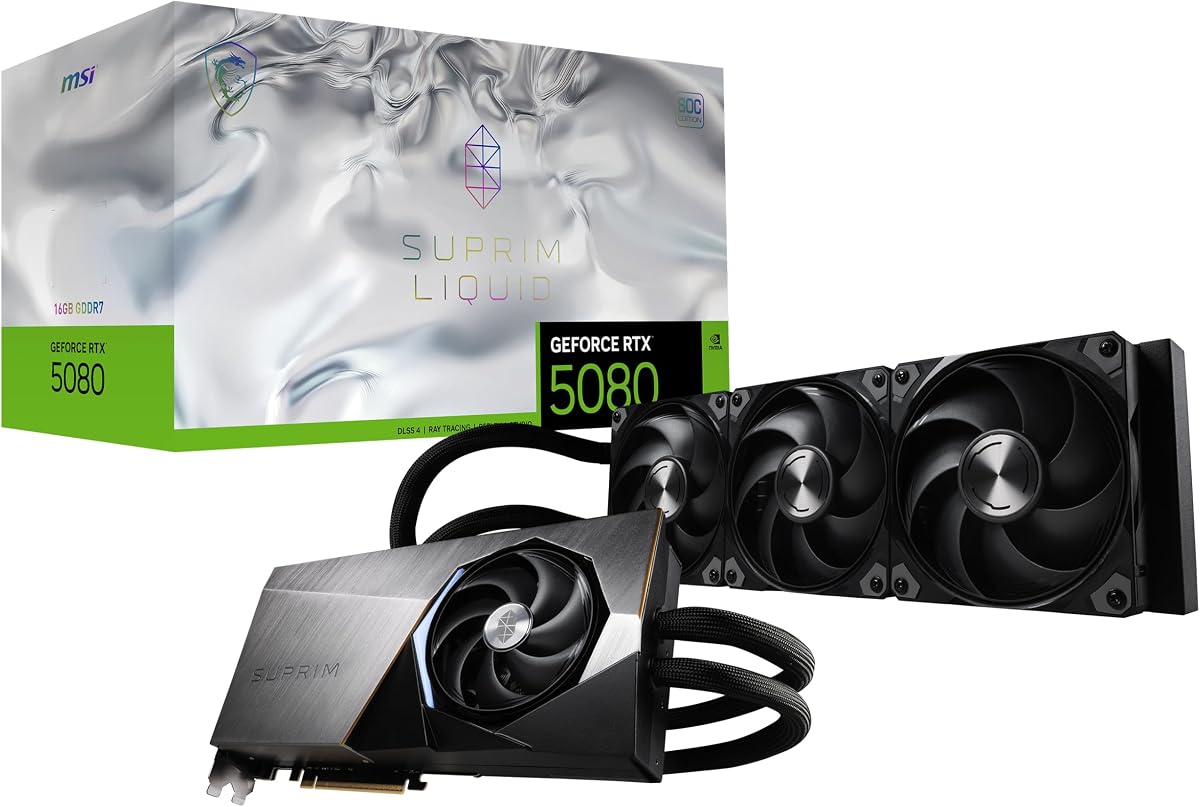
The MSI SUPRIM Liquid SOC offers top-tier performance with advanced liquid cooling technology. Its high clock speeds and 16GB GDDR7 memory ensure smooth handling of demanding games. This card is designed for enthusiasts who want the absolute best.
We may earn a commission when you buy through this link, at no additional cost to you.
Liquid cooling technology keeps thermals low for sustained performance under heavy loads. The 256-bit interface supports multiple high-resolution displays including 8K setups. This provides excellent connectivity for multi-monitor workstation and gaming builds.
Installation requires careful setup due to the liquid cooling system which adds complexity. The price point is higher than standard air-cooled cards but the performance justifies it. These factors are acceptable for serious enthusiasts only.
If you need maximum performance for rendering or high-resolution gaming this card is ideal. It offers headroom for future titles and professional workflows. We recommend it for experts and enthusiasts seeking top performance.
SUPRIM Liquid SOC uses liquid cooling to ensure extreme performance and optimal thermal management.
DisplayPort x 3 2.1a and HDMI 2.1b support high resolutions and multiple displays.
We may earn a commission when you buy through this link, at no additional cost to you.
Choosing the right flagship graphics card requires understanding key factors like architecture memory cooling and power. This guide breaks down what to consider before making a purchase decision.
Modern flagship cards use architectures like NVIDIA Blackwell to deliver high efficiency and AI capabilities. These chips support advanced features such as DLSS 4 and ray tracing that improve image quality and frame rates. Look for models with the latest architecture to ensure longevity and performance headroom.
Prioritize cards with newer architectures for better support and performance in future titles and applications.
Memory capacity and type are critical for handling high-resolution textures and complex scenes. GDDR7 offers faster bandwidth than GDDR6 enabling smoother performance in demanding games. A wider memory interface like 256-bit helps sustain high throughput during intensive rendering or gaming.
Ensure the card has at least 16GB of modern memory to handle current and future gaming and creative needs.
Effective cooling is essential for maintaining boost clocks and preventing thermal throttling. Look for cards with multiple fans large fin arrays and advanced thermal materials like phase-change pads. Liquid cooling options offer even better heat dissipation but require more complex installation.
Choose a cooling solution that matches your case airflow and usage patterns to ensure stable performance.
Flagship graphics cards demand significant power so verify your PSU wattage and connectors. Ensure you have a PSU with sufficient capacity and compatible connectors like 16-pin 12V-2×6. Upgrading your power supply may be necessary to support high-end cards reliably.
Always check power requirements before buying to avoid instability and potential hardware issues.
High-performance cards are often large and may not fit in smaller cases. Check the card length and slot count to ensure it fits your case and motherboard spacing. Consider cases with high clearance if you plan to install a massive flagship card.
Measure your case before purchasing to confirm the card fits without blocking airflow or ports.
Modern cards offer high-speed ports like HDMI 2.1b and DisplayPort 2.1a for multi-monitor setups. Ensure the card supports your monitor resolution and refresh rate to take full advantage of its power. Multiple outputs provide flexibility for gaming work or content creation environments.
Select a card with output types that match your displays and peripheral needs for a smooth setup.
Premium models often use military-grade components and protective PCB coatings for durability. Auto-Extreme manufacturing processes reduce failure rates and improve longevity of the card. These features matter if you plan to overclock or run the card under heavy loads for years.
Prioritize models with proven build quality and warranties to ensure long-term reliability for your system.
Software tools like GPU Tweak III provide intuitive performance tweaking thermal controls and monitoring. Look for features like Dual BIOS which let you switch between performance and quiet profiles. These tools offer customization for different usage scenarios and preferences.
Choose a card with good software support for easier control over performance and thermal behavior.
Install the card by securing it firmly in the PCIe slot and connecting power cables securely. Ensure all connectors are seated correctly to avoid power issues during operation.
Use manufacturer software to update drivers and monitor thermal performance regularly. Adjust fan curves if needed to balance noise and cooling efficiency based on your case airflow.
Keep the interior of your case clean to prevent dust buildup on the GPU fans and heatsinks. Clean dust from filters and vents periodically to maintain optimal thermal performance and longevity.
Yes for enthusiasts and professionals they are worth it because they deliver high frame rates and future-proof performance. While expensive they reduce bottlenecks in creative workflows and gaming setups. If you need top-tier performance now a flagship card is a smart investment.
Most flagship cards require a minimum of 850W PSU with the correct 12V-2×6 connectors. Check your card requirements before buying as power needs can exceed 1000W for some models. Ensure your PSU is modular and efficient to handle high power draw reliably.
Most flagship cards are large and may not fit in smaller cases without planning. Some models offer 2.5-slot designs but many require 3.6 slots or more. Measure your case dimensions carefully before purchasing to avoid fit issues.
Yes you should install the latest NVIDIA or AMD drivers for optimal performance and stability. Driver updates include bug fixes and support for new games. Use official manufacturer software for driver updates and configuration to avoid conflicts.
Keep case airflow optimal by adding case fans to remove hot air from GPU area. Clean dust from filters and heatsinks regularly to prevent thermal throttling. Adjust fan curves via software to balance noise and cooling as needed.
Liquid cooling offers better heat dissipation allowing higher sustained boost clocks. However it requires more complex installation and maintenance to ensure reliability. Air cooling is simpler and sufficient for most users with good case airflow.
DLSS 4 is NVIDIA's AI upscaling technology that boosts frame rates while maintaining image quality. It uses deep learning to generate frames and upresolve images for smoother gaming. It is supported on newer NVIDIA cards like the RTX 50 series.
GDDR7 offers faster bandwidth and efficiency than GDDR6 which helps in high-resolution gaming and rendering. If you plan on 4K gaming or professional workflows GDDR7 is a significant advantage. However GDDR6 still performs well for many common use cases.
The top picks in this guide include the ASUS TUF RTX 5070 Ti for value and the Gigabyte RTX 5080 for overall performance. These models balance cooling build quality and features to suit different user needs effectively.
Prioritize architecture memory capacity and cooling when selecting a card for your specific use case. Understanding your workload helps you choose the right card without overspending on unnecessary power.
Prices change frequently based on market demand so check current listings before finalizing your purchase. Verify compatibility with your system to ensure a smooth upgrade experience for your build.