
Seagate 2TB Game Drive for Xbox
4.5Editor score
2TB storage capacity for vault
Xbox certified compatibility
Built-in LED lighting
Compare the top 10 external SSD Xbox Series X S options for storage expansion and gaming performance to find the best fit for your console setup.
Modern gaming consoles require vast storage spaces to accommodate increasingly large game files and updates. External SSDs provide a convenient way to expand capacity without compromising performance significantly.
We evaluated ten leading storage solutions based on speed, compatibility, durability, and value. Our analysis covers official expansion cards and versatile portable drives suitable for Xbox Series X and S users.
Each selection highlights key features, real-world performance expectations, and ideal use cases. Note that availability and pricing may fluctuate, so verify current details before purchasing your preferred model.
4.5Editor score

4.8Editor score
4.6Editor score
This side-by-side comparison highlights the unique attributes of each drive to help you decide which storage solution aligns best with your gaming needs and budget constraints.


This Sandisk expansion card stands out as a top choice for Xbox Series X and S owners seeking seamless storage integration. With a perfect rating, it delivers official support and NVMe speeds that match the console's internal performance perfectly.
We may earn a commission when you buy through this link, at no additional cost to you.
The card leverages the Xbox Velocity Architecture to ensure games run directly from it without any lag. It supports Quick Resume, allowing you to switch between multiple suspended games instantly. The integration is effortless, requiring no complex setup or configuration steps.
While the price point is higher than typical USB drives, the performance parity justifies the expense for serious gamers. The card supports up to 2TB capacity across the range, giving ample room for large libraries. However, it is specifically designed for Xbox and lacks versatility for other devices.
If you prioritize performance and official compatibility above all else, this card is the definitive choice. It ensures your Next-gen games run smoothly without compromise. It is ideal for players who want to expand storage without sacrificing any load times or functionality.
The official licensing ensures that the drive works flawlessly with the Xbox system software and game optimization features.
Support for Quick Resume means you can jump between games instantly without reloading, enhancing your overall gaming workflow.
We may earn a commission when you buy through this link, at no additional cost to you.
The Seagate 2TB Game Drive offers excellent value for budget-conscious gamers needing substantial storage space. Rated highly for its practical design, it provides a certified way to expand your library without breaking the bank or sacrificing reliability standards.
We may earn a commission when you buy through this link, at no additional cost to you.
Its bold design complements the Xbox aesthetic with a built-in LED bar that illuminates in green. It supports up to 2TB of capacity, allowing you to store your entire game vault easily. While games must be moved to internal storage to play, archiving titles is seamless.
A significant benefit is the included three-year Rescue Data Recovery Services, adding peace of mind. The drive is Xbox certified and works across generations, ensuring long-term utility. However, USB 3.0 speeds are slower than internal NVMe performance, affecting load times if not managed properly.
For those prioritizing capacity and price over raw speed, this drive is a solid investment. It keeps your system organized and ready to play. It is best suited for storing older titles or less frequently played games to free up internal space.
With two terabytes available, you can archive a massive library of games without worrying about running out of space quickly.
The included rescue service ensures your game saves and data are recoverable in case of drive failure or accidental deletion.
We may earn a commission when you buy through this link, at no additional cost to you.
The WD_Black C50 Storage Expansion Card is a strong contender for users wanting official expansion at a competitive price point. It delivers NVMe performance that aligns with the console's architecture ensuring fast load times and smooth gameplay experiences overall.
We may earn a commission when you buy through this link, at no additional cost to you.
Optimized specifically for Xbox, this card unlocks the full potential of the Velocity Architecture for seamless access. It supports Quick Resume so you can switch between games instantly without delay. The plug-and-play setup makes it incredibly user-friendly for any console owner looking to expand storage quickly.
While the 1TB capacity may not be as vast as USB options, the performance benefits are significant for active gamers. The official licensing guarantees compatibility with all Xbox Series X and S titles without issues. It is slightly more expensive than generic drives but offers better integration and speed.
This card is perfect for players who want the convenience of an expansion card without the premium cost of other brands. It ensures your games run efficiently while keeping your system organized. We recommend it for those needing fast access to current-gen titles regularly.
Designed to work with the Velocity Architecture, the drive ensures games load quickly and run smoothly just like internal storage.
Quick Resume support allows you to jump back into your game exactly where you left off without waiting for reloads.
We may earn a commission when you buy through this link, at no additional cost to you.
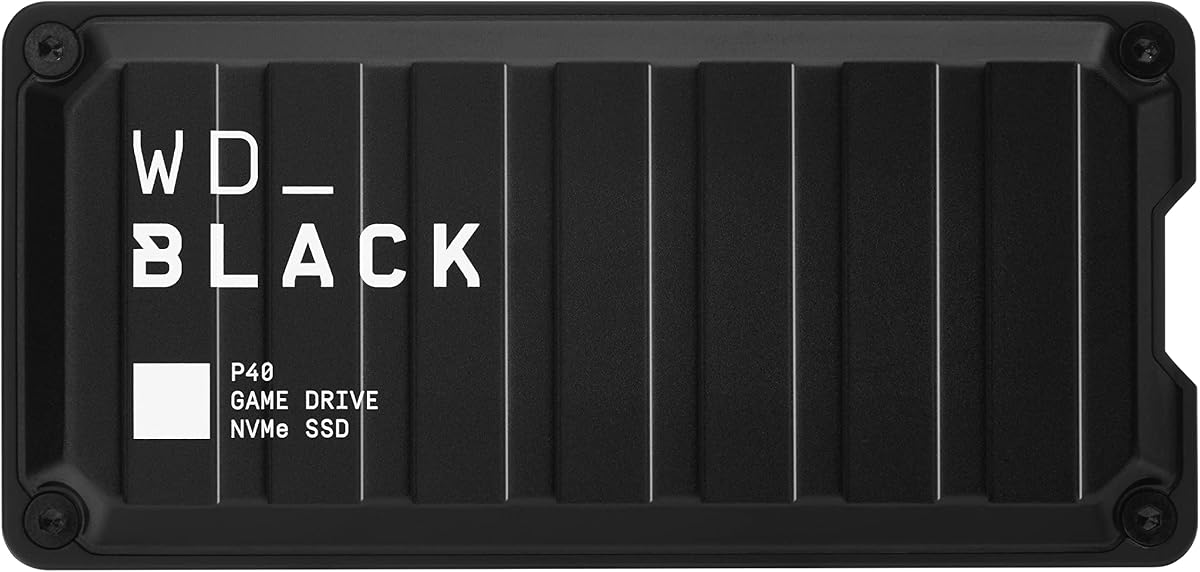
The WD P40 Game Drive SSD brings high performance and style to your gaming setup with its impressive transfer speeds. Rated well by users, it offers a rugged design and customizable lighting that appeals to gamers who want both speed and aesthetics in one package.
We may earn a commission when you buy through this link, at no additional cost to you.
With speeds up to 2000MB/s, this drive reduces load times significantly for compatible titles. The RGB lighting can be customized via software to match your setup vibe. It is shock-resistant and can survive drops of up to two meters ensuring reliability during transport.
Although it works with Xbox and PlayStation consoles, the USB 3.2 Gen2x2 interface may require adapters on older systems. The drive is purpose-built for gamers and keeps your latest titles installed ready for launch. It is versatile enough for use on PC as well for maximum flexibility.
If you need a portable solution that looks as good as it performs, this drive is an excellent choice. It balances durability with speed effectively for modern gaming needs. We suggest it for travelers or those who value customization options in their hardware.
The customizable RGB lighting allows you to personalize your desk setup while enjoying fast data transfer speeds for your games.
Built with a shock-resistant structure, the drive protects your data from accidental drops making it ideal for mobile gaming setups.
We may earn a commission when you buy through this link, at no additional cost to you.
The Lexar ES3 Portable SSD is defined by its incredibly thin and light design making it easy to carry anywhere. It offers fast data transfer speeds suitable for both work and play ensuring files move quickly between your devices and storage seamlessly every time.
We may earn a commission when you buy through this link, at no additional cost to you.
Despite its small size, it includes robust data encryption software to protect your files securely. It connects via USB 3.2 Gen 2 providing reliable performance for Xbox and other systems. The included Type-C cable ensures plug-and-play convenience for most modern devices you might own today.
However, it does not support MagSafe features which might limit use with some newer laptops or phones. The durability is standard without specific shock resistance claims compared to heavier models. It remains a strong option for users prioritizing portability and efficiency over ruggedness.
This drive is perfect for those who need a pocket-sized drive for quick file transfers. It fits easily in any bag without adding bulk to your gear. We recommend it for casual users who need reliable storage that travels well with their devices daily.
Weighing just 42 grams and being only 10.5mm thick, this drive slips easily into pockets or small bags for maximum portability.
The built-in encryption software ensures your sensitive files remain secure during transfers protecting your data from unauthorized access.
We may earn a commission when you buy through this link, at no additional cost to you.
The Lexar SL500 External SSD delivers incredible read speeds up to 2000MB/s making it ideal for fast file transfers. It features a slim metal design that fits easily in your pocket while maintaining durability for everyday use and travel needs worldwide.
We may earn a commission when you buy through this link, at no additional cost to you.
Its unique thermal control design ensures the drive stays cool even during intense data operations. It supports Apple ProRes recording on compatible iPhones adding versatility for creators. The metal body is robust yet lightweight perfect for on-the-go professionals or gamers on the move.
While speeds are high, performance on systems not supporting USB 3.2 Gen 2×2 may be lower than advertised. The drive is best utilized with compatible hosts to maximize its potential. It requires careful handling to ensure thermal vents remain clear for optimal performance.
If you need raw speed in a tiny package this drive is a strong contender. It handles large files with ease and keeps heat manageable during use. We recommend it for content creators or gamers who value speed and portability in their storage tools.
The built-in thermal design keeps the drive cool during peak performance ensuring consistent speeds during long usage sessions.
Support for ProRes recording makes this drive valuable for creators working with high-resolution video content on mobile devices.
We may earn a commission when you buy through this link, at no additional cost to you.
The Samsung T7 Portable SSD is a trusted name in storage known for its reliability and speed across many devices. It features a sturdy aluminum unibody that protects data while offering fast read and write speeds for gaming files easily.
We may earn a commission when you buy through this link, at no additional cost to you.
Its shock resistance up to six feet provides significant protection against accidental drops. The compact design makes it easy to carry in a bag or pocket during travel. It works with Xbox PC and mobile devices ensuring you can access your library anywhere.
While it is not officially branded as an Xbox drive it performs excellently for storing and archiving games. The firmware is robust and supports secure transfer protocols for your files. It is slightly heavier than some competitors but the build quality justifies the weight fully.
If you want a dependable drive that works everywhere the T7 is a top choice. It balances performance and durability effectively for daily use. We recommend it for users who need a versatile solution that does not compromise on reliability.
With a solid aluminum unibody and shock resistance the drive withstands daily wear and tear better than plastic alternatives.
Compatible with a wide range of devices including PCs consoles and phones making it a versatile storage solution for all needs.
We may earn a commission when you buy through this link, at no additional cost to you.
The Western Digital P50 SSD offers massive storage capacity with 4TB of space for your growing library. It delivers high-performance speeds suitable for reducing load times and archiving large titles efficiently on your Xbox system regularly.
We may earn a commission when you buy through this link, at no additional cost to you.
Its shock-resistant design ensures durability during transport while the included 18-inch cable provides convenient connection to your console. The SuperSpeed interface ensures you get the most out of the drive for your gaming activities every time. It is built for performance with reliable quality standards.
However, the large capacity comes with a higher price point compared to standard drives. The physical size is bulkier than 1TB options which may impact portability significantly. It is best suited for home setups where space and capacity are priorities over travel convenience.
If you need a vast library on one drive this SSD is the perfect solution. It keeps everything ready to launch without needing external management constantly. We recommend it for power users who need ample space for multiple next-gen titles.
With four terabytes available you can store your entire gaming history plus new releases without ever worrying about space again.
Despite its size the drive is shock-resistant and designed to handle physical impacts ensuring your data remains safe during moves.
We may earn a commission when you buy through this link, at no additional cost to you.
The Crucial X10 Pro Portable SSD delivers ultra-fast speeds ideal for professional workflows and large game files alike. It features robust protection against water and dust making it suitable for all-weather environments and rugged usage scenarios easily.
We may earn a commission when you buy through this link, at no additional cost to you.
It includes bonus software for photo and backup management enhancing its utility beyond just storage. The drop resistance up to seven and a half feet ensures safety against accidents. It connects via USB-C and USB-A for broad compatibility across devices you might use daily.
While it is an amazing drive for creators it lacks specific Xbox optimizations compared to branded cards. The speed is exceptional but may not be fully utilized by older consoles. It remains a reliable option for storage but consider your primary use case carefully.
If you need a durable drive that doubles as gaming storage this option works well. It protects your data in harsh conditions and offers high performance. We recommend it for users who want a reliable storage tool for multiple purposes.
The IP55 rating protects against dust and water making it safe for outdoor use or environments where accidents might happen.
With ultra-fast read speeds the drive handles large video files and game data efficiently without slowing down your projects.
We may earn a commission when you buy through this link, at no additional cost to you.
The Lexar 2TB ES3 External SSD offers a blend of capacity and speed suitable for expanding gaming libraries affordably. It features a sleek design that remains sturdy during daily use ensuring data safety and consistent performance over time.
We may earn a commission when you buy through this link, at no additional cost to you.
Built-in double layer graphite sheets help conduct heat away from the drive keeping it cool during fast transfers. It is drop-resistant up to two meters providing peace of mind if you move frequently. The 2-in-1 cable ensures you can connect to any device easily.
While not Xbox branded it works well with USB ports on consoles for general storage. The transfer speeds are solid for managing files and installing titles from external sources. It lacks specific Xbox features like Quick Resume which may limit some gaming scenarios.
If you need a portable 2TB drive without breaking the bank this option is solid. It provides reliable storage for both work and play tasks. We recommend it for users who need flexible storage that works across multiple devices seamlessly.
The double layer graphite sheets conduct heat efficiently preventing thermal throttling during long data transfer sessions.
Includes a versatile 2-in-1 cable that works with USB-C and USB-A ports for maximum compatibility with any host device.
We may earn a commission when you buy through this link, at no additional cost to you.
Selecting the right storage solution involves understanding your needs for capacity speed and compatibility with your Xbox setup.
Modern games often exceed 50GB each so planning for future titles is essential. Consider how many games you want to keep installed simultaneously versus stored externally.
Choose 1TB for essential titles or 2TB and above if you want a full library ready without constant management.
NVMe expansion cards offer the fastest speeds matching internal storage for gameplay. Portable SSDs vary but faster drives reduce load times for older titles or archived games.
Prioritize USB 3.2 Gen 2 or NVMe interfaces for the best transfer and load performance possible.
Official expansion cards play next-gen titles directly and support Quick Resume. Portable drives are versatile but often store rather than play next-gen games without moving them.
Buy an official card if you need to play immediately or a portable drive if you just need storage space for older titles.
Look for shock resistance ratings if you move your console or drive often. Metal or ruggedized cases protect data during travel better than plastic.
Select a drive with high drop resistance if you plan to use it outside your home setup regularly.
Ensure the drive uses a cable compatible with your console's USB ports. USB-C drives may need adapters for older USB-A systems.
Check the included cable length and type to avoid buying extra adapters after purchase.
Expansion cards cost more but offer better performance. Portable drives offer more storage per dollar but may lack specific console features.
Check warranty length and data recovery options to protect your investment over the long term.
If you own multiple consoles or a PC verify that the drive works across all systems. Some branded drives have exclusive features for specific ecosystems.
Choose a universal drive if you need to switch between devices frequently without format issues.
High-speed drives generate heat so look for cooling features like graphite sheets or aluminum bodies. Overheating can cause throttling or performance drops.
Ensure the drive has enough ventilation or thermal protection for long sessions.
Connect your drive to an available USB port on your console or PC. If prompted format the drive using the Xbox system settings to prepare it for games or media.
Transfer games from your internal storage to the external drive to free up space. You can archive titles here and install them when needed for quick access.
Avoid removing the drive while data is transferring to prevent corruption. Keep the drive in a cool dry place to maintain its longevity and performance over time.
You can only play Series X optimized games directly from an official expansion card. External USB SSDs are for archiving or playing older Xbox One titles unless you move them back to internal storage first.
Official NVMe expansion cards like the WD Black C50 or Seagate Expansion Card are the fastest. They match internal storage speeds allowing for seamless gameplay without lag.
Yes most new drives require formatting via the Xbox settings to work correctly. Formatting prepares the file system for the console and will erase any existing data on the drive.
Go to My Games and Apps select Manage for a game and choose Move. Select your external drive as the destination and confirm the transfer.
A 4TB drive is ideal if you want to store all your games without deleting anything. It is best for home setups where portability is less important than capacity.
Yes most portable SSDs work with both PC and Xbox. Ensure the drive uses a compatible file system or reformat as needed for each device.
The WD Black C50 remains the top pick for its seamless integration and speed while the Seagate Drive offers budget-friendly bulk. Both serve different needs depending on your performance and price priorities.
If you need to play next-gen titles directly prioritize an official expansion card. For archiving and versatility portable SSDs provide excellent value and flexibility for your library.
Check current availability and verify compatibility before buying to ensure the drive meets your specific needs. Storage tech evolves quickly so always confirm the latest details for your model.