
ASRock Intel Arc A580 Challenger 8GB OC
4.6Editor score
8GB GDDR6 memory
Xe HPG Architecture
Dual-fan 0dB cooling
This guide compares the top Intel Arc GPU models for gaming and workloads, highlighting performance features memory and pricing for informed buying decisions.
Choosing the right graphics card can transform your computing experience significantly. Intel Arc GPUs offer a compelling mix of performance and value for modern workloads.
We compared these products based on architecture, memory, connectivity, cooling, and real-world use cases. Each entry highlights key strengths to help you match the card to your needs.
Every pick shows what makes the model unique along with verified specs from the manufacturer. Keep in mind that prices and availability change frequently over time.
4.6Editor score

4.7Editor score

3.9Editor score
The following table offers a side-by-side view of every model reviewed here. Compare memory, architecture, and connectivity at a glance.



This workstation GPU targets AI inference and rendering with 24GB of GDDR6 memory. It carries a 3.9 rating reflecting professional use priorities.
We may earn a commission when you buy through this link, at no additional cost to you.
Its Xe2-HPG architecture delivers 197 TOPS of INT8 compute power for AI acceleration. Four DisplayPort 2.1 outputs enable expansive multi-monitor workflows.
While the single blower fan may generate noise, the ISV drivers ensure stability for critical engineering tasks. The card is optimized for Linux multi-GPU setups.
Buy this if you need high VRAM for large language models without cloud costs. It is the top choice for professional AI deployments.
The 24GB memory allows loading large models like 70B-class quantized models directly on GPU.
ISV certification guarantees compatibility with design and manufacturing software for reliable workflows.
We may earn a commission when you buy through this link, at no additional cost to you.
The B570 Challenger leads gaming value with 10GB GDDR6 and 2600 MHz clock speeds. It holds a 4.7 rating for solid performance and reliability.
We may earn a commission when you buy through this link, at no additional cost to you.
XeSS 2 technology enhances frame rates using AI upscaling. The dual-fan cooling system ensures silence at low loads while managing thermals during sessions.
A 160-bit bus may limit bandwidth compared to wider options, but the performance per watt remains strong. The metal backplate adds durability and style.
Choose this card for high-refresh gaming and content creation. It balances cost and capability better than most competitors.
XeSS 2 upscaling delivers higher framerates while preserving visual fidelity in supported titles.
0dB cooling technology stops fans completely under light usage for total quiet.
We may earn a commission when you buy through this link, at no additional cost to you.
The A580 Challenger brings next-gen Arc architecture at an accessible cost. With 8GB GDDR6 and a 4.6 rating, it delivers reliable entry-level performance.
We may earn a commission when you buy through this link, at no additional cost to you.
It features 384 XMX engines for AI acceleration. The factory overclock pushes performance for smooth gameplay and multimedia tasks.
System compatibility requires 650W PSU and two 8-pin connectors. The dual-slot design may not fit smaller cases.
Ideal for budget gamers and light creators, this card offers value. It is the best starting point for the Arc ecosystem.
The Xe HPG architecture delivers solid 1440p performance for the price tier.
0dB silent cooling stops fans at low loads to reduce noise.
We may earn a commission when you buy through this link, at no additional cost to you.
The Sparkle Titan OC pushes performance with a 2760MHz boost clock. It holds a 4.5 rating for reliability and high clock speeds.
We may earn a commission when you buy through this link, at no additional cost to you.
Its TORN Cooling 2.0 system manages heat efficiently. The 12GB GDDR6 supports higher texture details in modern titles.
The breathing light and sag bracket add aesthetic and structural value. However, availability may be limited in some regions.
Buy this if you want higher clocks out of the box. It suits gamers seeking premium features within the Arc lineup.
TORN Cooling 2.0 maintains stable temps under load for consistent gaming.
We may earn a commission when you buy through this link, at no additional cost to you.
This dual-GPU card targets extreme AI workloads with 48GB memory. It lacks a rating but supports 70B-class models locally.
We may earn a commission when you buy through this link, at no additional cost to you.
Each GPU runs at 2400 MHz delivering combined 394 TOPS. The PCIe 5.0 x8 interface ensures high bandwidth.
Cooling is optimized for server airflow. Software support includes PyTorch and vLLM.
Buy this only if you need local inference without cloud services. It is a specialized tool for researchers.
Eliminates need for cloud services when running large language models.
We may earn a commission when you buy through this link, at no additional cost to you.
Like the WEELIAO variant, this card combines two B60 GPUs. It aims for rendering and AI with 48GB memory.
We may earn a commission when you buy through this link, at no additional cost to you.
The dual-slot form factor fits standard cases. Turbo cooling exhausts heat directly to chassis.
It handles large-scale rendering and complex visual computing. Support is optimized for machine learning tasks.
Choose this for parallel processing needs. It serves professionals who need local memory capacity.
Dual-slot form factor avoids monopolizing motherboard expansion space.
We may earn a commission when you buy through this link, at no additional cost to you.
This bundle pairs the B570 GPU with a PRO-650G PSU. It holds a perfect 5.0 rating for user satisfaction.
We may earn a commission when you buy through this link, at no additional cost to you.
The PSU is 80 PLUS Gold certified and ATX3.1 ready. It ensures stable power for the GPU.
You get everything needed for a build upgrade. The GPU delivers 1440p performance out of the box.
Buy this for convenient system builds. It offers cost savings for new setups.
80 PLUS Gold PSU maximizes efficiency for stable performance.
We may earn a commission when you buy through this link, at no additional cost to you.
This low-profile card suits SFF workstations with 16GB memory. It has no rating but fits mini-tower cases.
We may earn a commission when you buy through this link, at no additional cost to you.
It draws 70W without external PCIe connectors. The Xe2 architecture delivers 170 TOPS for compute.
The turbo fan ensures airflow in compact chassis. Connectivity handles 128-bit bus bandwidth.
Buy this for edge workstations needing high VRAM. It solves space constraints with power.
Perfect for mini-tower and SFF setups needing high memory capacity.
We may earn a commission when you buy through this link, at no additional cost to you.
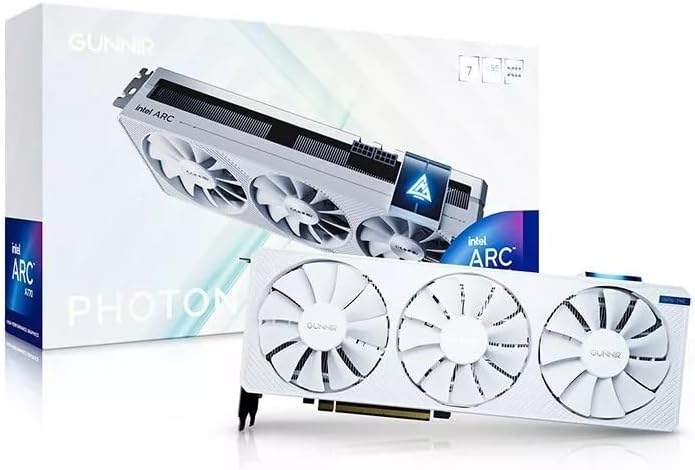
The A770 Photon stands out with white aesthetics and triple fans. It holds a 4.5 rating for stable performance.
We may earn a commission when you buy through this link, at no additional cost to you.
It drives 4K monitors efficiently with 256-bit bus. Triple fans maintain cool temps during intense workloads.
Future-proof connectivity includes HDMI and DisplayPort. White panels suit build aesthetics.
Choose this for visual appeal and gaming. It matches premium builds well.
Triple-fan design ensures stable temperatures during heavy workloads.
We may earn a commission when you buy through this link, at no additional cost to you.
The A310 targets multi-monitor setups with four HDMI ports. It holds a 4.6 rating for compact functionality.
We may earn a commission when you buy through this link, at no additional cost to you.
Its 50W TBP suits low-power systems. Single-slot design fits tight spaces.
Four outputs allow expanded desktops. Single fan keeps temps in check.
Buy this for office or light tasks. It supports multiple displays effectively.
Four HDMI outputs allow expanded desktops without adapters.
We may earn a commission when you buy through this link, at no additional cost to you.
Selecting the right Arc GPU requires understanding memory needs, architecture, and system compatibility.
Memory size determines model size and texture handling. 10GB or more suits modern games and AI models.
Xe2-HPG offers newer features over Xe HPG. Check generation to ensure driver support.
Dual or triple fans reduce noise. Blower fans suit multi-GPU setups.
Verify PSU capacity and connectors. Some models need dual 8-pin inputs.
HDMI 2.1a and DP 2.1 support high refresh rates. Match to monitor specs.
Professional workflows need ISV certification. Check software compatibility before purchase.
Measure case clearance. Low-profile models fit SFF builds.
Balance cost against performance tiers. Bundles offer added PSU savings.
Install drivers from Intel's official site for best stability. Ensure BIOS PCIe settings match GPU architecture.
Monitor temperatures using standard tools. Keep airflow clear around intake and exhaust vents.
Update firmware periodically. Adjust fan curves if noise becomes problematic during idle.
Yes, modern Arc models support XMX engines for AI acceleration. They run inference efficiently with high VRAM.
All listed models support DirectX 12 Ultimate with hardware ray tracing. Performance varies by generation.
Minimum 550W is advised for entry models. High-end options need 650W or more.
Low-profile models fit mini-towers. Measure clearance before purchasing larger cards.
They offer competitive value for specific workloads. Check benchmarks for your specific use case.
XeSS uses AI upscaling to boost frame rates. It balances visual fidelity with performance.
These options cover budget gaming to professional AI workloads. Top picks include the A580, B570, and B60 models.
Prioritize memory and cooling for long-term stability. Match architecture to software requirements.
Verify current prices and availability before buying. Prices fluctuate frequently in the GPU market.