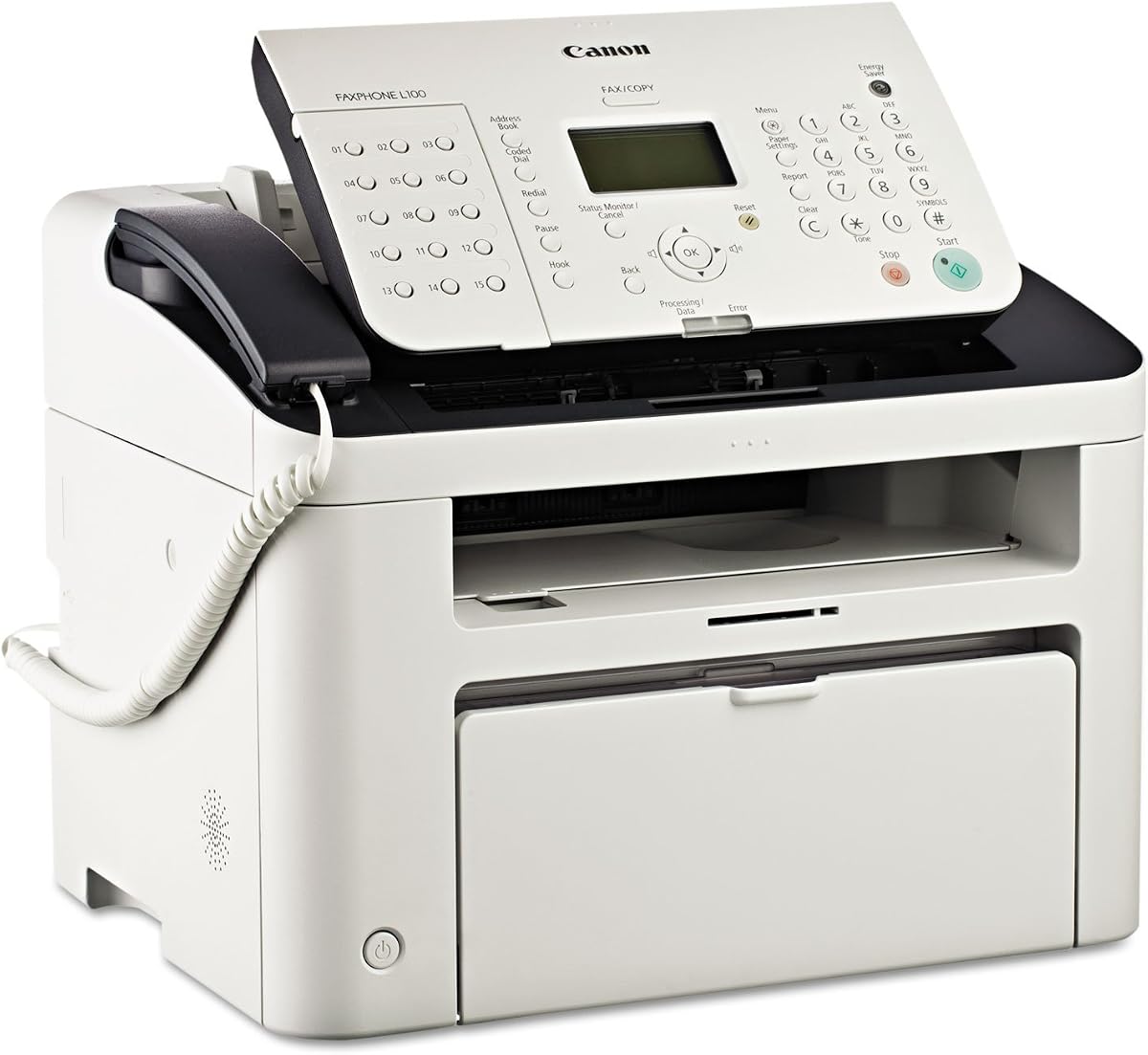
Canon FAXPHONE L100
4.1Editor score
Fifty two pages per minute print speed
Five hundred twelve sheets memory capacity
Thirty sheet auto document feeder
This guide compares the top 10 fax machines with phone capabilities including laser and thermal options to help you choose the right communication tool for
Finding a reliable fax machine with phone capabilities is essential for many businesses today. These devices combine communication functions to streamline your workflow. You need a model that offers clear transmission and easy operation. A good machine should handle documents efficiently without constant maintenance issues.
We compared the top ten products based on speed memory capacity and ease of use. Our analysis includes features like automatic document feeders and handset quality. We also looked at user reviews and technical specifications. This list covers various price points and feature sets for different needs.
Each pick highlights key strengths and potential trade-offs for your specific situation. You will see ratings and detailed specs to inform your decision making. Prices and availability can change so check the current listings before buying. These insights help you find the best value for your investment today.
4.1Editor score
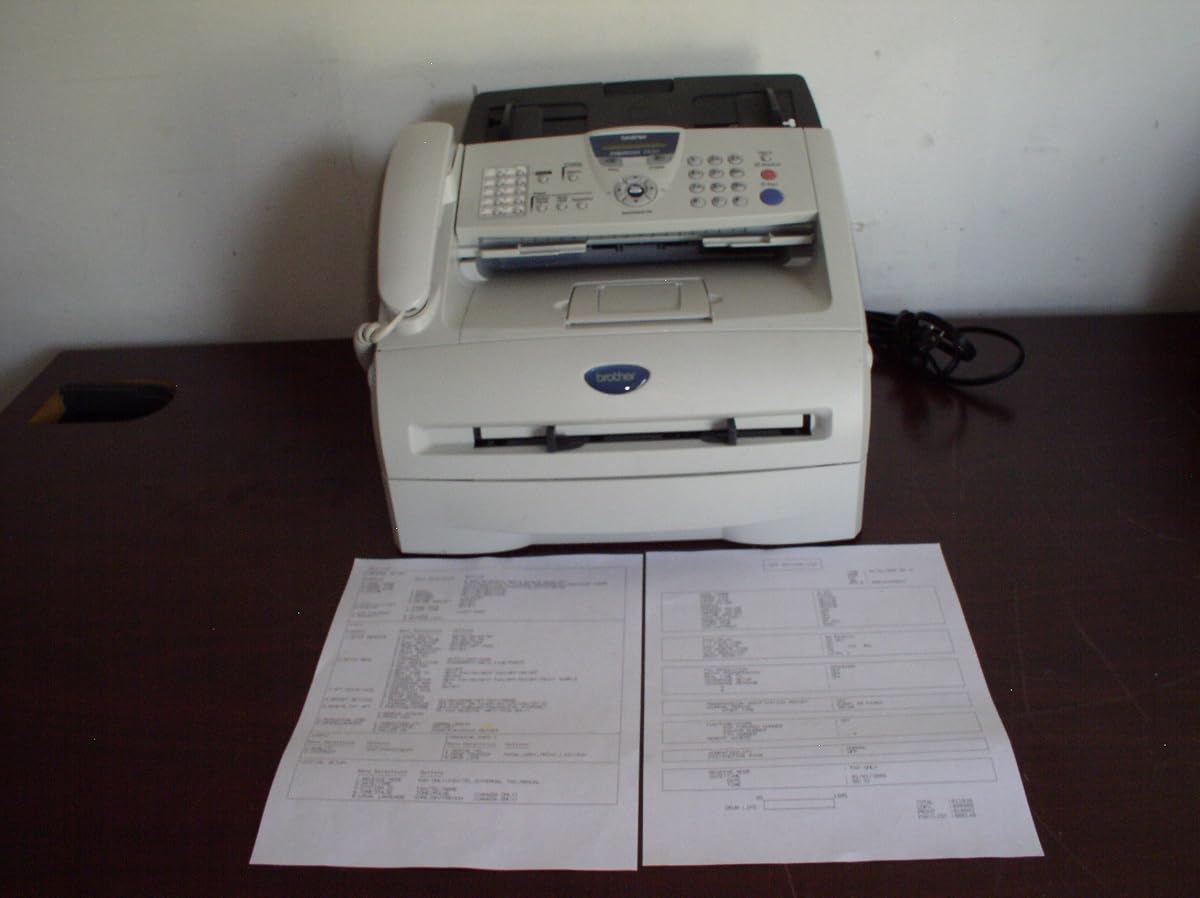
4.2Editor score

4.4Editor score
This side by side comparison shows all ten products with their key specifications and links. You can quickly see differences in memory capacity print speeds and paper handling features across the range.


The Brother FAX-575 stands out as a reliable all in one solution. It holds a solid rating from users who appreciate its straightforward interface. This device handles faxing phone calls and copying with equal ease for home offices.
We may earn a commission when you buy through this link, at no additional cost to you.
Its nine thousand six hundred BPS modem ensures transmissions happen quickly without waiting too long per page. The five hundred twelve KB memory allows you to store up to twenty five pages if the line is busy. This is crucial for high volume users who need reliability.
While the design is utilitarian it functions without fuss. The only trade off is the lack of modern smart connectivity like mobile sending. However for traditional business needs this machine delivers consistent performance and clear output quality.
If you need a dependable fax phone combo that works right out of the box this is a top choice. It fits well in settings where simplicity and speed matter most without requiring technical setup.
The modem speed of about fifteen seconds per page keeps workflows moving smoothly.
Store multiple faxes in memory to send later when the line is free.
We may earn a commission when you buy through this link, at no additional cost to you.
This renewed version offers the same core capabilities at a more accessible price point. Buyers can save money while still getting a fully functional fax and phone combo. It is ideal for those who want value without sacrificing essential features.
We may earn a commission when you buy through this link, at no additional cost to you.
The performance mirrors the new unit with fast modem speeds and generous memory. You still get twenty five pages stored and quick transmission rates. This makes it a practical choice for small budgets needing professional tools.
Keep in mind that as a renewed item the cosmetic condition may vary slightly. The warranty is often shorter than brand new units so check terms carefully. Still the internal components are tested to ensure they meet standards.
Choose this if you want the functionality of the top pick without paying full retail. It is a smart way to equip an office on a tight budget with proven technology.
Significant savings compared to new units with identical core capabilities.
Tested to ensure all internal functions work as expected reliably.
We may earn a commission when you buy through this link, at no additional cost to you.
The Canon FAXPHONE L100 brings impressive speed to the category with laser output. Users appreciate how quickly documents come out without compromising quality. This is perfect for offices that handle steady streams of incoming and outgoing pages.
We may earn a commission when you buy through this link, at no additional cost to you.
With nineteen pages per minute it outpaces many thermal models in the comparison. The memory holds significant data allowing you to queue jobs efficiently. Plus the energy saver mode helps reduce power usage when idle.
The larger size and need for toner are minor trade-offs for the speed gain. It ensures crisp text that is easy to read on copies and faxes. This reliability makes it a strong contender for daily business use.
If speed is your priority this laser fax delivers consistent results day after day. It balances performance and usability well for those needing high throughput capabilities.
Print and copy at nineteen pages per minute for quick task completion.
Store multiple faxes in five hundred twelve sheets of memory.
We may earn a commission when you buy through this link, at no additional cost to you.
This device represents a modern take on faxing by focusing on digital workflows. It allows you to send and receive faxes via your computer or smartphone easily. The paperless approach saves space and reduces physical clutter in the workspace.
We may earn a commission when you buy through this link, at no additional cost to you.
You can simply right click or drag and drop files to send a fax in steps. The system auto saves everything as PDFs and forwards copies to your email. This creates a digital record without needing to scan or print documents manually.
It does require an internet connection which differs from traditional phone lines. Also there is no physical handset so you rely on software for communication. However the convenience and cost savings are significant for tech savvy users.
Choose this if you want to eliminate paper waste and integrate faxing into your PC tools. It is ideal for remote teams or those who already use cloud storage solutions.
Send and receive via PC or mobile with drag and drop ease.
Incoming faxes save automatically as PDF to local or email.
We may earn a commission when you buy through this link, at no additional cost to you.
The Brother MFC7240 expands beyond faxing to include scanning and printing. This makes it a complete office station for those needing multiple tools in one. Users report good print quality and reliable fax capabilities across documents.
We may earn a commission when you buy through this link, at no additional cost to you.
With twenty one pages per minute it handles standard documents quickly. The tray holds two hundred fifty sheets so refills happen less often. The scanner is useful for digitizing incoming pages for electronic storage.
The main limitation is wired connectivity which limits placement flexibility. If you need Wi-Fi this might not be the right fit. However for desk based setups it provides great value with broad functionality.
Buy this if you want a single device for printing copying scanning and faxing. It simplifies desk clutter and centralizes output tasks efficiently.
Print scan copy and fax with a single machine save space.
Two hundred fifty sheet tray reduces need for frequent refills.
We may earn a commission when you buy through this link, at no additional cost to you.
This model focuses on essential plain paper fax features with added ID tools. It allows you to see who is calling before answering or sending pages. The answering machine interface helps manage incoming calls and messages seamlessly.
We may earn a commission when you buy through this link, at no additional cost to you.
While the modem speed is lower than others the core functions remain solid. Using plain paper avoids thermal rolls that fade over time. This ensures copies stay readable for longer periods.
User feedback is mixed which suggests potential reliability concerns. The warranty exchange program helps mitigate some risk if issues arise. Keep in mind speed is not a priority with this unit.
Consider this if Caller ID and plain paper are your primary needs. It serves basic business communication well without advanced digital features.
Identify incoming calls to manage communications more efficiently.
Avoid fading by using standard paper instead of thermal rolls.
We may earn a commission when you buy through this link, at no additional cost to you.
The Brother PPF-2800 is designed for straightforward plain paper faxing with storage. It allows you to store up to ninety pages which is generous for older models. This helps when lines are busy and you need to queue jobs.
We may earn a commission when you buy through this link, at no additional cost to you.
The auto dialing memory supports up to ninety nine stations for bulk sending. This is useful for businesses that send updates to multiple recipients regularly. The machine also makes up to ninety nine copies without scanning.
Speed is limited to ten pages per minute so it is not for fast paced environments. However for occasional use or smaller offices it provides the basics without complexity. The design is functional and easy to learn quickly.
Select this if you need bulk dialing and decent memory without advanced specs. It keeps things simple and accessible for traditional communication needs.
Store up to ninety nine stations for easy batch sending.
Store ninety pages in memory to send when the line is free.
We may earn a commission when you buy through this link, at no additional cost to you.
This laser fax excels with massive memory and robust dialing capabilities. It stores up to five hundred pages so you never miss incoming messages. This is perfect for busy offices that rely heavily on paper records.
We may earn a commission when you buy through this link, at no additional cost to you.
The eight megabyte memory ensures smooth operation even with large jobs. Users like the broadcast feature which sends to over two hundred locations easily. The quality is sharp and consistent without smudges or fading.
As a laser machine it requires toner rather than thermal rolls. This is a minor cost for the reliability and clarity it provides. The USB interface allows for future printing upgrades if needed.
Get this if you need high volume capacity and professional output. It balances speed storage and clarity for demanding environments well.
Eight megabyte memory holds up to five hundred pages easily.
Sharp text output that remains clear for long term records.
We may earn a commission when you buy through this link, at no additional cost to you.
This business class fax focuses on high performance with Super G3 technology. It transmits files faster than standard models while maintaining plain paper output. Users rate it highly for reliability in daily business operations.
We may earn a commission when you buy through this link, at no additional cost to you.
The laser monochrome technology ensures every copy is crisp and professional. It operates at fifteen pages per minute which supports steady workflows well. This model is built for those who prioritize consistency and speed.
The main consideration is that it is single function rather than multi task. You get focused fax power instead of scanning or printing extra tools. This specialization makes it efficient and easy to maintain.
Choose this if you need a dedicated fax for high reliability. It offers premium performance for those who value transmission quality most.
Super G3 fax type delivers faster transmission than older models.
Laser monochrome technology keeps every document sharp and readable.
We may earn a commission when you buy through this link, at no additional cost to you.
The Canon FAXPHONE L80 offers laser output in a compact package. It includes a handset so you can manage calls directly without extra tools. The USB interface makes it easy to connect to your computer setup.
We may earn a commission when you buy through this link, at no additional cost to you.
While the print speed is six pages per minute the quality is solid. This suits smaller offices where volume is not extremely high. The modem speed is decent for standard fax communications daily.
Users note that memory might be limiting compared to other models. However the inclusion of a handset adds convenience for phone calls. The warranty provides peace of mind for any hardware issues.
Opt for this if you want laser quality without taking up too much space. It is a good fit for small offices needing basic reliable fax tools.
Space saving design fits well in smaller work areas easily.
Built in telephone handset allows direct calls without extras.
We may earn a commission when you buy through this link, at no additional cost to you.
Choosing the right fax machine with phone involves looking at key features that match your office needs. This guide breaks down the factors to consider so you can make an informed decision.
Modem speed determines how fast faxes send and receive. Look for rates around nine thousand six hundred BPS or higher to reduce wait times. Faster speeds are crucial if you send high volumes daily to keep workflows moving smoothly.
Prioritize faster modems if time is critical for your business operations.
Memory stores faxes when lines are busy. Models range from ten pages to five hundred pages in storage. More memory ensures you never miss a message during peak hours or outages.
Select higher memory if you receive many faxes at once regularly.
Decide between plain paper or thermal paper output. Plain paper uses standard sheets which stay readable longer. Thermal paper is cheaper but can fade over time and may need replacement sooner.
Choose plain paper for long term record keeping and clarity.
An auto document feeder lets you load multiple pages at once. Look for capacities around twenty to thirty sheets to save time. This is vital for scanning multi page documents quickly without manual feeding.
Ensure the feeder matches your typical document size and volume.
Check how the machine connects to your network. Some use wired USB while others offer mobile or cloud integration. Choose what fits your setup to avoid placement or software issues.
Match connectivity to your office infrastructure for ease of use.
Auto dialing and broadcasting save you from typing numbers every time. Look for support for hundreds of stations if you send bulk updates. This feature improves efficiency for businesses sending to many contacts.
Use auto dialing to reduce manual input errors and time.
A good warranty protects you against defects or failures. Brands often offer one year coverage with exchange programs. Check what support is included to handle technical issues smoothly.
Always verify warranty terms before buying for peace of mind.
Measure your desk space before choosing a model. Larger units have more features but take up room. Compact options are available if space is limited in your workspace.
Select a size that fits your office layout comfortably.
Start by plugging the device into a power outlet and connecting the phone line. Ensure the handset is properly attached and the paper tray is loaded with correct size sheets.
Use the menu to set the time date and your machine ID. This helps recipients identify you on incoming pages. Test sending a single page to verify settings are working.
Clean the glass regularly with a soft cloth to remove dust. Use manufacturer approved toner or paper to avoid jams. Store the unit in a cool dry place to extend its lifespan.
Most standard models only need a phone line and power to operate. They transmit over voice lines so internet is not required. Digital models may need internet for mobile features but not for basic sending.
Laser machines use toner to print on plain paper for clear text. Thermal units use heat sensitive rolls that fade over time. Laser is better for records while thermal is cheaper upfront.
Some newer digital models allow sending via mobile apps. Traditional units require physical documents to be scanned. Check the product description for mobile integration before buying.
Access the memory menu on the keypad to save numbers. You can store up to hundreds of numbers for quick access. This is useful for recurring contacts in business.
Check if the paper or toner is low or loaded correctly. Ensure the document is face down on the glass. Clean the scanner glass to remove any debris blocking the feed.
Faxing over VoIP can sometimes fail due to signal issues. For best results use a traditional phone line if possible. Some adapters exist to help with VoIP compatibility.
Toner costs vary by model but typically range for standard cartridges. Laser machines need replacements less often than thermal. Check specific toner costs before choosing to budget accordingly.
Super G3 is a faster fax transmission standard than regular G3. It sends documents more quickly and improves reliability. Models with this feature are ideal for busy offices.
We reviewed ten top rated fax machines with phone capabilities to help you decide. The Canon FAXPHONE L100 and Brother IntelliFax 2820 stand out for speed and memory.
Focus on memory capacity and modem speed if you handle high volumes. Plain paper output and auto dialing are also key for business use.
Prices and stock vary so check current listings before purchasing. These models offer reliable communication for various office needs.