
ATTACK SHARK RS3 ULTRA
4.6Editor score
Carbon Fiber Hybrid Shell
8K Polling Rate Support
PAW3955MAX Sensor
Discover the top High Dpi Mouse for 4K Gaming Precision tested for accuracy. This guide compares sensors, polling rates, and ergonomics for peak performance.
Finding the right High Dpi Mouse for 4K Gaming Precision can transform your competitive edge. Modern displays demand hardware that tracks every micro-movement without lag or jitter. We evaluate the latest models designed to meet these rigorous standards for serious gamers.
Our team analyzed technical specifications, user feedback, and real-world performance data. We focused on sensors capable of handling high resolution demands while maintaining stability during intense sessions. Each product was selected based on its ability to deliver consistent accuracy across different play styles.
Each pick highlights specific strengths like lightweight designs, advanced optical sensors, or customizable controls. Prices fluctuate frequently so check current listings before purchasing. Our goal is to help you find the tool that matches your specific gaming needs and budget constraints effectively.
4.6Editor score
4.4Editor score

4.4Editor score
This side-by-side comparison highlights the key differences between the top ten mice selected for this guide. We look at sensor capabilities, weight, connectivity options, and unique features to help you decide which model fits your setup best.




The Razer Basilisk V3 Pro stands out as a top contender for anyone needing high precision in 4K gaming. With a 35K DPI sensor and robust battery life, it delivers smooth tracking and long usage without frequent charges.
We may earn a commission when you buy through this link, at no additional cost to you.
Its FOCUS PRO 35K Optical Sensor Gen-2 ensures flawless tracking even on glass surfaces. The HyperScroll Tilt Wheel adds functionality for both gaming and productivity, while 13 controls allow deep customization for macros and commands.
While it is slightly heavier than some esports models, the ergonomic design compensates by reducing hand strain. The optical switches promise longevity, though some users may prefer a lighter chassis for rapid flicks.
This mouse is ideal for gamers who value versatility and comfort over absolute minimal weight. If you need a reliable mouse that adapts to multiple tasks and high-resolution displays, the Basilisk V3 Pro is a strong recommendation.
The Focus Pro 35K sensor supports granular DPI adjustments perfect for navigating detailed 4K interfaces without losing aim stability.
HyperScroll technology lets you switch between tactile and free-spin modes, enhancing control in both shooters and productivity apps.
We may earn a commission when you buy through this link, at no additional cost to you.
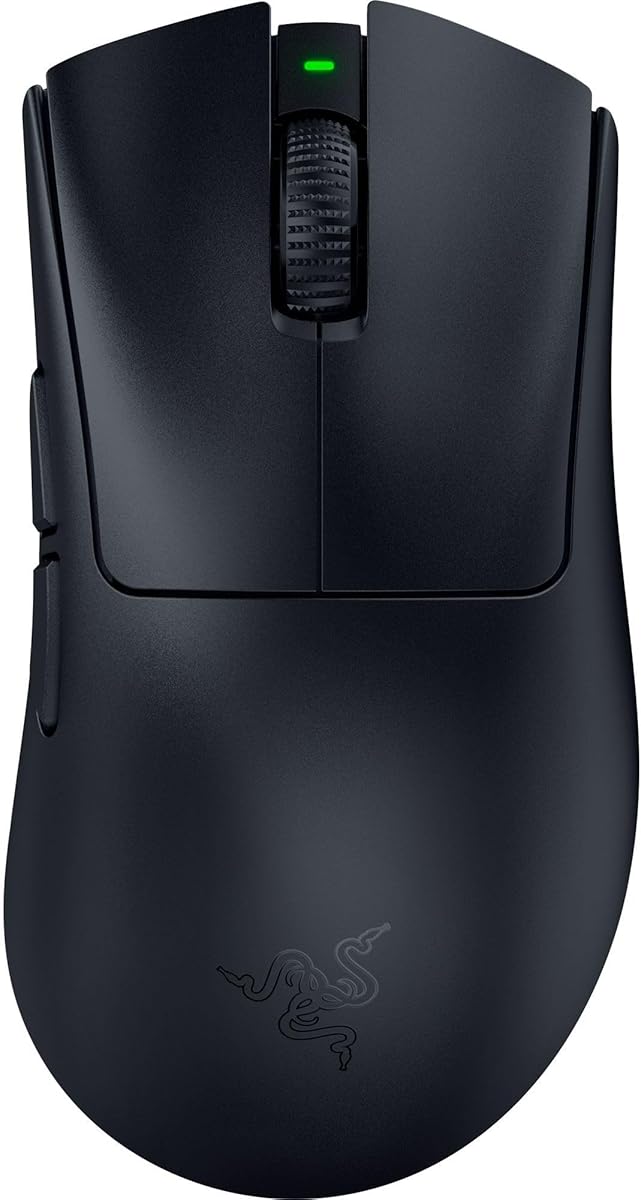
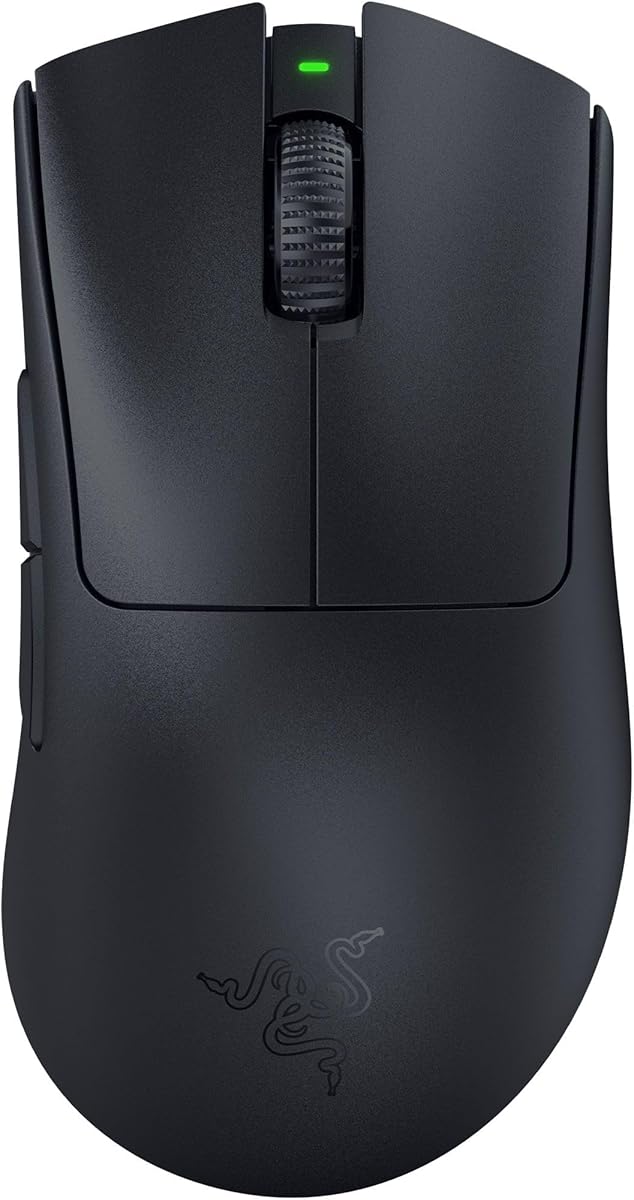
The Razer DeathAdder V3 Pro refines a legendary design with modern specs tailored for precision. Its 63g weight and Focus Pro sensor make it a favorite for players who need speed and accuracy on 4K screens.
We may earn a commission when you buy through this link, at no additional cost to you.
At 63g, this mouse offers an ultra-lightweight feel that reduces fatigue during long sessions. The Focus PRO 30K Optical Sensor ensures consistent tracking, while the improved ergonomic form supports a natural hand posture.
It lacks the extra buttons found on the Basilisk, but that simplifies the user experience for those who prefer minimal inputs. The optical switches ensure crisp clicks without double-click issues, though the lack of RGB might be a drawback for some.
If you prioritize speed and comfort over extra features, the V3 Pro is an excellent choice. It balances weight and performance perfectly for competitive gaming on high-resolution monitors.
Weighing just 63 grams, this mouse allows for faster movements and less strain, ideal for fast-paced 4K gaming sessions.
Developed with esports pros, the iconic shape ensures comfort and control for palm and claw grip users alike.
We may earn a commission when you buy through this link, at no additional cost to you.
This version of the Basilisk V3 offers high-end sensor tech at a more accessible price. With 30K DPI tracking and extensive customization, it remains a strong option for 4K gaming without the premium cost.
We may earn a commission when you buy through this link, at no additional cost to you.
The sensor handles high resolutions well, ensuring your cursor moves exactly as intended. The Chroma lighting adds immersion, and the 11 programmable buttons provide enough utility for complex game commands.
While it lacks the advanced tilt wheel features of the Pro model, the basic scroll wheel still works well. The ergonomics remain top-notch, though you must rely on the software to unlock all potential.
This is a great pick for budget-conscious gamers who still want professional-grade sensors. It delivers precision and style without breaking the bank.
You get the core performance of the V3 Pro without the extra cost, making it a smart choice for value-focused buyers.
The 13-zone Chroma lighting reacts with games to enhance your visual setup and gaming atmosphere.
We may earn a commission when you buy through this link, at no additional cost to you.
The Razer DeathAdder V4 Pro pushes the envelope with a 45K sensor and 8K polling rate. Designed for esports, it ensures minimal latency and maximum control, essential for high-resolution tactical gaming.
We may earn a commission when you buy through this link, at no additional cost to you.
Weighing just 56 grams, it is among the lightest ergonomic mice available. This weight reduction, combined with the 45K Focus Pro Sensor, allows for incredibly fast tracking without jitter. The battery life supports extended play without interruptions.
Some users might find the price steep compared to standard models, but the performance gains justify it. With fewer buttons, it focuses purely on movement and clicking precision rather than utility macros.
For competitive players who need every advantage, this is a top-tier choice. It offers the latest tech to handle demanding 4K environments.
The 45K sensor ensures accuracy at high speeds, crucial for tracking targets on large screens.
An 8K polling rate reduces input lag, providing a competitive edge in fast-paced games.
We may earn a commission when you buy through this link, at no additional cost to you.
GravaStar offers a distinct design with the Mercury M1 Pro, blending premium materials with high performance. Its magnesium alloy shell provides durability and a solid feel for gamers who appreciate hardware quality.
We may earn a commission when you buy through this link, at no additional cost to you.
The 26K DPI sensor delivers accurate tracking, while the tri-mode connectivity gives flexibility across devices. With up to 200 hours of battery, you can game for days on a single charge.
It is heavier than some competitors, which might slow down flicks in competitive scenarios. The RGB and software integration are functional but lack the depth of established brands.
This mouse is a great choice for those who value build quality and long battery life. It offers a premium experience at a reasonable price point.
The magnesium alloy shell provides a unique, durable feel that stands out among plastic alternatives.
Switch seamlessly between 2.4G, Bluetooth, and wired modes to fit any gaming or work setup.
We may earn a commission when you buy through this link, at no additional cost to you.
The ATTACK SHARK RS3 ULTRA brings high-end specs to a competitive price. Its carbon fiber shell and 8K polling rate appeal to gamers seeking performance without the flagship cost.
We may earn a commission when you buy through this link, at no additional cost to you.
The PAW3955MAX sensor tracks movements with precision, even on difficult surfaces. With up to 800 hours of battery life, you rarely need to charge it. The web driver allows quick adjustments without installing heavy software.
The unique look might not suit everyone, but it adds structural strength and style. The reliance on web drivers is a trade-off for convenience.
For those looking to save money while keeping top-tier features, this is a standout option. It balances weight, speed, and endurance well.
The carbon fiber hybrid shell keeps the mouse light while maintaining a rigid and durable structure.
Adjust settings directly in your browser, making it easy to tweak without complex installations.
We may earn a commission when you buy through this link, at no additional cost to you.
The G502 Hero remains a benchmark in gaming mice due to its versatility. With a high-performance HERO sensor and customizable weights, it adapts to different hand sizes and grip styles perfectly.
We may earn a commission when you buy through this link, at no additional cost to you.
Its 25600 DPI sensor provides smooth tracking, and the mechanical switches offer a satisfying click. The dual-mode scroll wheel is great for navigation, and the 11 buttons handle complex actions with ease.
Modern gamers might find it heavier than today's ultra-light options, which could affect speed. The wired design limits portability but ensures zero latency.
This mouse is perfect for users who want stability and customization over speed. It is a versatile tool for both work and play.
Adjust weights to match your personal preference for balance and feel during extended sessions.
The HERO sensor ensures accurate tracking without smoothing, ideal for precise aim in games.
We may earn a commission when you buy through this link, at no additional cost to you.
The Redragon M916 Wireless offers impressive specs at a budget price. Its 4K report rate and 26K DPI sensor make it a strong contender for gamers seeking precision without a high cost.
We may earn a commission when you buy through this link, at no additional cost to you.
Weighing only 49 grams, it feels light and responsive. The tri-mode connectivity ensures you can connect via Bluetooth or 2.4G easily. The ergonomic shape supports long sessions comfortably.
Build quality is solid but not as refined as premium brands. The software works well but lacks advanced features found in higher-end models.
If you need a budget mouse that performs like a high-end one, this is an excellent choice. It delivers value and performance for entry-level competitive play.
A 4000Hz report rate ensures your inputs are processed quickly, reducing lag during intense gameplay.
At 49 grams, this mouse allows for quick movements and easy wrist control.
We may earn a commission when you buy through this link, at no additional cost to you.
The Basilisk V3 Wired brings premium ergonomics at an affordable rate. It features a 26K DPI sensor and HyperScroll wheel for precision and control in various tasks.
We may earn a commission when you buy through this link, at no additional cost to you.
The thumb rest design adds comfort for long sessions. Optical switches ensure reliability and speed with 70 million click lifespan. The 11 buttons allow extensive macro configuration.
The cable can be a drawback for wireless fans, but it removes battery concerns. RGB lighting enhances the setup but depends on software for customization.
This is a great option for desk gamers who prioritize comfort and buttons over wireless freedom. It delivers high performance without needing frequent charging.
Designed to fit the natural curve of the hand, the thumb rest reduces strain during long play.
Switch between free-spin and tactile modes to suit gaming or browsing needs instantly.
We may earn a commission when you buy through this link, at no additional cost to you.
The G703 Lightspeed combines proven wireless tech with a comfortable shape. It supports POWERPLAY for seamless charging, ensuring you never lose time to batteries during key moments.
We may earn a commission when you buy through this link, at no additional cost to you.
The HERO 25K sensor provides smooth tracking, while LIGHTSPEED wireless keeps latency low. Side grips and rubber coatings enhance comfort during long sessions. The 6 buttons cover essential functions well.
RGB can reduce battery life, so many users turn it off. The weight might be heavy for ultra-light gamers, but it feels stable and durable.
For those who want a reliable wireless experience with the option for constant charging, this is a strong choice. It balances tradition and modern tech.
Keep your mouse charged while playing with the optional POWERPLAY mat for endless wireless freedom.
The design supports your hand naturally, reducing fatigue during intense gaming marathons.
We may earn a commission when you buy through this link, at no additional cost to you.
Choosing the right mouse for 4K gaming involves more than just high numbers. You must balance sensor quality, physical comfort, and connectivity to ensure the device matches your specific needs.
The DPI rating indicates how far the cursor moves per inch of physical movement. For 4K gaming, look for sensors that offer high DPI, such as 26K or 35K, to ensure you can navigate large screens with ease. However, raw numbers are not everything; the sensor must also track accurately without acceleration or jitter, especially during quick flicks. Modern optical sensors from brands like Razer and Logitech provide this reliability.
Prioritize sensors with high accuracy percentages and adjustable settings to suit different game types. A sensor with 99.8% accuracy ensures that your aim translates directly to on-screen movement, critical for precision.
Polling rate refers to how often the mouse sends data to your computer. For 4K precision, a 1000Hz rate is standard, but newer mice support 4000Hz or 8000Hz. Higher rates reduce latency, giving you faster feedback during competitive matches. This is especially useful when combined with high refresh rate monitors.
Ensure your system can handle higher polling rates without causing CPU issues. Most modern PCs manage this well, but check compatibility to maintain smooth performance.
Weight impacts how long you can game comfortably. Ultra-light mice around 50g to 60g allow faster movements but might feel less substantial. Heavier mice offer stability. Ergonomics are equally vital; the shape should fit your hand size and grip style to prevent strain.
Look for mice with thumb rests or specific curves if you experience fatigue. A comfortable grip ensures consistency, as you can focus on strategy rather than physical discomfort.
Wired mice guarantee zero latency and constant power but limit your movement range. Wireless models offer freedom and often come with advanced technologies that match wired speeds. For 4K setups, ensure the wireless connection has a high polling rate to avoid input lag.
If you choose wireless, check the battery life and charging options. Some mice support inductive charging pads, which can be a game changer for uninterrupted play.
Materials like magnesium alloy or carbon fiber add durability and reduce weight. These premium materials often come with better switches and scroll wheels. Optical switches are preferred over mechanical ones for their longer lifespan and resistance to double-clicking issues.
Check the PTFE skates for smooth gliding. Good skates ensure the mouse moves effortlessly across your desk, which is vital for precision aiming in 4K resolution.
Most gaming mice come with software that allows you to remap buttons and adjust DPI. For 4K precision, the ability to create profiles for different games helps maintain settings. Look for mice with multiple onboard memory profiles to store settings directly on the device.
Ensure the software is intuitive and supports macros if you need complex key binds. A well-designed interface saves time during setup and tweaking.
For wireless mice, battery life is crucial to avoid interruptions. Look for models that offer 50 hours of continuous use or more. Some provide fast charging or the option to switch to Bluetooth to save power.
Consider how RGB lighting impacts battery. Disabling RGB can extend life significantly. This is a trade-off between aesthetics and endurance that you should evaluate based on your gaming habits.
Premium mice offer the latest sensors and build quality but come at a cost. Budget options have improved significantly, offering high DPI at lower prices. Assess what features you truly need versus what you might pay for.
A mid-range mouse often offers the best value, balancing performance and affordability. Check reviews to ensure the specific model performs well in real-world scenarios before buying.
Begin by configuring your software settings to match your DPI needs. Most mice allow you to set DPI steps via physical buttons. This ensures you can switch between high precision aiming and fast movement quickly without opening menus during gameplay.
Maintain the mouse by cleaning the skates and sensor regularly. Dust can interfere with tracking and smoothness. Use a soft cloth and compressed air to remove debris from the scroll wheel and buttons to keep mechanical parts functioning well.
Update your firmware via the official software occasionally. Manufacturers release patches that improve performance or add features. Keeping your drivers current ensures compatibility with new games and operating systems for consistent precision.
Not necessarily. While high DPI allows for faster cursor movement on large screens, accuracy depends more on the sensor quality and your ability to control the mouse. High DPI without proper control can lead to jitter. It is often better to use a moderate DPI and adjust in-game sensitivity for precision.
Yes, modern wireless mice with technologies like LightSpeed or HyperSpeed offer latency comparable to wired ones. Many professional gamers now use wireless models. Ensure you choose a model with a 1000Hz or higher polling rate to minimize any potential lag during fast action.
Most optical sensors struggle on glass due to a lack of texture. To fix this, use a mousepad with a clear surface or ensure your mouse has a specific feature for glass tracking. Check the product specs for glass surface compatibility before purchasing.
A 1K polling rate sends data 1000 times per second, while a 4K rate sends it 4000 times. The 4K rate reduces input lag further, which can be beneficial on high refresh rate monitors. However, you need a strong PC to handle the increased CPU load without issues.
Yes, these mice are versatile. High DPI helps navigate large screens and multi-monitor setups easily. Many models also offer features like infinite scroll or customizable side buttons that improve workflow. However, the shape might be optimized for gaming grips.
Adjustable weights let you customize the feel and stability of the mouse. Adding weight can make it easier to control for precise aiming, while removing it allows for faster movements. This helps you find the perfect balance for your playstyle and wrist strength.
Optical switches generally last longer because they use light to register clicks, reducing physical wear. They often have a lifespan of 70 million to 90 million clicks. This makes them a reliable choice for heavy users who want to avoid double-click issues over time.
Magnesium alloy and carbon fiber are top choices for durability and lightness. These materials resist cracking and offer a premium feel. Standard plastics are durable too but might not provide the same rigidity or weight benefits as high-end alternatives.
We have explored ten top mice tailored for high-resolution gaming, ranging from ultra-light options to ergonomic powerhouses. Each offers unique strengths in sensor technology and build quality to help you achieve the highest level of accuracy.
When choosing, prioritize your hand size and grip style alongside sensor capabilities. A mouse that fits well will always perform better than one with better specs but poor ergonomics. Balance features like wireless connectivity with battery life based on your habits.
Prices and availability change frequently, so double-check current listings before finalizing your purchase. Investing in the right tool will enhance your experience and help you reach new heights in your gaming journey. Happy gaming.