
NZXT H5 Flow
4.7Editor score
Perforated PSU shroud
Ultra-fine mesh panels
Solid fan setup
This guide compares the top high airflow PC cases for optimal cooling and performance across various build sizes and budgets.
Building a high-performance PC requires more than just powerful components. You need a chassis designed to move air efficiently. High airflow cases prevent thermal throttling and extend hardware life by keeping temperatures low even under heavy loads.
We evaluated ten leading models based on ventilation design fan quality and build flexibility. Our team analyzed airflow paths, noise levels, and component compatibility. These selections represent the best balance of cooling potential and practical features for modern gaming rigs.
Each pick highlights unique strengths like modular panels or pre-installed fans. We focus on real-world usability for builders at any skill level. Note that pricing fluctuates regularly so check current listings before purchasing your next system enclosure.
4.7Editor score

4.7Editor score

4.8Editor score
The following table breaks down key specifications for every model to help you compare sizes fan counts and unique features side by side quickly.





The CORSAIR 4000D RS ARGB stands out as a top contender for builders seeking exceptional airflow. It scores high on cooling efficiency and build flexibility. The included RS fans and unique front panel design make it a reliable choice for modern gaming systems.
We may earn a commission when you buy through this link, at no additional cost to you.
Its standout feature is the FRAME Modular System which allows you to customize panels and internal layouts easily. The 3D Y-Pattern Airflow Panel reduces obstruction significantly ensuring cool air reaches components directly. InfiniRail mounting offers flexibility for custom fan configurations.
While the build quality is robust the glass side panel adds weight and can be tricky to manage. The lack of a rear fan in the base model means you might need to add one for optimal exhaust. These trade-offs are minor given the overall performance.
This case is ideal for enthusiasts who value customization and cooling. Whether you are upgrading an existing build or starting fresh it delivers on all fronts. We recommend it for anyone prioritizing airflow without sacrificing aesthetics.
The FRAME system lets you swap panels and trays to suit your exact needs.
The perforated front panel ensures maximum intake with minimal restriction for cooling.
We may earn a commission when you buy through this link, at no additional cost to you.
The NZXT H5 Flow offers impressive performance at a budget-friendly price point. It combines compact design with efficient airflow strategies. The perforated PSU shroud is a key feature that enhances cooling potential significantly compared to standard cases.
We may earn a commission when you buy through this link, at no additional cost to you.
Its ultra-fine mesh panels on all sides allow maximum air intake while filtering dust effectively. The pre-installed fans provide solid out-of-the-box performance without needing extra purchases. Cable management is streamlined with wide channels and hooks.
The compact form factor means you must check GPU length limits before buying. It may not fit the longest high-end cards. However for most standard builds it provides ample room. The basic I/O ports are sufficient but not advanced.
Ideal for builders seeking affordability without compromising cooling this case is a strong pick. It balances size and function well. We recommend it for users wanting a reliable airflow chassis that fits smaller desks easily.
The side and bottom perforations enable optimal air intake for the power supply.
A smaller footprint still supports 360mm radiators for powerful liquid cooling.
We may earn a commission when you buy through this link, at no additional cost to you.
The Cooler Master HAF II 500 defines premium cooling with its oversized fan configuration. It aims to maximize throughput with large openings and low resistance. This makes it perfect for high-end systems that generate significant heat during intensive tasks.
We may earn a commission when you buy through this link, at no additional cost to you.
The dual 220mm intake fans and 180mm exhaust create a powerful air stream through the chassis. Split-level cable management ensures routing does not block these large vents. The MasterRail system supports various fan sizes for customization.
While the performance is top-tier the high cost may not fit every budget. The size also demands ample desk space which limits portability. These are acceptable trade-offs for builders prioritizing raw cooling power over cost.
We recommend this case for enthusiasts with top-tier hardware needing extreme cooling. It handles heavy loads effortlessly. If you want the best airflow possible and have the budget this model delivers exceptional results.
Oversized fans reduce RPM noise while pushing more air than standard units.
Dual-Mode GPU Holder adds stability for heavy graphics cards.
We may earn a commission when you buy through this link, at no additional cost to you.
The MONTECH AIR 903 MAX provides excellent value for those needing E-ATX support. It includes four high-quality fans right out of the box. The ventilated mesh front ensures your system gets the airflow it needs under demanding loads.
We may earn a commission when you buy through this link, at no additional cost to you.
With room for 360mm radiators and GPUs up to 400mm this chassis is future-proof. The HP140 fans offer adjustable speed and lighting for tuning. Cable routing space helps keep the interior organized for easier maintenance.
While the build is solid the I/O buttons are somewhat basic compared to premium cases. Color options are limited to black which may not suit all aesthetics. However these factors do not impact the core cooling performance.
Ideal for builders planning upgrades this case supports high-performance parts well. It balances features and cost effectively. We recommend it for anyone needing a large case with ready-to-use cooling fans.
Four pre-installed fans save money and simplify initial system configuration.
Supports large graphics cards and radiators for powerful builds.
We may earn a commission when you buy through this link, at no additional cost to you.
The LIAN LI LANCOOL 216 is designed with airflow and component clearance in mind. It features massive 160mm front fans that move a lot of air efficiently. The modular motherboard tray allows you to adjust height for better cooling setups.
We may earn a commission when you buy through this link, at no additional cost to you.
Its support for graphics cards up to 392mm makes it compatible with the latest models. Fine mesh panels on the front and top help ventilation significantly. Velcro straps and clips keep cables neatly organized behind the tray.
The weight of the case is noticeable which might be an issue for portability. The price is slightly higher than budget alternatives but justifies with quality. These trade-offs are minor for users prioritizing build quality.
We recommend this case for gamers with large GPUs and cooling needs. It offers stability and performance in one package. Ideal for those wanting a reliable chassis that handles high-end hardware without struggle.
Move the motherboard tray to fit different air-cooled or water-cooled systems.
Clearance supports large graphics cards and multiple storage drives.
We may earn a commission when you buy through this link, at no additional cost to you.
The Antec Flux Pro offers a robust full-tower design with six PWM fans included. It aims for maximum cooling through multi-directional venting. The innovative iShift mount allows unique orientation for better airflow dynamics inside.
We may earn a commission when you buy through this link, at no additional cost to you.
With supports for two large radiators simultaneously it supports powerful liquid cooling setups. The dual temperature display helps monitor CPU and GPU heat in real time. Removable brackets simplify the installation of various components.
The complexity of the design may challenge first-time builders. The large size requires significant space which limits where you can place it. These factors are acceptable for users needing extreme thermal capacity.
We recommend this case for workstation or high-end gaming builds. It provides ample cooling headroom and unique features. Ideal for those wanting maximum control over their system's airflow and layout.
iShift PSU mount offers flexibility to optimize airflow paths inside.
Supports simultaneous 420mm and 360mm radiator installation.
We may earn a commission when you buy through this link, at no additional cost to you.
The CORSAIR 3500X RS ARGB balances aesthetics with cooling through panoramic glass panels. It supports cooling capacities without sacrificing the wraparound view. RS120-R fans are included to ensure strong airflow performance out of the box.
We may earn a commission when you buy through this link, at no additional cost to you.
The design includes mounting points for up to ten 120mm fans across multiple areas. Removable glass panels make building and maintenance much easier. This combination ensures you do not sacrifice cooling for looks.
The front glass can sometimes restrict direct airflow compared to mesh panels. This might be a concern for extreme heat generation. However it is a fair trade-off for those prioritizing visuals and style.
We recommend this case for builders who want a stunning view without major heat issues. It suits standard gaming rigs well. Ideal for those who value design as much as performance and want a clean look.
Wraparound tempered glass showcases every detail of your build beautifully.
Side and roof mounting points ensure ample space for airflow fans.
We may earn a commission when you buy through this link, at no additional cost to you.
The Lian Li V100 is optimized for modern back-connect motherboards which improves cable routing. It includes four PWM fans ensuring strong airflow immediately. The integrated ARGB strip offers full spectrum color control easily.
We may earn a commission when you buy through this link, at no additional cost to you.
Tool-less mounting mechanisms on side panels simplify access to internal components quickly. This helps with maintenance and upgrades significantly. Support for GPUs up to 420mm makes it ready for high-end cards.
The glass panels are sleek but require careful handling to avoid damage. Color options are limited mainly to black finishes. These minor drawbacks are balanced by its unique connectivity features.
We recommend this case for users with back-connect motherboards or future upgrades. It combines sleek design with practical features. Ideal for those seeking clean builds with high airflow performance and flexibility.
Supports back-connect ATX or Micro-ATX motherboards for cleaner routing.
Each side panel features tool-less mounting for easy fast access.
We may earn a commission when you buy through this link, at no additional cost to you.
The NZXT H9 Flow uses a dual-chamber design to separate PSU from main components. This improves thermal performance significantly and simplifies cable routing. Three F140Q fans are included to ensure efficient cooling out of the box.
We may earn a commission when you buy through this link, at no additional cost to you.
Its ten-fan capacity allows extensive airflow customization if needed. The panoramic glass panels provide a wraparound view of the build. Extra-wide channels make routing cables effortless for a clean interior.
The weight of the glass panels requires careful handling during installation. Basic fan controllers may limit advanced customization. These factors are acceptable for users prioritizing aesthetics and thermal separation.
We recommend this case for those wanting a modern look with efficient cooling. It suits standard gaming builds well. Ideal for users who value clean designs and strong thermal performance.
Separates main components from PSU and drives for better thermal performance.
Showcase every detail of your build with seamless glass paneling.
We may earn a commission when you buy through this link, at no additional cost to you.
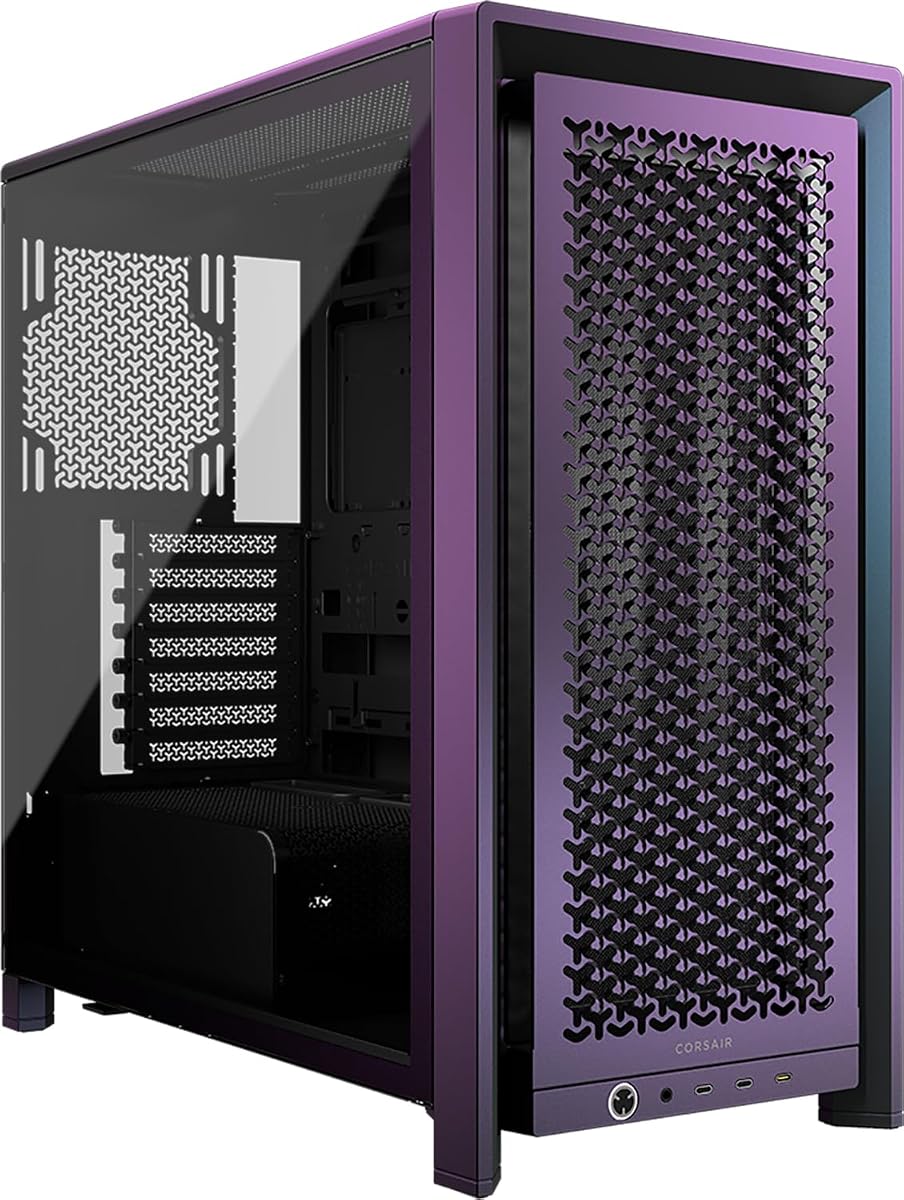
The CORSAIR Frame 4000D Vault Series is a unique limited edition for collectors. It features a stunning Galaxy finish and modular customization similar to the standard model. The dual 360mm radiator support allows exceptional cooling potential.
We may earn a commission when you buy through this link, at no additional cost to you.
FRAME system allows you to upgrade motherboard trays or I/O panels easily. The 3D Y-Pattern panel ensures low obstruction airflow for cool air delivery. InfiniRail mounting offers flexibility for custom configurations.
Availability is strictly limited to 1,337 units which may increase collector value. The higher price reflects exclusivity and specific finishes. These factors make it a niche pick for specific buyers.
We recommend this case for collectors wanting a unique look with high airflow. It combines exclusivity with performance features. Ideal for enthusiasts wanting a limited build with modular flexibility.
Showcases stunning Galaxy finish in a strictly limited run.
Take cooling to next level with three 360mm mounting locations.
We may earn a commission when you buy through this link, at no additional cost to you.
Choosing a case with high airflow requires understanding key design factors and features that impact cooling efficiency and build flexibility.
Look for cases with perforated panels instead of solid glass fronts. Mesh designs allow more air to reach components directly. Ventilated designs reduce thermal throttling significantly during high loads.
Prioritize front and top mesh panels for maximum intake and exhaust flow.
Check how many fans come included and their sizes. More large fans often move more air at lower RPM. This reduces noise while maintaining effective cooling performance.
Ensure cases support extra mounts for additional fans if needed.
Select a case that supports your motherboard size like ATX or E-ATX. Larger cases allow more airflow paths but take more space. Ensure it fits your desk and room comfortably.
Verify dimensions match your build needs and spatial constraints.
Check maximum graphics card length supported. High-end cards are often longer. Adequate clearance ensures they fit without obstructing airflow paths or fan placement.
Look for support for cards over 300mm for future compatibility.
Good cable management keeps airflow paths clear. Wide channels and hooks help hide wires neatly. Messy cables can block air movement and increase internal heat.
Choose cases with robust routing options for cleaner builds.
Modular trays or panels allow customization of airflow paths. These let you adjust layouts based on cooling needs. Flexibility helps optimize performance for specific hardware setups.
Prioritize systems that allow swapping trays for better cooling.
Durable materials like steel ensure structural integrity. Thin panels may vibrate or bend easily. Sturdy build quality supports heavy components without compromise.
Check steel thickness for long-term stability and durability.
High airflow should not mean loud noise. Look for fans with low noise ratings. Balanced airflow allows cooling without disturbing daily activities.
Check fan RPM limits to ensure quiet operation.
Clean dust filters regularly to maintain optimal airflow. Dust buildup restricts air paths and increases internal heat. Use compressed air or a vacuum to clean filters monthly.
Install fans correctly for intake and exhaust balance. Front intake and rear exhaust creates efficient flow. Improper placement can cause hot spots inside the chassis.
Check cable routing periodically to ensure it does not block fans. Neat routing maintains airflow paths over time. Adjust cables as components change or new fans are added.
High airflow cases feature perforated or mesh panels that allow unrestricted air movement. They typically include multiple high-performance fans and optimized intake paths. These design elements prevent heat buildup by keeping components cool efficiently.
Glass front panels offer better aesthetics but reduce airflow compared to mesh. If cooling is your priority mesh is better. Glass is acceptable for standard builds not extreme overclocking setups.
Most cases work well with three to five fans. Two front intakes and one rear exhaust is a common setup. Adding top fans improves heat extraction for better thermal performance overall.
Yes most cases allow adding extra fans if mounting points exist. Check compatible sizes before buying. Flexible cases let you customize airflow as your hardware changes.
Full-tower cases offer more space for radiators and fans. This allows better airflow but takes more room. Mid-towers often provide sufficient cooling for standard gaming builds.
Turn off the system and use compressed air to blow dust out. Remove filters to clean them separately. Regular cleaning keeps airflow efficient and reduces noise levels.
Yes ensure your case supports your motherboard size. ATX boards need larger cases than Mini-ITX. Incorrect sizing can limit airflow or component clearance significantly.
Back-connect boards route cables behind the tray for cleaner builds. Some cases offer special support for these designs. Look for cases that enable cleaner cable routing options.
We've reviewed ten top models balancing cooling performance and build flexibility. The CORSAIR 4000D RS ARGB leads with modular design while NZXT H5 Flow offers great value.
Prioritize ventilation design and fan count based on your hardware needs. Larger GPUs or liquid cooling require more clearance. Ensure cables are managed to avoid blocking airflow.
Prices and availability change frequently so check listings before buying. These cases provide reliable cooling for years of gaming and work.