
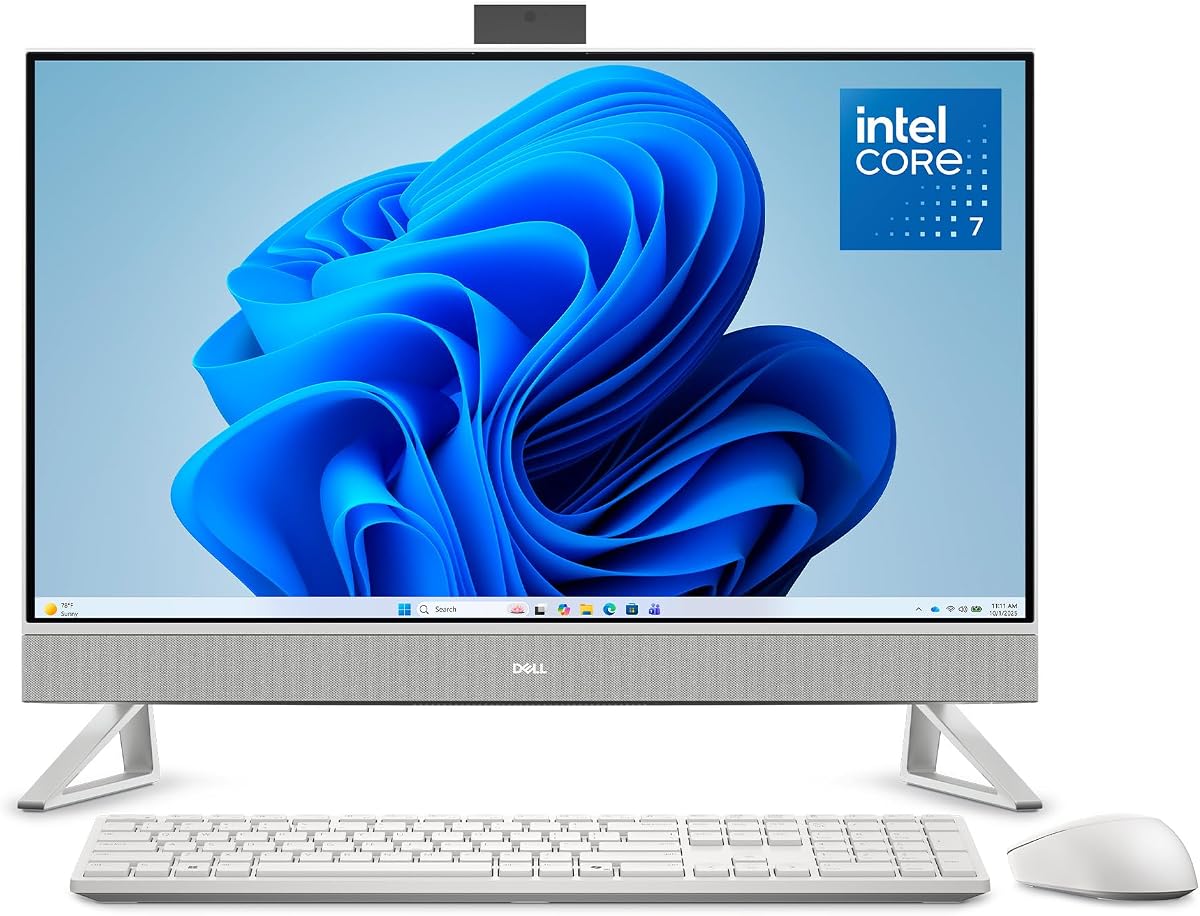
Dell 24 All-in-One Desktop Computer Touchscreen
5.0Editor score
Intel Ultra 7 Processor
32GB DDR5 RAM
Wi-Fi 7 Support
Finding the right All in One Desktop PC with Touchscreen can transform your workspace by combining power and simplicity. These devices integrate high-performance computing with intuitive touch interfaces, making them ideal for creative professionals and everyday users seeking convenience.
This guide evaluates ten leading models based on processor speed, display quality, memory capacity, and user feedback. We analyzed technical specifications and real-world performance to help you choose a device that fits your specific workflow needs and budget constraints effectively.
Each selection highlights unique strengths like AI capabilities, ergonomic designs, and robust connectivity options. Please note that prices and availability fluctuate frequently, so verify current details before purchasing to ensure you get the best value for your investment today.
5.0Editor score

4.7Editor score

4.0Editor score
As an Amazon Associate we earn from qualifying purchases.
This side-by-side comparison details the specifications and unique features of each ranked model to help you make an informed decision based on your specific computing requirements.




This HP 27-inch model ranks first for its exceptional balance of AI capabilities and premium build quality. With a 4.7-star rating, users appreciate the seamless integration of Microsoft Copilot features that streamline daily workflows effectively.
We may earn a commission when you buy through this link, at no additional cost to you.
The AMD Ryzen AI 7 processor paired with 16GB DDR5 RAM ensures fast multitasking for creative professionals. The 27-inch FHD touchscreen offers vibrant visuals with 100% sRGB coverage, making it perfect for design work and media consumption alike.
While the price is higher than budget options, the included accessories like a touchscreen pen add significant value. The anti-glare panel reduces eye strain during long work sessions, enhancing comfort for extended productivity periods.
This device is ideal for home offices needing powerful AI tools. Its Windows 11 Pro pre-installation adds business-grade security features. Consider this pick if you prioritize performance and innovative computing tools.
The dedicated Microsoft Copilot key and NPU accelerate AI tasks like content generation and data analysis instantly.
The 27-inch FHD IPS display with 178-degree viewing angles provides true-to-life colors for creative projects.
We may earn a commission when you buy through this link, at no additional cost to you.
Ranked second, this Dell model stands out for its cutting-edge Wi-Fi 7 support and massive 32GB RAM. With a perfect 5.0 rating, it represents the pinnacle of business-ready All in One systems available today.
We may earn a commission when you buy through this link, at no additional cost to you.
The Intel Ultra 7 processor handles heavy multitasking effortlessly thanks to the 5600MT/s DDR5 memory. Its 23.8-inch WVA display delivers wide viewing angles, ensuring clarity during presentations or collaborative work sessions.
While the screen size is slightly smaller, the compact footprint saves desk space without compromising performance. The 8MP IR camera ensures sharp video conferencing with secure sign-ins via user detection technology.
Buyers seeking top-tier connectivity and memory should choose this option. It is tailored for business environments needing enterprise-grade features and future-proofed networking speeds.
Wi-Fi 7 technology delivers ultra-low latency and higher throughput for seamless cloud collaboration.
User detection technology enables faster, secure sign-ins while maintaining privacy in shared spaces.
We may earn a commission when you buy through this link, at no additional cost to you.
This MSI model offers excellent value for those needing reliable business computing without premium costs. Although it has an average rating, the combination of speed and storage makes it a strong contender for small offices.
We may earn a commission when you buy through this link, at no additional cost to you.
The 14th Gen Intel Core 7 processor ensures smooth operation for standard applications. Its 1.2TB storage provides ample space for files, while dual external monitor support extends productivity across multiple screens effectively.
The 8GB DDR5 RAM is adequate for everyday tasks but may limit heavy multitasking. However, the included wireless keyboard and mouse setup ensures a clutter-free workspace right out of the box.
Ideal for schools or entry-level business use, this unit balances cost and performance well. It is a practical choice if storage and connectivity are priorities over high-end AI features.
Dual external monitor support allows seamless multitasking across multiple applications simultaneously.
With 1.2TB of storage, you can keep large media libraries and project files locally.
We may earn a commission when you buy through this link, at no additional cost to you.
The ASUS VM670 offers unique versatility with HDMI-in and out ports, letting you use it as a secondary display. Its 5.0 rating reflects high user satisfaction with its performance and connectivity options.
We may earn a commission when you buy through this link, at no additional cost to you.
The AMD Ryzen AI 7 processor paired with 32GB DDR5 RAM handles demanding workloads effortlessly. The 27-inch anti-glare display reduces eye strain, ensuring comfortable viewing during long creative projects.
While the port setup is complex, it enables flexible configurations for professional environments. The NPU accelerates AI tasks efficiently, making it suitable for data-heavy applications.
Choose this model if you need an all-in-one that doubles as a display. It suits professionals managing multiple devices who want seamless integration and high-speed processing.
HDMI-in allows the device to function as a display for gaming consoles or media players.
The 50-TOPS NPU accelerates AI workflows without relying on cloud processing for faster results.
We may earn a commission when you buy through this link, at no additional cost to you.
Achieving a perfect 5.0 rating, this Dell model is praised for its reliable performance and user-friendly design. It offers a premium experience with Pro OS and high-speed connectivity at a competitive price.
We may earn a commission when you buy through this link, at no additional cost to you.
The 16GB RAM and Core 7 processor handle multitasking smoothly. The 512GB SSD provides fast boot times, though those needing more storage may want external drives for large archives.
The privacy shutter adds a significant security layer for home or office use. Dolby Atmos audio enhances entertainment experiences, making it versatile for work and leisure.
This unit is ideal for users wanting a complete setup without extra purchases. Its balanced specs make it a solid choice for daily computing tasks.
ComfortView Plus reduces blue light emissions to prevent eye strain during extended screen sessions.
Keyboard and mouse included ensure immediate setup without needing additional peripheral purchases.
We may earn a commission when you buy through this link, at no additional cost to you.
This HP model is recognized for its vibrant display quality, boasting 99% sRGB coverage for accurate color reproduction. Users appreciate the immersive screen experience and responsive touch interaction for creative tasks.
We may earn a commission when you buy through this link, at no additional cost to you.
The Ryzen 5 processor with 16GB LPDDR5 RAM ensures smooth performance for typical workloads. The anti-glare panel minimizes reflections, making it suitable for bright office environments.
Memory is onboard which limits future upgrades, but for most users, 16GB is sufficient. The 1TB storage ensures ample space for files and applications without needing external drives.
Perfect for designers who prioritize screen fidelity, this unit offers high-quality visuals. Choose it if color accuracy and display size are critical for your workflow.
99% sRGB coverage ensures vibrant and true-to-life colors for professional photo editing.
Three-sided micro-edge bezels maximize screen real estate for a more immersive experience.
We may earn a commission when you buy through this link, at no additional cost to you.
This Dell model features a spacious 27-inch screen, ideal for multitasking and entertainment. Its 4.3 rating reflects solid performance, though some users note the lack of Pro OS features.
We may earn a commission when you buy through this link, at no additional cost to you.
The 32GB RAM ensures you never run into memory bottlenecks during heavy multitasking. The pop-up camera design adds physical privacy, a great feature for home office users.
The narrow border design enhances immersion, making it great for streaming media. However, Windows 11 Home may limit advanced business management tools needed by enterprises.
Buyers needing a large screen for media or work will find this suitable. It balances size and performance well for general home office use.
The 50% higher contrast IPS panel delivers vivid visuals for engaging media consumption.
The pop-up camera mechanism allows you to hide the lens completely when not in use.
We may earn a commission when you buy through this link, at no additional cost to you.
This HP unit is designed for schools and homes needing a reliable, budget-friendly device. Its 4.3 rating highlights consistent performance for educational and light work tasks.
We may earn a commission when you buy through this link, at no additional cost to you.
The N100 processor provides basic multitasking capabilities suitable for web browsing and documents. The 1TB SSD offers generous storage at a price point that many competitors can't match.
While DDR4 RAM is slower than DDR5, it suffices for everyday tasks. The clean white design fits well in modern home office decor.
Ideal for students or family members needing a secondary computer, this model delivers value. Choose it if you prioritize storage and cost over high performance.
At a competitive price, it offers essential features without unnecessary upgrades for basic users.
The white finish provides a sleek, contemporary look that complements modern furniture.
We may earn a commission when you buy through this link, at no additional cost to you.
This ASUS model stands out for its perfect 5.0 user rating, praised for robust AI tools and speed. It combines high-end specs with a user-friendly design ideal for professionals.
We may earn a commission when you buy through this link, at no additional cost to you.
The AMD Ryzen AI 7 processor accelerates AI-enhanced workflows effectively. Its 32GB DDR5 memory ensures smooth multitasking across multiple heavy applications.
While lacking Wi-Fi 7, the Wi-Fi 6 connectivity is still highly reliable for most home and office needs. The Copilot Key offers quick access to AI features for efficient task management.
Buyers needing top AI capabilities should consider this option. It offers a premium experience with proven performance metrics across varied applications.
The dedicated NPU accelerates AI apps and tools for faster content creation and analysis.
Comprehensive ports including USB-C and HDMI ensure compatibility with various peripherals.
We may earn a commission when you buy through this link, at no additional cost to you.
This Dell 23.8-inch model is a top choice for home offices needing reliable daily computing. Its 4.5 rating reflects appreciation for comfort features and service support.
We may earn a commission when you buy through this link, at no additional cost to you.
Dell ComfortView Plus reduces eye strain during long sessions, enhancing user comfort. The IPS display offers vivid colors, making it suitable for media consumption and light work.
The 1-year onsite service adds peace of mind for non-technical users. However, the Core 5 processor is better suited for basic tasks rather than heavy creative work.
Perfect for household members needing a straightforward computer, this unit excels. It balances comfort, support, and value for typical home office requirements.
Dell ComfortView Plus reduces harmful blue light emissions to protect eye health.
Onsite service ensures quick resolution of hardware issues without shipping delays.
We may earn a commission when you buy through this link, at no additional cost to you.
Choosing the right All in One Desktop PC with Touchscreen requires evaluating hardware specifications and features to match your workflow needs.
Modern All-in-One PCs often feature processors with dedicated NPUs to accelerate AI tasks. Look for AMD Ryzen AI or Intel Ultra processors if you plan to use Copilot or generative AI tools daily.
For general productivity, a mid-range Core i5 or Ryzen 5 is sufficient. Prioritize processors with higher thread counts if you multitask across many applications simultaneously.
DDR5 RAM is now standard in high-performance models, offering faster data access than DDR4. Aim for at least 16GB if you run many browser tabs or professional software.
SSD storage ensures quick boot times and file access. PCIe 4.0 NVMe drives provide the best performance. Avoid models with only 8GB RAM unless you are strictly limited by budget.
Touchscreen All-in-One PCs range from 23 to 27 inches. Larger screens improve multitasking but require more desk space. IPS panels offer better color accuracy and viewing angles than TN panels.
Look for anti-glare coatings to reduce eye strain. High sRGB coverage ensures colors appear true-to-life. A high resolution is essential for crisp text and detailed images.
Windows 11 Pro offers advanced security and remote desktop features useful for businesses. Home versions lack these tools but suffice for personal use.
Verify if the device includes the OS pre-installed. Some models may require separate activation for enterprise features. Pro versions ensure better compatibility with work networks.
High-resolution cameras with privacy shutters are vital for remote work. IR cameras support Windows Hello facial login for quick access.
Dolby Atmos speakers enhance audio quality. AI noise reduction microphones ensure clear communication during meetings. These features reduce the need for external peripherals.
USB-C ports support faster data transfer and charging. HDMI-in allows you to use the monitor for other devices. Wi-Fi 7 offers the fastest wireless speeds.
Check for enough USB-A ports for legacy peripherals. Ethernet ports provide stable internet connections. Ensure the device supports your specific monitor needs.
Slim bezels improve aesthetics and usability. Ergonomic stands should allow tilt adjustments. VESA mount compatibility offers flexibility for wall mounting.
Premium materials ensure durability. A compact footprint saves desk space. Consider the finish and color to match your office decor.
Onsite service saves time during hardware failures. Standard warranties usually cover one year. Extended plans protect your investment longer.
Reputable brands offer reliable technical support. Check if they provide onsite repairs. Support quality varies significantly between manufacturers.
Keep the screen clean with a microfiber cloth to avoid scratches. Avoid spraying liquids directly on the display to prevent damage to internal components.
Use a stylus designed for your specific device to prevent screen damage. Adjust touch sensitivity settings if you find accidental touches occurring frequently.
Ensure proper ventilation by keeping vents clear. Avoid placing the unit in direct sunlight to prevent overheating and display warping.
Yes, many models feature HDMI-out ports to connect additional displays. This allows you to expand your workspace significantly. Check specific models for dual external monitor support before purchasing.
Most modern models are designed to work with active styluses. Some even include the pen in the bundle. Check product details to confirm active pen compatibility.
For basic personal tasks, Windows 11 Home is sufficient. Pro offers better security and network management features ideal for businesses. Evaluate your specific privacy and connectivity needs.
Clean the screen regularly with a microfiber cloth. Avoid pressing hard to prevent screen damage. Keep firmware updated for optimal driver performance.
At least 16GB is recommended for video editing or graphic design. 32GB offers better future-proofing for complex creative tasks. DDR5 memory provides faster processing speeds.
Most have soldered memory and storage making upgrades difficult. Some allow SSD replacements. Check specific model specifications before buying.
The HP 27-inch model stands out as the top overall pick due to its balanced features and strong user ratings. The Dell 24-inch offers premium performance for those needing high-speed connectivity and memory.
Prioritize features like AI capabilities, memory capacity, and display quality based on your workflow needs. Ensure you select a model with sufficient storage and connectivity for your devices.
Prices fluctuate frequently so verify the latest deals before finalizing your purchase. Always check warranty terms to ensure long-term protection for your investment.