
Focusrite Scarlett Solo 4th Gen
4.6Editor score
Studio-quality sound conversion
Improved Air mode for vocals
Included recording software bundle
This guide compares the top audio interfaces with built in dsp for real-time effects, zero latency monitoring, and professional recording workflows across all
Finding the right audio interface with built in dsp capabilities can transform your recording workflow by enabling real-time effects processing without taxing your computer. These devices offer low-latency monitoring and professional sound quality that is essential for musicians and content creators alike.
We evaluated ten leading models based on their DSP performance, input versatility, software ecosystems, and overall value. Each product was selected for its ability to handle demanding recording tasks while providing intuitive controls and reliable connectivity for modern studio environments.
Every pick highlights key features like preamp quality, conversion clarity, and included software bundles to help you choose wisely. Keep in mind that availability and pricing fluctuate so checking current listings ensures you get the best deal at this moment in time.
4.6Editor score
4.7Editor score

4.0Editor score
This side-by-side comparison highlights the core specifications and unique strengths of each selected interface to help you identify the model that best fits your recording needs and budget constraints.




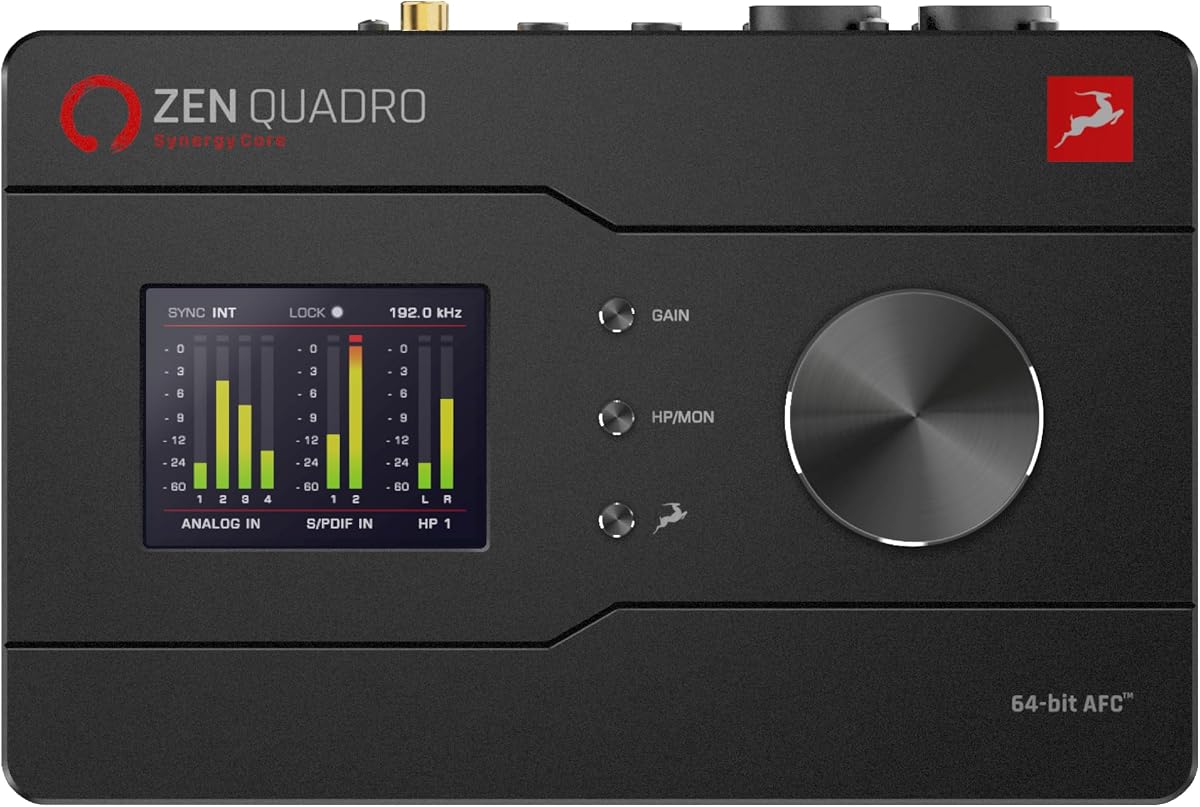
The Antelope Audio Zen Quadro stands out as a top choice for creators needing professional DSP power in a portable form. With a 4.7 rating it delivers flagship sound quality and clocking trusted by engineers worldwide.
We may earn a commission when you buy through this link, at no additional cost to you.
Its Synergy Core FX system runs analog-modeled compressors and EQs on dedicated hardware ensuring your computer CPU stays free for mixing tasks. The four discrete preamps offer plenty of gain for any mic or instrument.
While the software requirement might seem like a hurdle it unlocks a vast ecosystem of effects that run without taxing your system. Standalone presets allow you to save setups for quick recall on stage or in the studio.
This interface is ideal for serious musicians and streamers who demand zero latency and high fidelity. It balances portability with professional features making it a versatile hub for modern audio workflows.
The dedicated DSP and FPGA hardware ensure that effects process instantly allowing you to monitor through full chains without delay.
With ADAT and S/PDIF support you can easily add more inputs or connect external gear to grow your setup over time.
We may earn a commission when you buy through this link, at no additional cost to you.
The Focusrite Scarlett Solo 4th Gen brings big studio sound to home setups at an accessible price point. Rated highly by users it offers the same converters as Focusrite’s flagship interfaces found in major studios.
We may earn a commission when you buy through this link, at no additional cost to you.
Its new Air mode adds rich harmonic drive and presence to vocals and guitars helping you achieve a polished sound right from the source. The included software suite covers recording mixing and mastering needs completely.
While it lacks advanced onboard DSP controls the high-quality converters ensure your raw recordings are pristine. This simplicity makes it perfect for songwriters focusing on capturing the best performance without technical distractions.
This interface is the best starting point for new producers or solo artists. It provides professional sound quality and essential tools without overwhelming complexity or breaking your budget.
The 120dB dynamic range ensures your recordings capture every nuance with clarity and detail suitable for professional releases.
Included Pro Tools Intro and Ableton Live Lite give you immediate access to industry-standard recording capabilities.
We may earn a commission when you buy through this link, at no additional cost to you.
The Universal Audio Apollo Twin X QUAD is a powerhouse for those seeking authentic analog tones and a massive plugin library. Its Unison preamps let you record through real-time emulations of legendary gear like Neve and API.
We may earn a commission when you buy through this link, at no additional cost to you.
Access to over 200 UAD DSP plug-ins means you can shape your sound with award-winning tools without taxing your computer. The Auto-Gain feature helps set levels quickly so you never miss a take.
The investment is significant but the quality and ecosystem justify it for serious professionals. Thunderbolt 3 connectivity ensures fast data transfer and low latency for demanding production tasks.
This interface is best for producers who rely on specific vintage tones and need robust DSP performance. It transforms your studio into a world-class mixing environment with unparalleled sound shaping capabilities.
Record through authentic emulations of vintage gear directly into your DAW for a genuine analog workflow.
With hundreds of UAD plugins you have access to industry-standard effects and instruments for any genre.
We may earn a commission when you buy through this link, at no additional cost to you.
The Elgato Wave XLR MK.2 is designed specifically for streamers and podcasters who need reliable audio control. With 80dB of gain it ensures any XLR microphone sounds loud and clear for your audience.
We may earn a commission when you buy through this link, at no additional cost to you.
Its Wave FX Processor unifies DSP effects like compressor and EQ into one chain making it easy to enhance your voice without complex software. Touch controls with LED feedback let you adjust levels instantly.
The Wave Link App offers precise routing and monitoring so you can manage your show's audio easily. It integrates seamlessly with streaming platforms to deliver professional quality sound.
This interface is perfect for content creators who want simplicity and power. It simplifies the technical aspects of audio so you can focus on creating engaging content for your viewers.
Enhance your voice with built-in effects that unify DSP and plugins into a single signal chain.
Adjust levels and mute instantly with touch buttons that provide instant visual feedback.
We may earn a commission when you buy through this link, at no additional cost to you.
The Universal Audio Apollo Twin X DUO offers the same high-quality ecosystem as the QUAD model with slightly fewer DSP channels. It lets you record through Unison preamps for authentic emulations of classic gear.
We may earn a commission when you buy through this link, at no additional cost to you.
You still get access to the full library of UAD DSP plug-ins including award-winning titles that enhance your mixes. The Auto-Gain feature simplifies setup so you can focus on performance.
Bass management allows you to add a subwoofer to your monitoring setup for better low-end detail. It is a solid choice for producers who need premium sound without the highest tier cost.
This interface fits mid-level professionals looking for reliable DSP power. It balances performance and value well making it a staple for many home studios and mobile setups.
Record through authentic emulations of vintage gear directly into your DAW for a genuine analog workflow.
Mix with confidence using built-in correction powered by Sonarworks for accurate sound in any room.
We may earn a commission when you buy through this link, at no additional cost to you.
The Solid State Logic 2 MKII Plus brings legendary SSL sound to your desk with its 4K Analog Enhancement feature. It adds warmth and presence to your tracks using legacy console technology.
We may earn a commission when you buy through this link, at no additional cost to you.
With 32-bit 192kHz AD/DA converters you get high-resolution audio that captures detail perfectly. Zero-latency monitoring ensures you can hear yourself without delay during recording sessions.
This interface is bus powered and easy to use making it portable for mobile recording. It offers a simple workflow that prioritizes sound quality over complex routing options.
Ideal for musicians and engineers who value analog warmth and simplicity. It delivers a classic SSL feel in a compact package that is easy to integrate into any workflow.
Add legacy SSL console character to your tracks with a simple switch that enhances warmth and presence.
Monitor your inputs directly without computer lag so you can perform naturally during recording.
We may earn a commission when you buy through this link, at no additional cost to you.
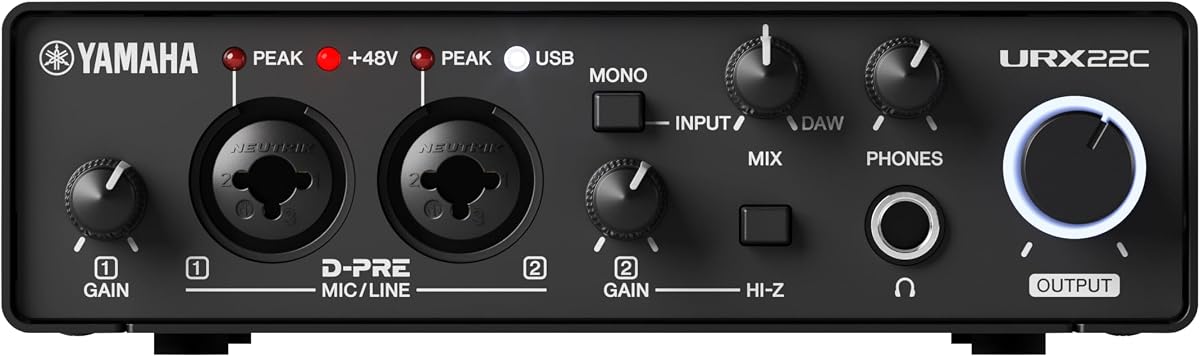
The Yamaha URX22C offers rugged durability with its full-metal housing making it suitable for frequent travel. It supports 32-bit 192kHz recording ensuring high-resolution capture for your projects.
We may earn a commission when you buy through this link, at no additional cost to you.
Its DSP-powered monitoring includes REV-X reverb and Channel Strip effects that run locally on the device. The Class-A D-PRE preamps provide clean gain for any mic or instrument.
Included Cubase AI software gives you a starting point for recording right out of the box. It is a reliable option for creators who need a sturdy interface with solid audio quality.
This interface is ideal for guitarists and vocalists on the move. Its robust build and essential features make it a dependable tool for live sessions and portable studios.
The full-metal housing ensures ultimate durability so the interface can withstand frequent travel and use.
DSP-powered monitoring includes high-quality reverb and channel strip effects that run without CPU load.
We may earn a commission when you buy through this link, at no additional cost to you.
The MOTU UltraLite-mk5 is a powerhouse for recording bands or complex sessions with 18 inputs and 22 outputs. Its DSP-driven monitor mixing lets you create separate mixes for different performers.
We may earn a commission when you buy through this link, at no additional cost to you.
With 125dB dynamic range the audio quality is superb capturing every detail of your performance. The OLED display provides high-resolution metering so you can see all signal activity clearly.
On-board effects include reverb and EQ making it versatile for live monitoring tasks. It connects easily to Mac Windows and iOS devices ensuring compatibility with any setup.
This interface is perfect for small studios or live sound engineers. Its capacity and flexibility make it a robust hub for recording and monitoring multiple tracks simultaneously.
Create separate unique mixes for each output pair giving performers personalized monitor mixes during recording.
The high-resolution OLED display lets you view all signal activity and metering at a glance.
We may earn a commission when you buy through this link, at no additional cost to you.
The Yamaha URX22 brings modern control with a 4.3-inch touchscreen that makes adjusting settings quick and easy. It features dual USB-C ports for flexible connection options with computers and mobile devices.
We may earn a commission when you buy through this link, at no additional cost to you.
Its built-in DSP processor ensures latency-free monitoring with professional sound quality for your recordings. The preamps offer a generous 78dB gain range to handle any microphone or line level source.
Included software like Cubase Al and WaveLab Cast provides tools for creating audio content right away. It is a promising option for creators who want a visual interface for their audio setup.
This interface is best for users who prefer touch controls over physical knobs. It offers a unique workflow that simplifies monitoring and mixing through its intuitive display system.
The 4.3 touchscreen provides intuitive control over levels and settings without digging through menus.
Connect to multiple devices simultaneously for flexible routing and mobile recording workflows.
We may earn a commission when you buy through this link, at no additional cost to you.
The Antelope Audio Zenith 2 is designed specifically for streamers and podcasters needing an all-in-one solution. It features a virtual guitar rig and Smart Vocal Chain to transform your audio instantly.
We may earn a commission when you buy through this link, at no additional cost to you.
With industry-leading 123dB conversion and Synergy Core effects you get professional sound without taxing your computer. The dual independent headphone mixes allow multiple users to monitor separately during sessions.
It supports plug-and-play on Mac PC iOS and Android making it incredibly versatile for mobile creators. The colorful display lets you customize themes and monitor levels easily during recording.
This interface is ideal for content creators who want a complete studio in a portable box. It simplifies complex tasks so you can produce high-quality audio with minimal setup time.
Use onboard DSP to record through effects in real time without fighting your computer CPU.
Unique to its class this interface features two outputs with fully independent mixes for collaboration.
We may earn a commission when you buy through this link, at no additional cost to you.
Selecting the right audio interface requires understanding how DSP capabilities impact your workflow and sound quality. These factors will help you narrow down options to find the ideal fit.
Look for interfaces with dedicated DSP chips that handle effects processing locally. This reduces CPU load on your computer and ensures near-zero latency during recording and monitoring sessions.
Prioritize devices that advertise standalone DSP mixing or hardware effects chains for real-time workflows.
Determine how many inputs you need for microphones instruments and line devices. Interfaces with multiple combo jacks or Hi-Z inputs offer greater flexibility for bands and solo artists.
Ensure the output count matches your monitoring needs including speaker and headphone connections.
Many interfaces include bundles of plugins DAWs and drivers that extend their utility. Check if these tools integrate well with your existing software and offer the sound shaping you need.
Consider the long-term value of included software when comparing different models.
USB-C and Thunderbolt offer faster data transfer rates that support higher audio resolutions. Wireless connectivity might be important for mobile setups but check for stable driver support.
Choose a connection type that matches your computer ports and speed requirements.
High-quality preamps ensure clean gain without noise which is critical for vocals and instruments. Look for features like phantom power and gain range that suit your microphone types.
Evaluate preamp specifications to ensure they meet professional recording standards.
If you plan to travel frequently check for rugged metal housings and robust connectors. Portability is key for on-the-go creators who need reliable gear in various environments.
A sturdy build prevents damage during transport and ensures longevity of the unit.
Set a realistic budget that balances your required features with cost. Higher-end models often offer better conversion and more extensive DSP capabilities but entry-level units can suffice for basics.
Assess whether advanced features justify the extra cost for your specific use case.
Physical knobs and screens make adjusting levels intuitive while touch screens offer modern control. Choose a design that allows you to make changes quickly without navigating menus.
Test or read reviews about the control layout to ensure it matches your workflow.
Connect your audio interface to a power source and your computer using the appropriate cable. Install any required drivers or control panel software to enable full DSP functionality and monitoring features.
Set your input levels carefully to avoid clipping while ensuring a strong signal. Use the DSP mixer to add reverb or EQ to your monitoring chain so you hear processed audio while recording.
Store the device in a dry cool place when not in use to protect internal components. Clean the exterior with a soft cloth and avoid exposing it to extreme temperatures or moisture.
Built-in DSP means the interface has its own processor to handle effects like reverb or EQ without using your computer CPU. This allows for real-time monitoring and recording with no delay or lag.
Most interfaces require control panel software to access and configure DSP effects. Some models offer standalone hardware controls but you will still need drivers for the computer connection.
Yes using built-in DSP allows you to monitor effects in real time with zero latency. This helps you hear your processed sound instantly while tracking without taxing your computer.
It is helpful but not strictly necessary if your computer has enough power. However DSP offloads work from your CPU making recording smoother especially with complex effects chains.
Common DSP effects include EQ compression reverb delay and virtual instrument emulation. High-end models may offer vintage amp simulations and complex routing for live monitoring.
No built-in DSP reduces power usage on your computer because processing happens on the interface itself. This helps prevent overheating and performance slowdowns during long recording sessions.
Our top picks highlight diverse options from the flexible Antelope Zen Quadro to the budget-friendly Focusrite Scarlett Solo. Each brings unique strengths in sound quality and DSP power for various user needs.
Prioritize features like latency performance and input types that match your workflow. Choosing the right tool ensures your recordings sound professional without overwhelming technical complexities.
Always verify current specifications and stock before buying to ensure you get the model that fits your plans. These interfaces offer powerful solutions for elevating your audio production experience.