
Thermalright Aqua Elite 240 V3
4.7Editor score
Fourth gen pump head
S-FDB bearing fans
Compact 240mm size
RGB synchronization support
Compare the top Aio for Am4am5 coolers for AM4 and AM5 CPUs. This guide reviews performance, noise, compatibility, and features to help you choose the right
Choosing the right cooling solution is critical for maintaining peak performance and longevity in your PC build. All-in-one liquid coolers offer a balance of efficiency and ease of use that air coolers often struggle to match. For users with AM4 and AM5 sockets, finding a compatible model ensures stable thermals under heavy loads.
We have evaluated ten top-rated all-in-one liquid coolers based on cooling efficiency, noise levels, build quality, and socket compatibility. Each product was analyzed for its ability to handle modern processors while maintaining quiet operation. This list covers a range of sizes and features to suit different budget and performance needs.
Each pick highlights key strengths such as thermal performance, RGB lighting, and installation ease. You will find detailed breakdowns of pump design, fan quality, and warranty support. Please note that product availability and pricing can change frequently, so check current listings before making your final decision.
4.7Editor score

4.7Editor score

4.2Editor score
This table provides a side-by-side look at the ten selected coolers to help you quickly compare key specifications and features. Use this overview to identify which model best fits your specific case size and performance requirements.


The ARCTIC Liquid Freezer III Pro 360 stands out as a top contender for AM4 and AM5 users seeking maximum thermal performance. With a 4.5 rating, it delivers exceptional cooling thanks to its specialized design elements. The inclusion of a dedicated VRM fan sets it apart from standard AIO solutions on the market.
We may earn a commission when you buy through this link, at no additional cost to you.
This model features the P12 PRO fan which offers more power and quieter operation compared to previous iterations. The native offset mounting shifts the cold plate towards the CPU hotspot ensuring efficient heat transfer. Integrated cable management keeps your build clean by hiding PWM cables within the hose sheathing.
While the thicker radiator design can sometimes interfere with high-profile RAM modules, the thermal benefits often outweigh this concern for enthusiasts. The VRM fan ensures stable performance under heavy loads by cooling voltage converters directly. This makes it ideal for overclocking and sustained workloads.
For users prioritizing raw cooling power and build quality, this cooler is a highly recommended choice. It balances noise and performance effectively while offering robust support for modern AMD sockets. Verify case clearance before purchase to ensure compatibility with your specific hardware configuration.
The offset mounting technology ensures direct contact with the CPU hotspot for faster heat removal.
An integrated fan cools voltage regulators to prevent throttling during intensive tasks.
We may earn a commission when you buy through this link, at no additional cost to you.
The ARCTIC Liquid Freezer III 360 offers nearly identical performance to the Pro variant but without the ARGB lighting. It maintains the same high-quality P12 PRO fans and VRM cooling features at a slightly lower price point. This makes it an attractive option for builders focused on function over form.
We may earn a commission when you buy through this link, at no additional cost to you.
Users benefit from the native offset mounting which improves heat transfer efficiency on modern CPUs. The VRM fan is a unique addition that helps maintain system stability during peak usage. Integrated cable management simplifies the build process by reducing visible wiring clutter significantly.
The lack of RGB lighting may be a drawback for those seeking a colorful aesthetic but does not impact cooling. The radiator thickness remains a consideration for RAM compatibility especially in compact mid-tower cases. Overall it delivers reliable thermals for high-end AM4 and AM5 processors.
Choose this model if you prioritize cooling efficiency and system stability over visual effects. It provides a solid foundation for high-performance builds without unnecessary cost. Ensure your case supports the radiator dimensions before installation to avoid fitment issues.
Ideal for users who want top-tier cooling without paying for RGB aesthetics.
Offset mounting design ensures the cold plate aligns with the CPU hotspot.
We may earn a commission when you buy through this link, at no additional cost to you.
The Thermalright Peerless Vision 360 ARGB stands out with its large 3.95-inch IPS LCD screen on the pump head. This feature allows users to display system stats or custom images creating a striking visual effect. It combines practical cooling with high customization potential for showpiece builds.
We may earn a commission when you buy through this link, at no additional cost to you.
The wireless splicing fans reduce cable clutter while offering infinity mirror lighting effects. S-FDB bearings ensure quiet operation and long lifespan even at high speeds. The PWM temperature control adjusts fan speed automatically based on system load for optimal efficiency.
While the screen adds significant aesthetic value it requires software to manage content and can draw extra power. The wireless fans are innovative but may complicate maintenance compared to traditional wired setups. However the unique look and solid cooling make it a compelling choice for enthusiasts.
Recommend this cooler for users who want a standout visual element in their system. It balances performance with innovation to deliver a memorable build experience. Ensure your motherboard supports the necessary headers for both power and lighting connections.
Display dynamic content or system metrics on the large pump head screen.
Reduce cable clutter with wireless fans that maintain performance and lighting.
We may earn a commission when you buy through this link, at no additional cost to you.
The MSI MAG Coreliquid A13 360 delivers a perfect balance of performance and reliability for AM4 and AM5 builds. With a high-speed pump and split-flow radiator it ensures efficient heat removal under demanding conditions. The 4.7 rating reflects its strong performance across various testing scenarios.
We may earn a commission when you buy through this link, at no additional cost to you.
Ceramic bearings extend pump lifespan while the split-flow design reduces resonance and improves durability. Evaporation-proof tubing maintains system integrity over time by preventing coolant loss. Installation is straightforward with included mounting brackets for both AMD and Intel sockets.
While the RGB is standard compared to premium models it integrates well with most motherboards. The tubing length may be tight for some large cases but usually suffices for standard builds. This cooler provides robust thermals and quiet operation for long-term use.
Ideal for users seeking a dependable all-rounder without excessive bells and whistles. It handles high loads effectively while maintaining a low noise profile. Verify case clearance and tube reach before finalizing your purchase decision.
Unique radiator design improves heat exchange efficiency and reduces motor resonance.
High-speed pump with ceramic bearings ensures durability and consistent performance.
We may earn a commission when you buy through this link, at no additional cost to you.
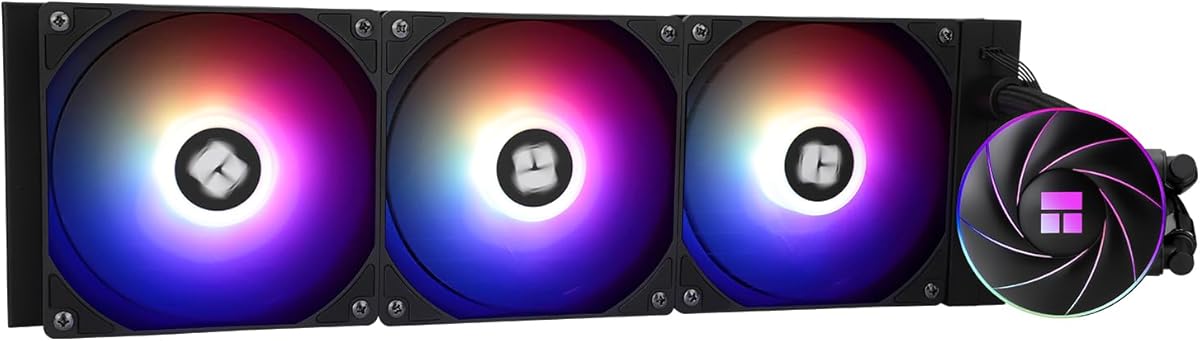
The Thermalright Aqua Elite 240 V3 offers exceptional value for users seeking efficient cooling without breaking the bank. Its compact 240mm size suits smaller cases while still delivering impressive thermal performance. The 4.7 rating highlights its reliability and effectiveness in everyday use.
We may earn a commission when you buy through this link, at no additional cost to you.
The fourth generation pump head ensures efficient coolant circulation with a long operational life. S-FDB bearing fans provide quiet airflow and help reduce vibration during operation. RGB lighting syncs with the motherboard to create a cohesive look in your build.
While it lacks the raw power of 360mm models it is sufficient for most mainstream CPUs. The design is straightforward without extra features like screens or VRM fans. This focus on essentials keeps the price low while maintaining high quality standards.
Perfect for budget-conscious builders who do not want to compromise on cooling quality. It handles daily tasks and gaming loads with ease. Ensure your case supports 240mm radiator placement before purchase.
Delivers strong cooling results at a price point accessible to most users.
Ideal for mid-tower or smaller cases where space is limited.
We may earn a commission when you buy through this link, at no additional cost to you.
The NZXT Kraken Plus 360 offers a premium experience with its high-quality LCD screen and efficient turbine pump. It allows users to customize the display with images or system stats enhancing the visual appeal of their setup. This cooler represents the high end of consumer liquid cooling solutions.
We may earn a commission when you buy through this link, at no additional cost to you.
Zero RPM mode stops fans at low loads for silent operation when cooling is less critical. The single breakout cable simplifies installation and reduces cable clutter inside the case. Tool-free brackets make mounting easy across different AMD and Intel sockets.
Despite its high price and reliance on software it delivers consistent performance and a refined user experience. The LCD is bright and responsive which makes it a standout feature. However users must rely on CAM software for full functionality which may not appeal to everyone.
Recommended for those seeking the best build experience and visual customization options. It combines cooling capability with high-end features that justify its cost for enthusiasts. Check software requirements and budget before committing to this model.
Fans stop completely at low loads to ensure a whisper-quiet environment.
Turbine pump delivers efficient cooling with low noise under heavy workloads.
We may earn a commission when you buy through this link, at no additional cost to you.
The Thermalright Aqua Elite 120 V3 is designed for users with smaller cases that cannot accommodate larger radiators. Despite its compact size it provides effective cooling for mainstream processors. Its 4.6 rating indicates strong performance relative to its size class.
We may earn a commission when you buy through this link, at no additional cost to you.
The fourth generation pump head ensures efficient heat transfer with minimal noise. RGB fans sync with the motherboard to match the system theme without adding extra controllers. This model maintains the same build quality as its larger siblings in a reduced footprint.
While it may not handle extreme overclocking as well as 360mm models it is perfect for standard builds. The simplicity of design ensures fewer points of failure over time. Installation is straightforward with all necessary brackets included for various sockets.
Best suited for mini-ITX or compact mid-tower builds needing liquid cooling efficiency. It offers a clean look and solid thermals for everyday use. Ensure your case supports 120mm radiator mounts before purchasing.
Ideal for small form factor builds needing liquid cooling in limited space.
Fourth gen pump provides reliable circulation without excess noise.
We may earn a commission when you buy through this link, at no additional cost to you.
The NZXT Kraken Core 360 RGB provides a streamlined 360mm cooling solution with a focus on simplicity. Its single-frame fan design reduces screws and cables for a cleaner build. This model delivers reliable cooling for AM4 and AM5 systems at an accessible price.
We may earn a commission when you buy through this link, at no additional cost to you.
The high static pressure fans push air through the radiator efficiently for strong heat dissipation. Direct motherboard connection means no extra controllers are needed for operation. PWM-enabled fans allow precise adjustments to balance noise and cooling based on workload.
While it lacks advanced customization like screens it performs well for standard gaming and workloads. The single-frame design simplifies installation but limits independent fan control. This makes it a practical choice for those prioritizing function and cleanliness.
Recommend for users seeking a no-fuss 360mm cooler with good cooling power. It balances ease of use with effective thermal management. Ensure your motherboard has sufficient PWM headers for all fans.
Single-frame design reduces cables and screws for a tidy build.
High static pressure fans maximize radiator heat dissipation effectively.
We may earn a commission when you buy through this link, at no additional cost to you.
The CORSAIR Nautilus 360 RS prioritizes low noise with a whisper-quiet pump and efficient fan design. Its direct motherboard connection and daisy-chain capability simplify wiring significantly. This model is well-suited for users who value silence alongside effective cooling.
We may earn a commission when you buy through this link, at no additional cost to you.
RS fans provide strong static pressure to move air through the radiator efficiently. The convex cold plate ensures maximum contact with the CPU for faster heat transfer. Thermal paste is pre-applied to speed up installation and reduce initial setup time.
While it lacks elaborate RGB lighting it offers a clean and functional aesthetic. The daisy-chain setup reduces cable clutter making it easier to manage complex builds. Performance remains strong despite the focus on noise reduction.
Ideal for quiet workstations or gaming rigs where sound is a primary concern. It delivers reliable cooling with minimal noise. Check your case clearance and socket compatibility before purchase.
Whisper-quiet pump ensures minimal noise even under high loads.
Daisy-chain fans connect to a single header to reduce cable clutter.
We may earn a commission when you buy through this link, at no additional cost to you.
The Thermalright Aqua Elite 360 ARGB offers an affordable entry into 360mm liquid cooling with solid performance. Its full copper base ensures efficient heat transfer from the CPU to the coolant. This model delivers reliable thermals for AM4 and AM5 builds at a competitive price.
We may earn a commission when you buy through this link, at no additional cost to you.
S-FDB bearing fans operate quietly while providing adequate airflow for heat dissipation. The radiator provides sufficient surface area to handle high-end processors effectively. RGB sync allows fans and pump to match your system lighting for a cohesive look.
While case width recommendations may be restrictive for some setups the cooling performance is strong. The pump speed is standard but effective for most non-overclocked systems. This makes it a great choice for value-focused enthusiasts.
Recommended for users needing a full 360mm cooler on a budget. It balances cost and performance well. Ensure your case supports 360mm radiator mounting and check width requirements.
Copper base ensures rapid heat transfer from CPU to coolant loop.
Provides 360mm cooling capability at an accessible price point.
We may earn a commission when you buy through this link, at no additional cost to you.
Selecting the right AIO cooler requires evaluating several factors to ensure compatibility and performance for your specific system.
Radiator size is a primary consideration as it dictates cooling capacity and physical fit. Common sizes include 120mm, 240mm, and 360mm. A 360mm radiator offers the best cooling but requires significant space in the case often limiting RAM clearance. Always verify your case supports the chosen radiator size and check mounting locations.
Ensure your case has enough room for the radiator and fans without interfering with other components.
Modern AM4 and AM5 sockets have different mounting requirements. Most top models now include AM5 brackets but always check the manufacturer compatibility list before purchasing. Some older coolers may need adapters or manual mounting adjustments for AM5 support.
Verify that the cooler includes hardware specifically for AM5 to avoid installation issues.
The pump moves coolant through the loop and impacts cooling efficiency and noise. High RPM pumps circulate coolant faster but may be louder. Ceramic bearings in the pump can extend lifespan and reduce wear over time. Look for pump designs with proven reliability in reviews.
Prioritize pumps with durable bearings and appropriate speed for your noise preferences.
Fans dissipate heat from the radiator and contribute to overall system noise. High static pressure fans are better for pushing air through dense radiator fins. S-FDB bearings help reduce friction and vibration leading to quieter operation. Consider fan speed ranges to ensure quiet operation at idle.
Choose fans with high static pressure and bearing technology that minimizes noise.
Many AIO coolers include RGB fans or pump lighting for aesthetics. Some models offer advanced customization while others provide simple color cycles. Ensure your motherboard supports the lighting interface such as 5V 3-pin ARGB to control effects effectively. Software integration can enhance the experience but adds complexity.
Decide if lighting is important to your build and verify compatibility with your system.
Simplified cable management makes building easier and improves airflow. Some coolers integrate cables into tubing or use single breakout cables. Daisy-chain fans reduce the number of motherboard headers needed. Look for tool-free mounting brackets to save time during installation.
Models with integrated cable routing and clear instructions are easier to install.
Price ranges vary based on size features and brand. Entry-level models focus on function while premium ones include screens and advanced RGB. Determine your priorities such as cooling performance or aesthetics to allocate budget wisely. Consider long-term value rather than just upfront cost.
Balance your budget with the features that matter most for your specific use case.
A solid warranty protects your investment against defects or leaks. Many brands offer three to five year coverage. Customer support quality matters if issues arise during the product life. Check brand reputation and support availability before purchase.
Ensure the product comes with a reliable warranty and accessible customer support.
Install the cooler by mounting the pump head onto the CPU using the provided brackets and thermal paste. Ensure the radiator is attached securely to the case fans and connected to the appropriate motherboard headers.
Check pump and fan operation shortly after powering on the system to confirm coolant flow and fan rotation. Use monitoring software to track temperatures and adjust fan curves via BIOS or control software for optimal balance.
Regular maintenance includes cleaning radiator fans of dust to maintain airflow. Inspect tubing for leaks or wear periodically. Keep the area around the case clean to prevent debris from entering the system.
Most modern AM4 coolers support AM5 with updated mounting brackets but you should check manufacturer compatibility before purchase. Some models require specific AM5 hardware or adapters. Verify the product details to ensure a proper fit for your motherboard socket.
The best size depends on your case and cooling needs. A 360mm radiator provides maximum cooling but requires significant case space. A 240mm unit is a good balance for most builds. Consider case clearance and RAM clearance when selecting size.
Many top brands include AM5 mounting hardware but not all models support it natively. Older or budget coolers may require third-party brackets. Always check product specs and mounting kit details to ensure compatibility with AM5 before buying.
Use compressed air to blow dust out of the radiator fins. Keep the system powered off and remove fans if needed for better access. Cleaning regularly maintains airflow and cooling efficiency without needing to disassemble the liquid loop.
RGB synchronization does not impact cooling performance but enhances visual integration with your system. It requires compatible motherboard headers and software. Use it if aesthetics matter to you otherwise standard operation works fine without sync.
Modern AIO coolers are sealed to minimize leak risk but leaks can occur over time. Most offer warranties covering liquid damage. Regularly check for condensation or moisture to catch issues early and maintain system safety.
Most AIO pumps operate quietly but noise levels vary by model. Look for units with ceramic bearings and moderate pump speeds for low noise. Check reviews for decibel ratings to ensure it matches your quietness expectations.
Yes AIO coolers handle the heat from overclocking well especially 360mm units. Ensure the pump speed and fan performance match your overclock demands. Monitor temperatures under load to confirm stability after any overclock changes.
We have reviewed ten top AIO coolers offering cooling performance and features for AM4 and AM5 users. The MSI MAG Coreliquid A13 360 stands out for overall value and performance while the Thermalright Aqua Elite 240 V3 offers excellent budget value.
Prioritize case compatibility and socket support to ensure your chosen cooler fits properly. Focus on pump quality and fan performance for consistent thermals during demanding tasks. Balance aesthetics like RGB with practical features based on your personal preferences.
Prices and availability may change so check current listings for the best deals before purchasing. Select the model that best aligns with your system requirements and budget to maintain optimal CPU performance for years to come.