
MINISFORUM MS-S1 MAX Mini AI Workstation PC
4.5Editor score
128GB LPDDR5x unified memory
Cluster design for distributed compute
Compact and energy efficient design
This guide compares the top 10 dual GPU AI setups for local LLM inference and training, covering workstations, servers, and mini clusters.
Choosing the right dual GPU AI setup is critical for researchers and developers who need powerful local inference and training capabilities without relying on cloud services.
We compared ten distinct systems ranging from compact mini PCs to massive rackmount servers based on VRAM capacity, compute throughput, cooling efficiency, and software compatibility.
Each pick highlights specific strengths for different workloads, though prices and availability change frequently so verify current stock before purchasing any high performance computing system.
4.5Editor score


This table provides a quick side-by-side look at the key specifications of every system featured in this guide to help you narrow down your choice quickly.


This unique dual-GPU design combines two Arc Pro B60 GPUs to deliver 48GB of VRAM on a single PCIe card, making it possible to run massive models locally without multi-card configurations.
We may earn a commission when you buy through this link, at no additional cost to you.
With a combined 394 TOPS of INT8 performance and native support for frameworks like PyTorch and vLLM, this card is purpose-built for high-concurrency inference and complex AI workloads.
The turbo edition features a triple-thermal design with a blower fan ensuring stable temperatures during long tasks, though you will need a motherboard that supports x16 lane bifurcation for optimal speed.
If you need to deploy 70B class models like DeepSeek-R1 on a single system without cloud dependency, this card offers a compelling balance of performance and cost efficiency.
The 48GB unified memory allows you to load large language models entirely into VRAM, removing the bottlenecks typically associated with CPU offloading or multi-card NVLink setups.
By using a PCIe 5.0 x8 + x8 interface, this card integrates easily into standard consumer platforms, significantly lowering the total system cost for local LLM deployment.
We may earn a commission when you buy through this link, at no additional cost to you.
The APC MES2X offers a turnkey solution for professionals who need extreme AI capabilities right out of the box, featuring dual RTX PRO 6000 Blackwell GPUs with 96GB VRAM each.
We may earn a commission when you buy through this link, at no additional cost to you.
Powered by a Ryzen 9 9950X and cooled by a 360mm liquid cooler, this system handles heavy workloads like model fine-tuning and complex simulations without thermal throttling.
While the price point is significant, the integration of high-end components and preloaded drivers makes it a reliable choice for mission-critical workflows where uptime is essential.
This system is ideal for studios or research labs that require immediate deployment of high-performance AI tools without spending weeks on custom hardware assembly.
With 192GB total VRAM, you can host multiple massive models simultaneously or train larger models locally without hitting memory limits that typically require cloud solutions.
Custom built with professional cable management and fully tested, this workstation ensures stability and reduces the risk of hardware failure during intensive production cycles.
We may earn a commission when you buy through this link, at no additional cost to you.
The APC ES620 pairs the latest GeForce RTX 5090 GPUs with a high-end Ryzen processor to create a powerhouse for AI and graphics workloads.
We may earn a commission when you buy through this link, at no additional cost to you.
This system offers 64GB of GDDR7 memory per GPU and is liquid cooled to ensure that performance remains consistent during long training or rendering sessions.
While it shares similarities with other workstation builds, the use of GeForce cards may offer a better price to performance ratio for those not needing enterprise ISV certifications.
Choose this if you want the latest consumer graphics tech in a reliable chassis that supports high speed storage and ample RAM for data processing tasks.
The RTX 5090 brings advanced architecture features that accelerate both traditional graphics rendering and AI inference workloads significantly.
With 15 USB ports and 5Gb Ethernet, this workstation provides excellent connectivity for peripheral devices and fast network data transfers.
We may earn a commission when you buy through this link, at no additional cost to you.
NVIDIA DGX Spark brings supercomputer performance to your desk by integrating the Grace Blackwell architecture into a compact desktop form factor.
We may earn a commission when you buy through this link, at no additional cost to you.
This system enables enterprise-scale AI right where you need it offering seamless integration with the full NVIDIA AI software stack for local development and deployment.
With up to 1 PetaFLOP of AI performance and 128GB of unified memory per unit you can prototype and test large models efficiently without leaving your workspace.
It is perfect for organizations that want to augment laptop and cloud resources with powerful local compute power for secure and rapid innovation cycles.
The GB10 chip delivers unmatched compute density allowing you to run complex analytics and training locally in a fraction of the time.
Keeping your data on-premises with DGX Spark ensures higher security and privacy compared to uploading sensitive models to the cloud.
We may earn a commission when you buy through this link, at no additional cost to you.
The ASUS Dual EPYC server is a true enterprise powerhouse designed for HPC clusters and large scale AI training requiring extreme density and reliability.
We may earn a commission when you buy through this link, at no additional cost to you.
Featuring two 192 core processors and eight RTX PRO 6000 GPUs it offers the highest performance in this guide for teams running complex simulations or training massive LLMs.
The toolless design and ASUS control center software streamline maintenance ensuring that your infrastructure remains efficient and secure even under heavy continuous workloads.
This system is best suited for research labs and data centers that need maximum throughput and have the infrastructure to support high power rackmount hardware.
With 24 channel DDR5 RDIMM support you achieve extremely high memory bandwidth essential for feeding data hungry AI accelerators without bottlenecks.
Support for up to 15 NICs including 200GbE allows for ultra-fast data transfer critical for cluster computing and distributed training.
We may earn a commission when you buy through this link, at no additional cost to you.
Designed specifically for PIX4Dsurvey and similar geospatial tasks this workstation balances high core CPU performance with powerful GPU acceleration for complex data rendering.
We may earn a commission when you buy through this link, at no additional cost to you.
It features a Ryzen Threadripper processor and 128GB of ECC memory to handle large datasets reliably while the RTX 5090 provides the graphical horsepower needed for visualizations.
The inclusion of 10GbE networking and fast NVMe storage ensures that transferring and processing massive survey data sets is done efficiently without delays.
This build is an excellent choice for professionals in mapping and construction who need a tailored system for their specific workflow requirements.
ECC memory prevents silent data corruption which is critical when processing complex geospatial data where accuracy is paramount.
Onboard 10GbE LAN allows for rapid file transfers from storage servers ensuring your workflow stays uninterrupted.
We may earn a commission when you buy through this link, at no additional cost to you.
Empowered PC offers this turnkey workstation to deliver unprecedented machine learning capabilities for training massive local LLMs and handling complex neural networks.
We may earn a commission when you buy through this link, at no additional cost to you.
Driven by a 192 core processor and triple RTX PRO 6000 GPUs this system provides the raw compute power needed to work without cloud latency.
The massive 768GB RAM pool and Gen5 NVMe storage allow you to ingest and parse huge datasets in real time which is critical for data science pipelines.
If you are an engineer or researcher needing a reliable system that supports both CAD and AI, this build provides a definitive tool for generative design.
With triple GPUs you can distribute training across multiple accelerators significantly reducing the time to converge on complex models.
Empowered PC provides lifetime technical support and a 3 year warranty ensuring you have help whenever you need it.
We may earn a commission when you buy through this link, at no additional cost to you.
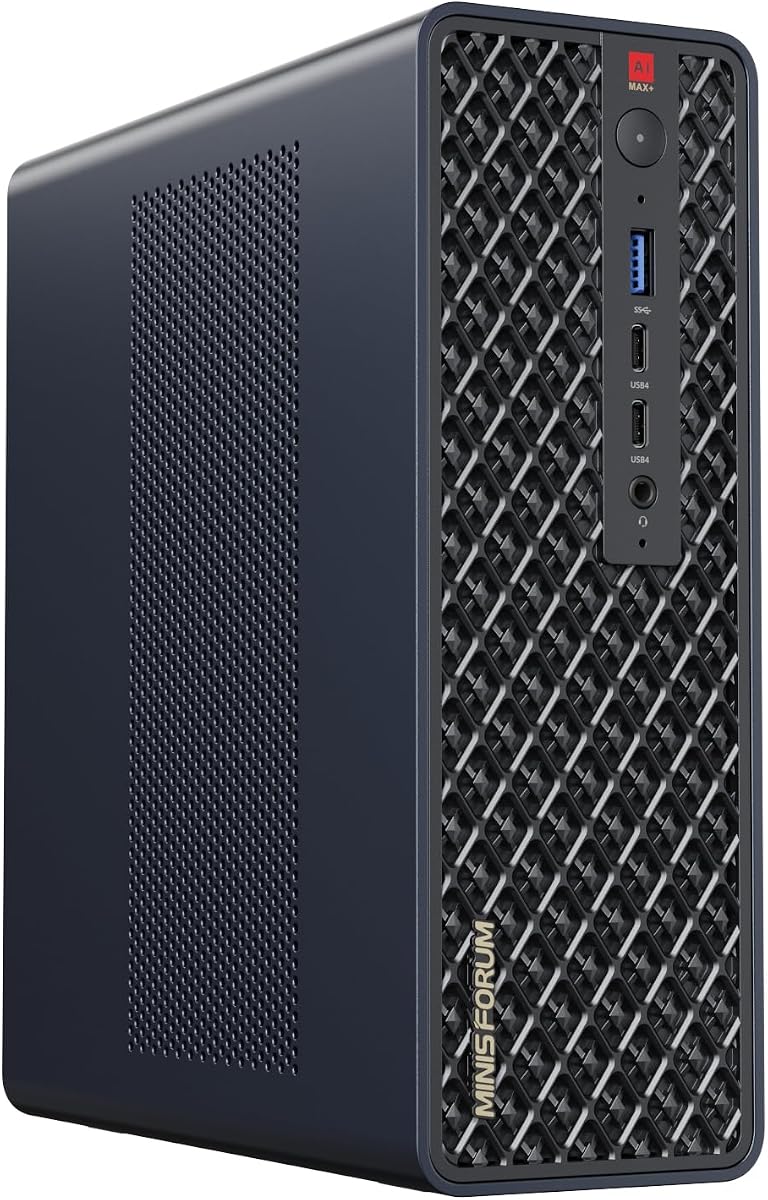
The MS-S1 MAX features a powerful APU integrating CPU GPU and NPU to deliver 126 TOPS total system output ideal for local LLMs and multimodal tasks.
We may earn a commission when you buy through this link, at no additional cost to you.
Its 128GB unified memory pool allows the GPU to access a shared bandwidth resource eliminating traditional VRAM bottlenecks found in many compact systems.
With cluster design support two units can be configured to run large models locally and the compact size allows for rack deployment in enterprise environments.
This is a top pick for those who want high performance AI in a small footprint without the noise and heat of a large tower workstation.
LPDDR5x memory shared between CPU and GPU ensures smoother data transfer and higher stability under high loads.
Multiple units can be cascaded to create a distributed computing center suitable for scaling AI tasks efficiently.
We may earn a commission when you buy through this link, at no additional cost to you.
This Max-Q workstation GPU packs 96GB of GDDR7 memory into a dual-slot card making it perfect for hosting heavy open-source LLMs locally.
We may earn a commission when you buy through this link, at no additional cost to you.
It delivers over 3500 TOPS of AI performance while capping power at 300 watts making multi-GPU desktop scaling viable for demanding research labs.
The advanced thermal management ensures reliable operation during continuous workloads while the Max-Q design fits into standard desktop chassis easily.
Buy this if you need professional grade reliability and VRAM capacity for agentic workflows and data science pipelines without cloud subscription overhead.
The 96GB capacity eliminates bottlenecks allowing you to run multiple models simultaneously on a single workstation.
Built with enterprise-grade standards and a 3-year manufacturer warranty this card ensures stability for professional use.
We may earn a commission when you buy through this link, at no additional cost to you.
This mini workstation is built with the Ryzen AI Max+ 395 processor bringing 126 TOPS of performance to a tiny chassis perfect for desktop deployments.
We may earn a commission when you buy through this link, at no additional cost to you.
With five 8K video outputs it supports extensive multitasking which is great for digital signage trading floors or engineering work requiring wide views.
The system supports Wi-Fi 7 and 10GbE ports ensuring that network speeds are not a bottleneck for remote workflows or large file transfers.
It is an ideal choice for users who need a compact and quiet system that still offers strong productivity features and multiple display connectivity.
Five video outputs allow you to connect multiple monitors simultaneously improving productivity without needing additional hardware.
Advanced phase change cooling and intelligent fans ensure the system stays quiet and cool even under peak loads.
We may earn a commission when you buy through this link, at no additional cost to you.
Selecting a dual GPU system requires understanding your workload needs budget constraints and physical environment to ensure you get the best value.
VRAM is often the most critical factor for AI models since insufficient memory forces offloading to slower system RAM which drastically reduces performance. Look for setups offering at least 48GB total VRAM to run large quantized models locally.
Compute power measured in TOPS determines how quickly your system can process AI tasks. Ensure that the combined throughput of both GPUs meets the requirements of your target models like 70B parameter quantizations.
Unified memory designs allow CPU and GPU to share a pool reducing data transfer overhead. This is especially useful in compact systems where dedicated VRAM might be limited.
Dual GPUs need sufficient PCIe lanes to avoid bottlenecks. Check if your motherboard supports bifurcation to ensure each GPU gets enough bandwidth for optimal speed.
Sustained AI workloads generate significant heat. Ensure the system has adequate cooling and a power supply that can handle the combined load of both GPUs without throttling.
Verify that the GPUs support your preferred frameworks like PyTorch or vLLM. Enterprise cards often offer better ISV certification for stability in production environments.
Decide between rackmount servers and desktop workstations based on your space and noise requirements. Compact systems are great for offices while servers suit data centers.
Consider future needs. Systems with expansion slots or cluster modes allow you to add more compute power as your models and data grow.
Start by installing the latest drivers and optimizing your environment with container tools like Docker to manage dependencies efficiently and ensure consistent performance across tasks.
Monitor thermal performance regularly using system tools to avoid overheating during long inference sessions and keep the system in a well ventilated area for better airflow.
Perform periodic stress tests on new software updates to verify system stability and ensure that both GPUs are recognized correctly before deploying critical workloads.
While some tools allow mixed GPU setups it is generally better to use identical GPUs to ensure balanced loads and avoid compatibility issues with distributed training.
NVLink helps with pooling memory but many modern models work efficiently over PCIe especially if each GPU has enough VRAM for the model size.
Linux distributions like Ubuntu are preferred for their native support in most AI tools though Windows works well for many consumer frameworks and models.
Yes 48GB is sufficient for many quantized models like 70B parameters allowing you to run them locally without offloading to system RAM.
Some mini PCs support clustering where multiple units share the load for a model significantly boosting total throughput and memory capacity effectively.
Dual GPUs often require 1000W to 1600W power supplies depending on the specific models and whether the system uses high core CPUs for data handling.
From compact mini PCs to massive rackmount servers the best dual GPU AI setup depends on your specific needs for VRAM capacity compute power and physical space.
For most developers focusing on local inference the WEELIAO MAXSUN card and MINISFORUM MS-S1 MAX offer excellent performance to cost ratios for running large models efficiently.
Always verify the current prices and availability before purchase as high demand hardware may see fluctuations and ensure you have adequate power and cooling for your chosen system.