
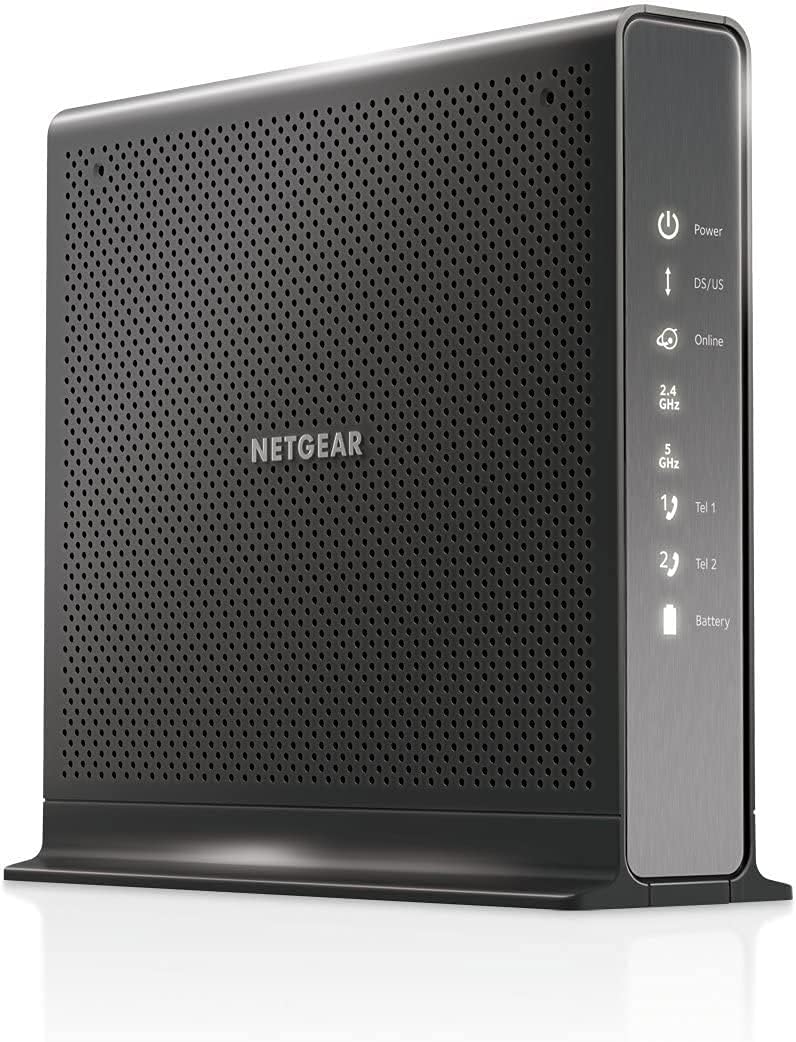
NETGEAR Nighthawk C7000
4.2Editor score
DOCSIS 3.0 standard
AC1900 WiFi 5 speed
Compatible with Xfinity and Cox
This guide compares the top Cable Modem WiFi Router Combo models for 2026, evaluating speed, coverage, and provider compatibility to help you choose the best
Finding a reliable Cable Modem WiFi Router Combo can simplify your home network setup while saving on monthly rental fees. These devices combine modem and routing functions into one unit, offering streamlined installation and consistent performance for streaming, gaming, and daily browsing tasks.
We evaluated ten top-rated models based on DOCSIS standards, WiFi generation, and provider compatibility. Our analysis focuses on real-world performance metrics like coverage area, device capacity, and wired port options to ensure you get the best value for your specific internet plan and household demands.
Each pick highlights key strengths and limitations to guide your decision-making process. Note that pricing and availability fluctuate regularly, so verify current deals before purchasing. This guide ensures you select a combo unit that matches your speed requirements and technical preferences without unnecessary complexity or cost.
4.2Editor score

4.1Editor score

3.9Editor score
This comparison table outlines the core specifications of each model to help you quickly identify the right fit for your internet plan and home size. Consider your provider compatibility and speed needs before selecting a device.





The NETGEAR Nighthawk CAX30 stands out as a top choice for households seeking reliable gigabit speeds and modern WiFi 6 technology. With a strong rating and widespread provider approval, it delivers consistent performance for streaming and gaming without needing separate modem and router units.
We may earn a commission when you buy through this link, at no additional cost to you.
Its DOCSIS 3.1 technology ensures you can maximize your cable internet plan potential while the AX2700 WiFi handles multiple devices efficiently. The app allows easy network management, speed tests, and guest network setup, making it accessible for users of all technical levels.
While it lacks fiber support and voice service compatibility for some providers, the trade-offs are acceptable for pure data users. The coverage area and wired port options provide sufficient flexibility for most home sizes and device counts without significant performance degradation.
Buyers looking for a versatile combo unit should prioritize this model for its balance of speed and ease of use. It is ideal for those upgrading from older WiFi 5 systems or needing more reliable coverage across larger living spaces.
The AX2700 standard offers improved capacity for connected devices, reducing congestion during peak usage hours and ensuring smoother video calls and streaming experiences.
Using the Nighthawk app, you can pause internet access for specific devices, run diagnostic tests, and monitor connected hardware effortlessly from your smartphone.
We may earn a commission when you buy through this link, at no additional cost to you.
The NETGEAR Nighthawk C7000 provides a cost-effective solution for users who do not need the latest WiFi 6 features. It remains a popular option for its solid performance in medium-sized homes and compatibility with major cable providers like Xfinity and Cox.
We may earn a commission when you buy through this link, at no additional cost to you.
Its AC1900 WiFi 5 capabilities support streaming and gaming with sufficient speed for most households. The Beamforming+ feature helps direct signals to devices, reducing dead spots and maintaining stable connections throughout the home without excessive technical setup.
Although it does not support plans exceeding 800Mbps or WiFi 6, it is a practical choice for budget-conscious buyers. The included USB port allows basic storage sharing, adding utility without complicating the device footprint or cost structure.
Consider this model if your internet plan is under 800Mbps and you prefer a reliable, no-fuss setup. It delivers consistent results for daily browsing, video streaming, and casual gaming without requiring advanced networking knowledge.
This unit offers excellent value by combining essential modem and router functions into one device, eliminating monthly rental fees while maintaining reliable internet access.
Certified for Xfinity and Cox networks, it ensures smooth activation and ongoing service without unexpected compatibility issues or provider restrictions.
We may earn a commission when you buy through this link, at no additional cost to you.
The NETGEAR Nighthawk CAX80 caters to power users and large homes needing maximum throughput and extensive coverage. With its 2.5 Gig port and AX6000 WiFi capabilities, it handles high-bandwidth activities like 4K streaming and heavy gaming without compromising performance.
We may earn a commission when you buy through this link, at no additional cost to you.
Its DOCSIS 3.1 technology allows compatibility with the fastest cable plans available, offering future-proof headroom for speed upgrades. The expanded coverage of 2500 sq ft ensures reliable signal strength even in multi-story homes with dense construction materials.
While the cost is higher, the investment is justified for those requiring multi-gigabit wired connections and robust wireless performance. The OFDMA feature improves efficiency during peak usage, keeping response times low when the whole family is connected online.
This model is best for tech enthusiasts or households with many simultaneous devices. If you need wired speeds beyond standard Gigabit and extensive wireless reach, it offers premium capabilities that lower-tier units cannot match.
The inclusion of a 2.5 Gig port allows fastwired connections for desktops and servers, reducing bottlenecks for data-intensive tasks and local network transfers.
With coverage up to 2500 sq ft, it reduces dead zones and ensures consistent high-speed connections across large or multi-level residential spaces.
We may earn a commission when you buy through this link, at no additional cost to you.
This renewed version of the NETGEAR Nighthawk CAX30 offers significant savings while delivering the same core performance as a new unit. It is an excellent option for buyers who want high-end features like WiFi 6 and DOCSIS 3.1 without the full retail cost.
We may earn a commission when you buy through this link, at no additional cost to you.
The device maintains strong capabilities for handling modern internet plans and multiple connected devices. Buyers should verify the condition and warranty details before purchase, but many renewed units arrive in near-new condition with full functionality intact.
Its performance matches the new model in real-world testing, making it a smart choice for cost-conscious shoppers. The savings can offset other networking equipment costs, such as Ethernet cables or network switches, while maintaining high-speed internet access.
Choose this model if you are comfortable with refurbished electronics and want to maximize value. It is ideal for households needing robust WiFi 6 capabilities but preferring to avoid the premium price tag of brand-new hardware.
Renewed units provide an accessible entry point into WiFi 6 technology, allowing users to enjoy modern features at a fraction of the original retail price.
Despite being renewed, the hardware supports up to 1Gbps plans and delivers consistent throughput for gaming and streaming without noticeable degradation.
We may earn a commission when you buy through this link, at no additional cost to you.
The NETGEAR Nighthawk CAX30 is recognized for its reliability and compatibility with high-speed cable plans. It supports DOCSIS 3.1 and offers AX2700 WiFi 6 performance, making it a solid choice for modern households with diverse connectivity needs.
We may earn a commission when you buy through this link, at no additional cost to you.
With four Gigabit Ethernet ports and a USB 3.0 port, it provides ample wired options for desktops, consoles, and storage devices. The included Armor security trial adds a layer of protection against online threats, ensuring safer browsing for all connected family members.
While it does not support DSL or bundled voice services, it excels in pure data environments. Its ability to handle plans up to 2Gbps offers future-proofing for households likely to upgrade internet speeds in the near term.
Buyers seeking a dependable combo unit with modern features should consider this model. It balances performance, security, and connectivity options effectively for those needing a robust network foundation.
The inclusion of a USB 3.0 port allows fast data transfer for external drives, enabling easy media sharing across your local network.
Built-in firewall and WPA3 encryption protect your network from unauthorized access, while the Armor trial extends protection against malware and hacking attempts.
We may earn a commission when you buy through this link, at no additional cost to you.
The ARRIS Surfboard G34 combines modern design with powerful DOCSIS 3.1 performance, offering AX3000 WiFi speeds suitable for large households. Its compact footprint saves space, while its certification ensures compatibility with major ISPs like Cox, Xfinity, and Spectrum.
We may earn a commission when you buy through this link, at no additional cost to you.
It supports internet plans up to 2.5Gbps, providing substantial headroom for future upgrades. The dual-band WiFi 6 coverage handles multiple devices efficiently, ensuring consistent streaming and gaming experiences throughout the home.
While it has fewer Ethernet ports than some competitors, it focuses on delivering wireless performance and reliability. Users should confirm specific model support with their provider before purchasing to ensure seamless activation and service continuity.
This model is ideal for those prioritizing wireless speeds and design in a compact device. It is well-suited for households seeking a high-capacity combo unit without the bulk of larger routers.
The DOCSIS 3.1 support ensures compatibility with the fastest available cable plans, allowing users to maximize their subscription potential without hardware limitations.
The compact form factor allows easy placement in living areas or home offices, reducing visual clutter while maintaining high-performance network capabilities.
We may earn a commission when you buy through this link, at no additional cost to you.
The renewed NETGEAR Nighthawk C7000 offers an affordable entry point for households needing reliable internet without advanced WiFi 6 features. It provides solid coverage for medium-sized homes and supports plans up to 800Mbps, making it suitable for most average families.
We may earn a commission when you buy through this link, at no additional cost to you.
Its AC1900 speeds ensure smooth performance for streaming and gaming, with enough capacity for 30 connected devices. The renewed status allows significant savings compared to new units, though buyers should check warranty terms carefully before committing.
While it uses older WiFi 5 technology, it remains capable for daily tasks and general home use. The combination of cost savings and proven performance makes it a practical choice for budget-conscious buyers who do not need the latest standards.
Choose this model if you are comfortable with refurbished electronics and have moderate internet speed needs. It delivers consistent connectivity for browsing, video calls, and casual entertainment without breaking the bank.
This unit provides essential networking functions at a low cost, ideal for renters or those with temporary housing arrangements needing reliable internet access.
Supporting up to 30 connected devices, it ensures stable connections for smartphones, tablets, and laptops simultaneously during peak usage times.
We may earn a commission when you buy through this link, at no additional cost to you.
The NETGEAR Nighthawk C7100V stands out for its ability to support both internet and voice services in one unit, making it ideal for households using bundled plans. It offers AC1900 speeds and includes two phone lines for home VoIP connectivity.
We may earn a commission when you buy through this link, at no additional cost to you.
Its compatibility with Xfinity cable and voice plans ensures seamless integration for subscribers needing both services. The option for battery backup during power outages maintains communication capabilities when electricity fails, which is a critical feature for home safety.
While it is limited to Xfinity services and uses older WiFi standards, the voice functionality is a strong differentiator. Buyers should confirm their plan includes voice support before purchasing to fully utilize these specialized features.
This model is best for Xfinity subscribers requiring home phone service alongside internet. It simplifies setup by eliminating separate phone modems, providing a consolidated solution for voice and data needs.
By combining VoIP ports with modem and router functions, it reduces hardware clutter and simplifies wiring for households using both internet and phone services.
Battery backup capabilities allow continued voice service during outages, ensuring essential communication remains available when electricity is disrupted.
We may earn a commission when you buy through this link, at no additional cost to you.
The NETGEAR C6250 is a compact and affordable solution for households with basic internet needs. It supports plans up to 300Mbps and offers sufficient coverage for smaller homes, making it ideal for those not requiring high-speed fiber or gigabit upgrades.
We may earn a commission when you buy through this link, at no additional cost to you.
Its AC1600 speeds handle streaming and casual gaming effectively, with capacity for 25 connected devices. The included parental controls allow simple management of access times and content, which is helpful for families with children.
While it lacks advanced DOCSIS or modern WiFi standards, it delivers consistent performance for entry-level users. The limited port count is acceptable for most home setups, especially when wireless connectivity is prioritized over wired connections.
Choose this model if you have a moderate internet plan and smaller living space. It provides essential combo functionality without unnecessary features or cost, ensuring reliable connectivity for everyday browsing and entertainment.
This unit provides core modem and router functions in a compact package, ideal for apartments or small homes with limited space requirements.
Parental controls allow easy scheduling of internet access, helping parents manage screen time and online safety without complex technical configurations.
We may earn a commission when you buy through this link, at no additional cost to you.
The ARRIS SBG7600AC2 is a reliable choice backed by a long history of modem sales, offering AC2350 speeds for robust wireless performance. It supports plans up to 800Mbps and provides four Gigabit Ethernet ports for wired device connectivity.
We may earn a commission when you buy through this link, at no additional cost to you.
Users can manage the network via the Surfboard Central App, which offers real-time monitoring and parental controls. Its proven reliability makes it a practical option for households seeking a stable network foundation without requiring the latest advanced technologies.
While it uses older DOCSIS 3.0 standards, it delivers sufficient speed for most modern internet plans. Buyers should verify provider compatibility before purchasing, as approval may vary based on specific ISP requirements and network configurations.
Choose this model if you prioritize brand reliability and solid performance over cutting-edge features. It is well-suited for households needing dependable internet access and comprehensive network management tools.
With over 260 million modems sold, ARRIS offers a track record of consistent quality and support, giving buyers confidence in their network infrastructure.
The Surfboard Central App provides easy setup, real-time device monitoring, and advanced controls like time limits and pausing internet for enhanced family safety.
We may earn a commission when you buy through this link, at no additional cost to you.
Selecting the right combo device involves balancing speed, coverage, and compatibility to ensure it meets your home internet needs.
Always verify that the model is approved by your specific cable provider before purchasing. Some units work with major ISPs like Xfinity and Spectrum but may not support others like Verizon or AT&T due to network certification differences.
Confirm compatibility on the provider's website to avoid activation issues or additional fees upon setup.
DOCSIS 3.1 models offer faster speeds and better efficiency for modern plans, while 3.0 is sufficient for lower tiers. Choosing the right standard ensures you can maximize your internet plan without hardware bottlenecks.
Upgrade to DOCSIS 3.1 if your plan exceeds 500Mbps to ensure future compatibility and performance.
WiFi 6 models provide better device handling and efficiency than WiFi 5, especially in homes with many connected gadgets. Faster speeds ensure smoother streaming and gaming across the house.
Select WiFi 6 if you have multiple smart devices or need reliable performance for high-bandwidth activities.
Estimate your home square footage to choose a device with adequate range. Larger homes may require higher-rated models or additional extenders to eliminate dead zones and maintain consistent connectivity.
Check the rated coverage to ensure it aligns with your home size and layout before buying.
Gaming consoles, desktops, and NAS devices benefit from wired connections for stability and low latency. More Ethernet ports reduce the need for additional switches and ensure critical devices maintain peak performance.
Ensure the device has enough ports for your primary wired devices or plan to add a switch if necessary.
Modern combo units include firewalls, WPA3 encryption, and antivirus trials to protect against online threats. These features help secure your network from unauthorized access and malware.
Look for built-in security tools or subscription options to enhance your network defense.
If you use bundled voice services, ensure the model includes phone ports or VoIP capabilities. Not all data-only units support voice plans, which could require additional hardware.
Check product descriptions for voice compatibility if you rely on home phone services.
Calculate potential rental savings over time to justify the purchase price. Higher-end models may cost more upfront but can offset monthly fees quickly and improve long-term reliability.
Prioritize models offering the best balance of performance and cost for your specific needs.
Start by disconnecting your old modem and router before installing the new combo unit. Connect the coaxial cable to the input port and power it on to allow activation with your provider.
Use the manufacturer's mobile app to configure your network name, password, and security settings. Update firmware regularly to ensure optimal performance and protection against vulnerabilities.
Keep the device in a well-ventilated area away from direct sunlight or heat sources. Periodically restart it to clear cache and maintain consistent connection stability.
No, these devices are designed for cable internet providers. Fiber connections require specific ONT hardware and routers that handle different signaling protocols. Verify your internet technology before purchasing any combo unit.
Activation typically takes 10 to 30 minutes depending on your provider. You may need to call or use an online portal to register the MAC address of your new device. Follow the provider's instructions carefully to avoid delays.
Yes, owning your device can save up to $168 per year compared to renting from your ISP. These savings often offset the purchase price within the first year. Verify fees with your provider to calculate your potential savings accurately.
All models include Ethernet ports suitable for consoles, with higher-end units offering better speeds for online gaming. For competitive gaming, prioritize models with DOCSIS 3.1 and WiFi 6 to minimize lag and improve connection stability.
Only models specifically designed for voice plans, like the C7100V, support phone services. Most data-only combos will not work with bundled voice subscriptions. Always check for voice port requirements before purchasing if you need home phone service.
Activation or setup fees may apply when you switch to a new modem model. Contact your provider to confirm any associated costs and ask if they can be waived for new customers. Some providers offer online setup options that reduce these fees.
Upgrades may require a newer DOCSIS standard to support higher speeds. Ensure your device is compatible with your current tier to avoid performance limitations. Most modern models support up to 1Gbps or more without upgrades.
Switching back is straightforward but requires additional hardware connections. You may need to reconfigure settings and potentially pay rental fees again. Ensure you have all necessary Ethernet cables for the transition if you plan to revert.
We highlighted top options like the NETGEAR Nighthawk CAX30 for overall performance and the C7000 for budget-conscious buyers. Each model offers unique benefits depending on your speed requirements and provider compatibility.
Prioritize devices that match your plan tier and home size to avoid unnecessary costs or performance issues. Consider future needs such as higher speeds or more devices when choosing between WiFi 5 and WiFi 6 standards.
Check current prices and availability before purchasing as deals may change frequently. Verify provider compatibility and activation requirements to ensure a smooth setup experience for your new network hardware.