
Lenovo 16 Numeric Keypad Laptop
4.2Editor score
Intel Core i5-13420H
24GB DDR5 RAM
Privacy shutter webcam
This guide compares the top laptops with numpad for business and productivity in October 2026, focusing on performance, display size, and keyboard quality.
Finding a laptop with a dedicated numeric keypad is essential for professionals who handle spreadsheets, accounting, or data entry daily. These devices streamline workflows by providing quick access to numbers without switching layers. Whether you work from home or in a corporate office, having a full-size keyboard layout can significantly boost your efficiency and reduce typing errors during long sessions.
We evaluated ten distinct models based on their processor power, memory capacity, storage speed, and overall build quality. Each selection features a genuine numeric keypad integrated into the main keyboard layout rather than relying on function key shortcuts. Our comparison considers display size, connectivity options, battery life, and operating system features to ensure you find a machine that matches your specific professional demands.
Each product highlight showcases unique strengths such as high-speed RAM, large screens for multitasking, or portable designs for travel. We have verified specifications directly from manufacturer listings to ensure accuracy in our descriptions. Please note that availability and configurations may change over time, so checking the latest details before purchasing is always recommended for the best experience.
4.2Editor score

4.5Editor score

4.7Editor score
The following table provides a side-by-side look at the core specifications of each selected laptop. This overview helps you quickly identify differences in screen size, memory, storage, and processor types across the ten options available for purchase today.


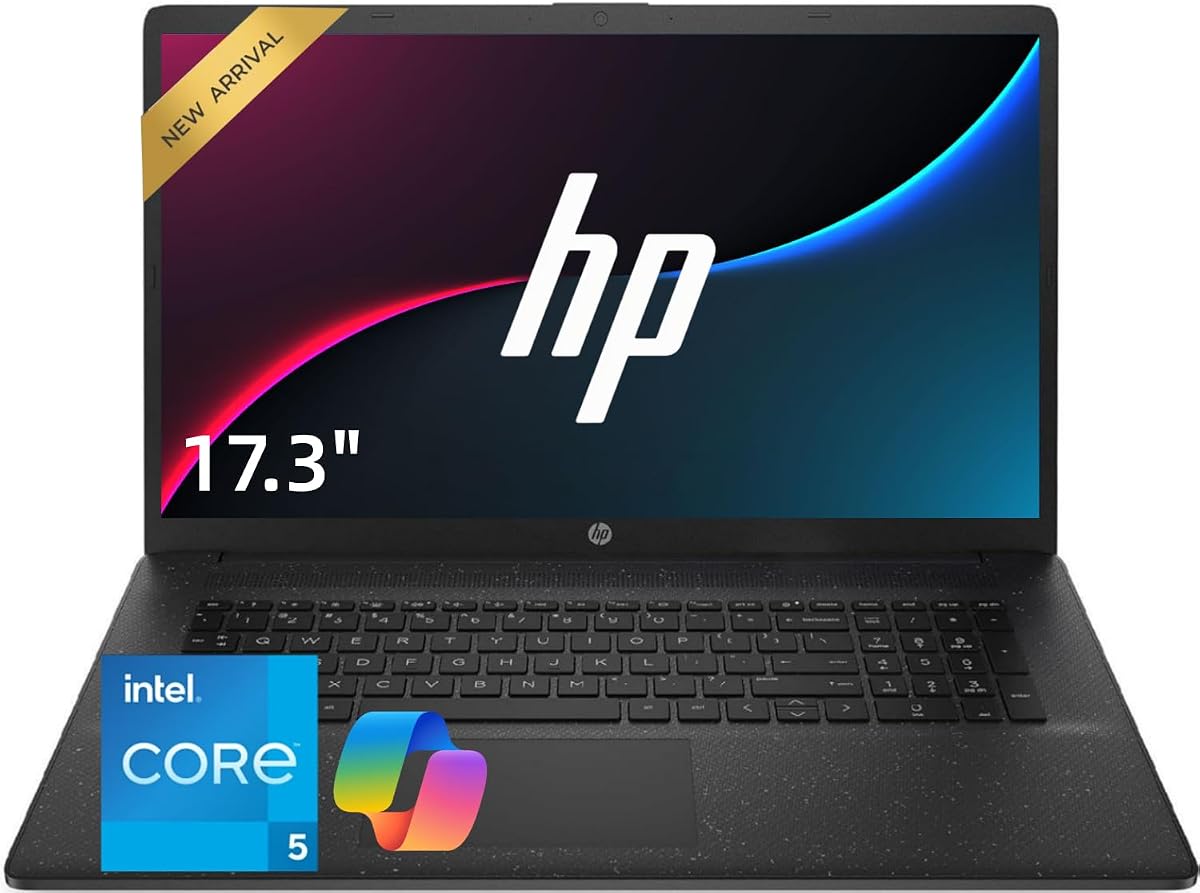


This HP model stands out as a top choice for users who need substantial screen real estate and a reliable numeric keypad. It balances performance and practicality with a large display that accommodates complex spreadsheets and multiple windows simultaneously. The keyboard includes a dedicated numpad section which is crucial for accounting or data entry work.
We may earn a commission when you buy through this link, at no additional cost to you.
The Intel Core 5 processor delivers consistent performance for daily business tasks including video conferencing and browser heavy workflows. With 32GB of RAM you can run numerous applications without experiencing slowdowns or lag. Storage is handled by a 1TB SSD ensuring quick boot times and fast file access for large project files.
While the large screen is a benefit it can add to the overall weight of the laptop making it less ideal for frequent travel. Some users may find the bezel thickness slightly older compared to ultra-modern designs. However for stationary office work these trade-offs are generally acceptable given the productivity gains.
Buyers seeking a robust workstation for home or office should consider this model highly. It offers the essential tools needed for professional tasks without requiring external peripherals. We recommend it for accountants or analysts who prioritize screen size and input speed over portability.
The 17.3 inch display provides extra horizontal and vertical space that simplifies viewing multiple columns in spreadsheets.
The full-size keyboard ensures comfortable typing sessions and accurate number entry through the integrated numeric keypad.
We may earn a commission when you buy through this link, at no additional cost to you.
This Lenovo laptop brings modern features to a price-conscious audience by including DDR5 RAM and a numeric keypad. The 16 inch display offers more vertical space than standard 15.6 inch models which helps with document viewing. It is built for professionals who need reliable performance without overspending on unnecessary extras.
We may earn a commission when you buy through this link, at no additional cost to you.
The Intel Core i5 processor provides enough power for multitasking and light content creation tasks. You will benefit from the faster speeds of DDR5 memory which improves overall system responsiveness during heavy usage. The 1TB SSD ensures you have ample space for files and quick access to your daily work.
Privacy features such as a shutter on the webcam add an extra layer of security for remote workers. While the build is sturdy it focuses on utility rather than premium aesthetics or high-end materials. This makes it a practical choice for small business owners or students entering the workforce.
We suggest this unit for anyone who values performance per dollar and needs a numpad for data work. It covers the essential bases well including connectivity and memory speed. Ensure you check port availability if you rely on multiple external peripherals for your workflow.
DDR5 RAM offers higher bandwidth which helps when switching between heavy applications like browsers and accounting software.
A physical privacy shutter allows you to cover the camera quickly during sensitive video calls or meetings.
We may earn a commission when you buy through this link, at no additional cost to you.
This flagship model combines a premium feel with practical specs like high RAM and fast charging capabilities. It is designed for business users who need a reliable machine that can handle demanding office applications efficiently. The presence of a numpad ensures it suits data entry roles without compromise.
We may earn a commission when you buy through this link, at no additional cost to you.
With 32GB of RAM this system can handle virtual machines or heavy data processing tasks smoothly. The NVMe SSD provides rapid data transfer speeds which reduces wait times when opening large files. Fast Charge technology helps you get back to work quickly after a short power break.
The processor is a capable quad-core unit that handles most daily tasks with ease. While it might not be the top tier CPU available it pairs well with the high memory count for balanced performance. Users looking for speed will appreciate the instant responsiveness during multitasking scenarios.
Recommend this laptop for professionals who need a sturdy workhorse with ample memory for future-proofing. The fast charge feature is a significant plus for those who move between meetings frequently. It represents a strong investment for business environments where uptime is critical.
Fast Charge capability allows the battery to recover significant power in a short period reducing downtime between sessions.
The 32GB RAM allows for running multiple large applications simultaneously without performance degradation.
We may earn a commission when you buy through this link, at no additional cost to you.
This business laptop offers a solid foundation for office tasks with a dedicated numeric keypad for efficient typing. It features a narrow bezel design that maximizes screen space within a compact 15.6 inch chassis. The inclusion of Windows 11 Pro adds enterprise features useful for business users.
We may earn a commission when you buy through this link, at no additional cost to you.
The AMD processor supports everyday tasks like video chatting and photo editing with reasonable speed. AMD FreeSync technology helps keep visual output smooth during dynamic content viewing. This ensures a pleasant experience when watching media or running graphical interfaces on the display.
The 16GB RAM is sufficient for typical multitasking but may not be enough for heavy virtualization needs. Storage is standard at 512GB which works for most but might require external drives for very large archives. Overall it strikes a balance between cost and functionality for standard office environments.
We see this as a good fit for small business owners who need a reliable machine for general use. The Pro version of Windows offers better security and management features for companies. Check your storage needs carefully as some might prefer larger capacity drives out of the box.
Windows 11 Pro supports remote desktop and other tools that facilitate secure remote work and IT management.
FreeSync technology syncs the refresh rate to reduce screen tearing during high activity visual tasks.
We may earn a commission when you buy through this link, at no additional cost to you.
This model stands out for its massive amount of RAM which makes it suitable for heavy multitasking workloads. The processor is a Ryzen 7 chip that offers strong performance for various business applications. A dedicated numeric keypad is included to speed up data entry for users who type numbers frequently.
We may earn a commission when you buy through this link, at no additional cost to you.
With 40GB of RAM you can run multiple virtual machines or large spreadsheets without slowdowns. The storage is a spacious 1TB SSD ensuring quick access to all your files and applications. This configuration is rare in standard laptops and offers a significant advantage for power users.
The inclusion of an RJ45 Ethernet port is a welcome feature for stable network connections. Many modern laptops omit this but it is vital for offices with wired internet requirements. While the design is not the most modern it delivers on performance and utility for professional tasks.
We recommend this for professionals who need specific connectivity and memory without buying an expensive workstation. The Ethernet port alone makes it valuable for environments where Wi-Fi is unreliable. Ensure you test compatibility with your specific software before finalizing your purchase decision.
The high RAM count ensures smooth operation when running resource intensive applications concurrently.
An onboard Ethernet port provides a stable wired connection which is crucial for secure data transfers.
We may earn a commission when you buy through this link, at no additional cost to you.
This laptop pairs a capable Ryzen 7 processor with a fast PCIe SSD for responsive system performance. It is designed for business use with a numeric keypad to assist with frequent number input. The display features anti-glare coating which reduces eye strain during long working hours indoors.
We may earn a commission when you buy through this link, at no additional cost to you.
The processor provides enough power to handle multitasking and data analysis tasks efficiently. Wi-Fi 6 support ensures you have the latest wireless standards for faster internet speeds and better stability. This is important for modern businesses that rely heavily on cloud based applications and collaboration tools.
The 512GB SSD is a good size for most users and the PCIe interface makes boot times very quick. However the graphics capability is integrated meaning this is not suited for gaming or heavy video editing. It remains an excellent choice for standard office and home business applications.
Consider this unit if you need a balance of speed and practicality without overspending on premium features. The anti-glare screen is a significant benefit for users in bright offices. It meets the needs of general business users looking for reliability and ease of use.
The PCIe SSD delivers high read write speeds which speeds up application loading and file management.
Wi-Fi 6 offers better performance in crowded network environments compared to older wireless standards.
We may earn a commission when you buy through this link, at no additional cost to you.
This HP business laptop offers a spacious screen paired with strong memory specs for efficient multitasking. The privacy shutter on the webcam adds a layer of security for remote workers concerned about data safety. It includes a numeric keypad which is essential for accurate data entry in accounting roles.
We may earn a commission when you buy through this link, at no additional cost to you.
The 10-core processor handles general office workloads well even if it is not aimed at gaming enthusiasts. With 32GB of RAM you can keep many tabs and applications open simultaneously without system lag. The large screen helps users view multiple documents side by side effectively.
The privacy camera shutter is a notable feature that allows you to physically block the lens when not in use. This is particularly useful for professionals working from home where background privacy is important. While the laptop is large it is designed to remain comfortable for daily desktop use.
We recommend this for users who need a large workspace and value privacy in their daily workflow. The high memory count ensures longevity for your investment as software demands increase over time. It is a practical choice for home offices where physical security of data is a priority.
A dedicated shutter provides a mechanical way to block the camera ensuring no accidental recording occurs.
The wide display allows for comfortable split-screen viewing of documents and reference materials.
We may earn a commission when you buy through this link, at no additional cost to you.
This model emphasizes longevity with a large screen and battery life designed for mobile professionals. It is part of a newer edition lineup featuring a Ryzen 5 processor for balanced everyday performance. The numeric keypad is integrated into the keyboard layout ensuring easy access for number heavy tasks.
We may earn a commission when you buy through this link, at no additional cost to you.
The 17.3 inch screen provides ample space for reviewing detailed reports or managing spreadsheets. Battery life is highlighted as a strong point allowing for extended unplugged work sessions. This is beneficial for users who frequently move between meeting rooms or work from cafes.
Office 365 for Web access is included which is useful for those who prefer cloud based productivity tools. The RAM and storage are standard for business use and handle typical office applications well. It offers a good value proposition for users needing a reliable portable large screen device.
We suggest this laptop for those who prioritize mobility and screen size over raw processing power. The inclusion of web office tools helps users stay productive even with limited offline software. Check battery specs carefully if you work in environments where charging points are scarce.
The battery capacity is optimized to support a full workday without needing to find an outlet.
Web based access to Office tools allows you to create and edit documents directly in the browser.
We may earn a commission when you buy through this link, at no additional cost to you.
This portable laptop combines a slim form factor with a dedicated numeric keypad for travel friendly work. It is designed for users who need basic number entry capabilities without carrying a heavy desktop replacement. The large battery capacity supports extended usage away from power sources.
We may earn a commission when you buy through this link, at no additional cost to you.
The AMD processor handles lightweight tasks efficiently while keeping the system cool under load. You can expand the storage if you need more space for media or project files later on. This flexibility makes it a good candidate for users with growing data needs.
The 10000mAh battery is a standout feature that offers long life for daily commutes. However the 8GB RAM might limit performance when many browser tabs are open simultaneously. It is best suited for users who primarily work on single applications or light multitasking scenarios.
We recommend this for students or travelers who need a compact device with a numpad. The slim profile fits easily into backpacks making it convenient for on the go work. Ensure your workflow does not require heavy memory usage before choosing this model.
The slim design ensures the laptop fits easily into standard bags without adding significant weight.
Expandable SSD slots allow you to upgrade storage later as your data collection grows.
We may earn a commission when you buy through this link, at no additional cost to you.
This entry-level laptop offers essential features including a numeric keypad for basic business needs. It is lightweight and easy to carry making it suitable for students or casual users who travel. The IPS display ensures reasonable viewing angles which is helpful during shared work sessions.
We may earn a commission when you buy through this link, at no additional cost to you.
The processor is an older model but still capable of handling word processing and web browsing tasks. Storage starts at 128GB but can be expanded which helps manage cost while meeting basic needs. This makes it an accessible option for those with limited budgets but specific entry requirements.
With 6GB of RAM performance will be adequate for simple tasks but may struggle with heavy loads. Users should be mindful of how many applications they run at once to avoid slowdowns. It serves well as a secondary machine or for basic administrative duties.
We suggest this for entry-level users who need an affordable machine with a numpad. It is not suited for power users but covers the basics for daily productivity tasks. Check the expansion slot details to ensure you can add more storage if needed later.
This model provides a low cost entry point into laptops that include a dedicated number pad.
An IPS panel offers better color consistency and viewing angles compared to older TN panels.
We may earn a commission when you buy through this link, at no additional cost to you.
Choosing the right laptop with a numeric keypad involves balancing performance needs with portability requirements. This guide outlines the key factors to consider to help you make an informed decision.
Screen size dictates how much content you can view at once which is vital for spreadsheets and data work. Larger screens like 17 inches offer more workspace but increase weight and reduce portability. Look for Full HD resolution or higher to ensure text and numbers are crisp and readable during long sessions.
Prioritize a display size that fits your primary work environment and transport habits.
The CPU handles all calculations and tasks so it should match your workload intensity. For basic data entry any modern dual or quad core processor will suffice. Power users running multiple applications or virtual machines should look for i5 or Ryzen 5 series or higher.
Match the processor tier to the software complexity you expect to run daily.
RAM determines how many applications you can run simultaneously without slowdowns. 8GB is a minimum standard for general use but 16GB or more is recommended for heavy multitasking. Higher memory ensures smoother performance when switching between complex documents and web browsers.
Invest in at least 16GB if you work with large files or multiple apps at once.
Solid State Drives offer faster boot times and file access compared to traditional hard drives. Look for SSDs with at least 512GB capacity to store documents and applications locally. NVMe SSDs provide even quicker speeds which improves overall system responsiveness.
Choose an SSD over a hard drive for significantly better speed and durability.
Ensure the keyboard includes a dedicated numeric keypad section rather than using a function key combo. This physical separation improves typing accuracy and speed for data entry tasks. A full-size keyboard also reduces finger strain during long typing sessions.
Verify that the numeric keys are physical and not just a secondary function layer.
Check for essential ports like USB-A USB-C and HDMI to connect peripherals and monitors. Some models include an Ethernet port which is beneficial for stable wired network connections. Adequate connectivity reduces the need for extra adapters or hubs.
Confirm the available ports match your current and future peripheral needs.
Battery life impacts how long you can work unplugged which is key for remote or mobile work. Look for ratings that support at least a standard workday. Modern lithium-ion batteries offer better longevity but actual performance varies by usage intensity.
Select a model with strong battery life if you frequently work away from power sources.
Windows 11 Pro offers enterprise features like remote desktop and enhanced security. Home versions are sufficient for general use but Pro provides better management tools. Ensure the OS supports the business software you plan to run on the device.
Consider the OS version based on your security and connectivity requirements.
Use the numeric keypad exclusively for data entry tasks to maximize efficiency. Ensure your cursor is in the correct field before typing to avoid errors in documents. This dedicated layout reduces the need to switch focus between keyboard sections.
Maintain the device by keeping it clean and dry. Dust can accumulate in the keypad and around keys so use a soft brush or compressed air regularly. This prevents debris from causing sticking or unresponsive keys.
Manage heat by ensuring vents are not blocked during heavy use. Overheating can reduce performance and battery life so use the laptop on a flat hard surface. Avoid placing it on soft fabrics like blankets which trap heat.
No key placement can vary slightly between manufacturers and models. Some layouts include function keys above the numbers while others integrate them differently. Always check the product images to verify the specific layout matches your preference.
Yes you can purchase external USB numeric keypads as an alternative. These devices plug into any USB port and provide a dedicated number layout. This is a cost-effective way to add the feature to existing non-equipped laptops.
RAM allows the system to keep applications open and active without reloading data from storage. Higher RAM reduces lag when switching between programs or opening large files. It is essential for smooth multitasking in professional environments.
A larger display provides more real estate for viewing complex spreadsheets and documents side by side. This reduces the need to zoom or scroll constantly which improves workflow speed. It is ideal for users who prioritize screen space over portability.
Yes Pro includes features like BitLocker encryption and remote desktop which enhance security and management. These tools are valuable for business users who need to protect sensitive data. Home versions are suitable for basic use but lack these advanced controls.
Wi-Fi 6 offers faster data transfer speeds and better performance in crowded networks. It reduces latency and increases range making it ideal for offices with many devices. This ensures stable connections for video calls and cloud access.
Yes AMD Ryzen processors offer comparable performance for general office and multitasking tasks. Many models provide strong multi-threaded performance at competitive prices. Choice often comes down to specific feature sets or pricing.
This guide highlights ten reliable options that integrate a numeric keypad to streamline your workflow. The top picks range from large screen workstations to portable budget friendly machines. Each model offers a balance of performance and input speed suitable for professional needs.
When selecting a unit prioritize the factors that matter most to your daily tasks. If you handle heavy data entry a large screen and high memory count are critical. For travel focused users portability and battery life take precedence.
Remember to verify the latest specifications and availability before making a final decision. Configurations can change and new models may be released frequently. Checking current listings ensures you get the best value and features for your investment.