
Cooling Station and Stand for PS5/Slim/Pro
4.5Editor score
Automatic temperature controlled fan
RGB honeycomb lighting modes
Dual controller charging dock
Compare the top cooling stands for PS5 console including Slim and Pro models to find the best fan and charger combo for your gaming setup.
Every PS5 owner knows heat buildup can slow performance and shorten console life. A dedicated cooling stand helps dissipate warm air efficiently while keeping your setup organized and stylish.
We reviewed ten leading cooling stations based on fan power, compatibility with Slim and Pro models, charging speed, and extra features like USB hubs and RGB lighting.
Each pick below highlights specific strengths for different budgets and needs. Remember that stock and pricing can change quickly so check current details before you order your new accessory.
4.5Editor score
4.4Editor score

4.4Editor score
This side-by-side comparison shows key specs and features for all ten cooling stations so you can quickly see which design fits your console model and accessory needs.


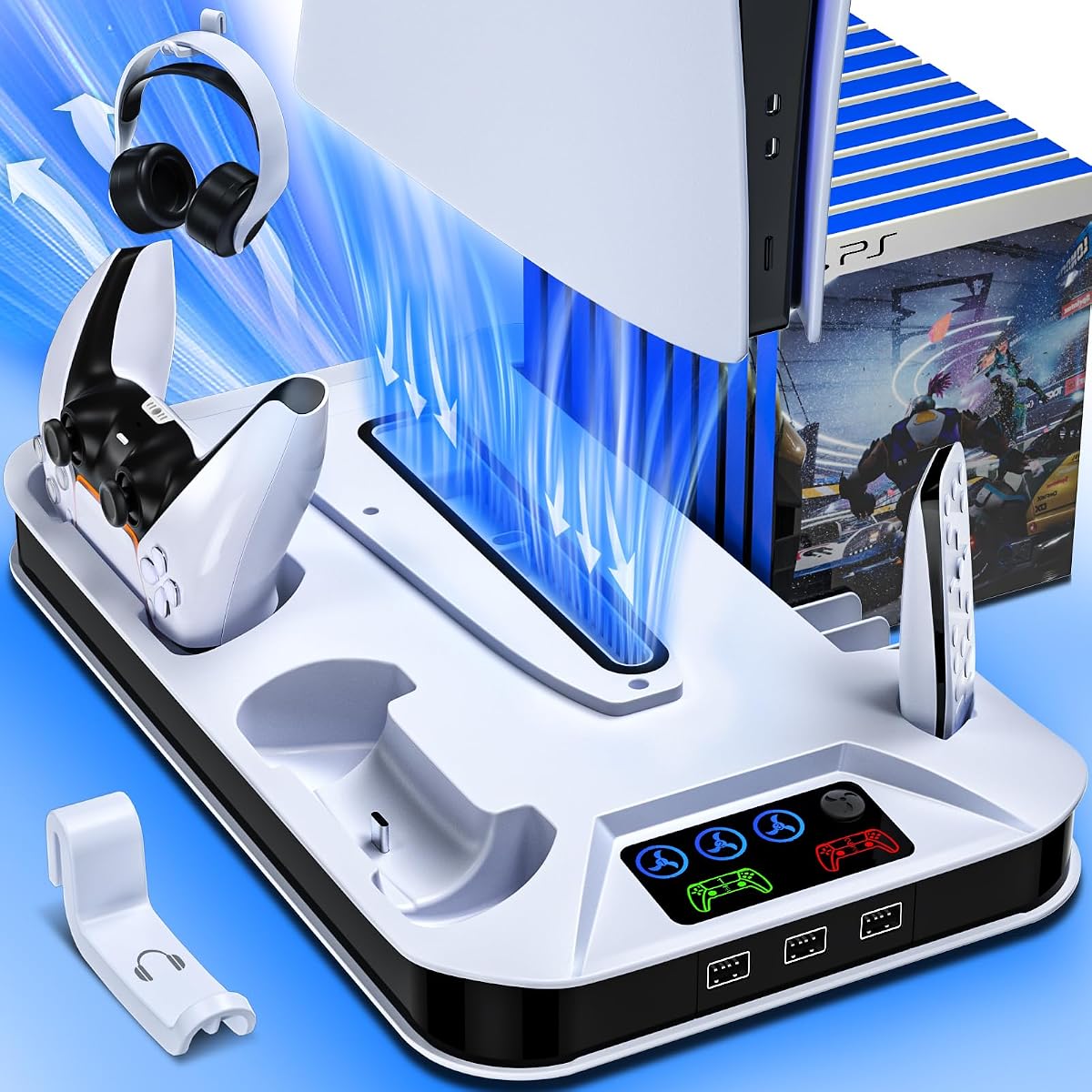
This stand ranks first for its balanced mix of powerful cooling and practical features that help keep your PS5 running smoothly without clutter. It supports Standard, Slim, and Pro versions with a secure screw lock and a turbo fan that dissipates heat effectively during long gaming sessions. The built-in controller dock charges two units quickly while three USB ports let you power headsets or media remotes without extra adapters. Its design matches the console aesthetic well making it a sleek upgrade for most gaming setups. You get a reliable organizer that also protects your hardware from overheating risks over time.
We may earn a commission when you buy through this link, at no additional cost to you.
The cooling system uses a high-efficiency turbo fan with three speed settings so you can choose between low noise or maximum airflow depending on load. A safety screw locks the console to the base to prevent slipping or tipping while playing. Dual controllers charge in about three hours with LED indicators showing status clearly at a glance. Three USB ports add real flexibility for charging headsets or cameras alongside controllers. The media remote slot and headset holder keep everything within reach and reduce cable tangles on your desk or shelf.
While it fits all PS5 variants you may need to remove a panel adapter for Slim or Pro models which adds a small setup step. The fan can get noticeable on high speed though it remains quiet at lower settings for daily use. Charging indicators are clear but the dock does not support Edge controllers in this version so check compatibility if you own one. These trade-offs are minor given the strong cooling and organization benefits it delivers for standard PS5 users who want a tidy powerful base.
Choose this if you need a complete all-in-one cooling and charging solution that works across all current PS5 generations with room for extra accessories. It suits gamers who run long sessions and want to avoid overheating while keeping their desk tidy and controllers ready to go. The balance of performance compatibility and extra ports makes it the top choice for most buyers looking for reliability and value. Add it to your setup to protect your console investment and enjoy a cleaner organized gaming area today.
Three adjustable turbo fan speeds let you match airflow to your room temperature and play style without sacrificing silence or power.
USB ports headset holder and remote slot consolidate your gear so you spend less time searching and more time playing without clutter.
We may earn a commission when you buy through this link, at no additional cost to you.
This horizontal stand offers a unique sideways layout that saves vertical space on your shelf while still delivering strong cooling and dual controller charging. Its scalable design works with Standard Slim and Pro versions and includes EVA foams to adapt the fit for Digital editions without extra hardware. The push-down charging dock secures both standard and Edge controllers quickly and the turbo fan has three speeds to manage heat during intense play. Setup is tool-free and takes just minutes so you can start using it right away after unboxing. It is an ideal choice if you prefer a low profile setup that keeps your console stable and organized.
We may earn a commission when you buy through this link, at no additional cost to you.
The horizontal orientation frees up room above your console for speakers or decor while the base keeps controllers and the unit secure. EVA foams adjust the base width to match Digital consoles ensuring a snug fit without gaps or wobble. The charging dock supports Edge controllers which many vertical stands do not and the LEDs show status at a glance. Three speed fan settings let you pick quiet or powerful airflow and the touch switch is intuitive to use. Cable management is simple with one plug connecting to your PS5 for both power and data without messy cords.
You will need to place the EVA foam correctly for Digital models which can be a small extra step for first time users. Vertical users may find it less space efficient if they rely on wall mounts or tall cabinets above their TV. The fan can be heard on high though it stays low at moderate levels during normal gaming. These are minor considerations for a design that prioritizes stability and Edge controller support which matters for many owners who want a low profile base.
Pick this if you want a horizontal layout that supports Edge controllers and adapts to all PS5 versions without tools or complex assembly. It works well for users who need to save vertical space or prefer a wide base that feels more secure on a shelf. The combination of cooling charging and adaptability makes it a strong contender for those who value versatility and clean installation. Add it to your setup to organize your console and controllers while keeping temperatures low and sessions uninterrupted.
Scalable base with EVA foams ensures a tight secure fit for all PS5 generations without extra brackets or hardware to install yourself.
Dock supports both standard and Edge controllers so owners of the premium pad can charge without needing a separate accessory.
We may earn a commission when you buy through this link, at no additional cost to you.
This stand stands out for its smart auto fan feature that reads console temperature and adjusts speed automatically to keep things cool without you lifting a finger. A built-in temperature probe monitors heat in real time and switches between three speed tiers or lets you pick manual modes if you prefer. RGB lighting with nine effects adds a customizable visual touch to your setup while the base charges two controllers fast and includes USB ports for extra gear. It fits Standard Slim and Pro models and remembers your last fan and light settings after a restart. It is the top pick for those who want intelligence and style alongside solid cooling power.
We may earn a commission when you buy through this link, at no additional cost to you.
The automatic mode changes fan speed based on exact temperature thresholds so the system stays efficient without constant manual changes. Memory function saves your preferred settings so you do not need to reset them after each reboot. Nine RGB effects give you full control over lighting mode and brightness to match your room or game mood. Dual controller charging completes in about two and a half hours and USB ports support headsets cameras or remotes. The base feels solid and matches the console aesthetic while keeping everything within reach on your desk or shelf.
Installation requires tightening a safety screw which can be a small task for first time users but ensures stability during play. Auto fan can be noisy under heavy load though manual mode lets you reduce sound when needed for quiet sessions. The lighting system is vibrant but may distract some users who prefer a simpler look without LEDs. These trade-offs are acceptable given the smart features and customization you get that make this a premium option for tech-savvy gamers.
Choose this if you want advanced auto cooling and customizable RGB lighting that adapts to your console temperature while supporting all current PS5 versions. It suits players who value smart features and want to personalize their setup with lights and easy charging for controllers and headsets. The memory function and sensor control make daily use effortless and reliable. Add it to your gaming area to protect your console from heat and enjoy a tailored visual and functional experience.
Temperature probe reads heat levels and adjusts fan speed automatically so your console stays cool without manual input or guesswork.
Nine lighting effects with brightness control let you customize the look of your station to match your room decor and gaming mood.
We may earn a commission when you buy through this link, at no additional cost to you.
This stand delivers strong performance at a friendly price point so you can protect your PS5 from heat without spending extra on premium features. It supports Standard Slim and Pro consoles with a screw lock and four non-slip pads for stability while a three-speed turbo fan keeps airflow efficient. Dual controllers charge quickly with clear LED status lights and three USB ports let you power headsets cameras or remotes alongside. A headset holder and media slot keep your desk tidy and give you fast access during sessions. It is a solid everyday choice for most players who want reliable cooling and organization at great value.
We may earn a commission when you buy through this link, at no additional cost to you.
The turbo fan runs quietly at low and medium speeds but ramps up to high when needed to move warm air from the console bottom. Charging docks finish both units in about two and a half hours and smart chip protection prevents overcharging issues over time. USB ports are placed on the side for easy reach and the holder keeps your headset from sliding off when not in use. The white design matches the console look and the base sits steady on any flat surface without rocking or slipping during use.
Panel adapters may need removal for some Slim or Pro models which adds a small setup step before play. The design is simple without RGB or auto fan features which may disappoint users wanting more tech customization. Fan can be a bit louder on high though it remains acceptable for most rooms and gaming setups. These limitations are minor given the solid build and cooling power that make it a practical pick for budget conscious gamers.
Pick this if you need a dependable and affordable solution that keeps your PS5 cool and organized without extra bells or whistles. It works well for standard players who want quick charging and extra ports for accessories while saving space and keeping costs low. The balance of performance and value makes it a safe choice for most households. Add it to your setup to protect your console and enjoy a neat efficient gaming area today.
Reliable cooling and charging features at a lower price mean you get strong protection for your console without paying for extras you may not need.
Headset holder and side USB ports keep accessories tidy and accessible so you spend less time searching and more time playing during sessions.
We may earn a commission when you buy through this link, at no additional cost to you.
This stand offers a compact layout that works well on smaller desks while still delivering strong cooling and support for both standard and Edge controllers. The enlarged turbo fan has three speed levels and remembers your last setting after a reboot so you do not need to reset it each time. A safety screw secures the console to the base to prevent slipping during play and USB ports on the side charge headsets or remotes easily. Dual controller charging is fast and the LED indicators show status clearly at a glance. It is a smart choice for users who need space saving design without losing core performance features.
We may earn a commission when you buy through this link, at no additional cost to you.
The fan memory function keeps your preferred speed setting intact after power cycles and makes daily use smoother and simpler. Charging docks support Edge controllers which many other stands do not and give you flexibility for premium controller owners. USB ports add real versatility for powering extra gear without needing a separate hub on your desk. The screw lock ensures the console stays steady and safe even during vigorous play and the base is stable on most surfaces. Overall it provides essential cooling and charging in a tight efficient package.
It lacks RGB lighting and premium aesthetics which may make it less visually appealing than some other models on this list. The build is functional but not fancy and some users may prefer more design options or color choices. Fan can be audible on high though it is quiet at low settings for normal daily gaming. These are small drawbacks for a stand that prioritizes utility and Edge controller support at a compact size and reasonable cost.
Choose this if you want a compact reliable cooling solution that supports Edge controllers and keeps your desk tidy without extra bulk. It suits users with limited space who still want full cooling and charging for two controllers plus extra accessories. The fan memory and screw lock add practical benefits that make daily use smooth. Add it to your setup to protect your console and organize gear efficiently in a small footprint.
Compact design fits small desks and shelves while still providing full cooling and charging for controllers and extra accessories.
Charging docks fit both standard and Edge controllers so premium pad owners can charge without buying a separate accessory.
We may earn a commission when you buy through this link, at no additional cost to you.
This stand delivers auto cooling and colorful RGB lighting at a low price so you get smart features without paying a premium. A temperature probe reads console heat and adjusts fan speed automatically while manual mode gives you full control if you prefer. Nine RGB lighting modes add a vibrant touch to your desk and the dock charges two controllers quickly with clear LED status indicators. It supports both standard and Edge controllers and remembers your last fan and light settings after a restart. It is a strong value pick for players who want style and smart cooling in one package.
We may earn a commission when you buy through this link, at no additional cost to you.
The automatic fan mode keeps temperatures low without constant manual changes and saves you from guessing the right setting. RGB lighting offers nine total modes including single color and breathing effects that can be toggled easily with a button. Dual controller charging completes in about two and a half hours and works well for both standard and Edge units. Memory function saves your preferences so you do not have to reset them after each reboot. The base is stable and fits Standard Slim and Pro models with a secure feel.
It does not include USB ports so you will need a separate hub for extra accessories like cameras or remotes. The build is simpler than premium models and may not feel as solid to some users. Fan can be audible on high though it is acceptable for most rooms and gaming setups. These trade-offs are minor given the price and smart features that make it a great budget option.
Pick this if you want auto cooling and RGB style at a low cost while supporting all PS5 models and both controller types. It works well for players who prioritize value and visual appeal over extra USB ports. The combination of performance and customization makes it an easy choice. Add it to your setup to protect your console and enjoy colorful efficient cooling today.
Temperature probe reads heat and adjusts fan speed automatically so your console stays cool without manual input or guesswork.
Nine lighting modes with breathing effects let you personalize your setup visually without paying for premium features.
We may earn a commission when you buy through this link, at no additional cost to you.
This horizontal stand offers a wide stable base that supports Standard Slim and Pro models while allowing Edge controller charging without extra accessories. A scalable design with EVA foams ensures a snug fit for Digital consoles and three-speed turbo fan keeps heat low during play. The push-down dock secures both controller types quickly and LEDs show status at a glance. Setup is tool-free and takes minutes so you can start using it right away. It suits users who want a low profile secure base that fits Edge controllers and keeps gear organized on your shelf.
We may earn a commission when you buy through this link, at no additional cost to you.
The horizontal layout saves vertical space for speakers or decor while the base keeps the console steady and safe. EVA foams adjust the width to match Digital models without gaps or wobble. Charging dock supports Edge controllers which many vertical stands do not and the touch switch fan is intuitive. One cable connects to your PS5 for both power and data without messy cords. The fan has three speeds so you can pick quiet or powerful airflow as needed.
You must place the EVA foam correctly for Digital models which can be a small step for first time users. Vertical users may find it less space efficient if they rely on wall mounts or tall cabinets. The fan can be heard on high though it remains quiet at moderate levels. These are minor issues for a design that prioritizes Edge controller support and stability over extra features.
Pick this if you want a horizontal layout that supports Edge controllers and adapts to all PS5 versions without tools or complex assembly. It works well for users who need to save vertical space or prefer a wide base that feels more secure on a shelf. Add it to your setup to organize your console and controllers while keeping temperatures low.
Dock supports both standard and Edge controllers so premium pad owners can charge without needing a separate accessory.
Wide base keeps console stable and secure while saving vertical space for speakers or decor above your unit.
We may earn a commission when you buy through this link, at no additional cost to you.
This stand offers auto fan control with a large turbo fan that adjusts speed to console temperature so heat stays low without constant changes. A Type-C cable lets you choose console or wall power and includes smart chip protection that stops charging at 70 percent to protect battery life. It supports Standard Slim and Pro versions with a safety screw for stability and charges two controllers in about two hours with clear LED indicators. Extra charging ports let you power headsets or remotes and the base includes a media slot and hard drive space. It is a smart reliable pick for users who want efficient auto cooling and solid protection for their gear.
We may earn a commission when you buy through this link, at no additional cost to you.
The auto mode changes fan speed based on temperature thresholds so the system stays efficient without manual changes. Type-C cable adds flexibility for power and the smart chip protects your controllers from overcharging and overheating risks over time. Dual charging completes in about two hours and LEDs show status clearly at a glance. The hard drive slot and media remote keep your gear organized and ready to use. Screw lock ensures the console stays steady and safe even during vigorous play.
It lacks USB hubs so you may need an external dock for extra devices. Setup requires a safety screw which can be a small task for first time users. Fan can be audible on high though it remains quiet at low settings. These are minor limitations for a stand that delivers strong auto cooling and battery protection at a practical price.
Choose this if you want reliable auto cooling and battery protection for your controllers while supporting all PS5 models. It suits players who prefer smart features and solid build without premium cost. Add it to your setup to protect your console and enjoy efficient cooling and charging today.
Temperature probe reads heat and adjusts fan speed automatically so your console stays cool without manual input or guesswork.
Smart chip stops charging at 70 percent to prevent overcharging damage and extend controller battery lifespan over time.
We may earn a commission when you buy through this link, at no additional cost to you.
This stand features a vibrant ring of RGB lights with eight color options and four modes to customize your gaming setup while cooling and charging controllers. The turbo fan has three speeds and lets you pick noise or power with color LED indicators for quick selection. Dual controllers charge in about three hours with safe overheat protection and USB ports power headsets or remotes. A safety screw locks the console to the base to keep it secure and the base includes headset holders and disc storage for 12 games. It is a stylish and practical pick for players who want visual flair and solid organization.
We may earn a commission when you buy through this link, at no additional cost to you.
The ring LED lighting offers eight colors with fast and slow breathing modes and can be toggled with a single button. Charging docks finish both units in about three hours and protect against overheat and overvoltage risks. USB ports on the side let you power extra gear without a separate hub. The screw lock ensures the console stays steady and the holder keeps your headset from sliding off during use. Disc storage keeps your games tidy and within reach without extra cases or boxes.
Fan noise can be noticeable on high though it is quiet at lower settings for normal play. The build is functional but not premium and may not feel as solid as some other models on this list. These are minor drawbacks for a stand that delivers strong RGB style and organization at a friendly price. It works well for users who want color and utility without paying for top features.
Pick this if you want colorful RGB lighting and solid cooling and charging for your PS5 while keeping your desk tidy. It suits players who value visual flair and game storage. Add it to your setup to protect your console and enjoy a lively organized gaming space.
Eight RGB colors with breathing modes let you customize your desk look to match your room decor and gaming mood.
Built-in slots keep up to 12 game discs and a headset tidy and accessible so you spend less time searching.
We may earn a commission when you buy through this link, at no additional cost to you.
This stand provides strong cooling and organization with a three-stage turbo fan that blows hot air from the console base to prevent overheating risks. Dual controllers charge in about three hours with clear LED status lights and three USB ports let you power headsets cameras or remotes. A headset holder and media slot keep your desk tidy and give you fast access during sessions. The base is stable and matches the console look and a screw lock ensures a secure connection to your unit. It is a reliable choice for players who want practical cooling and organization at a solid price.
We may earn a commission when you buy through this link, at no additional cost to you.
The turbo fan runs quietly at low and medium speeds but ramps up to high when needed to move warm air. Charging docks finish both units in about three hours and smart chip protection prevents overcharging issues over time. USB ports are placed on the side for easy reach and the holder keeps your headset from sliding off when not in use. The white design matches the console look and the base sits steady on any flat surface without rocking or slipping during use. Screw lock adds security and stability.
Panel adapters may need removal for some Slim or Pro models which adds a small setup step before play. The design is simple without RGB or auto fan features which may disappoint users wanting more tech customization. These are minor limitations for a stand that delivers reliable cooling and charging for most users at a reasonable cost.
Choose this if you want dependable cooling and organization without extra bells or whistles at a solid price point. It suits players who need quick charging and extra ports for accessories while keeping things neat and efficient. Add it to your setup to protect your console and enjoy a clean organized gaming area.
Three-stage adjustable turbo fan dissipates heat from the console bottom to keep performance smooth during long gaming sessions.
USB ports headset holder and media slot keep accessories tidy and accessible so you spend less time searching during play.
We may earn a commission when you buy through this link, at no additional cost to you.
Choosing a PS5 cooling stand involves balancing airflow design and extra features to fit your play style and desk space.
Look for adjustable fan speeds so you can choose quiet low settings for casual play or high power during intense gaming marathons. Stronger airflow dissipates more heat but can be noisier so find a model with clear manual or auto options.
Prioritize stands with three-speed fans or auto modes that adjust to temperature to keep your console cool without constant manual input.
Ensure the stand fits all PS5 versions including Standard Slim and Pro since consoles vary in size and panel design. Some models require removing panel adapters or using extra screws to lock the console securely.
Check for adjustable bases or EVA foams that let you fit Disc and Digital editions without extra brackets or hardware.
Select a dual dock that can charge both controllers at once and supports Edge controllers if you own one. LED indicators help you track charge status so you never run out of power mid-session.
Prioritize stands with fast charging and smart chip protection to avoid overcharging and extend controller battery lifespan.
Extra USB hubs let you power headsets cameras or remotes without adding another plug to your console. A headset holder or media slot keeps gear within reach and reduces cable clutter on your desk.
Choose stands with side USB ports and storage slots to keep your setup tidy and your accessories ready to use.
If you want visual flair pick a stand with RGB modes and adjustable brightness to match your room or game mood. Many stands offer breathing or color effects that can be toggled with a single button.
Prioritize stands with customizable RGB lighting if you value style but ensure you can turn it off for quiet sessions.
Horizontal stands save vertical space while vertical ones take up less floor space but can be taller. Pick based on your shelf height and whether you need room for speakers or decor above.
Prioritize horizontal designs for low profiles or vertical ones to keep your console off the floor in tight spaces.
Auto stands use built-in temperature probes to read console heat and adjust fan speed without manual changes. These save effort and keep your system cool even when you forget to adjust settings mid-game.
Prioritize auto mode stands if you want smart cooling that adapts to your play style without constant input.
Look for sturdy materials safety screws and non-slip pads so your console stays balanced and protected during play. Smart chips and overheat protection help prevent damage to controllers and extend battery life over time.
Prioritize stands with secure locks and protective chips to keep your console and controllers safe and stable.
Place the stand on a flat stable surface and align your PS5 base with the grooves before tightening the safety screw to keep it secure. Connect the USB or Type-C cable to your console or wall and switch on the fan before starting your game.
Use the touch or auto button to pick your fan speed and adjust as needed during sessions. Check controller charging LED indicators to know when units are full and avoid leaving them connected too long.
Clean the fan vents and base with a soft cloth monthly to prevent dust buildup and keep cooling efficient. Store headsets and controllers in the holder or slots to avoid tangles and maintain a tidy gaming setup.
Most stands on this list support Standard Slim and Pro models but some require removing panel adapters or using included screws for a snug fit. Check compatibility notes before buying.
Yes most stands have dual docks that charge both units in two to three hours. Look for LED indicators and smart chip protection to keep charging safe and efficient.
Most stands have low speeds that are quiet enough for casual play. High speeds move more air but can be louder so choose based on your noise tolerance.
Many include USB hubs to charge headsets cameras or remotes without extra plugs. Check the specs to confirm port counts and placement for your setup.
Some stands offer RGB modes with single or breathing effects that you can toggle or turn off. Look for models with customizable lighting if you want extra visual flair.
Wipe vents and base with a soft cloth monthly to prevent dust buildup. Avoid cleaning with liquids and keep the area dry to maintain cooling efficiency.
The top picks offer a range of styles and smart features so you can choose auto cooling RGB lighting or strong airflow depending on your setup. All support Standard Slim and Pro models and most provide dual charging and extra ports to keep your desk tidy and your play uninterrupted.
Focus on fan control and compatibility to find a unit that matches your space and console version. Auto modes and RGB options add convenience and style but basic models still deliver reliable cooling at great value for most buyers.
Remember that stock and pricing can change quickly so review current details before you place your order. A good stand protects your console extends its life and keeps your gaming area organized for years.