
Cable Matters 2-Pack 6-Pin to 8-Pin
4.7Editor score
Two Pack Included
Secure Locking Latch
Four Inch Length
This guide compares the top GPU power adapters for 2026 including 12VHPWR and PCIe 6 to 8 pin cables to help you choose safe reliable power delivery for your
GPU power adapters are essential components for ensuring your graphics card receives stable and adequate electricity. They bridge the gap between your power supply unit and the specific connector requirements of modern GPUs. Choosing the right adapter prevents overheating and system instability.
We compared ten top-rated adapters based on build quality, connector safety, and compatibility with various GPU models. Our analysis covers traditional PCIe 6 to 8 pin converters and the newer 12VHPWR standard. Each product was evaluated for durability and user feedback.
Each pick in this list highlights specific strengths such as cable length, bend resistance, or wattage capacity. We also note compatibility warnings to help you avoid damaging your hardware. Prices and availability change frequently so check the links for current stock before buying.
4.7Editor score

4.2Editor score

3.9Editor score
The following table provides a side-by-side comparison of all ten selected GPU power adapters. It highlights key specifications such as connector type, wattage rating, and specific compatibility notes to help you quickly identify the right adapter for your system.


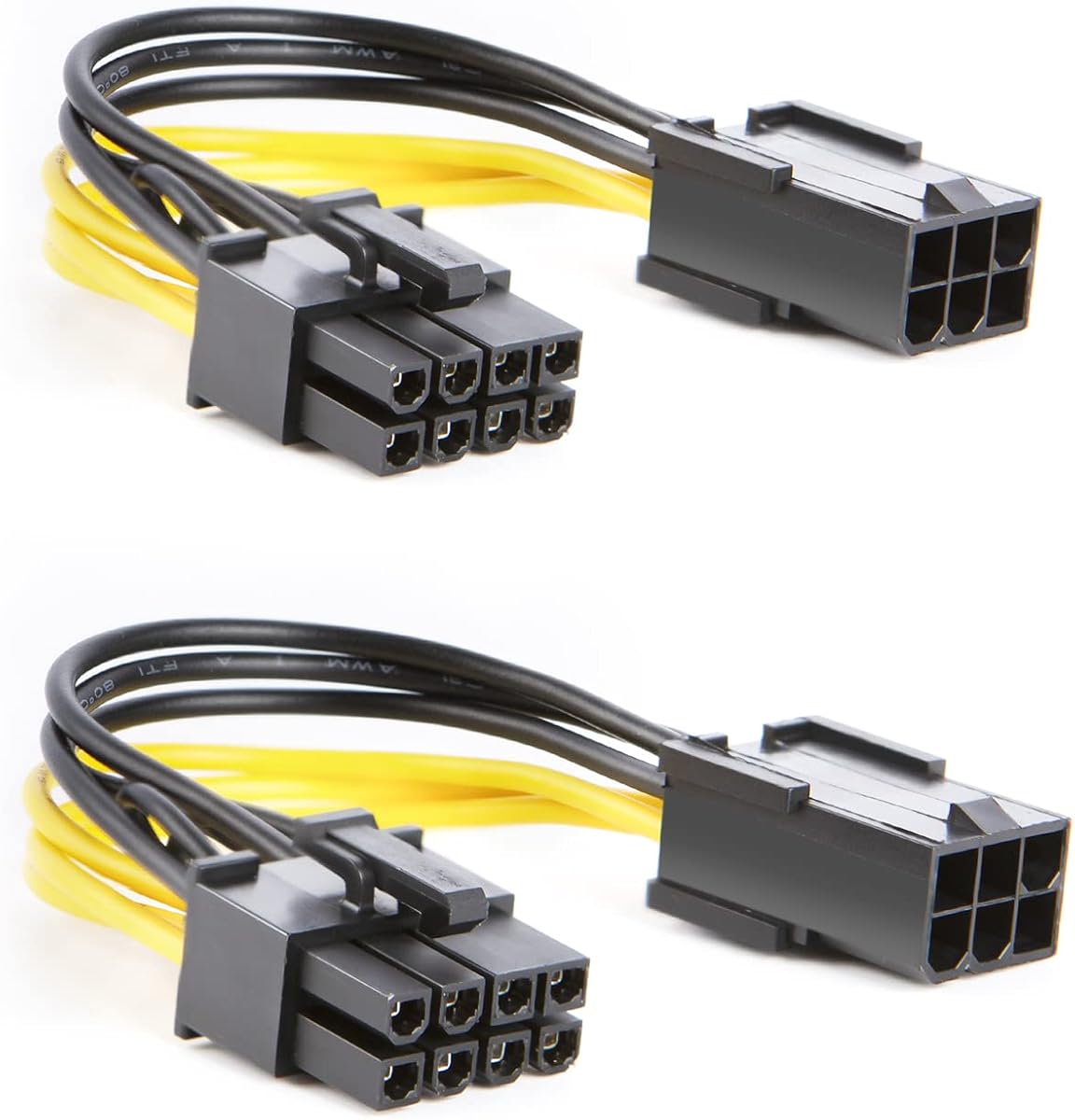


This adapter from Cable Matters is a solid choice for users needing to convert a 6-pin PCIe power plug to an 8-pin connector. It holds a high rating of 4.7 stars from thousands of verified purchasers. The product is designed to provide a secure connection without increasing PSU wattage.
We may earn a commission when you buy through this link, at no additional cost to you.
The main strength of this cable lies in its secure connection features. The 8-pin male connector includes a locking latch to prevent accidental disconnection. The 6-pin female connector uses a keyed housing to ensure proper alignment. This design helps prevent damage to the GPU power input over time.
One trade-off is the short length of only four inches. This is suitable for tight spaces but might not reach in larger cases without tension. Additionally it does not increase power capacity so users must ensure their PSU provides sufficient wattage before use.
Buyers looking for a reliable and inexpensive adapter for compatible GPUs will find this product valuable. It is ideal for those who have spare 6-pin ports and need to power an 8-pin card. Always verify your GPU power requirements before installation.
The locking latch on the 8-pin connector ensures the cable stays firmly attached to the graphics card during operation.
Buying a two-pack offers flexibility for multiple systems or provides a spare option if one cable gets damaged later.
We may earn a commission when you buy through this link, at no additional cost to you.
This adapter is designed specifically for GPUs with the new 16-pin 12VHPWR connector. It features a 90-degree right angle design to prevent overheating caused by bent cables. The 13-inch length offers ample room for cable management in smaller cases.
We may earn a commission when you buy through this link, at no additional cost to you.
The construction uses 16AWG tinned copper wire to ensure stable voltage transmission. The plug terminals are made of alloy copper to handle higher currents without heat buildup. The included cable combs help keep the setup neat and tidy for a professional look.
A limitation is that this cable is not suitable for 12pin GeForce RTX 3090 Series GPUs. It is optimized for RTX 4070 Ti and similar models. Users must ensure their PSU has the necessary connectors to support this extension properly.
Ideal for builders upgrading to RTX 40 Series cards this adapter provides a cleaner look and better thermal performance. The flexible sleeve protects the cable from strain. Ensure your system meets the power requirements before purchasing.
The right angle connector prevents the cable from bending too much which reduces heat and risk of loosening connections.
Included acrylic clips allow users to bundle cables neatly improving airflow and visual appeal inside the PC case.
We may earn a commission when you buy through this link, at no additional cost to you.
This NZXT adapter is a premium solution for users with NZXT ATX 2.X power supplies. It connects to NVIDIA 40 Series GPUs using the 12VHPWR standard without requiring an ATX 3.0 PSU. It is rated to deliver up to 600 watts of power safely.
We may earn a commission when you buy through this link, at no additional cost to you.
The cable is designed to be more compact than the bulky adapters included with many graphics cards. This helps reduce clutter inside the case and improves airflow. The dual 8-pin PCIe connectors on one side plug directly into the power supply.
The primary limitation is compatibility since it is guaranteed only for use with NZXT C-Series Gold ATX 2.X PSUs. Other brands may not work reliably. Users should check their power supply model before ordering to avoid returns.
For those invested in the NZXT ecosystem this adapter offers a seamless upgrade path to modern GPUs. It ensures stable power delivery for high-demand cards. Check compatibility with your specific PSU model to confirm suitability.
Rated for 600 watts this adapter ensures your GPU receives enough power for peak performance without throttling.
The compact design replaces the larger original adapter making it easier to fit in tight cases with limited space.
We may earn a commission when you buy through this link, at no additional cost to you.
Fasgear offers a robust extension cable for GPUs with 16-pin connectors. It supports up to 600 watts of output and uses 16AWG tinned copper wire for stable power transmission. The 30cm length is ideal for improving cable management in standard cases.
We may earn a commission when you buy through this link, at no additional cost to you.
The plug terminals are made of alloy copper and tinned material to prevent oxidation and ensure stable currents. It includes four transparent cable comb clips to help manage the extension cord neatly. This design supports 400W to 450W output for most modern cards.
Users must ensure their power supply has at least two unoccupied 8-pin PCIe ports for this adapter to function correctly. Connecting fewer than two can cause system damage. It is not compatible with GPUs that have a 12pin power connector.
This adapter is a strong choice for users who need more length than the stock cable provides. It balances price and performance effectively. Always verify your PSU connector count before purchasing.
The 16AWG tinned copper wire prevents oxidation and ensures stable voltage transmission even under high load.
Included cable clips help secure the extension cord reducing clutter and improving airflow within the computer case.
We may earn a commission when you buy through this link, at no additional cost to you.
This cable acts as a conversion adapter for power supplies that come with a native 12VHPWR output. It connects the female port of the PSU cable to the dual 8-pin male connector for the graphics card. It is 6.8 inches long which suits compact builds.
We may earn a commission when you buy through this link, at no additional cost to you.
It works with specific Corsair and Seasonic ATX 3.0 power supplies listed in the product details. The 16AWG copper wire supports up to 600W output ensuring stable power delivery. It is designed for GPUs with 8-pin or 6-pin connectors.
It is not compatible with GPUs that use a 12+4 pin connector like the RTX 4070 Ti Super. Users must match their GPU connector type with this adapter to avoid errors. Check PSU compatibility carefully before buying.
This is a practical solution for ATX 3.0 power users who want to use GPUs with traditional 8-pin inputs. It avoids the need for extra adapters. Always confirm your PSU model matches the compatibility list.
Designed to work seamlessly with ATX 3.0 power supplies that include native 12VHPWR output cables for clean setup.
The short 6.8 inch length keeps cable clutter to a minimum in smaller cases without sacrificing functionality.
We may earn a commission when you buy through this link, at no additional cost to you.
This adapter provides a 13-inch extension for GPUs with a 16-pin connector. It is designed for GeForce RTX 4070 and similar series cards. The flexible protective sleeve and nylon braided fiber protect the cable from damage over time.
We may earn a commission when you buy through this link, at no additional cost to you.
It includes transparent cable comb clips to help you manage the extension cord for a clean look. The construction uses 16AWG tinned copper wire to ensure stable voltage transmission. It supports up to 450W peak power.
The cable is not suitable for 12pin GPUs such as the RTX 3090 series. Users should verify their specific GPU model before purchasing. It is a good option for those needing extra reach in larger cases.
Ideal for builders upgrading to newer NVIDIA cards this adapter offers better cable management. The flexible design reduces strain on the GPU port. Check compatibility with your specific graphics card model.
The nylon braided fiber and flexible protective sleeve shield the internal wires from stress and daily wear.
Included cable combs allow users to route cables neatly improving the overall appearance of the build.
We may earn a commission when you buy through this link, at no additional cost to you.
CableCreation offers a cost-effective solution for converting 6-pin power to 8-pin. This two-pack is ideal for users with multiple systems or needing a spare. It uses 18AWG pure copper conductors for safe and superior performance.
We may earn a commission when you buy through this link, at no additional cost to you.
The cables support up to 36W which is sufficient for many mid-range GPUs. They are RoHS certified indicating compliance with environmental safety standards. Compatible with graphics cards from Gigabyte, Radeon, and Sapphire with 8-pin connectors.
The 4-inch length is standard for this type of adapter but may be short for deep cases. It is designed to avoid the expense of upgrading the entire power supply. Users should ensure their PSU has sufficient wattage.
This adapter is a reliable choice for older systems upgrading with new GPUs that require more power. It balances price and performance well. Verify your specific GPU power requirements before purchase.
Using 18AWG pure copper ensures safe and efficient power transfer with minimal resistance and heat buildup.
RoHS certification confirms the product meets strict environmental standards reducing harmful substances during use.
We may earn a commission when you buy through this link, at no additional cost to you.
This bridge adapter is designed to finish cable routing for 12VHPWR GPUs with a tight 180-degree bend. It prevents the power cable from pressing against the side panel for a cleaner build. It is capable of withstanding temperatures up to 105 degrees Celsius.
We may earn a commission when you buy through this link, at no additional cost to you.
The adapter simplifies cabling in builds where the standard cable might be too long or awkward to route. It ensures reliability even with high-power graphics cards that generate significant heat. The design helps protect components from stress.
The price is higher than generic adapters because of its specialized form factor. It is only for use with PCIe 5.0 12VHPWR GPUs so users must check their model. It offers premium aesthetics and thermal stability.
Builders focused on aesthetics and thermal performance will appreciate this bridge. It eliminates cable clutter effectively. Ensure your GPU supports this specific adapter type before purchasing.
Capable of withstanding temperatures up to 105 degrees Celsius this bridge ensures reliability with high-power cards.
The 180-degree bend prevents cable pressure against the case panel ensuring a cleaner and more professional look.
We may earn a commission when you buy through this link, at no additional cost to you.
EVGA PowerLink is designed to improve cable management and support a variety of PCI-E connections with adjustable spacing. It includes integrated solid state capacitors to provide power filtering for your system. This device helps reduce noise and stabilizes power delivery.
We may earn a commission when you buy through this link, at no additional cost to you.
It supports all NVIDIA Founders Edition and many EVGA GeForce cards from the 10 and 20 series. The adjustable spacing allows for flexible mounting orientations depending on your case. This makes installation easy for users with unique layouts.
This product is less relevant for very new GPUs as it targets older generations. It is a niche solution for EVGA users seeking better airflow and power stability. Check your specific card compatibility before buying.
It is a specialized tool for users prioritizing power stability and cable neatness. The capacitors help filter power effectively. Verify your card model matches the supported list.
Integrated solid state capacitors give you power filtering to reduce noise and ensure stable voltage to the GPU.
Adjustable spacing supports flexible mounting orientations making it easier to route cables cleanly inside your case.
We may earn a commission when you buy through this link, at no additional cost to you.
This adapter is engineered to deliver up to 600W of stable power using a 16-pin modular to three ATX 8-pin configuration. It features a 90-degree angled connector to enable clean cable routing and reduce port strain. The construction uses robust aluminum alloy for durability.
We may earn a commission when you buy through this link, at no additional cost to you.
The Type B layout is designed for next-generation graphics cards needing higher wattage. It supports flexible mounting orientations while maintaining secure connections. It is ideal for systems with three or more available 8-pin ports on the PSU.
You must ensure your power supply has three unoccupied 8-pin ports to use this adapter. It is a powerful solution for high-end cards but requires sufficient PSU capacity. Always check your PSU specifications before purchasing.
Ideal for enthusiasts needing maximum power stability this adapter offers a robust connection. It simplifies power delivery for top-tier GPUs. Verify your PSU connector availability to ensure compatibility.
Engineered to deliver up to 600W of stable power this adapter supports high-performance graphics cards effectively.
Robust aluminum alloy construction ensures the adapter can withstand sustained high-performance operation and heat.
We may earn a commission when you buy through this link, at no additional cost to you.
Choosing the right adapter requires understanding your GPU's power needs and your power supply's capabilities. This guide outlines key factors to consider to ensure safe and efficient power delivery.
Check if your GPU requires a 6-pin or 8-pin connector or the newer 12VHPWR 16-pin standard. Using the wrong adapter type can lead to poor connections or hardware damage. Always verify the port type on your graphics card.
Ensure the adapter matches your GPU's input and your PSU's output to avoid mismatches.
Confirm that the adapter is rated to handle the maximum power draw of your graphics card. Most modern adapters are rated between 400W and 600W. Using an under-rated adapter can cause overheating and system instability.
Choose an adapter with a wattage rating that meets or exceeds your GPU's requirements.
Measure the distance between your PSU and GPU to determine the necessary cable length. Standard adapters are often short at around 4 inches but extensions can be 13 inches or longer. Proper length reduces strain on the connectors.
Select a length that allows for a gentle curve without forcing the cable into a tight angle.
Look for adapters made with high-quality conductors like tinned copper wire which reduces resistance and oxidation. Avoid cheap plastic connectors that may melt under heat. Good materials ensure stable transmission over time.
Prioritize cables with metal connectors and thick durable insulation for safety.
Cables with right-angle or 180-degree designs help prevent overheating caused by sharp bends. Flexible sleeves protect the internal wires from bending too much. This feature is critical for newer high-power connectors.
Choose an adapter that minimizes stress on the connector at the GPU port.
A locking latch on the connector ensures the cable stays securely attached to the GPU during movement. This prevents accidental disconnection which can lead to system crashes. Keyed housings also help with proper alignment.
Check for a locking feature to secure the connection firmly in place.
Some adapters are designed for specific PSU brands like NZXT or Corsair and may not work with others. Ensure the adapter matches your power supply's connector types to avoid incompatibility issues. Always check the compatibility list.
Verify that your PSU supports the required connector configuration before purchasing.
Look for adapters that are RoHS certified or have safety approvals from recognized bodies. These certifications indicate the product meets environmental and safety standards. Avoid uncertified cables that might pose fire risks.
Choose products with safety certifications to ensure reliable and safe operation.
Turn off your computer and unplug the power cable from the wall before installing the adapter. Ensure your hands are free of static charge by using a wrist strap or touching a grounded metal surface. This prevents electrostatic discharge from damaging your components.
Plug the male connectors into the power supply and ensure they click securely into place. If the adapter has a locking latch engage it to hold the connection firmly. Do not force the adapter into the port if it does not fit easily.
Inspect the cables regularly for any signs of wear, melting, or bending. Avoid bending the adapter near the connector to prevent internal damage. If you notice any heat or damage replace the adapter immediately to protect your hardware.
Not necessarily. This adapter converts the connector type but does not increase power from your PSU. Ensure your PSU provides enough wattage to support the GPU before using this adapter. Check your GPU power requirements carefully.
A 12VHPWR adapter connects a modern graphics card with a 16-pin port to a power supply with dual 8-pin cables. It is designed to deliver up to 600 watts of power safely. These adapters are often required for RTX 40 series cards.
If your PSU lacks the necessary connectors like dual 8-pin or 12VHPWR you may need a new PSU. However some adapters allow you to use existing connectors. Check your PSU specs to confirm support before purchasing an adapter.
Bending the cable slightly is fine but sharp bends near the connector can cause damage. Use adapters with right-angle connectors to minimize stress. Proper cable management prevents overheating and disconnection over time.
Choose based on the distance between your PSU and GPU. A 4-inch adapter suits compact cases where space is limited. A 13-inch adapter provides more room for airflow and cable management in larger cases.
Cable clips help manage the extension cord to keep it neat and secure. They improve airflow inside the case and reduce clutter. Using clips ensures the cable does not rest on hot components.
Excessive heat suggests the adapter is not properly seated or is under-rated for the load. Check that all connectors are fully plugged in and secure. If heat persists turn off the system and replace the adapter to avoid damage.
Most adapters work with standard PCIe ports but some NZXT or specific branded adapters may not be universal. Always check the product compatibility list for your specific GPU and PSU models. Universal adapters are available for broader support.
We have reviewed ten top-rated adapters for 2026 offering options for various GPU connector types. Whether you need a simple 6 to 8 pin conversion or a high-power 12VHPWR extension there is a pick for every build.
Prioritize build quality and wattage rating to ensure safe operation for your graphics card. Check compatibility with your PSU before purchasing to avoid returns. Select a length that suits your case size.
Prices and availability change frequently so check the links for the best deals today. Always verify current stock and customer reviews before buying. Investing in a good adapter ensures stability for your system.