
ASRock B550M-HDV Socket AM4
4.5Editor score
Supports Ryzen 5000 Series
Six USB 3.2 Gen1 Ports
Stable Power Phase Design
This guide compares the top ten low power motherboard options for NAS, home servers, and efficient builds based on performance, connectivity, and thermal
Finding the right low power motherboard is essential for building energy efficient systems like home servers or NAS devices. These boards balance performance with minimal electricity usage to keep your setup running smoothly without high bills.
We have compared ten real products based on their specifications, user ratings, and real world capabilities. Our list covers a range of form factors and chipsets to help you find the perfect match for your specific needs.
Each pick shows key details including processor support, expansion slots, and connectivity options. Keep in mind that prices can change frequently so verify current listings before finalizing your purchase decision.
4.5Editor score

4.5Editor score

4.1Editor score
Here is a side by side view of all ten products to help you quickly identify the best fit for your project requirements and budget constraints.





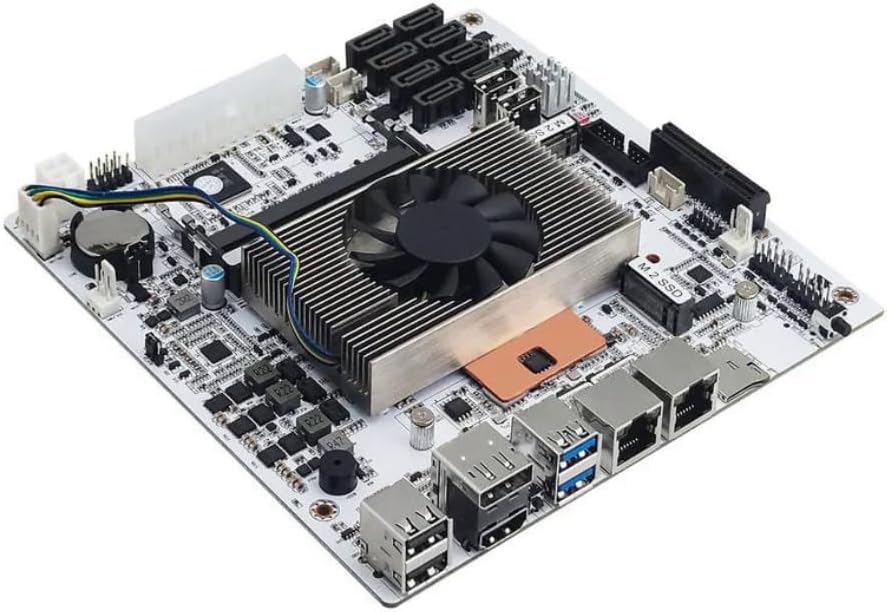
This industrial NAS motherboard stands out with its Intel Celeron N5105 processor offering four cores and threads for efficient multitasking. With a solid 4.5 rating users praise its stability for network security and multimedia applications where low power is critical.
We may earn a commission when you buy through this link, at no additional cost to you.
The standout feature is the four 2.5GbE network ports which provide secure and fast connections ideal for professional firewall appliances. It also supports dual 4K displays via HDMI and DP making it versatile for media center setups too.
While it requires both 24PIN and 4PIN power connections which adds cabling complexity, the moisture proof fiber board ensures reliability in varied environments. The initial boot time to read memory information might take a few minutes but stability compensates.
Buyers looking for a robust low power solution for servers or NAS systems will find this board a top choice. It balances performance features and energy efficiency better than most options in its class.
The inclusion of four 2.5GbE ports allows for advanced network configurations like link aggregation or multiple VLANs without needing extra hardware.
High density moisture proof circuitry ensures the board withstands humidity and heat better than standard consumer grade motherboards.
We may earn a commission when you buy through this link, at no additional cost to you.
For those on a tight budget this ASRock Micro ATX board offers incredible value by including the Intel J1800 processor directly. It has a 4.0 rating and works well for basic office tasks or light home server needs where high speed is not a priority.
We may earn a commission when you buy through this link, at no additional cost to you.
The board supports DDR3 memory which keeps costs low and includes various video outputs like VGA DVI and HDMI for flexibility with older monitors. It also provides six USB 2.0 ports ensuring you have enough connectivity for peripherals.
The main trade-off is the age of the DDR3 standard and the older J1800 CPU which limits modern software performance. However for simple static tasks like a web server or printer host it remains a capable choice.
If you need the most economical low power motherboard without sacrificing basic features this model delivers. It is perfect for legacy system upgrades or entry level embedded projects.
Having the CPU included in the package reduces overall build costs significantly compared to buying separate components.
Multiple video ports mean you can connect various types of displays without needing adapters or converters.
We may earn a commission when you buy through this link, at no additional cost to you.
This Mini-ITX board is a premium pick for users needing high performance in a small low power form factor. With an 8th gen quad-core 8-thread CPU it outperforms many mainstream chips while keeping TDP low for 24/7 operation.
We may earn a commission when you buy through this link, at no additional cost to you.
The standout is the eight SATA ports combined with dual 2.5G LAN which makes it ideal for complex NAS storage or firewall appliances. It also includes two M.2 NVMe slots for fast caching or boot drives.
Buyers should note a known sleep mode bug which requires staying awake for continuous operation. Additionally it needs both 24PIN and 4PIN power connections. These minor issues are acceptable given the high performance per watt.
Those building a serious home server or virtualization host will appreciate the robust features. It offers professional grade capabilities in a compact footprint at a reasonable price point.
VT-x and VT-d support ensures smooth virtual machine operations for complex network environments.
The 6 layer PCB resists moisture and heat making it reliable for embedded industrial systems.
We may earn a commission when you buy through this link, at no additional cost to you.
This board features a Core i5 8265U processor which delivers strong performance for demanding NAS tasks. It includes eight SATA ports and two NVMe slots allowing for massive storage capacity and fast caching options.
We may earn a commission when you buy through this link, at no additional cost to you.
The dual 2.5GbE LAN ports support link aggregation for increased network throughput. Built-in features like a Clear CMOS button help with troubleshooting BIOS issues quickly during setup.
It does not support sleep mode which is standard for servers but users must ensure power settings are configured correctly. The processor is an ES version which might have minor firmware quirks compared to retail units.
Best for users needing a powerful mini PC or NAS that handles heavy virtualization. The storage flexibility is unmatched in this size class for home lab enthusiasts.
Eight SATA ports plus two NVMe slots provide plenty of room for expanding your storage array over time.
2.5GbE controllers allow for faster data transfers within your local network without upgrading cabling.
We may earn a commission when you buy through this link, at no additional cost to you.
This AM4 board offers great value by supporting Ryzen 5000 series CPUs which provide excellent performance per watt. It has a 4.5 rating and features PCIe 4.0 for fast storage speeds with compatible processors.
We may earn a commission when you buy through this link, at no additional cost to you.
The board includes HDMI DVI and VGA outputs which is rare for modern boards ensuring compatibility with older monitors. Six USB 3.2 ports and 7.1 HD audio cover most daily connectivity needs.
Users get Full Spike Protection to guard against electrical surges. However with only two DIMM slots memory expansion is limited to 64GB total which might restrict heavy virtualization tasks.
Ideal for budget builds or office PCs needing efficient power use. The mix of legacy and modern features makes it a versatile pick for general use.
Three video outputs let you connect multiple monitors or older VGA screens without adapters.
Full Spike Protection safeguards ports from surges increasing system longevity.
We may earn a commission when you buy through this link, at no additional cost to you.
The MSI PRO B550M-P features Core Boost technology for stable power delivery to Ryzen 5000 processors. Its 4.4 rating reflects reliability and good thermal management for long term 24/7 use.
We may earn a commission when you buy through this link, at no additional cost to you.
Memory overclocking up to 4400+ MT/s helps increase system responsiveness. The Frozr AI cooling feature adjusts fans based on temperatures to maintain balance between silence and cooling.
It includes one Gen4 and one Gen3 M.2 slot for flexible storage options. However the network hardware is a basic Gigabit controller which may limit high speed internal transfers.
Good for users prioritizing stability and speed in a compact mATX size. It handles everyday tasks and moderate workloads efficiently without excessive power draw.
Frozr AI automatically manages fan speeds to keep noise low while maintaining safe temperatures.
Core Boost VRM design ensures consistent voltage for steady performance under load.
We may earn a commission when you buy through this link, at no additional cost to you.
This board achieves a perfect 5.0 rating thanks to its robust feature set and reliable performance. It supports Wi-Fi 6E for low latency wireless which is rare in this price range.
We may earn a commission when you buy through this link, at no additional cost to you.
The eight phase power design ensures stable performance for Ryzen 5000 CPUs. It also includes eight USB 3.2 Gen1 ports giving you plenty of connectivity for peripherals.
Realtek ALC1220 audio provides immersive sound for multimedia tasks. While it is more expensive the connectivity and power delivery justify the cost for enthusiasts.
Ideal for users who want a wireless ready home theater PC or office workstation. The build quality supports demanding workloads without thermal throttling.
Wi-Fi 6E support ensures you can connect to modern routers for faster and more reliable wireless access.
Premium audio codec supports 7.1 surround sound for high fidelity listening experiences.
We may earn a commission when you buy through this link, at no additional cost to you.
This Mini-ITX board is perfect for small builds needing wireless connectivity. The Direct 6 Phase PWM with DrMOS ensures power efficiency for Ryzen processors while keeping heat low.
We may earn a commission when you buy through this link, at no additional cost to you.
It includes Intel WiFi and Bluetooth which simplifies cable management in compact cases. Three display outputs allow for multi-monitor setups even in a small form factor.
The PCIe 3.0 limit is a constraint compared to B550 boards but acceptable for general use. Two RAM slots restrict memory upgrades but are sufficient for most home server needs.
Great for building a small home media center or mini PC. The compact design saves space while providing essential modern connectivity features.
Direct 6 Phase Digital PWM delivers precise power to the CPU for better stability and less heat.
Built-in WiFi and Bluetooth eliminate the need for expansion cards saving valuable space.
We may earn a commission when you buy through this link, at no additional cost to you.
The GIGABYTE B550M K offers reliable performance for Ryzen 5000 CPUs with a solid 4.4 rating. The 3+3 power phase design provides steady delivery for daily tasks without excessive heat.
We may earn a commission when you buy through this link, at no additional cost to you.
Advanced Thermal Armor helps dissipate heat efficiently keeping the chipset cool during operation. It also supports four DIMM slots for RAM expansion up to 128GB for heavy virtualization.
Q-Flash allows BIOS updates without a CPU making maintenance easier. While it lacks high end features it covers the basics well for a moderate price.
Suitable for users building a standard home PC or low power server. It balances cost and performance well for those who do not need cutting edge specs.
Chipset heatsink ensures better heat dissipation for stable long-term operation under load.
Four DIMM slots allow for significant memory upgrades to suit growing storage needs.
We may earn a commission when you buy through this link, at no additional cost to you.
This model includes the J4125 processor offering four cores for basic multi-tasking at low power. While it has a lower 3.4 rating it serves well for simple embedded or home lab setups.
We may earn a commission when you buy through this link, at no additional cost to you.
It supports DDR4 memory which provides better speed than older generations. The M.2 Key E slot allows for WiFi expansion which is useful for compact builds.
Performance is limited by PCIe 2.0 speeds which restricts high bandwidth expansion cards. It is better suited for light workloads like home media streaming.
Good for budget conscious users needing a small low power PC. It offers basic functionality without unnecessary features that drive up cost.
The CPU is included reducing component costs and simplifying the build process.
PCIe 2.0 slots are sufficient for network cards but not for high bandwidth SSDs.
We may earn a commission when you buy through this link, at no additional cost to you.
Selecting the right motherboard requires understanding power efficiency, connectivity needs, and system stability factors that impact long term performance.
Look for processors with a low Thermal Design Power (TDP) such as 15W or less for energy savings. Efficient CPUs reduce electricity bills and heat generation making 24/7 operation sustainable.
Prioritize models with CPUs that match your workload to avoid overpaying for unused power.
Ensure the board size like Mini-ITX or Micro-ATX fits your planned case. A mismatch can prevent installation or limit airflow.
Measure your case interior dimensions before purchasing to guarantee a proper fit.
NAS or server builds benefit from multiple Ethernet ports like 2.5GbE for high speed transfers. USB 3.0 support ensures fast peripheral access.
Choose a board with enough ports to avoid extra expansion cards that add cost and power draw.
Check RAM slots and max capacity to support your OS and apps. M.2 NVMe slots offer faster boot and cache speeds than SATA.
Verify the number of SATA ports needed for your drive array before buying.
Some boards need both 24PIN and 4PIN power connectors which may require specific power supplies. Ensure your PSU has the necessary cables.
Missing power connectors can prevent the system from turning on entirely.
Heatsinks and AI cooling adjust fans to maintain stability without noise. Good thermal design extends hardware life.
Look for boards with chipset heatsinks for better performance in warm environments.
BIOS tools like Q-Flash allow updates without a CPU which is handy for troubleshooting. Look for compatibility with your intended OS.
Ensure the manufacturer provides driver support for your specific OS version.
Industrial grade boards with moisture proof PCBs withstand humidity better than consumer ones. This is vital for 24/7 NAS operation.
Check reviews for long-term reliability ratings before purchasing to avoid failures.
Install the motherboard securely in a case with proper standoffs to prevent short circuits. Connect the CPU cooler carefully to ensure even contact and thermal paste application.
Attach all power cables firmly including the extra 4-pin connector if your board requires it. Ensure data cables for SATA are securely plugged into both board and drives.
Regularly update BIOS drivers for best stability and security. Clean dust from vents and fans to keep cooling efficient over the years.
Yes, low power boards consume less electricity which reduces bills and heat output significantly. They are ideal for 24/7 systems where efficiency matters more than extreme performance.
Some boards support modern GPUs but performance may be limited by older CPU cores. Focus on efficiency models if gaming is a secondary need to your primary workloads.
Mini-ITX boards are smaller making them perfect for compact builds. Micro-ATX offers more slots for expansions so choose based on space and feature needs.
Many models like NAS boards support eight SATA ports allowing extensive storage. Always check the spec for SATA counts if you plan to add many drives.
Use good case fans and ensure airflow around the board. Passive cooling works if the board has enough heatsinks and the case is well ventilated.
Industrial boards often use better materials for moisture and heat resistance. They suit 24/7 NAS use better where consumer boards might fail due to wear.
We highlighted ten diverse options from budget picks to premium servers like the Celeron N5105 for efficiency and Ryzen boards for flexibility.
Prioritize your storage and network needs when choosing. A board with enough SATA ports and fast LAN saves upgrades later.
Always verify current prices and compatibility before buying as specs and costs change frequently in the market.