
Logitech H390 Wired Headset
4.4Editor score
Plug-and-play USB
Rotating noise canceling mic
6.23 ft cable
This guide compares the top headsets for Teams Meetings to help you choose the best wireless or wired option for clear audio and comfort.
Choosing the right headset for Teams Meetings is crucial for maintaining professionalism and clarity during virtual interactions. A good headset ensures your voice is heard clearly while blocking out distractions, allowing you to focus on important discussions without technical interruptions.
We compared ten top-rated models based on audio quality, comfort, battery life, and compatibility with Microsoft Teams. Our analysis covers both wired and wireless options, ensuring you find a solution that fits your specific work environment and daily meeting schedule effectively.
Each pick highlights unique features like noise cancellation, multipoint connectivity, and ergonomic design. Note that prices change frequently, so check current listings before purchasing to ensure you get the best value for your budget and specific workplace needs.
4.4Editor score
4.9Editor score

4.5Editor score
This table provides a side-by-side comparison of all ten models to help you quickly identify key specifications like connectivity type, battery performance, and specific noise cancellation features for your needs.


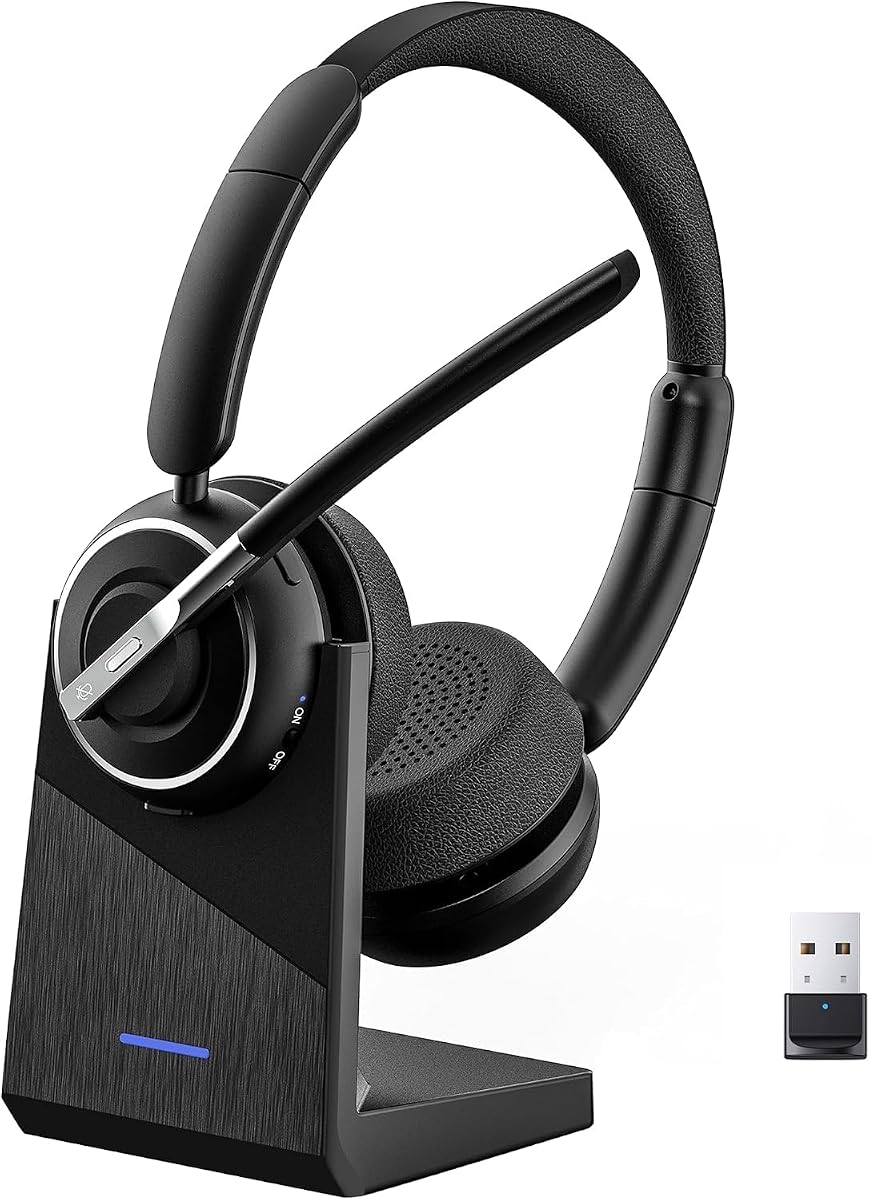
This Bluetooth headset offers state-of-the-art noise reduction technology, making it our top choice for clear communication during virtual meetings. It holds an impressive 4.9 rating from users who appreciate its ability to filter out interference effectively.
We may earn a commission when you buy through this link, at no additional cost to you.
Its standout quality is the ability to remove 99.9% of surrounding noise, ensuring your voice comes through crisply in any environment. The built-in one-click mute provides immediate privacy for confidential discussions, which is essential for professional settings.
While the USB dongle works exclusively with Windows operating systems, this limitation is acceptable given the robust connection stability it provides. The lightweight construction prevents hair entanglement, making it perfect for prolonged daily use without fatigue.
This headset is ideal for professionals who need reliable audio quality in busy offices or while traveling. We recommend it for anyone prioritizing noise cancellation and long battery life for consecutive meetings.
Advanced tech filters out 99.9% of surrounding interference for flawless voice calls.
Built with a high-capacity battery for up to 35 hours of continuous operation.
We may earn a commission when you buy through this link, at no additional cost to you.
The Logitech H390 delivers digital stereo sound tuned for calls and meetings at a budget-friendly price. With a 4.4 rating, it stands out as a reliable wired option that requires no software installation for use.
We may earn a commission when you buy through this link, at no additional cost to you.
Its rotating noise-canceling mic minimizes unwanted background noise, while inline controls let you adjust volume without disruption. The long cable provides freedom to stand up during conversations, and it meets Google's compatibility standards.
Being a wired headset limits mobility compared to wireless options, but the stability of a physical connection is valuable for static workspaces. The padded comfort and easy-to-clean cushions ensure it remains usable throughout long days.
This is the perfect choice for users who need a dependable, low-cost solution for basic meetings. We recommend it for students or office workers who prioritize value and simplicity.
Plug the USB-A connector into your computer and you are ready to talk immediately.
Fine-tuned drivers provide enhanced digital audio for music, calls, and meetings.
We may earn a commission when you buy through this link, at no additional cost to you.
The Lenovo 6550 is fully certified for Microsoft Teams, ensuring optimized audio and dedicated controls for seamless communication. It holds a 4.5 rating thanks to its advanced hybrid ANC that helps you stay focused in busy environments.
We may earn a commission when you buy through this link, at no additional cost to you.
Its ANC combined with environmental noise cancellation isolates your voice, keeping it clear during calls. The fast charge feature delivers up to two hours of playback from just five minutes of charging, ideal for quick top-ups.
While the price is higher, the premium build quality and certification justify the investment for professional environments. The ergonomic design with pressure-relieving headband supports hours of comfortable wear without fatigue.
This headset is best for business users who need guaranteed compatibility with Teams and superior noise isolation. We recommend it for those who prioritize reliability and comfort in high-demand settings.
Fully certified for Microsoft Teams with dedicated call controls and optimized audio.
Up to 60 hours of music playback with ANC off for all-day use.
We may earn a commission when you buy through this link, at no additional cost to you.
This wireless headset combines hybrid active noise cancellation with environmental noise cancellation to ensure your voice is heard clearly. It features an innovative flip-to-mute microphone boom that allows you to mute conversations instantly and reliably.
We may earn a commission when you buy through this link, at no additional cost to you.
The dedicated Qualcomm USB-A dongle provides a stable, low-latency connection for computers without built-in Bluetooth. Powered by the latest Bluetooth 5.4, it offers faster pairing and lower battery consumption while maintaining a 33-foot operating range.
The flip-to-mute feature is a significant convenience for users who need quick privacy without fumbling for buttons. However, the dongle is not compatible with landlines, so it works best for PC and Mac users specifically.
Ideal for professionals needing a balance of advanced noise handling and easy connectivity options. We recommend it for those who value physical mute controls and stable wired wireless connections.
Hybrid ANC and ENC ensure voice clarity even in noisy offices or busy homes.
Stay connected to two devices at once via adaptor and Bluetooth seamlessly.
We may earn a commission when you buy through this link, at no additional cost to you.
This headset ensures crystal-clear communication with Microsoft Teams Open Office certification, perfect for hybrid workspaces. At only 140g, it features adjustable memory foam earcups and a flexible headband for extended comfort during long workdays.
We may earn a commission when you buy through this link, at no additional cost to you.
Its replaceable earcups extend the life of the device, which is a practical feature for long-term use. Three-mic noise suppression technology blocks distractions, delivering unmatched audio clarity for professional calls or casual gaming sessions.
The requirement for a USB-A receiver for Teams functionality is a minor limitation compared to full Bluetooth integration. However, the lightweight design and long battery life make it a strong contender for budget-conscious professionals.
Best for users looking for a certified UC headset that balances comfort and durability. We recommend it for those who need a reliable option for daily virtual meetings.
Microsoft Teams Open Office certification ensures compatibility with virtual meetings.
Up to 31 hours of talk time on a single charge for uninterrupted use.
We may earn a commission when you buy through this link, at no additional cost to you.
Made for the way you work and play, this professional headset is casual enough for home and available in three modern colors. It uses beamforming technology and digital signal processing to capture your voice clearly while eliminating background sound.
We may earn a commission when you buy through this link, at no additional cost to you.
The featherweight design with memory foam earpads ensures a comfortable fit that won't weigh you down, even when meetings go long. With multipoint Bluetooth, you can seamlessly switch between your devices for added convenience.
While its rating is lower than top picks, its lightweight nature makes it suitable for users who prioritize comfort above all else. The flip-to-mute mic provides immediate privacy anytime, which is a key feature for quick meetings.
This option is best for hybrid workers who need a stylish, light headset for frequent calls. We recommend it for those who want a balance between work and casual listening.
Featherweight design with memory foam earpads for a comfortable fit.
Immerse yourself in sonic pleasure with 40 mm speakers driving full, rich audio.
We may earn a commission when you buy through this link, at no additional cost to you.
This wireless headset features environmental noise cancelling technology that blocks most background distractions like loud pets. It holds a high 4.6 rating from users who appreciate its ability to keep calls clear in noisy environments.
We may earn a commission when you buy through this link, at no additional cost to you.
The one-touch mute button instantly silences your mic during Zoom and Teams meetings, ensuring privacy when you need it. Dual pairing allows you to connect your laptop and smartphone simultaneously for maximum productivity.
With 40 hours of talk time, it can keep up with your busy schedule without frequent charging. The USB-A adapter makes it versatile for Windows PCs without built-in Bluetooth support.
Best for users needing a reliable value option with strong noise filtering. We recommend it for office workers who face constant background noise.
ENC technology blocks most background distractions for crystal-clear calls.
Boost productivity by connecting this work headset to laptop and smartphone simultaneously.
We may earn a commission when you buy through this link, at no additional cost to you.
This Logitech wireless headset allows you to customize firmware and EQ for a personalized audio experience via the LogiTune app. With dual beamforming mics on the extended boom, it suppresses background noise in homes and shared workspaces.
We may earn a commission when you buy through this link, at no additional cost to you.
The embedded 30 mm dynamic audio drivers deliver clear audio for calls and other listening options. You can move freely about your home or office with a wireless range of up to 30 meters (98 feet).
Replaceable earpads extend the life of the headset, which is a sustainable feature for long-term users. While the battery life is average, the certification as carbon neutral adds value for eco-conscious buyers.
Ideal for users who want customization options and reliable noise suppression. We recommend it for those who need flexibility in audio settings.
Download and install LogiTune for access to enhanced features and firmware updates.
Move freely about your home or office with this Bluetooth headset with microphone.
We may earn a commission when you buy through this link, at no additional cost to you.
Experience all-day comfort with its lightweight design and foam or leatherette ear cushions that won't weigh you down. It delivers crystal-clear calls with advanced noise-canceling microphones for seamless communication in meetings.
We may earn a commission when you buy through this link, at no additional cost to you.
Simply plug into your laptop via USB-A or USB-C for instant use, plus easy call and volume controls for smooth call management. It is certified for Microsoft Teams and works with all leading online meeting platforms.
The powerful 28mm speakers deliver richer sound for a better audio experience during calls. Its solid sound quality ensures you hear and are heard clearly, making it a reliable tool for daily work.
Best for users needing a simple, lightweight wired solution. We recommend it for office workers who prioritize immediate setup.
Hear and be heard clearly with advanced noise-canceling microphones for seamless communication.
Simply plug into your laptop via USB-A or USB-C for instant use.
We may earn a commission when you buy through this link, at no additional cost to you.
This headset uses an AI noise cancelling microphone to reduce background distractions like keyboard clicks and home noise. It features a convenient charging base that neatly stores the USB dongle, keeping your workspace organized.
We may earn a commission when you buy through this link, at no additional cost to you.
Up to 65 hours of battery keeps you connected through long workdays, back-to-back meetings, and customer support shifts. The lightweight design with a reversible ear hook lets you wear it on either ear for a personalized fit.
The responsive controls let you answer calls, adjust volume, and mute your mic instantly without reaching for your phone or computer. This ensures focus on the conversation and efficient call management.
Ideal for professionals seeking a complete package with long battery life and organized storage. We recommend it for call centers or heavy daily users.
AI noise cancelling microphone helps reduce background distractions like office chatter.
Up to 65 hours of battery keeps you connected through long workdays.
We may earn a commission when you buy through this link, at no additional cost to you.
Selecting the perfect headset requires balancing technical specs, comfort, and budget. This guide covers the critical factors to ensure your chosen device enhances your meeting productivity.
Choose between wired and wireless options based on your need for mobility. Wired headsets like the Logitech H390 offer reliability and zero latency, while wireless models provide freedom to move around your workspace. Bluetooth offers versatility, but a USB dongle often ensures a more stable connection for office PCs.
For maximum stability during critical calls, wired or dongle-supported wireless is ideal. If you travel often, Bluetooth with multipoint is essential for switching devices seamlessly.
Noise cancellation is vital for clear communication in busy environments. Look for models with ENC (Environmental Noise Cancellation) to ensure your voice is clear and ANC (Active Noise Cancellation) to block incoming distractions. High-end models like the Lenovo 6550 use hybrid ANC for superior isolation.
Always check if the mic uses beamforming or suppression technology. A good mic ensures you are heard clearly even with background noise.
Since meetings can last hours, comfort is a primary consideration. Lightweight designs (around 122-140g) reduce strain, while memory foam earpads prevent overheating. Some models offer replaceable earcups or adjustable headbands to fit various head shapes.
Test the fit if possible. Over-ear designs generally offer better noise isolation but may be heavier than on-ear options.
Battery life determines how long you can work without charging. Aim for at least 30 hours of talk time for full-day usage. Models with fast charging can provide hours of playback in just a few minutes of charging, reducing downtime.
If you work long shifts, prioritize 40+ hour batteries. Always keep the charging cable accessible for backup.
Certification ensures optimized audio performance and dedicated call controls on the headset. Certified devices often provide better integration with meeting software, making it easier to answer or mute calls directly from the headset buttons.
Choose certified models for business environments to guarantee seamless compatibility with your organization's tech stack.
Multipoint allows you to connect to two devices at once, such as a laptop and phone. This feature is essential for switching between a desktop call and a mobile chat without disconnecting manually.
If you juggle multiple devices, ensure the headset supports Bluetooth multipoint for smooth transitions during the workday.
A quality boom mic or beamforming technology ensures your voice is picked up clearly. Physical mute buttons, especially flip-to-mute designs, offer instant privacy during conversations without fumbling for software controls.
Always check for a dedicated mute indicator light so you know when your mic is off.
Look for headsets with replaceable parts like earpads, which extend the device's lifespan. Check warranty terms to ensure protection against defects, especially if the headset will be used daily.
Investing in a durable unit reduces long-term costs and ensures consistent performance over time.
Connect your headset using the provided USB-A or USB-C dongle for computers without Bluetooth. Follow the manufacturer's instructions to pair via Bluetooth for wireless functionality, ensuring you install any necessary drivers or apps like LogiTune.
Maintain your device by cleaning earcups regularly with a dry cloth and keeping firmware updated. Avoid exposing the headset to extreme heat or moisture, and use the charging base when available to keep the device organized and safe.
Optimize audio quality by adjusting noise cancellation settings to match your environment. Test your mic during non-critical times to ensure it is muted properly before important meetings.
Yes, many Bluetooth headsets are compatible with Microsoft Teams, but certification ensures optimal performance. Certified devices like the Lenovo 6550 offer dedicated call controls and better integration. Always check for the Microsoft Teams Open Office certification label.
Hybrid Active Noise Cancellation (ANC) combined with Environmental Noise Cancellation (ENC) provides the best results for noisy environments. Look for models that suppress background distractions while keeping your voice clear for colleagues.
Most wireless headsets are designed for computers and mobile devices, not traditional landlines. If you need landline compatibility, consider a dedicated UC headset or verify compatibility before purchasing a Bluetooth model.
Quality headsets can last 3 to 5 years with proper care. Features like replaceable earcups and durable batteries extend their usable life significantly compared to standard consumer models.
Modern Bluetooth 5.3 and 5.4 technologies minimize lag significantly. Using a USB dongle further reduces latency compared to standard Bluetooth connections, ensuring smooth audio during meetings.
Yes, brands like Logitech include models with post-consumer recycled plastic and carbon neutral certifications. These sustainable options help reduce environmental impact without compromising performance.
The PrancyBt Wireless Headset, Logitech H390, and Lenovo 6550 offer the best balance of features for most users. Each brings unique strengths like superior noise cancellation, budget-friendly value, or premium certification.
Prioritize noise cancellation and comfort if you attend multiple meetings daily. Ensure the connectivity type matches your workplace setup for reliable performance.
Check current prices and availability before purchasing as these values change frequently. Always read user reviews to confirm compatibility with your specific devices.