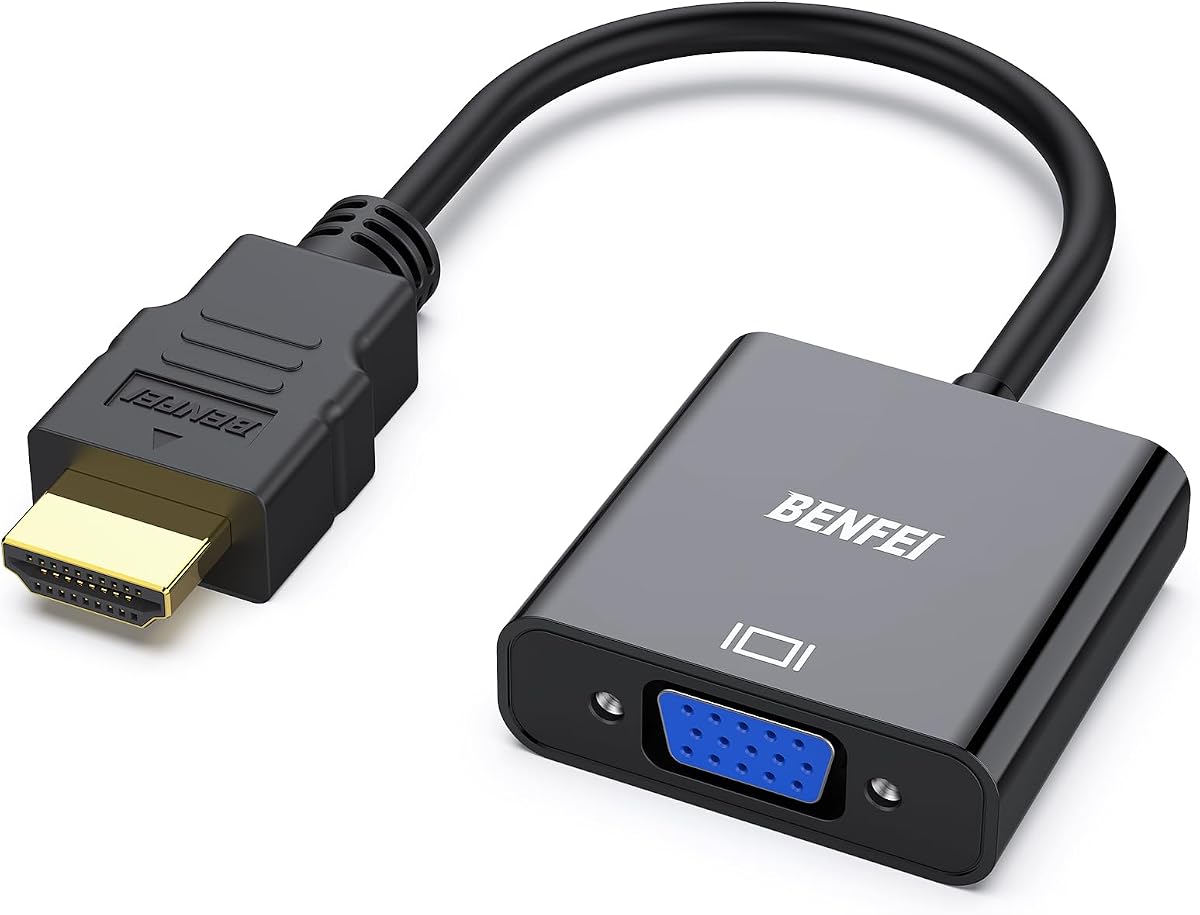
BENFEI HDMI to VGA Gold-Plated Adapter
4.6Editor score
Compact portable design
1080p Full HD support
Gold plated connectors
18 month warranty
This guide compares the top HDMI to VGA Converter Adapter models for 2026 based on build quality, signal stability, audio support, and compatibility across
Connecting modern HDMI devices to legacy VGA monitors requires a reliable converter adapter. These small gadgets bridge the gap between digital and analog signals ensuring your presentations and media play smoothly on older screens without flickering or signal loss issues.
We evaluated ten top rated adapters based on resolution support build durability and extra features like audio output. Our analysis covers compact travel options longer cables and powered models to help you find the right match for your specific desktop laptop or gaming console setup needs.
Each pick below highlights unique strengths such as gold plated connectors wide compatibility lists or extended warranties. Prices and availability change frequently so please check the current listings before purchasing to ensure you get the best deal on the model that fits your workflow.
4.6Editor score

4.6Editor score

4.4Editor score
The following table provides a side by side overview of all ten selected adapters focusing on key specifications such as resolution support audio features power requirements and warranty terms to help you quickly compare options.



The BENFEI HDMI to VGA adapter ranks as the top budget choice for users needing basic signal conversion. With a 4.6 star rating it delivers solid performance for connecting modern laptops to older projectors or monitors. Its compact design makes it easy to carry for business presentations or home entertainment setups.
We may earn a commission when you buy through this link, at no additional cost to you.
This adapter uses an advanced IC chip to convert digital HDMI signals to analog VGA outputs reliably. The gold plated connectors resist corrosion ensuring long term signal integrity. It supports resolutions up to 1920×1080 at 60Hz providing clear Full HD visuals on compatible displays without significant lag or artifacts.
While it lacks audio output which is a common limitation in passive adapters the video performance remains strong. Users should note that it is unidirectional so it cannot convert VGA sources to HDMI. The included 18 month warranty offers peace of mind for this low cost hardware investment.
Buyers looking for a simple effective solution without extra features will appreciate this model. It works well with most HDMI enabled devices including Chromebooks and gaming consoles. For presentations where audio comes from separate speakers this adapter handles video transfer flawlessly.
The built-in IC chip ensures stable analog output from digital sources preventing flickering or color issues.
Gold plated connectors and molded strain relief protect against daily wear and tear during travel.
We may earn a commission when you buy through this link, at no additional cost to you.
This adapter serves a different niche by converting older VGA outputs to modern HDMI inputs. It is ideal for users who want to connect a classic desktop or laptop to a new TV or projector. The 4.5 rating reflects its utility for specific legacy hardware setups.
We may earn a commission when you buy through this link, at no additional cost to you.
The integrated USB cable allows audio to be transmitted alongside video through the HDMI port. This solves the common issue where VGA sources lack audio output capabilities. The adapter is plug and play requiring no drivers making it easy to set up on Windows or Mac systems.
While it cannot convert HDMI to VGA it is a necessary tool for reversing the signal flow. Users must ensure their source device has a VGA output port which many older machines still do. The compact form factor ensures it fits easily into laptop bags.
Those with older PCs needing to display content on modern screens will find this valuable. The USB audio feature adds significant value compared to video only adapters. It is a specialized tool that fills a specific gap in home connectivity needs.
The USB audio cable embeds sound with video so you hear audio through HDMI speakers.
Perfect for connecting older workstations or retro consoles to modern display devices.
We may earn a commission when you buy through this link, at no additional cost to you.
The Moread adapter stands out for its impressive five year warranty which signals high confidence in build quality. With a 4.6 star rating it is a favorite among users who prioritize longevity. It connects HDMI devices to VGA monitors with consistent performance for work or gaming.
We may earn a commission when you buy through this link, at no additional cost to you.
Like other active adapters it uses a dedicated chip to convert the signal ensuring minimal degradation. The gold plated connector resists corrosion better than standard metal parts. It supports Full HD resolution which is sufficient for most office work and streaming video applications.
The main trade-off is the lack of audio output requiring a separate sound setup. However the video stability makes up for this limitation in professional environments. The five year coverage protects your investment far longer than typical one or two year warranties.
Buyers who value peace of mind and durability should choose this model. It works with a wide range of devices including Raspberry Pi and Intel NUC. For those needing a reliable long term solution the extended warranty makes it a top contender.
The five year unconditional warranty offers superior protection against defects and failures.
Advanced IC chip ensures the conversion remains clear and steady without visual noise.
We may earn a commission when you buy through this link, at no additional cost to you.
StarTech is known for professional grade hardware and this adapter delivers consistent performance. It is designed to be plug and play without requiring any software installation on your computer. The 4.5 rating reflects its reliability for business use cases where stability matters.
We may earn a commission when you buy through this link, at no additional cost to you.
The adapter uses integrated GPU resources to minimize CPU usage making it efficient for multitasking. It does not require external power which simplifies cable management on your desk. The screw locking cable feature prevents accidental disconnection during presentations or critical sessions.
While the price is higher than generic brands the build quality justifies the cost for professionals. The short cable length means you might need an extension if your ports are far apart. This is a trade-off for its compact travel friendly design.
Users who need a hassle free setup across Windows Mac and Linux will appreciate this model. It supports standard resolutions up to 1080p which covers most monitor needs. For office environments requiring dependable hardware this is a solid investment.
Universal compatibility means it works immediately on all major operating systems without extra steps.
Screw locking cables keep the connection tight so the cable does not wiggle loose.
We may earn a commission when you buy through this link, at no additional cost to you.
This model combines the adapter and a 6 foot cable into one unit saving you from buying them separately. It is perfect for setups where the monitor sits a bit away from your computer. The 4.4 rating indicates strong user satisfaction with the convenience it offers.
We may earn a commission when you buy through this link, at no additional cost to you.
The gold plated connectors and molded strain relief ensure the cable lasts through frequent plugging and unplugging. It supports Full HD resolutions which is great for streaming content or running dual screens. The uni-directional design ensures signal flows correctly from source to display.
Since the cable is integrated you cannot replace it if it gets damaged but the length suits most desks. The build quality is consistent with other BENFEI products ensuring reliable performance over time. It removes the guesswork of compatible cable selection.
Buyers who want a complete solution without extra purchases will find this valuable. The 18 month warranty covers any defects in the cable or adapter parts. For home office setups where space is moderate this length is usually sufficient.
The integrated cable means you do not need to search for a compatible VGA connector separately.
Gold plated connectors maintain high definition signal quality over the longer cable distance.
We may earn a commission when you buy through this link, at no additional cost to you.
This adapter is specifically designed for devices like TV sticks that often lack enough power for standard adapters. It includes a Micro USB port to ensure stable operation during streaming or gaming. The 4.4 rating highlights its utility for media center users.
We may earn a commission when you buy through this link, at no additional cost to you.
The 3.5mm audio jack allows you to connect external speakers or headphones directly to the adapter. This is critical since VGA does not carry audio signals on its own. The gold plated connector ensures the video remains sharp and stable during playback.
You will need to supply a Micro USB power source which adds a bit of cable management. However this requirement ensures the adapter runs reliably with low power HDMI ports. It supports Full HD output which is essential for modern content streaming.
Users with Roku or Fire TV sticks will find this model very practical for connecting to older TVs. The 18 month warranty covers the device if issues arise. It solves the specific problem of powering converters from weak HDMI ports.
The 3.5mm jack lets you connect speakers so you get sound along with the video.
The Micro USB port provides extra power ensuring the adapter does not shut down.
We may earn a commission when you buy through this link, at no additional cost to you.
UGREEN offers a well rounded adapter that includes both video and audio capabilities. The inclusion of a Micro USB cable helps users with low power HDMI ports connect easily. The 4.5 rating shows strong satisfaction among users for its reliability and ease of use.
We may earn a commission when you buy through this link, at no additional cost to you.
The built-in chipset converts the digital signal to analog without needing extra drivers. It supports Full HD resolution which is standard for most modern monitors. The 3.5mm jack allows you to plug in a 3. audiomm audio cable for sound output.
While you still need to buy a separate audio cable for speakers the adapter supports it fully. The compact design makes it portable enough for daily commuting. It is a great choice for those who need a simple plug and play solution.
Buyers with Chromebooks or MacBooks will appreciate the wide compatibility. The low power support ensures it works with devices that cannot power regular adapters. For general office use it is a reliable and affordable option.
Works with Mac PC laptops and streaming devices providing a single solution for all.
The Micro USB port ensures devices like Apple TV or Raspberry Pi can run it.
We may earn a commission when you buy through this link, at no additional cost to you.
This premium adapter uses external power to ensure the signal remains stable over long distances. It is ideal for conference rooms or industrial setups where reliability is critical. The 4.4 rating reflects its solid performance in professional environments.
We may earn a commission when you buy through this link, at no additional cost to you.
The active chipset ensures that the video conversion is smooth with minimal loss. The dedicated 3.5mm audio port allows you to connect high quality external speakers for presentations. It supports Full HD resolution which meets standard business display requirements.
Because it requires a 5V power source you will need an outlet near your setup. This extra step adds stability but reduces portability slightly. The build quality is designed for continuous use rather than occasional travel.
Buyers needing a robust solution for classrooms or meeting rooms should consider this model. The external power ensures it works even with weaker HDMI sources. For professional AV setups this reliability is often worth the higher price.
External power ensures the adapter does not fluctuate or lose signal during long use.
The separate audio output allows for better sound quality in conference presentations.
We may earn a commission when you buy through this link, at no additional cost to you.
StarTech provides another strong option with an integrated audio port for connecting speakers easily. This makes it suitable for presentations where you need both video and sound from one device. The 4.3 rating shows it is a reliable choice for general users.
We may earn a commission when you buy through this link, at no additional cost to you.
It supports resolutions up to 1920×1200 which is higher than standard 1080p. This makes it great for high resolution monitors that need extra pixel density. The plug and play setup means no software is needed to get started quickly.
The adapter is compact and fits well in a laptop bag for travel. However you still need to connect a cable to the speakers for audio output. The build quality is consistent with professional grade standards for reliability.
Buyers who need higher resolution support will find this adapter useful. It is a good middle ground between basic and premium models. For standard presentations it offers enough features without extra complexity.
Support for 1200p resolution helps on monitors with extra screen space.
The lightweight body makes it easy to carry for business trips and meetings.
We may earn a commission when you buy through this link, at no additional cost to you.
The Dell branded adapter is a reliable choice for those who prefer OEM parts for their devices. It is designed to match the build quality of Dell monitors and laptops. The 4.5 rating suggests it performs well within the Dell ecosystem.
We may earn a commission when you buy through this link, at no additional cost to you.
It is a standard dongle that converts HDMI to VGA without extra ports or power needs. The compact form factor ensures it does not stick out too much from the device port. It supports standard resolutions suitable for office monitors.
Because it is a simpler model it does not include extra features like audio outputs. This is fine for users who have external speakers or integrated sound systems. The quality is consistent with Dell standards for durability.
Buyers using Dell hardware should consider this for compatibility assurance. It is a simple effective tool for connecting older displays to new PCs. For corporate environments using Dell products this is a safe choice.
Designed specifically to work seamlessly with Dell hardware and displays.
No extra cables needed just plug it in and start using it immediately.
We may earn a commission when you buy through this link, at no additional cost to you.
Choosing the right adapter requires understanding your device ports signal direction and whether you need audio.
Always check whether your adapter converts HDMI to VGA or VGA to HDMI. Most modern laptops need HDMI to VGA since they have HDMI outputs but older desktops need the reverse direction to connect to newer HDMI screens.
Confirm the source port on your device matches the adapter input before purchasing to avoid buying the wrong converter.
Look for adapters that support at least 1080p Full HD resolution for clear images. Some adapters only support 720p which can look blurry on larger projectors or high pixel density screens.
Ensure the adapter matches your display requirements to avoid fuzzy images or signal loss.
VGA ports do not carry audio so you need an adapter with a 3.5mm audio jack if you want sound. Without this feature you will need external speakers or another audio cable to get audio output.
If sound is important choose an active adapter with a dedicated audio port for speakers.
Some adapters require an external USB power source especially for low power HDMI devices. These are more stable but add a cable to your setup. Others run off the HDMI port alone which is convenient for travel.
Decide between convenience and stability based on whether you need to plug in power regularly.
Gold plated connectors resist corrosion and ensure a solid connection over time. Plastic housings can break easily so look for metal or reinforced designs for durability. Molded strain relief protects the cable from bending damage.
Choose adapters with durable materials if you plan to carry them frequently in a bag.
A longer warranty period like three to five years indicates confidence in the product quality. Brands like Moread offer five year warranties while others offer eighteen months. Good customer service helps if you face setup issues.
Prioritize brands with strong support policies to protect your investment from defects.
Check that the adapter lists your specific device type such as Mac or gaming console. Some adapters do not work with low power ports like Apple TV or MacBook Pro Retina without extra power.
Ensure the product page explicitly supports your model to avoid connection failures.
Decide whether you need a fixed length cable or just an adapter. Integrated cables simplify setup but limit your options if you need a different length later.
Separate adapters give flexibility to use cables that match your desk layout.
Start by plugging the HDMI side of the adapter into your source device such as a laptop or console. Ensure the connection is snug to prevent signal flickering during use.
Connect a VGA cable to the female port on the adapter and attach it to your monitor. If the adapter has an audio jack plug in speakers or headphones for sound.
If your device requires external power connect the USB cable to a USB port or wall charger. Avoid bending the cables sharply and store them loosely to maintain durability.
No VGA does not carry audio by default. You need an adapter with a 3.5mm audio jack to connect external speakers. Otherwise use HDMI directly if your display supports it for built-in audio.
Yes many adapters work with Mac laptops but some require external power. Check if your model supports low power HDMI ports like MacBook Pro Retina or Apple TV for stable output.
No HDMI to VGA adapters are unidirectional. You cannot use them to connect a VGA source to an HDMI monitor. Ensure you buy the correct direction for your setup.
Most adapters only support up to 1080p or 1200p. 4K signals require DisplayPort or HDMI to HDMI adapters. Check the specs to ensure it meets your resolution needs.
No most adapters are plug and play on Windows Mac and Linux. The operating system detects them automatically without needing extra software installations.
This usually means the adapter is not powered or the resolution is unsupported. Connect the USB power if needed and check your display settings to match the monitor's resolution.
Yes but expect a slight input lag compared to HDMI. It works for casual play but competitive gaming may suffer from signal conversion delays.
Quality adapters last years if handled gently. Gold plated connectors and sturdy casings improve lifespan. Avoid frequent plugging and unplugging to extend durability.
The ten adapters compared here offer solid options for connecting HDMI sources to VGA displays. Top picks like BENFEI and Moread balance performance with affordability for most users.
Prioritize audio support and power needs based on your specific hardware setup. Ensure the direction and resolution match your monitor before buying to avoid returns.
Prices and availability change so check current listings for the best deals. This guide helps you find a reliable converter that fits your needs without hassle.