
SUNLU Filament Dryer S2
4.3Editor score
Simple touch screen controls
Holds two standard spools
Fast heating to preset temp
Compare the top 10 filament dryer for 3D printing models to solve moisture issues and improve print quality with our detailed expert review guide.
Moisture in filament can ruin prints quickly. A good filament dryer for 3D printing keeps materials dry during storage and printing. This guide helps you choose the right box for your needs and budget.
We compared ten top models based on capacity, heating speed, and user ratings. Each entry includes real specs and pros to help you decide. We focus on features that matter most to makers.
Each pick shows key strengths and ideal use cases. Prices and availability change often, so check the links for current info. Trust verified data to avoid wet filament and failed prints.
4.3Editor score
4.4Editor score

4.6Editor score
This side-by-side comparison highlights key specs for all ten models. Use it to quickly find the right capacity, heating tech, and price range for your workshop.


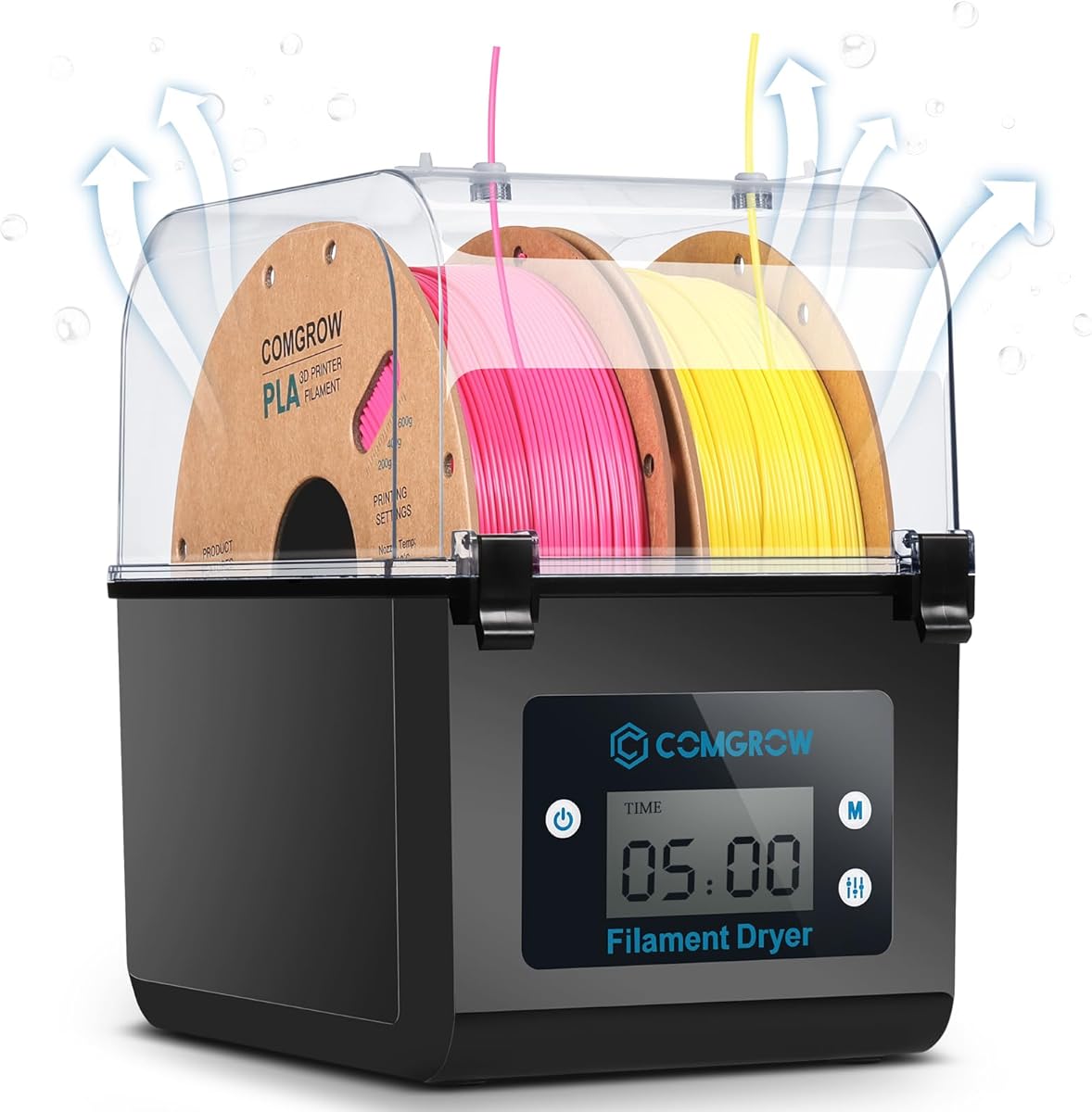
The Comgrow 3D Printer Filament Dryer Box stands out as a top choice for its balance of capacity and control. With a 4.4 rating, it promises reliable moisture removal for PLA, PETG, and ABS. Its large interior fits two 1kg spools, making it ideal for hobbyists who print frequently.
We may earn a commission when you buy through this link, at no additional cost to you.
Key strengths include real-time temperature and humidity monitoring via a clear 2-inch LCD. Users can set temps up to 50°C and times up to 12 hours. The sealed design with a Teflon tube outlet ensures filament stays dry during printing without exposure to ambient air.
Trade-offs include a lower max temperature of 50°C, which may not suit high-temp materials like polycarbonate. Some users noted initial setup requires checking cable sockets. However, the sealed performance and easy controls make these minor issues acceptable for most standard printing needs.
This dryer is best for makers needing consistent results with common filaments. It prevents stringing and poor adhesion by keeping moisture away. If you want a reliable box with clear monitoring and decent capacity, this Comgrow model is a strong recommendation.
The LCD screen shows real-time data so you know exactly when filament is dry.
The Teflon outlet lets you feed filament while keeping the rest of the spool dry.
We may earn a commission when you buy through this link, at no additional cost to you.
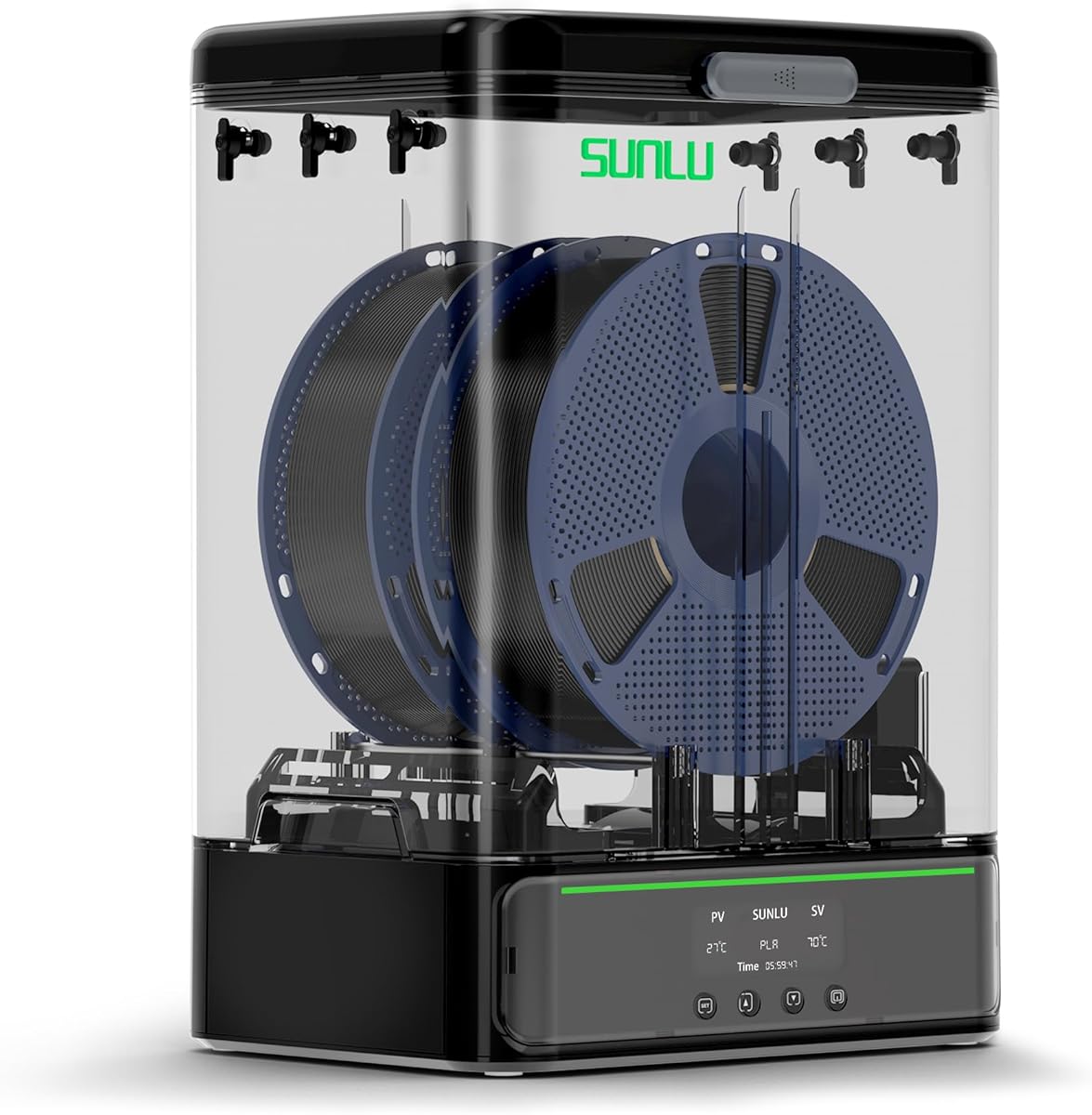
The SUNLU Filament Dryer S2 offers an affordable entry into filament drying without sacrificing core functionality. Rated 4.3, it provides essential features like adjustable temp and timer settings. Its size accommodates two standard spools, making it practical for home workstations.
We may earn a commission when you buy through this link, at no additional cost to you.
It heats quickly and maintains temps from 35 to 70°C. The large touch screen simplifies setup for different materials. The translucent lid allows you to check progress without opening the box, which helps maintain a dry environment during the cycle.
While it lacks advanced features like humidity monitoring, it focuses on effective drying. Some users note it has basic insulation. For the price, however, it revives damp filament well and reduces stringing, making it a smart pick for budget-conscious makers.
Choose this model if you need a simple, effective dryer at a lower cost. It solves moisture issues for PLA and PETG efficiently. If you do not need extra sensors or high-temp options, this SUNLU S2 delivers solid value.
The touch screen lets you set temps and times with just a few taps.
It saves money by reviving old spools instead of buying new ones.
We may earn a commission when you buy through this link, at no additional cost to you.
The Creality Space Pi X4 is a premium solution for serious 3D printing needs. With a 4.6 rating, it offers dual heating chambers and a massive 4-spool capacity. It handles advanced filaments like PC and ASA thanks to its 85°C max temperature.
We may earn a commission when you buy through this link, at no additional cost to you.
Dual 200W chambers dry filament 30% faster than single units. The touch UI allows precise temp customization. Beyond drying, it maintains humidity during pauses via a sealed enclosure. An illuminated window lets you monitor spools without breaking the seal.
Its main trade-off is cost and size, which may not suit small desks. However, for high-volume users, it reduces waste and ensures consistent quality. The investment pays off by preventing failed prints due to moisture-related issues.
This box is perfect for pros who need speed and capacity. It extends shelf life and supports a wide range of materials. If you want top-tier performance and room for multiple spools, this Creality X4 is the best premium choice.
Dual heaters cut drying time significantly compared to standard single-chamber dryers.
High heat capability unlocks printing with tough materials like polycarbonate and ASA.
We may earn a commission when you buy through this link, at no additional cost to you.
The SUNLU S4 is designed for efficiency with its 4-spool capacity. Rated 4.5, it uses a 350W heater and three fans for even heat distribution. It fits large workstations and supports up to 70°C for various materials like PA and Nylon.
We may earn a commission when you buy through this link, at no additional cost to you.
Its eight exit holes allow feeding multiple printers or flexible angles. The large internal space ensures spools do not touch, promoting consistent drying. Users can set timers up to 99 hours for long cycles without intervention.
The trade-off is its size and weight, which require dedicated space. However, for workshops needing multi-printer support, it is invaluable. The powerful heater ensures quick drying even in humid conditions, saving time on long print jobs.
Select this if you run a shop or need bulk drying. It supports most standard and advanced filaments. If space is not an issue, the SUNLU S4 offers robust performance and flexible feeding options for complex setups.
Eight exit holes let you connect to multiple machines or different angles.
The 350W heater ensures rapid and even drying across the entire box.
We may earn a commission when you buy through this link, at no additional cost to you.
The Creality Space PI Plus upgrades drying with 360-degree hot air and a large touch screen. Rated 4.4, it offers presets for 12 filament types including composites. It monitors humidity in real-time to ensure optimal conditions.
We may earn a commission when you buy through this link, at no additional cost to you.
The 110W PTC heater heats quickly and avoids uneven hot spots. You can adjust temps between 45 and 70°C freely. The touch interface makes switching between units or custom modes very simple. A 48-hour timer allows for long cycles.
It has lower capacity than some competitors, holding only two spools. However, its precision and presets save time on setup. It is a strong choice for users who value data monitoring and quick selection of settings.
This model suits makers who print composites or need precise control. The humidity monitor helps avoid surprises. If you need smart features and a modern interface, this Space PI Plus delivers excellent functionality for home labs.
One-key settings for 12 types make it easy to handle complex materials.
Track humidity on the screen so you know exactly when filament is ready.
We may earn a commission when you buy through this link, at no additional cost to you.
The Polymaker Polydryer combines drying and storage in one connected unit. Rated 4.3, it focuses on consistent drying performance using heated air and desiccant support. It helps transition from drying to sealed storage without breaking the seal.
We may earn a commission when you buy through this link, at no additional cost to you.
It includes a hygrometer to track moisture levels easily. The design aims to reduce issues like bubbling and layer inconsistency. It supports common materials like Nylon, PLA, and TPU. The sealed box protects filament between print sessions effectively.
Capacity is limited to one spool, which may require more frequent changes. Temperature control is less detailed than dedicated boxes. However, for users wanting a complete moisture defense in one box, it offers practical convenience.
Choose this if you want simplicity and integrated protection. It works well for smaller setups. If you need a reliable companion that keeps your filament dry after drying, this Polymaker box is a solid option.
Heated drying plus desiccant protection keeps filament dry before, during, and after use.
The hygrometer helps you judge status without guessing about humidity levels.
We may earn a commission when you buy through this link, at no additional cost to you.
The Creality Space Pi SE uses a PTC heater and built-in fan for 360-degree circulation. Rated 4.3, it heats to 65°C quickly. Insulation on the inner walls keeps the outside safe to touch. It displays humidity and drying time via a countdown.
We may earn a commission when you buy through this link, at no additional cost to you.
Users can set temps from 45 to 65°C freely. It works well with PLA, ABS, and Nylon. The sealed design and Teflon tubes help feed filament smoothly. A vacuum bag after drying is recommended for best storage.
The trade-off is single-spool capacity and limited controls. However, its efficiency and safety make it a reliable daily driver. It effectively solves clogging and poor adhesion. For home users, its simplicity is a benefit.
This box is a good middle ground for standard printing. It handles most materials well. If you need a safe, quick heater with basic monitoring, this Space Pi SE is a practical choice.
Thermal insulation on the walls prevents burns while the box is running.
The fan circulates hot air to ensure even drying around the spool.
We may earn a commission when you buy through this link, at no additional cost to you.
This SUNLU S4 variant offers a large 4-spool capacity for high throughput. Rated 4.6, it features a 350W heater and three fans for consistent heat. It supports temps up to 70°C for diverse materials like PC and PA.
We may earn a commission when you buy through this link, at no additional cost to you.
Eight exit holes allow flexible filament loading for multiple printers. The internal dimensions ensure spools do not obstruct airflow. Users can set timers up to 99 hours to dry overnight. It also supports DIY upgrades like shoe drying.
Its size requires significant workspace. However, the efficiency and capacity are unmatched in this price range. The heater ensures quick drying even in humid weather. It is a strong option for multi-printer setups.
Pick this if you need capacity and flexibility. It helps maintain print quality across jobs. If you have the space, this SUNLU S4 offers robust performance and customizable potential.
Three fans ensure the heat spreads evenly throughout the large chamber.
Multiple holes allow you to feed filaments at different angles easily.
We may earn a commission when you buy through this link, at no additional cost to you.
The SUNLU SP2 focuses on handling larger 3kg spools while maintaining sealing. Rated 4.4, it heats to 70°C in 15 minutes. It features a detachable design for easy storage after drying. The lid uses sliding latches and gaskets for a tight seal.
We may earn a commission when you buy through this link, at no additional cost to you.
It includes humidity monitoring and desiccant containers. The LCD screen shows temps and time. Rollers support heavy spools smoothly. It works with most standard materials and fits typical filament sizes. The quiet operation is a plus.
While capacity is one large spool, it serves high-volume users needing larger rolls. The sealed storage helps maintain dryness between jobs. It is a reliable system for those buying bulk filament.
Choose this if you work with 3kg spools. It saves handling effort and keeps materials dry. If you want fast heating and good sealing for long spools, this SP2 is a strong contender.
The 250W heater reaches target temps quickly to save drying time.
Gaskets and latches keep moisture out during storage periods.
We may earn a commission when you buy through this link, at no additional cost to you.
The SUNLU S2 provides a straightforward way to keep filament dry. Rated 4.3, it allows custom settings for 35 to 70°C. Its large capacity fits two standard spools. It saves money by reviving damp filament instead of replacing it.
We may earn a commission when you buy through this link, at no additional cost to you.
Users can set drying times up to 99 hours. The translucent lid lets you view progress without opening the box. It is especially useful for printers in humid basements. It improves print quality significantly by reducing moisture.
It lacks humidity sensors found in other models. However, for most users, the temperature control is enough. It is a simple yet effective tool for maintaining material quality. It reduces brittleness and threading issues.
This model is ideal for beginners or budget setups. It handles standard needs well. If you want a reliable dryer that saves time and money, the SUNLU S2 is a great option.
It removes moisture from old filament so you do not have to buy new ones.
The interface makes it easy to start drying without complex menus.
We may earn a commission when you buy through this link, at no additional cost to you.
Selecting the right dryer depends on your material needs and workspace. This guide covers critical factors to consider.
Capacity determines how many spools you can dry or store. Standard boxes hold two 1kg spools. Large units like the SUNLU S4 hold four. Choose based on your print volume.
Higher capacity means fewer reloads and better efficiency for busy makers.
Different materials require different drying temps. PLA needs lower heat around 45 to 50°C. Advanced materials like Polycarbonate may need 80°C or more. Ensure the dryer supports your material.
Check max temp specs to avoid damaging sensitive filaments like TPU.
PTC heaters are common and efficient. Some models use heating pads. Air circulation via fans ensures even drying. Dual chambers speed up the process significantly.
Look for models with built-in fans for better distribution and faster cycles.
Interfaces range from simple knobs to touch screens. Real-time humidity monitoring adds value. Touch panels make it easier to switch settings quickly.
Choose a display that helps you track progress without opening the box.
A good seal prevents moisture from re-entering. Look for rubber gaskets and cable exits with plugs. Some units function as storage boxes too.
Sealed designs are critical for maintaining dryness during long printing sessions.
Consider the space in your workspace. Larger boxes offer more capacity but take up room. Some models are modular or detachable for storage.
Ensure your desk or shelf can support the physical size and weight.
Check compatibility with your common filaments. Most support PLA and PETG. Others handle Nylon and PC. Ensure the dryer matches your material list.
Universal compatibility saves the need for multiple dryers for different materials.
Prices vary from budget boxes to premium models. Consider what features you actually need. Basic models often suffice for standard PLA and PETG.
Balance cost with features like humidity monitoring or high capacity.
Set the temperature based on your material. Avoid exceeding max limits. Use the timer to automate the cycle. Let it run for a few hours before printing.
Keep the lid sealed during operation. Use the cable outlet properly to avoid leaks. Clean the interior regularly to avoid dust buildup.
Check humidity levels if your model supports it. Store filament in the box after drying to keep it dry. Replace desiccants if included.
PLA can absorb moisture over time but does not need drying for all prints. For best results, dry it if it has been exposed to humidity. It helps reduce popping sounds and improves strength.
Drying times vary by material and moisture level. Generally, 4 to 6 hours works for standard filaments. Nylon may require 12 hours or more. Check your material specs.
Yes, many dryers like the SUNLU S4 hold multiple spools. Check capacity ratings to ensure space for your rolls. Drying together saves time for big projects.
PETG usually needs 60 to 65 degrees C. Avoid exceeding this to prevent warping. Always check the manufacturer's recommended settings for your specific spool.
Dryers help dry filament but storage in vacuum bags helps maintain dryness. Use the dryer to remove moisture, then seal in bags or use a storage dryer.
Most dryers allow long timers, so leaving them overnight is safe. Set the timer to stop heating after drying. Keep the lid sealed to protect the filament.
Unplug and let it cool. Wipe the inside with a dry cloth. Avoid water on the electronics. Check filters or vents if your model has them.
Popping usually indicates moisture in the filament. Drying removes this moisture. Use a dryer to fix the issue before printing again.
The top picks range from budget models like the SUNLU S2 to premium units like the Creality X4. Each addresses specific needs for capacity and control.
Prioritize features like humidity monitoring or dual chambers if you print advanced materials. For basic use, a sealed box with clear temps is sufficient.
Check current prices and availability via the links. Conditions change fast so verify specs before buying. Happy printing with dry filament.