
AI Voice Recorder, AI Note Taker, Unlimited Transcription, Lite
4.4Editor score
Unlimited free transcription plan
Web search integration
Lightweight portable build
This guide compares the top AI meeting transcription devices for professionals, students, and creatives seeking accurate notes, summaries, and secure audio
In today's fast-paced professional environment, capturing every detail of meetings and calls is crucial for productivity. AI meeting transcription devices offer a powerful solution by automatically converting speech into text, generating summaries, and organizing action items without manual effort.
We evaluated ten leading devices based on transcription accuracy, battery life, privacy standards, and ease of use. Our analysis includes real-world performance data, user feedback, and technical specifications to help you choose the right tool for your workflow.
Each pick highlights key strengths and ideal use cases so you can make an informed decision quickly. Remember that features and availability can change over time so verify current details before purchasing your next AI note taker device.
4.4Editor score

4.5Editor score

4.8Editor score
This side-by-side comparison highlights the core specifications and unique capabilities of each top-ranked AI meeting transcription device to simplify your selection process.



The Plaud Note Pro stands out as a top-tier AI meeting transcription device with exceptional build quality and smart features. It offers a rating that reflects high user satisfaction and professional-grade performance for daily note taking needs.
We may earn a commission when you buy through this link, at no additional cost to you.
Its AI directional audio ensures crystal clear voice capture even in noisy environments while the multimodal input allows you to add images and notes during recording. The built-in Ask Plaud feature lets you interact directly with your recordings for deeper insights.
While it carries a premium price tag the included starter plan and robust privacy compliance make it a worthwhile investment for professionals. Some features rely on cloud connectivity which may limit offline usage compared to purely local devices.
This device is ideal for executives, lawyers, and consultants who need reliable, secure, and feature rich transcription tools. We recommend it as the best overall choice for those willing to invest in high quality productivity gear.
You can snap photos of documents or type notes during recording to enrich your audio file with visual context for better future recall.
Ask questions about your meeting content directly within the app to extract key points and draft follow-up emails without manual review.
We may earn a commission when you buy through this link, at no additional cost to you.
Pocket AI Voice Recorder delivers a seamless hands-free recording experience especially for iPhone users thanks to its native MagSafe compatibility. Its rating indicates strong user satisfaction with core features and ease of use in everyday scenarios.
We may earn a commission when you buy through this link, at no additional cost to you.
It excels at turning conversations into clear summaries and action items automatically. The Ask Pocket feature helps you quickly retrieve insights without digging through audio files which saves significant time during busy work weeks.
Battery life is impressive lasting up to four days on a single charge but some advanced AI tools require a subscription. This device works best when paired with constant internet access for full functionality.
Consider this device if you want a minimalist and convenient solution that integrates perfectly with your mobile setup. It is a strong contender for mobile professionals who value quick access and reliable transcription.
Attach the device directly to your phone with MagSafe so you can focus on the conversation without holding a recorder.
The system organizes your meetings into structured maps so you can find specific discussion points instantly via search.
We may earn a commission when you buy through this link, at no additional cost to you.
The AI Voice Recorder Lite offers an impressive value proposition with unlimited free transcription and AI summaries included out of the box. Its rating reflects solid performance for a budget friendly device that still packs useful smart features.
We may earn a commission when you buy through this link, at no additional cost to you.
It stands out for its web search integration which allows you to ask your AI assistant to look up info beyond the recording. The ultra slim design makes it easy to carry in a wallet or slip into a card holder.
While premium features like calendar sync require an upgrade the core capabilities are robust and free. Privacy protection remains strong with enterprise level encryption standards ensuring your sensitive data stays secure.
This device is perfect for students, freelancers, or anyone needing reliable transcription without monthly fees. We highly recommend it for those seeking an affordable yet powerful entry into AI note taking.
Use the Ask AI feature to search the web for deeper context on topics discussed in your meetings or lectures.
Weighing only 29 grams this device is light enough to wear or carry unnoticed during long daily routines.
We may earn a commission when you buy through this link, at no additional cost to you.
Comulytic Note Pro impresses with a specialized vertical knowledge base that accurately captures terms in fields like law, finance, and real estate. It achieves high accuracy scores that appeal to professionals who deal with complex jargon regularly.
We may earn a commission when you buy through this link, at no additional cost to you.
Its wireless sync technology transfers recordings to the cloud rapidly without interrupting your workflow. The device also offers a generous starter plan with unlimited transcription and basic summaries at no monthly cost.
Battery life supports long days of continuous recording while privacy standards remain strict with AES encryption and CCPA compliance. Premium analysis tools require an upgrade but the core utility is strong and free.
This device suits business consultants and agents who need precise terminology handling without breaking the bank. It is a practical choice for those valuing accuracy and speed in their professional documentation.
The device understands industry specific terms like financial advice or legal clauses for more accurate transcripts.
Transfers recordings to the cloud via Wi-Fi up to ten times faster than traditional Bluetooth connections.
We may earn a commission when you buy through this link, at no additional cost to you.
Comu Action Pro takes automation to the next level by generating editable documents like slides and emails directly from your conversations. It holds an exceptional rating among users who value productivity and minimal manual editing time.
We may earn a commission when you buy through this link, at no additional cost to you.
The six mic setup with motion sensors ensures precise audio capture even in crowded rooms. Battery life is a standout at over seventy hours so you never run out of power during extended projects.
While it is a premium investment the ability to turn words into actionable documents saves hours of work. Some features rely on cloud processing which means offline functionality is limited compared to hardware only recorders.
Consider this device if you want your recordings to turn into ready-to-use documents instantly. It is perfect for busy executives and content creators who need comprehensive output without heavy editing.
The system drafts slides, emails, and to-do lists automatically based on your meeting audio content.
Four omnidirectional mics plus directional and bone-conduction mics ensure every voice is captured clearly.
We may earn a commission when you buy through this link, at no additional cost to you.
Note AI Voice Recorder supports over one hundred fifty languages making it ideal for international teams and multilingual interviews. Its high accuracy rating ensures that accents and jargon are handled professionally across different regions.
We may earn a commission when you buy through this link, at no additional cost to you.
The device uses a GPT based engine for deep conversation analysis which generates mind maps and actionable reports easily. Privacy is paramount with end-to-end encryption and full control over your data storage and management.
While the hardware is rugged and slim some advanced features depend on subscriptions which may add costs over time. The desktop software adds significant value for users who prefer detailed editing on a larger screen.
This device is best for global professionals and researchers who need multilingual support and strong data control. It is a versatile choice for those who collaborate across borders and require detailed analysis.
Transcribe and translate conversations in over one hundred fifty languages with professional grade accuracy.
You keep full control over your recordings and can export or manage them securely across all devices.
We may earn a commission when you buy through this link, at no additional cost to you.
Plaud Note Non-Pro remains one of the thinnest AI note takers available with a slim profile that slips easily into any pocket. It delivers solid performance and ratings comparable to its Pro sibling at a more accessible price point.
We may earn a commission when you buy through this link, at no additional cost to you.
The vibration conduction sensor ensures clear call recordings without needing to place the device on the table. Standby time is impressive at sixty days so you can forget to charge it for weeks without losing functionality.
While the battery is smaller than the Pro version the core transcription and summarization features remain robust. Privacy standards match the Pro version ensuring your sensitive data is protected with global compliance certifications.
This device is perfect for users who prioritize portability and sleek design without sacrificing core AI capabilities. We recommend it for daily note takers who value simplicity and long-term readiness.
Capture internal phone sounds directly for crystal clear call recordings without external noise interference.
Add notes and images during recording to create a richer context for your meeting insights later.
We may earn a commission when you buy through this link, at no additional cost to you.
AI Voice Recorder Offline stands out for its ability to process transcriptions without needing an internet connection. This device receives high marks for security and functionality making it ideal for sensitive cross-border business communication.
We may earn a commission when you buy through this link, at no additional cost to you.
Its hardware level encryption and real-time projection capabilities make it a robust tool for formal meetings and lectures. The full touchscreen interface provides intuitive control over settings and recordings during use.
Offline features are limited to five languages which may require cloud processing for other languages. The device is heavier than others but the included five year pro membership adds significant long-term value.
Choose this device if security and offline reliability are your top priorities for confidential discussions. It is a specialized tool for enterprises and professionals who cannot rely on constant internet access.
Transcribe and translate conversations locally on the device without sending data to external servers.
Three-tier hardware encryption ensures your data is locked down at the device, file, and screen level.
We may earn a commission when you buy through this link, at no additional cost to you.
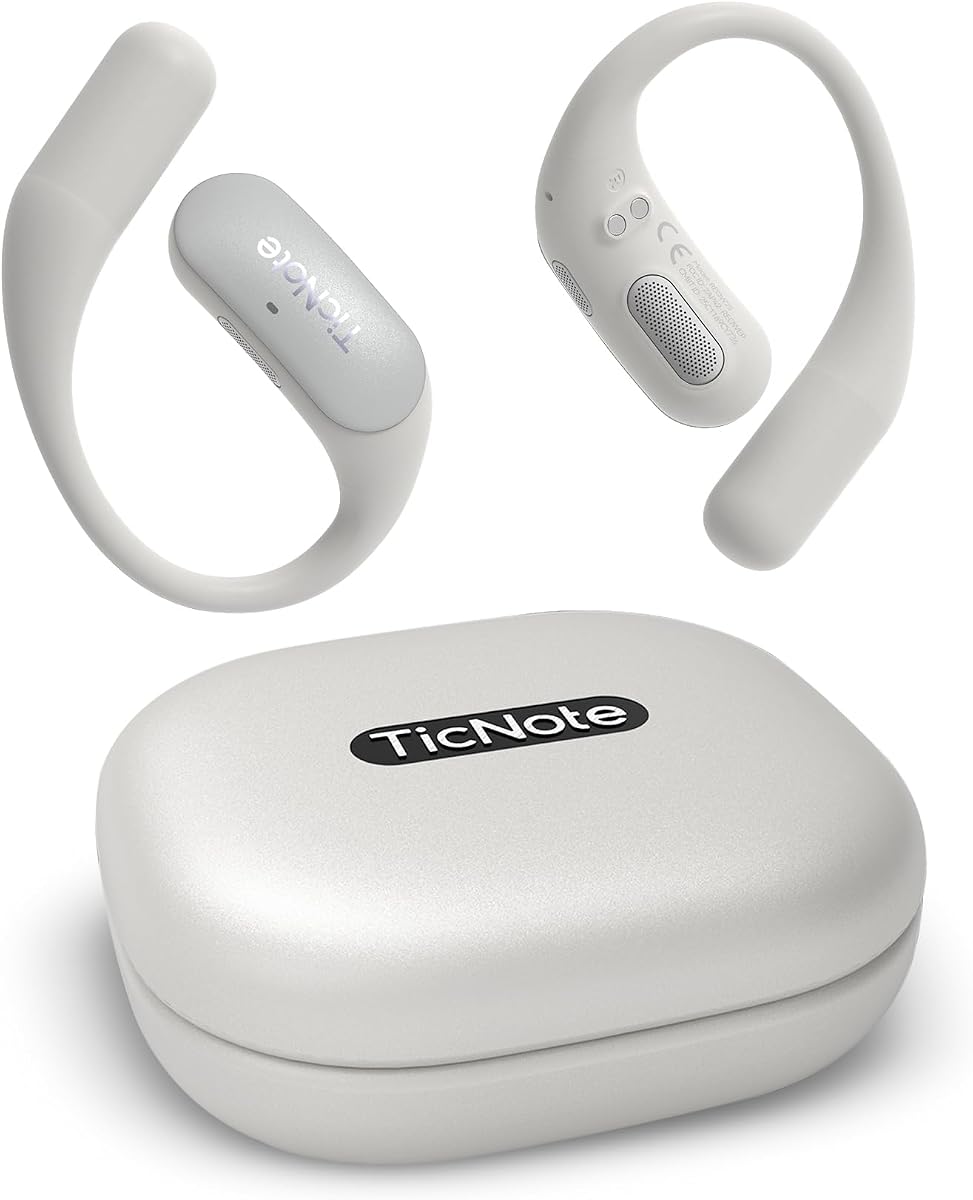
Mobvoi TicNote Pods is a wearable voice recorder designed for team collaboration with encrypted cloud storage and shared access. It receives solid ratings for its ability to keep teams aligned on outcomes and follow-up tasks automatically.
We may earn a commission when you buy through this link, at no additional cost to you.
The built-in Shadow AI organizes information into useful outputs for work and collaboration. It supports over one hundred twenty languages making it ideal for multilingual teams and cross-border meetings.
Battery life is short at five hours which limits usage for all-day conferences without frequent recharging. The device relies on Wi-Fi for most features which may be a constraint in low coverage areas.
This device is best for teams that prioritize shared notes and version history in a collaborative workspace. It suits office workers and project managers who need seamless integration and team-wide access.
Share notes and recordings via TicNote Cloud so your team stays aligned on next steps easily.
Shadow AI helps organize data into structured formats for easier collaboration and follow-up workflows.
We may earn a commission when you buy through this link, at no additional cost to you.
Comulytic Note Pro offers another variation focused on efficiency and strong privacy standards for daily professional use. Its rating reflects a solid balance of performance and affordability for those needing dependable transcription tools.
We may earn a commission when you buy through this link, at no additional cost to you.
The device supports over one hundred thirteen languages and includes a vertical knowledge base for professional terms. Battery life is robust at forty five hours of continuous recording which covers almost any workweek without charging.
While premium features require a subscription the core unlimited transcription and summaries remain free and useful. Wi-Fi sync ensures your data is backed up quickly without interrupting your recording session.
This device is ideal for professionals seeking a reliable and efficient tool for daily meetings. We recommend it for anyone who values battery life and data privacy in a budget friendly device.
The knowledge base captures industry specific terms like finance or law for more accurate transcripts.
Your data is encrypted and protected under CCPA ensuring full control and legal compliance for your info.
We may earn a commission when you buy through this link, at no additional cost to you.
Selecting the right AI transcription device requires balancing features like battery life, privacy, and language support to match your workflow needs.
Look for devices that advertise 98% or higher accuracy and support for multiple accents. High accuracy ensures you spend less time correcting errors and more time acting on insights.
Prioritize models with specialized knowledge bases if you work in technical industries like law or finance.
Battery performance ranges from five hours to seventy hours depending on the model. If you attend long conferences travel often choose a device with at least thirty hours of recording time.
A long standby time is also useful so you do not lose charge between infrequent meetings.
For sensitive business or medical data check for encryption standards like AES and compliance with laws like HIPAA or CCPA. Ensure that processing happens locally or requires your explicit authorization.
Choose devices that offer end-to-end encryption and do not use your data for AI training unless you consent.
If you work with international teams ensure the device supports transcription in your required languages. Some models offer up to one hundred fifty languages while others focus on major ones only.
Real-time translation features can also help when participating in multilingual discussions directly.
Wi-Fi sync is generally faster than Bluetooth for uploading recordings to the cloud. Some devices require an internet connection for full AI functionality while others work offline.
Choose a connectivity model that fits your office environment and travel habits for best results.
A robust app or desktop software makes it easier to manage and export your recordings. Look for features like summaries, action items, and calendar sync to enhance productivity.
Devices that allow collaboration and version history are essential for team workflows.
Some devices offer unlimited free transcription while others require a subscription for advanced features. Consider the long term cost of subscriptions versus the included free tiers.
Evaluate if the core features meet your needs before paying for premium plans.
Slim and lightweight devices are easier to carry and less noticeable during meetings. MagSafe compatibility or magnetic accessories can improve hands-free usage on your phone.
Ensure the device fits comfortably in your pocket or bag for daily convenience.
Always obtain consent from all participants before recording a meeting to comply with privacy laws. Most devices have a visible recording indicator to inform others you are capturing audio.
Place the device centrally or attach it to your phone to capture audio clearly. Avoid placing it near loud vents or speakers to reduce background noise.
Regularly update the device firmware and app to ensure best performance and security. Clean the exterior with a soft cloth and avoid exposing it to moisture or extreme temperatures.
Yes they are legal but you must obtain consent from all parties involved. Laws vary by region but most places require one party or all party consent.
Some devices support offline transcription but features vary. Check the specific product details for offline capabilities before purchase.
Most devices claim 98% accuracy but it depends on audio quality. Clear recordings with distinct speakers yield better summaries.
Many devices offer free basic transcription but advanced features may require a plan. Always review the included starter plan details first.
Yes most devices allow exporting files to text or audio formats. Check the app settings to find export options.
If the device relies on the internet some features may pause. Offline capable devices will continue recording locally until synced.
Most are not designed for water exposure so handle them with care. Keep them dry to protect the electronics and microphones.
Charging times vary from ninety minutes to several hours. Plan charging sessions during downtime or use power banks for travel.
We highlighted top picks like the Plaud Note Pro for overall excellence and the AI Voice Recorder Lite for budget value. Each device offers unique strengths to match different professional needs and workflows.
When choosing prioritize factors such as privacy compliance, battery life, and language support. Ensure the device fits seamlessly into your daily routine for maximum productivity.
Remember that technology evolves quickly so verify current specs and pricing before buying. A reliable transcription tool can significantly boost efficiency and help you never miss a detail again.