
Anker 2.4G Wireless Ergonomic Mouse
4.2Editor score
Vertical handshake design
Adjustable DPI settings
Wireless USB receiver
This guide compares the top ten ergonomic mice for wrist pain based on design, comfort, and features to help you find the perfect device for your needs.
Working long hours at a desk can lead to significant wrist strain and discomfort. Ergonomic mice are designed to keep your hand in a natural position, reducing stress on your joints and muscles throughout the day.
We evaluated ten top-rated vertical and ergonomic mice based on user feedback, design features, and performance capabilities. Our goal was to identify devices that genuinely alleviate pain while maintaining productivity and ease of use.
Each selection highlights specific benefits like silent clicks, wireless connectivity, and adjustable sensitivity. Please note that product availability and pricing may fluctuate over time, so verify details before making your final purchase decision.
4.2Editor score

4.4Editor score

4.4Editor score
The following table provides a side-by-side comparison of all ten selected mice, highlighting their key specifications and unique selling points to help you make an informed decision.




The Logitech Lift Vertical stands out as a top choice for users seeking relief from wrist strain. With its 57-degree vertical angle, it promotes a natural handshake position that reduces forearm twist and pressure on the wrist.
We may earn a commission when you buy through this link, at no additional cost to you.
This mouse features a softly textured grip and a snug thumb rest that provide day-long comfort during extended use. Its SmartWheel ensures smooth scrolling while whisper-quiet clicks keep your workspace peaceful and distraction free.
While the price is higher than some competitors, the build quality and ergonomic certification justify the investment. The multi-device connectivity allows seamless switching between computers via Bluetooth or Logi Bolt USB receiver.
Anyone spending hours at a computer should consider this model for its ability to maintain productivity without compromising wrist health. It is an excellent option for both home offices and professional workstations.
The vertical design aligns the wrist naturally, minimizing muscle strain compared to traditional horizontal mice.
Connect to up to two devices easily using Bluetooth Low Energy or the Logi Bolt USB receiver for versatile use.
We may earn a commission when you buy through this link, at no additional cost to you.
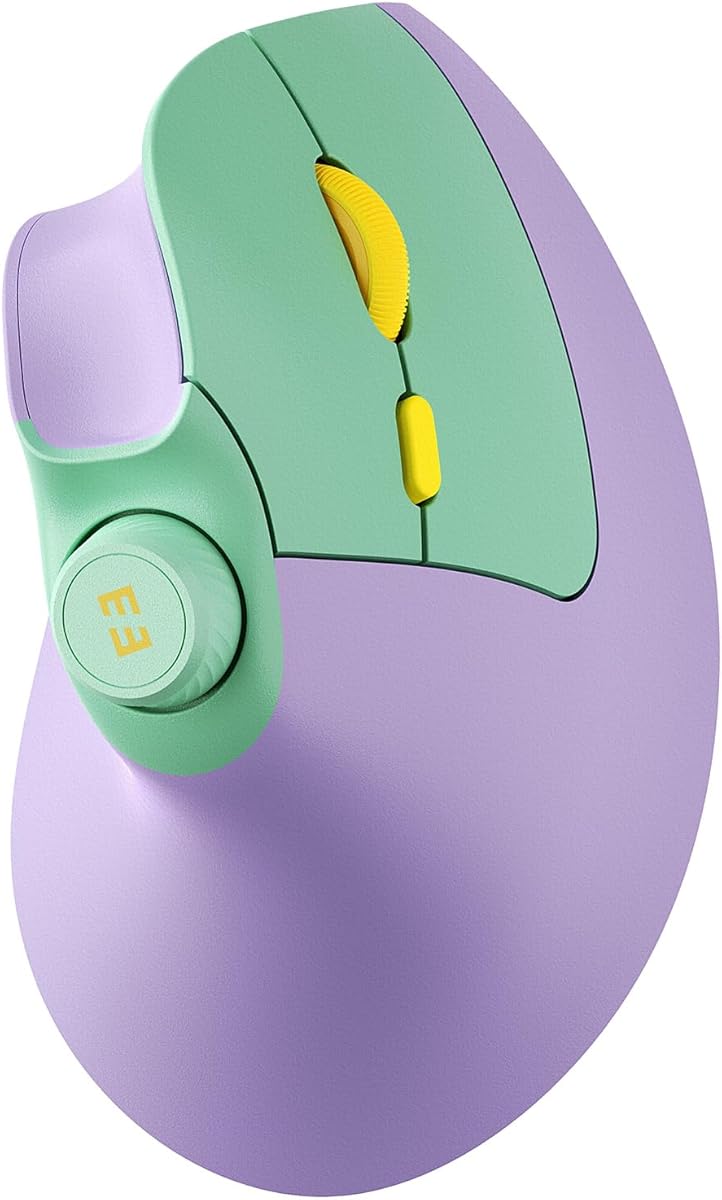
The Anker 2.4G Wireless Ergonomic Mouse offers an accessible entry point for those new to vertical mice. Its ergonomic structure encourages a healthy neutral handshake position to reduce strain and amplify productivity.
We may earn a commission when you buy through this link, at no additional cost to you.
Featuring 800 to 1600 DPI resolution optical tracking, this device ensures smooth and precise cursor movement across various surfaces. It includes next and previous buttons for efficient web browsing and everyday tasks.
Although the click sounds are unavoidable and batteries are not included, the power-saving mode extends usage significantly. This makes it a practical choice for budget-conscious users looking for immediate relief from wrist discomfort.
Ideal for students and office workers, this mouse balances cost with functionality. It is a reliable tool for maintaining comfort during long hours of computer usage.
The scientifically designed structure promotes a natural wrist position that minimizes repetitive strain injuries over time.
With adjustable DPI settings, you can switch between precision editing and fast browsing with ease.
We may earn a commission when you buy through this link, at no additional cost to you.
The TECKNET Ergonomic Mouse is engineered for users who value a quiet workspace. Its nearly silent click technology helps avoid disturbances in libraries or open offices while maintaining high performance.
We may earn a commission when you buy through this link, at no additional cost to you.
With 4800 DPI and six adjustable levels, this mouse adapts to different tasks from detailed work to fast scrolling. The Bluetooth and USB modes offer flexibility for connecting up to three devices seamlessly.
While side buttons may have limited compatibility with macOS and batteries are not included, the low power consumption ensures long usage between changes. The deep sleep mode further conserves energy during inactivity.
This model is perfect for multitaskers who need silent operation without sacrificing speed. It provides a reliable solution for reducing wrist pain in shared environments.
Enjoy almost silent left and right clicks that ensure your work remains undisturbed in quiet settings.
Experience smooth cursor movement with high precision optics that work well on various desk surfaces.
We may earn a commission when you buy through this link, at no additional cost to you.
The UGREEN Ergonomic Wireless Mouse combines a natural vertical design with smooth tracking capabilities. It features quiet-click buttons that help keep your workspace peaceful while you browse and work.
We may earn a commission when you buy through this link, at no additional cost to you.
Built with durable PTFE glide feet, this mouse ensures effortless movement and reduced surface friction. The four adjustable DPI levels allow you to match sensitivity for precise document editing or fast gaming.
Although it requires an AA battery and is designed for right-handed users, the dual wireless connection supports up to three devices. This makes it versatile for laptops, desktops, and tablets alike.
Ideal for users seeking comfort and quiet, this mouse balances affordability with functionality. It is a strong contender for those who want reliable performance without disturbing others.
The Teflon glide pads ensure smooth tracking that reduces wear on your mouse pad and improves speed.
Switch between Bluetooth and 2.4G wireless effortlessly to match your workflow needs.
We may earn a commission when you buy through this link, at no additional cost to you.
The ProtoArc EM11 NL is designed specifically for small to medium hands seeking ergonomic relief. Its rechargeable battery eliminates the need for disposable batteries while keeping your wrist naturally straight.
We may earn a commission when you buy through this link, at no additional cost to you.
With 1000 to 2400 DPI levels, it offers higher sensitivity than standard optical mice for precise tracking. The vertical design puts your forearm in a relaxed position reducing discomfort and risk of strain injuries.
While the learning curve may take a few weeks to master, users find significant improvements in comfort over time. It supports dual Bluetooth and USB connectivity for seamless multi-device use.
This mouse is perfect for users with smaller hands who want a rechargeable option. It offers a sustainable and effective solution for reducing wrist pain during daily tasks.
Avoid battery waste with a built-in Li-Ion battery that charges via the included Type-C cable.
The smaller form factor ensures a perfect fit for hands under seven and a half inches.
We may earn a commission when you buy through this link, at no additional cost to you.
The Lekvey Ergonomic Mouse encourages healthy neutral handshake positions for smoother movement and less overall strain. Many users find it reduces wrist pain significantly after a short adjustment period.
We may earn a commission when you buy through this link, at no additional cost to you.
With a high-capacity rechargeable battery, this device offers over 150 hours of continuous use. The page back and forward buttons enhance productivity, while the three DPI levels allow for versatile sensitivity.
Although it lacks Bluetooth and is recommended for medium to large hands, the plug-and-play simplicity makes it easy to set up. The USB receiver stores inside the mouse for easy portability.
This mouse is ideal for users seeking a reliable rechargeable option with simple setup. It is a solid choice for reducing discomfort during long work sessions.
Enjoy extended usage on a single charge with a battery that supports over 150 hours of continuous use.
No drivers or pairing required—just plug the receiver in and start using the mouse immediately.
We may earn a commission when you buy through this link, at no additional cost to you.
The TECKNET Ergonomic Mouse supports versatile connectivity options for simple pairing and fast switching. Its 52-degree vertical angle promotes a relaxed handshake grip that reduces strain on your forearm.
We may earn a commission when you buy through this link, at no additional cost to you.
Ditching disposable batteries, the 600mAh rechargeable battery offers up to two months of use. The silent click technology reduces noise by 99% which is perfect for libraries or open offices.
While back buttons may not work on Mac, the six adjustable DPI levels allow precision for any task. The durable build withstands millions of clicks ensuring long-term reliability.
This model is perfect for professionals who need efficiency and quiet. It offers a versatile solution for reducing wrist pain across various devices.
The rechargeable battery eliminates the need for extra disposable batteries saving you money and effort.
The 52-degree angle is designed to fit medium hands like a glove promoting a natural posture.
We may earn a commission when you buy through this link, at no additional cost to you.
The seenda MOU-302 features a unique built-in volume control for direct media adjustments. This promotes a natural handshake grip that keeps your wrist and forearm in a neutral line.
We may earn a commission when you buy through this link, at no additional cost to you.
With up to 2 months of battery life and silent clicks, this mouse suits quiet environments and busy workflows. The adjustable DPI ensures smooth control while the three-device connectivity supports multitasking.
Although the specific design may not suit everyone, the universal compatibility with Windows and macOS makes it versatile. It is an excellent choice for streamers and remote workers needing quick control.
This mouse offers convenience and ergonomic relief in one package. It is a strong contender for users who value media shortcuts and quiet operation.
Adjust music volume directly from the mouse to boost efficiency without switching windows.
Noiseless clicks prevent distractions ensuring a focused environment for work and study.
We may earn a commission when you buy through this link, at no additional cost to you.
The Logitech MX Vertical features a unique 57-degree vertical angle to reduce pressure on your wrist. Its natural handshake position reduces muscular activity by 10 percent without losing overall performance.
We may earn a commission when you buy through this link, at no additional cost to you.
The 4000 DPI high-precision sensor results in less hand movement to reduce fatigue. The textured rubber surface assures a natural grip while the cursor speed switch allows instant adjustments.
While the price is higher, the design is tested and approved by leading ergonomists for improved posture. This makes it a top choice for users who prioritize quality and long-term health.
Ideal for professionals seeking the best in ergonomic technology, this mouse offers superior comfort and precision. It is an investment in your wrist health and daily productivity.
The advanced optical sensor ensures accurate cursor movement with less hand effort.
Shaped for the human hand, it fits a variety of sizes and provides a stable grip.
We may earn a commission when you buy through this link, at no additional cost to you.
The TECKNET 2.4G Wireless Ergonomic Vertical Mouse features a scientific 60-degree vertical grip to reduce strain. The forearm stays straight and muscles relax as you reach forward naturally.
We may earn a commission when you buy through this link, at no additional cost to you.
With six programmable buttons and five adjustable DPI levels, it speeds up workflow. Thumb shortcuts reduce repetitive click fatigue while silent buttons ensure a quiet workspace.
Although it only connects via USB receiver, the reliable interference-free connection ensures smooth performance. The rechargeable design adds convenience while avoiding constant battery changes.
This model is ideal for users seeking a balance of features and comfort. It provides a practical solution for reducing wrist pain without extra cost.
Thumb shortcuts and adjustable DPI allow you to switch between tasks quickly.
The 60-degree grip aligns the wrist to reduce twisting and pressure over time.
We may earn a commission when you buy through this link, at no additional cost to you.
Selecting the right ergonomic mouse involves considering several key factors that impact comfort and functionality. Understanding these elements helps you choose a device that fits your needs.
Vertical mice are designed to place your hand in a natural handshake position which reduces wrist rotation and strain. Look for angles between 57 and 60 degrees as these are clinically proven to reduce muscle activity.
Ensure the shape fits your hand size comfortably to maintain long-term usability.
Most modern ergonomic mice offer wireless connectivity via Bluetooth or a USB receiver. Bluetooth is ideal for laptops and devices with limited ports while a receiver ensures stable performance.
Consider models that support multi-device switching if you work across multiple computers.
A high-quality sensor ensures smooth cursor tracking across different surfaces. Look for adjustable DPI levels to adapt sensitivity based on whether you are browsing or editing documents.
Higher DPI is beneficial for large monitors and precision work.
Ergonomic mice often include side buttons for page navigation or shortcuts. Programmable buttons can significantly improve workflow efficiency and reduce repetitive clicking.
Check compatibility with your operating system for full functionality.
Many ergonomic mice are rechargeable via USB-C which is environmentally friendly and cost-effective. Others use AAA batteries but feature deep sleep modes to extend usage.
Evaluate battery life to ensure uninterrupted work sessions.
Ergonomic mice come in various sizes tailored for small medium or large hands. Choosing the wrong size can negate ergonomic benefits and cause further discomfort.
Measure your hand length before purchasing to ensure a proper fit.
Durable materials and textured grips enhance comfort and longevity. Look for models with high-quality plastics or rubberized surfaces for better control.
Strong build quality ensures the mouse withstands daily use.
A solid warranty provides peace of mind and reflects manufacturer confidence. Many brands offer one to three-year warranties for their ergonomic products.
Good customer support ensures quick resolution of any technical issues.
To get the most out of your ergonomic mouse, allow yourself a transition period. The vertical design may feel unusual initially but consistency helps your body adapt to the neutral posture within a few weeks.
Keep the mouse and surface clean to ensure smooth tracking. Wipe the glide feet and sensor lens periodically with a soft cloth to maintain performance and hygiene.
Adjust your desk height and monitor position alongside the mouse to promote overall ergonomic posture. Your elbow should be at a ninety-degree angle and your wrist straight to minimize strain.
Vertical mice are designed to keep the wrist in a neutral position which can reduce pressure on the median nerve. While they are not a cure, many users find relief from carpal tunnel symptoms when switching to these devices.
Most users adapt to the shape and functionality within one to three weeks. It is common to feel some initial discomfort as your muscles adjust to the new grip but patience leads to improved comfort.
Most vertical ergonomic mice are designed for right-handed use due to thumb button placement. However some models offer symmetrical designs or ambidextrous features that work for both hand preferences.
Many modern optical sensors track well on glass but it depends on the specific model. Look for mice with advanced tracking technology or use a mouse pad for consistent performance.
Ergonomic mice can be used for casual gaming but may lack the precision required for competitive play. High DPI models with adjustable settings provide a good balance between comfort and performance.
Initial discomfort often results from muscle adjustment as your arm and wrist align differently. Ensure you are not gripping the mouse too tightly and give yourself time to adapt to the new posture.
Yes many modern ergonomic mice feature built-in rechargeable batteries via USB-C. This eliminates the need for disposable batteries and ensures long usage between charges.
Many top models support multi-device connectivity allowing you to switch between computers seamlessly. Check the specifications for Bluetooth pairing limits to ensure it meets your needs.
The ten mice reviewed in this guide offer a wide range of options for users seeking relief from wrist pain. From the budget-friendly Anker to the premium Logitech MX Vertical each device brings unique benefits to your desk setup.
When choosing a model prioritize factors like vertical angle, battery life, and connectivity to ensure long-term satisfaction. A mouse that fits your hand and workflow is essential for reducing strain and maintaining productivity.
Remember that product availability and details may change over time so check current listings before purchasing. Investing in the right ergonomic mouse is a crucial step toward better wrist health and daily comfort.