
Air Mouse Remote MX3 Pro
3.8Editor score
Plug and Play 2.4G
Mini Keyboard Backside
5 Key IR Learning
This guide compares the top Air Mouse for Android TV Box models to help you find the best wireless remote with keyboard and voice control features for your
Finding the right Air Mouse for Android TV Box can transform how you interact with your smart entertainment system. A good model offers precise cursor control, easy typing, and seamless navigation without the limitations of a standard remote.
We evaluated ten top-rated options based on connectivity, build quality, and feature sets. Each product was analyzed for its compatibility with Android TV, voice assistant support, and overall ease of use in various home environments.
Each pick below highlights key strengths and specific use cases. Note that pricing and availability change frequently, so verify current deals before purchasing. Our goal is to simplify your choice with clear, expert insights.
3.8Editor score

4.5Editor score
4.3Editor score
This table provides a side-by-side overview of the ten selected air mouse remotes. It highlights key specifications like connectivity type, battery power, and unique features to help you compare at a glance.


This remote stands out as a top contender for Android TV users. With a 4.5 rating, it balances advanced features with ease of use. The dual wireless modes offer flexibility that many competitors lack.
We may earn a commission when you buy through this link, at no additional cost to you.
The IR learning capability is comprehensive, allowing you to control your TV and other devices from one unit. The 6-axis gyroscope ensures smooth cursor movement, making navigation intuitive. Voice search functionality works well within supported apps.
While it lacks compatibility with Fire Stick, its support for most Android boxes is robust. The electronic manual on the back is a unique touch that aids setup. Some users may need to update firmware for PC use.
If you want a versatile remote that adapts to your setup, this is an excellent choice. It simplifies control without sacrificing functionality. The build quality and feature set justify its position as a top pick.
You can switch between Bluetooth and 2.4G RF depending on your device needs. This ensures stable connectivity across different types of media players and smart TVs.
The remote allows IR learning on all buttons. This means you can control your TV and the box simultaneously, reducing the need for multiple remotes.
We may earn a commission when you buy through this link, at no additional cost to you.
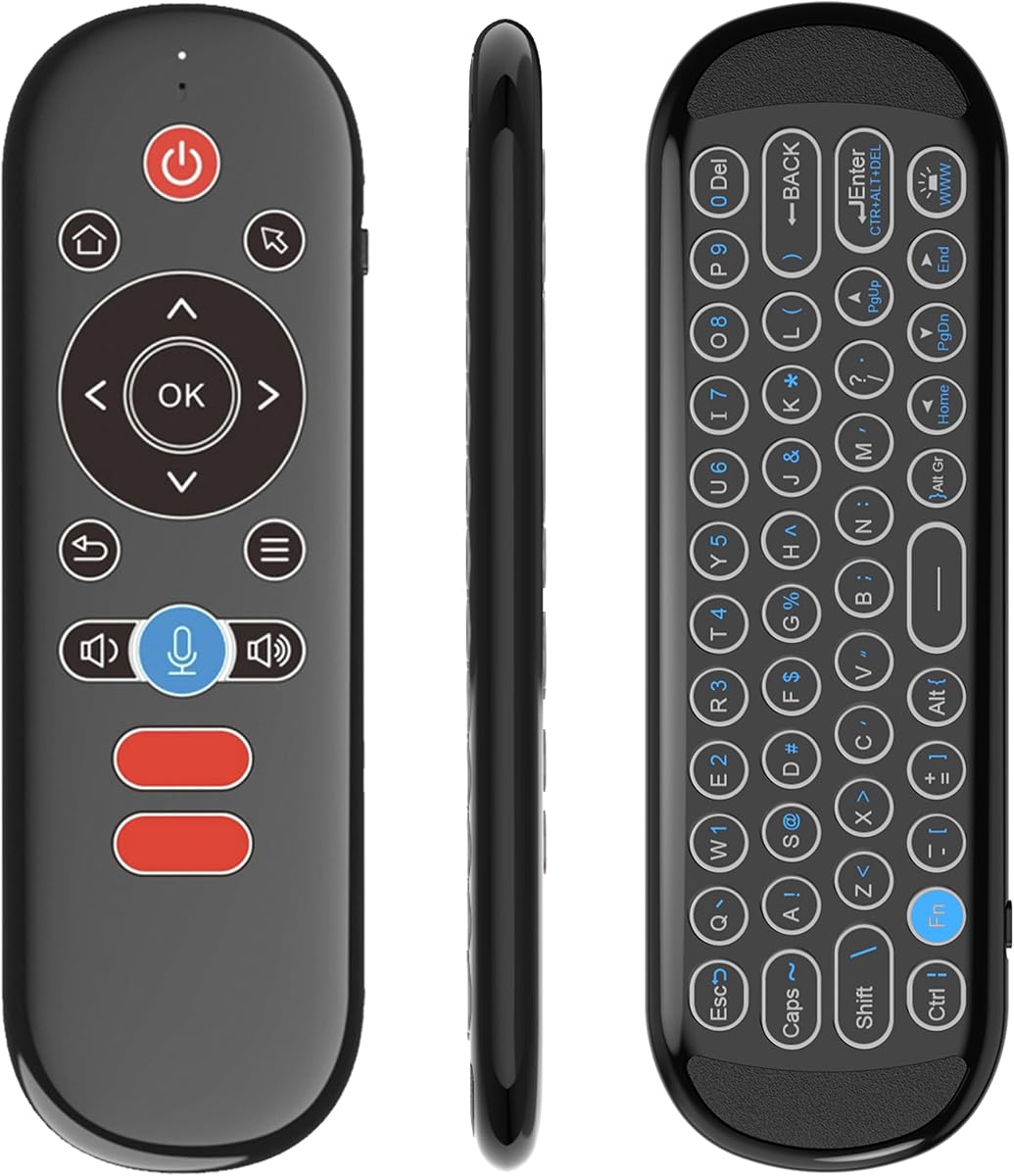
For budget-conscious buyers, this MX3 Pro offers essential features without breaking the bank. It provides basic air mouse functionality and a mini keyboard for text entry. The 2.4G connection ensures quick response times.
We may earn a commission when you buy through this link, at no additional cost to you.
The built-in 6-axis somatosensory sensor allows for cursor control via wrist movement. It is ideal for those who want to search and type easily on their TV. The IR learning covers five keys, enough for basic TV control.
The main trade-off is the limited IR learning compared to higher-end models. Some users report connectivity issues if the USB receiver is placed incorrectly. However, the value proposition remains strong for simple setups.
Choose this if you need a functional remote at a low cost. It covers the basics well and works across many Android boxes. The mini keyboard adds convenience that many cheaper remotes lack.
The remote works immediately after plugging in the USB receiver. No drivers are needed, making it a straightforward solution for most users.
The mini keyboard on the back allows for quick typing. This is useful for entering passwords or searching for content without a physical keyboard.
We may earn a commission when you buy through this link, at no additional cost to you.
This model is designed for users who want premium features like a rechargeable battery and backlighting. The 7-color backlight helps when typing in low light. It supports both Bluetooth and 2.4G modes.
We may earn a commission when you buy through this link, at no additional cost to you.
The 6-axis gyro ensures precise cursor movement. Voice control adds another layer of convenience for searching content. The IR learning function supports 100% of functions from your existing remotes.
The rechargeable battery is a significant plus for long-term use. It eliminates the need for frequent AAA battery replacements. However, the price is higher than basic models.
For a high-end experience, this remote delivers quality and versatility. It fits well in modern living rooms and gaming setups. The backlight and charging capability make it a standout choice.
The 7-color backlight allows you to see keys in the dark. This is particularly useful for night-time browsing or gaming sessions.
It can store all IR functions from other remotes. This allows you to replace multiple remotes with a single universal device.
We may earn a commission when you buy through this link, at no additional cost to you.
This remote focuses on voice capabilities and dual firmware support. It works with devices like TCL Smart TVs and Shield TV in BT mode. The IR learning covers almost all buttons for universal control.
We may earn a commission when you buy through this link, at no additional cost to you.
The built-in voice assistant helps search programs easily. The 6-axis gyroscope provides accurate pointing. It comes with a USB receiver for plug-and-play setup in 2.4G mode.
You must note that it is not compatible with Fire Stick or Roku. The battery requirement is a downside compared to rechargeable units. However, the range and stability are excellent for most setups.
If voice control is a priority, this model performs well. The dual firmware allows flexibility for PC users. It is a reliable choice for Android TV and ATV devices.
Voice commands work in supported apps for smooth control. This reduces the need to type out search queries manually on the TV.
You can switch to PC mode to use it on computers. This dual purpose makes it more versatile than a standard TV remote.
We may earn a commission when you buy through this link, at no additional cost to you.
This remote works across Android, Windows, Mac, and Linux. It supports 2.4G RF technology for quick connection. The 17 keys include volume and navigation controls for ease of use.
We may earn a commission when you buy through this link, at no additional cost to you.
Voice input allows chat or text entry via microphone. The 6-axis gyroscope helps detect direction changes for mouse control. It is suitable for PCs and projectors alike.
The voice search is limited to built-in boxes. This may restrict utility compared to full voice assistants. The connection is stable though, which is key for media control.
Choose this for its broad OS compatibility. It fits well in a home office or living room. The multi-platform support is rare in budget remotes.
It supports Linux, Android, Windows, and Mac OS. This makes it adaptable for various devices beyond just a TV box.
The 3-in-1 design covers air mouse and IR functions. This reduces the clutter of needing separate remotes for different devices.
We may earn a commission when you buy through this link, at no additional cost to you.
This remote is designed to be small and portable. It features a 6-axis gyroscope for precise cursor control. The RGB backlight aids visibility in dark settings.
We may earn a commission when you buy through this link, at no additional cost to you.
It pairs via Bluetooth or 2.4G. The Type-C charging means no batteries are needed. One IR key is available for basic TV control.
The limited IR learning is a trade-off for size. Some users may find the build lighter than expected. However, it works well for laptops and Android boxes.
It is ideal for travel or tight spaces. The rechargeable battery adds value over time. For a portable media remote, this fits the bill.
The Type-C port allows easy charging without batteries. This reduces waste and cost over the life of the device.
The vibrant RGB backlight helps with key visibility. You can cycle colors or turn it off as needed.
We may earn a commission when you buy through this link, at no additional cost to you.
This model combines a mini keyboard with an air mouse. It supports 2.4G wireless connection. The 3-axis gyro and 3-axis sensor allow for accurate movement.
We may earn a commission when you buy through this link, at no additional cost to you.
You can learn up to 5 keys from your TV remote. The 10 meter range is useful for larger rooms. It works with IPTV and set-top boxes well.
The lack of voice is a minor drawback. The design is straightforward without extra flair. However, the typing experience is functional for most users.
Choose this for solid typing and cursor control. It is a reliable remote for media centers. The range and compatibility support many home setups.
Motion sensor allows mouse control by waving. This provides a more intuitive experience than traditional navigation.
The mini keyboard makes it easy to input text. It works well for search bars or messaging apps.
We may earn a commission when you buy through this link, at no additional cost to you.
This MX3 Pro features a dual-faced backlight for typing in dark. It uses 2.4GHz RF technology for stable connection. There are 38 keys for comprehensive input options.
We may earn a commission when you buy through this link, at no additional cost to you.
The LED backlight is useful at night. It supports Windows, Android, and Mac OS. Five keys can be programmed for IR learning.
You must note that batteries are not included. Some keys might not work on specific devices. The build is solid though for daily use.
It is great for those who type often. The backlight adds value to the typing experience. Consider this for a functional home theater setup.
The LED backlight helps you see keys clearly. This is especially useful in low-light environments.
It supports Windows, Android, Mac, and Linux. This versatility makes it suitable for various devices.
We may earn a commission when you buy through this link, at no additional cost to you.
This remote features a single-sided layout for simplicity. It includes a gyroscope core with anti-tremor compensation. The buttons are designed to be wear-resistant.
We may earn a commission when you buy through this link, at no additional cost to you.
The Bluetooth pairing requires holding specific buttons. It is ideal for Android systems. The design ensures stable cursor movement without shaking.
It lacks a USB receiver option. This may limit compatibility with some TVs. The focus is on clean, wireless control.
For Android users seeking simplicity, this is a strong option. The anti-tremor feature is a nice touch. It reduces clutter in your hand.
The gyroscope helps identify gestures accurately. This makes the cursor feel more stable and responsive.
The design is simple and easy to handle. This avoids the complexity of dual-sided keyboards.
We may earn a commission when you buy through this link, at no additional cost to you.
This remote works with Android, Windows, Linux, and Mac. It features a 6-axis motion sensor for navigation. The mini keyboard helps with searching efficiently.
We may earn a commission when you buy through this link, at no additional cost to you.
You must learn the power key to turn on/off devices. The 10 meter range works well for most rooms. The return policy offers peace of mind.
The lack of voice is expected at this price. The motion sensor supports horizontal and vertical operation. It is a solid general-purpose remote.
Select this if you need broad device support. It handles Xbox and Raspberry Pi well. The learning feature ensures basic TV control.
It works across many systems like Android and Xbox. This flexibility makes it a good general purpose remote.
The 3-Gyro and sensor help operate easily. You can switch between modes as needed for games or typing.
We may earn a commission when you buy through this link, at no additional cost to you.
Choosing the right air mouse involves considering connectivity, battery life, and additional features. This guide breaks down the key factors to help you make an informed decision.
Air mice typically use 2.4G RF or Bluetooth. RF is simpler to set up, while Bluetooth offers a wider range of compatible devices. If you need to switch between PC and TV, look for dual-mode options.
Verify which connection type your device supports before purchasing. Most Android boxes accept 2.4G with a USB receiver, while some modern TVs prefer Bluetooth.
A built-in 6-axis gyroscope allows for precise cursor control via wrist movement. This is essential for navigating menus without a physical mouse. Check if the remote supports both horizontal and vertical modes.
Look for terms like motion sensor or gyrosensor in the specs. High-quality sensors reduce lag and make navigation feel natural.
Many air mice include a mini keyboard for typing passwords or search terms. Consider whether you need backlit keys for low-light use. A QWERTY layout is standard, but some models have fewer keys.
Backlit keys add value for evening use. Ensure the keyboard is easy to access and does not make the remote too bulky for one-hand use.
IR learning allows you to control other devices like TVs or soundbars. Some remotes allow all buttons to be programmed, while others limit this to a few keys. This is crucial for a single remote solution.
Check how many keys can be learned. If you want to replace multiple remotes, ensure the IR function is comprehensive enough for your needs.
Voice control lets you search for content using your voice. Support varies by model, with some working on specific apps or OS versions. It adds convenience for long searches without typing.
Confirm voice compatibility with your devices. Some remotes work with Google Assistant while others have proprietary systems. Ensure it fits your ecosystem.
Some remotes use AAA batteries, while others are rechargeable via USB-C. Rechargeable options are more environmentally friendly and cost-effective long-term. However, battery types are easier to replace instantly.
Consider your usage habits. If you use it daily, rechargeable is better. If you use it sparingly, AAA batteries may suffice.
Not all remotes work with every device. Some exclude Fire Stick or Roku, while others work with Windows and Mac. Always check the compatibility list to avoid issues.
Read the fine print for exceptions. If you have a mixed ecosystem of devices, ensure the remote supports all of them.
Battery life impacts how often you need to charge or replace batteries. Look for specs indicating hours of usage. Long-lasting batteries reduce interruptions during entertainment sessions.
Rechargeable models often offer 50 hours of use. Battery models depend on quality. Check reviews for real-world endurance.
To start using your air mouse, plug in the USB receiver and insert batteries or charge the device. If your TV has Bluetooth, pair it through the settings menu for wireless operation.
Gently wave your wrist to move the cursor on the screen. The 6-axis sensor detects movement, so avoid jerky motions to maintain precision. Use the keyboard on the back for typing text when searching.
Keep the remote away from water and excessive heat. Clean the keys with a soft cloth to prevent dust buildup. If you have a rechargeable model, avoid letting the battery drain completely to extend its life.
Most standard air mice do not support Fire Stick due to proprietary software. You need a Fire TV specific remote or a compatible third-party option. Always check the product's compatibility list before buying.
IR learning allows the remote to mimic signals from other remotes. You point your original remote at the air mouse to program specific buttons like power or volume. This creates a universal control experience.
To pair, enter pairing mode usually by holding specific buttons for a few seconds. Then go to your device's Bluetooth settings and select the remote. It should connect automatically once selected.
If you use 2.4G RF, a USB receiver is required. For Bluetooth models, no receiver is needed. Check the specs to see which type of connectivity the remote uses.
Many air mice support Windows and Mac. Some require switching modes via a button combination. Ensure the remote mentions PC support in the specs for guaranteed compatibility.
Jittery cursor often stems from low battery or interference. Try replacing batteries or recharging the device. Ensure there are no obstructions between the receiver and the remote.
Voice search usually works within supported apps like YouTube or Netflix. It may not work in all systems or games. Verify app compatibility before purchase.
Rechargeable models last 30 to 50 hours on a single charge. Battery models depend on usage but generally last several weeks. Always check the battery life claim in the product specs.
Our top picks include the BOXPUT Android Universal Remote for versatility and the MX3 Pro for budget buyers. Each option offers distinct strengths depending on your needs.
Prioritize compatibility and connectivity features when choosing. Ensure the remote supports your devices and has the controls you need, like voice or backlighting.
Remember that prices fluctuate, so check current deals before buying. These remotes provide the convenience of navigating with ease. Choose the one that fits your setup best.