
Cudy R700
4.4Editor score
OpenWRT ready enterprise control
Five gigabit ports included
Automatic failover support
This guide compares the top ten load balancing routers for businesses and homes, evaluating WAN port counts, security features, VPN support, and network
Choosing the right load balancing router is crucial for maintaining stable internet connectivity across multiple WAN connections. These devices distribute traffic efficiently, ensuring optimal bandwidth usage and preventing network bottlenecks during peak hours.
We evaluated ten leading models based on port configurations, security protocols, and management capabilities. Each product offers unique strengths for small offices, remote teams, or advanced home labs seeking reliable network redundancy.
Every selection highlights specific use cases, from budget-friendly setups to enterprise-grade solutions. Note that availability and pricing fluctuate frequently, so verify current details before purchasing to ensure you get the best value.
4.4Editor score

4.5Editor score

4.0Editor score
This side-by-side comparison highlights key specifications across all ten selected routers, focusing on WAN capabilities, security features, and management options to help you find the ideal match for your network needs.




The TP-Link ER7206 stands out as a top-tier choice for businesses requiring advanced network control. With a rating of 4.5, this model delivers professional-grade features including multi-WAN support and deep integration with the Omada ecosystem.
We may earn a commission when you buy through this link, at no additional cost to you.
Its flexible port configuration allows up to four WAN connections, optimizing bandwidth across multiple ISPs. The integrated SDN platform provides centralized cloud management, making it ideal for multi-site deployments where remote oversight is essential.
While the cost is higher than entry-level options, the investment pays off through scalability and advanced security. The ability to support up to 700 clients ensures it remains reliable even as network demands grow over time.
This router is best suited for small to medium businesses needing robust connectivity and centralized control. If you require seamless integration with access points and switches, the ER7206 offers the most complete solution available today.
The Omada SDN platform enables administrators to manage entire networks from a single interface, reducing IT overhead significantly.
Advanced firewall policies and DoS defense protect sensitive data while maintaining high throughput for critical applications.
We may earn a commission when you buy through this link, at no additional cost to you.
The Cudy R700 delivers exceptional value for users seeking professional features without a high price tag. Rated 4.4, this router supports up to five ISPs with automatic failover, ensuring business continuity even if one connection drops.
We may earn a commission when you buy through this link, at no additional cost to you.
Its OpenWRT-ready design unlocks advanced customization, allowing tech-savvy users to implement VLAN segmentation and custom QoS policies. The complete VPN gateway suite supports protocols like WireGuard and OpenVPN for secure remote access.
While it lacks the polished ecosystem of larger brands, the R700 covers all essential needs for remote offices or home labs. The included diagnostic tools make troubleshooting straightforward without needing external software.
Choose this router if you need flexibility and affordability for a multi-WAN setup. It is an excellent starting point for those who want to learn network management without breaking the budget.
Instant traffic rerouting keeps operations online during outages, crucial for remote offices relying on stable internet.
Full OpenWRT support empowers users to tailor firewall rules and security policies to specific organizational needs.
We may earn a commission when you buy through this link, at no additional cost to you.
The Alta Labs Route10 targets advanced home and enterprise users needing next-generation wired performance. Rated 4.0, this router handles multi-gigabit workloads effortlessly thanks to a hardware-accelerated Qualcomm quad-core processor.
We may earn a commission when you buy through this link, at no additional cost to you.
Features like 10Gbps SFP+ ports and integrated PoE+ make it ideal for high-bandwidth environments. It manages traffic visibility with real-time stats, allowing administrators to optimize flow before bottlenecks occur.
While it requires separate access points for Wi-Fi coverage, the dedicated routing power ensures wired devices never face congestion. This focus on pure routing efficiency makes it unique compared to all-in-one consumer routers.
Invest in the Route10 if you prioritize speed and precision over convenience. It is the top choice for network enthusiasts or businesses running heavy data transfer tasks that demand stable throughput.
Specialized hardware handles VPN and firewall rules without slowing down 10Gbps data transfer speeds.
Power connected access points directly through the router, reducing cable clutter and external power needs.
We may earn a commission when you buy through this link, at no additional cost to you.
The Omada ER7412-M2 is designed for networks needing high throughput and flexible port options. With a 4.5 rating, it supports load balancing across up to eleven WAN ports, maximizing broadband utilization effectively.
We may earn a commission when you buy through this link, at no additional cost to you.
Its mix of 2.5G and Gigabit ports ensures compatibility with modern high-speed internet plans. Security is robust, including DPI and IPS/IDS features that protect against sophisticated online threats while maintaining performance.
The device integrates smoothly with other Omada hardware, creating a unified network environment. While setup can be intricate for beginners, the control it offers is unmatched for managed service providers or large offices.
Consider this model if you need a blend of speed and security in a scalable form. It excels in environments where multiple connections must be aggregated without sacrificing network safety.
Load balancing across multiple lines ensures you get the most value from every Mbps of internet service purchased.
Deep packet inspection monitors traffic patterns to block attacks before they reach your internal devices.
We may earn a commission when you buy through this link, at no additional cost to you.
The TP-Link ER605 offers a practical solution for small businesses needing reliable load balancing. Rated 4.4, it features five gigabit ports and supports up to three WAN connections for efficient bandwidth distribution.
We may earn a commission when you buy through this link, at no additional cost to you.
Its USB port allows mobile broadband backup, ensuring connectivity during ISP outages. The intuitive web interface simplifies management for teams without dedicated IT staff, saving time on maintenance tasks.
While it lacks the extreme scalability of premium models, it covers essential needs perfectly for most small offices. Security functions like DoS defense and IP filtering provide adequate protection against common online risks.
Select this router if you need a straightforward, affordable way to manage multiple internet lines. It strikes a great balance between functionality and ease of use for everyday business operations.
Mobile broadband support via USB ensures your network stays active even if primary ISPs fail unexpectedly.
A compact footprint fits easily into small cubicles or home office desks without taking up valuable space.
We may earn a commission when you buy through this link, at no additional cost to you.
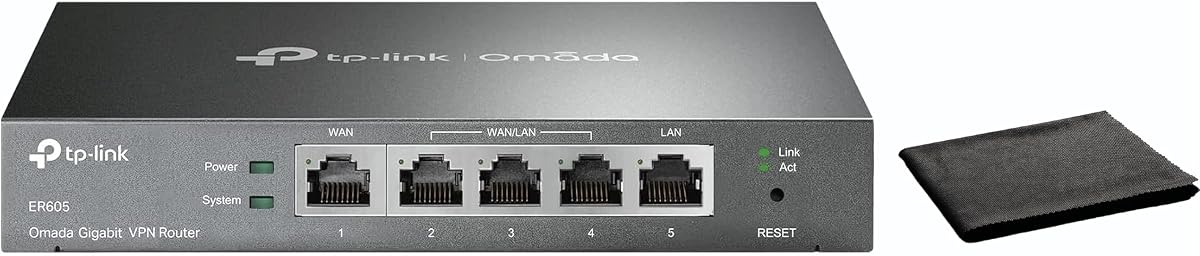
The TP-Link ER-605 simplifies network management for businesses prioritizing speed and reliability. With a 4.3 rating, it offers dual WAN ports and cloud monitoring to help admins stay updated on network health remotely.
We may earn a commission when you buy through this link, at no additional cost to you.
Intelligent bandwidth management ensures critical applications like video calls receive priority over less urgent traffic. The compact design makes it suitable for various installation environments, including cafes or remote work setups.
While it may not have as many ports as larger models, its focus on ease of use is a major advantage. The included mounting cloth and accessories demonstrate attention to practical deployment needs.
This unit is ideal for teams that want to get online quickly without complex configuration. It delivers solid performance for small to medium businesses needing stable and secure internet access.
QoS settings allow you to direct bandwidth to essential applications, preventing slowdowns during busy periods.
Cloud monitoring provides real-time status updates, enabling quick responses to potential connectivity issues.
We may earn a commission when you buy through this link, at no additional cost to you.
The TP-Link TL-R470T+ provides a budget-friendly entry into multi-WAN networking. Rated 4.2, it supports up to four WAN ports with advanced load balancing to guarantee maximum bandwidth availability.
We may earn a commission when you buy through this link, at no additional cost to you.
It offers extensive client management tools and PPPoeE server support, which is rare at this price point. The lightning protection safeguard helps prevent hardware damage from power surges, extending the device's lifespan.
While the Ethernet speeds are limited to 10/100M, it remains effective for smaller internet plans. The smaller case design makes it perfect for internet cafes or compact office setups where space is limited.
Choose this router if you need basic failover without spending much. It is a reliable workhorse for environments that do not require multi-gigabit speeds but still value redundancy.
Bandwidth resources can be marshaled to specific clients based on their application environments for better fairness.
Lightning protection ensures the router survives voltage spikes, which is vital for unstable electrical environments.
We may earn a commission when you buy through this link, at no additional cost to you.
The TP-Link TL-R480T+ serves as a straightforward entry point for those needing basic load balancing. With a 4.2 rating, it offers three configurable WAN/LAN ports, allowing flexible network layouts for small setups.
We may earn a commission when you buy through this link, at no additional cost to you.
Its design prioritizes simplicity, making it easy to configure without deep technical knowledge. It balances traffic across available connections, ensuring users have access to multiple internet sources without complex routing logic.
While it lacks modern features like multi-gigabit support, it remains a valid option for legacy systems or limited budgets. The compact size ensures it fits easily into crowded network cabinets or desk areas.
This router is best for users seeking basic functionality without extra complexity. If you need simple redundancy without advanced security or VPN capabilities, it meets the core requirements effectively.
Configurable LAN and WAN ports let you adapt the hardware to your specific physical network layout.
Proven load balancing logic ensures consistent connectivity even during ISP fluctuations or outages.
We may earn a commission when you buy through this link, at no additional cost to you.
The Ubiquiti EdgeRouter 4 is a powerful choice for network professionals who prefer silent, fanless operation. With a 4.6 rating, it handles high-performance routing needs with a robust internal architecture.
We may earn a commission when you buy through this link, at no additional cost to you.
Its three Gigabit Ethernet ports and one SFP port provide essential connectivity for fiber and copper setups. The ability to mount on a desk or rack allows it to fit into diverse physical environments easily.
While the CLI interface may challenge beginners, it offers precise control for custom configurations. The low power consumption makes it efficient for always-on deployments where energy costs matter.
Select this model if you value quiet operation and powerful customization. It is a staple for tech-savvy users who need reliable routing without the noise of cooling fans.
Fanless cooling ensures zero noise pollution, making it ideal for sound-sensitive environments like offices or homes.
Multiple mounting options let you secure the router vertically, horizontally, or in standard rack setups.
We may earn a commission when you buy through this link, at no additional cost to you.
The Omada Fusion 2.5G stands out with its unique touchscreen interface for on-site monitoring. Rated 4.7, it delivers lightning-fast processing with a quad-core CPU and five 2.5G ports for fast connectivity.
We may earn a commission when you buy through this link, at no additional cost to you.
Its touchscreen displays real-time traffic and health scores, allowing quick troubleshooting without a laptop. Automatic device discovery and batch adoption simplify the setup of larger networks significantly.
While it comes at a higher price point, the features justify the cost for professional deployments. The inclusion of a built-in controller means all features are available immediately without licensing fees.
This router is perfect for admins who need physical visibility into network health. If rapid deployment and local diagnostics are priorities, this model offers a distinct advantage over competitors.
The built-in touchscreen provides immediate status updates, helping technicians resolve issues on the spot.
Bluetooth-assisted discovery allows you to adopt new devices instantly, saving hours of manual configuration.
We may earn a commission when you buy through this link, at no additional cost to you.
Selecting the right router depends on matching your network size, internet speeds, and specific security requirements with the device's capabilities.
The number of WAN ports dictates how many internet connections you can aggregate. Look for routers with at least three ports to ensure redundancy and load balancing flexibility for your ISP needs.
Prioritize models offering flexible port assignments that allow LAN ports to double as WAN connections as your infrastructure grows over time.
Robust firewalls and DoS defense are essential for protecting data across multiple connections. Ensure the router includes SPI firewall, IP filtering, and intrusion prevention systems to block unauthorized access effectively.
Verify that encryption standards meet modern requirements so that sensitive communications remain secure during transmission.
Businesses often need secure remote access to internal resources. Check for support for protocols like WireGuard, OpenVPN, and IPsec to enable reliable and encrypted connections from external locations.
Higher connection limits are crucial for larger teams accessing the network simultaneously without performance degradation.
Traffic prioritization ensures critical applications receive necessary bandwidth first. Quality of Service (QoS) settings allow you to define rules that prevent non-essential traffic from slowing down business operations.
Advanced routers offer application-level inspection to automatically recognize and prioritize specific software without manual rule creation.
A user-friendly interface saves time during setup and daily maintenance. Web GUIs and mobile apps enable remote access and monitoring without needing direct physical access to the device.
Cloud integration is valuable for managing multiple sites centrally, providing a unified view of network health and performance metrics.
Processor power and memory determine how well the router handles encryption and multiple simultaneous connections. Look for hardware-accelerated processing to maintain high speeds during intensive routing tasks.
Consider models with fanless designs if noise is a concern, especially in quiet office or home environments where acoustic comfort is important.
Begin by connecting your modem or fiber ONT to the primary WAN port, then link your switches or PCs to the LAN ports. Configure each WAN connection in the router settings using the credentials provided by your internet service provider.
Set up failover rules to ensure traffic automatically switches to a backup connection if the primary link fails. Test these rules by temporarily unplugging the main cable to verify that the secondary link takes over without interruption.
Regularly update the firmware to patch security vulnerabilities and access new features. Monitor traffic statistics weekly to identify any unusual patterns or bandwidth bottlenecks that may require adjustments to your QoS rules.
A load balancing router splits outgoing traffic across multiple internet connections based on a defined policy. This ensures that if one connection fails or gets congested, the traffic is redirected to others to maintain speed and reliability.
Most professional routers like the ones reviewed do not broadcast Wi-Fi directly. You will need to connect separate access points via Ethernet to provide wireless coverage throughout your building.
Failover protection detects when your primary internet connection goes down and automatically switches to a backup link. This ensures your business or home stays online without manual intervention during an outage.
Yes, models with SFP ports allow direct fiber connections by accepting compatible transceiver modules. Ensure you choose a router that supports the specific speeds required by your fiber provider.
If your internet plan exceeds 1Gbps, select a router with Multi-Gigabit ports like 2.5G or 10G to utilize the full speed. For standard connections, Gigabit ports are sufficient and cost-effective for most users.
Cloud management is useful if you manage multiple sites or prefer remote oversight. For a single location, a local web interface is often enough to handle configuration and monitoring tasks efficiently.
We highlighted ten routers ranging from budget-friendly options to high-performance enterprise solutions. Each model offers distinct strengths, ensuring you can find a device that aligns with your specific network requirements and technical skill level.
Prioritize port flexibility and security features when making your selection. A router that supports your future growth will save money and hassle down the line as your internet usage expands.
Remember to verify current stock and specifications before purchasing to ensure compatibility with your existing setup. Regularly check for firmware updates to keep your network secure and operating at peak efficiency.