
TEAMIX 20 Inch Monitor Stand Riser
4.6Editor score
Durable MDF wood construction
Simple assembly process
Classic minimalist design
This guide compares the top 10 desktop monitor risers for ergonomics, storage, and durability to help you choose the perfect desk organizer for your workspace.
Finding the right desktop monitor riser can transform your workspace by improving posture and freeing up valuable desk space. A quality stand elevates your screen to eye level, reducing neck strain during long work sessions while providing storage underneath for keyboards and accessories.
We evaluated ten top-rated models based on build quality, adjustability, weight capacity, and storage features. Our analysis covers metal, wood, and plastic options to ensure you find a solution that fits your specific desk layout and ergonomic needs without compromising stability.
Each pick highlights unique strengths like adjustable heights, dual-monitor support, or built-in drawers. While prices and availability change frequently, these models consistently receive high praise from users for their reliability and design, making them excellent starting points for your search.
4.6Editor score

4.7Editor score

4.6Editor score
This side-by-side comparison breaks down the key specifications and features of all ten selected models to help you quickly identify which riser aligns best with your specific workspace requirements and budget constraints.


The WALI Computer Monitor Stand stands out as the top recommendation for most users due to its versatile adjustability and robust build. With a 4.7 rating, it consistently receives praise for its ability to lift screens to eye level comfortably while providing ample space for devices up to 44 pounds.
We may earn a commission when you buy through this link, at no additional cost to you.
Its large metal shelf measures 14.6 by 9.3 inches, accommodating most flat screens and laptops securely. The ventilated design with holes ensures heat dissipation, preventing devices from overheating during extended use. Rubber pads on the bottom protect your desk surface from scratches and prevent sliding.
While it lacks a built-in drawer, the open space underneath effectively stores keyboards and notebooks to reduce clutter. The three height levels offer flexibility without complex mechanisms, making it ideal for quick ergonomic adjustments in home offices.
Buy this if you need a reliable, sturdy solution that balances price and performance. It is especially suitable for single monitor setups or laptops where ventilation and stability are priorities over decorative storage features.
The stand offers three fixed height levels of 3.9, 4.7, and 5.5 inches to help you find the perfect viewing angle that reduces neck strain.
Large vented holes on the shelf actively prevent overheating by allowing air to circulate around your monitor or laptop during operation.
We may earn a commission when you buy through this link, at no additional cost to you.
The TEAMIX 20 Inch Monitor Stand offers exceptional value for budget-conscious buyers seeking a solid wooden solution. Rated 4.6 stars, it combines a minimalist design with surprising durability, capable of supporting up to 80 pounds of equipment.
We may earn a commission when you buy through this link, at no additional cost to you.
Made from high-quality MDF wood board, the stand features a 20 by 9.5 inch shelf that fits most screens under 50 inches. Its black finish blends easily with modern home decor, providing a professional look without the cost of premium metal options.
While assembly is required, it is straightforward and takes minimal time. The open shelf underneath allows you to slide in keyboards or notebooks, keeping your workspace organized. However, the wood surface can show scratches over time if not handled carefully.
Choose this model if you prefer a traditional look and need maximum weight capacity without spending much. It is ideal for heavy monitors or dual setups where budget is a primary concern.
The black MDF wood board offers a clean, modern aesthetic that complements most home office setups and decor styles seamlessly.
With a strong support limit of 80 lbs, this riser can handle heavy monitors or multiple devices without bending or instability.
We may earn a commission when you buy through this link, at no additional cost to you.
The YAOHUOO Dual Monitor Stand is designed for professionals who need expansive workspace solutions. With a 38.6-inch length and 100-pound capacity, it is engineered to hold two monitors or a large TV securely while maintaining exceptional stability.
We may earn a commission when you buy through this link, at no additional cost to you.
Heavy-duty steel footing with non-slip pads ensures the stand does not wobble even under heavy loads. The wooden top provides a warm aesthetic contrast to the industrial legs, fitting well in both corporate and home environments.
Assembly takes about ten minutes with included tools, and the design elevates screens to a healthier viewing height. While it lacks height adjustments, the fixed ergonomic height works well for most seated setups. Its wide footprint means you need a substantial desk surface.
Invest in this if you run dual monitor setups or need a printer stand that can support significant weight. It is the best choice for power users who prioritize space and stability over compactness.
The 38.6 inch length provides ample room for two monitors side by side, enabling efficient multitasking workflows.
Heavy-duty steel legs with non-slip pads prevent shaking or collapsing during use, ensuring a secure platform for your devices.
We may earn a commission when you buy through this link, at no additional cost to you.
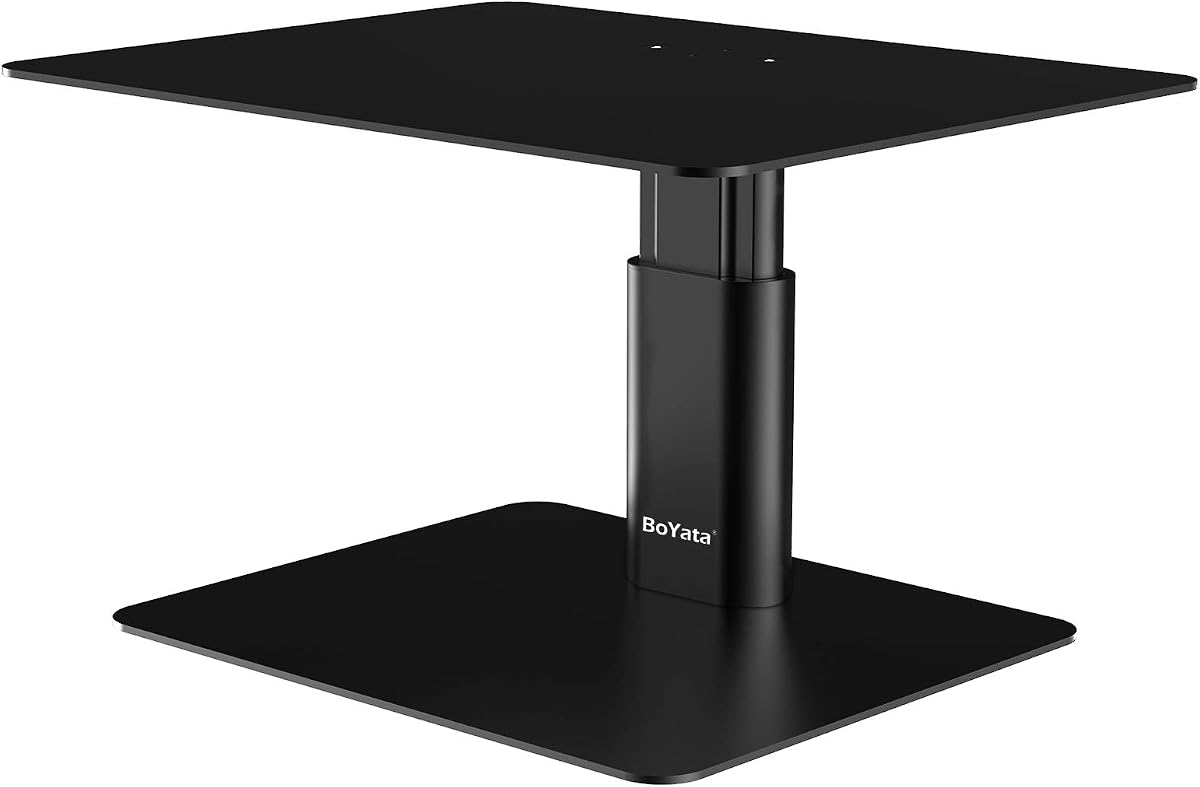
BoYata Monitor Stand distinguishes itself with a unique twist knob mechanism allowing continuous height adjustment. With a 4.7 rating, it offers precise control over viewing angles, making it ideal for users who prefer custom ergonomics over fixed steps.
We may earn a commission when you buy through this link, at no additional cost to you.
Constructed from durable metal, the stand supports up to 33 pounds with a wobble-free design. The two base plates and single support rod assembly is straightforward, requiring only a screwdriver. Skidproof pads prevent slipping on smooth desk surfaces.
The space between metal plates allows keyboard storage underneath. However, the weight capacity is lower than some competitors, so it suits standard monitors better than heavy ones. The metal surface may get warm in direct sunlight.
Select this for its ergonomic precision and clean design. It fits well in home offices where you need to fine-tune your screen height frequently for comfort.
The twist knob allows for infinite height adjustments rather than fixed levels, ensuring a perfect ergonomic fit for your specific posture.
High-quality metal plates provide long-lasting durability and resistance to bending under typical daily office loads.
We may earn a commission when you buy through this link, at no additional cost to you.
Amazon Basics Height Adjustable Stand offers a practical solution for portable setups. Rated 4.6, its ABS plastic construction keeps it lightweight while still supporting small monitors and laptops up to 22 pounds reliably.
We may earn a commission when you buy through this link, at no additional cost to you.
The unique 3-level stackable design lets you customize height between 2.87, 4.2, and 4.8 inches using detachable legs. This flexibility helps adapt to different desk environments quickly. The tapered design ensures the base is stable enough for everyday office use.
While the plastic feel differs from wood or metal, it resists wear well. Anti-slip feet ensure it stays in place. However, it is not intended for heavy appliances, so check device weight carefully before purchasing.
Choose this if you move desks frequently or need a budget-friendly, easy-to-clean option. It is best for lightweight laptops or smaller screens in shared spaces.
Detachable legs allow you to stack the stand into three different height configurations to suit your preferred viewing position.
High-quality ABS plastic balances strength and portability, making this unit easy to move between rooms or offices.
We may earn a commission when you buy through this link, at no additional cost to you.
Buying this 2 Pack provides exceptional value for multi-workspace homes or offices. Each unit features cold-rolled steel with waterproof coating and 150 heat dissipation holes to keep devices cool. The 4.7 rating reflects user satisfaction with durability and ease of use.
We may earn a commission when you buy through this link, at no additional cost to you.
You can adjust heights to 4.13, 4.92, or 5.7 inches by pressing buttons on the legs. This flexibility is rare at this price point. The phone holder adds convenience for video calls. Assembly takes under 30 seconds with no tools needed.
The large 14.6 by 9.3 inch platform holds keyboards comfortably. You can stack them for more storage. However, if you only need one stand, the bulk of two units might be unnecessary. The waterproof coating resists spills well.
Pick this if you need stands for multiple rooms or want to share with a partner. It offers high functionality and metal quality for a low total cost.
Screw legs onto the platform in under 30 seconds without tools for immediate use right out of the box.
150 precisely placed holes actively prevent overheating of laptops and desktop computers during extended work sessions.
We may earn a commission when you buy through this link, at no additional cost to you.
Klearlook offers a unique foldable design ideal for small desks. With a 4.7 rating, it adjusts widths to 16.5, 18.5, or 20.5 inches easily. The white finish looks clean but may need occasional wiping. No assembly is required, saving time.
We may earn a commission when you buy through this link, at no additional cost to you.
The hidden drawer and tablet holder organize essentials neatly. Rubberized legs prevent slipping. It supports 55 lbs, fitting ultrawide monitors well. However, the drawer is compact, holding only small items like pens or notes. Folding it down is quick.
This stands out for flexibility and organization features. The metal plate inside adds stability. If you need something you can pack away when not in use, this is a top contender for small spaces.
Choose this for its dual storage utility and zero assembly. It suits home offices where desk space is limited and quick adjustments are needed.
Adjust widths to 16.5, 18.5, or 20.5 inches to match different keyboard sizes or desk configurations easily.
A hidden drawer and tablet holder keep your desk clutter-free and provide easy access to office essentials.
We may earn a commission when you buy through this link, at no additional cost to you.
OPNICE Desk Organizers simplifies your workspace with built-in storage features. Rated 4.6, it comes ready to use with no assembly. The drawer and two pen holders keep supplies accessible without cluttering your desk surface.
We may earn a commission when you buy through this link, at no additional cost to you.
Premium metal construction ensures stability for heavy daily use. The black finish blends with most office styles. Elevating your monitor reduces neck strain effectively. However, the drawer is shallow, so deep file storage is not possible.
This unit is perfect for those who prioritize quick setup. It supports dual monitors well. While storage is limited to small items, the convenience of an all-in-one organizer is valuable for busy professionals.
Select this for its ready-to-use convenience and sleek look. It fits well in corporate offices or dorm rooms where time is limited.
Handy hanging pen holders and a drawer organize accessories instantly for better focus and efficiency.
Unbox and use immediately to enjoy instant workspace optimization without needing tools or assembly time.
We may earn a commission when you buy through this link, at no additional cost to you.
WESTREE combines wood aesthetics with industrial strength. Rated 4.6, its patented design features thick steel legs and a brown wood finish. This creates a unique look that adds character to any workspace while supporting dual monitors effectively.
We may earn a commission when you buy through this link, at no additional cost to you.
Anti-slip pads are included on the bottom to prevent sliding. The ergonomic design raises screens to eye level to reduce neck strain. Assembly takes about two minutes with pre-drilled holes and included tools. It works as a printer or TV stand too.
The rustic finish might not suit minimalists, but it adds warmth. Stability is excellent due to the heavy legs. If you need style with function, this dual stand is a strong contender for modern home offices.
Choose this if you want a decorative yet sturdy option. It is ideal for shared workspaces where visual appeal matters alongside functionality.
Sturdy steel legs combined with a rustic brown wood finish add a unique look to any office environment.
Heavy-duty thick steel legs ensure stability and prevent any wobbling during heavy daily use.
We may earn a commission when you buy through this link, at no additional cost to you.
gianotter offers a dual stand designed for immediate use without assembly. Rated 4.5, it features magnetic pen holders and a drawer to keep supplies tidy. The high-strength metal build ensures it can handle daily office tasks reliably.
We may earn a commission when you buy through this link, at no additional cost to you.
Elevating monitors reduces eye strain and improves posture. The storage underneath allows keyboard or mouse placement to maximize desktop area. While assembly-free, the metal surface may feel cold to the touch in winter. The magnetic holders are a useful touch.
This is a solid choice for those wanting storage and durability in one package. The USPTO patented design ensures quality. It fits well in compact offices where every inch counts. Check dimensions to ensure dual fit.
Select this for its hassle-free setup and practical storage features. It is great for anyone needing dual monitor support with quick access to office tools.
Two magnetic pen holders and a drawer organize desk accessories and office supplies efficiently to keep your workspace clear.
Skip assembly hassle and transform your desktop instantly by unboxing this stand and placing it on your desk.
We may earn a commission when you buy through this link, at no additional cost to you.
Choosing the right desktop monitor riser involves evaluating several key factors to ensure it meets your ergonomic and storage needs effectively. This guide breaks down the essential aspects to consider before purchasing.
Ensure the stand supports your device's weight securely. Look for metal or thick wood models that do not wobble even with heavy monitors. A stable base prevents accidents and ensures longevity for your investment.
Always check the manufacturer's weight limit and choose one that exceeds your device's actual weight for safety.
The riser should elevate your screen so the top is at eye level to reduce neck strain. Adjustable models offer flexibility for different users or sitting positions. Fixed heights work if they match your standard ergonomic needs.
Prioritize stands that offer multiple height options or adjustable knobs to fit your specific posture requirements.
Metal stands typically last longer and support more weight than plastic ones. Wood offers aesthetic appeal but requires care to avoid scratches. Consider your environment and how much wear the stand will face daily.
Select materials that align with your durability expectations and desired desk aesthetics.
Look for shelves or drawers underneath to store keyboards, notebooks, or pens. Open space helps declutter your desk while keeping essentials handy. Integrated drawers add privacy for small items but reduce vertical space.
Choose a design that maximizes storage utility without sacrificing the primary function of elevating your screen.
Some stands require tools and time to build, while others are ready out of the box. If you value convenience, look for tool-free options or minimal assembly. Detailed instructions help prevent frustration during setup.
Opt for assembly-free models if you want immediate usability without setup efforts.
Measure your desk space and device size to ensure the stand fits. Wide dual-monitor stands need substantial surface area. Check width and depth dimensions to avoid overcrowding your workspace.
Verify that the platform is wide enough for your monitor and tall enough for clearance underneath.
Vented designs help prevent devices from overheating by allowing air circulation. If you use a laptop or heavy GPU, ventilation is crucial. Solid surfaces may trap heat more effectively than mesh options.
Prioritize models with holes or mesh to keep your electronics running cool during extended use.
Prices vary based on material and features. Basic wood or plastic stands are affordable, while metal with storage costs more. Balance your budget against the features you truly need rather than optional extras.
Set a spending limit and focus on essentials like stability and height rather than decorative elements.
To install your riser, clear your desk surface and assemble any required parts using the included tools. Place the stand on a flat area and ensure all legs are securely tightened before placing your monitor on top.
Clean the surface regularly with a soft cloth to remove dust. Avoid harsh chemicals on wood or metal finishes. Keep liquids away from the platform to prevent spills that could damage your devices or the stand.
Check bolts and joints monthly to ensure stability. Tighten any loose parts immediately. If the stand shifts, adjust the non-slip pads or move it to a more stable surface to prevent tipping.
A desktop monitor riser is a stand that elevates your screen to eye level to improve posture. It creates space underneath for keyboards or storage, helping to declutter your workspace and reduce strain on your neck and back during work.
Yes, raising your screen ensures you look straight ahead rather than down, reducing neck and eye fatigue. Proper alignment helps maintain a healthy viewing angle. Over time, this simple adjustment can prevent chronic headaches and discomfort associated with prolonged computer use.
Weight capacity varies by model, typically ranging from 22 to 100 pounds. Check product specs for specific limits. Metal stands usually support more weight than plastic ones. Ensure your device's weight is within the limit to maintain safety and stability.
Yes, wide risers are designed for dual or triple monitor setups. Ensure the width matches your combined monitor sizes. Dual monitor stands often provide extra stability. Verify dimensions carefully to ensure both screens fit securely on the platform.
Some require assembly while others come pre-assembled. Assembly-free models save time and effort. If assembly is needed, instructions and tools are usually included. Check the product description to know what to expect before purchasing.
Wipe with a soft cloth and mild soap solution. Avoid abrasive cleaners that damage finishes. Dry thoroughly to prevent moisture damage. For wood, use specific wood cleaners to maintain the surface quality.
Some models include drawers for storage. Drawers help organize small items. Check if your preferred model has one before buying. Many focus on open space underneath instead.
Metal stands are more durable and support more weight. Wood offers a classic aesthetic. Choose based on your needs. Both work well for typical office setups.
Our top picks like the WALI, TEAMIX, and YAOHUOO offer strong value for diverse needs. Whether you seek budget, storage, or stability, there is a suitable model for your setup. Prioritize ergonomics and durability when making your final selection.
Focus on features that solve your specific workspace issues. If you need storage, look for drawers. If you need space, choose a wide model. Matching the riser to your workflow ensures long-term satisfaction.
Remember that prices and availability fluctuate, so check current deals before buying. A well-chosen riser improves daily comfort and productivity. Invest in one that fits your desk and budget perfectly.