
MAIWO 4 Bay Hard Drive Enclosure with USB-C
3.5Editor score
10 Gbps Speed USB-C
Daisy Chain Expansion support
HD-TV Port for 4K output
Finding reliable storage is crucial for modern data needs. A 4 Bay Hard Drive Enclosure with Cooling Fans offers expandable capacity and thermal management. These devices protect your valuable files while keeping them accessible across multiple systems.
We evaluated ten leading models based on build quality, transfer speeds, and fan efficiency. Our analysis focuses on real-world performance for professionals and enthusiasts who need stable DAS solutions without complex RAID setups.
Each pick highlights specific strengths like USB speeds and compatibility. Note that prices and stock change frequently so check current listings before buying to ensure you get the best value for your specific storage requirements.
3.5Editor score

4.3Editor score

4.0Editor score
As an Amazon Associate we earn from qualifying purchases.
We compare the top ten 4 Bay Hard Drive Enclosure with Cooling Fans models side by side to help you find the perfect storage solution for your specific data needs and budget constraints.


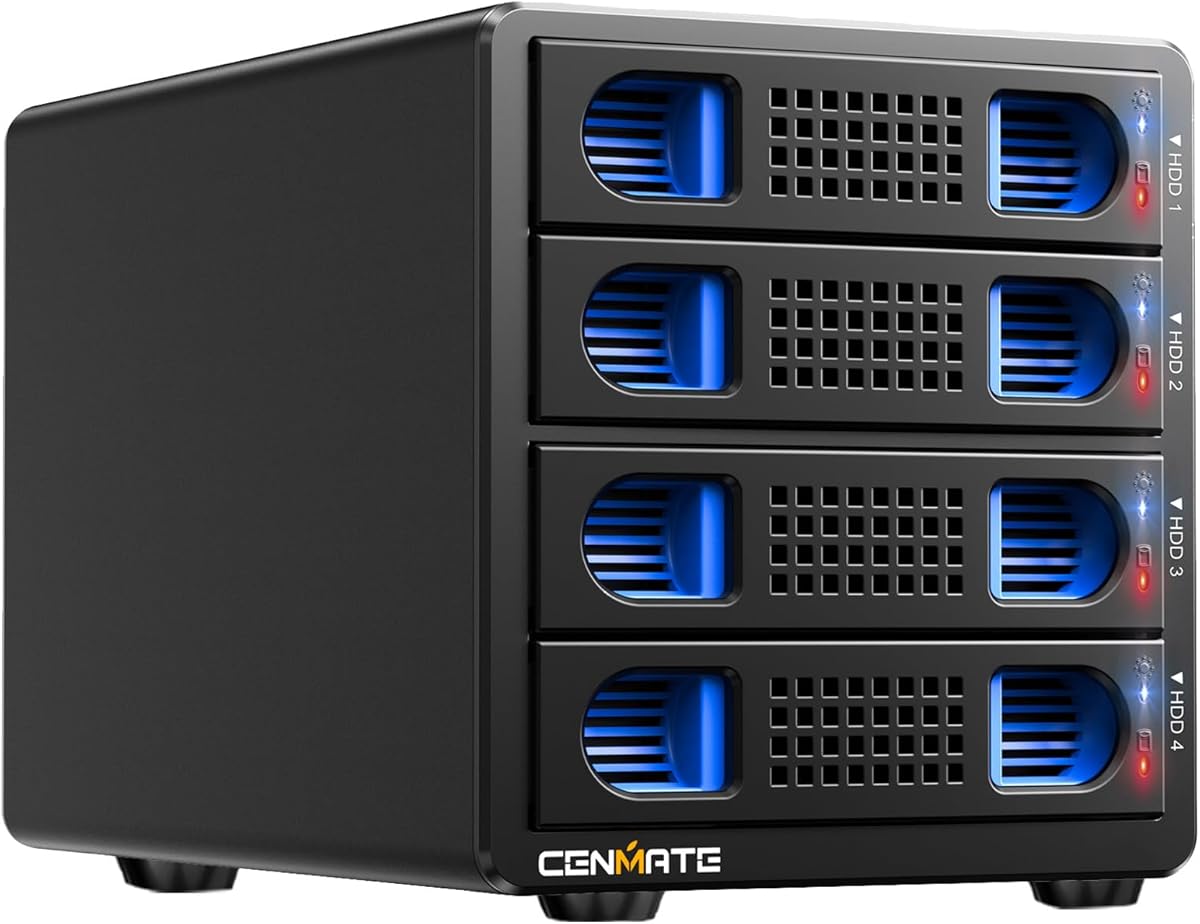
The CENMATE Aluminum 4 Bay Hard Drive Enclosure stands out as a top choice for personal and enterprise users. It holds a solid 4.3 rating and supports up to 80TB total capacity across four bays for ample storage expansion.
We may earn a commission when you buy through this link, at no additional cost to you.
Its aluminum-alloy build with a 2 inch fan maximizes data security by preventing heat buildup. USB 3.0 offers speeds up to 5Gbps which is 10 times faster than USB 2.0 for quick file transfers.
While the fan noise is around 40-50 decibels it ensures drive health. This trade-off is acceptable for most users who prioritize data integrity over silence in a home office setup.
It is ideal for users needing hot swappable tool-free access without RAID complexity. We recommend this enclosure for anyone wanting reliable external storage that saves space on desktops and laptops.
This enclosure supports 2.5 and 3.5 inch HDDs and SSDs making it ideal for personal or enterprise use.
Equipped with advanced chip and USB 3.0 output interface it transfers 1G movie in 3-5 seconds efficiently.
We may earn a commission when you buy through this link, at no additional cost to you.
The CENMATE Aluminum 4 Bay 10Gbps Hard Drive Enclosure delivers blazing fast transfer speeds for professional workflows. It holds a 4.1 rating and supports up to 80TB total capacity using USB 3.2 Gen 2 technology.
We may earn a commission when you buy through this link, at no additional cost to you.
USB 3.2 output interface transfers 1G files in 3-5 seconds which is 20 times faster than USB 2.0. The 4 HDDs setup achieves total R/W speeds of 1016MB/s ensuring efficient large file handling.
Fans activate at 40-50 decibels to prevent overheating which is crucial for sustained performance. While noisy it ensures your data remains secure during intensive data transfer processes without interruption.
It is best for users requiring maximum throughput and hot swappable flexibility. We recommend this enclosure for those needing fast external storage that works seamlessly across Windows Mac and Linux systems.
USB 3.2 Gen 2 cables and interfaces enable up to 10Gbps speeds for efficient high volume data transfers.
Supports hot swapping allowing users to replace hard drives without powering off the device for enhanced efficiency.
We may earn a commission when you buy through this link, at no additional cost to you.
The MAIWO 4 Bay Hard Drive Enclosure offers a budget friendly option with smart cooling features. It has a 3.5 rating and supports up to 96TB total capacity using USB-C for versatile connectivity options.
We may earn a commission when you buy through this link, at no additional cost to you.
Two cooling fans activate when drive temperature exceeds 48°C ensuring optimal heat dissipation. This intelligent design keeps your 3.5 SATA HDDs protected while maintaining energy efficiency for eco-friendly use.
The HD-TV port allows easy connection to TVs for 4K video output enhancing multimedia experiences. However independent power switches require manual control which may be less convenient than automatic systems.
It is perfect for users needing cost-effective storage expansion with basic entertainment features. We recommend this enclosure for those seeking affordable DAS solutions that support smart TVs and computers.
Aluminum alloy design with cooling fans automatically activate at 48°C to protect your hard drives efficiently.
Connect your computer to TV easily with HD-TV port supporting 4K HD video output for entertainment.
We may earn a commission when you buy through this link, at no additional cost to you.
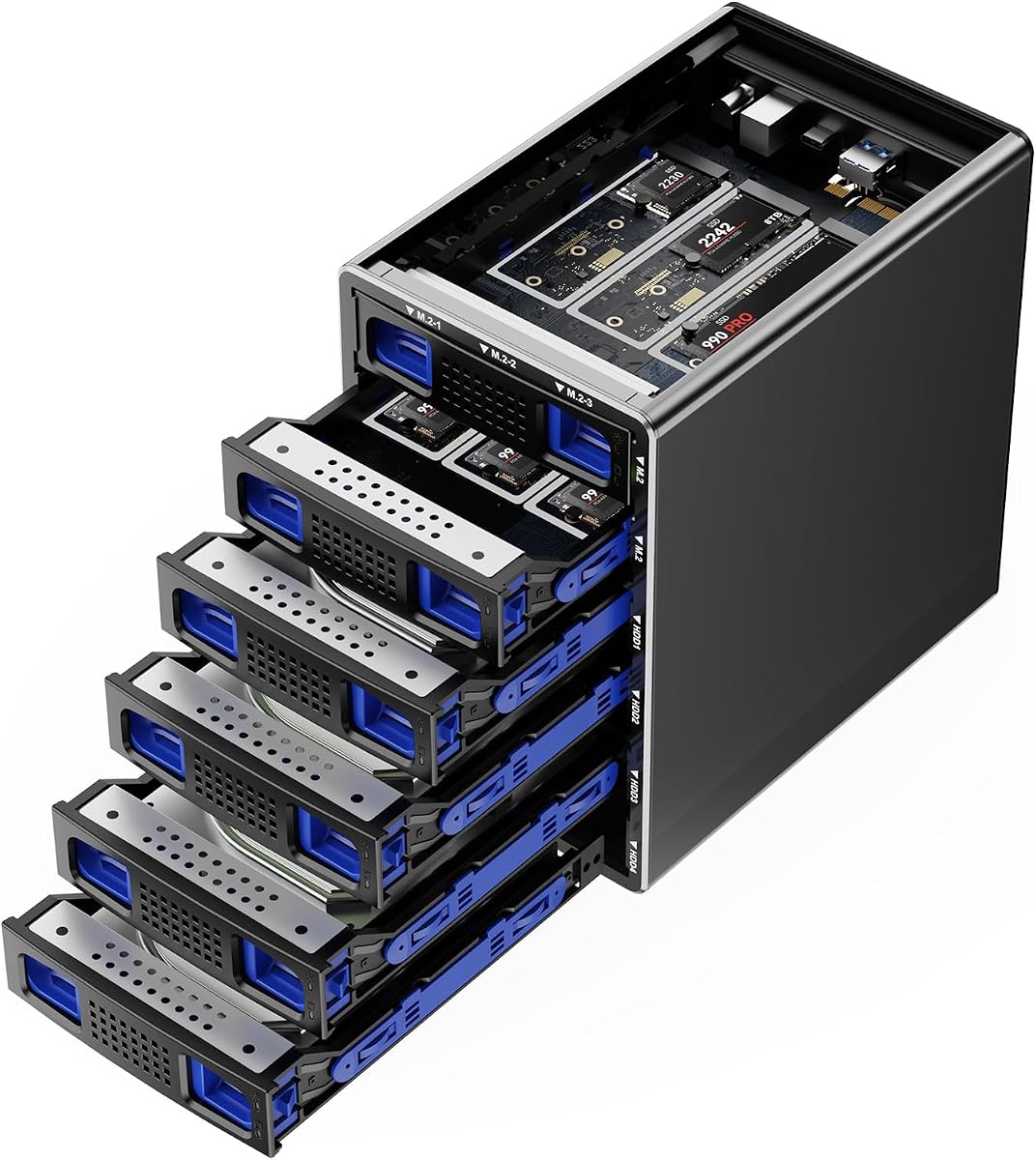
The CENMATE Hybrid 4*2.5/3.5 SATA HDD/SSD+6* M/B+M Key M.2 NVMe Enclosure combines massive capacity with high speed performance. It holds a 4.1 rating and supports up to 136TB total storage across diverse drive types.
We may earn a commission when you buy through this link, at no additional cost to you.
Using advanced chip solutions it achieves full load read rates at 200-300MB/S with USB 3.2 Gen 2 protocols. This hybrid setup leverages HDDs massive capacity and SSDs high-speed performance for optimized storage management.
Silent fans built in aluminum-alloy materials protect user data security continuously even when not actively transferring data. While fans do not sleep this ensures drives remain cool during intensive multitasking scenarios without overheating risks.
It is best for users needing both bulk storage and fast access in one unit. We recommend this enclosure for creative professionals requiring versatile external storage that supports both HDDs and NVMe SSDs.
CENMATE First Hybrid HDD+NVMe SSD Enclosure combines massive capacity with high-speed performance simultaneously for users.
Tool-free hard drive tray design enables easy installation and removal of drives without requiring additional tools.
We may earn a commission when you buy through this link, at no additional cost to you.
The WAVLINK 4-Bay Hard Drive Enclosure delivers premium features including stunning video output and high-speed connectivity. It holds a 4.0 rating and supports up to 88TB total capacity using USB 3.2 Type-C technology effectively.
We may earn a commission when you buy through this link, at no additional cost to you.
Blazing fast data transfer speeds reach up to 10Gbps allowing you to handle massive files efficiently. An additional USB-C port enables daisy-chaining devices enhancing your workspace connectivity options significantly.
Dual built-in fans automatically activate at 48°C ensuring your drives remain cool and perform optimally. While mounting brackets for 2.5 inch drives are not included the robust aluminum shell offers superior heat dissipation.
It is ideal for multimedia creators needing both storage and display capabilities. We recommend this enclosure for users requiring professional-grade external storage with seamless HDMI integration for presentations.
Supports both 3.5 and 2.5 inch hard drives and SSDs for versatile expandable storage up to 88TB.
Additional USB 3.2 Type-C port for peripherals and HDMI interface supporting 4K60Hz video output.
We may earn a commission when you buy through this link, at no additional cost to you.
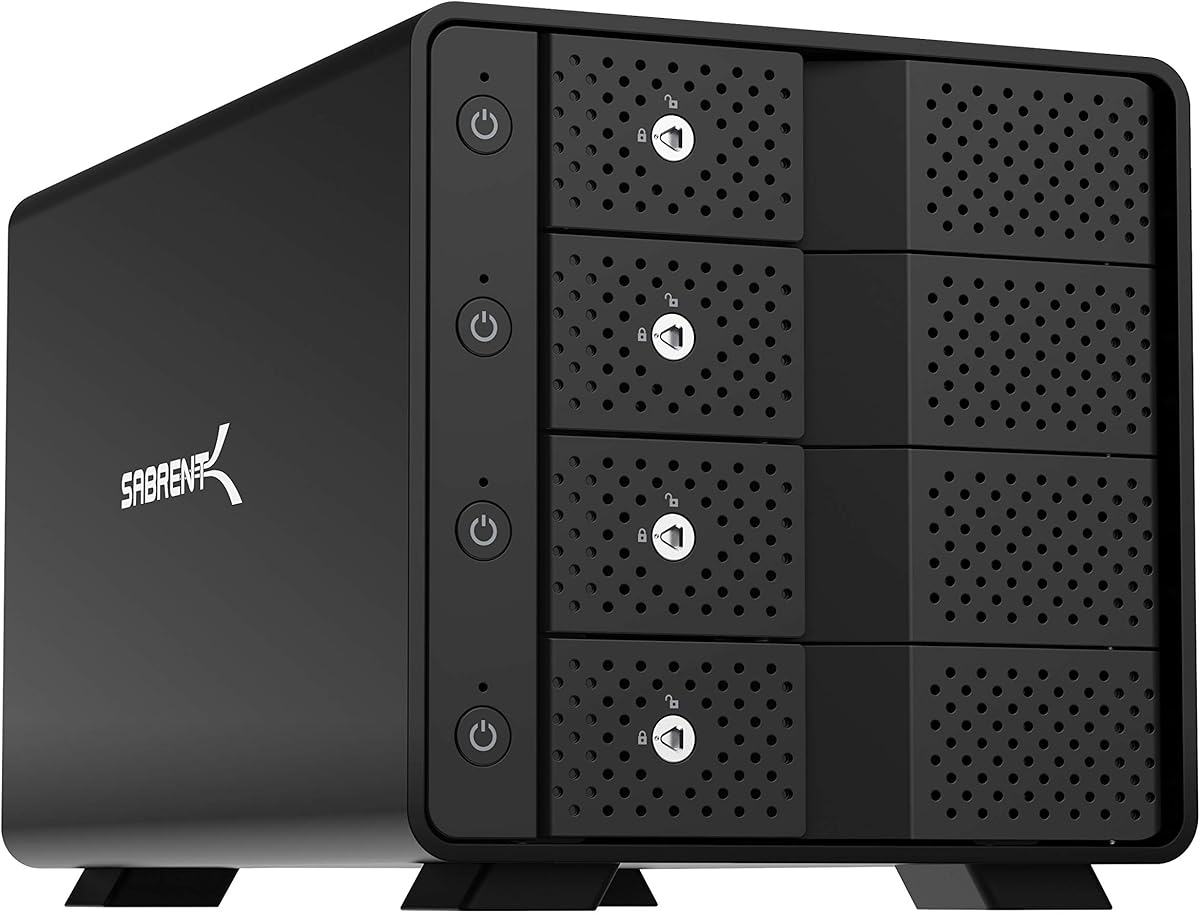
The SABRENT USB 3.0 4-Bay 2.5in SATA SSD/HDD Docking Station is a compact solution for small form factor drives. It holds a 4.2 rating and supports up to 64TB total capacity across four bays for efficient storage management.
We may earn a commission when you buy through this link, at no additional cost to you.
USB 3.0 interface delivers up to 5Gbps transfer speeds which is backward compatible with USB 2.0 and 1.1 devices. This ensures wide compatibility with older systems while maintaining fast data access for modern needs.
Tool-Free Drive Access is enabled by a magnetic cover design ensuring fast access without screws. The built-in whisper-quiet fan keeps drives cool but noise control may vary with extended continuous use.
It is best for users working with 2.5 inch drives needing quiet operation. We recommend this docking station for those requiring reliable compact external storage that supports Windows macOS and Linux systems.
Supports up to 4x 16TB 2.5 inch SATA SSDs or HDDs for massive storage capacity needs.
Quickly swap drives with no screws required via magnetic cover design ensuring fast access convenience.
We may earn a commission when you buy through this link, at no additional cost to you.
The CENMATE 4 Bay Hard Drive Enclosure with USB A/C 3.0+eSATA Cable offers versatile connectivity options for users. It holds a 4.0 rating and supports up to 80TB total capacity for personal or enterprise storage needs.
We may earn a commission when you buy through this link, at no additional cost to you.
JMS567+JMB575 chip provides USB 3.0 output interface transferring 1G files in 3-5 seconds efficiently. This 10 times faster than USB 2.0 ensuring smooth data flow during large file transfers.
An eSATA cable is included but hot-swapping is not supported which may limit flexibility. Fan noise around 40-50 decibels ensures cooling though it may bother noise sensitive users in quiet environments.
It is ideal for users needing dual connectivity options without complex RAID setups. We recommend this enclosure for those seeking reliable external storage that works with Windows Mac and Linux systems.
Supports 2.5 and 3.5 inch HDDs and SSDs making it ideal for personal or enterprise use.
Equipped with DC 12V power adapter to provide stability for high-speed transmission during use.
We may earn a commission when you buy through this link, at no additional cost to you.
The WAVLINK 4-Bay Hard Drive Enclosure with Max 128TB Capacity offers massive storage potential for professionals. It holds a 4.2 rating and supports up to 128TB total capacity using USB 3.2 Type-C technology effectively.
We may earn a commission when you buy through this link, at no additional cost to you.
Blazing fast data transfer speeds reach up to 10Gbps allowing you to handle massive files efficiently. An additional USB-C port enables daisy-chaining devices enhancing your workspace connectivity options significantly.
Dual built-in fans automatically activate at 48°C ensuring your drives remain cool and perform optimally. While mounting brackets for 2.5 inch drives are not included the robust aluminum shell offers superior heat dissipation.
It is ideal for multimedia creators needing both storage and display capabilities. We recommend this enclosure for users requiring professional-grade external storage with seamless HDMI integration for presentations.
Supports both 3.5 and 2.5 inch hard drives and SSDs for versatile expandable storage up to 128TB.
Additional USB 3.2 Type-C port for peripherals and HDMI interface supporting 4K60Hz video output.
We may earn a commission when you buy through this link, at no additional cost to you.
The CENMATE Aluminum 4 Bay Hard Drive RAID Enclosure provides RAID flexibility for users needing data redundancy. It holds a 3.8 rating and supports up to 80TB total capacity for personal or enterprise storage needs.
We may earn a commission when you buy through this link, at no additional cost to you.
JMS567+JMB393 chip provides USB 3.0 and eSATA output interfaces for versatile connectivity options. This enables 1G file transfers in 3-5 seconds which is 10 times faster than USB 2.0 speed.
Eight RAID modes offer flexibility but changing modes requires disconnecting power and using a screwdriver. Fan noise around 40-50 decibels ensures cooling though it may bother noise sensitive users in quiet environments.
It is ideal for users needing RAID options without a NAS. We recommend this enclosure for those seeking reliable external storage that works with Windows Mac and Linux systems.
Supports 2.5 and 3.5 inch HDDs and SSDs making it ideal for personal or enterprise use.
Supports RAID 0 1 3 5 10 CLONE LARGE NORMAL modes with design requiring power disconnect to switch.
We may earn a commission when you buy through this link, at no additional cost to you.
The SABRENT 4-Bay USB-C 10Gbps Hard Drive Enclosure offers robust security features for drive management. It holds a 4.1 rating and supports up to 80TB total capacity using USB 3.1 Gen 2 Type-C port effectively.
We may earn a commission when you buy through this link, at no additional cost to you.
A dedicated ASMedia ASM1351 controller for each of the four bays gives every drive its own stable independent connection. This ensures reliable data transfers without interference from other drives in the docking station.
Tray-Less Hot-Swap with security includes locking key and Kensington slot for physical protection. While it does not support RAID it offers JBOD-style individual mounting for users preferring direct-attached storage.
It is ideal for users needing secure external storage without RAID complexity. We recommend this docking station for those requiring professional-grade external storage with advanced security features for public spaces.
A dedicated ASMedia ASM1351 controller for each of the four bays gives every drive its own stable independent connection.
Tool-free drive insertion with on/off switch activity LED per bay locking key and Kensington slot.
We may earn a commission when you buy through this link, at no additional cost to you.
Selecting the right 4 Bay Hard Drive Enclosure with Cooling Fans requires understanding key factors that impact performance and longevity.
When choosing a 4 Bay Hard Drive Enclosure with Cooling Fans you must consider the maximum capacity of each drive bay. Some support up to 80TB while others go higher like 136TB. Ensure your intended drives match these limits to avoid compatibility issues.
Look for enclosures that support up to 20TB or more per bay. This ensures future-proofing as drive capacities grow over time.
The USB version determines transfer speed. USB 3.0 offers 5Gbps while USB 3.2 offers 10Gbps. For large files or frequent transfers choose higher speeds to save time. USB Type-C is generally more versatile than USB A.
Prioritize enclosures with USB 3.2 Gen 2 if you move large datasets daily. Speed impacts workflow efficiency significantly.
Fans are crucial to prevent overheating especially with multiple drives running simultaneously. Look for models with temperature-controlled fans that activate only when needed to reduce noise. Aluminum-alloy builds also help dissipate heat better than plastic.
Check fan specifications like decibel levels. Silent fans or those with temperature control are ideal for quiet offices.
Ensure the enclosure supports your drive types such as 2.5 inch or 3.5 inch HDDs and SSDs. Some models offer hybrid support for M.2 NVMe drives too. Verify thickness limits especially for 2.5 inch drives to avoid fit issues.
Choose models that support both 2.5 and 3.5 inch drives for maximum flexibility in upgrading later.
Hot swapping allows you to replace drives without powering off. This is vital for users needing continuous access. Check if the model explicitly supports hot swappable features for smooth workflow transitions.
Enclosures with independent ON/OFF power switches per bay make hot swapping easier and safer.
Decide if you need RAID for data redundancy or performance. Many enclosures are DAS only without RAID. If you need protection against drive failure look for models with specific RAID modes or use software RAID.
For pure storage expandability choose DAS models to keep things simple without data loss risks during mode changes.
Aluminum-alloy builds offer better heat dissipation and durability compared to plastic. A sturdy shell protects drives from accidental bumps. Also check for Kensington locks if physical security is a concern in shared spaces.
Invest in premium metal builds to ensure long-term reliability and better thermal management over years.
External power adapters ensure stability especially with multiple drives running. Look for DC 12V adapters or 84W supplies for larger drives. Auto-switching adapters are beneficial if you travel or use international outlets.
Stable power prevents data corruption. Avoid models with underpowered supplies that struggle with high capacity drives.
First install your drives carefully without tools if tool-free trays are present. Ensure they are fully seated in the bays to avoid connection issues. Check that all cables are securely connected before powering on.
Second monitor the fan noise and heat levels during initial use. If the fans are too loud consider placing the enclosure on a vibration-dampening mat. Regularly clean the vents to prevent dust buildup.
Third backup your data regularly since external enclosures are susceptible to hardware failure. Use disk imaging software to clone important drives before swapping them out. Keep the enclosure away from direct sunlight.
Most models listed support macOS including Mac 9.1 and above. Always verify OS compatibility in the product specifications before purchasing to ensure seamless plug and play functionality without driver installation.
Yes most models support 3.5 inch SATA HDDs and SSDs. Ensure the drive thickness matches specifications as some limit to specific millimeters. Check mounting bracket requirements for 2.5 inch drives specifically.
Fan noise typically ranges around 40 to 50 decibels. While this is quiet enough for home offices it may disturb users sensitive to noise. Models with silent fans offer quieter alternatives if noise is a major concern.
Yes most 4 Bay Hard Drive Enclosure with Cooling Fans models come with external DC power adapters. Ensure you use the correct adapter to maintain stability and avoid data corruption during high-speed transfers.
Some models offer specific RAID modes like RAID 0 or 1. Others are DAS only without hardware RAID. Choose based on whether you need redundancy or simple storage expansion for your workflow needs.
Hot swappable models allow drive changes without powering off. For those that do not support it power down completely before swapping. Refer to manual instructions for specific switch toggles regarding this feature.
We reviewed the top ten 4 Bay Hard Drive Enclosure with Cooling Fans models to help you find the perfect storage solution. From budget options to premium features there is a model for every need and budget range.
Prioritize cooling efficiency and transfer speeds based on your daily workload. Investing in aluminum builds and proper power supplies ensures longevity and reliable performance for years to come.
Always check current listings before buying as prices and stock change frequently. Ensure you get the best value for your specific storage requirements today.