
LG Smart Monitor Swing
4.1Editor score
Built-in webOS smart features
Wheeled rolling stand
AirPlay 2 support
Touchscreen monitors transform how we interact with digital content by offering intuitive control. A great 32 inch model combines large real estate with responsive touch technology. This guide explores the best options available for professionals and gamers alike.
We evaluated these monitors based on display quality, touch responsiveness, and ergonomic design. Our team analyzed technical specifications and user feedback to identify top performers. Each entry highlights unique strengths that cater to specific workflow needs.
Every product pick includes detailed specs and key benefits to help you decide. Keep in mind that availability and offers can change frequently over time. Check the latest listings before purchasing to ensure you get the best value.
4.1Editor score

5.0Editor score

4.2Editor score
As an Amazon Associate we earn from qualifying purchases.
The following table compares the key specifications of all ten selected monitors side by side. This overview helps you quickly identify which model matches your specific connectivity and performance requirements.



This 32-inch monitor stands out as the top choice for high-performance touch interaction. With a perfect 5.0 rating, it delivers stunning clarity and smooth motion for various tasks. The 4K resolution ensures every detail is crisp and clear on the large screen.
We may earn a commission when you buy through this link, at no additional cost to you.
Its 144Hz refresh rate makes it ideal for fast-paced content like gaming or video editing. The 10-point capacitive touch allows precise navigation across design software or whiteboards. Multiple ports including HDMI 2.1 and Type-C offer flexible connection options for modern setups.
While the display is excellent, users should note that macOS devices only support two-point touch. Additionally mobile devices and consoles like PS5 do not enable touch functionality on this screen. These limitations are acceptable given the overall performance and build quality.
Buyers seeking a premium touch experience for work or entertainment should strongly consider this model. It balances resolution, refresh rate, and connectivity better than any other option reviewed. The sturdy stand and VESA compatibility ensure it fits well in any workspace.
The combination of 4K resolution and 144Hz refresh rate provides a smooth and detailed visual experience.
With HDMI 2.1, DP 1.4, and Type-C ports, you can connect various devices without needing adapters.
We may earn a commission when you buy through this link, at no additional cost to you.
The LG Smart Monitor Swing brings a unique blend of smart features and mobility to the table. It operates independently with webOS so you do not always need a connected computer. The rolling stand allows you to move the display effortlessly between rooms.
We may earn a commission when you buy through this link, at no additional cost to you.
Its IPS panel delivers rich colors and wide viewing angles making it suitable for collaborative work. The touchscreen is intuitive and supports gestures for easy navigation through apps. Connectivity is robust with multiple USB-C ports and HDMI inputs.
While expensive compared to standard monitors, the versatility justifies the cost for specific use cases. The hidden adapter compartment keeps cables organized which adds to the professional look. However users new to webOS may need time to explore its features fully.
This monitor is perfect for environments needing flexibility like meeting rooms or home offices. The ability to switch between PC and streaming modes seamlessly is a major advantage. It sets a high standard for smart touch monitors in 2026.
webOS enables you to manage tasks and stream content without needing a separate computer system.
The wheeled base and torsion spring hinge make it easy to adjust position and move around.
We may earn a commission when you buy through this link, at no additional cost to you.
FYHXele offers a compelling budget option for those needing a large touch display without breaking the bank. The 2K resolution provides clear text and images suitable for office work and creative tasks. A 100Hz refresh rate ensures smooth scrolling and video playback.
We may earn a commission when you buy through this link, at no additional cost to you.
It features 100% coverage of standard color spaces which is impressive for this price range. The 10-point touchscreen responds well to gestures allowing for intuitive interaction. USB-C connectivity simplifies setup for laptops and modern devices.
Users should be aware that gaming consoles and some Apple products do not support touch here. This limitation is common in budget models but does not affect PC or laptop use. The stand allows basic adjustments which is sufficient for most desk setups.
For users prioritizing value and clarity this monitor delivers excellent performance. It competes well with more expensive models in terms of color and sharpness. It is a smart choice for students or small businesses on a tight budget.
Delivering 2K resolution and 100Hz refresh at a budget price makes this a strong contender.
High-fidelity color reproduction ensures vibrant visuals for design and multimedia tasks.
We may earn a commission when you buy through this link, at no additional cost to you.
Xyrio brings a feature-rich 2K touchscreen to the market with strong specifications for its class. The 100% sRGB coverage and 1.07B colors offer vibrant visuals ideal for creative professionals. Integrated speakers add convenience for meetings and media playback.
We may earn a commission when you buy through this link, at no additional cost to you.
Its compatibility with Linux, Android, and Raspberry Pi makes it versatile for industrial or dev projects. The 10-point capacitive touch works reliably across supported operating systems. Adjustable stand options allow for comfortable viewing in portrait or landscape modes.
Currently lacking customer ratings means users must rely on specs and features for decision making. The inclusion of RGB lighting adds a stylish touch to modern desks. Ensure your drivers are updated to fully utilize all touch capabilities.
This monitor is well-suited for technical users or those needing broad system compatibility. The high color depth and resolution support detailed design work effectively. It stands as a solid alternative if you need flexible OS support.
Compatible with Windows, Linux, Android, and Raspberry Pi for diverse technical applications.
1.07B colors and high contrast ratio ensure deep and accurate visual representation.
We may earn a commission when you buy through this link, at no additional cost to you.
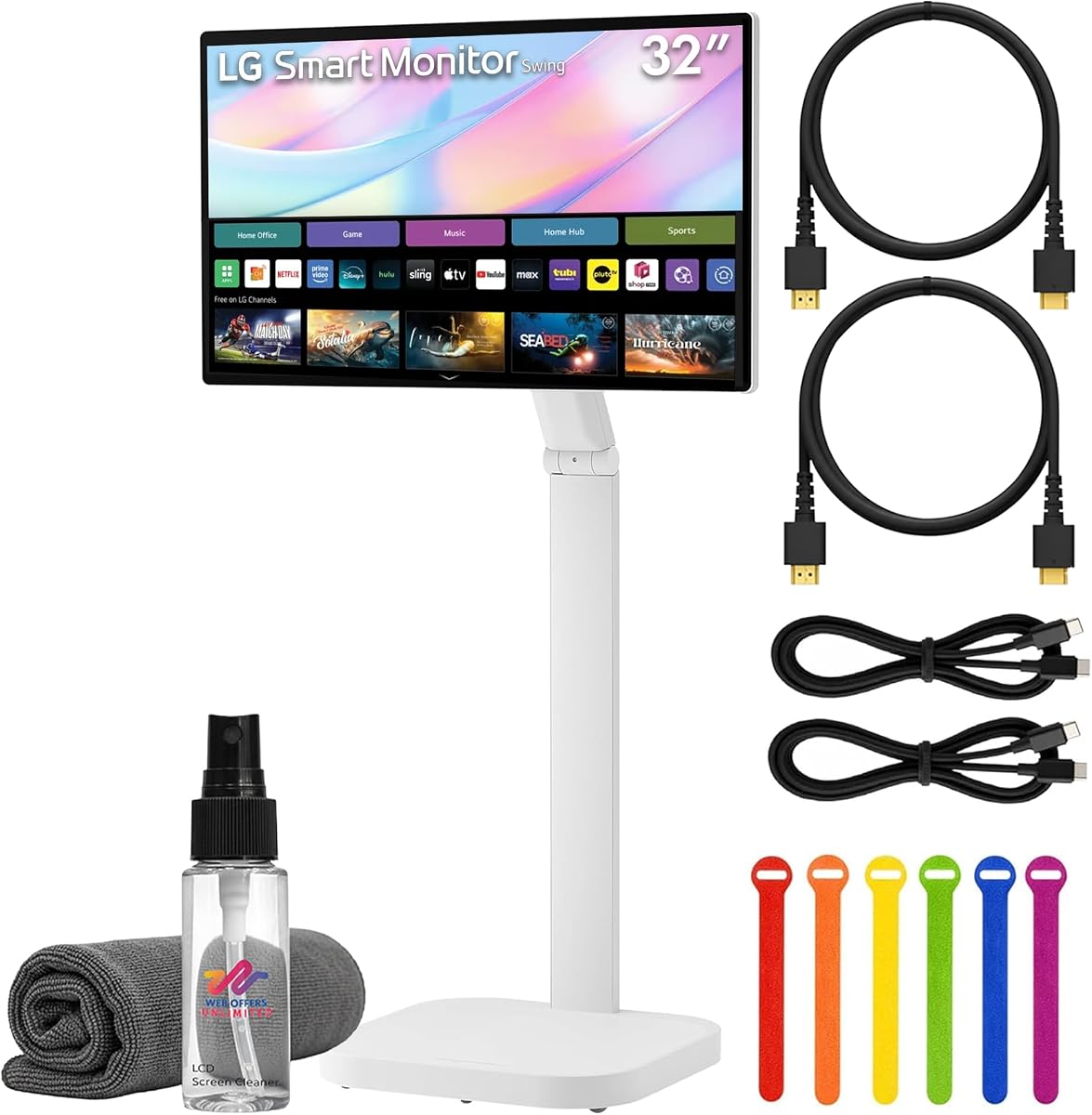
This bundle offers everything needed to get started with a smart 4K touch monitor immediately. It includes essential cables and accessories that simplify installation for users. The core unit matches the LG Smart Monitor Swing in functionality and display quality.
We may earn a commission when you buy through this link, at no additional cost to you.
The rolling stand ensures mobility while the included ties keep cables organized. Users benefit from the webOS interface which allows streaming and remote access without a PC. Stereo speakers enhance the multimedia experience significantly.
The extra cost over the standard unit may not appeal to everyone who has cables. However for those needing a ready-to-go solution this package is very convenient. Ensure you check what specific accessories are included in your region.
Ideal for offices or homes where quick deployment is valuable. The 4K clarity and smart features make it a robust productivity tool. It removes the hassle of sourcing compatible cables separately.
Includes HDMI cable, USB-C cable, and ties so you can start using it right away.
Ultra HD resolution delivers crisp details for work and entertainment on a 32-inch screen.
We may earn a commission when you buy through this link, at no additional cost to you.
Elo monitors are known for reliability in commercial and industrial environments. This model is designed to run continuously without overheating or failure. Its robust build complies with safety standards for public spaces.
We may earn a commission when you buy through this link, at no additional cost to you.
Power passthrough and VESA mounting allow flexible integration into existing systems. IoT control enables remote management which is vital for managing multiple devices. Touch response is optimized for kiosk and signage applications.
This unit is not aimed at home users but rather businesses needing durability. It is expensive compared to consumer models but offers longevity in high traffic areas. Ensure you have the necessary infrastructure for IoT integration.
Perfect for retail stores or offices requiring a permanent touch interface. The reliability and compliance make it a safe choice for mission-critical setups. It is a specialized tool for specific professional needs.
Designed to operate 24/7 in environments with constant user interaction and movement.
Meets UL-60950 and IK-07 standards for impact resistance and electrical safety.
We may earn a commission when you buy through this link, at no additional cost to you.
This LG model offers a dependable IPS display for standard office tasks. Full HD resolution is sufficient for text and general work though not 4K. It provides reliable performance at a lower cost than newer touch models.
We may earn a commission when you buy through this link, at no additional cost to you.
The IPS panel ensures good color consistency across the screen from various angles. Brightness levels are adequate for indoor office lighting conditions. It serves well for users needing a basic visual output.
Note that this specific title might not have advanced touch features depending on model year. It is often a reference product for general display comparisons. Always confirm connectivity options before purchase.
Suitable for basic setups where budget is a primary concern. It balances price and quality well for entry-level needs. Keep an eye on availability for newer revisions.
IPS panel technology delivers consistent color and wide viewing angles.
Adequate brightness and resolution for standard text and spreadsheet work.
We may earn a commission when you buy through this link, at no additional cost to you.
Samsung's QM series is built for commercial environments requiring reliable touch. The 32-inch Full HD screen provides clarity for interactive displays. A 5.0 rating indicates strong performance and customer satisfaction.
We may earn a commission when you buy through this link, at no additional cost to you.
Designed for business settings this unit handles constant use well. The black finish integrates cleanly into professional setups. It is a step up from consumer models in terms of ruggedness.
Pricing reflects its commercial nature which might be overkill for home use. Ensure your software is compatible with the touch layer drivers. It is a sturdy option for high-traffic touch applications.
Ideal for reception desks or retail counters needing responsive touch. The build quality justifies the investment for professional environments. Consider your usage scenario before purchasing.
Built for continuous use in business settings with durable components.
Interactive touch layer supports intuitive navigation for users.
We may earn a commission when you buy through this link, at no additional cost to you.
This Samsung LCD provides standard display utility for office work. The 75Hz refresh rate offers slight smoothness over 60Hz for basic tasks. It is a solid choice for users needing a standard screen.
We may earn a commission when you buy through this link, at no additional cost to you.
Full HD resolution is sufficient for spreadsheets and documents. The black finish fits well in professional environments. Check if it meets your specific port requirements before buying.
Value might be lower compared to newer panels with higher refresh rates. Ensure you verify the exact connectivity options. It remains a dependable option for simple setups.
Best for straightforward monitoring needs without advanced features. It performs well for basic productivity tasks. Consider newer models if you need faster refresh rates.
Provides standard display output for text and document viewing.
75Hz refresh rate offers slightly smoother motion than standard 60Hz.
We may earn a commission when you buy through this link, at no additional cost to you.
LG offers another variant of its smart rolling monitor with similar features. The 31.5-inch 4K screen delivers excellent clarity for content consumption. Eye care technology helps reduce strain during long sessions.
We may earn a commission when you buy through this link, at no additional cost to you.
AirPlay 2 compatibility makes it easy to share content from Apple devices. The rolling stand allows flexible positioning in the room. It is a smart choice for households with multiple devices.
A lower average rating suggests some mixed experiences compared to the main model. Ensure you verify compatibility with your specific network setup. It is a strong contender for smart media control.
Ideal for living rooms or open offices needing mobility. The smart features and resolution make it versatile. Compare prices to see if the main swing model is better value.
AirPlay 2 allows seamless content sharing from iPhones and iPads.
Built-in eye care technology reduces strain during extended use.
We may earn a commission when you buy through this link, at no additional cost to you.
Selecting the right 32 inch touchscreen monitor depends on your specific needs and budget. This guide covers key factors to consider for a well-informed decision.
Resolution determines how sharp your content looks on the screen. Higher resolutions like 4K provide more detail which is useful for design work or media. For general office tasks 2K is often sufficient and may save money.
Look for models offering higher pixel counts if you plan to view detailed media. Sharpness reduces eye strain during long work sessions.
The refresh rate affects how smoothly motion appears on screen. Gamers and video editors benefit from rates like 144Hz or higher. Standard office tasks usually work fine with 60Hz to 100Hz.
Choose a higher refresh rate if you consume fast-moving content often.
Touchscreens can be capacitive or resistive with capacitive being more responsive. Multi-touch support allows for gestures like pinching and swiping. Ensure the touch points match your usage scenario such as collaborative work.
Capacitive screens are standard for modern use due to better sensitivity.
Ports determine how you connect your computer or mobile device. HDMI DP and USB-C are common standards offering video and power transfer. USB-C with power delivery simplifies setups by using one cable.
Verify you have the right ports to avoid needing extra adapters.
An adjustable stand helps maintain a comfortable viewing posture. Look for tilt swivel height and pivot options. Wall mounting capability offers flexibility if desk space is limited.
Ergonomic features prevent physical strain during extended daily use.
Color accuracy is vital for creative professionals needing consistent visuals. Check for color gamut coverage like sRGB or DCI-P3. Higher brightness levels ensure visibility in well-lit rooms.
Invest in good color specs if you work with images or video often.
Some monitors offer built-in operating systems like webOS for streaming. This removes the need for a PC for certain tasks. Consider if you value standalone functionality or prefer a PC connection.
Smart features can add versatility to your workspace setup.
Commercial grade monitors are built to handle constant use. Look for impact resistance or long operational hour ratings. Durability matters most in public or high-traffic environments.
Choose robust models for business settings to ensure longevity.
Connect your computer via HDMI DP or USB-C depending on available ports. Ensure you connect the USB data cable for touch to activate. Follow the power sequence to avoid signal issues.
Clean the screen with a soft lint-free cloth to remove smudges. Avoid harsh chemicals that could damage the touch coating. Use compressed air for ports to remove dust.
Adjust the stand height to align with eye level for better posture. If using for touch ensure your fingers are dry for accurate input. Enable touch drivers through your operating system settings.
Not all models support 4K resolution as some offer 1080p or 2K. Always check the product specifications before purchase to confirm resolution. Higher resolution models provide more detailed visuals.
Most touch monitors work with Macs but touch functions may be limited. macOS often restricts multi-touch to fewer points. Check product guidelines for OS compatibility details.
Use a USB-C or USB-A to USB-B cable alongside your video cable. Some USB-C ports support power and touch through a single connection. Ensure the USB data link is active for touch to work.
Some models with high refresh rates like 144Hz are great for gaming. Touch can add interactive elements but is not required for all games. Look for low response time and high refresh for best results.
Capacitive touch uses the body's electrical charge to detect input and is more responsive. Resistive touch uses pressure and is durable but less sensitive. Most modern monitors use capacitive panels.
Many models support VESA mounting brackets for wall installation. Verify the VESA pattern matches your mount and stand can be removed. This is ideal for saving desk space or collaborative setups.
Most modern monitors work plug-and-play on Windows and Mac. However installing specific drivers may improve performance or gestures. Check the manufacturer website for software updates.
This guide highlighted top models balancing resolution touch performance and design. The LG and FYHXele options stand out for premium and budget categories respectively. Your choice should align with specific workflow needs and OS compatibility.
Prioritize refresh rate and connectivity if you need smooth motion and flexible setups. Ergonomics and stand adjustability are crucial for long term comfort. Ensure the monitor fits your desk or wall mounting requirements.
Always check current listings for the latest pricing and availability. Technology updates frequently so comparing recent data helps secure the best value. Investing in a quality touch monitor enhances daily digital interaction.