
Rosewill VNW 550W
4.6Editor score
80 PLUS Certified Non-Modular
DC-DC High Amperage Design
Compact 35% Smaller Chassis
Discover the top 550W PSU options for reliable power delivery, efficiency, and quiet operation across gaming, workstations, and compact desktop builds.
Choosing the right power supply unit is critical for system stability and longevity. A 550W PSU offers a sweet spot for budget and mid-range builds, balancing cost with sufficient wattage for modern components. This guide highlights ten top contenders to help you find the perfect match for your specific hardware needs.
We compared these units based on efficiency ratings, build quality, fan noise, and protection features. Each product was evaluated against industry standards like 80 Plus certification and ATX compliance. The goal is to provide a clear overview of what distinguishes each model, ensuring you can make an informed decision for your next PC build or upgrade.
Each pick includes detailed specifications, pros, cons, and expert insights tailored to different user scenarios. We cover everything from budget-friendly non-modular designs to premium gold-certified modular options. Please note that prices and availability change frequently, so always verify current details before purchasing to ensure you get the best value available.
4.6Editor score

5.0Editor score

4.8Editor score
This table provides a side-by-side comparison of the ten leading 550W power supply units available today. We have organized key specifications to help you quickly identify differences in efficiency, warranty, form factor, and special features across each model.



The NovaMist Misting Fan PSU offers a solid entry point for budget-conscious builders seeking reliable power. It carries an 80 PLUS Bronze certification, ensuring decent efficiency for everyday tasks. With a strong 5-year limited warranty, it promises long-term operation without frequent replacements or unexpected failures.
We may earn a commission when you buy through this link, at no additional cost to you.
This unit focuses on core reliability, featuring a low noise fan that keeps acoustic levels down during standard usage. The Bronze certification helps reduce electricity costs compared to unregulated units, making it suitable for home offices or light gaming setups. Its design prioritizes function over flashy aesthetics, which suits many standard PC cases.
The main trade-off is the lack of modular cabling, which can lead to cable clutter inside your case. Additionally, the feature set is basic, missing advanced protections or efficiency ratings found in premium models. However, for users on a tight budget, these compromises are acceptable given the price and warranty coverage.
You should buy this PSU if you need a dependable power source for a mid-range system without breaking the bank. It is best suited for users who prioritize long-term warranty support over advanced features. Always ensure your case has enough clearance before installation.
The 5-year warranty provides peace of mind, ensuring you are covered against manufacturing defects for an extended period.
The low noise fan design ensures that the PSU does not become a source of distraction in quiet environments.
We may earn a commission when you buy through this link, at no additional cost to you.
The Rosewill VNW 550W is an excellent choice for budget builds requiring stable power delivery. It features an advanced DC-DC high amperage +12V rail design, which ensures clean voltage output for sensitive components. The compact chassis makes it ideal for small-form-factor cases where space is at a premium.
We may earn a commission when you buy through this link, at no additional cost to you.
Safety is a priority here, with a 5-protection suite including UVP, OVP, OPP, SCP, and OCP to safeguard your system. The optimized thermal control uses a steel shell with large vents and a silent fan to keep temperatures in check. Active PFC design also helps improve efficiency and reduce energy waste.
The primary drawback is the non-modular design, meaning all cables are permanently attached. This can create clutter in tight spaces, though the compact size mitigates some of this. Users looking for premium aesthetics might find it too utilitarian, but functionality remains the focus.
Choose this PSU if you need a reliable, safe, and compact power solution for entry-level to mid-range PCs. It is particularly well-suited for users building in small cases or those on a strict budget. The protection suite offers good value for the price point.
The advanced DC-DC design ensures stable and clean voltage delivery, which is crucial for system stability.
With a chassis that is 35% smaller, it offers flexible integration into compact PC builds.
We may earn a commission when you buy through this link, at no additional cost to you.
The LIAN LI RB550 stands out with its support for the ATX 3.1 platform, making it future-ready for newer GPUs. It provides reliable 550W power with active PFC to maintain consistent delivery. The integrated cable management, including routing channels and Velcro straps, helps achieve a cleaner look in the back of your case.
We may earn a commission when you buy through this link, at no additional cost to you.
Noise is minimized with a 135mm hydraulic-bearing fan optimized for low operation under typical loads. This fan design ensures efficient cooling without excessive noise, making it suitable for office or home environments. The Bronze certification helps keep energy costs down while still delivering adequate performance.
While it supports future standards, it remains non-modular which might limit cable flexibility compared to higher-end models. The efficiency rating is also standard, so those seeking top-tier energy savings might look elsewhere. However, the value for future-proofing is significant.
Buy this PSU if you want to prepare your build for next-gen components without overspending. It is ideal for users who value clean cable management and low noise. The ATX 3.1 compliance is a major plus for longevity.
Built to the ATX 3.1 standard, it is ready for upcoming hardware demands.
Built-in routing channels and Velcro straps help tuck excess cable length for better airflow.
We may earn a commission when you buy through this link, at no additional cost to you.
The ASRock Challenger 550W delivers stable performance with its ATX 2.52 compliance and 5V BOOST function. It supports up to 130% total power excursions, providing headroom for transient power spikes from CPUs and GPUs. The included cables cover essential connectors for modern builds, including multiple PCIe and SATA options.
We may earn a commission when you buy through this link, at no additional cost to you.
It uses Taiwanese capacitors known for durability, contributing to a 100,000-hour MTBF. The 120mm Golf-Blade fan optimizes airflow while operating quietly under typical loads. The Bronze certification ensures good efficiency, reducing heat output during operation.
The unit is non-modular, which limits cable management options in smaller cases. Its performance is solid but not class-leading compared to premium Gold units. However, it offers good value for mid-range builds needing reliable power.
This PSU is a great fit for users looking for stability and adequate protection in a standard tower case. The power excursion handling makes it robust for gaming setups. Ensure your case fits the ATX size before purchasing.
Handles up to 130% total power excursions to maintain stability during spikes.
Taiwanese capacitors and a 100,000-hour MTBF promise long-term reliability.
We may earn a commission when you buy through this link, at no additional cost to you.
The Thermaltake Smart 500W offers continuous power delivery with a focus on quiet operation. It features a 120mm ultra quiet cooling fan that ensures efficient heat dissipation without noise. The 80 PLUS certification guarantees 80% efficiency under typical load, helping to reduce power consumption.
We may earn a commission when you buy through this link, at no additional cost to you.
Safety features include Over Power, Over Voltage, and Short Circuit Protection to keep your system safe. It has a powerful +12 Volt rail for superior performance under all loading types. Active PFC improves power factor correction, optimizing energy use.
As a White Certified unit, it may not be as efficient as Bronze or Gold options. The non-modular design also means cable management might be trickier in small cases. Despite this, it remains a strong budget option for entry-level builds.
Consider this PSU if you need a reliable, quiet power source for basic tasks or light gaming. The warranty and protection suite add value to the package. It is a safe choice for standard desktop systems.
The ultra quiet fan ensures low noise levels during regular operation.
Industry grade protections guard against voltage spikes and short circuits.
We may earn a commission when you buy through this link, at no additional cost to you.
The MONTECH Century II 550W is a top-tier choice with full ATX 3.1 compatibility and Gold efficiency. Its fully modular design allows you to connect only the cables you need, reducing clutter significantly. The 100% Japanese capacitors ensure high reliability and consistent performance.
We may earn a commission when you buy through this link, at no additional cost to you.
Optimized ventilation includes a 135mm FDB silent fan with zero RPM mode for silent operation at low loads. The silver metallic appearance adds a premium look to your build. Protection features cover OCP, OVP, UVP, SCP, OTP, and OPP for comprehensive safety.
It is priced higher than basic models, but the Gold certification and modular convenience justify the cost. The 12V-2×6 cable compatibility is vital for next-gen GPUs. Users wanting premium features without breaking the bank will appreciate this unit.
Choose this PSU if you want excellent efficiency, modularity, and modern compatibility. It is perfect for builders who prioritize cable management and quiet performance. The warranty is an added benefit of quality.
Connect only necessary cables for cleaner airflow and aesthetics.
The fan stops at low loads to provide silent operation when needed.
We may earn a commission when you buy through this link, at no additional cost to you.
The MSI MAG A550BN delivers consistent power for everyday gaming and productivity. It carries the 80 PLUS BRONZE certification, which ensures efficient energy conversion. The unit is designed to support mid-range CPUs and GPUs effectively.
We may earn a commission when you buy through this link, at no additional cost to you.
MSI is a reputable brand known for quality components, which translates to reliability. The PSU includes standard protection features to safeguard against electrical faults. Its straightforward design works well in most standard ATX cases.
While detailed technical specs are minimal in the listing, real-world performance is generally robust. It may lack some premium features found in more expensive models. However, it offers a safe and efficient solution for most users.
Buy this PSU if you trust the MSI brand and need a reliable power source. It is suitable for general builds where stability is key. The Bronze efficiency keeps energy bills in check.
MSI brings a trusted name to power supply manufacturing.
80 PLUS BRONZE certification ensures efficient operation.
We may earn a commission when you buy through this link, at no additional cost to you.
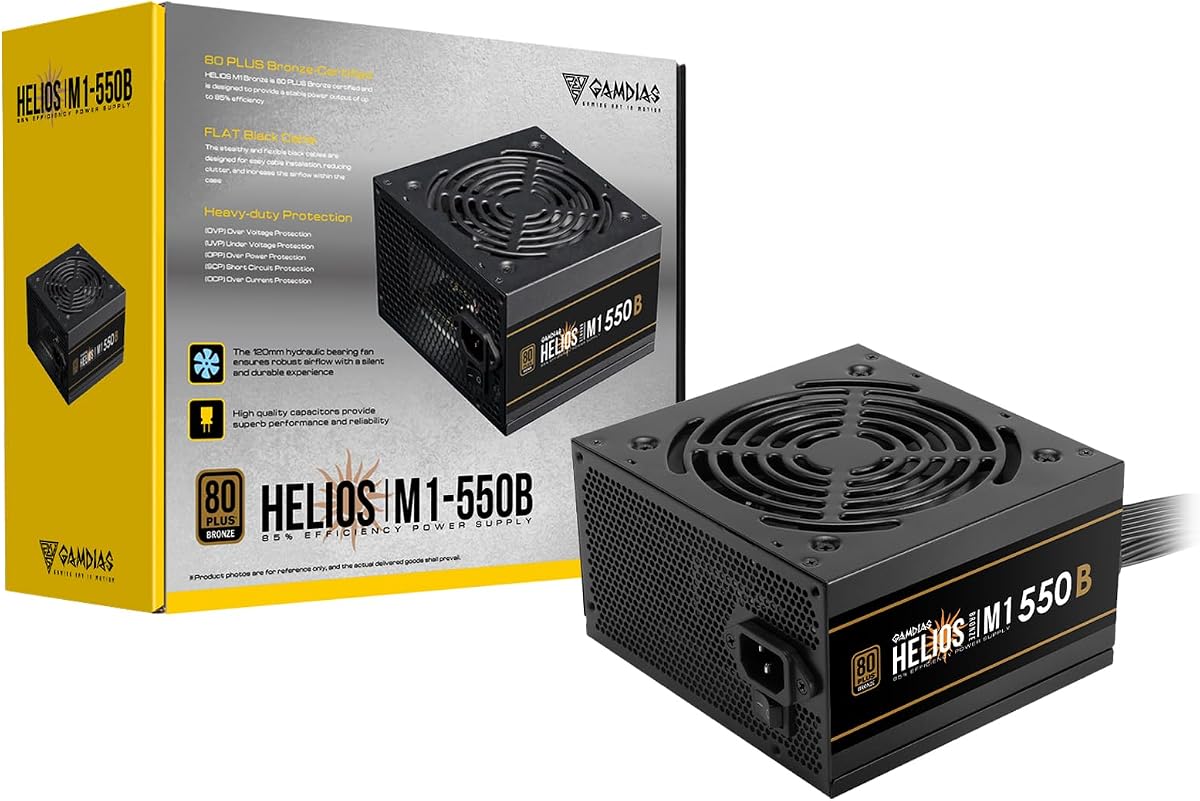
The GAMDIAS Helios M1 offers an economic solution for power transfer with smart fan control. It adjusts fan speed based on loading to balance noise and cooling. The Ultra Silent Mode allows manual adjustment for quiet environments or maximum heat dissipation.
We may earn a commission when you buy through this link, at no additional cost to you.
It features high temperature resilience up to 50 degrees Celsius, making it durable for varying conditions. High-quality capacitors ensure reliability and performance consistency. The 80+ Bronze certification keeps energy costs low.
The lack of brand recognition might be a concern for some, but performance is solid. It suits users who prioritize low noise and cost-effectiveness over premium features. The design is practical and straightforward.
Consider this PSU if you need a budget-friendly and quiet power option. The ECO fan system is particularly useful for home or office setups. Ensure compatibility with your case size.
Fan speed adjusts automatically to balance power loading and noise.
Operates effectively up to 50 degrees Celsius for durable performance.
We may earn a commission when you buy through this link, at no additional cost to you.
The be quiet! Pure Power 12 delivers exceptional efficiency and future-proof compatibility. With up to 92.9% efficiency, it lowers power costs and heat. ATX 3.1 and PCIe 5.1 support make it ideal for high-end systems.
We may earn a commission when you buy through this link, at no additional cost to you.
It uses a robust single 12V rail to handle power surges for next-gen processors. The temperature-controlled 120mm fan ensures quiet cooling. German engineering guarantees high performance and durability.
The price is premium compared to budget options. However, the efficiency and build quality justify it for serious users. It is a top choice for silent builds.
Buy this PSU if you demand top efficiency and quiet operation. It is perfect for high-end gaming and professional workstations. The warranty and quality assurance are excellent.
German design and quality ensure superior performance and reliability.
Supports next-gen PCIe 5.1 GPUs for future-proofing.
We may earn a commission when you buy through this link, at no additional cost to you.
The Silverstone Extreme 550Rz brings Gold efficiency to the compact SFX form factor. It is compliant with SFX12V 4.1 and supports modular cabling. Japanese capacitors and a silent 92mm FDB fan ensure reliability.
We may earn a commission when you buy through this link, at no additional cost to you.
Black flat cables improve airflow and installation ease. It includes a primary 12V-2×6 connector for modern GPUs. The smart deactivation feature helps keep noise low.
SFX units are often pricey but necessary for small cases. The modularity is a significant advantage over fixed cabling options. Ensure your case supports SFX before buying.
Choose this PSU if you need a powerful unit for a mini-ITX build. The Gold certification and modularity make it a standout. It is worth the premium for small form factors.
Compact size ideal for small and portable PC builds.
Modular cabling reduces clutter and improves airflow.
We may earn a commission when you buy through this link, at no additional cost to you.
Selecting the right PSU requires considering efficiency, wattage, form factor, and protection features. This guide breaks down the essential factors to help you make an informed decision for your specific build needs.
Efficiency ratings like 80 Plus White, Bronze, Gold, and Platinum indicate how much power is converted to usable output versus lost as heat. A higher rating means lower electricity bills and less heat inside your case. For a 550W unit, Bronze or Gold is typically sufficient depending on your budget and usage. Always check the specific efficiency curve at typical loads to ensure real-world performance matches claims.
Look for at least Bronze certification for balanced efficiency. Gold offers better savings and heat reduction for daily use.
While 550W is the nominal rating, check the +12V rail amperage since modern CPUs and GPUs draw most power from this rail. A unit with strong +12V support ensures stable performance under load. Verify that the PSU can handle transient power spikes without shutting down, which is common in gaming scenarios. If you plan to upgrade to a more powerful GPU later, consider the headroom available.
Ensure the PSU provides stable power with high amperage on the +12V rail for your CPU and GPU needs.
Most cases use standard ATX power supplies, but compact builds often require SFX or SFX-L units. Always measure your case dimensions to ensure the PSU fits physically. SFX units are smaller but often come at a premium price. Compatibility with the standard connector layout is crucial to avoid issues during installation. Check your motherboard case manual for specific requirements.
Match the PSU form factor to your case size to ensure physical fit and proper mounting.
Non-modular PSUs have all cables permanently attached, which can lead to clutter if you do not use all connectors. Modular PSUs allow you to connect only the cables you need, improving airflow and aesthetics. Fully modular units give maximum flexibility for cable management. Consider your budget; non-modular units are cheaper, but modular ones improve build quality.
Choose modular for better cable management; non-modular is acceptable for budget builds with ample case space.
Protection features like Over Voltage (OVP), Under Voltage (UVP), Over Power (OPP), and Short Circuit (SCP) safeguard your hardware from electrical faults. A quality PSU will include multiple layers of protection to prevent damage. Always check the spec sheet for these safety measures to ensure they are comprehensive. Reliable brands typically integrate these circuits effectively without compromising performance.
Ensure your PSU includes OVP, UVP, and SCP protections for maximum hardware safety.
Warranty periods range from 3 to 10 years depending on the model and brand. Longer warranties often reflect higher confidence in component quality. A robust support network ensures you can resolve issues quickly. Check the terms for claim procedures and whether they cover manufacturing defects fully. Investing in a unit with a strong warranty can save money in the long run.
Opt for units with at least a 5-year warranty to ensure long-term reliability and peace of mind.
Fan noise is a critical factor for silent builds or home theaters. Look for fans with hydraulic bearings or fluid dynamic bearings (FDB) for smoother and quieter operation. Some units offer zero RPM modes that stop the fan under light loads. Effective cooling ensures the PSU does not overheat even during peak usage. Check reviews for real-world noise levels at high loads.
Select a PSU with a large, high-quality fan or zero RPM mode for quiet operation.
Newer standards like ATX 3.1 and PCIe 5.1 compatibility prepare your PSU for upcoming hardware. These standards ensure support for higher transient power demands from modern GPUs. A 12V-2×6 cable is essential for next-gen graphics cards. While not strictly necessary for current builds, it extends the lifespan of your investment. Check if the unit supports these modern interfaces if possible.
Prioritize ATX 3.1 and PCIe 5.1 support for better compatibility with new components.
Proper installation starts with grounding yourself to avoid static electricity. Secure the PSU into your case using screws to ensure stability and vibration dampening. Route cables neatly to avoid blocking airflow. Ensure all connectors are seated firmly to prevent intermittent power loss. Test the system before closing the case to verify functionality.
Maintain your PSU by keeping the internal fans clean from dust. Use compressed air periodically to blow out debris that can clog cooling vents. Keep the case vents clear to allow adequate airflow. Avoid placing the system in direct sunlight or hot environments that can strain components. Regularly inspect cables for wear and tear to prevent electrical hazards.
Monitor your system temperatures and voltages using software tools to detect any instability. If you experience random shutdowns, check the PSU fan for smooth operation. Ensure you do not exceed the wattage limits of the unit. For best longevity, avoid constant operation at maximum load. Proper care ensures years of reliable performance.
Yes, 550W is sufficient for most mid-range gaming builds featuring GPUs like the RTX 3060 or RX 6600. Ensure your specific components are supported by checking their wattage requirements. High-end systems may need more power, but for mainstream gaming, 550W strikes a good balance.
Bronze certified units offer 85% efficiency while Gold units reach around 90% efficiency. Gold models generate less heat and use less energy for the same output. The price difference is usually modest, but Gold offers better long-term savings and performance.
Modular PSUs improve cable management and airflow but cost more. For budget builds with ample case space, non-modular is perfectly fine. If aesthetics and airflow are priorities, fully modular is worth the extra expense.
Noise often comes from the fan working harder at high loads. Dust buildup or worn bearings can also cause noise. If the noise is excessive, consider cleaning the unit or replacing it if under warranty to maintain safety and comfort.
Yes, Japanese capacitors generally offer higher quality, longevity, and stability. They handle heat and voltage fluctuations better than standard caps. Many premium units use these capacitors to ensure reliability.
Overdrawing power can trigger protection circuits causing shutdowns or damage to components. Avoid running your system at full capacity constantly. Leave headroom for transient spikes and future upgrades to maintain system health.
A quality PSU with strong components can last 7 to 10 years easily. Proper ventilation and avoiding dust buildup extend its lifespan. Regular maintenance and using protection features contribute to long-term reliability.
Check the new GPU's power requirements and ensure the PSU has enough wattage and connectors. Newer GPUs may require specific cables like PCIe 5.1 connectors. If the PSU is old, replacing it is safer to avoid instability.
We have reviewed the top 10 options ranging from budget Bronze units to premium Gold models. Each choice offers distinct benefits like ATX 3.1 support or superior acoustic performance. Whether you prioritize cost or future-proofing, there is a fit for your needs.
Focus on efficiency and protection features when making your final decision. Modularity and fan noise also play key roles in your daily experience. A reliable power supply is the backbone of your system and should not be overlooked.
Prices fluctuate based on market conditions and promotions. Always check the current listings and read user reviews before purchasing. Ensuring compatibility with your specific hardware is the final step to success.