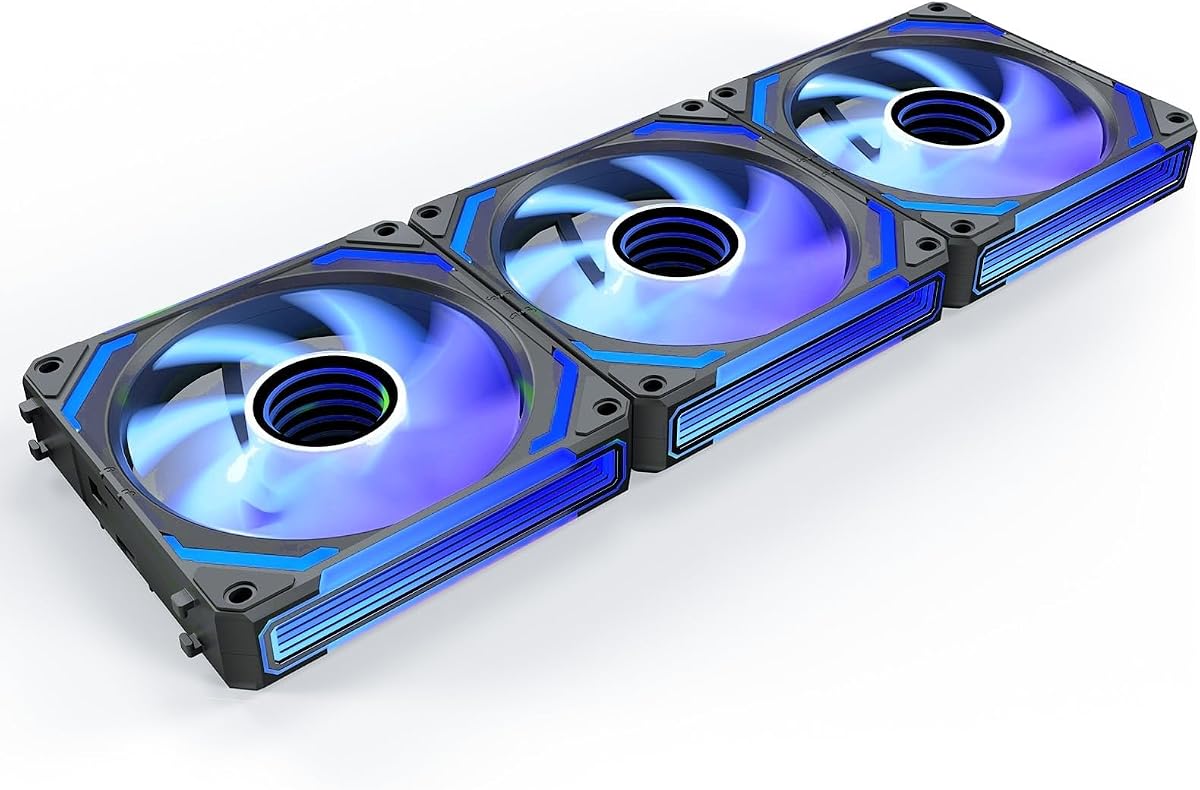
AsiaHorse COSMIQ 120mm
4.8Editor score
Stunning infinity mirror RGB design
Music sync lighting capabilities
Reverse fan option included
This guide compares the top addressable RGB fans for PC builds, focusing on cooling performance, lighting effects, noise levels, and ease of installation for
Modern PC builders demand more than just cooling; they want systems that look stunning. Addressable RGB fans provide individual LED control for vibrant, customizable lighting effects that transform your setup into a visual masterpiece while maintaining optimal thermal performance.
We evaluated ten top-rated addressable RGB fans based on airflow, static pressure, noise levels, and lighting quality. Our comparison considers build quality, bearing types, connectivity options, and compatibility with modern motherboards to help you choose the right fans for your specific needs.
Each pick showcases distinct strengths whether you prioritize silent operation, extreme cooling, or immersive lighting. Prices and availability fluctuate frequently so always check current listings before purchasing to ensure you get the best deal for your budget and system requirements.
4.8Editor score

4.7Editor score

4.7Editor score
The following table provides a side-by-side technical comparison of all ten addressable RGB fans reviewed in this guide allowing you to quickly assess specifications like airflow, static pressure, bearing type, and LED count for each model.




The Thermalright TL-C12C-S 5 pack stands out as our top choice for builders seeking a balance of performance and affordability. With a 4.7 rating from hundreds of users this five fan kit delivers reliable cooling and beautiful ARGB lighting without breaking the bank.
We may earn a commission when you buy through this link, at no additional cost to you.
Each fan features an S-FDB bearing that ensures smooth operation and minimal noise while reaching up to 1550 RPM. The blades are designed with a soft LED atomizing effect that reflects light evenly creating a pleasing glow that integrates well with most PC cases.
While it lacks advanced daisy-chain wiring you get five solid fans for a competitive price. The PWM control allows automatic speed adjustment based on motherboard temperature ensuring efficient cooling during gaming sessions and silence when idle.
This kit is ideal for budget-conscious enthusiasts or anyone upgrading a build with five standard 120mm fan mounts. It provides a complete solution for case airflow and RGB aesthetics making it our top recommendation for most users.
The 66.17 CFM airflow ensures adequate cooling for standard cases while the static pressure handles moderate airflow resistance effectively.
Seventeen customizable light modes plus motherboard sync allow you to match your fan lighting with your system's overall theme and mood.
We may earn a commission when you buy through this link, at no additional cost to you.
The CORSAIR RS120 ARGB 3 pack is a high-performance option for users who prioritize cooling efficiency and clean cabling. Rated at 4.6 stars it brings the reputation of a trusted component manufacturer with advanced features like AirGuide technology and magnetic dome bearings.
We may earn a commission when you buy through this link, at no additional cost to you.
AirGuide technology uses anti-vortex vanes to direct airflow precisely where needed which improves heat dissipation on radiators and heatsinks. The daisy-chain design means you only need one PWM and one ARGB connector per cable run simplifying case management significantly.
While the Magnetic speed reaches 2100 RPM producing noticeable noise it delivers 72.8 CFM of airflow which is excellent for high-pressure environments. The magnetic dome bearing reduces friction and vibration ensuring smoother operation over long periods.
Choose these fans if you need extra cooling power for an AIO system or a high-end CPU cooler and value brand support. The higher price is justified by the performance and cable management benefits for serious builds.
Anti-vortex vanes focus airflow directly onto components improving cooling efficiency even when mounted on restricted radiator or heatsink surfaces.
Daisy-chain connections reduce cable clutter by allowing multiple fans to share a single connector pair for both power and lighting control.
We may earn a commission when you buy through this link, at no additional cost to you.
The AsiaHorse COSMIQ 120mm three pack is our top premium choice for users who want exceptional visual impact alongside strong performance. With a 4.8 rating it stands out for its infinity mirror RGB design that creates a layered lighting effect unlike standard fans.
We may earn a commission when you buy through this link, at no additional cost to you.
The music sync feature uses a built-in microphone to change lighting patterns based on audio from your game or music. This interactive element adds a unique dimension to your build that traditional fans cannot match for immersive setups.
Performance is also solid with 68.5 CFM airflow and 2.05mmH2O static pressure. The reverse fan included in the pack ensures consistent lighting even when mounted for bottom intake without obscuring the fan blades behind the frame.
While expensive these fans justify their cost with unique features and high build quality. They are perfect for showpiece builds where aesthetics are as important as thermal performance and interactive lighting effects.
The layered infinity mirror effect creates a deep visual appearance that transforms a standard fan into a standout piece of modern PC art.
Music sync mode reacts to system audio changing colors and patterns in real time for a responsive and engaging desktop environment.
We may earn a commission when you buy through this link, at no additional cost to you.
The Thermalright TL-C12C-S X5 is a repeat entry that earns high marks for silent performance. Rated at 4.7 stars this five-pack option focuses on reducing noise while maintaining effective cooling through intelligent PWM temperature control features.
We may earn a commission when you buy through this link, at no additional cost to you.
Noise levels stay below 25.6dBA even at full speed making it nearly inaudible during normal operation. The intelligent temperature control function automatically adjusts speeds based on motherboard sensors eliminating the need for manual configuration or BIOS changes.
The S-FDB bearing ensures longevity and smoothness reducing friction-induced noise over time. This reliability makes it a safe choice for users who prioritize a quiet workspace over maximum airflow speeds or flashy lighting effects.
Buy this if you need a quiet fan solution for a home office or bedroom PC. The thermal efficiency is adequate for most cases and the silent operation enhances your overall computing experience significantly.
The PWM temperature control function adjusts fan speed automatically to maintain optimal cooling while minimizing unnecessary noise generation at idle.
S-FDB bearings reduce mechanical friction and vibration ensuring the fans remain quiet and reliable even after years of continuous operation.
We may earn a commission when you buy through this link, at no additional cost to you.
The ARCTIC P12 Pro A-RGB offers powerful performance at an accessible price. Rated at 4.7 it is ideal for radiators and dense cases where high static pressure is necessary to push air through restrictive barriers.
We may earn a commission when you buy through this link, at no additional cost to you.
Its maximum speed reaches 3000 RPM which is significantly higher than many competitors allowing for aggressive cooling when needed. The FDB bearing ensures smooth operation though noise increases with speed so it is best managed via PWM profiles.
The high static pressure rating means it can push air through radiators more effectively than standard fans. This makes it a practical choice for liquid cooling setups where airflow resistance is a common challenge.
Buy this if you need a budget-friendly high-pressure fan for radiators or dense mesh cases. The price point is exceptional for the performance it delivers and it suits users comfortable with BIOS control.
A 3000 RPM top speed allows this fan to deliver extreme airflow and static pressure when your thermal requirements demand maximum performance.
Compared to similar high-pressure options this fan offers outstanding value making high-end static pressure cooling accessible to all builders.
We may earn a commission when you buy through this link, at no additional cost to you.
The 6 Pack ARGB PWM Combo provides a complete solution with four forward and two reverse fans. Rated at 4.4 it includes a hub for easier control and is designed for 3D cooling strategies in modern PC cases.
We may earn a commission when you buy through this link, at no additional cost to you.
Reverse fans allow bottom or side intake to maintain consistent lighting visibility from the front. Each fan has 28 LEDs ensuring bright uniform lighting without needing extra strips or controllers for a cohesive look.
The included hub simplifies wiring by combining ARGB and PWM signals reducing clutter inside your case. This convenience appeals to builders who want a clean setup without managing multiple motherboard headers.
Choose this if you need six fans for a large case and want to maintain forward visibility. The hub and reverse fans add utility though the mixed reviews suggest checking recent feedback before purchase.
Reverse blade fans maintain lighting visibility when mounted on bottom or side intake slots keeping your build visually consistent and attractive.
The 2-in-1 hub centralizes speed and lighting control reducing cable clutter and simplifying connections for large multi-fan configurations.
We may earn a commission when you buy through this link, at no additional cost to you.
The Thermalright TL-C12C-S 3 pack is perfect for smaller builds needing fewer fans. Rated at 4.6 it shares the same core features as the larger pack including silent operation and reliable S-FDB bearings for consistent cooling.
We may earn a commission when you buy through this link, at no additional cost to you.
Each fan reaches 1550 RPM with 66.17 CFM of airflow providing ample cooling for standard setups. The silent performance makes it suitable for quiet environments while maintaining the same visual appeal as the larger kits.
Cable length is limited to around 55cm so careful routing is necessary for larger cases. However for compact builds this limitation is rarely an issue and the price per fan remains very competitive.
Select this if you need exactly three fans and want to save money. It is a straightforward reliable solution that offers the same quality as larger Thermalright bundles in a smaller package.
Designed for smaller setups the three-pack delivers the same quality and performance as larger bundles without unnecessary extra hardware.
With consistent airflow and silent operation the fans maintain a comfortable and quiet computing environment for daily tasks and gaming.
We may earn a commission when you buy through this link, at no additional cost to you.
The Thermaltake CT120 EX ARGB 3 pack introduces magnetic connections for easy daisy-chaining. Rated at 4.6 it simplifies installation significantly and provides millions of color options for customizable lighting effects.
We may earn a commission when you buy through this link, at no additional cost to you.
The magnetic design allows fans to snap together reducing loose cables and connectors inside the case. This improves airflow and aesthetics while minimizing the risk of cable management issues during or after installation.
Anti-vibration mounting systems reduce noise transmission through the case frame. The 9 addressable LEDs provide vivid color output that can be controlled via standard motherboard software for a unified system look.
Choose this for streamlined installation and magnetic daisy-chaining convenience. It is a solid choice for builders who value neat cable management and reliable performance with customizable lighting.
Magnetic connectors allow fans to snap together securely eliminating extra wires and simplifying multi-fan installation and cable management.
16.8 million color choices via motherboard sync allow you to create precise lighting effects that match your theme and mood.
We may earn a commission when you buy through this link, at no additional cost to you.
The Thermaltake CT120 ARGB 2 pack is a compact option for small builds. Rated at 4.6 it offers daisy-chain support and hydraulic bearings which provide durability and smooth operation for basic cooling needs.
We may earn a commission when you buy through this link, at no additional cost to you.
Speeds up to 2000 RPM deliver decent airflow while hydraulic bearings ensure reliable long-term performance. The 9 addressable LEDs offer bright lighting that syncs with motherboards for a clean aesthetic appearance.
Daisy-chaining reduces connector requirements and makes multi-fan setups easier. This is useful for cases with limited header availability and simplifies the overall look of your internal cable layout.
Select this for small builds needing two high-quality fans. It balances affordability and performance making it a safe choice for casual users who prioritize neat aesthetics and brand reliability.
Hydraulic bearings reduce friction and noise ensuring the fans remain smooth and quiet over years of daily operation and usage.
Daisy-chain cables allow multiple fans to connect via one pair of headers reducing clutter and simplifying motherboard port requirements.
We may earn a commission when you buy through this link, at no additional cost to you.
The Thermaltake LE120 ARGB 3 pack is our top rated option at 4.8 stars. It provides balanced performance with 66.1 CFM airflow and includes a PWM splitter for easy multi-fan control without extra costs.
We may earn a commission when you buy through this link, at no additional cost to you.
Hydraulic bearings ensure long-term reliability while the 9 LED count per fan offers vivid and customizable lighting. The PWM control range allows fine-tuned speed adjustments for optimal cooling and noise management.
Inclusion of a splitter adds value making installation more convenient for builders with limited motherboard headers. This feature simplifies setups where connecting three separate fans might otherwise be complex or require adapters.
Choose this for a reliable balanced choice with excellent value. The high rating reflects user satisfaction with performance and ease of use making it a top candidate for any standard PC case upgrade.
A included 3-way PWM splitter allows you to connect all three fans to a single motherboard header easily without extra adapters or cables.
66.1 CFM airflow and 1.41mmH2O pressure provide a balanced mix of cooling capability and noise control for everyday system needs.
We may earn a commission when you buy through this link, at no additional cost to you.
Selecting the right addressable RGB fans involves balancing performance features and budget. This guide outlines critical factors to ensure you choose the best fit for your system.
Airflow measured in CFM determines how much air moves through a case while static pressure in mmH2O shows how well air is pushed through resistance like radiators. Choose high static pressure for liquid cooling and high airflow for general case ventilation.
Prioritize static pressure for radiators and airflow for open cases.
Bearings influence noise and lifespan. Fluid Dynamic Bearings (FDB) and Sleeve Bearings offer quiet operation while Magnetic or Hydro bearings provide better longevity. Avoid cheap sleeve bearings for high performance builds.
Opt for FDB or magnetic bearings for long-term silent performance.
PWM fans allow your motherboard to adjust speed based on temperature. This ensures cooling only when needed reducing noise and power use. Always check for 4-pin PWM compatibility.
Always choose PWM fans for automatic temperature control.
Ensure fans support 5V 3-pin ARGB not 12V 4-pin. Motherboards vary so check your BIOS supports ARGB control. Daisy-chaining simplifies wiring and reduces clutter inside your case.
Verify 5V 3-pin ARGB and daisy-chain support.
Noise measured in dB(A) impacts comfort. Fans below 25dB are nearly silent while those above 30dB are noticeable during idle. Check max noise at full speed and look for bearing claims.
Aim for under 25dB for silent office environments.
Fans must fit your case dimensions such as 120mm or 140mm. Reverse fans ensure lighting visibility from intake sides. Anti-vibration mounts reduce rattling noise.
Check case dimensions and mounting options carefully.
Buying in packs reduces cost per fan but consider your needs. Some packs include controllers or splitters for added value. Calculate cost per fan versus buying individually.
Buy in packs for better value and bundle features.
Install fans securely using provided screws to prevent vibration. Ensure airflow direction points toward intake or exhaust as designed. Connect PWM to 4-pin headers and RGB to 5V 3-pin headers carefully.
Use BIOS or RGB software to set PWM curves and lighting effects. Calibrate lighting to sync with other components. Avoid blocking fan blades with cables to ensure optimal airflow and cooling.
Dust accumulation reduces cooling. Clean fans every three months with compressed air. Avoid touching blades directly. Check for wobbling or noise indicating bearing wear that may require replacement.
RGB fans use 12V 4-pin connectors with synchronized lighting across each fan. ARGB uses 5V 3-pin allowing individual LED control for more dynamic effects. Check your motherboard compatibility before buying.
Not always. Daisy-chaining fans reduces connector needs. If your motherboard has limited headers use a hub or splitter. Some packs include these for convenience.
Yes. PWM controls fan speed via the 4-pin connector while RGB handles lighting via the 3-pin. Both operate independently so you get full control over performance and aesthetics.
Reverse fans allow intake positions to show lighting through the blades rather than the frame. This maintains visual consistency especially on bottom or side intakes where lighting might otherwise be hidden.
Use compressed air to remove dust from blades and housing. Avoid water. Ensure the PC is powered off. Dust buildup restricts airflow and causes fans to work harder and noisier.
Not necessarily. Modern fans with quality bearings and PWM control stay quiet at normal speeds. Noise usually spikes only at maximum RPM under heavy thermal load which is managed by motherboard settings.
Our top picks like the Thermalright TL-C12C-S 5 pack and AsiaHorse COSMIQ offer excellent balance of performance and aesthetics. Each model delivers unique strengths from silent operation to music sync lighting for any build style.
Prioritize static pressure for radiators and airflow for general cooling. Ensure compatibility with your motherboard's RGB and PWM ports to avoid connection issues. Consider pack sizes that match your case's fan requirements.
Always verify current pricing before purchasing as prices fluctuate regularly. These guide provides a solid foundation but real-time listings ensure you secure the best value for your specific system configuration and needs.