
ASUS Pro WS W890E-SAGE SE
5.0Editor score
Intel Xeon 600 support
NitroPath DRAM technology
Server-grade IPMI management
This comprehensive guide compares the top ten ASUS server motherboards for enterprise and workstation use in October 2026 based on performance and features.
Selecting the right server motherboard is crucial for ensuring reliability, scalability, and performance in modern data centers and workstations. ASUS offers a wide range of options designed to meet diverse needs from entry-level servers to high-end AI workstations.
We have carefully evaluated ten top-rated ASUS server motherboards based on their specifications, connectivity options, power delivery, and overall build quality. Our analysis focuses on real-world applicability and compatibility with the latest processors and memory standards.
Each product in this list highlights key features, pros, and cons to help you make an informed decision. Please note that product availability and pricing may change frequently so verify details before purchasing.
5.0Editor score

3.7Editor score
4.3Editor score
The following table provides a side-by-side comparison of all ten ASUS server motherboards covered in this guide. Use this to quickly identify key specifications and features that matter most to your specific workload requirements.


The ASUS Pro WS WRX90E-SAGE SE stands out as the top choice for high-performance workstation needs. It supports AMD Ryzen Threadripper PRO 7000 WX-Series processors enabling extreme multitasking and rendering capabilities.
We may earn a commission when you buy through this link, at no additional cost to you.
Its connectivity is unmatched with seven PCIe 5.0 x16 slots allowing users to install multiple GPUs or high-speed network cards. The dual 10Gb LAN ports ensure fast data transfer essential for server environments.
While the price is high the robust power delivery with 32 stages ensures stability under heavy loads. The active cooling for VRM and chipset prevents thermal throttling even during 24/7 operation.
This board is ideal for professionals who need maximum expansion and reliability. If you require top-tier performance for AI or CAD workloads this motherboard delivers exceptional value.
Seven PCIe 5.0 x16 slots allow for unparalleled connectivity enabling multiple GPUs or specialized accelerator cards to run simultaneously.
Integrated IPMI with a dedicated LAN port allows remote hardware management ensuring minimal downtime for critical server applications.
We may earn a commission when you buy through this link, at no additional cost to you.
Designed for the future of AI computing the ASUS Pro WS W890E-SAGE SE offers cutting-edge features for Intel workstations. It supports Xeon 600 processors providing massive computational power for data processing.
We may earn a commission when you buy through this link, at no additional cost to you.
The NitroPath DRAM technology significantly enhances memory performance which is crucial for large datasets and complex simulations. Seven PCIe 5.0 slots ensure you can expand storage and networking without bottlenecks.
Users appreciate the comprehensive cooling solution including active fans for VRM and M.2 drives. This maintains optimal temperatures ensuring longevity and consistent performance over extended periods.
This motherboard is perfect for professionals building AI or rendering workstations. Its premium build quality and extensive connectivity options justify the investment for serious workloads.
NitroPath DRAM technology optimizes signal integrity allowing for higher stable frequencies and lower latency during intensive tasks.
With USB4 and USB 20Gbps Type-C ports alongside PCIe 5.0 the board supports next-gen peripherals and storage devices.
We may earn a commission when you buy through this link, at no additional cost to you.
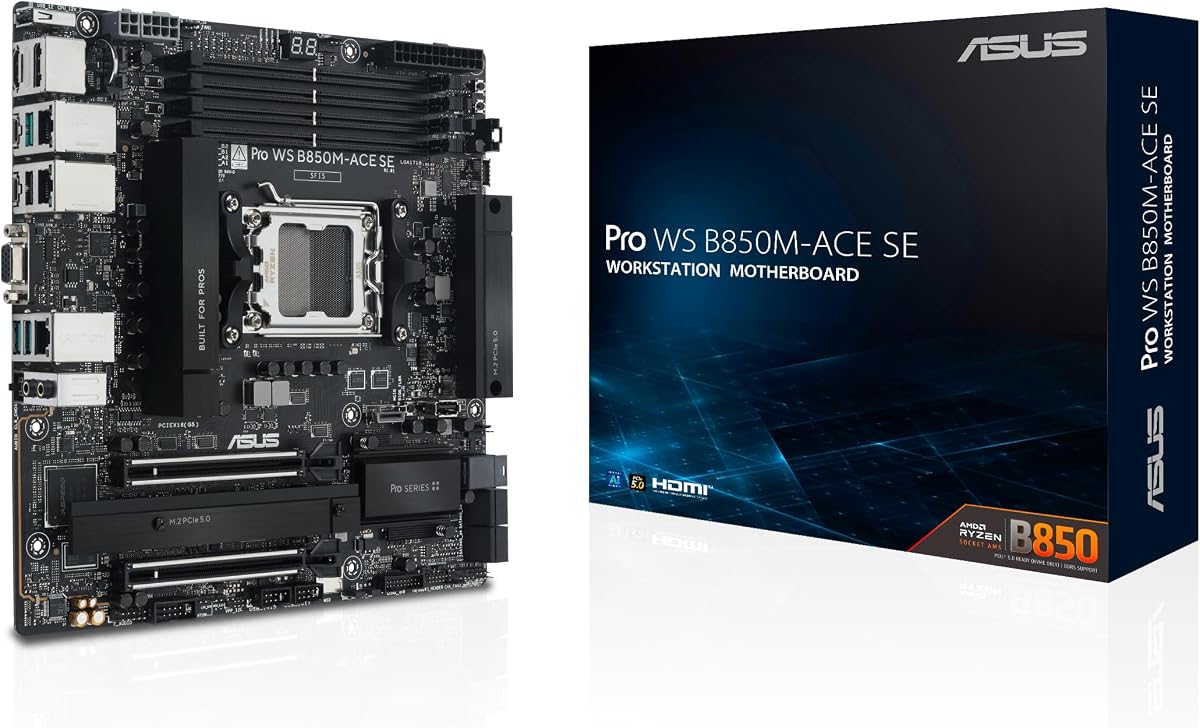
The ASUS Pro WS B850M-ACE SE brings server-grade features to a compact MicroATX form factor at an accessible price. It supports AMD Ryzen 9000 series making it ideal for smaller workstations.
We may earn a commission when you buy through this link, at no additional cost to you.
Despite the size it includes two PCIe 5.0 M.2 slots and USB4 support ensuring fast storage and peripheral speeds. The onboard BMC supports IPMI remote management a rare feature in this class.
Build quality is solid with robust power delivery and thermal pads for M.2 drives. This ensures stability even when running demanding business applications continuously.
This board is excellent for budget-conscious buyers needing enterprise features. It balances cost and performance effectively making it a top pick for small office servers.
Onboard BMC allows for IPMI implementation enabling remote monitoring and control without needing additional cards.
Designed to handle Ryzen 9000 series efficiently ensuring stable performance even under sustained multi-threaded loads.
We may earn a commission when you buy through this link, at no additional cost to you.
The ASUS Pro WS W890-SAGE provides a robust foundation for Intel workstations with CEB form factor. It supports Xeon 600 processors and offers significant expansion through its seven PCIe slots.
We may earn a commission when you buy through this link, at no additional cost to you.
A key feature is the readiness for IPMI expansion cards allowing users to customize their management needs. This flexibility makes it suitable for varied server environments.
The power stages and active cooling ensure thermal stability. Combined with NitroPath DRAM technology memory performance is optimized for demanding workloads.
This board is a strong choice for those needing custom server features. Its balance of connectivity and expandability suits professional workstation builds well.
The board includes headers for IPMI expansion cards offering flexibility in remote management setup.
We may earn a commission when you buy through this link, at no additional cost to you.
The ASUS Pro WS TRX50-SAGE WIFI integrates high-speed wireless directly into the workstation platform. With WiFi 7 it ensures fast connectivity for wireless peripherals or network access.
We may earn a commission when you buy through this link, at no additional cost to you.
It supports up to 96-core CPUs with 36 power stages delivering stable power. This makes it reliable for heavy rendering and simulation tasks.
The three PCIe 5.0 x16 slots provide ample room for GPU expansion. Additionally M.2 slots with SlimSAS support allow for fast storage configurations.
This board is suitable for modern workstations needing wireless flexibility. Its power design and manageability features make it a solid investment.
WiFi 7 support ensures low latency and high throughput for wireless connections and peripheral access.
We may earn a commission when you buy through this link, at no additional cost to you.
The ASUS Pro WS TRX50-SAGE WiFi A offers extensive connectivity including four M.2 slots and USB4 ports. This is ideal for workstations requiring massive storage capacity.
We may earn a commission when you buy through this link, at no additional cost to you.
It supports AMD Threadripper PRO processors and includes robust power delivery for sustained performance. The thermal design helps maintain stability during long tasks.
IPMI software support provides essential management tools. The slimSAS NVMe support ensures fast data access which is critical for database and video editing tasks.
This board is great for storage-heavy workstations. Its connectivity options and manageability features make it a compelling choice for professionals.
Four M.2 slots with SlimSAS support enable versatile and rapid storage configurations for demanding applications.
We may earn a commission when you buy through this link, at no additional cost to you.
The ASUS Pro WS W680-ACE IPMI is designed for Intel Core processors with a focus on business reliability. It comes with an IPMI expansion card bundled adding immediate value.
We may earn a commission when you buy through this link, at no additional cost to you.
Features include dual PCIe 5.0 slots and Thunderbolt 4 headers for versatile peripheral connectivity. The cooling system is designed to handle sustained loads efficiently.
With Intel 2.5Gb Ethernet ports networking is reliable and fast. The motherboard is tested for 24/7 operation ensuring uptime for critical applications.
This board is perfect for small business servers needing basic management. Its bundled IPMI card saves money and simplifies setup.
The bundled IPMI expansion card provides immediate hardware management capabilities without additional costs.
We may earn a commission when you buy through this link, at no additional cost to you.
The ASUS P12R-M/10G-2T is an entry-level server motherboard targeting small businesses. It supports Intel Xeon E-2300 series processors which offer solid performance for basic tasks.
We may earn a commission when you buy through this link, at no additional cost to you.
Its Micro ATX design fits into compact cases making it suitable for small offices. The C252 chipset ensures compatibility with server-grade components.
While detailed specs are limited it provides reliable foundations for standard server roles. It is a cost-effective choice for startups or small deployments.
This board is best for basic server needs. Its simplicity and affordability make it a practical option for budget builds.
The Micro ATX form factor allows installation in smaller server cabinets saving physical space in offices.
We may earn a commission when you buy through this link, at no additional cost to you.
The ASUS Z13PE-D16 supports dual Intel Xeon processors offering massive computational power. It is designed for heavy server workloads like virtualization and big data analytics.
We may earn a commission when you buy through this link, at no additional cost to you.
With support for up to 4TB of RAM it handles large datasets effortlessly. Dual 10Gbps LAN ports ensure high-speed network connectivity for data transfer.
IPMI tools allow for remote management which is vital for unattended servers. The board is built to handle high TDP processors stable.
This board is ideal for high-performance server racks. Its dual CPU support and manageability features make it a top choice for enterprise.
Support for 16 DDR5 slots allows up to 4TB of memory enabling handling of massive datasets.
We may earn a commission when you buy through this link, at no additional cost to you.
The ASUS Pro WS W680-ACE IPMI offers a second option for Intel users needing management features. It supports 13th Gen Core processors and provides standard server reliability.
We may earn a commission when you buy through this link, at no additional cost to you.
It includes a dedicated Ethernet controller for BMC ensuring effective IPMI management. The slimSAS support adds storage flexibility for business users.
Power delivery is stable with durable capacitors and inductances. This ensures longevity and consistent performance during operation.
This board is suitable for users needing specific management features. Its design balances standard server requirements with business utility.
The dedicated BMC chip and Ethernet controller enable robust remote server management and monitoring.
We may earn a commission when you buy through this link, at no additional cost to you.
Choosing the right motherboard requires evaluating several technical factors to ensure compatibility and performance. This guide outlines the key aspects you should consider before purchasing.
Ensure the motherboard socket matches your chosen CPU. ASUS offers sockets like sTR5 for Threadripper and LGA 4677 for Xeon. Mismatched sockets will prevent installation entirely.
Always verify the supported processor generation on the manufacturer's QVL list.
Server applications often demand large amounts of ECC memory. Check the maximum RAM capacity and supported speeds. DDR5 is standard for new platforms offering higher bandwidth.
Prioritize boards with enough DIMM slots to allow future expansion without replacing the motherboard.
PCIe slots are critical for adding GPUs, network cards, or storage controllers. Verify the number and generation of slots available. PCIe 5.0 provides the best future-proofing.
Ensure the motherboard supports the specific card sizes and lanes required by your peripherals.
High-core-count CPUs require robust VRM phases. Look for boards with sufficient power stages and effective cooling. Poor power delivery can lead to instability or throttling.
Dual PSU connectors are beneficial for server systems requiring redundant power sources.
Fast networking is essential for server performance. Integrated 10Gb or 2.5Gb Ethernet ports reduce the need for expansion cards. Dual LAN ports allow link aggregation.
Choose boards with dedicated management LANs for remote administration capabilities.
IPMI support allows remote hardware monitoring and rebooting. This is vital for managing servers off-site. Ensure the motherboard includes BMC headers or dedicated ports.
Some boards bundle IPMI cards while others require separate purchases for full functionality.
Server motherboards come in sizes like EEB, CEB, and ATX. Confirm your chassis supports the specific board size. Proper fit ensures all ports align correctly.
Consider airflow and cooling space when selecting the form factor for your build.
NVMe storage is faster than traditional SATA. Look for M.2 slots supporting PCIe 5.0 or SlimSAS connectors for high-speed boot drives.
Check if the motherboard has enough storage headers for your planned array configuration.
Install the motherboard in a compatible chassis with a sturdy stand-off pattern. Secure it firmly to prevent vibration damage to components.
Use high-quality cooling solutions for CPU and VRMs. Server systems run hot so ensure airflow paths are clear and dust filters are clean.
Update the BIOS regularly to ensure compatibility and stability. Check the support page for new firmware releases before deployment.
ASUS server motherboards feature robust power delivery, ECC memory support, and integrated management tools like IPMI. These ensure reliability and uptime essential for server environments.
Yes many server boards use non-standard form factors like EEB or CEB. Verify your case supports the specific dimensions and mounting hole spacing of the motherboard.
It depends on the socket. Some workstation boards support desktop Ryzen or Core chips but server models often require Xeon or Threadripper PRO processors for stability.
While not always mandatory ECC memory improves stability and data integrity. For critical tasks it is highly recommended to use ECC R-DIMMs.
IPMI allows remote monitoring and control of server hardware. You can reboot, update BIOS, or view system status without physical access to the machine.
Use the BIOS flashback feature if available or update through the BIOS utility with a USB drive. Always follow the official guide to avoid corruption.
We have reviewed ten powerful ASUS server motherboards ranging from compact options to high-end workstation boards. Each offers unique features to match different server requirements.
When choosing prioritize compatibility with your processor and memory. Consider connectivity and management tools to ensure long-term reliability and ease of use.
Prices and availability fluctuate often so verify current stock before purchasing. Always check the latest compatibility lists for optimal performance.