
Gwolves Skoll Mini SK-S Black
4.4Editor score
50g ultralight weight
3389 high precision sensor
Detachable cable included
This guide compares the best claw grip gaming mouse for small hands focusing on lightweight designs ergonomics and sensor performance to help you choose the
Finding the right gaming mouse can transform your experience especially when you have smaller hands. Claw grip users need specific shapes that support their fingers without causing strain during long sessions. The ideal mouse balances weight, size, and sensor precision to ensure you never miss a shot.
We evaluated ten top contenders based on real-world performance, build quality, and ergonomic fit. Each model was assessed for its suitability for claw grip styles and small hand anatomy. Our analysis includes wireless capabilities, sensor accuracy, and button responsiveness to give you a clear picture.
Each pick in this list highlights key strengths and potential trade-offs to help you decide. Remember that prices fluctuate frequently so check current offers before purchasing. We aim to provide honest insights so you can invest in gear that enhances your gameplay effectively.
4.4Editor score

4.6Editor score

4.1Editor score
This side-by-side comparison details the specifications and key features of each selected mouse to help you make an informed decision based on your specific gaming needs and hand size.


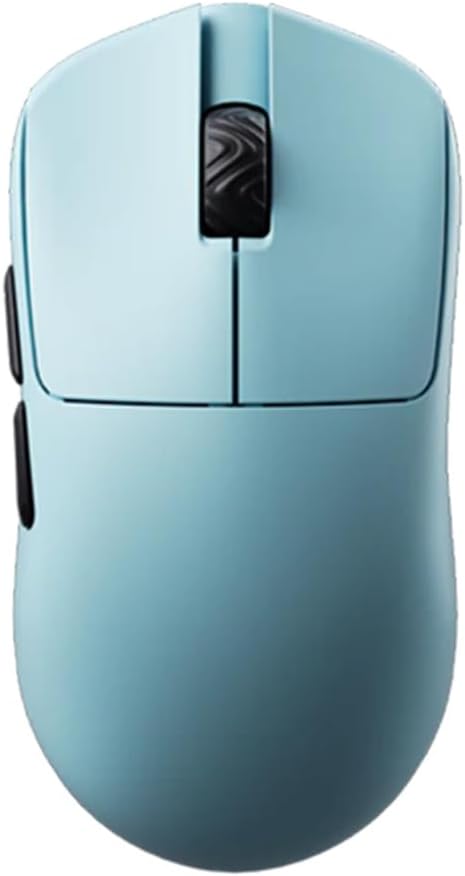

The Lamzu Atlantis Mini Champion Edition stands out as a top-tier choice for claw grip users with small hands. Its lightweight design and high-end sensor make it a favorite among competitive gamers seeking precision and speed.
We may earn a commission when you buy through this link, at no additional cost to you.
With a weight of only 51 grams, this mouse reduces wrist strain significantly during extended play sessions. The symmetrical hourglass shape supports the hand naturally preventing finger cramps and allowing for aggressive claw positioning without discomfort.
While the price is higher than many budget alternatives the performance justifies the investment. The dust-proof encoder and optical switches ensure long-term reliability which is crucial for daily competitive use and maintaining consistent performance over time.
Gamers who prioritize lightweight performance and sensor accuracy should strongly consider this model. It offers a seamless wireless experience with minimal latency making it an ideal upgrade for those looking to refine their setup and improve their overall gaming output.
The hourglass symmetry design provides a broad back and curved top that fits small hands perfectly reducing fatigue during long matches.
Equipped with the Pixart PAW3950 sensor this mouse supports up to 30000 DPI and 750 IPS ensuring accurate motion detection without delays.
We may earn a commission when you buy through this link, at no additional cost to you.
The Gwolves Skoll Mini offers an impressive balance of performance and affordability for gamers on a budget. Its ergonomic honeycomb design and 50g weight make it a compelling option for claw grip users needing speed and precision.
We may earn a commission when you buy through this link, at no additional cost to you.
Despite the lower cost this mouse delivers solid performance with the reliable 3389 sensor. The lightweight build allows for rapid flicks and movements without fatigue which is essential for fast-paced competitive games and precise aiming scenarios.
The main trade-off is the honeycomb shell which can trap dust over time but is easy to clean. Also since it uses a cable you miss out on wireless convenience however the detachable cable allows for easy replacement and portability.
Budget-conscious gamers looking for a lightweight wired mouse will find great value here. It provides the essential features needed for competitive play without breaking the bank making it an excellent entry point for small-handed claw players.
This mouse delivers high-end specifications like 16000 DPI and a lightweight shell at a fraction of the cost of premium wireless models.
Designed specifically for small hands the compact size and honeycomb structure ensure a comfortable grip for claw users during long sessions.
We may earn a commission when you buy through this link, at no additional cost to you.
The Pulsar X2H Mini Wireless delivers premium features in a compact form factor designed for aggressive claw grips. Its elevated hump and narrow waist provide the support needed for small hands to maintain stability and control effortlessly.
We may earn a commission when you buy through this link, at no additional cost to you.
This model features the highly rated PAW3395 sensor which ensures accurate tracking and responsiveness. The optical switches reduce the chance of accidental double clicks and offer a crisp tactile feel that many competitive players prefer for precise inputs.
While this unit is renewed the performance remains consistent with new units. The only limitation might be the software ecosystem which is straightforward but lacks deep customization features found in more complex gaming platforms for advanced users.
Players who need a reliable wireless mouse with strong ergonomics will appreciate this choice. The extended battery life and high polling rate ensure you can game for hours without interruption which is vital for both competitive and casual environments.
The raised rear hump and slender waist provide better stability for aggressive claw grip users ensuring comfort during extended gaming sessions.
Powered by a Nordic MCU this mouse offers efficient processing and an impressive 100 hours of battery life at 1000Hz polling rate.
We may earn a commission when you buy through this link, at no additional cost to you.
The Bloody V7 is a distinctive choice for gamers who value macro scripting and extensive programmability. Its ergonomic shape is specifically tailored to support claw grip styles while offering a wide range of customization options for complex tasks.
We may earn a commission when you buy through this link, at no additional cost to you.
Equipped with eight programmable buttons this mouse allows for efficient workflow management and game automation. The rubberized coating provides a secure grip which helps prevent slipping during intense gaming sessions and adds comfort to the overall user experience.
One limitation is the older sensor technology compared to modern ultra-light options. While it offers reliable tracking for general use it may not match the high-speed precision of newer models used in competitive esports environments specifically.
Users looking for a durable mouse with strong macro support should consider this model. It offers a blend of comfort and functionality that suits both gaming and productivity tasks making it a versatile tool for a variety of computing needs.
The Bloody 6 software allows for detailed macro and scripting adjustments giving users precise control over automation and input sequences.
The rubberized black coating enhances grip security ensuring the mouse stays stable in your hand even during rapid and aggressive movements.
We may earn a commission when you buy through this link, at no additional cost to you.
The Pulsar X3 LHD is a remarkable option for left-handed claw grip gamers. Its extreme lightness combined with a unique hybrid shape delivers exceptional precision and comfort for those who struggle to find suitable gear for their dominant hand.
We may earn a commission when you buy through this link, at no additional cost to you.
This mouse features the exclusive XS-1 sensor which offers high speed tracking and accuracy. The hybrid ergonomic design blends palm and claw shapes to provide a balanced experience that supports various grip styles without compromising on control or comfort.
While the performance is top tier the price point is higher than average. Additionally the left-handed design limits its availability to a niche market but for lefties it is often the only high quality option available for serious gaming.
Left-handed gamers seeking lightweight precision will find this mouse invaluable. The featherlight build reduces fatigue significantly allowing for longer play sessions with consistent performance that rivals the best models on the market today.
The XS-1 Sensor boasts 32000 DPI resolution and 750 IPS tracking speed delivering unparalleled precision for high speed competitive gameplay.
The RelaxClaw shape ensures a balance between palm support and claw control providing lasting comfort for extended gaming sessions.
We may earn a commission when you buy through this link, at no additional cost to you.
The Corsair IRONCLAW SE offers a powerful feature set for gamers who prefer a wired or wireless connection with extensive macro support. Its ergonomic asymmetric shape is designed for comfort though it is better suited for larger hand sizes.
We may earn a commission when you buy through this link, at no additional cost to you.
With ten programmable buttons and surface calibration capabilities this mouse adapts well to different gaming scenarios. The massive battery life ensures you can game for days without needing a charge which is excellent for marathon gaming sessions and consistency.
Small-handed users might find the shape too large for optimal claw grip comfort. However the feature-rich design and customizable RGB lighting make it a strong contender for those who prioritize functionality and aesthetics over compact ergonomics.
Gamers looking for high customization and long battery life should consider this model. It provides a stable wireless experience with robust software support making it a versatile tool for both gaming and productivity tasks on PC.
With up to 285 hours of battery life over 2.4GHz this mouse supports extended gaming sessions without frequent recharging interruptions.
The iCUE software allows for easy programming of macros and keybinds ensuring your mouse is set up for peak performance and productivity.
We may earn a commission when you buy through this link, at no additional cost to you.
The V8 Gaming Mouse is designed for fast-paced competitive gaming with its ultra-lightweight 36g frame. Its symmetrical shape and high-quality sensor make it a top choice for claw and fingertip gamers who prioritize speed and agility.
We may earn a commission when you buy through this link, at no additional cost to you.
Powered by the PixArt PAW3950 optical sensor this mouse delivers accurate tracking and stable performance. The Kailh optical switches provide instant actuation ensuring your inputs are registered immediately which is critical for responsive gameplay.
Setup is simplified with a web-based driver requiring no software installation. However some users might find the button spacing slightly tight for larger fingers and the design is functional rather than visually striking compared to other premium models.
Competitive players seeking minimal weight and high-speed performance will appreciate this mouse. Its efficient wireless connection and ergonomic shell ensure you can execute precise movements with ease making it a solid investment for serious gaming.
Equipped with Kailh optical switches this mouse offers instant actuation and improved durability compared to traditional mechanical switches.
The web-based driver allows for quick adjustments without installing bulky software streamlining the setup process for new users.
We may earn a commission when you buy through this link, at no additional cost to you.
The Pulsar X2H Wireless in white combines top-tier performance with a striking aesthetic appeal. Its compact symmetrical design and reliable sensor make it an excellent choice for small-handed claw users who value style as well as function.
We may earn a commission when you buy through this link, at no additional cost to you.
This model features the PixArt PAW3395 sensor with integrated Motion-Sync technology for precise tracking. The optical switches ensure swift responses while the Nordic MCU provides efficiency and extended battery life for uninterrupted gaming sessions over time.
While the white color is visually appealing it can show fingerprints and scratches more easily than darker models. Additionally the price point is on the higher end but the build quality and performance justify the investment for enthusiasts.
Gamers who want a stylish and reliable wireless mouse will love this model. The ergonomic shape supports aggressive claw grips effectively while the lightweight design ensures comfort during long play sessions and competitive matches.
The upgraded internal structure ensures shell rigidity and consistent satisfying clicks that last through intense gaming sessions.
Fuelled by a Nordic MCU this mouse delivers extended battery life up to 100 hours with precise status readings.
We may earn a commission when you buy through this link, at no additional cost to you.
The V6 Gaming Mouse offers the benefits of an ultra-lightweight design without the maintenance issues of honeycomb shells. Its solid body and symmetrical shape make it suitable for claw and palm users who prefer a classic feel.
We may earn a commission when you buy through this link, at no additional cost to you.
Weighing only 40g this mouse reduces hand fatigue during extended sessions. The concave buttons naturally fit the fingers providing clear click positioning and improved consistency which is essential for accurate gameplay and rapid inputs.
While solid shells can retain slightly more heat they are more durable and dust resistant. The web-based driver simplifies setup so you can start gaming without complex installations or software requirements for configuration.
Players seeking a lightweight yet durable option will find this mouse appealing. Its reliable wireless connection and ergonomic buttons ensure responsive performance that supports both competitive and casual gaming needs effectively.
Weighing around 40g this mouse significantly reduces hand fatigue while avoiding the dust issues associated with honeycomb shells.
Comfortable concave buttons naturally fit your fingers providing clear click positioning and improved consistency for rapid inputs.
We may earn a commission when you buy through this link, at no additional cost to you.
The BenQ Zowie S2-C is a legendary choice for esports pros who value simplicity and consistency. Its driverless operation means you can plug it in and start playing without any software installation required for basic functionality.
We may earn a commission when you buy through this link, at no additional cost to you.
Designed specifically for small hands the S-C series offers a shortened symmetrical shape that supports palm and claw grips alike. The high quality paracord cable minimizes drag allowing for smooth movement across any surface during intense gaming sessions.
While it lacks the high DPI options of modern sensors its tracking is reliable and consistent. The limited customization might not suit advanced users who prefer software tweaking but many prefer this plug and play experience for tournament consistency.
Gamers who want a no fuss mouse that performs reliably will appreciate this model. It is built to last with a strong warranty and durable construction ensuring it can handle the rigors of competitive play without failure.
The driverless design allows for plug and play operation which ensures you can start playing instantly without software installation.
The shortened symmetrical design is built for comfort and supports both palm and claw grip styles for ideal competitive performance.
We may earn a commission when you buy through this link, at no additional cost to you.
Choosing the right mouse depends on several factors that directly impact your comfort and performance. Here are key aspects to consider before making a purchase decision.
Lightweight mice are generally preferred for claw grip users as they reduce wrist strain and allow for quicker movements. Look for models between 40g and 60g to ensure agility without sacrificing stability during gameplay.
Prioritize lightweight frames to enhance speed and reduce fatigue during long gaming sessions.
A high-quality sensor ensures accurate tracking and responsiveness. Modern optical sensors offer high DPI and IPS ratings which are essential for precise aiming and smooth cursor movement.
Select a mouse with a top-tier sensor for reliable performance across all surfaces.
Symmetrical or ergonomic shapes tailored for small hands provide better support for claw grip users. Ensure the mouse has a narrow waist and comfortable back curvature to prevent finger cramps.
Choose a shape that fits your hand size to maximize comfort and control.
Wireless mice offer freedom of movement but ensure they have low latency and long battery life. Wired mice provide consistent power and zero lag which may be preferred for competitive play.
Decide between wireless freedom or wired consistency based on your gaming preferences.
Optical switches are becoming popular for their durability and faster response times compared to mechanical switches. They reduce the risk of accidental double clicks and provide a crisp tactile feel.
Opt for optical switches if you prioritize longevity and precise clicking.
Adjustable DPI allows you to fine-tune sensitivity according to your playing style and monitor setup. Aim for mice with a wide DPI range to accommodate different tasks from gaming to productivity.
Ensure the mouse offers flexible DPI adjustment for versatile usage.
Buttons should be accessible without stretching your fingers too far. Extra side buttons can enhance functionality but ensure they are easy to reach and press during intense action.
Check that buttons are positioned naturally for your grip style.
A robust build and good warranty protect your investment. Look for mice with strong shells and reliable construction to ensure they withstand daily use and accidental drops.
Consider warranty terms and build quality for long-term reliability.
To get the best performance from your mouse place it on a clean and flat mousepad. Ensure the surface is free of debris to maintain accurate tracking and smooth gliding movements.
Adjust your DPI settings to match your gaming style. Lower DPI is often better for precision aiming while higher DPI suits fast-paced movement. Save your preferred settings if your mouse supports profiles.
Regularly clean the mouse surface and sensor lens to prevent dust accumulation. For wireless models keep the unit charged and store it properly to extend battery life and overall device longevity.
A suitable mouse for small hands has a compact shape and a narrow waist to support a secure grip. The weight should be light enough to prevent strain but heavy enough to maintain stability during rapid movements.
Claw grip can offer better precision and faster flicks in FPS games due to its balance between speed and control. It allows fingers to rest on the back of the mouse enabling quicker adjustments.
Yes optical switches typically last longer than mechanical ones as they use light beams instead of physical contacts. This reduces wear and tear resulting in consistent performance over millions of clicks.
Lightweight mice reduce fatigue during long sessions allowing for smoother and faster movements. They are especially beneficial for competitive gaming where precision and speed are critical.
Use a soft cloth or compressed air to remove dust from the surface and sensor. Avoid harsh chemicals that might damage the finish. Regular cleaning ensures optimal tracking and longevity.
A good DPI range for gaming is between 800 and 1600 depending on your sensitivity preference. Higher DPI allows for faster movement but lower DPI offers more precision for aiming.
Modern wireless mice with advanced technology have negligible latency making them suitable for competitive gaming. Look for models with high polling rates to ensure responsiveness.
Battery life varies by model but many high-end wireless mice offer 100 hours or more. Proper charging habits and usage settings help maximize battery duration.
We hope this guide has clarified the best options available for claw grip gamers with small hands. From the Lamzu Atlantis Mini to the Gwolves Skoll Mini each model offers unique strengths for different needs.
Prioritize ergonomics and sensor performance to ensure your mouse enhances your gameplay. A comfortable fit and reliable tracking can make a significant difference in your overall gaming experience.
Remember to check current prices and availability before purchasing as deals change frequently. Investing in the right mouse will reward you with better control and comfort for every session.