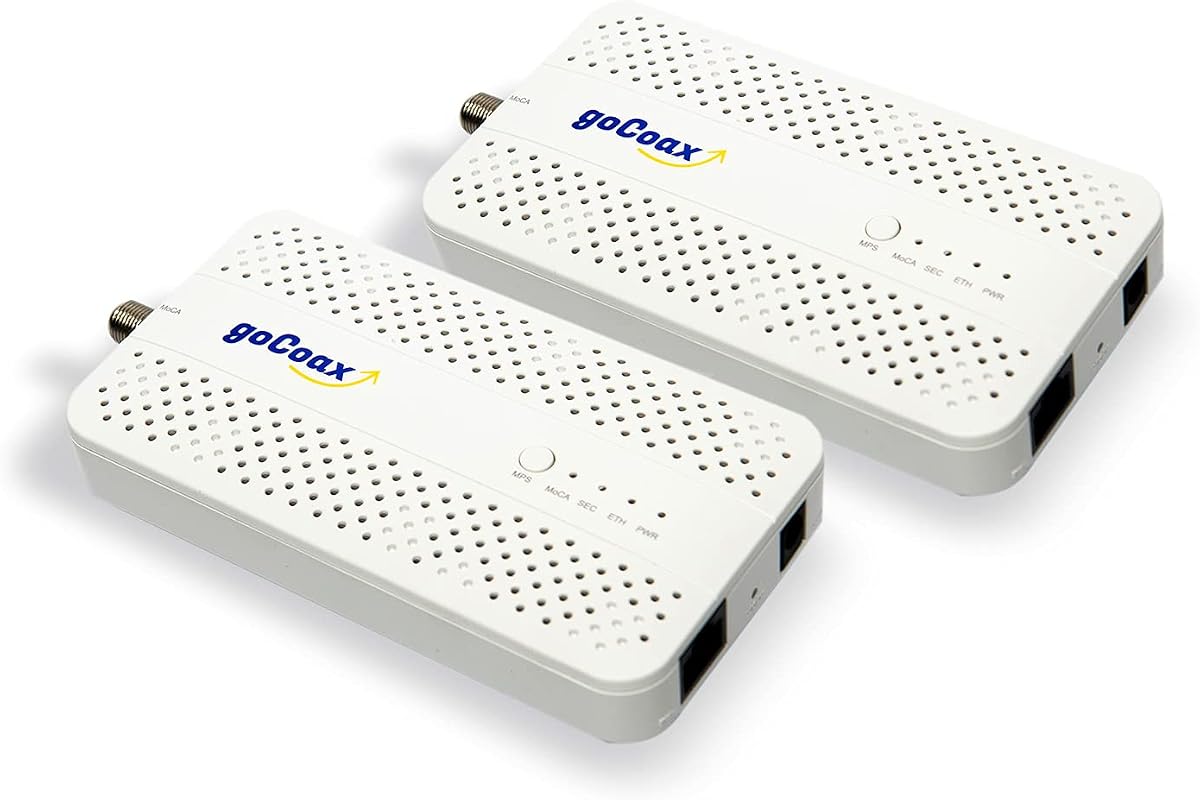
goCoax MoCA 2.5 Adapter (2-Pack) with 2.5GbE Ethernet Port
4.6Editor score
Full 2.5Gbps Speed
Under 3ms Latency
Plug and Play Kit
This guide compares the top coax to Ethernet adapters for 2026, evaluating speed, compatibility, and ease of use to help you find the best wired networking
Modern homes need fast wired connections but running new cables is difficult. Coax to Ethernet adapters turn existing coax wiring into reliable gigabit networks without drilling walls or paying for professional installation services today.
We evaluated ten top models based on speed, latency, compatibility, and real-world performance. Our analysis covers MoCA 2.5 and G.hn standards to ensure you choose a solution that works with your specific ISP and home wiring setup effectively.
Each pick below highlights key features, pros, cons, and ideal use cases. Prices and availability change frequently so always verify current details before purchasing. This guide helps you navigate options from budget kits to premium enterprise-grade adapters confidently.
4.6Editor score

4.8Editor score

4.6Editor score
The following table compares all ten products side by side. Look closely at port speeds, included accessories, and compatibility notes to match your home setup.


The TRENDnet TMO-313C2K ranks as our top pick for its exceptional reliability and speed. With a 4.8 star rating it delivers consistent 2.5Gbps performance ideal for modern high bandwidth homes requiring stable wired connections today.
We may earn a commission when you buy through this link, at no additional cost to you.
Its MoCA 2.5 technology ensures low latency and high throughput. The improved packet error rate keeps voice and video calls clear even during peak hours. Government compliance adds trust for users needing secure networking solutions.
The compact design fits easily behind routers or in entertainment centers. While it requires a MoCA enabled setup its performance justifies the investment. You avoid Wi-Fi dead zones and enjoy full gigabit speeds reliably.
Choose this adapter if you prioritize stability and speed. It suits gamers streamers and remote workers needing dependable wired connections. Verify your coax wiring is interconnected for best results before ordering online now.
Its combination of speed reliability and compliance makes it the standout choice for most users seeking premium performance.
4K HD video flows smoothly without buffering thanks to the enhanced bandwidth and lowered latency.
We may earn a commission when you buy through this link, at no additional cost to you.
The goCoax MA2500D offers excellent value for users wanting 2.5Gbps without breaking the bank. With a 4.6 rating it turns coax into a blazing fast wired backbone instantly.
We may earn a commission when you buy through this link, at no additional cost to you.
Its plug and play design simplifies setup. Just connect adapters near router and device. Latency stays under 3ms making it ideal for gaming and video conferencing across multiple rooms.
While it works with most cable providers you may need a PoE filter for security. The kit includes all necessary cables so no extra purchases are needed immediately after opening.
Pick this if you want fast speeds at a lower cost. It works well with eero Orbi and Google Wifi systems as a wired backhaul for mesh networks easily.
Under 3ms latency ensures competitive gaming stays lag free without running new wires.
Everything needed comes in the box for immediate use out of the box.
We may earn a commission when you buy through this link, at no additional cost to you.
The Kiwee KB-M3-02 stands out with dual 2.5GbE ports allowing multiple devices at full speed. Rated 4.6 it brings next-gen networking to homes with existing coax wiring.
We may earn a commission when you buy through this link, at no additional cost to you.
Its future-proof design handles 4K and 8K streaming effortlessly. The ultra-low latency ensures smooth gameplay and video calls even during peak hours without interruptions.
The all-inclusive kit includes coax and Ethernet cables so setup is instant. It works with all major routers and ISPs ensuring maximum flexibility for any home office setup.
Choose this for premium performance and extra ports. It suits demanding users who need multiple wired connections at full speed simultaneously. Ideal for large homes needing full coverage easily.
Two ports let you connect multiple devices at full speed without needing an extra switch.
High-grade components ensure years of reliable high-speed networking ahead.
We may earn a commission when you buy through this link, at no additional cost to you.
The ScreenBeam ECB7250K02 starter kit delivers speeds surpassing Wi-Fi using coax wiring. Rated 4.4 it includes splitters and cables to enhance wired networks quickly.
We may earn a commission when you buy through this link, at no additional cost to you.
It connects remote Wi-Fi access points easily and works with most routers. The 2.5Gbps Ethernet port supports 4K streaming and remote work effectively without lag.
Note that some DOCSIS 3.1 modems might conflict due to frequency overlap. Check with your ISP before purchasing to ensure compatibility with your network setup today.
Pick this for expanding networks with Wi-Fi access points. It's ideal for homes needing wired access in multiple rooms without running new cables through walls.
Connect remote access points via coax for extended coverage without new wiring.
Everything needed for setup including splitters and cables is in the box.
We may earn a commission when you buy through this link, at no additional cost to you.
The Hitron HTEM5 extends existing networks using coax wiring. Rated 4.3 it works with cable and most fiber services including Verizon Fios and Google Fiber.
We may earn a commission when you buy through this link, at no additional cost to you.
It provides 2.5Gbps speeds for 4K streaming and gaming. The kit includes adapters and cables for plug-and-play setup without extra purchases needed immediately.
Verify your coax outlets are interconnected before buying. Free technical support helps if you face connectivity issues due to home wiring configuration.
Choose this if you have cable or most fiber internet. Avoid if you use AT&T fiber as it causes signal interference with MoCA networks today.
Ensure coax outlets are interconnected and not isolated for proper function.
Free technical support helps resolve wiring configuration issues quickly.
We may earn a commission when you buy through this link, at no additional cost to you.
The LNOVISION converter upgrades analog systems to IP using existing coax. Rated 4.4 it supports PoE standards for cameras and phones with simple setup.
We may earn a commission when you buy through this link, at no additional cost to you.
It works with RG59 RG6 cables and uses a heat sink for reliability. Indoor use only with point-to-point connection ensuring stable data and power.
For multiple cameras use the recommended EOC switch kit to avoid interference. It's ideal for elevators or small CCTV setups needing twisted pair coax.
Pick this for surveillance upgrades without new wiring. Ensure you have a PoE switch or injector ready for the receiver to function properly.
Convert old analog systems to modern IP cameras using existing coax cables.
Built-in heat sink ensures stable performance during long continuous use.
We may earn a commission when you buy through this link, at no additional cost to you.
The Nexuslink GCA-1200-KIT transforms unused coax into a gigabit network. Rated 4.3 it delivers speeds up to 1.2Gbps for gaming and streaming on dark wiring.
We may earn a commission when you buy through this link, at no additional cost to you.
For best performance use it on dark coax not shared with TV services. Setup is simple and quick without rewiring or installing new Ethernet cables.
Ensure you are not using this with active cable TV lines as it will not work. It extends reach and enables uninterrupted streaming on separate networks.
Choose this if you have disconnected coax in your walls. It's ideal for homes wanting a secondary secure network on unused lines easily.
Designed exclusively for unused wiring not carrying active TV services.
Up to 800 meters of coverage for large homes and offices.
We may earn a commission when you buy through this link, at no additional cost to you.
The KB-M3-03 kit offers 2.5Gbps data speeds and 30W PoE+ power. Rated 4.4 it connects and powers access points cameras and phones via one cable.
We may earn a commission when you buy through this link, at no additional cost to you.
Ideal for Wi-Fi 6E or 7 access points needing both power and data. The seamless network expansion avoids extra outlets or complex setups for large homes.
It ensures consistent interference-free signal over long distances. Low-latency transfer prevents buffering during high-performance gaming or streaming sessions.
Pick this for powering modern devices and extending Wi-Fi. It simplifies installing cameras or access points in hard-to-reach rooms easily.
Delivers power and data to cameras access points and phones via one Ethernet cable.
Perfect companion for latest generation Wi-Fi access points needing wired backhaul.
We may earn a commission when you buy through this link, at no additional cost to you.
The TRENDnet TMO-312C single adapter offers reliable gigabit speeds. Rated 4.3 it is backed by a 3-year manufacturer protection for peace of mind.
We may earn a commission when you buy through this link, at no additional cost to you.
It works with coax wiring to create faster wired connections to devices. The compact design fits any installation including desktop or entertainment center.
While it caps at 1Gbps it still outperforms many Wi-Fi options. It supports up to 16 nodes for whole-home coverage on one network.
Choose this if you need just one adapter for a device. Ensure your coax wiring is active and compatible with MoCA standards today.
Includes 3-year manufacturer protection backing quality support and peace of mind.
RJ-45 port allows MoCA traffic to flow smoothly with reduced bottlenecks.
We may earn a commission when you buy through this link, at no additional cost to you.
The ScreenBeam ECB6200S02 is an add-on adapter for existing starter kits. Rated 4.2 it provides 1Gbps connectivity improving speed over traditional wireless.
We may earn a commission when you buy through this link, at no additional cost to you.
It extends the MoCA network for more devices without buying full kits. Each device needs a MoCA adapter so rooms without ports require one unit.
Verify your router has MoCA capability or add adapters. It is cost-effective for expanding connectivity in more rooms efficiently.
Pick this if you already own a starter kit. Ensure compatibility with your existing setup before buying to avoid unnecessary expenses.
Expand your network affordably without buying full starter adapter kits again.
Check router MoCA support to avoid incompatibility issues with existing hardware.
We may earn a commission when you buy through this link, at no additional cost to you.
Selecting the right adapter involves checking speed compatibility and wiring. This guide breaks down critical factors to ensure your purchase meets your home needs.
Most adapters use MoCA 2.5 offering up to 2.5Gbps real-world speeds. MoCA 2.0 caps at 1Gbps and may limit future bandwidth needs. Check the protocol version to ensure it matches your internet plan and device capabilities.
Choose MoCA 2.5 for best performance and longevity. If your internet is under 1Gbps MoCA 2.0 may suffice but 2.5 prepares your home for future upgrades.
Look for Ethernet ports matching your devices. 2.5GbE ports are becoming standard and support high-end NAS and PCs. Some kits include multiple ports reducing the need for extra switches in crowded rooms.
Prioritize adapters with ports matching your device needs. If you connect multiple devices one adapter with multiple ports offers better value than buying multiple single-port units.
Most cable ISPs like Comcast Xfinity and Spectrum support MoCA. However AT&T and satellite providers like DirecTV often block or use different frequencies. Verify your provider supports MoCA before buying.
Confirm compatibility with your ISP to avoid returns. If unsure contact your provider to ask if MoCA adapters work on your service.
Ensure your home uses interconnected coax wiring. If a splitter isolated coax or satellite wiring exists the adapters may fail. Check outlets are connected to a main junction.
Inspect your coax setup before ordering. Isolated runs from satellite TV or unused wiring may need rewiring to function with Ethernet adapters.
Kits vary in included cables and adapters. Some include coax and Ethernet cables plus splitters or power adapters. Others sell accessories separately adding to total cost.
Check the box contents to avoid extra purchases. A full kit saves time and ensures you have everything for immediate setup.
Some adapters provide Power over Ethernet (PoE) for cameras and access points. This eliminates separate power outlets for devices mounted high or far away.
Use PoE adapters if connecting cameras or APs. It simplifies wiring and keeps setups clean without visible power cords.
Choose adapters with MoCA 2.5 and 2.5G ports to support future speed increases. Older adapters may bottleneck faster internet plans eventually.
Invest in adapters with higher speeds than needed now. It prevents needing upgrades when your internet plan improves later.
Check if the brand offers support. Some vendors include free technical support to help with wiring or configuration issues.
Select brands known for responsive support. Wiring issues are common and having guidance saves frustration.
First connect the adapter to an active coax outlet near your router using the included coax cable. Ensure the outlet is part of a working coax network not isolated for satellite.
Next plug one end of the Ethernet cable into the adapter and the other into your router or device. Connect the power adapter and wait for the MoCA indicator light to stabilize.
Care the adapters by keeping them in well-ventilated areas. Avoid covering them with objects and ensure dust is cleared regularly for long-term reliability and performance.
No they do not work with satellite TV wiring from DirecTV or Dish. These systems often isolate coax networks making them incompatible with MoCA. Verify your wiring is interconnected before purchasing an adapter.
MoCA 2.5 is a standard supporting speeds up to 2.5Gbps over coax. It is worth it for future-proofing since it outperforms older versions and Wi-Fi. Choose it for best performance and longevity.
Some high-split DOCSIS systems need a MoCA compatible splitter. Standard splitters may block MoCA frequencies. Check with your ISP or kit instructions for requirements.
Yes many work with fiber providers like Verizon Fios or Google Fiber if coax wiring is active. AT&T Fiber is an exception due to frequency interference.
Yes coax adapters generally offer faster speeds and lower latency. Powerline depends on electrical wiring quality while coax uses shielded cabling for reliability.
Yes they work with systems like Eero Orbi and Google Wifi. They can serve as wired backhaul improving mesh network performance across rooms.
Most adapters are plug-and-play with zero configuration. They auto-discover each other over coax and create the network automatically upon connection.
We reviewed ten top adapters from budget to premium. The TRENDnet TMO-313C2K leads overall while goCoax offers best budget value.
Prioritize MoCA 2.5 support and verified ISP compatibility. Ensure your coax wiring is active and interconnected before purchasing.
Prices and availability change so check current details before buying. Choose the adapter that matches your home wiring and internet speed needs for reliable performance.