
Switch Cooling Fan with Bottom Cooling
Vertical stand design
Real time RPM display
Includes joystick caps
Discover the top 10 cooling fans for Nintendo Switch Dock designed to prevent overheating and ensure smooth gameplay performance for your console setup.
Keeping your Nintendo Switch cool during extended gaming sessions is essential for maintaining performance and preventing unexpected shutdowns due to overheating issues.
We compared ten highly rated cooling solutions based on fan speed, noise levels, build quality, and compatibility with original and OLED dock models to find the best options.
Each pick includes detailed specs and pros and cons to help you choose the right cooler while keeping in mind that product availability and details may change over time.

4.6Editor score

4.4Editor score
This side by side comparison highlights key specifications and features across all ten cooling fans to help you make an informed decision for your Switch dock setup.



This cooling fan ranks first for its comprehensive feature set including a digital LED display that shows both fan speed and exit temperature in real time.
We may earn a commission when you buy through this link, at no additional cost to you.
The adjustable fan speed ranges from 510rpm to 6000rpm allowing you to balance cooling power with noise levels depending on your gaming intensity.
While the fan is nearly silent below 2400rpm it does produce some spinning sound at higher speeds which is a reasonable trade-off for maximum heat exhaust.
It is the ideal choice for Switch 1 and 2 owners who want precise control over their cooling setup without needing additional hardware or complex installations.
The LED display provides instant feedback on how hot your console is running so you can adjust fan speed before performance drops.
Besides the fan you get a fixed pad for stability and two joystick caps to protect your controls during long sessions.
We may earn a commission when you buy through this link, at no additional cost to you.
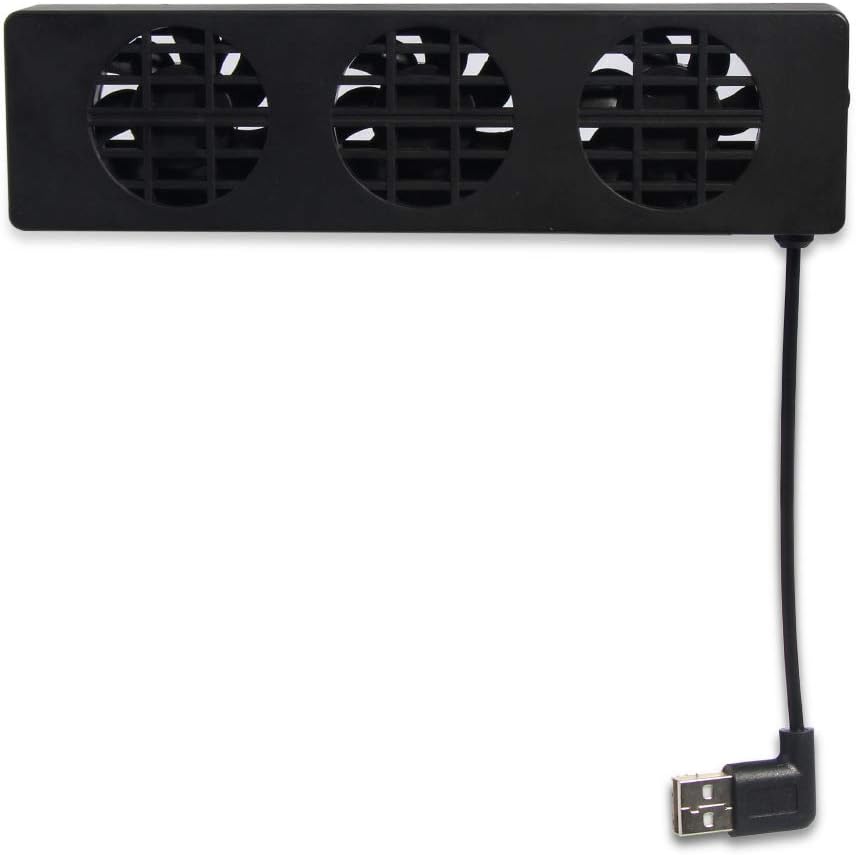
The TNP model uses three built-in fans to provide strong ventilation performance that helps lower the console temperature quickly and effectively during gameplay.
We may earn a commission when you buy through this link, at no additional cost to you.
It offers three speed modes including Turbo and Normal so you can select the right balance for light gaming or hardcore sessions without overheating.
Though the rating is slightly lower than top picks the straightforward installation and compact design make it a practical choice for many users.
This cooler is best suited for those who prioritize physical fan count and ease of use over advanced monitoring features like temperature displays.
Three fans working together create a robust airflow path that moves heat away from critical console components more efficiently.
The design allows it to fit seamlessly with your original dock saving room on your entertainment cabinet without obstructing ports.
We may earn a commission when you buy through this link, at no additional cost to you.
Designed specifically for the Switch 2 this cooling stand offers dual fans and three cooling levels ensuring stable performance and body protection during extended sessions.
We may earn a commission when you buy through this link, at no additional cost to you.
It includes six card slots for game storage and three USB expansion ports which reduces cable clutter and makes charging controllers and headsets convenient.
The RGB light modes let you customize the look to match your setup though you can turn them off if you prefer a distraction-free environment.
If you are using the Switch 2 this stand provides a unified solution for cooling storage and power distribution that enhances your overall gaming experience.
This unit combines cooling with card storage and USB expansion so you need fewer separate accessories on your desk or TV stand.
When connected to the Switch 2 charging dock the fan automatically operates at full speed ensuring immediate cooling without manual setup.
We may earn a commission when you buy through this link, at no additional cost to you.
The GLDRAM unit is a direct replacement for the 2021 OLED dock featuring super turbo fans that blow directly onto the OLED base to dissipate heat faster.
We may earn a commission when you buy through this link, at no additional cost to you.
It includes fourteen game card slots on top which is a significant advantage for collectors who want quick access to frequently used game cards.
The shell is made of durable ABS material that is light in weight and small in size ensuring the console stays cool even after hours of charging and play.
This cooler stands out for its OLED-specific design and large storage capacity making it the premium choice for Switch OLED owners who value organization.
With fourteen slots you can store a large collection of game cards right on your dock so you can switch games immediately.
The blue light fan matches the OLED dock design and turns on and off with the fan to keep your setup looking cohesive.
We may earn a commission when you buy through this link, at no additional cost to you.
This Dobe fan is designed for the OLED model and uses a high-speed fan to speed up air circulation inside the base to achieve heat dissipation.
We may earn a commission when you buy through this link, at no additional cost to you.
Installation is straightforward with the original power adapter connecting directly to the Type C input port allowing power from the dock.
The fan includes a blue LED inside that creates a lighting effect which is synchronized with the fan so it is on when cooling is active.
It is a solid choice for users who want a quiet and visually matching accessory without needing complex adjustments or multiple fan speeds.
The white color and design intent match the OLED base so the addition does not look out of place in your setup.
Even when charging the fan ensures the equipment stays cool and input delay is gone which is critical for responsive gameplay.
We may earn a commission when you buy through this link, at no additional cost to you.
This fan features a super turbo fan that accelerates airflow and instantly cools the dock for better heat dissipation during intense gaming sessions.
We may earn a commission when you buy through this link, at no additional cost to you.
The fan runs at 3000r/min which is fast enough to cool your console quickly ensuring optimal performance while you play for hours.
Its white color and blue LED light match the OLED look enhancing the overall aesthetic of your gaming setup while keeping things functional.
For those needing a quick affordable upgrade to their cooling this fan delivers strong performance and space saving design at a low cost.
The 3000r/min speed ensures that heat is removed from the dock quickly preventing the console from throttling during demanding games.
The sleek white finish with blue accents blends with your console while providing a smart solution for cooling without clutter.
We may earn a commission when you buy through this link, at no additional cost to you.
This model is equipped with three cooling fans inside to effectively dissipate heat and keep the console cool when gaming for long periods.
We may earn a commission when you buy through this link, at no additional cost to you.
You can adjust the cooling speed using the switch on the side which offers Turbo and Normal modes to suit different gaming needs.
It is made from superior material and features a small compact design that is easy to set up and use on any compatible dock station.
The Bewinner unit offers reliable multi-fan cooling with simple controls making it a practical choice for users who prefer mechanical switches.
Three fans working in unison provide more effective heat transfer than single fan models reducing console temperature more efficiently.
A side mounted switch lets you toggle between turbo and normal modes quickly without needing complex menus or digital interfaces.
We may earn a commission when you buy through this link, at no additional cost to you.
Built-in three cooling fans provide powerful ventilation that reduces game console temperature quickly and effectively during gameplay to prevent overheating.
We may earn a commission when you buy through this link, at no additional cost to you.
The device includes a switch to choose Turbo fast Normal slow or Off working modes so you can adjust to your gaming intensity.
It is driven via the USB port on the dock which means no extra power is needed and you can easily insert it onto the back of the dock.
With its easy to carry and store size the OSTENT cooler is a practical addition for users who value simple and portable cooling solutions.
The powerful ventilation from three fans helps reduce heat fast so you can extend your gaming sessions without thermal throttling.
Using the dock USB port means you do not need to find extra outlets or cables to power the cooling system.
We may earn a commission when you buy through this link, at no additional cost to you.
This fan fits the original dock station and effectively lowers operating temperature to avoid unexpected game pauses caused by overheating during sessions.
We may earn a commission when you buy through this link, at no additional cost to you.
It features an LED display to show real-time fan speed RPM and exhaust temperature clearly which helps you monitor console health at a glance.
Support speed adjustment from 510RPM to 6000RPM and runs nearly silent below 2400RPM balancing strong cooling and low noise experience.
Given the affordable price and inclusion of accessories like joystick caps and a fixed pad this fan is an outstanding budget-friendly choice for many.
The LED display gives you direct access to RPM and temperature so you can confirm the fan is working as expected.
The package includes a fixed stabilizer pad and joystick caps so you can protect your console and controls without extra purchases.
We may earn a commission when you buy through this link, at no additional cost to you.
This black cooling fan is designed specifically for the Switch OLED model dock ensuring a perfect fit and targeted airflow for better heat dissipation.
We may earn a commission when you buy through this link, at no additional cost to you.
It features a compact form factor that does not clutter your setup while providing reliable cooling performance during extended gaming sessions.
The black color matches the dock hardware maintaining a cohesive visual look in your entertainment center or gaming station.
With a solid user rating this fan is a trustworthy option for those who prefer a simple plug-and-play solution without extra buttons or displays.
Designed for the OLED model it ensures that the cooling unit aligns properly with your console ventilation points.
The black finish blends with the OLED dock so it does not stand out and keeps your console area looking tidy.
We may earn a commission when you buy through this link, at no additional cost to you.
Choosing the right cooling fan for your Switch dock involves considering several factors to ensure compatibility performance and value for your specific setup needs.
Always check that the cooling fan is compatible with your specific dock model whether it is the original standard dock or the OLED variant to avoid fit issues.
Verify the connection method and required ports before purchase to ensure seamless installation and stable performance on your console.
Higher RPM speeds provide better cooling but often come with more noise so consider whether you need maximum performance or a quiet experience during play.
Look for adjustable speed options that allow you to balance cooling power with acceptable noise levels for your environment.
Fans with LED displays for temperature or RPM give you more control over your thermal management so you can react quickly to heat spikes.
Basic models with simple on-off switches are also effective if you do not need detailed monitoring during your gaming sessions.
Materials like ABS plastic are durable and lightweight which helps maintain structural integrity without adding excess weight to your docking station setup.
Choose fans with robust construction and protective pads to prevent scratches on your console dock during installation and daily use.
Some cooling docks include extra game card slots or USB ports that reduce clutter and allow you to charge accessories without extra cables.
If you have many games or controllers consider a unit that integrates storage and charging functionality to simplify your setup.
Most fans draw power from the dock USB port which is convenient but verify this is supported by your specific dock model to avoid power issues.
Models that require external power adapters may limit portability but can provide more consistent performance if dock USB power is insufficient.
Look for products that come with warranties such as lifetime coverage which ensures you can get assistance if the fan fails after purchase.
Responsive customer service is valuable for troubleshooting installation or technical issues that might arise with your cooling accessory.
RGB lights or color finishes like black or white help the cooler blend with your console setup so it does not look like an afterthought.
Choose lighting options that enhance your gaming experience without distracting from the screen or creating unwanted visual clutter.
Install the fan by inserting it onto the back of the dock station and plugging the provided USB or Micro USB cable into the dock's port for power.
Turn on the fan using the side or front switch to activate cooling mode and adjust speed settings according to your gaming intensity or noise preference.
Clean the fan blades periodically with compressed air or a soft cloth to remove dust that can reduce airflow and increase operating temperatures over time.
While the Switch manages heat well extended gaming sessions can cause overheating which leads to throttling or unexpected pauses. A cooling fan helps maintain optimal temperatures and extends the console lifespan during docked play.
Most cooling fans are designed for specific dock models such as original or OLED. Always check compatibility before buying to ensure the fan fits securely and connects properly to your dock USB port.
If you notice the console becomes warm to the touch or you experience lag use a higher fan speed. Models with temperature displays make it easier to monitor heat levels in real time.
Most fans operate quietly at lower speeds but noise can increase at maximum RPM. If you prefer silence check for models with adjustable speed and run them at moderate settings during casual gameplay.
Some cooling fans like those designed for original Switch docks may not fit the Steam Deck which has a different shape. Always verify compatibility with your handheld device before purchase.
Quality cooling fans with durable materials and stable build can last several years if kept clean and not run at max speed continuously. Proper maintenance and care help extend their service life.
We reviewed ten cooling fans that range from basic models with three fans to advanced docks with digital displays and card storage for various user needs.
Prioritize compatibility with your dock model and consider whether you need speed controls or temperature feedback to match your gaming style and setup space.
Product details and prices may change over time so always check current listings and confirm the features match what you need before finalizing your purchase.