
Brother DS-640
4.3Editor score
Ultra compact design
Micro USB power
Free scanning software
This guide compares the top 10 document scanners for iPhone 18 users, evaluating speed, portability, software compatibility, and value to help you choose the
Finding a document scanner for iPhone 18 users requires careful consideration of connectivity and mobile app support. Modern workflows demand devices that sync seamlessly with iOS ecosystems for efficient digital organization on the go.
We evaluated ten leading portable scanners based on real-world performance metrics, software features, and physical design. Our analysis focuses on compatibility with mobile devices, scanning speed, optical resolution, and overall ease of use for daily tasks.
Each product entry details key specifications, pros, cons, and ideal use cases to streamline your decision process. Please note that product availability and pricing may fluctuate, so verify current offers before finalizing your purchase decision today.
4.3Editor score

4.3Editor score
4.4Editor score
The following table provides a side-by-side comparison of all ten selected scanners. We highlight key specifications like speed, connectivity, and media handling to help you quickly identify the device that fits your specific mobile scanning needs.





The Epson Workforce ES-50 stands out as a top choice for mobile professionals needing reliable document capture. With a strong user rating of 4.3 stars, it balances speed and portability effectively for on-the-go scanning tasks.
We may earn a commission when you buy through this link, at no additional cost to you.
Its standout quality is the ultra-fast scanning speed of 5.5 seconds per page, which significantly reduces wait times during busy workflows. The included Epson ScanSmart software simplifies organization by allowing direct cloud uploads and automatic file naming without complex setups.
However, users must note that this model relies on a manual single-sheet feeding process. While convenient for receipts and small stacks, it may slow down high-volume tasks compared to auto-feeders found in more premium desktop units.
For iPhone 18 users seeking a lightweight solution that connects easily via USB to laptops or mobile hubs, this scanner delivers consistent performance. It is an ideal companion for digitalizing records quickly without sacrificing desk space.
Its compact footprint fits easily into laptop bags, making it perfect for field work or remote meetings where paperless workflows are essential.
Epson ScanSmart facilitates seamless conversion to searchable PDFs using Nuance OCR, ensuring scanned text remains editable and easy to locate later.
We may earn a commission when you buy through this link, at no additional cost to you.
The Brother DS-640 offers exceptional value for users needing a no-frills scanning solution. Rated 4.3 stars by users, it excels in portability and speed without demanding a high investment.
We may earn a commission when you buy through this link, at no additional cost to you.
Its primary strength is its ultra-compact design, measuring less than one foot in length and weighing only 1.5 lbs. This allows it to fit in almost any bag or even a large pocket, ensuring you are ready to scan anywhere.
The scanner operates via a micro USB cable connected to a computer, which limits standalone mobile use but keeps costs low. While it lacks a built-in battery, this trade-off enables reliable performance without charging concerns.
If you need an affordable entry point for digitizing documents quickly at home or in a small office, the DS-640 is a solid choice. Its speed of 16 pages per minute ensures efficient processing of daily paperwork.
The narrow profile minimizes workspace usage, keeping your desk clear while maintaining access to essential scanning capabilities.
Brother software supports multiple scan destinations including email and cloud services, offering flexibility despite the wired connection requirement.
We may earn a commission when you buy through this link, at no additional cost to you.
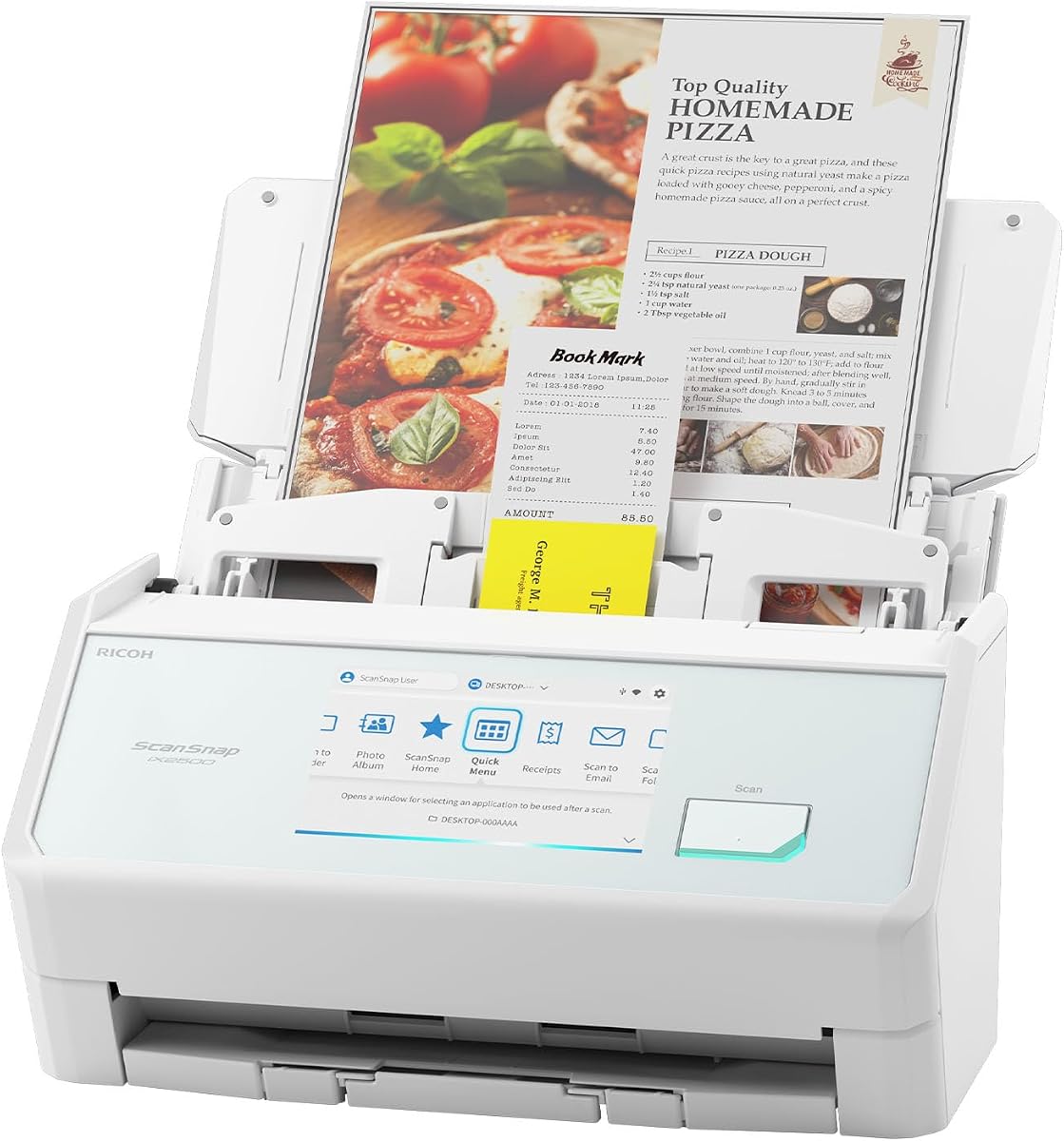
The ScanSnap iX2500 represents the pinnacle of desktop scanning technology for modern workflows. With a 4.4-star rating, it combines speed, intelligence, and wireless freedom in a robust package.
We may earn a commission when you buy through this link, at no additional cost to you.
Its most impressive feature is the 45 pages per minute duplex scanning speed, which handles two-sided documents instantly. The large touchscreen interface allows for customizable profiles that can send files directly to mobile devices or cloud storage without a computer.
While the cost is higher than portable units, the included 100-sheet feeder reduces manual interaction significantly. The built-in Wi-Fi 6 ensures fast, secure connections even in crowded office networks, facilitating smooth integration into existing digital ecosystems.
For power users managing large volumes of paperwork who still want seamless mobile access, this scanner is unmatched. Its ability to auto-name and sort files saves hours of administrative time monthly.
Smart profiles automatically apply OCR and file naming rules, ensuring your digital library remains organized with minimal user input.
Wi-Fi 6 and USB-C options provide versatile connection methods, accommodating both legacy ports and modern high-speed transfer needs.
We may earn a commission when you buy through this link, at no additional cost to you.
The CZUR Shine Ultra is a unique high-speed scanner designed primarily for flat documents and books. Rated 4.2 stars, it offers an alternative to traditional sheet-fed devices for specific use cases.
We may earn a commission when you buy through this link, at no additional cost to you.
Its patented flattening technology allows it to scan curved book pages without damage, making it excellent for preserving archival materials. At just one second per page, it is one of the fastest optical scanners available for this form factor.
However, it lacks direct iOS compatibility, which limits utility for iPhone users relying solely on mobile apps. The software works best with Windows and macOS systems, so consider your primary device before purchasing.
If you need a rapid solution for digitizing physical books or teaching materials while using a desktop PC, the Shine Ultra delivers impressive results. Its adjustable height design also supports ergonomic positioning during long sessions.
Pixel transformation technology corrects curvature in real-time, ensuring straight text lines even when scanning open book pages.
The 13MP camera captures fine details clearly, allowing for precise digitization of charts and images alongside standard text.
We may earn a commission when you buy through this link, at no additional cost to you.
The Brother DS-740D enhances mobile scanning with duplex capabilities in a portable form factor. With a 4.3-star rating, it is trusted by professionals who need to digitize double-sided documents quickly.
We may earn a commission when you buy through this link, at no additional cost to you.
Its single-pass duplex scanning allows both sides of a page to be captured simultaneously, doubling efficiency. This is particularly useful for contracts or receipts where information exists on both sides and needs to be archived completely.
Like the DS-640, this unit is USB-powered and portable but adds the convenience of dual-sided scanning. The desk-saving design reduces its footprint, making it ideal for shared workspaces where every inch matters.
For users needing duplex functionality without the bulk of a larger machine, this scanner is a smart investment. It integrates well with existing document management systems, ensuring seamless workflow automation.
Capture both sides of a document in one pass, saving time and reducing wear on delicate paper compared to double-feed methods.
The narrow design saves over 11 inches of desk space, leaving room for other peripherals while maintaining high performance standards.
We may earn a commission when you buy through this link, at no additional cost to you.
The Canon imageFORMULA R10 brings automated feeding to the portable segment. Rated 4.1 stars, it simplifies bulk scanning by handling small stacks without manual intervention.
We may earn a commission when you buy through this link, at no additional cost to you.
Its 20-sheet automatic feeder is a significant advantage for batch processing tasks like invoices or receipts. This feature reduces the need to feed every document by hand, freeing up your hands for other work while it runs.
The scanner handles various media types, including plastic cards and receipts, which can jam simpler devices. Built-in software ensures quick previewing and editing, helping you maintain quality without needing external apps.
If you frequently scan small batches of documents and value convenience over raw speed, the R10 is a strong contender. Its USB power requirement keeps it light and portable for travel use.
Designed to scan receipts, business cards, and plastic cards reliably, making it suitable for diverse business record-keeping needs.
Pre-installed tools allow instant scanning without driver installations, ensuring you can start digitizing documents immediately upon connection.
We may earn a commission when you buy through this link, at no additional cost to you.
The Epson Perfection V19 II is designed for high-quality image scanning rather than bulk document processing. With a 3.9 rating, it is ideal for archiving photos and delicate materials that cannot be fed through rollers.
We may earn a commission when you buy through this link, at no additional cost to you.
Its 4800 dpi optical resolution captures fine details in artwork and vintage photos, allowing for high-resolution digital copies. One-touch scanning and photo restoration features make it easy to revive faded images without advanced editing skills.
While effective for images, its flatbed design means single documents must be placed manually, slowing down text digitization. The kickstand allows vertical storage, saving desk space when the device is not in use.
Choose this scanner if preserving visual media is your primary goal alongside occasional document needs. It offers unmatched fidelity for static items that require careful handling.
Easy Photo Fix technology restores color and clarity to faded images with a single click, simplifying archival restoration tasks.
Scan books and photo albums with the removable lid, making it possible to digitize larger bound items flatly.
We may earn a commission when you buy through this link, at no additional cost to you.
The Epson Workforce ES-60W is designed for users who prioritize wireless mobility over all other features. Rated 4.1 stars, it offers true untethered scanning capability for diverse operating systems.
We may earn a commission when you buy through this link, at no additional cost to you.
Its standout feature is wireless connectivity, allowing scans to be sent directly to iOS or Android devices without needing a computer intermediary. This makes it exceptionally versatile for iPhone users managing documents on the go.
With a 4-second scan speed, it is among the fastest mobile units available. However, users must manage battery levels carefully as it runs on internal batteries that are not built-in rechargeable, potentially requiring periodic replacements.
If you need complete freedom from cables and want to capture receipts instantly using your smartphone app, this model is a top choice. It bridges the gap between desktop functionality and true portability.
Supports both iOS and Android devices seamlessly, ensuring you can access scanned files regardless of the mobile device you use.
The scanner automatically detects connectivity and switches between USB and wireless modes, simplifying usage across different work environments.
We may earn a commission when you buy through this link, at no additional cost to you.
This handheld scanner provides a cost-effective entry point into digital document management. Rated 3.9 stars, it offers basic functionality suitable for occasional use or travel needs.
We may earn a commission when you buy through this link, at no additional cost to you.
Its primary benefit is independence from a computer; files can be stored directly on a Micro SD card. The 900 DPI resolution allows for high-quality color image capture, suitable for photos or detailed diagrams.
Operation involves manually sliding the wand across a document, which requires a steady hand. While efficient for small items, it is less suited for standard pages where consistent speed and alignment are critical.
For travelers or students needing a low-cost tool for quick digitization without laptops, this device is practical. It simplifies document access by storing files locally on a portable card.
Direct SD card storage ensures files are saved without needing network connectivity or external storage devices immediately.
Three resolution modes allow you to adjust image quality based on your needs, balancing file size and detail preservation.
We may earn a commission when you buy through this link, at no additional cost to you.
The silver version of this handheld scanner offers the same practical features as its blue counterpart. Rated 3.9 stars, it is a budget-friendly tool for basic digitization tasks on the move.
We may earn a commission when you buy through this link, at no additional cost to you.
It supports storing scanned files directly onto a Micro SD card, eliminating the need for immediate computer access. The 900 DPI resolution ensures that documents and images are captured with sufficient clarity for most standard uses.
As a handheld wand device, it requires manual movement across the page which may demand practice to achieve perfectly aligned scans. This makes it less ideal for high-volume workflows but perfect for occasional document needs.
If you require a portable, low-cost solution that operates independently of power outlets or computers, this model is effective. Its simplicity makes it accessible for users who want basic scanning without complex setups.
Store and share scans directly via SD card, ensuring you have access to documents even when internet or PC access is unavailable.
Multiple resolution settings enable you to optimize file size against image detail based on your specific requirements.
We may earn a commission when you buy through this link, at no additional cost to you.
Selecting the right document scanner for iPhone 18 depends on your specific workflow requirements. This guide outlines critical factors to consider to ensure you invest in a device that enhances your productivity.
Modern scanners offer various connectivity methods including USB, Wi-Fi, and Bluetooth. For iPhone 18 users, wireless options are preferable as they allow direct scanning to the device without needing a computer intermediary.
Prioritize scanners with dedicated iOS apps or cloud compatibility to ensure seamless file transfer and access from your mobile device.
If you travel frequently, the physical dimensions and weight of the scanner matter significantly. Look for ultra-compact designs that fit into laptop sleeves or small bags without adding bulk.
Choose lightweight models under two pounds if you plan to carry your scanner daily to meetings or remote workspaces.
Speed impacts workflow efficiency, especially when processing large volumes of documents. Measured in pages per minute (ppm), faster scanners reduce waiting times and improve overall productivity.
For occasional use, speeds of 10-15ppm are adequate, but high-volume users should aim for models exceeding 20ppm to save time.
Consider the type of documents you scan most often. Some devices handle only single sheets manually, while others include automatic feeders for multi-page batches.
Select auto-feeders for high-volume tasks to reduce manual handling and ensure consistent alignment of pages during scanning.
Software determines how you manage and organize scanned files. Look for features like Optical Character Recognition (OCR) to convert images into editable text and searchable PDFs.
Ensure the manufacturer provides robust mobile apps or cloud integration to facilitate easy file sharing and editing directly from your iPhone.
Some scanners require constant USB power from a computer, while others operate on batteries. For truly mobile use, battery-powered models are essential to avoid dependency on wall outlets.
Check battery life specifications and replacement costs to ensure uninterrupted scanning sessions during travel or fieldwork.
Optical resolution, measured in dots per inch (DPI), affects the clarity of scanned output. Standard text documents generally require 300 DPI, while photos or detailed images benefit from 600 DPI or higher.
Choose a scanner with adjustable resolution settings to balance file size with clarity based on your storage needs.
Determine your budget and compare features against cost. Higher-priced models often include advanced features like duplex scanning or large capacity feeders that may not be necessary for everyone.
Evaluate the total cost of ownership including software licenses and accessories to ensure you receive the best value for your investment.
Start by installing the manufacturer's software or mobile app on your iPhone 18. Ensure your device is updated to the latest OS version to maximize compatibility and performance with scanning tools.
Clean the scanner glass or sensor periodically with a soft, lint-free cloth to prevent smudges or dust from affecting scan quality. For sheet-fed models, ensure documents are free of staples or paper clips to avoid jams.
Store the scanner in a dry, dust-free environment when not in use. Avoid placing it in direct sunlight or extreme temperatures to protect internal components and extend the lifespan of the device.
Most traditional desktop scanners connect via USB and require a computer to process data. However, many modern portable models feature Wi-Fi or Bluetooth capabilities that allow direct connection to mobile devices. Check if the specific scanner model has a dedicated iOS app before purchasing.
OCR converts scanned images of text into editable and searchable digital formats. This means you can copy, paste, or search through your scanned documents rather than just storing them as static images, enhancing usability and organization.
Many portable scanners are USB-powered for simplicity and cost-effectiveness. However, battery-powered models are available for users needing complete mobility without access to power outlets or computers during scanning tasks.
Ensure all documents are flat, aligned, and free of staples or clips before loading them into the scanner. Regularly clean the scanner rollers and sensors to remove dust or debris that could interfere with the feeding mechanism.
Duplex scanning allows a scanner to capture both sides of a document in one pass or two passes. Look for scanners with automatic duplex capabilities to save time and ensure complete digital records of your paperwork.
Most manufacturers include basic scanning software for free with their devices. Additionally, many scanners offer cloud integration with free storage tiers, allowing you to manage files without purchasing additional software licenses.
We explored ten diverse document scanners ranging from ultra-portable handheld units to powerful desktop solutions. The Epson Workforce ES-50 and Brother DS-640 stand out for their balance of performance and affordability for daily mobile tasks.
When selecting a scanner, prioritize connectivity options and software compatibility to ensure a seamless workflow with your iPhone. Consider factors like scanning speed and document handling capabilities to match your specific workload volume.
Always verify current pricing and stock availability as deals may change. Investing in a reliable scanner today will streamline your document management and support efficient digital organization in the future.