
Antec Flux Pro
4.7Editor score
Six PWM fans included standard
Multi-directional vent design
Innovative PSU mounting options
Explore the best dual system PC cases for parallel computing and modular builds. This guide compares top chassis options for airflow, cooling, and design.
Dual system PC cases offer unique flexibility for builders needing parallel computing or dedicated test environments. These chassis support two independent systems within a single footprint, maximizing desk space and cooling efficiency for advanced workstations or enthusiast rigs.
We compared ten top-rated cases based on thermal performance, modularity, and build quality. Our analysis focuses on airflow design, component clearance, and ease of cable management to help you find the right chassis for your specific dual setup needs.
Each pick highlights key features like chamber separation, fan support, and GPU clearance. Note that availability and pricing change frequently, so check current listings before purchasing to ensure you get the best deal on your new dual system chassis.
4.7Editor score

4.7Editor score
This side-by-side comparison highlights the key specifications and features of the top ten dual system PC cases available today. Use this table to quickly identify which chassis meets your specific cooling, storage, and component clearance requirements.


The NZXT H9 Flow RGB+ stands out as a top choice for modern dual system builds. With a 4.7 rating, it balances aesthetics and function through its dual-chamber design that isolates heat sources effectively.
We may earn a commission when you buy through this link, at no additional cost to you.
Its optimized airflow uses perforated steel and angled front-right fans to cool high-performance components efficiently. The ten-fan capacity allows for extensive custom liquid cooling setups without compromising on space.
While the price is higher than average, the build quality and ease of cable management justify the investment. The panoramic glass view enhances the visual appeal of any high-end workstation or gaming rig.
This case is ideal for users who prioritize clean looks and thermal performance. It is highly recommended for builders seeking a reliable chassis that supports latest motherboard technologies seamlessly.
The dedicated secondary chamber isolates power and cables from your main build, improving overall system stability and cooling efficiency significantly.
Back-connect ready features ensure compatibility with rear-connecting motherboards like ASUS BTF and MSI Project Zero for a cable-free look.
We may earn a commission when you buy through this link, at no additional cost to you.
The Antec Flux Pro offers exceptional value for builders needing robust cooling without breaking the bank. Rated 4.7, it includes six PWM fans and features a unique multi-directional vent design for superior airflow.
We may earn a commission when you buy through this link, at no additional cost to you.
Its innovative iShift PSU mount and support for simultaneous radiator installation make it versatile for custom liquid cooling. The combination of metal, glass, and wood adds a high-quality texture to your workspace.
Assembly might be more complex than standard cases due to its modular design, but the flexibility it offers is worth the effort. This is a strong contender for those who want customization options.
Ideal for budget-conscious enthusiasts who demand performance, this case delivers on both form and function. It is a reliable choice for building powerful systems with extensive cooling needs.
Supports up to twelve fans simultaneously with pre-installed options, ensuring your components stay cool even under heavy loads.
Crafted with metal, glass, and wood to create a high-quality texture that stands out from typical all-metal chassis.
We may earn a commission when you buy through this link, at no additional cost to you.
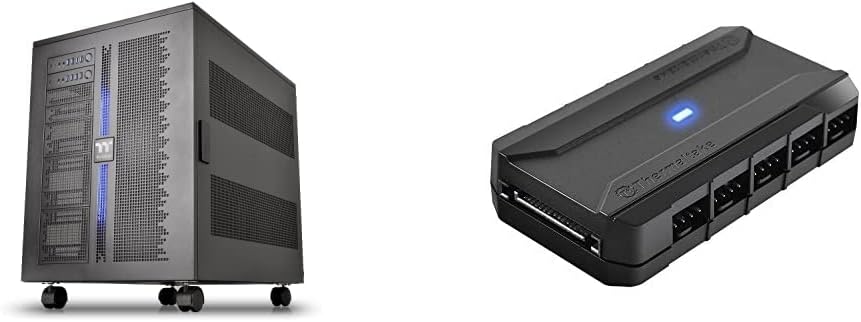
The Thermaltake Core W200 is a premium option designed specifically for parallel computing needs. Its dual system capable chassis supports two separate systems back-to-back, making it perfect for test labs or high-end workstations.
We may earn a commission when you buy through this link, at no additional cost to you.
With support for up to two 600mm radiators and a fully modular design, this case offers unmatched flexibility for custom liquid cooling. The Commander FP hub powers ten fans simultaneously to maintain optimal temperatures.
Its large size and high cost reflect its professional capabilities. Users looking for maximum expansion options will find the investment worthwhile for the performance and versatility it delivers.
This case is ideal for professionals or serious enthusiasts who need to run two systems in one footprint. It is the ultimate choice for scalable and powerful dual system configurations.
Designed to install two separate systems in a back-to-back configuration, effectively doubling your compute power in one chassis.
Supports up to 2x 600mm radiator applications allowing for extreme cooling performance for high-heat workloads.
We may earn a commission when you buy through this link, at no additional cost to you.
The Cooler Master HAF II 500 focuses heavily on thermal performance with its oversized fans and low resistance design. Rated 4.8, it delivers massive airflow throughput through large front and rear ventilation openings.
We may earn a commission when you buy through this link, at no additional cost to you.
Its split-level cable management optimizes routing space for better organization while the MasterRail system supports various fan and radiator configurations. The flexible storage cage adapts to different PSU lengths easily.
While not the sleekest case visually, it prioritizes function over form. The dual-mode GPU holder adds stability for heavy cards, ensuring your components remain secure during transit or operation.
This case is best for users who prioritize cooling efficiency above all else. It is a powerful choice for overclocking or running multiple GPUs in a confined environment.
Features two 220mm intake fans and one 180mm rear exhaust to drive exceptional cooling for high-performance builds.
Dual-Mode GPU Holder supports two GPUs up to 3.6 slots thick each, perfect for multi-GPU rendering setups.
We may earn a commission when you buy through this link, at no additional cost to you.
The ASUS TUF Gaming GT502 combines rugged design with modern dual-chamber features. Rated 4.6, it allows independent cooling zones for CPU and GPU while maintaining a compact mid-tower footprint.
We may earn a commission when you buy through this link, at no additional cost to you.
Tool-free side panels provide easy access for maintenance, and the panoramic glass view highlights your build. The included vertical mount and support bracket ensure your graphics card stays secure without sagging.
Its high-speed connectivity options add practical value to daily use. While it may be slightly pricier than competitors, the build quality and usability features justify the cost effectively.
Ideal for gamers and builders needing reliable durability, this case balances style and function. It is recommended for those seeking a sturdy chassis with modern connectivity needs.
Internals divided into two chambers allow you to configure independent cooling zones for the CPU and GPU effectively.
Bundled support bracket and vertical mount options banish GPU sag and ensure stability for heavy graphics cards.
We may earn a commission when you buy through this link, at no additional cost to you.
The ASUS ROG Strix Helios II is built for showcase builds with premium aluminum and dual glass panels. Rated 4.3, it supports EATX motherboards and large graphics cards with dedicated braces.
We may earn a commission when you buy through this link, at no additional cost to you.
Optimal thermal performance is achieved through pre-installed performance fans and a diamond-grille front design. The advanced I/O panel offers high-speed ports and control buttons for quick adjustments.
Its large size and premium pricing make it suited for high-end setups. Users needing space for top-tier components will appreciate the extensive support and quality construction included.
This case is ideal for enthusiasts wanting a luxury feel and maximum expansion. It is a solid choice for building powerful rigs that demand premium aesthetics and performance.
Aluminum front panel featuring diamond-grille design and 3D-structured filter to support effective cooling and style.
Features two USB 20Gbps Type-C ports, four USB-A 3.0 ports, and control buttons for lighting and fan speeds.
We may earn a commission when you buy through this link, at no additional cost to you.
The HAVN HS 420 offers a unique hybrid design that prioritizes optimal GPU cooling through balanced airflow. Rated 4.6, its dual-chamber layout directs cool air from the bottom intake onto the GPU.
We may earn a commission when you buy through this link, at no additional cost to you.
With capacity for eleven 140mm fans and support for multiple radiators, cooling options are extensive. The SimpliCable routing system ensures a clean appearance with guided cables and a fan hub.
Its heat-formed glass panel provides a panoramic view with minimal distortion, enhancing the visual quality of your build. The adjustable support bracket handles various GPU shapes effectively.
Ideal for users seeking innovation and precise cooling, this case stands out from standard options. It is highly recommended for builders wanting a unique aesthetic with powerful thermal performance.
Dual-chamber design with balanced airflow directs cool air from the bottom intake onto the centrally positioned GPU.
Unique SimpliCable routing system and fan hub ensure cables are cleanly routed for a pristine overall appearance.
We may earn a commission when you buy through this link, at no additional cost to you.
The NZXT H6 RGB+ delivers a compact dual-chamber design with seamless curved glass for a stunning look. Rated 4.4, it isolates power and cables while delivering targeted airflow directly to your components.
We may earn a commission when you buy through this link, at no additional cost to you.
Its high-airflow mesh ensures efficient cooling, while the integrated anti-sag bracket supports large GPUs securely. The 10 fan support allows for flexible customization without compromising on size.
Because it ships without fans, you have full control over your cooling setup. This flexibility is ideal for those who prefer to select their own components and lighting.
This case is ideal for users with limited space who still want high-end features. It is a top choice for compact builds that do not compromise on style or thermal performance.
Single-piece tempered glass bent to a tight radius offers minimal distortion and highlights every component and RGB detail.
Standardized mounts across top, front-right, bottom, and rear provide flexible cooling options for smaller spaces.
We may earn a commission when you buy through this link, at no additional cost to you.
The Thermaltake Capo X delivers parallel operation for two independent mATX systems in one chassis. Rated 5.0, it features individual I/O ports and detachable GPU braces for stable support.
We may earn a commission when you buy through this link, at no additional cost to you.
It supports up to thirteen 120mm fans and hidden connector motherboards for cleaner builds. Each system has dedicated power and reset switches, making management straightforward for complex setups.
Its 5.0 rating reflects exceptional user satisfaction with its unique design. While complex to configure, it solves desk space issues by combining two systems into one efficient footprint.
This case is ideal for IT professionals or enthusiasts needing test environments. It is the best option for those who need parallel operation in a single chassis effectively.
Each system features its own I/O including power reset audio and USB ports, allowing independent control and access.
Extra cutouts allow support for hidden connector motherboards such as ASUS BTF to hide cables for a cleaner build.
We may earn a commission when you buy through this link, at no additional cost to you.
The Thermaltake View 380 TG offers dual chamber cooling with an affordable price point. Rated 4.7, it features pillarless front and side tempered glass panels for an unobstructed view of your build.
We may earn a commission when you buy through this link, at no additional cost to you.
Included ARGB fans add immediate visual appeal without extra costs. It supports hidden connector motherboards to reduce cable clutter and improve the overall aesthetic of your system.
Its simplicity makes it a great entry point for dual chamber cases. While it lacks advanced features, it delivers solid performance and style for the price effectively.
This case is ideal for beginners or budget builders. It is recommended for those wanting a dual chamber design and glass look without spending extra money.
Dual chamber case with pillarless front and side tempered glass panel providing a clear and continuous view.
Four Hydraulic Bearing 120mm ARGB Lite Fans pre-installed for immediate visual enhancement and cooling.
We may earn a commission when you buy through this link, at no additional cost to you.
Selecting the right dual system case requires balancing component needs with cooling capabilities and desk space. This guide explains the essential factors to consider for a successful build.
Dual chamber cases separate your PSU and drives from the main components. This separation improves thermal performance and makes cable management significantly easier by keeping clutter away from your main system.
Look for cases with clear separation or separate zones to ensure your heat sources do not affect critical components like the CPU and GPU.
Dual systems generate significant heat so airflow is critical. Check for cases that support multiple large fans or high-performance radiators to maintain safe temperatures for both systems.
Prioritize designs with front intake and rear exhaust fans to create a clear and consistent path for hot air to exit.
Ensure the case can accommodate the specific GPUs and CPUs you plan to use. Dual GPUs or large air coolers require extra space in both height and width dimensions.
Check the maximum GPU length and radiator support listed in the specifications before making your final purchase decision.
Modular cases allow you to rearrange parts like drive cages or fans based on your needs. This flexibility helps in optimizing space when fitting two systems or large components.
Look for removable brackets and customizable storage options to adjust the layout for your specific setup requirements.
Two systems mean twice the cables so effective routing is essential for airflow and safety. Cases with wide channels and tie-down points help keep cables organized and out of the airflow path.
Choose designs with dedicated cable routing guides to simplify installation and maintain a clean look inside your chassis.
Dual systems need easy access to USB and audio ports. Look for cases with clear I/O placement or individual ports if you plan to operate two systems independently.
Ensure the panel offers modern connections like USB-C for the latest devices and peripherals you may connect.
Your case choice impacts your desk aesthetic so consider glass panels or unique designs that fit your style. Tempered glass offers better visibility but adds weight and cost to the build.
Balance your desire for a panoramic view with practical concerns like dust protection and ease of access.
Prices vary significantly based on included fans and build materials. Investing in a sturdy case with pre-installed fans can save money compared to buying parts separately later.
Decide on your budget early and compare options that include essential features to maximize value for your specific needs.
Start by planning your airflow layout to ensure hot air exits efficiently. Install intake fans at the front and exhaust fans at the rear to create consistent airflow throughout both systems.
Keep dust filters clean by checking them every few months. Dust can block ventilation and reduce cooling performance especially in dual system setups that run continuously.
Regularly check cable connections and secure them tightly with the provided ties. Loose cables can obstruct airflow or cause short circuits if they touch hot components.
A dual system PC case is designed to house two independent computing systems within a single chassis. This setup allows for parallel computing or separate environments for testing and daily use efficiently.
Many dual system cases offer excellent airflow with large fans and optimized vents. However, you must ensure both systems have enough cooling power to avoid heat buildup in the shared space.
Building in these cases can be complex due to the space required for two systems. Careful planning and modular designs help simplify cable management and component installation for most users.
Most dual system cases support ATX or E-ATX motherboards depending on the model. Always check the specific compatibility list to confirm which boards are supported for each system.
Yes, many dual cases support multiple GPUs or even two GPUs per system. Ensure you check the maximum GPU length and clearance to avoid fitting issues with large graphics cards.
Use the built-in channels and tie-down points to route cables for each system separately. Labeling cables can help distinguish power and data lines for each independent setup easily.
We explored ten top options ranging from budget-friendly choices to premium professional workstations. Each case offers unique features tailored to different cooling and aesthetic needs effectively.
Prioritize thermal performance and component clearance when making your final decision. Ensuring your systems stay cool will extend their lifespan and maintain consistent performance over time.
Remember to check current prices and availability before buying as deals can change quickly. Finding the right dual system case will enhance your workspace productivity and comfort.